reset Acura RDX 2016 User Guide
[x] Cancel search | Manufacturer: ACURA, Model Year: 2016, Model line: RDX, Model: Acura RDX 2016Pages: 445, PDF Size: 15.25 MB
Page 102 of 445
101
uuGauges and Multi-Information Display uMulti-Information Display
Continued
Instrument Panel
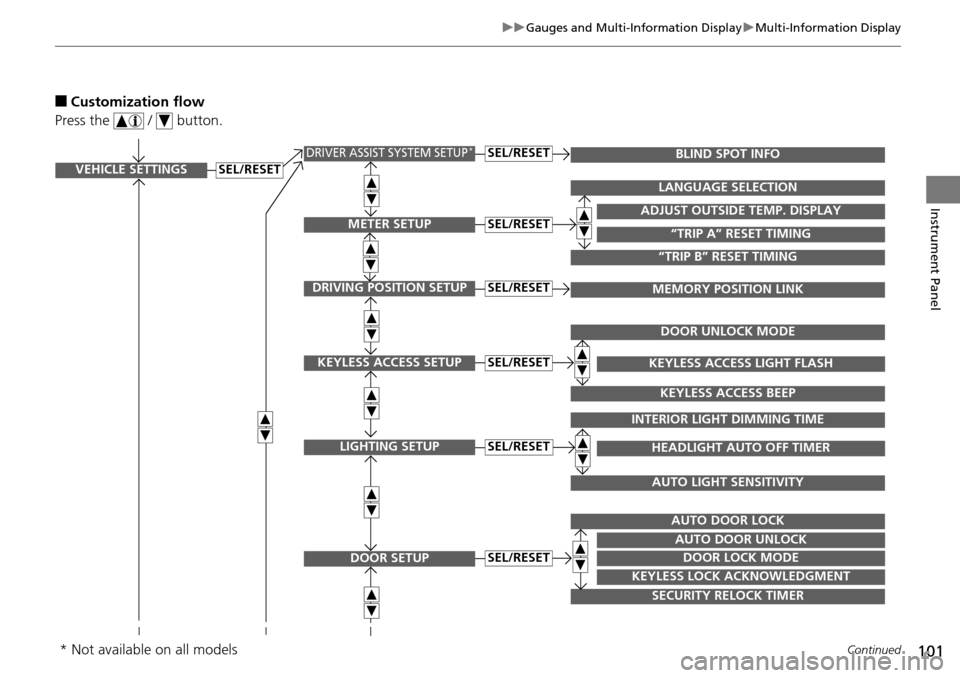
■Customization flow
Press the / button.
VEHICLE SETTINGS
METER SETUP
DRIVING POSITION SETUP
KEYLESS ACCESS SETUP
LIGHTING SETUP
DOOR SETUP
“TRIP A” RESET TIMING
ADJUST OUTSIDE TEMP. DISPLAY
LANGUAGE SELECTION
“TRIP B” RESET TIMING
MEMORY POSITION LINK
KEYLESS ACCESS LIGHT FLASH
DOOR UNLOCK MODE
KEYLESS ACCESS BEEP
HEADLIGHT AUTO OFF TIMER
INTERIOR LIGHT DIMMING TIME
AUTO LIGHT SENSITIVITY
DOOR LOCK MODE
AUTO DOOR UNLOCK
AUTO DOOR LOCK
KEYLESS LOCK ACKNOWLEDGMENT
SECURITY RELOCK TIMER
SEL/RESET
SEL/RESET
SEL/RESET
SEL/RESET
SEL/RESET
SEL/RESET
DRIVER ASSIST SYSTEM SETUP*BLIND SPOT INFOSEL/RESET
* Not available on all models
Page 103 of 445
102
uuGauges and Multi-Information Display uMulti-Information Display
Instrument Panel
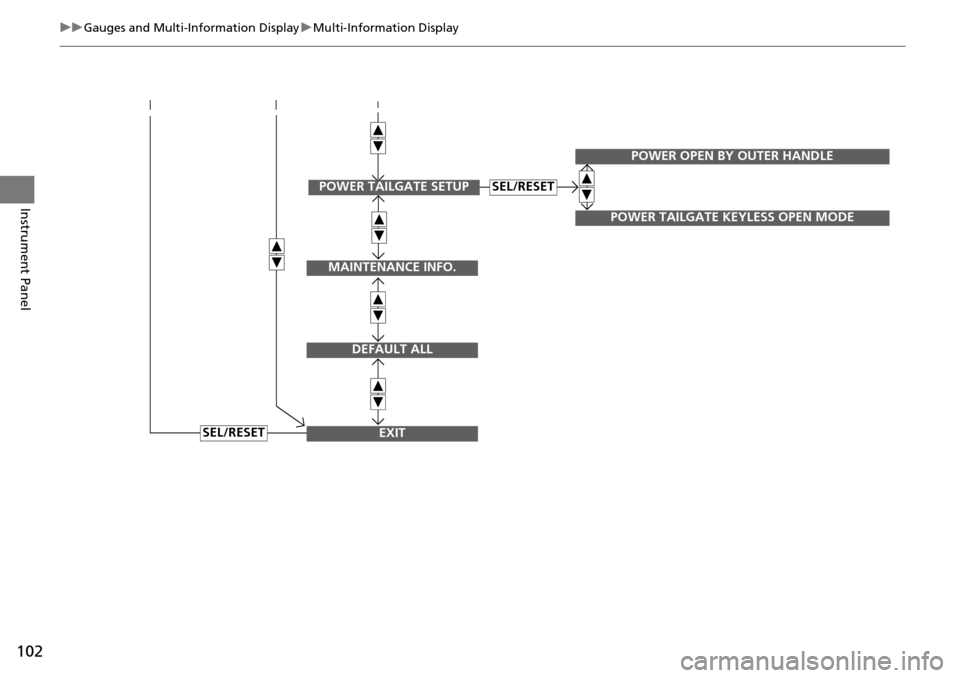
SEL/RESET
MAINTENANCE INFO.
DEFAULT ALL
EXIT
POWER TAILGATE SETUP
POWER OPEN BY OUTER HANDLE
POWER TAILGATE KEYLESS OPEN MODE
SEL/RESET
Page 104 of 445
103
uuGauges and Multi-Information Display uMulti-Information Display
Continued
Instrument Panel
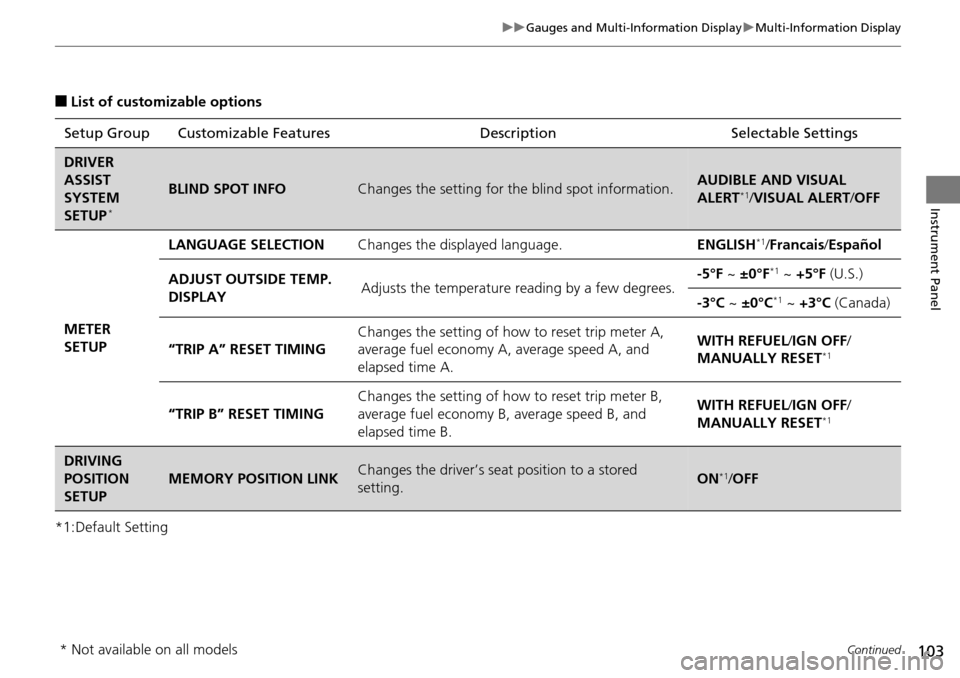
■List of customizable options
*1:Default Setting Setup Group Customizable Features
Description Selectable Settings
DRIVER
ASSIST
SYSTEM
SETUP
*
BLIND SPOT INFOChanges the setting for the blind spot information.AUDIBLE AND VISUAL
ALERT*1/VISUAL ALERT /OFF
METER
SETUP LANGUAGE SELECTION
Changes the displayed language. ENGLISH
*1/Francais /Español
ADJUST OUTSIDE TEMP.
DISPLAY Adjusts the temperature reading by a few degrees. -5°F ~
±0°F
*1 ~ +5°F (U.S.)
-3°C ~ ±0°C
*1 ~ +3°C (Canada)
“TRIP A” RESET TIMING Changes the setting of how to reset trip meter A,
average fuel economy A,
average speed A, and
elapsed time A. WITH REFUEL/
IGN OFF/
MANUALLY RESET
*1
“TRIP B” RESET TIMING Changes the setting of ho
w to reset trip meter B,
average fuel economy B, average speed B, and
elapsed time B. WITH REFUEL/
IGN OFF/
MANUALLY RESET*1
DRIVING
POSITION
SETUP
MEMORY POSITION LINKChanges the driver’s seat position to a stored
setting.ON*1/ OFF
* Not available on all models
Page 106 of 445
105
uuGauges and Multi-Information Display uMulti-Information Display
Continued
Instrument Panel
*1: Default SettingSetup Group Customizable Features
Description Selectable Settings
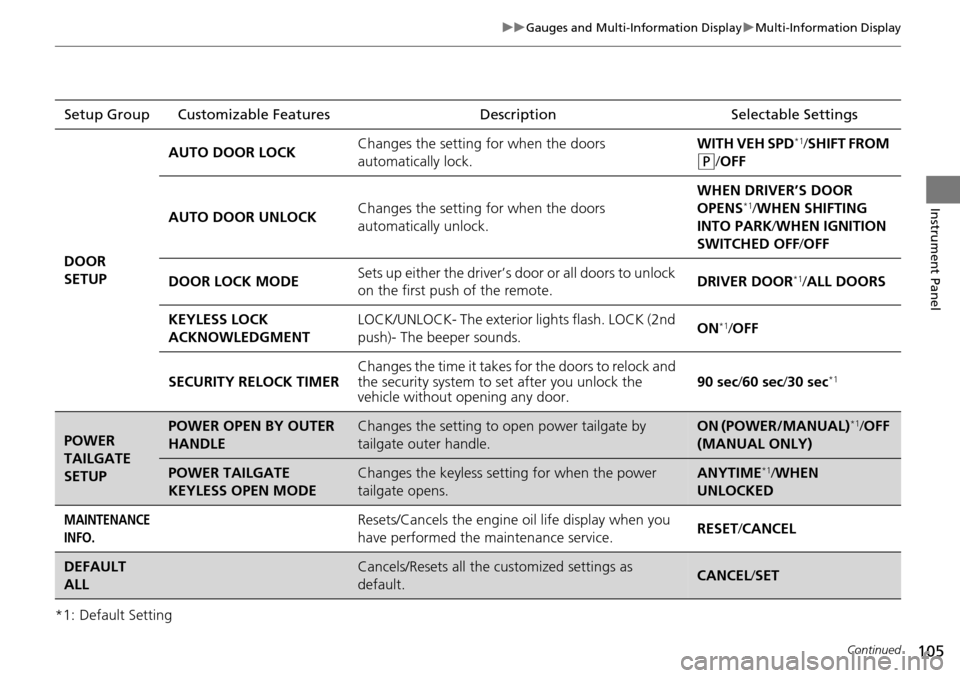
DOOR
SETUP AUTO DOOR LOCK
Changes the setting for when the doors
automatically lock. WITH VEH SPD
*1/
SHIFT FROM
(P/OFF
AUTO DOOR UNLOCK Changes the setting for when the doors
automatically unlock. WHEN DRIVER’S DOOR
OPENS
*1/
WHEN SHIFTING
INTO PARK/ WHEN IGNITION
SWITCHED OFF /OFF
DOOR LOCK MODE Sets up either the driver’s door or all doors to unlock
on the first push of the remote. DRIVER DOOR
*1/
ALL DOORS
KEYLESS LOCK
ACKNOWLEDGMENT LOCK/UNLOCK- The exterior
lights flash. LOCK (2nd
push)- The beeper sounds. ON
*1/
OFF
SECURITY RELOCK TIMER Changes the time it takes for the doors to relock and
the security system to set after you unlock the
vehicle without op
ening any door. 90 sec
/60 sec/ 30 sec
*1
POWER
TAILGATE
SETUPPOWER OPEN BY OUTER
HANDLEChanges the setting to open power tailgate by
tailgate outer handle.ON (POWER/MANUAL)*1/OFF
(MANUAL ONLY)
POWER TAILGATE
KEYLESS OPEN MODEChanges the keyless setting for when the power
tailgate opens.ANYTIME*1/ WHEN
UNLOCKED
MAINTENANCE
INFO.Resets/Cancels the engine oil life display when you
have performed the maintenance service. RESET
/CANCEL
DEFAULT
ALLCancels/Resets all the customized settings as
default.CANCEL /SET
Page 107 of 445
uuGauges and Multi-Information Display uMulti-Information Display
106
Instrument Panel
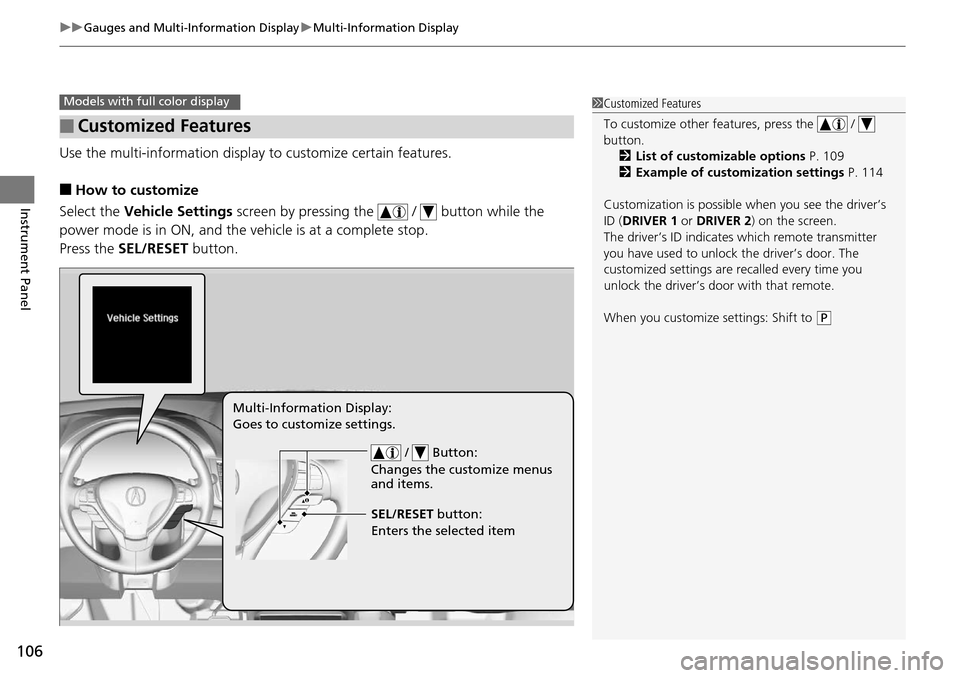
Use the multi-information display to customize certain features.
■How to customize
Select the Vehicle Settings screen by pressing the / button while the
power mode is in ON, and the vehicle is at a complete stop.
Press the SEL/RESET button.
■Customized Features
Models with full color display1Customized Features
To customize other features, press the /
button.
2 List of customizable options P. 109
2 Example of customization settings P. 114
Customization is possible when you see the driver’s
ID ( DRIVER 1 or DRIVER 2) on the screen.
The driver’s ID indicates which remote transmitter
you have used to unlock the driver’s door. The
customized settings are recalled every time you
unlock the driver’s door with that remote.
When you customize settings: Shift to
( P
/ Button:
Changes the customize menus
and items.
Multi-Information Display:
Goes to customize settings.
SEL/RESET button:
Enters the selected item
Page 108 of 445
107
uuGauges and Multi-Information Display uMulti-Information Display
Continued
Instrument Panel
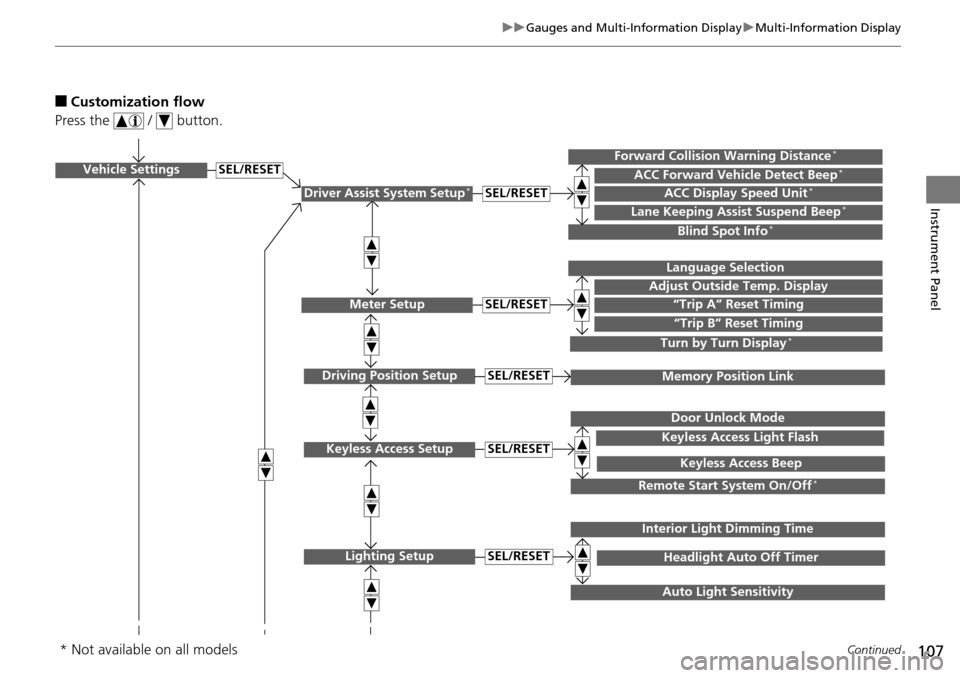
■Customization flow
Press the / button.
Vehicle Settings
Meter Setup
Keyless Access Setup
Lighting Setup
“Trip A” Reset Timing
Adjust Outside Temp. Display
Language Selection
“Trip B” Reset Timing
Keyless Access Light Flash
Door Unlock Mode
Keyless Access Beep
Headlight Auto Off Timer
Interior Light Dimming Time
Auto Light Sensitivity
SEL/RESET
SEL/RESET
SEL/RESET
SEL/RESET
Remote Start System On/Off*
Driver Assist System Setup*ACC Display Speed Unit*ACC Forward Vehicle Detect Beep*Forward Collision Warning Distance*
Lane Keeping Assist Suspend Beep*
Blind Spot Info*
SEL/RESET
Turn by Turn Display*
Driving Position SetupMemory Position LinkSEL/RESET
* Not available on all models
Page 109 of 445
108
uuGauges and Multi-Information Display uMulti-Information Display
Instrument Panel
SEL/RESET
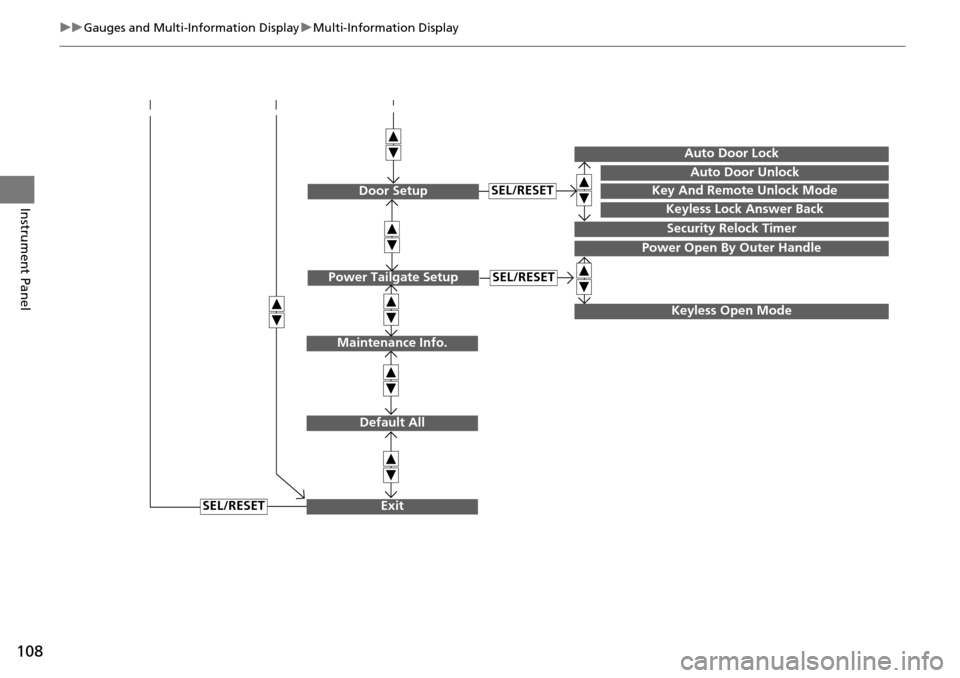
Maintenance Info.
Default All
Exit
Door SetupKey And Remote Unlock Mode
Auto Door Unlock
Auto Door Lock
Keyless Lock Answer Back
Security Relock Timer
SEL/RESET
Power Open By Outer Handle
Power Tailgate SetupSEL/RESET
Keyless Open Mode
Page 111 of 445
110
uuGauges and Multi-Information Display uMulti-Information Display
Instrument Panel
*1:Default SettingSetup Group Customizable Features
Description Selectable Settings
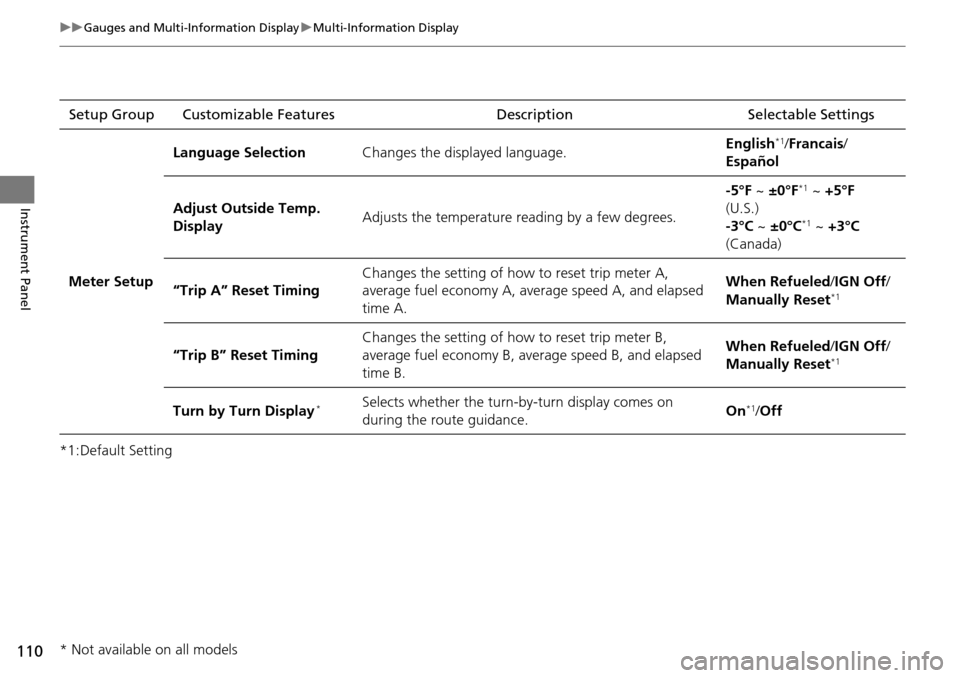
Meter Setup Language Selection
Changes the displayed language. English
*1/
Francais /
Español
Adjust Outside Temp.
Display Adjusts the temperature reading by a few degrees. -5°F ~
±0°F
*1 ~ +5°F
(U.S.)
-3°C ~ ±0°C
*1 ~ +3°C
(Canada)
“Trip A” Reset Timing Changes the setting of how to reset trip meter A,
average fuel economy A, average speed A, and elapsed
time A. When Refueled
/IGN Off/
Manually Reset
*1
“Trip B” Reset Timing Changes the setting of how to reset trip meter B,
average fuel economy B, av
erage speed B, and elapsed
time B. When Refueled
/IGN Off/
Manually Reset*1
Turn by Turn Display*Selects whether the turn-b y-turn display comes on
during the route guidance. On*1/
Off
* Not available on all models
Page 114 of 445
113
uuGauges and Multi-Information Display uMulti-Information Display
Continued
Instrument Panel
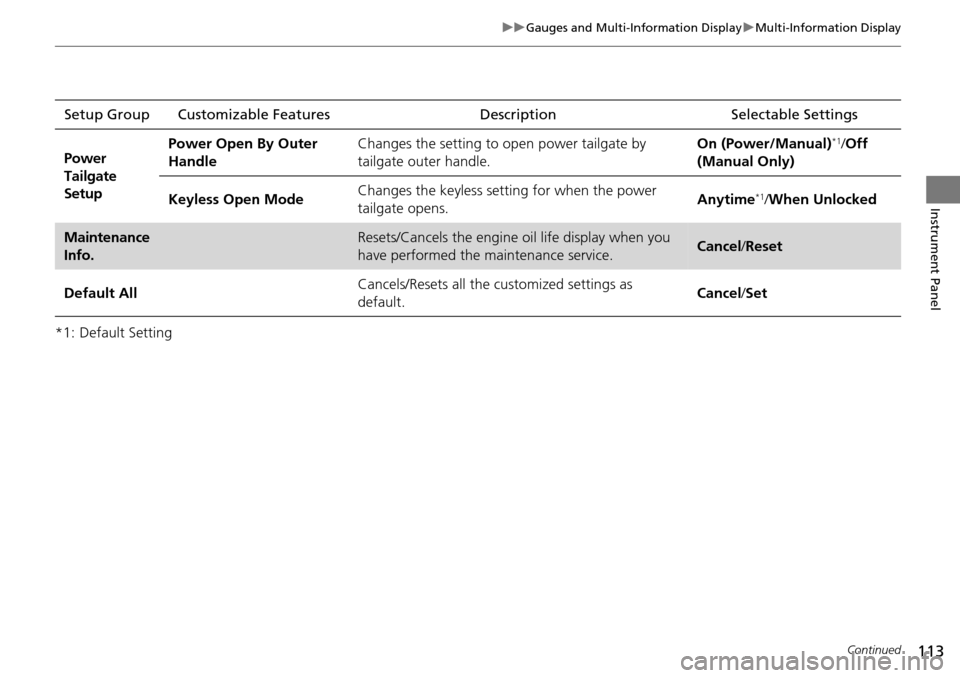
*1: Default SettingSetup Group Customizable Features
Description Selectable Settings
Power
Tailgate
Setup Power Open By Outer
Handle
Changes the setting to open power tailgate by
tailgate outer handle. On (Power/Manual)
*1/
Off
(Manual Only)
Keyless Open Mode Changes the keyless setting
for when the power
tailgate opens. Anytime
*1/
When Unlocked
Maintenance
Info.Resets/Cancels the engine oil life display when you
have performed the maintenance service. Cancel /Reset
Default All Cancels/Resets all the customized settings as
default. Cancel
/Set
Page 115 of 445
114
uuGauges and Multi-Information Display uMulti-Information Display
Instrument Panel
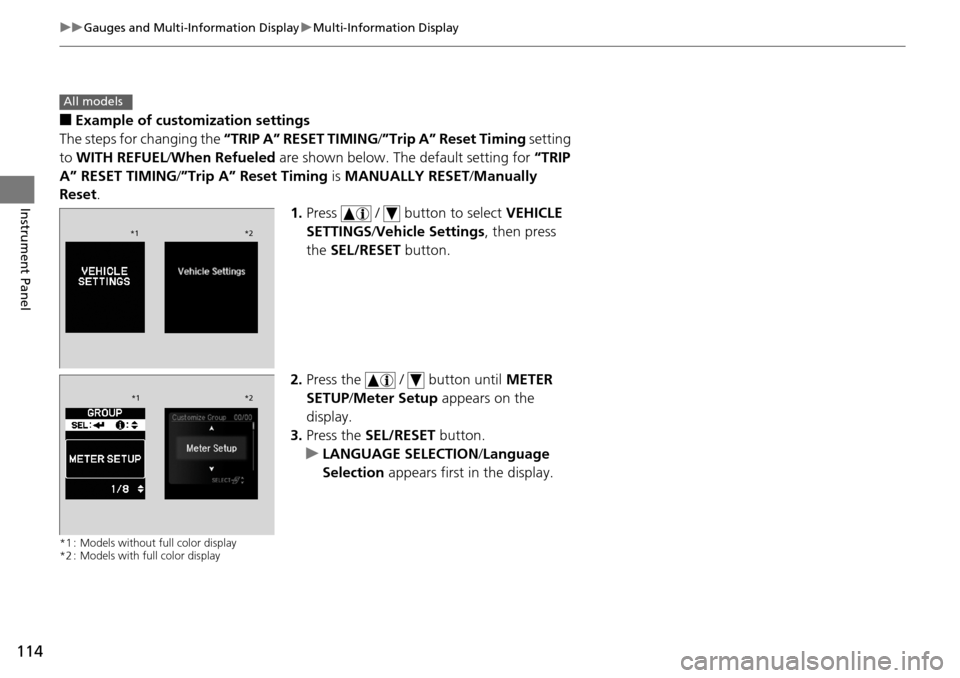
■Example of customization settings
The steps for changing the “TRIP A” RESET TIMING /”Trip A” Reset Timing setting
to WITH REFUEL /When Refueled are shown below. The default setting for “TRIP
A” RESET TIMING/ ”Trip A” Reset Timing is MANUALLY RESET/Manually
Reset .
1.Press / button to select VEHICLE
SETTINGS /Vehicle Settings , then press
the SEL/RESET button.
2. Press the / button until METER
SETUP/ Meter Setup appears on the
display.
3. Press the SEL/RESET button.
u LANGUAGE SELECTION /Language
Selection appears first in the display.
*1 : Models without full color display
*2 : Models with full color display
All models
*1 *2
*1*2