start Acura RDX 2016 User Guide
[x] Cancel search | Manufacturer: ACURA, Model Year: 2016, Model line: RDX, Model: Acura RDX 2016Pages: 445, PDF Size: 15.25 MB
Page 69 of 445
68
uuIndicators u
Instrument Panel
*1:On the left: Models without full color display
On the right: Models with full color display
*2:Models with full color display
*3:Models without full color display
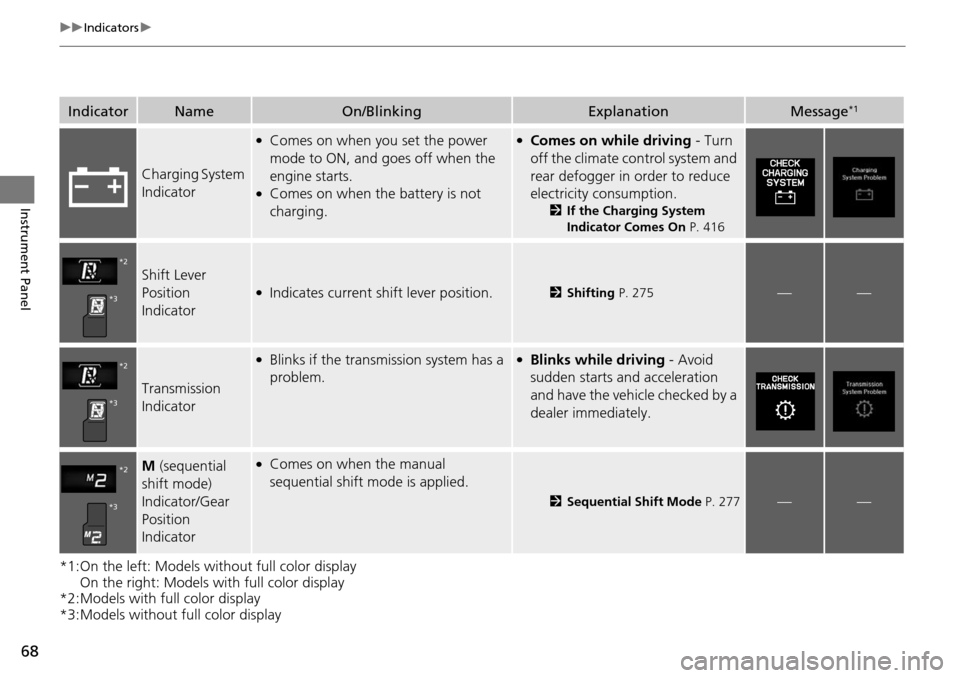
IndicatorNameOn/BlinkingExplanationMessage*1
Charging System
Indicator
●Comes on when you set the power
mode to ON, and goes off when the
engine starts.
●Comes on when the battery is not
charging.
●Comes on while driving - Turn
off the climate control system and
rear defogger in order to reduce
electricity consumption.
2 If the Charging System
Indicator Comes On P. 416
Shift Lever
Position
Indicator●Indicates current shift lever position.2Shifting P. 275——
Transmission
Indicator
●Blinks if the transmission system has a
problem.●Blinks while driving - Avoid
sudden starts and acceleration
and have the vehicle checked by a
dealer immediately.
M (sequential
shift mode)
Indicator/Gear
Position
Indicator●Comes on when the manual
sequential shift mode is applied.
2 Sequential Shift Mode P. 277——
*2
*3
*2
*3
*2
*3
Page 72 of 445
71
uuIndicators u
Continued
Instrument Panel
*1:On the left: Models wi thout full color display
On the right: Models with full color display
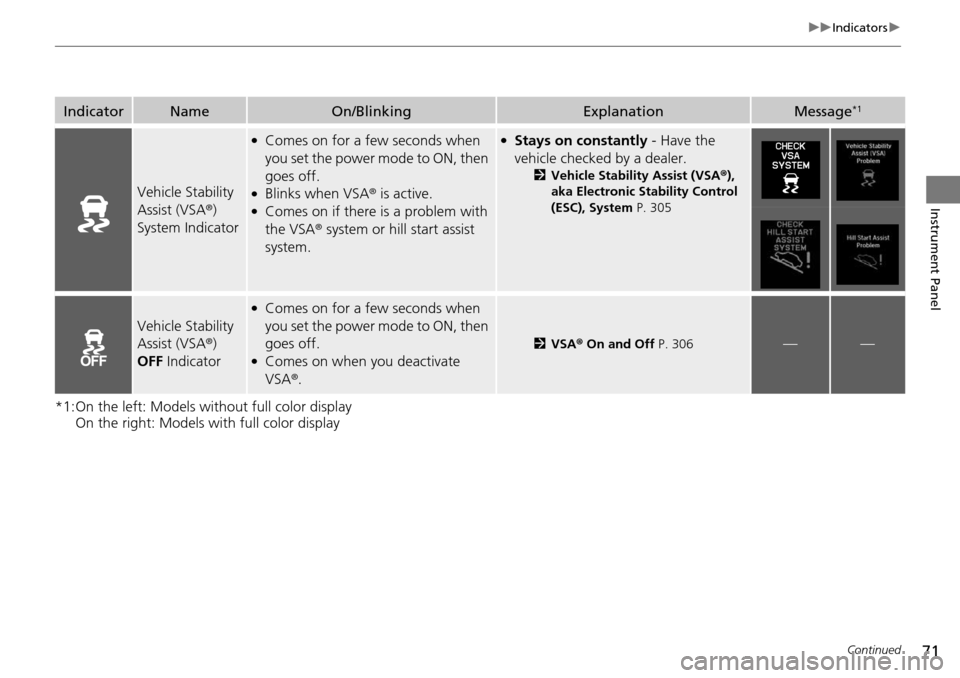
IndicatorNameOn/BlinkingExplanationMessage*1
Vehicle Stability
Assist (VSA ®)
System Indicator
●Comes on for a few seconds when
you set the power mode to ON, then
goes off.
●Blinks when VSA ® is active.●Comes on if there is a problem with
the VSA® system or hill start assist
system.
●Stays on constantly - Have the
vehicle checked by a dealer.
2 Vehicle Stability Assist (VSA® ),
aka Electronic Stability Control
(ESC), System P. 305
Vehicle Stability
Assist (VSA®)
OFF Indicator
●Comes on for a few seconds when
you set the power mode to ON, then
goes off.
●Comes on when you deactivate
VSA ®.
2 VSA ® On and Off P. 306——
Page 73 of 445
72
uuIndicators u
Instrument Panel
*1:On the left: Models without full color display
On the right: Models with full color display
*2:Models without full color display
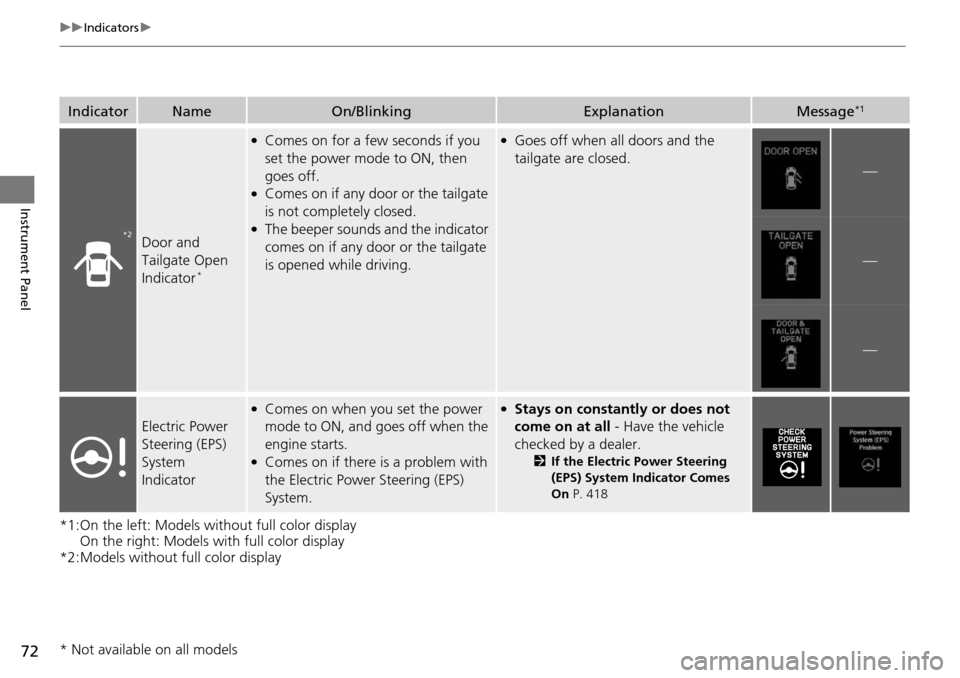
IndicatorNameOn/BlinkingExplanationMessage*1
Door and
Tailgate Open
Indicator
*
●Comes on for a few seconds if you
set the power mode to ON, then
goes off.
●Comes on if any door or the tailgate
is not completely closed.
●The beeper sounds and the indicator
comes on if any door or the tailgate
is opened while driving.
●Goes off when all doors and the
tailgate are closed.
—
—
—
Electric Power
Steering (EPS)
System
Indicator
●Comes on when you set the power
mode to ON, and goes off when the
engine starts.
●Comes on if there is a problem with
the Electric Power Steering (EPS)
System.
●Stays on constantly or does not
come on at all - Have the vehicle
checked by a dealer.
2 If the Electric Power Steering
(EPS) System Indicator Comes
On P. 418
*2
* Not available on all models
Page 75 of 445
74
uuIndicators u
Instrument Panel
*1:On the left: Models without full color display
On the right: Models with full color display
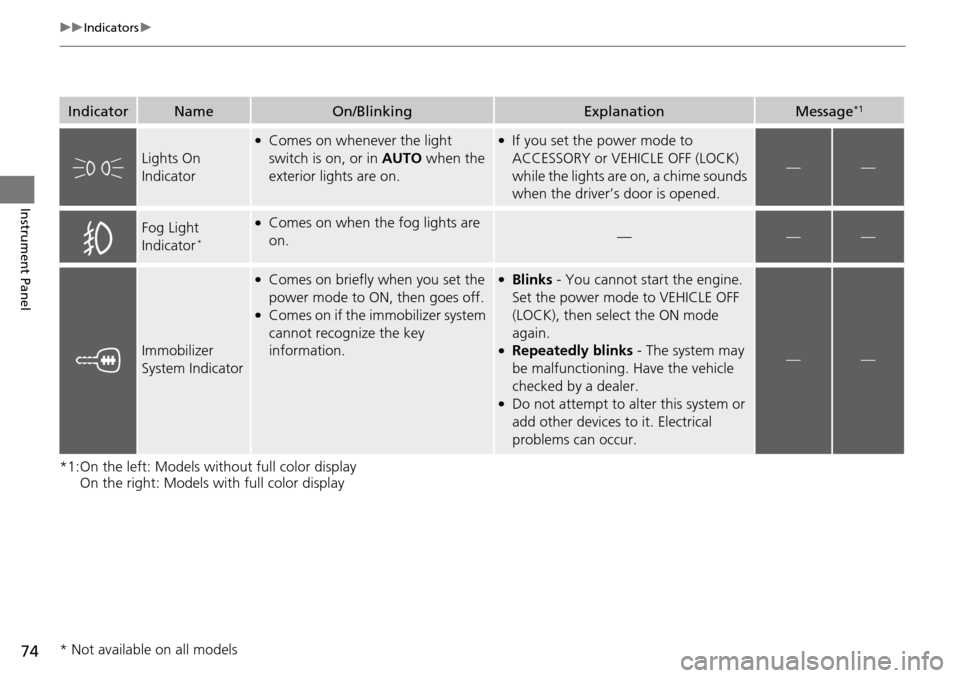
IndicatorNameOn/BlinkingExplanationMessage*1
Lights On
Indicator
●Comes on whenever the light
switch is on, or in AUTO when the
exterior lights are on.●If you set the power mode to
ACCESSORY or VEHICLE OFF (LOCK)
while the lights are on, a chime sounds
when the driver’s door is opened.
——
Fog Light
Indicator*
●Comes on when the fog lights are
on.———
Immobilizer
System Indicator
●Comes on briefly when you set the
power mode to ON, then goes off.
●Comes on if the immobilizer system
cannot recognize the key
information.
●Blinks - You cannot start the engine.
Set the power mode to VEHICLE OFF
(LOCK), then select the ON mode
again.
●Repeatedly blinks - The system may
be malfunctioning. Have the vehicle
checked by a dealer.
●Do not attempt to alter this system or
add other devices to it. Electrical
problems can occur.
——
* Not available on all models
Page 77 of 445
76
uuIndicators u
Instrument Panel
*1:On the left: Models without full color display
On the right: Models with full color display
*2:Models with full color display
*3:Models without full color display
IndicatorNameOn/BlinkingExplanationMessage*1
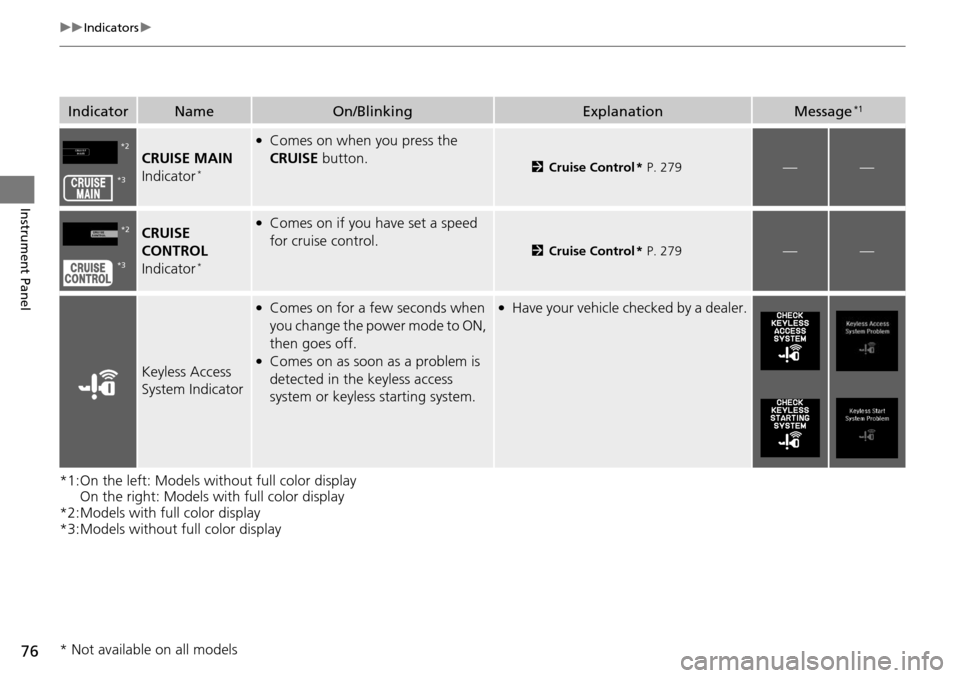
CRUISE MAIN
Indicator*
●Comes on when you press the
CRUISE button.
2Cruise Control * P. 279——
CRUISE
CONTROL
Indicator
*
●Comes on if you have set a speed
for cruise control.
2 Cruise Control * P. 279——
Keyless Access
System Indicator
●Comes on for a few seconds when
you change the power mode to ON,
then goes off.
●Comes on as soon as a problem is
detected in the keyless access
system or keyless starting system.
●Have your vehicle checked by a dealer.
*2
*3
*2
*3
* Not available on all models
Page 85 of 445

84
uuIndicators uMulti-Information Display Warn ing and Information Messages
Instrument Panel
*1:On the left: Models without full color display
On the right: Models with full color display
Message*1ConditionExplanation
●Appears if there is a problem with the starting
system.●As a temporary measure, press and hold the
ENGINE START/STOP button for 15
seconds while depressing the brake pedal
and manually start the engine.
Have the vehicle checked by a dealer.
—
●Appears after you unlock and open the
driver’s door.
2 Starting the Engine P. 268
●Appears three seconds after the TO START
ENGINE/ To Start Engine message appears.
2Starting the Engine P. 268
●Appears when the steering wheel is locked.●Move the steering wheel left and right after
pressing the ENGINE START/STOP button.
U.S.U.S.
Canada
Page 86 of 445
85
uuIndicators uMulti-Information Display Warning and Information Messages
Continued
Instrument Panel
*1:On the left: Models wi thout full color display
On the right: Models with full color display
Message*1ConditionExplanation
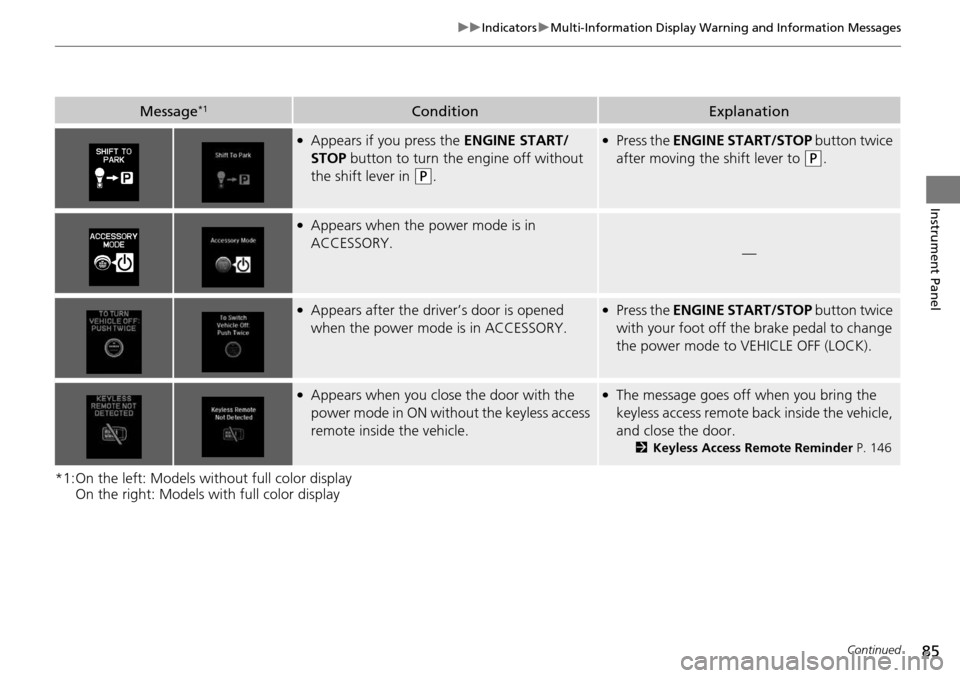
●Appears if you press the ENGINE START/
STOP button to turn the engine off without
the shift lever in
(P.
●Press the ENGINE START/STOP button twice
after moving the shift lever to
(P.
●Appears when the power mode is in
ACCESSORY.
—
●Appears after the driver’s door is opened
when the power mode is in ACCESSORY.●Press the ENGINE START/STOP button twice
with your foot off the brake pedal to change
the power mode to VEHICLE OFF (LOCK).
●Appears when you close the door with the
power mode in ON without the keyless access
remote inside the vehicle.●The message goes off when you bring the
keyless access remote back inside the vehicle,
and close the door.
2 Keyless Access Remote Reminder P. 146
Page 87 of 445
86
uuIndicators uMulti-Information Display Warn ing and Information Messages
Instrument Panel
*1:On the left: Models without full color display
On the right: Models with full color display
Message*1ConditionExplanation
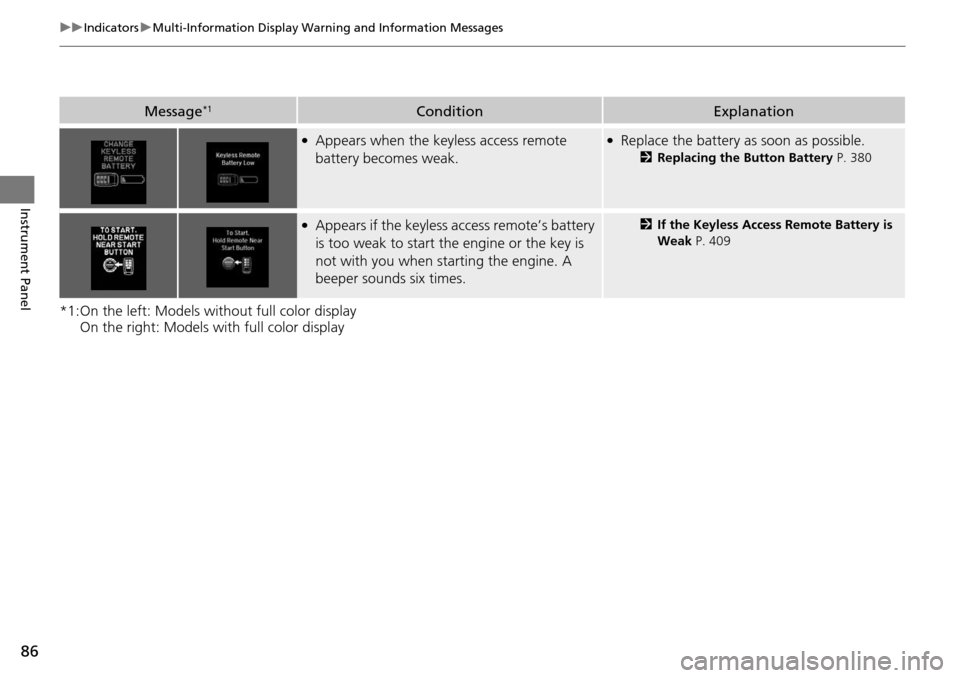
●Appears when the keyless access remote
battery becomes weak.●Replace the battery as soon as possible.
2Replacing the Button Battery P. 380
●Appears if the keyless access remote’s battery
is too weak to start the engine or the key is
not with you when starting the engine. A
beeper sounds six times.2If the Keyless Access Remote Battery is
Weak P. 409
Page 91 of 445
90
uuIndicators uMulti-Information Display Warn ing and Information Messages
Instrument Panel
*1:On the left: Models without full color display
On the right: Models with full color display
Message*1ConditionExplanation
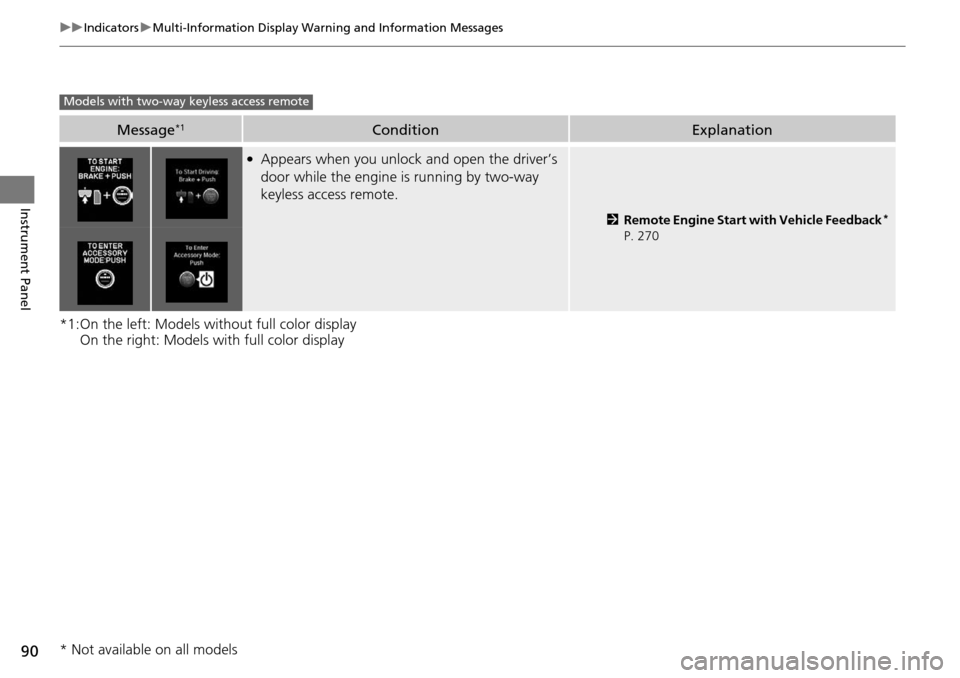
●Appears when you unlock and open the driver’s
door while the engine is running by two-way
keyless access remote.
2Remote Engine Start with Vehicle Feedback*
P. 270
Models with two-way keyless access remote
* Not available on all models
Page 108 of 445
107
uuGauges and Multi-Information Display uMulti-Information Display
Continued
Instrument Panel
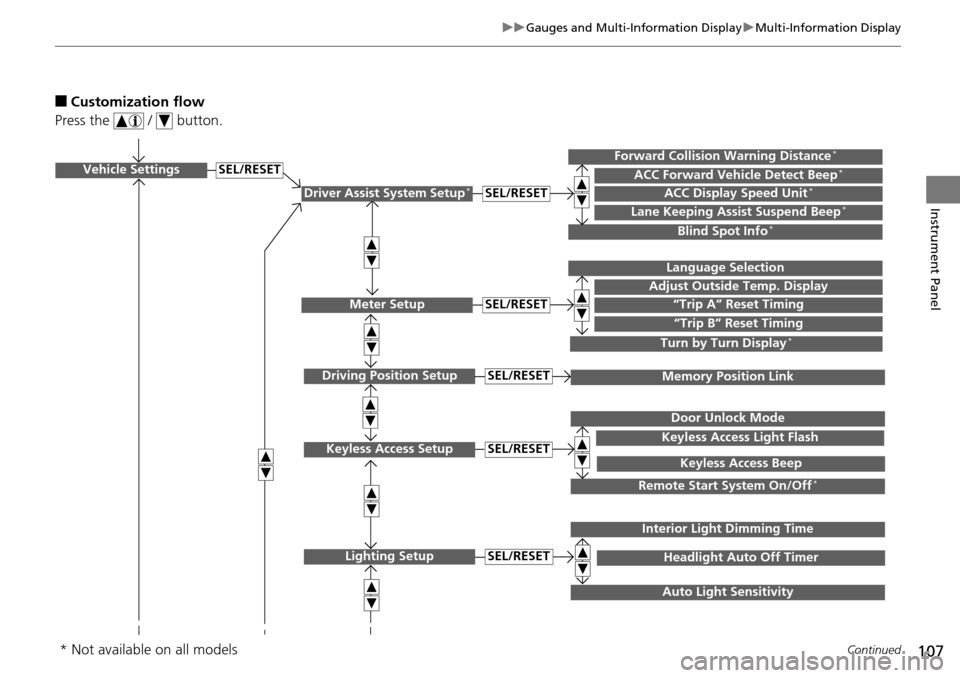
■Customization flow
Press the / button.
Vehicle Settings
Meter Setup
Keyless Access Setup
Lighting Setup
“Trip A” Reset Timing
Adjust Outside Temp. Display
Language Selection
“Trip B” Reset Timing
Keyless Access Light Flash
Door Unlock Mode
Keyless Access Beep
Headlight Auto Off Timer
Interior Light Dimming Time
Auto Light Sensitivity
SEL/RESET
SEL/RESET
SEL/RESET
SEL/RESET
Remote Start System On/Off*
Driver Assist System Setup*ACC Display Speed Unit*ACC Forward Vehicle Detect Beep*Forward Collision Warning Distance*
Lane Keeping Assist Suspend Beep*
Blind Spot Info*
SEL/RESET
Turn by Turn Display*
Driving Position SetupMemory Position LinkSEL/RESET
* Not available on all models