start Acura RDX 2016 Owner's Guide
[x] Cancel search | Manufacturer: ACURA, Model Year: 2016, Model line: RDX, Model: Acura RDX 2016Pages: 445, PDF Size: 15.25 MB
Page 112 of 445
111
uuGauges and Multi-Information Display uMulti-Information Display
Continued
Instrument Panel
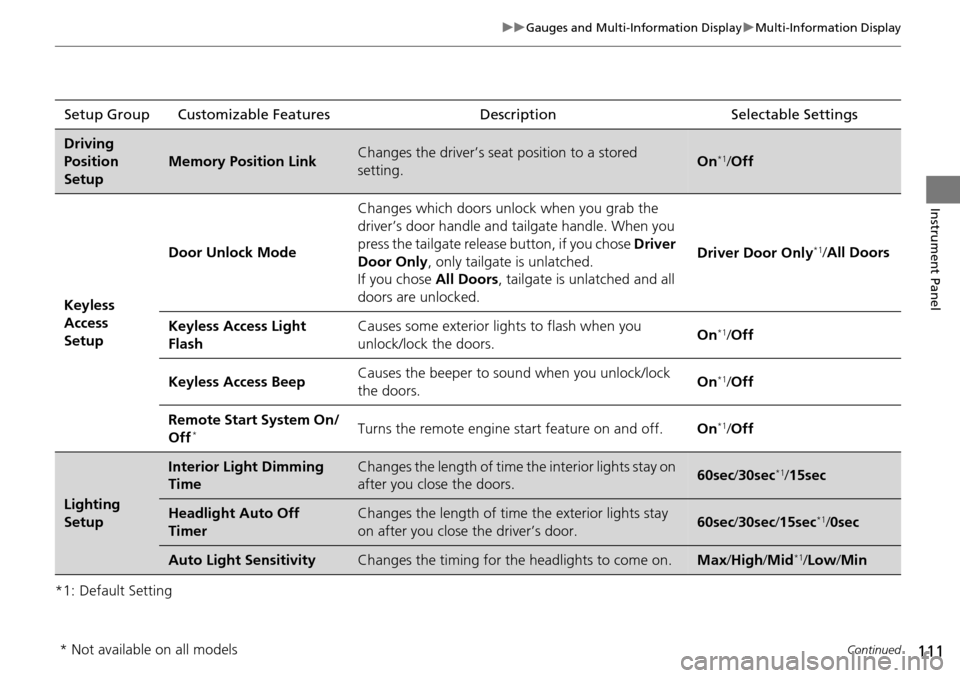
*1: Default SettingSetup Group Customizable Features
Description Selectable Settings
Driving
Position
Setup
Memory Position LinkChanges the driver’s seat position to a stored
setting.On*1/ Off
Keyless
Access
Setup Door Unlock Mode
Changes which doors unlock when you grab the
driver’s door handle and tailgate handle. When you
press the tailgate release button, if you chose
Driver
Door Only , only tailgate is unlatched.
If you chose All Doors, tailgate is unlatched and all
doors are unlocked. Driver Door Only
*1/
All Doors
Keyless Access Light
Flash Causes some exterior li
ghts to flash when you
unlock/lock the doors. On
*1/
Off
Keyless Access Beep Causes the beeper to so
und when you unlock/lock
the doors. On
*1/
Off
Remote Start System On/
Off
*Turns the remote engine start feature on and off. On*1/Off
Lighting
Setup
Interior Light Dimming
TimeChanges the length of time the interior lights stay on
after you close the doors.60sec /30sec*1/15sec
Headlight Auto Off
TimerChanges the length of time the exterior lights stay
on after you close the driver’s door.60sec /30sec /15sec*1/ 0sec
Auto Light SensitivityChanges the timing for th e headlights to come on.Max/High /Mid*1/Low /Min
* Not available on all models
Page 118 of 445
117
Controls
This chapter explains how to operate the various controls necessary for driving.
Setting the Clock.............................. 118
Locking and Unlocking the Doors Key Types and Functions .................. 119
Low Keyless Access Remote Signal Strength ..... 122Locking/Unlocking the Doors from the Outside .......................................... 123
Locking/Unlocking the Doors from the Inside ... 128Childproof Door Locks ..................... 129
Auto Door Locking/Unlocking .......... 130
Opening and Closing the Tailgate ... 131
Security System Immobilizer System .......................... 137
Security System Alarm ...................... 137
Opening and Closing the Windows .... 140Opening and Closing the Moonroof....... 143Operating the Switches Around the
Steering Wheel ENGINE START/STOP Button............. 144
Turn Signals ..................................... 147
Light Switches.................................. 147
Fog Lights
*...................................... 150
Daytime Running Lights ................... 150
Wipers and Washers ........................ 151
Brightness Control ........................... 154
Rear Defogger/Heated Door Mirror Button ... 155Driving Position Memory System ...... 156 Adjusting the Steering Wheel .......... 158
Adjusting the Mirrors Interior Rearview Mirror ................... 159
Power Door Mirrors ......................... 160
Adjusting the Seats Adjusting the Seat Positions ............. 162
Interior Lights/Interior Convenience ItemsInterior Lights .................................. 169
Interior Convenience Items .............. 171
Climate Control System Using Automatic Climate Control .... 180
Synchronized Mode ......................... 182
Automatic Climate Control Sensors.....183
* Not available on all models
Page 120 of 445
119Continued
Controls
Locking and Unlocking the Doors
Key Types and Functions
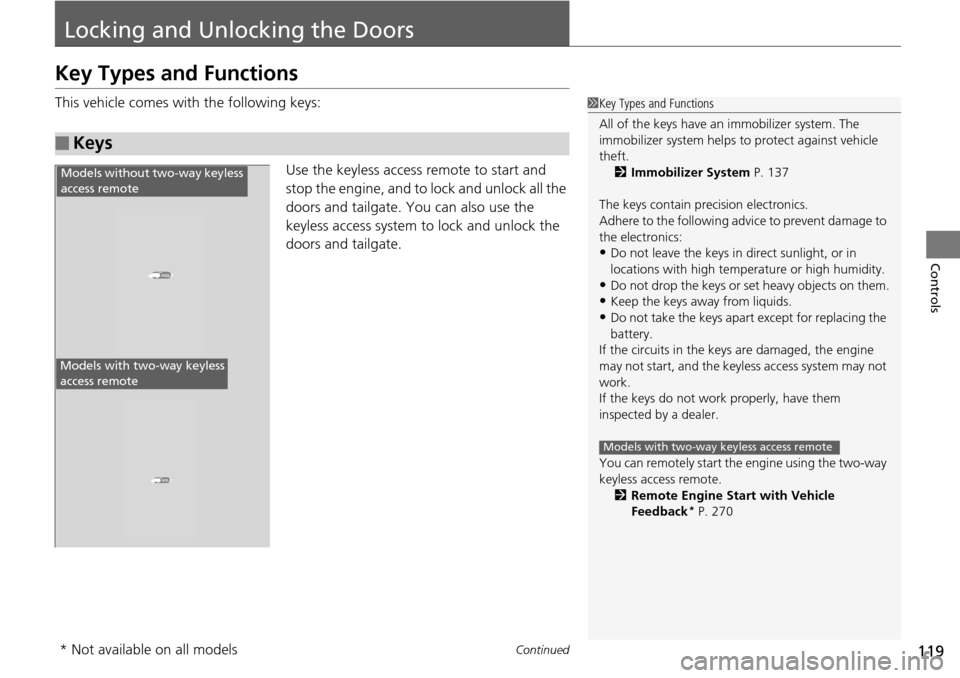
This vehicle comes with the following keys:
Use the keyless access remote to start and
stop the engine, and to lock and unlock all the
doors and tailgate. You can also use the
keyless access system to lock and unlock the
doors and tailgate.
■Keys
1Key Types and Functions
All of the keys have an immobilizer system. The
immobilizer system helps to protect against vehicle
theft. 2 Immobilizer System P. 137
The keys contain precision electronics.
Adhere to the following advi ce to prevent damage to
the electronics:
•Do not leave the keys in direct sunlight, or in
locations with high temperature or high humidity.
•Do not drop the keys or set heavy objects on them.
•Keep the keys away from liquids.
•Do not take the keys apart except for replacing the
battery.
If the circuits in the keys are damaged, the engine
may not start, and the keyless access system may not
work.
If the keys do not work properly, have them
inspected by a dealer.
You can remotely start the engine using the two-way
keyless access remote.
2 Remote Engine Start with Vehicle
Feedback
* P. 270
Models with two-way keyless access remote
HOLD
HOLD
Models without two-way keyless
access remote
Models with two-way keyless
access remote
* Not available on all models
Page 122 of 445
121
uuLocking and Unlocking the Doors uKey Types and Functions
Controls
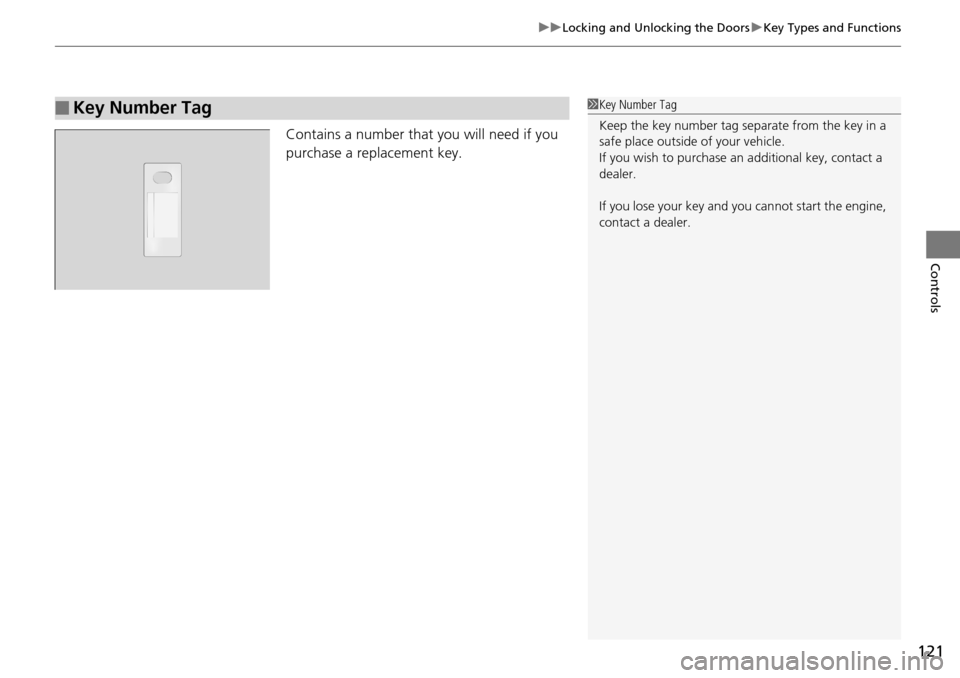
Contains a number that you will need if you
purchase a replacement key.
■Key Number Tag1Key Number Tag
Keep the key number tag separate from the key in a
safe place outside of your vehicle.
If you wish to purchase an additional key, contact a
dealer.
If you lose your key and you cannot start the engine,
contact a dealer.
Page 123 of 445
122
uuLocking and Unlocking the Doors uLow Keyless Access Remote Signal Strength
Controls
Low Keyless Access Remo te Signal Strength
The vehicle transmits radio waves to loca te the keyless access remote when locking/
unlocking the doors, opening the ta ilgate, or to start the engine.
In the following cases, locking/unlocking the doors or opening the tailgate or
starting the engine may be inhibited or operation may be unstable:
• Strong radio waves are being tra nsmitted by nearby equipment.
• You are carrying the keyless access remote together with telecommunications
equipment, laptop computers, cell phones, or wireless devices.
• A metallic object is touching or co vering the keyless access remote.1Low Keyless Access Remote Signal Strength
Communication between the keyless access remote
and the vehicle consumes the keyless access remote’s
battery.
The keyless access remote battery lasts about two
years. This changes by how often you use the remote.
The battery is consumed whenever the keyless access
remote is receivi ng strong radio wave s. Avoid placing
it near electrical appliances such as televisions and
personal computers.
Page 128 of 445

127
uuLocking and Unlocking the Doors uLocking/Unlocking the Doors from the Outside
Controls
You can remotely check if your vehicle’s doors
are all locked or any are unlocked using the
keyless access remote from extended
distances.
Press the lock button, the Amber (left) LED blinks once. Then after three seconds one
of the following feedback will come:
• Green (center) comes on: Acknowle dges that the doors are locked.
• Red (right) comes on: Acknowledges that doors are not locked, or any door is not
completely closed.
• Red (right) blinks three times: The remote does not receive the door lock status
from the vehicle.
■Checking Door Lock Status*1 Checking Door Lock Status*
Operate the remote in an open space. If there are
buildings or other obstacl es between your vehicle
and the remote, the remote may not work even
within the operable range. However, the range of
unlock, all doors, and panic functions are the same as
the standard keyless access remote. 2 Using the Remote Transmitter P. 125
When checking the door lock status, you can also
start or stop the engine. 2 Remote Engine Start with Vehicle
Feedback
* P. 270
Red
Green
Amber
Lock Button
* Not available on all models
Page 134 of 445

133
uuOpening and Closing the Tailgate uOpening/Closing the Power Tailgate
Continued
Controls
Opening/Closing the Power Tailgate
The power tailgate can be operated by pr essing the power tailgate button on the
remote transmitter, pressing the power tailgate switch on the dashboard, or
pressing the button on the tailgate.
■The power tailgate can be opened when:
• The tailgate is fully closed.
• The shift lever is in
(P.
■The power tailgate ca n be closed when:
• The tailgate is fully open.
• The shift lever is in
(P.
1Opening/Closing the Power Tailgate
NOTICE
Do not push or pull on the power tailgate when it is
being automatically opened or closed.
Forcibly opening or closing the power tailgate while
in operation can deform the tailgate frame.
When operating the power tailgate, make sure there
is enough space around your ve hicle. People near the
tailgate may be se riously hurt if the tailgate hits or
closes on their heads. Be especially cautious if
children are around.
The power tailgate may not open or close under the
following conditions:
•You start the engine while the tailgate is automatically
opening or closing.
•The vehicle is park ed on a steep hill.
•The vehicle is swayed in a strong wind.
•The tailgate or the roof is covered with snow or ice.
If you close the power tail gate when all the doors are
locked, the power tailgate locks automatically.
3WARNING
Closing a power tailga te while anyone is
in the path of the tailgate can cause
serious injury.
Make sure everyone is clear before
closing the power tailgate.
Page 135 of 445
uuOpening and Closing the Tailgate uOpening/Closing the Power Tailgate
134
Controls
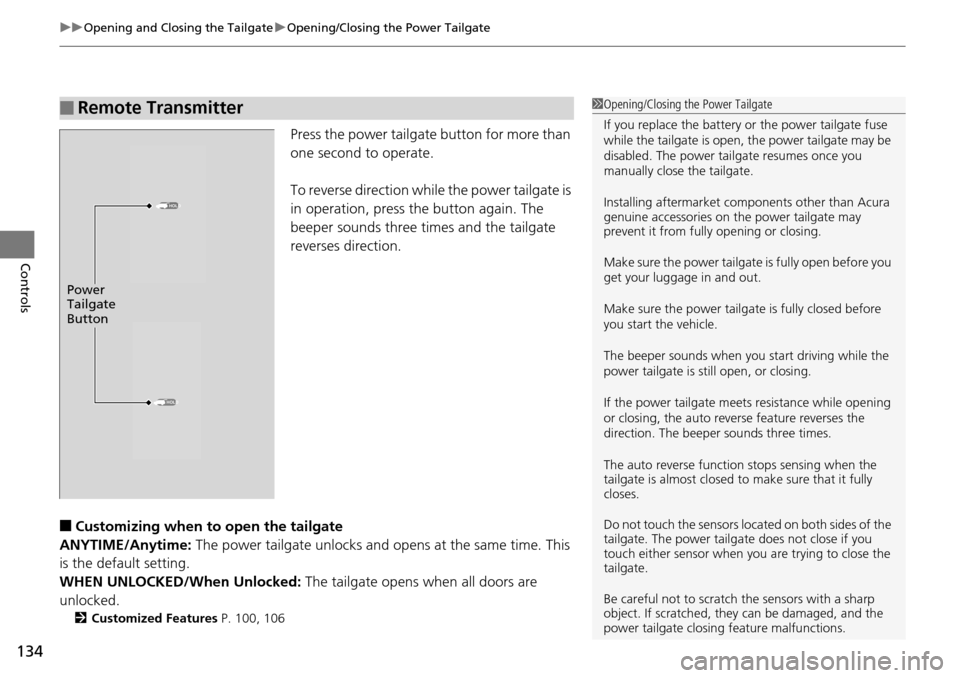
Press the power tailgate button for more than
one second to operate.
To reverse direction while the power tailgate is
in operation, press the button again. The
beeper sounds three times and the tailgate
reverses direction.
■Customizing when to open the tailgate
ANYTIME/Anytime: The power tailgate unlocks and opens at the same time. This
is the default setting.
WHEN UNLOCKED/When Unlocked: The tailgate opens when all doors are
unlocked.
2 Customized Features P. 100, 106
■Remote Transmitter1Opening/Closing the Power Tailgate
If you replace the battery or the power tailgate fuse
while the tailgate is open, the power tailgate may be
disabled. The power tail gate resumes once you
manually close the tailgate.
Installing aftermarket com ponents other than Acura
genuine accessories on the power tailgate may
prevent it from fully opening or closing.
Make sure the power tailgate is fully open before you
get your luggage in and out.
Make sure the power tailgate is fully closed before
you start the vehicle.
The beeper sounds when you start driving while the
power tailgate is still open, or closing.
If the power tailgate meet s resistance while opening
or closing, the auto reverse feature reverses the
direction. The beeper sounds three times.
The auto reverse function stops sensing when the
tailgate is almost closed to make sure that it fully
closes.
Do not touch the sensors located on both sides of the
tailgate. The power tailga te does not close if you
touch either sensor when you are trying to close the
tailgate.
Be careful not to scratch the sensors with a sharp
object. If scratched, they can be damaged, and the
power tailgate closing feature malfunctions.
HOLD
HOLD
Power
Tailgate
Button
Page 138 of 445
137Continued
Controls
Security System
Immobilizer System
The immobilizer system prevents a key that has not been pre-registered from
starting the engine. Each key contains electronic transmitters that use electronic
signals to verify the key.
Pay attention to the following when selecting the ACCESSORY mode with the
ENGINE START/STOP button:
• Do not allow objects that emit strong radio waves near the ENGINE START/
STOP button.
• Make sure the key is not covered by or touching a metal object.
• Do not bring a key from another vehicle’s immobilizer system with the keyless
access remote.
Security System Alarm
The security system alarm activates when the doors, tailgate, or hood are opened
without the key, remote transmitt er or keyless access system.
However, the alarm goes off when a door is opened with the key, then the shift
lever is moved out of
( P or the hood is opened before the power mode is set to ON.
■When the security system alarm activates
The horn sounds intermittently, an d all of the exterior lights flash.
■To deactivate the security system alarm
Unlock the vehicle using the remote tra nsmitter, or keyless access system. The
system, along with the horn and flashing lights, is deactivated.
1 Immobilizer System
NOTICE
Leaving the keyless access re mote in the vehicle can
result in theft or accidental movement of the vehicle.
Always take the key with you whenever you leave the
vehicle unattended.
Do not alter the system or add other devices to it.
Doing so may damage the system and make your
vehicle inoperable.
1 Security System Alarm
The security alarm continues for a maximum of two
minutes until the security system alarm deactivates.
Page 145 of 445
144
Controls
Operating the Switches Around the Steering Wheel
ENGINE START/STOP Button
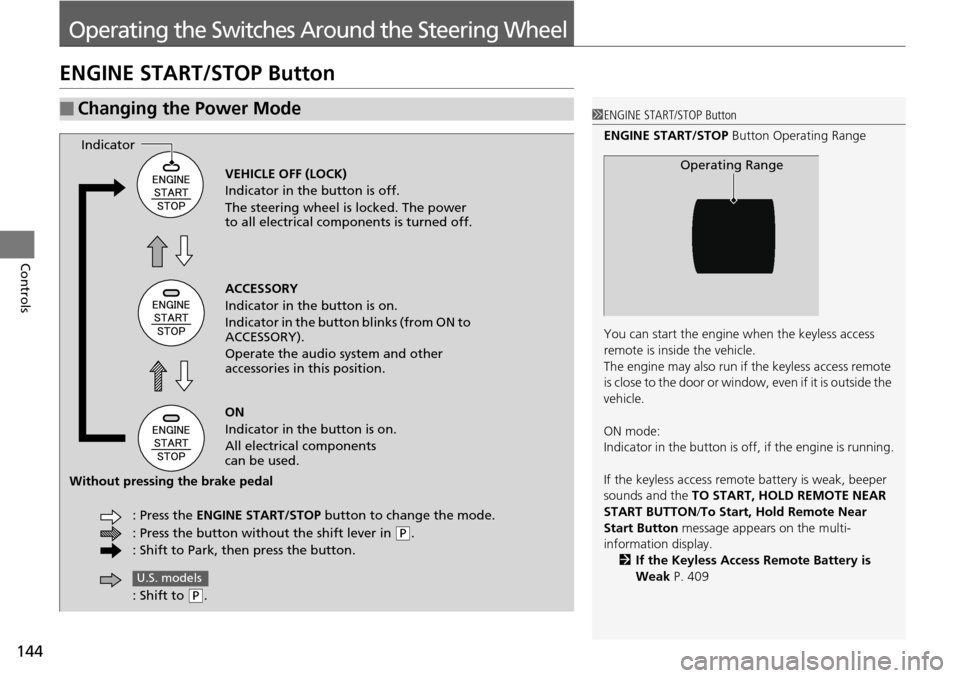
■Changing the Power Mode1ENGINE START/STOP Button
ENGINE START/STOP Button Operating Range
You can start the engine when the keyless access
remote is inside the vehicle.
The engine may also run if the keyless access remote
is close to the door or window, even if it is outside the
vehicle.
ON mode:
Indicator in the button is of f, if the engine is running.
If the keyless access remote battery is weak, beeper
sounds and the TO START, HOLD REMOTE NEAR
START BUTTON /To Start, Hold Remote Near
Start Button message appears on the multi-
information display. 2 If the Keyless Access Remote Battery is
Weak P. 409
Operating RangeVEHICLE OFF (LOCK)
Indicator in the button is off.
The steering wheel is locked. The power
to all electrical components is turned off.
ACCESSORY
Indicator in the button is on.
Indicator in the button blinks (from ON to
ACCESSORY).
Operate the audio system and other
accessories in this position.
ON
Indicator in the button is on.
All electrical components
can be used.
: Press the ENGINE START/STOP button to change the mode.
: Press the button without the shift lever in
( P.
: Shift to Park, then press the button.
Indicator
Without pressing the brake pedal
: Shift to
(P.
U.S. models