the Acura RDX 2017 User Guide
[x] Cancel search | Manufacturer: ACURA, Model Year: 2017, Model line: RDX, Model: Acura RDX 2017Pages: 449, PDF Size: 10.88 MB
Page 16 of 449
15
Quick Reference Guide
Features (P 185)
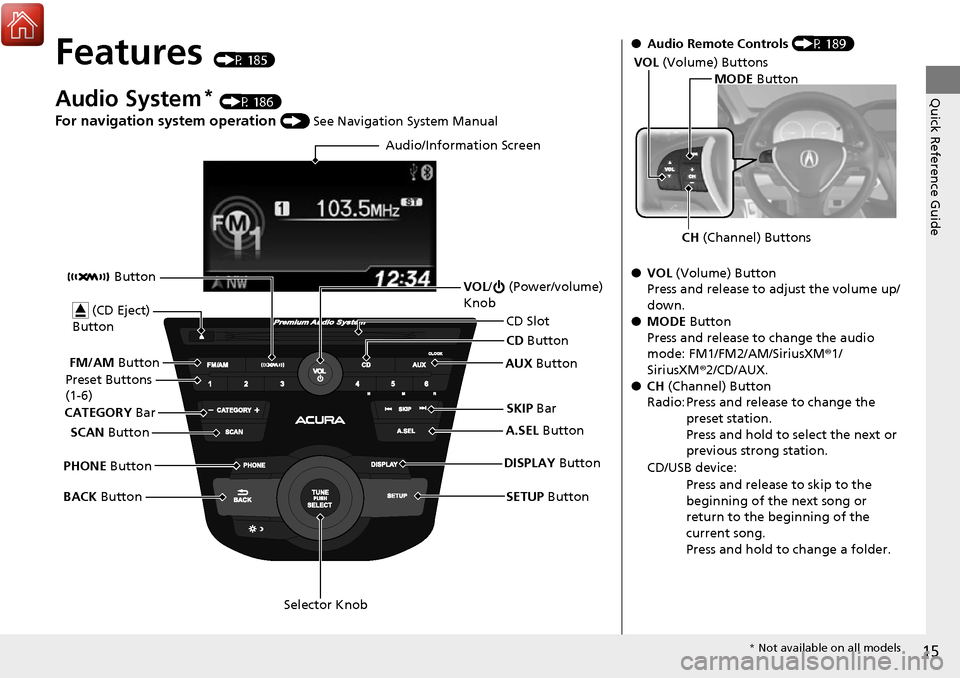
Audio System* (P 186)
For navigation system operation () See Navigation System Manual
Audio/Information Screen
SCAN Button
CATEGORY
Bar
Selector Knob
BACK
Button VOL
/ (Power/volume)
Knob
CD Button
AUX Button
CD Slot
(CD Eject)
Button
Preset Buttons
(1-6)
SETUP Button
SKIP
Bar
PHONE Button Button
FM/AM
Button
A.SEL Button
DISPLAY Button
●Audio Remote Controls (P 189)
● VOL (Volume) Button
Press and release to adjust the volume up/
down.
● MODE Button
Press and release to change the audio
mode: FM1/FM2/AM/SiriusXM ®1/
SiriusXM ®2/CD/AUX.
● CH (Channel) Button
Radio: Press and release to change the preset station.
Press and hold to select the next or
previous strong station.
CD/USB device: Press and release to skip to the
beginning of the next song or
return to the beginning of the
current song.
Press and hold to change a folder.
MODE Button
CH (Channel) Buttons
VOL
(Volume) Buttons
* Not available on all models
Page 17 of 449
16
Quick Reference Guide
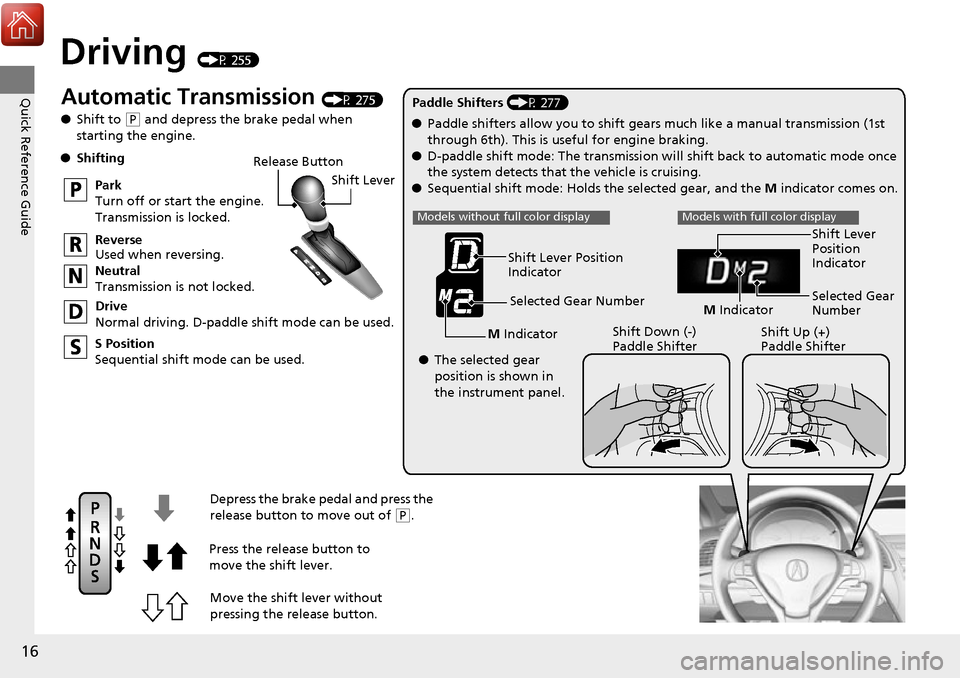
Driving (P 255)
Release ButtonShift Lever
Depress the brake pedal and press the
release button to move out of
( P.
Move the shift lever without
pressing the release button.
Press the release button to
move the shift lever.
●
Shifting
Park
Turn off or start the engine.
Transmission is locked.
Reverse
Used when reversing.
Neutral
Transmission is not locked.
Drive
Normal driving. D-paddle shift mode can be used.
S Position
Sequential shift mode can be used. Paddle Shifters (P 277)
M Indicator Shift Down (-)
Paddle Shifter Shift Up (+)
Paddle Shifter
●
Paddle shifters allow you to shift gears much like a manual transmission (1st
through 6th). This is useful for engine braking.
● D-paddle shift mode: The transmission will shift back to automatic mode once
the system detects that the vehicle is cruising.
● Sequential shift mode: Holds the selected gear, and the M indicator comes on.
Selected Gear Number
Automatic Transmission (P 275)
● Shift to
(P and depress the brake pedal when
starting the engine.
Shift Lever Position
Indicator
● The selected gear
position is shown in
the instrument panel.
Models without full color displayModels with full color display
M Indicator Selected Gear
Number Shift Lever
Position
Indicator
Page 18 of 449
17
Quick Reference Guide
VSA® OFF Button (P 310)
● The vehicle stability assist (VSA® ) system
helps stabilize the vehicle during
cornering, and helps maintain traction
while accelerating on loose or slippery
road surfaces.
● VSA ® comes on automatically every time
you start the engine.
● To turn VSA ® on or off, press and hold
the button until you hear a beep.
Cruise Control* (P 279)
● Cruise control allows you to maintain a
set speed without keeping your foot on
the accelerator pedal.
● To use cruise control, press the CRUISE
button, then press DECEL/SET once you
have achieved the desired speed (above
25 mph or 40 km/h).
Tire Pressure Monitoring
System (TPMS)
(P 314)
● TPMS monitors tire pressure.
● TPMS is turned on automatically every
time you start the engine.
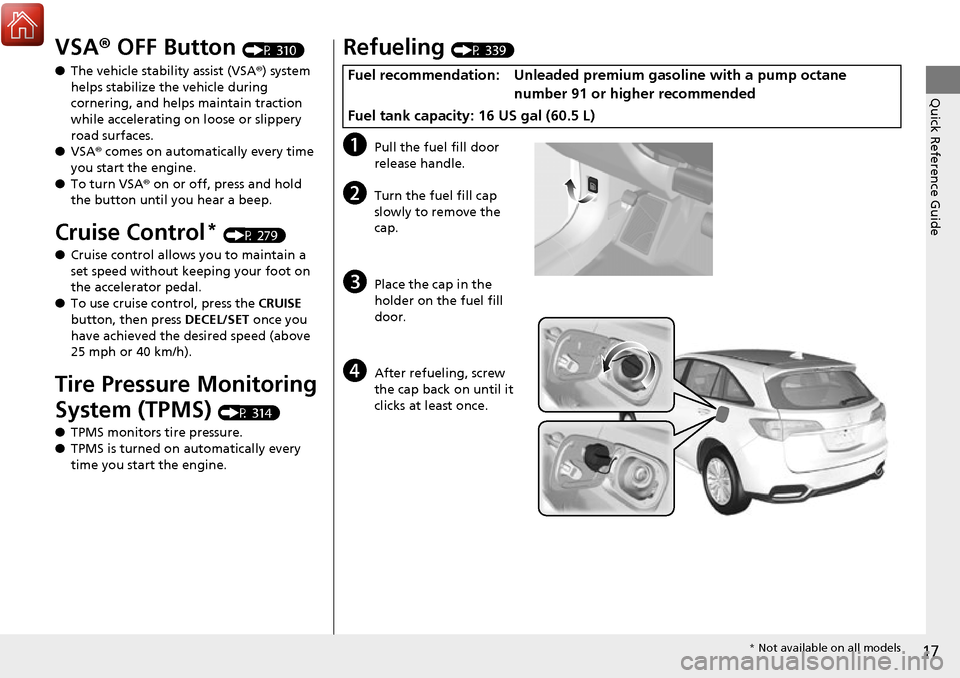
Refueling (P 339)
aPull the fuel fill door
release handle.
bTurn the fuel fill cap
slowly to remove the
cap.
cPlace the cap in the
holder on the fuel fill
door.
dAfter refueling, screw
the cap back on until it
clicks at least once.
Fuel recommendation: Unleaded premium gasoline with a pump octane
number 91 or higher recommended
Fuel tank capacity: 16 US gal (60.5 L)
* Not available on all models
Page 19 of 449
18
Quick Reference Guide
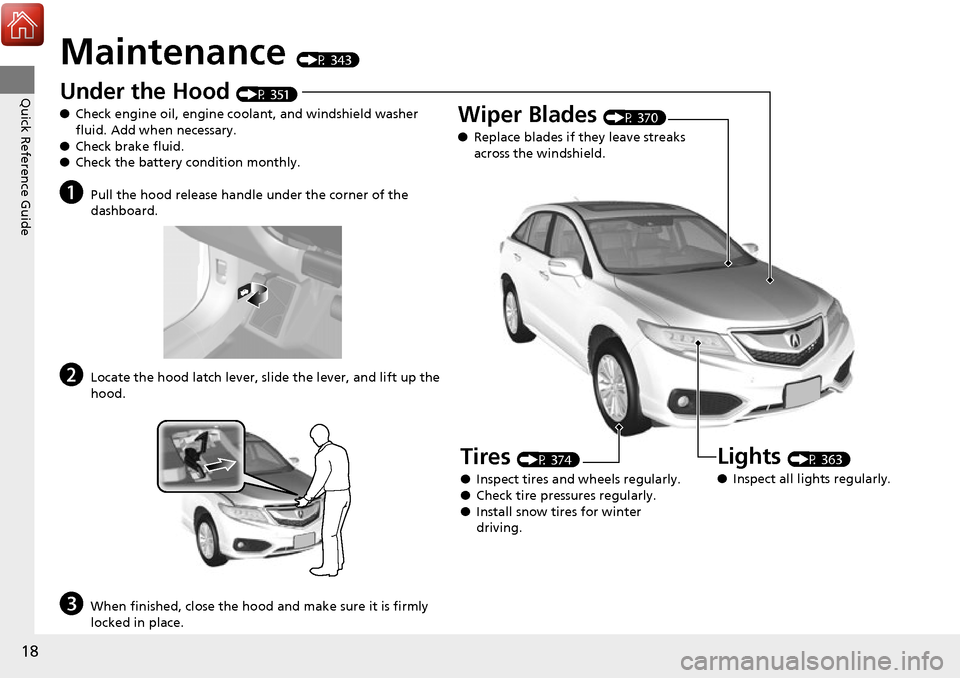
Maintenance (P 343)
Under the Hood (P 351)
● Check engine oil, engine coolant, and windshield washer
fluid. Add when necessary.
● Check brake fluid.
● Check the battery condition monthly.
aPull the hood release handle under the corner of the
dashboard.
bLocate the hood latch lever, sl ide the lever, and lift up the
hood.
cWhen finished, close the hood and make sure it is firmly
locked in place.
Lights (P 363)
● Inspect all lights regularly.
Wiper Blades (P 370)
● Replace blades if they leave streaks
across the windshield.
Tires (P 374)
● Inspect tires and wheels regularly.
● Check tire pressures regularly.
● Install snow tires for winter
driving.
Page 20 of 449
Quick Reference Guide
19
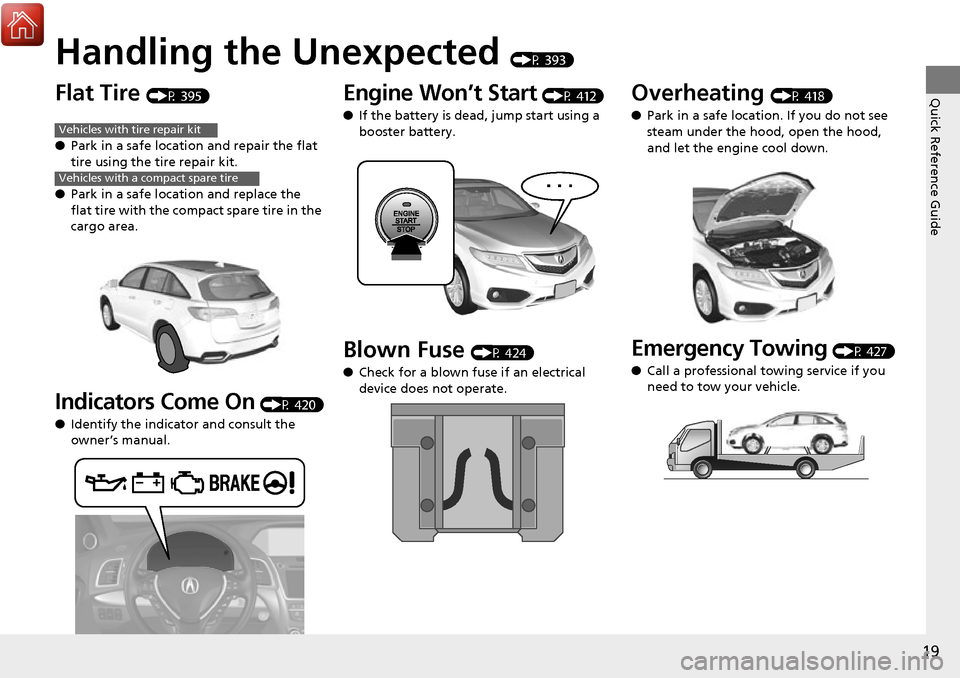
Handling the Unexpected (P 393)
Flat Tire (P 395)
● Park in a safe location and repair the flat
tire using the tire repair kit.
● Park in a safe location and replace the
flat tire with the comp act spare tire in the
cargo area.
Indicators Come On (P 420)
● Identify the indica tor and consult the
owner’s manual.
Vehicles with tire repair kit
Vehicles with a compact spare tire
Engine Won’t Start (P 412)
● If the battery is dead, jump start using a
booster battery.
Blown Fuse (P 424)
● Check for a blown fuse if an electrical
device does not operate.
Overheating (P 418)
● Park in a safe location. If you do not see
steam under the hood, open the hood,
and let the engine cool down.
Emergency Towing (P 427)
● Call a professional towing service if you
need to tow your vehicle.
Page 21 of 449
20
Quick Reference Guide
What to Do If
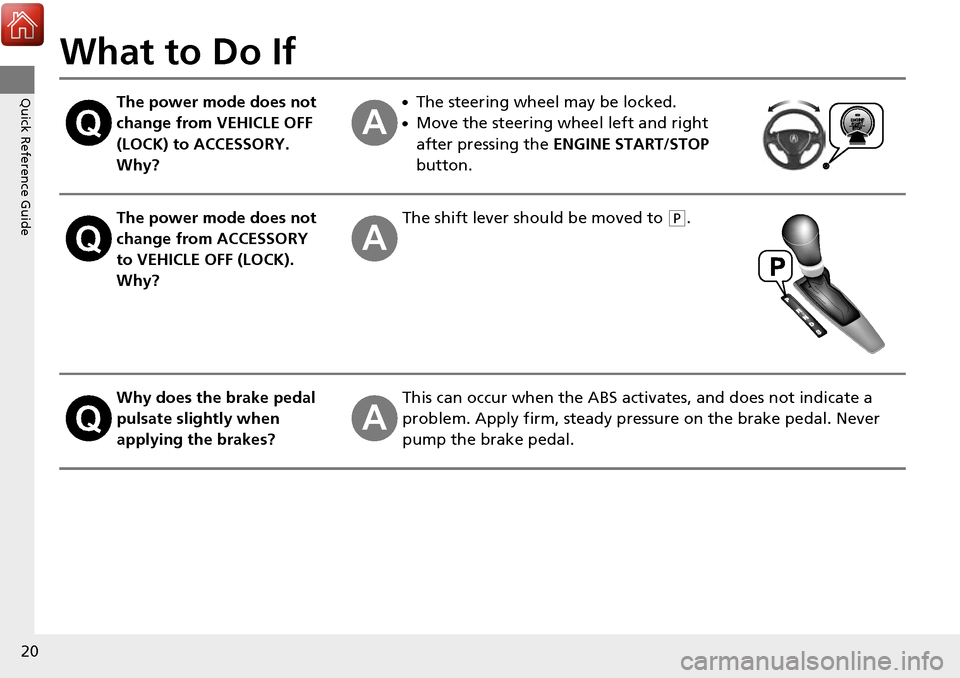
The power mode does not
change from VEHICLE OFF
(LOCK) to ACCESSORY.
Why?●The steering wheel may be locked.
●Move the steering wheel left and right
after pressing the ENGINE START/STOP
button.
The power mode does not
change from ACCESSORY
to VEHICLE OFF (LOCK).
Why?The shift lever should be moved to (P.
Why does the brake pedal
pulsate slightly when
applying the brakes?This can occur when the ABS activates, and does not indicate a
problem. Apply firm, steady pressure on the brake pedal. Never
pump the brake pedal.
Page 22 of 449
21
Quick Reference Guide
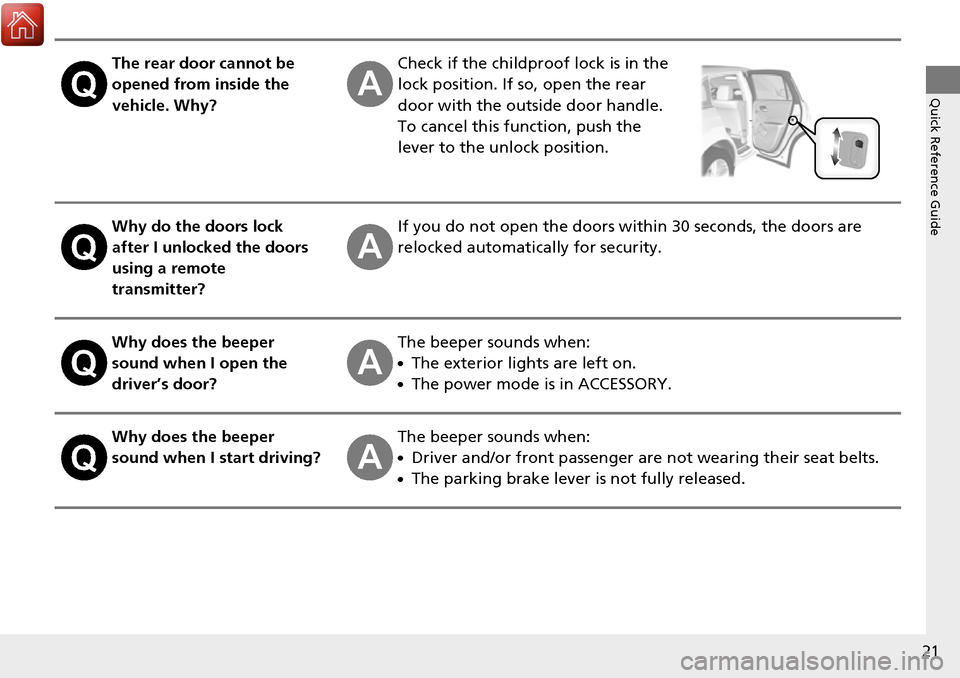
The rear door cannot be
opened from inside the
vehicle. Why?Check if the childproof lock is in the
lock position. If so, open the rear
door with the outside door handle.
To cancel this function, push the
lever to the unlock position.
Why do the doors lock
after I unlocked the doors
using a remote
transmitter?If you do not open the doors within 30 seconds, the doors are
relocked automatically for security.
Why does the beeper
sound when I open the
driver’s door?The beeper sounds when:
●The exterior lights are left on.
●The power mode is in ACCESSORY.
Why does the beeper
sound when I start driving?The beeper sounds when:
●Driver and/or front passenger are not wearing their seat belts.
●The parking brake lever is not fully released.
Page 23 of 449
22
Quick Reference Guide
Why do I hear a screeching
sound when I apply the
brake pedal?The brake pads may need to be replaced. Have your vehicle
inspected by a dealer.
Is it possible to use
unleaded gasoline with a
Pump Octane Number
(PON) of 87 or higher on
this vehicle?Unleaded gasoline with a Pump Octane Number (PON) of 91 or
higher is recommended.
Use of lower octane gasoline can cause occasional metallic
knocking noise in the engine and will result in decreased engine
performance.
Use of gasoline with a pump octane less than 87 can lead to
engine damage.
Page 25 of 449
24
Safe Driving
For Safe Driving
The following pages explain your vehicle’s safety features and how to use them
properly. The safety precautions below are ones that we consider to be among the
most important.
Important Safety Precautions
■Always wear your seat belt
A seat belt is your best protection in all types of collisions. Airbags are designed to
supplement seat belts, not replace them. So even though your vehicle is equipped
with airbags, make sure you and your passen gers always wear your seat belts, and
wear them properly.
■Restrain all children
Children age 12 and under should ride prop erly restrained in a back seat, not the
front seat. Infants and small children shoul d be restrained in a child seat. Larger
children should use a booster seat and a lap/ shoulder seat belt until they can use the
belt properly without a booster seat.
■Be aware of airbag hazards
While airbags can save lives, they can caus e serious or fatal injuries to occupants
who sit too close to them, or are not prop erly restrained. Infants, young children,
and short adults are at the greatest risk. Be sure to follow all instructions and
warnings in this manual.
■Don’t drink and drive
Alcohol and driving don’t mix. Even one dr ink can reduce your ability to respond to
changing conditions, and your reaction time gets worse with every additional drink.
So don’t drink and drive, and don’t let your friends drink and drive, either.
1Important Safety Precautions
Some states, provinces and territories prohibit the use
of cell phones other than hands-free devices by the
driver while driving.
Page 26 of 449
25
uuFor Safe Driving uImportant Safety Precautions
Safe Driving
■Pay appropriate attention to the task of driving safely
Engaging in cell phone conversation or other activities that keep you from paying
close attention to the road, other vehicles , and pedestrians could lead to a crash.
Remember, situations can change quickly, and only you can decide when it is safe to
divert some attention away from driving.
■Control your speed
Excessive speed is a major factor in crash injuries and deaths. Generally, the higher
the speed, the greater the risk, but serious injuries can also occur at lower speeds.
Never drive faster than is safe for curr ent conditions, regardless of the maximum
speed posted.
■Keep your vehicle in safe condition
Having a tire blowout or a mechanical failure can be extremely hazardous.
To reduce the possibility of such problems, check your tire pressures and condition
frequently, and perform all regularly scheduled maintenance.