Front seat Acura RDX 2017 Owner's Guide
[x] Cancel search | Manufacturer: ACURA, Model Year: 2017, Model line: RDX, Model: Acura RDX 2017Pages: 449, PDF Size: 10.88 MB
Page 61 of 449
60
uuChild Safety uSafety of Larger Children
Safe Driving
Safety of Larger Children
The following pages give instructions on how to check proper seat belt fit, what kind
of booster seat to use if one is needed , and important precautions for a child who
must sit in front.
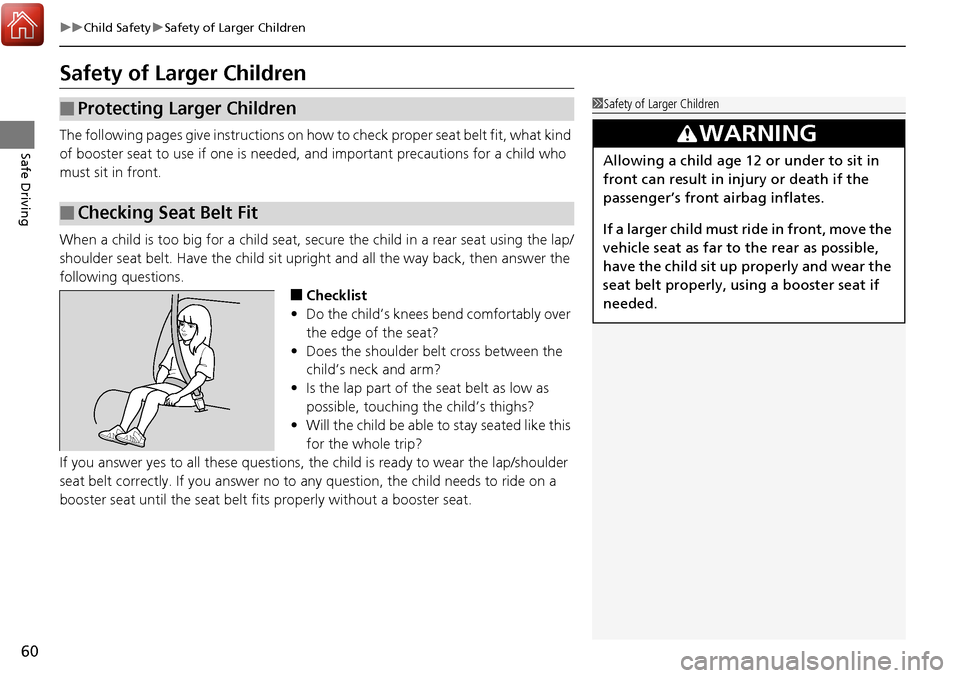
When a child is too big for a child seat, secure the child in a rear seat using the lap/
shoulder seat belt. Have the child sit upright and all the way back, then answer the
following questions.
■Checklist
• Do the child’s knees bend comfortably over
the edge of the seat?
• Does the shoulder belt cross between the
child’s neck and arm?
• Is the lap part of the seat belt as low as
possible, touching the child’s thighs?
• Will the child be able to stay seated like this
for the whole trip?
If you answer yes to all these questions, the child is ready to wear the lap/shoulder
seat belt correctly. If you answer no to any question, the child needs to ride on a
booster seat until the seat belt fits properly without a booster seat.
■Protecting Larger Children
■Checking Seat Belt Fit
1 Safety of Larger Children
3WARNING
Allowing a child age 12 or under to sit in
front can result in injury or death if the
passenger’s front airbag inflates.
If a larger child must ri de in front, move the
vehicle seat as far to the rear as possible,
have the child sit up properly and wear the
seat belt properly, us ing a booster seat if
needed.
Page 62 of 449

61
uuChild Safety uSafety of Larger Children
Safe DrivingIf a lap/shoulder seat belt cannot be used
properly, position the child in a booster seat in
a rear seating position. For the child’s safety,
check that the child meets the booster seat
manufacturer’s recommendations.
Your vehicle has a rear seat where children can be properly restrained. If you ever
have to carry a group of children, and a child must ride in front:
• Make sure you read and fully understand the instructions and safety information
in this manual.
• Move the front passenger seat as far back as possible.
• Have the child sit upright and well back in the seat.
• Check that the seat belt is properly positi oned so that the child is secure in the
seat.
■Monitoring child passengers
We strongly recommend that you keep an ey e on child passengers. Even older, more
mature children sometimes need to be remind ed to fasten their seat belts and sit up
properly.
■Booster Seats1 Booster Seats
When installing a booster seat, make sure to read the
instructions that came with it, and install the seat
accordingly.
There are high- and low-type booster seats. Choose a
booster seat that allows the child to wear the seat
belt correctly.
Some U.S. states and Canadian provinces and
territories require children to use a booster seat until
they reach a given age or weight (e.g. 6 years or 60
lbs). Be sure to check current laws in the state or
province, or territory where you intend to drive.
■Protecting Larger Children-Final Checks
Page 70 of 449
69
uuIndicators u
Continued
Instrument Panel
*1:On the left: Models wi thout full color display
On the right: Models with full color display
IndicatorNameOn/BlinkingExplanationMessage*1
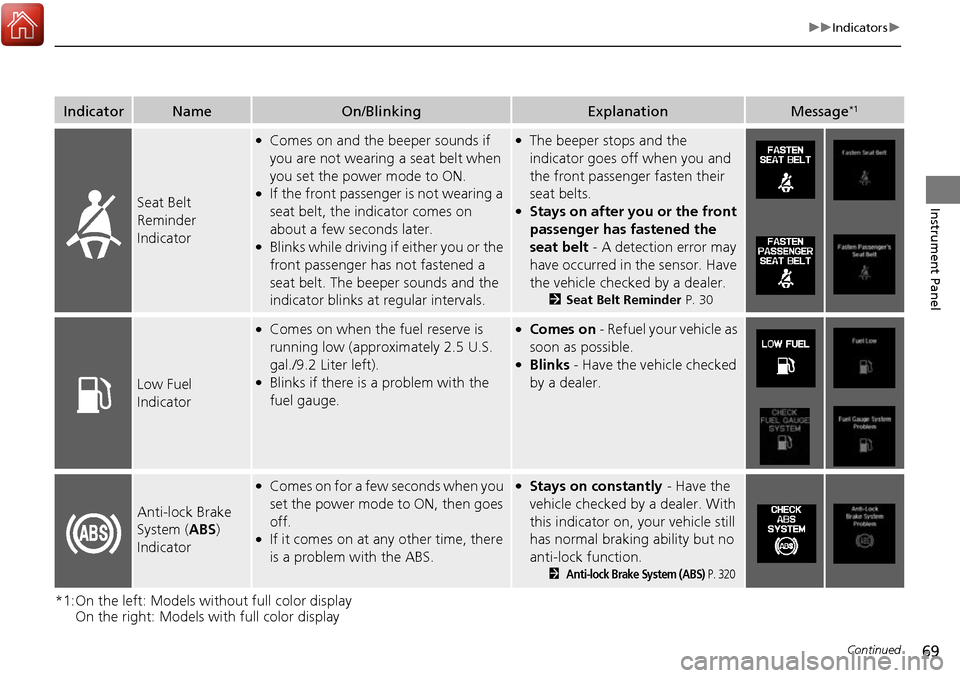
Seat Belt
Reminder
Indicator
●Comes on and the beeper sounds if
you are not wearing a seat belt when
you set the power mode to ON.
●If the front passenger is not wearing a
seat belt, the indicator comes on
about a few seconds later.
●Blinks while driving if either you or the
front passenger has not fastened a
seat belt. The beeper sounds and the
indicator blinks at regular intervals.
●The beeper stops and the
indicator goes off when you and
the front passenger fasten their
seat belts.
●Stays on after you or the front
passenger has fastened the
seat belt - A detection error may
have occurred in the sensor. Have
the vehicle checked by a dealer.
2 Seat Belt Reminder P. 30
Low Fuel
Indicator
●Comes on when the fuel reserve is
running low (approximately 2.5 U.S.
gal./9.2 Liter left).
●Blinks if there is a problem with the
fuel gauge.
●Comes on - Refuel your vehicle as
soon as possible.
●Blinks - Have the vehicle checked
by a dealer.
Anti-lock Brake
System ( ABS)
Indicator
●Comes on for a few seconds when you
set the power mode to ON, then goes
off.
●If it comes on at any other time, there
is a problem with the ABS.
●Stays on constantly - Have the
vehicle checked by a dealer. With
this indicator on, your vehicle still
has normal braking ability but no
anti-lock function.
2Anti-lock Brake System (ABS) P. 320
Page 71 of 449
70
uuIndicators u
Instrument Panel
*1:On the left: Models without full color display
On the right: Models with full color display
IndicatorNameOn/BlinkingExplanationMessage*1
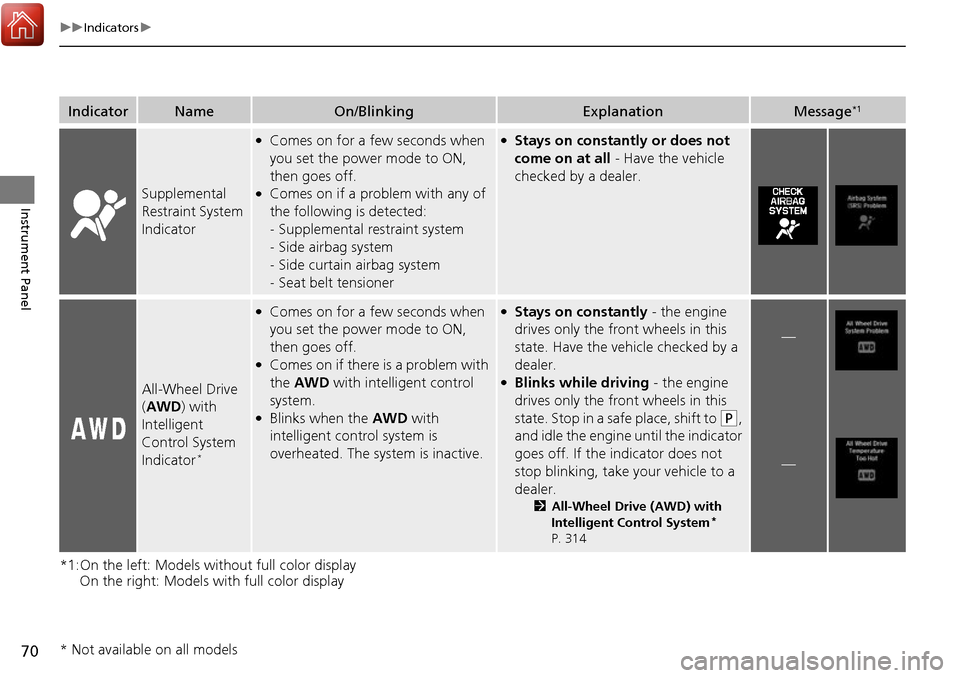
Supplemental
Restraint System
Indicator
●Comes on for a few seconds when
you set the power mode to ON,
then goes off.
●Comes on if a problem with any of
the following is detected:
-Supplemental restraint system
- Side airbag system
- Side curtain airbag system
- Seat belt tensioner
●Stays on constantly or does not
come on at all - Have the vehicle
checked by a dealer.
All-Wheel Drive
( AWD ) with
Intelligent
Control System
Indicator
*
●Comes on for a few seconds when
you set the power mode to ON,
then goes off.
●Comes on if there is a problem with
the AWD with intelligent control
system.
●Blinks when the AWD with
intelligent control system is
overheated. The system is inactive.
●Stays on constantly - the engine
drives only the front wheels in this
state. Have the vehicle checked by a
dealer.
●Blinks while driving - the engine
drives only the front wheels in this
state. Stop in a safe place, shift to
(P,
and idle the engine until the indicator
goes off. If the indicator does not
stop blinking, take your vehicle to a
dealer.
2 All-Wheel Drive (AWD) with
Intelligent Control System*
P. 314
—
—
* Not available on all models
Page 129 of 449

128
uuLocking and Unlocking the Doors uLocking/Unlocking the Doors from the Inside
Controls
Locking/Unlocking the Doors from the Inside
■Locking a door
Push the lock tab forward.
■Unlocking a door
Pull the lock tab rearward.
Pull the front door inner handle. u The door unlocks and opens in one
motion.
■Using the Lock Tab1Using the Lock Tab
When you lock the door using the lock tab on the
driver’s door, all the other d oors and tailgate lock at
the same time.
When you unlock the door using the lock tab on the
driver’s door, only the driv er’s door will unlock.
To Unlock
Lock TabTo Lock
■Unlocking Using the Inner Handle of Front Doors1Unlocking Using the Inner Handle of Front Doors
The front door inne r handles are designed to allow
front seat occupants to open the door in one motion.
However this feature requires that front seat
occupants never pull a front door inner handle while
the vehicle is in motion.
Children should always ride in a rear seat where
childproof door locks are provided. 2 Childproof Door Locks P. 129
Inner
Handle
Page 141 of 449
140
Controls
Opening and Closing the Windows
Opening/Closing the Power Windows
The power windows can be opened and closed when the power mode is in ON,
using the switches on the do ors. The driver side switches can be used to open and
close all of the windows.
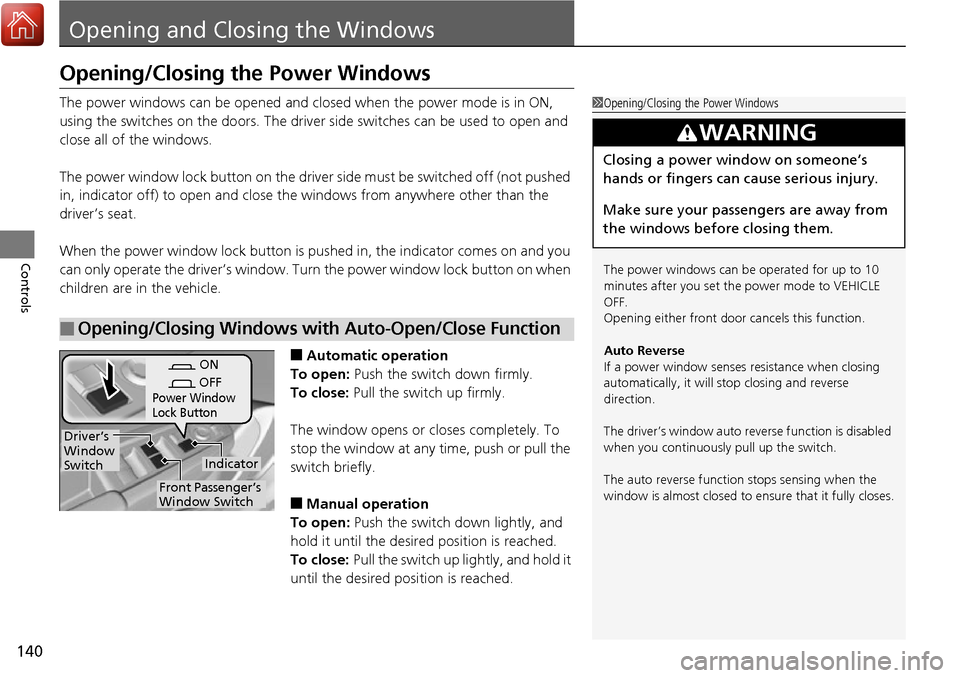
The power window lock button on the driver side must be switched off (not pushed
in, indicator off) to open and close th e windows from anywhere other than the
driver’s seat.
When the power window lock button is pu shed in, the indicator comes on and you
can only operate the driver’s window. Turn the power window lock button on when
children are in the vehicle.
■Automatic operation
To open: Push the switch down firmly.
To close: Pull the switch up firmly.
The window opens or closes completely. To
stop the window at any time, push or pull the
switch briefly.
■Manual operation
To open: Push the switch down lightly, and
hold it until the desired position is reached.
To close: Pull the switch up lightly, and hold it
until the desired position is reached.
■Opening/Closing Windows with Auto-Open/Close Function
1 Opening/Closing the Power Windows
The power windows can be operated for up to 10
minutes after you set the power mode to VEHICLE
OFF.
Opening either front door cancels this function.
Auto Reverse
If a power window senses resistance when closing
automatically, it will stop closing and reverse
direction.
The driver’s window auto re verse function is disabled
when you continuously pull up the switch.
The auto reverse function stops sensing when the
window is almost closed to en sure that it fully closes.
3WARNING
Closing a power window on someone’s
hands or fingers can cause serious injury.
Make sure your passengers are away from
the windows before closing them.
ON
OFF
Power Window
Lock Button
Indicator
Driver’s
Window
Switch
Front Passenger’s
Window Switch
Page 163 of 449
162
Controls
Adjusting the Seats
Adjusting the Seat Positions
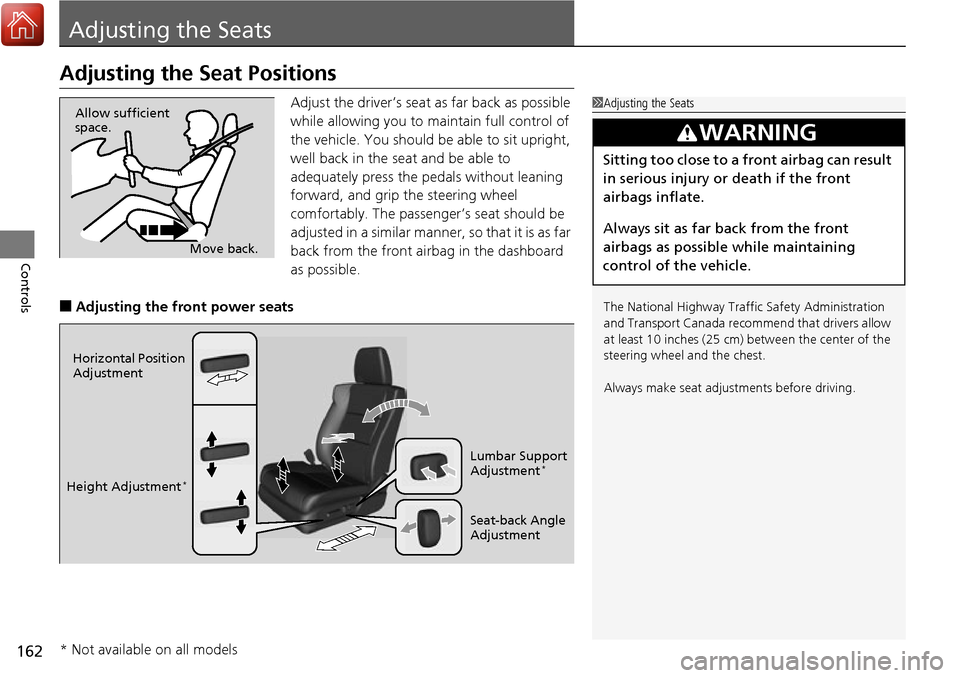
Adjust the driver’s seat as far back as possible
while allowing you to maintain full control of
the vehicle. You should be able to sit upright,
well back in the seat and be able to
adequately press the pedals without leaning
forward, and grip the steering wheel
comfortably. The passenger’s seat should be
adjusted in a similar manner, so that it is as far
back from the front airbag in the dashboard
as possible.
■Adjusting the front power seats
1Adjusting the Seats
The National Highway Traffic Safety Administration
and Transport Cana da recommend that drivers allow
at least 10 inches (25 cm) between the center of the
steering wheel and the chest.
Always make seat adjustments before driving.
3WARNING
Sitting too close to a front airbag can result
in serious injury or death if the front
airbags inflate.
Always sit as far back from the front
airbags as possible while maintaining
control of the vehicle.
Move back.
Allow sufficient
space.
Horizontal Position
Adjustment
Height Adjustment
*
Seat-back Angle
Adjustment Lumbar Support
Adjustment
*
* Not available on all models
Page 164 of 449
Continued163
uuAdjusting the Seats uAdjusting the Seat Positions
Controls
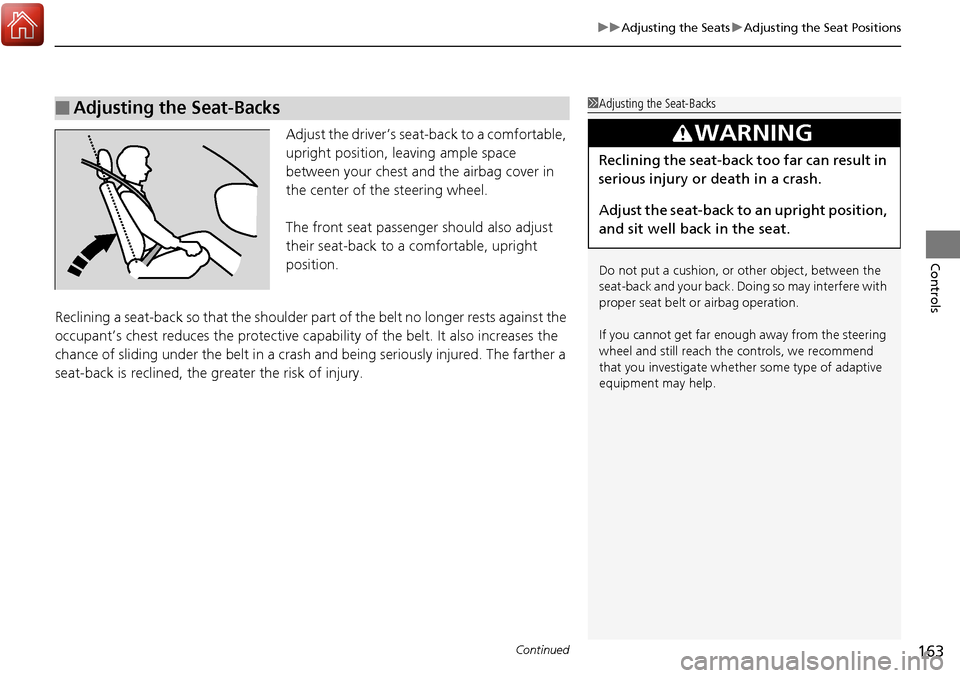
Adjust the driver’s seat -back to a comfortable,
upright position, leaving ample space
between your chest and the airbag cover in
the center of the steering wheel.
The front seat passenger should also adjust
their seat-back to a comfortable, upright
position.
Reclining a seat-back so that the shoulder part of the belt no longer rests against the
occupant’s chest reduces the protective capa bility of the belt. It also increases the
chance of sliding under the belt in a crash and being seriously injured. The farther a
seat-back is reclined, the gr eater the risk of injury.
■Adjusting the Seat-Backs1Adjusting the Seat-Backs
Do not put a cushion, or other object, between the
seat-back and your back. Do ing so may interfere with
proper seat belt or airbag operation.
If you cannot get far e nough away from the steering
wheel and still reach th e controls, we recommend
that you investigate whether some type of adaptive
equipment may help.
3WARNING
Reclining the seat-back too far can result in
serious injury or death in a crash.
Adjust the seat-back to an upright position,
and sit well back in the seat.
Page 165 of 449

uuAdjusting the Seats uAdjusting the Seat Positions
164
Controls
Your vehicle is equipped with head restraints
in all seating positions.
Head restraints are most effective for
protection against whiplash and other rear-
impact crash injuries when the center of the
back of the occupant’s head rests against the
center of the restraint. The tops of the
occupant’s ears should be level with the
center height of the restraint.
■Adjusting the front and rear ou ter head restraint positions
To raise the head restraint: Pull it upward.
To lower the head restraint: Push it down
while pressing the release button.
■Adjusting the Head Restraints1 Adjusting the Head Restraints
For the head restraint system to work properly:
•Do not hang any items on the head restraints, or
from the restraint legs.
•Do not place any object be tween an occupant and
the seat-back.
•Install each restraint in its proper location.
3WARNING
Improperly positioning head restraints
reduces their effectiveness and increases
the likelihood of serious injury in a crash.
Make sure head restraints are in place and
positioned properly before driving.
Position head in the center
of the head restraint.
Page 167 of 449
uuAdjusting the Seats uAdjusting the Seat Positions
166
Controls
After all occupants have adjusted their seats and head restraints, and put on their
seat belts, it is very important that they continue to sit upright, well back in their
seats, with their feet on the floor, until the vehicle is safely parked and the engine is
off.
Sitting improperly can increase the chance of injury during a crash. For example, if
an occupant slouches, lies down, turns si deways, sits forward, leans forward or
sideways, or puts one or both feet up, the chance of injury during a crash is greatly
increased.
In addition, an occupant who is out of position in the front seat can be seriously or
fatally injured in a crash by striking interior parts of the vehicle or being struck by an
inflating front airbag.
■Maintain a Proper Sitting Position1 Maintain a Proper Sitting Position
3WARNING
Sitting improperly or out of position can
result in serious injury or death in a crash.
Always sit upright, well back in the seat,
with your feet on the floor.