maintenance Acura RDX 2018 Service Manual
[x] Cancel search | Manufacturer: ACURA, Model Year: 2018, Model line: RDX, Model: Acura RDX 2018Pages: 453, PDF Size: 20.13 MB
Page 368 of 453
367
uuReplacing Light Bulbs uFront Turn Signal Light/Parking Light/Daytime Running Light and Front Side Marker Light Bulbs
Maintenance
Front Turn Signal Light/Parking Light/Daytime
Running Light and Front Side Marker Light Bulbs
When replacing, use the following bulbs.
1.Turn the steering wheel all the way to the
opposite side from the light being replaced.
Passenger side: Turn the steering wheel to
the left.
Driver side:Turn the steering wheel to the
right.
2. Remove the holding clips and screw, and
pull the inner fender back.
2 Fog Light Bulbs* P. 365
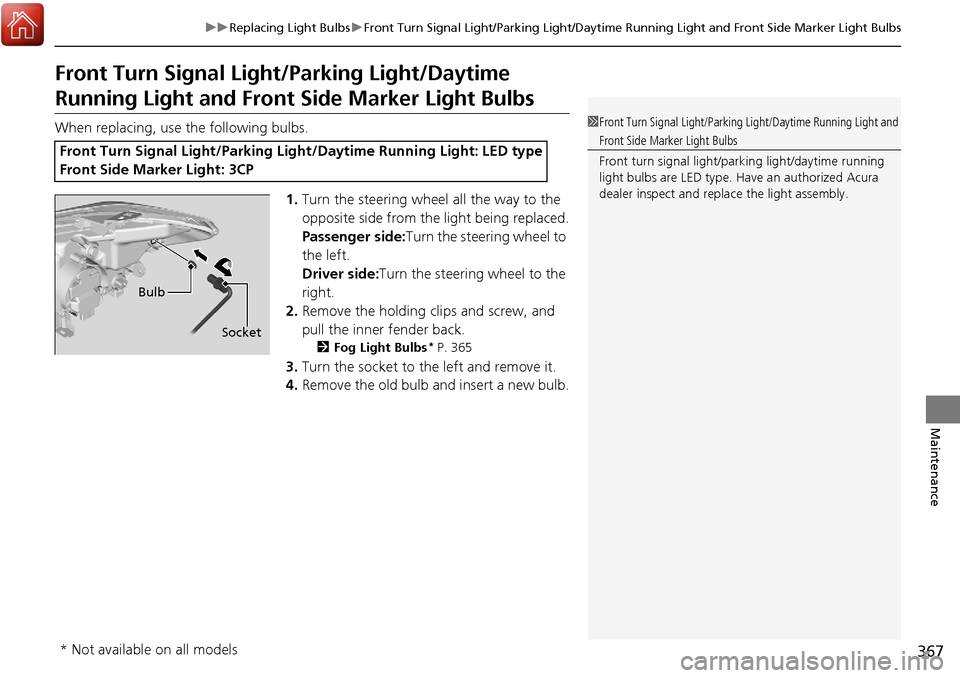
3.Turn the socket to the left and remove it.
4. Remove the old bulb and insert a new bulb.
Front Turn Signal Light/Parking Li ght/Daytime Running Light: LED type
Front Side Marker Light: 3CP
1 Front Turn Signal Light/Parking Light/Daytime Running Light and
Front Side Marker Light Bulbs
Front turn signal light/parking light/daytime running
light bulbs are LED type. Have an authorized Acura
dealer inspect and replace the light assembly.
Bulb
Socket
* Not available on all models
Page 369 of 453
368
uuReplacing Light Bulbs uBrake Light/Taillight/Rear Side Marker Li ght and Rear Turn Signal Light Bulbs
Maintenance
Brake Light/Taillight/Rear Side Marker Light and
Rear Turn Signal Light Bulbs
When replacing, use the following bulbs.
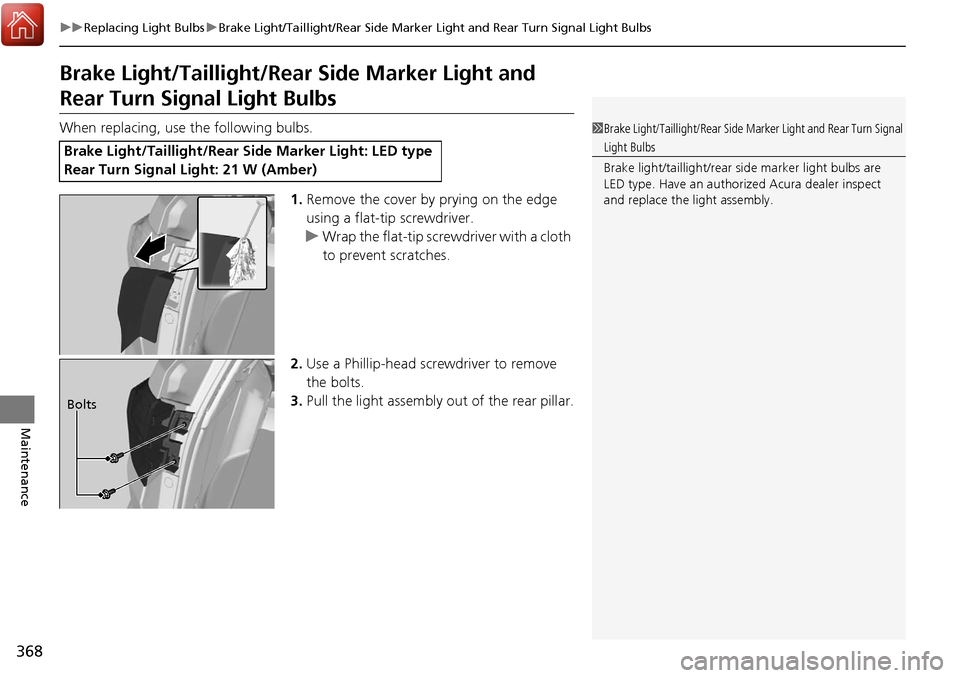
1.Remove the cover by prying on the edge
using a flat-tip screwdriver.
u Wrap the flat-tip screwdriver with a cloth
to prevent scratches.
2. Use a Phillip-head scre wdriver to remove
the bolts.
3. Pull the light assembly out of the rear pillar.
Brake Light/Taillight/Rear Si de Marker Light: LED type
Rear Turn Signal Light: 21 W (Amber)
1 Brake Light/Taillight/Rear Side Mar ker Light and Rear Turn Signal
Light Bulbs
Brake light/taillight/rear side marker light bulbs are
LED type. Have an authorized Acura dealer inspect
and replace the light assembly.
Bolts
Page 370 of 453
369
uuReplacing Light Bulbs uBrake Light/Taillight/Rear Side Marker Light and Rear Turn Signal Light Bulbs
Maintenance
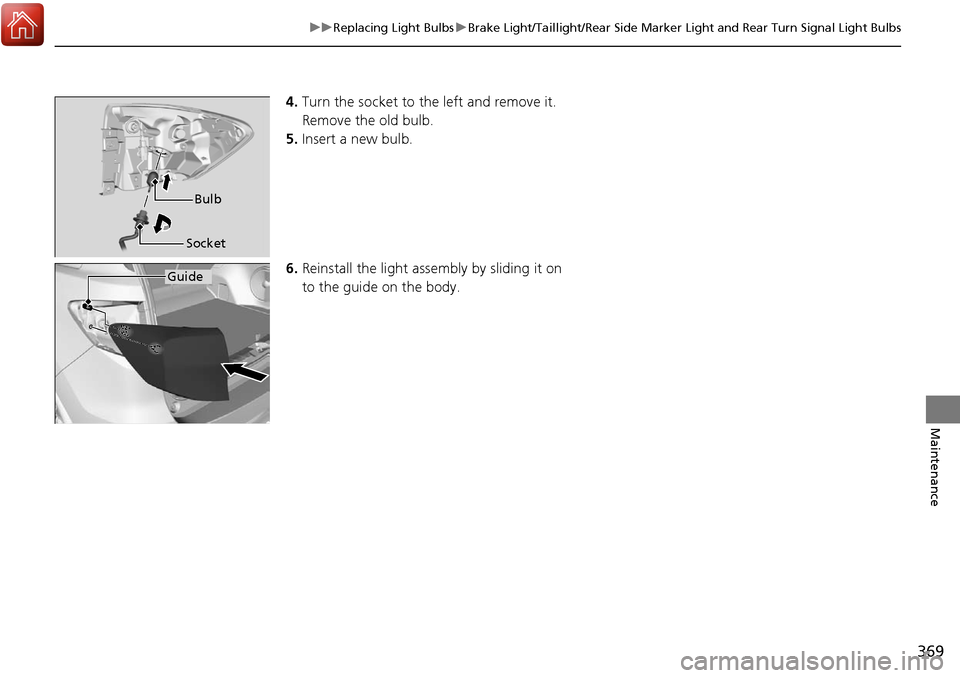
4. Turn the socket to th e left and remove it.
Remove the old bulb.
5. Insert a new bulb.
6. Reinstall the light assembly by sliding it on
to the guide on the body.
Bulb
Socket
Guide
Page 371 of 453
370
uuReplacing Light Bulbs uBack-Up Light and Taillight Bulbs
Maintenance
Back-Up Light and Taillight Bulbs
When replacing, use the following bulbs.
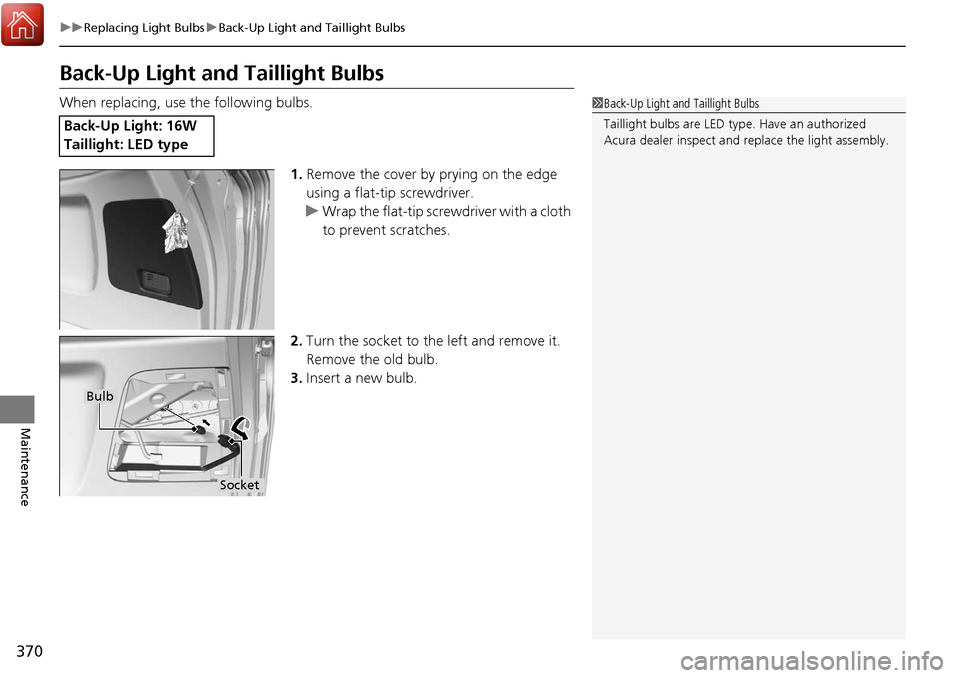
1.Remove the cover by prying on the edge
using a flat-tip screwdriver.
u Wrap the flat-tip screwdriver with a cloth
to prevent scratches.
2. Turn the socket to the left and remove it.
Remove the old bulb.
3. Insert a new bulb.
Back-Up Light: 16W
Taillight: LED type
1Back-Up Light and Taillight Bulbs
Taillight bulbs are LED ty pe. Have an authorized
Acura dealer inspect and replace the light assembly.
Bulb
Socket
Page 372 of 453
371
uuReplacing Light Bulbs uRear License Plate Light Bulb
Maintenance
Rear License Plate Light Bulb
When replacing, use the following bulb.
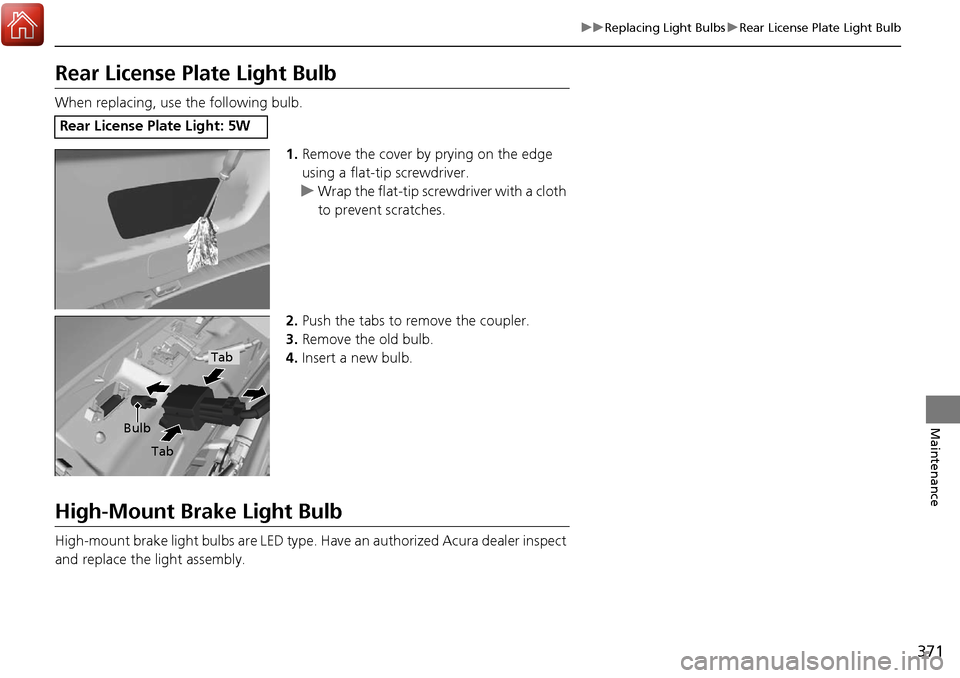
1.Remove the cover by prying on the edge
using a flat-tip screwdriver.
u Wrap the flat-tip scre wdriver with a cloth
to prevent scratches.
2. Push the tabs to remove the coupler.
3. Remove the old bulb.
4. Insert a new bulb.
High-Mount Brake Light Bulb
High-mount brake light bulbs are LED type. Ha ve an authorized Acura dealer inspect
and replace the light assembly.
Rear License Plate Light: 5W
Bulb
Tab
Tab
Page 373 of 453
372
Maintenance
Checking and Maintaining Wiper Blades
Checking Wiper Blades
If the wiper blade rubber has deteriorated, it will leave streaks and the hard surfaces
of the blade may scratch the window glass.
Changing the Front Wiper Blade Rubber
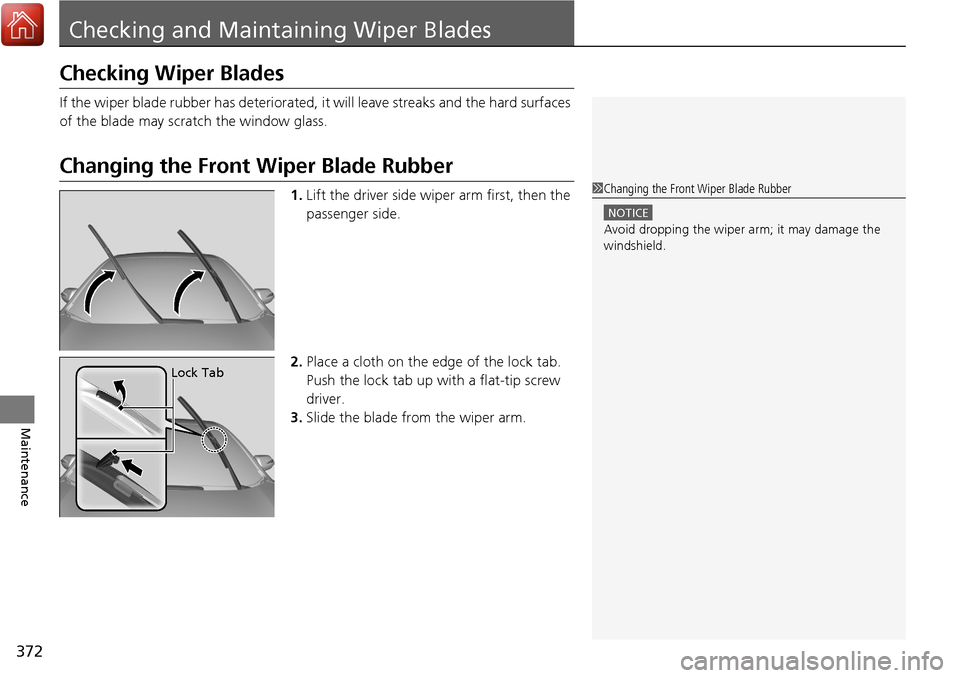
1. Lift the driver side wiper arm first, then the
passenger side.
2. Place a cloth on the edge of the lock tab.
Push the lock tab up with a flat-tip screw
driver.
3. Slide the blade from the wiper arm.1Changing the Front Wiper Blade Rubber
NOTICE
Avoid dropping the wiper ar m; it may damage the
windshield.
Lock Tab
Page 374 of 453
373
uuChecking and Maintaining Wiper Blades uChanging the Front Wiper Blade Rubber
Maintenance
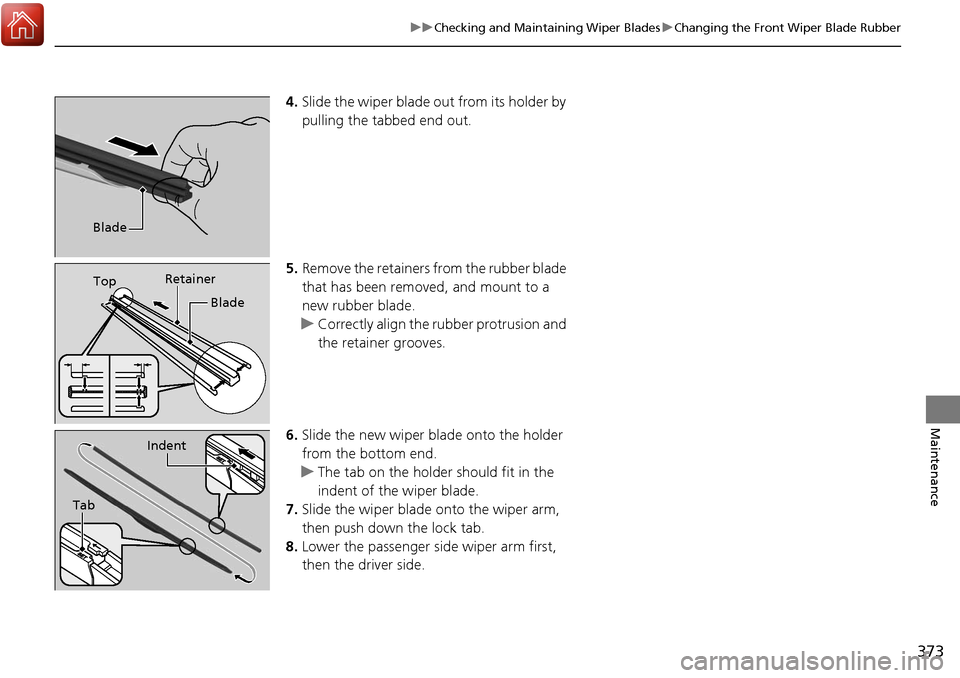
4. Slide the wiper blade out from its holder by
pulling the tabbed end out.
5. Remove the retainers from the rubber blade
that has been removed, and mount to a
new rubber blade.
u Correctly align the rubber protrusion and
the retainer grooves.
6. Slide the new wiper bl ade onto the holder
from the bottom end.
u The tab on the holder should fit in the
indent of the wiper blade.
7. Slide the wiper blade onto the wiper arm,
then push down the lock tab.
8. Lower the passenger side wiper arm first,
then the driver side.
Blade
Top Retainer
Blade
Tab
Indent
Page 375 of 453
374
uuChecking and Maintaining Wiper Blades uChanging the Rear Wiper Blade Rubber
Maintenance
Changing the Rear Wiper Blade Rubber
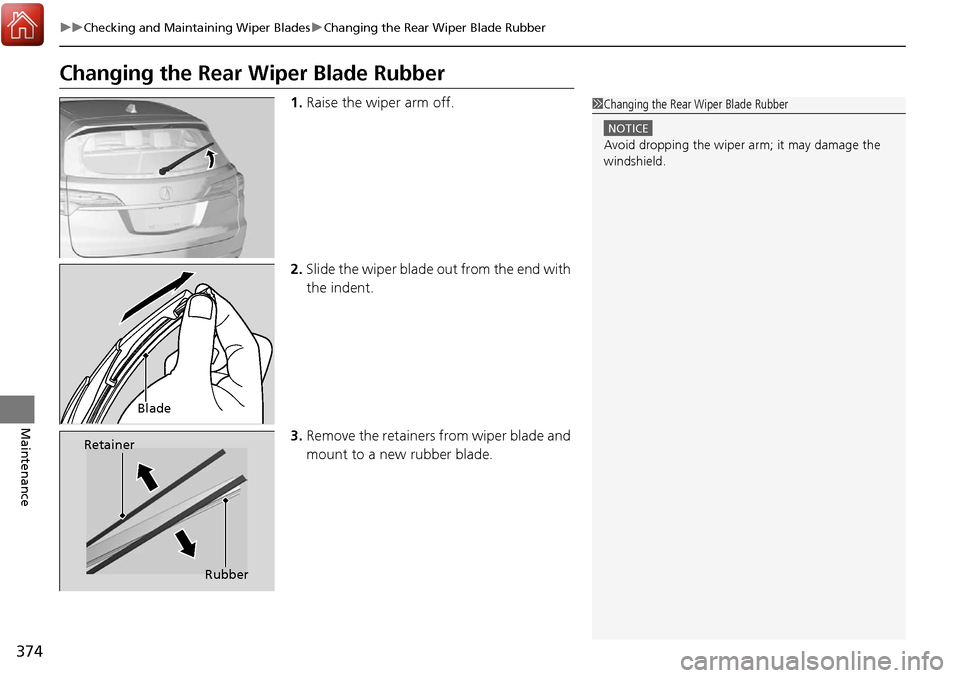
1. Raise the wiper arm off.
2. Slide the wiper blade out from the end with
the indent.
3. Remove the retainers from wiper blade and
mount to a new rubber blade.1Changing the Rear Wiper Blade Rubber
NOTICE
Avoid dropping the wiper ar m; it may damage the
windshield.
Blade
Retainer
Rubber
Page 376 of 453
375
uuChecking and Maintaining Wiper Blades uChanging the Rear Wiper Blade Rubber
Maintenance
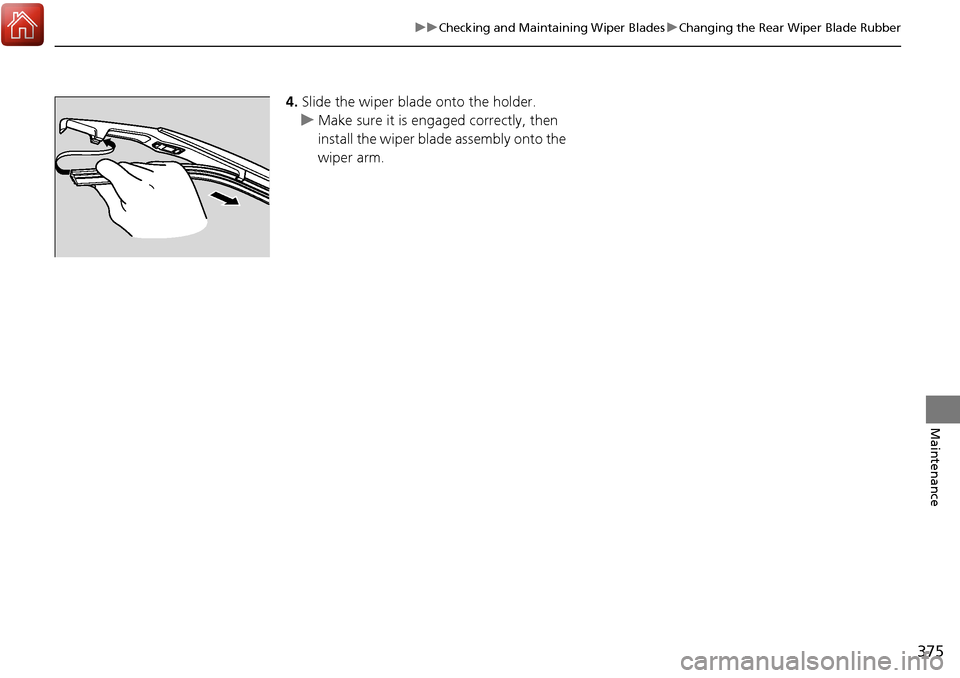
4. Slide the wiper blade onto the holder.
u Make sure it is engaged correctly, then
install the wiper blade assembly onto the
wiper arm.
Page 377 of 453
376
Maintenance
Checking and Maintaining Tires
Checking Tires
To safely operate your vehicle, your tires must be of the proper type and size, in
good condition with adequate tread, and properly inflated.
■Inflation guidelines
Properly inflated tires provide the best combination of handling, tread life, and comfort.
Refer to the driver’s doorjamb label or spec ification’s page for the specified pressure.
Underinflated tires wear unevenly, adversely affect handling and fuel economy, and
are more likely to fail from overheating.
Overinflated tires make your vehicle ride harshly, are more prone to road hazards,
and wear unevenly.
Every day before you drive, look at each of the tires. If one looks lower than the
others, check the pressure with a tire gauge.
At least once a month and before long trip s, use a gauge to measure the pressure in
all tires, including the spare. Even tires in good condition can lose 1 to 2 psi (10 to
20 kPa, 0.1 to 0.2 kgf/cm
2) per month.
■Inspection guidelines
Every time you check inflation, also examine the tires and valve stems.
Look for:
• Bumps or bulges on the side or in the tread. Replace the tire if you find any cuts,
splits, or cracks in the si de of the tire. Replace it if you see fabric or cord.
• Remove any foreign objects and inspect for air leaks.
• Uneven tread wear. Have a deal er check the wheel alignment.
• Excessive tread wear.
2 Wear Indicators P. 381
•Cracks or other damage around valve stem.
1Checking Tires
Measure the air pressure when tires are cold. This
means the vehicle has been parked for at least three
hours, or driven less than 1 mile (1.6 km). If
necessary, add or releas e air until the specified
pressure is reached.
If checked when hot, tire pressure can be as much as
4–6 psi (30–40 kPa, 0.3–0.4 kgf/cm
2) higher than if
checked when cold.
Have a dealer check the tires if you feel a consistent
vibration while driving. Ne w tires and any that have
been removed and reinst alled should be properly
balanced.
3WARNING
Using tires that are excessively worn or
improperly inflated can cause a crash in
which you can be seriously hurt or killed.
Follow all instruction s in this owner’s
manual regarding ti re inflation and
maintenance.