maintenance Acura RDX 2018 Repair Manual
[x] Cancel search | Manufacturer: ACURA, Model Year: 2018, Model line: RDX, Model: Acura RDX 2018Pages: 453, PDF Size: 20.13 MB
Page 388 of 453
387
uuRemote Transmitter Care uReplacing the Button Battery
Maintenance
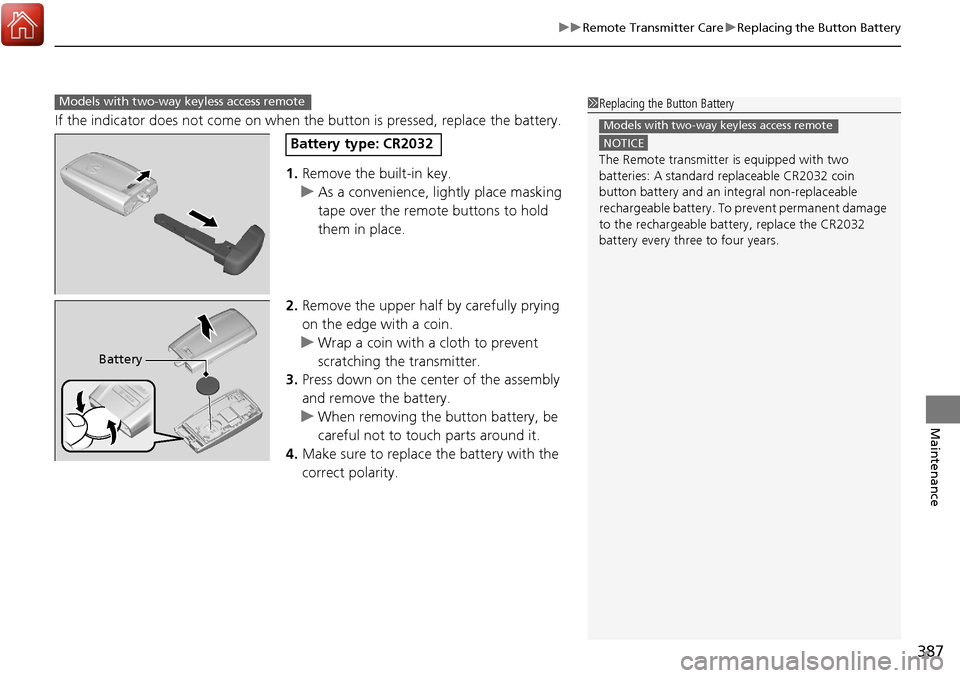
If the indicator does not come on when the button is pressed, replace the battery.
1. Remove the built-in key.
u As a convenience, lightly place masking
tape over the remote buttons to hold
them in place.
2. Remove the upper half by carefully prying
on the edge with a coin.
u Wrap a coin with a cloth to prevent
scratching the transmitter.
3. Press down on the center of the assembly
and remove the battery.
u When removing the button battery, be
careful not to touch parts around it.
4. Make sure to replace the battery with the
correct polarity.
Models with two-way keyless access remote1Replacing the Button Battery
NOTICE
The Remote transmitter is equipped with two
batteries: A standard replaceable CR2032 coin
button battery and an in tegral non-replaceable
rechargeable battery. To prevent permanent damage
to the rechargeable battery, replace the CR2032
battery every three to four years.
Models with two-way keyless access remote
Battery type: CR2032
Battery
Page 389 of 453
388
Maintenance
Climate Control System Maintenance
Dust and Pollen Filter
The climate control system is equipped wi th a dust and pollen filter that collects
pollen, dust, and other debris in the air. The Maintenance MinderTM messages will let
you know when to replace the filter.
We recommend that you replace the dust and pollen filter sooner when using your
vehicle in areas with high concentrations of dust.
1Dust and Pollen Filter
If the airflow from the climate control system
deteriorates noticeably, and the windows fog up
easily, the filter may need to be replaced. Please
contact a dealer for replacement.
Page 390 of 453
389Continued
Maintenance
Cleaning
Interior Care
Use a damp cloth with a mixture of mild detergent and warm water to remove dirt.
Use a clean cloth to remove detergent residue.
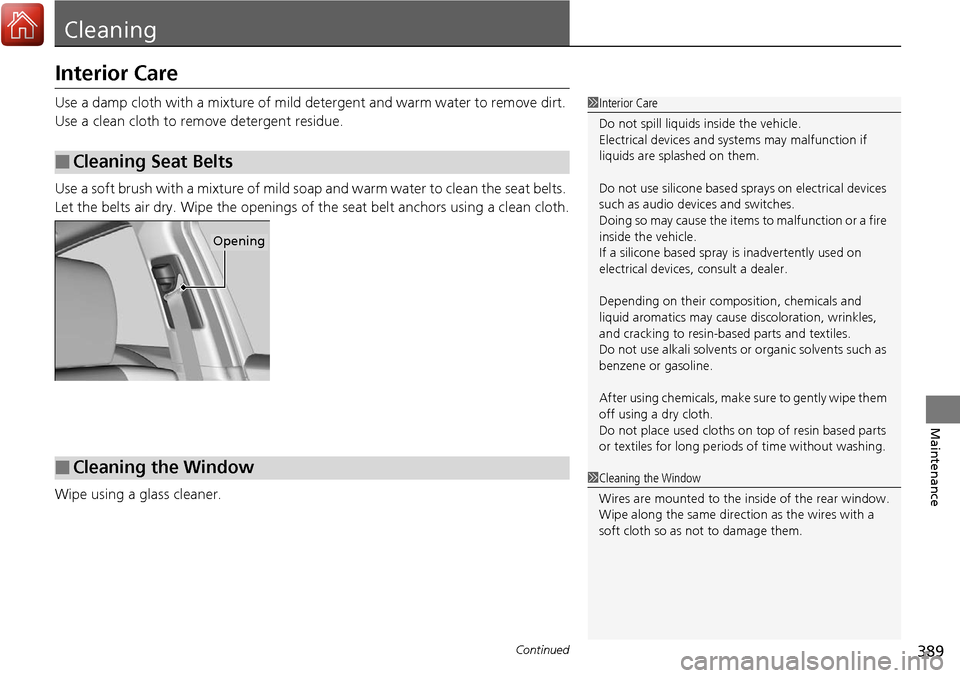
Use a soft brush with a mixture of mild soap and warm water to clean the seat belts.
Let the belts air dry. Wipe the openings of the seat belt anchors using a clean cloth.
Wipe using a glass cleaner.
■Cleaning Seat Belts
1 Interior Care
Do not spill liquids inside the vehicle.
Electrical devices and systems may malfunction if
liquids are splashed on them.
Do not use silicone based sp rays on electrical devices
such as audio devices and switches.
Doing so may cause the items to malfunction or a fire
inside the vehicle.
If a silicone based spray is inadvertently used on
electrical devices, consult a dealer.
Depending on their compos ition, chemicals and
liquid aromatics may cause discoloration, wrinkles,
and cracking to resin-ba sed parts and textiles.
Do not use alkali solvents or organic solvents such as
benzene or gasoline.
After using chemical s, make sure to gently wipe them
off using a dry cloth.
Do not place used cloths on top of resin based parts
or textiles for long periods of time without washing.
Opening
■Cleaning the Window1Cleaning the Window
Wires are mounted to the in side of the rear window.
Wipe along the same direct ion as the wires with a
soft cloth so as not to damage them.
Page 391 of 453
uuCleaning uInterior Care
390
Maintenance
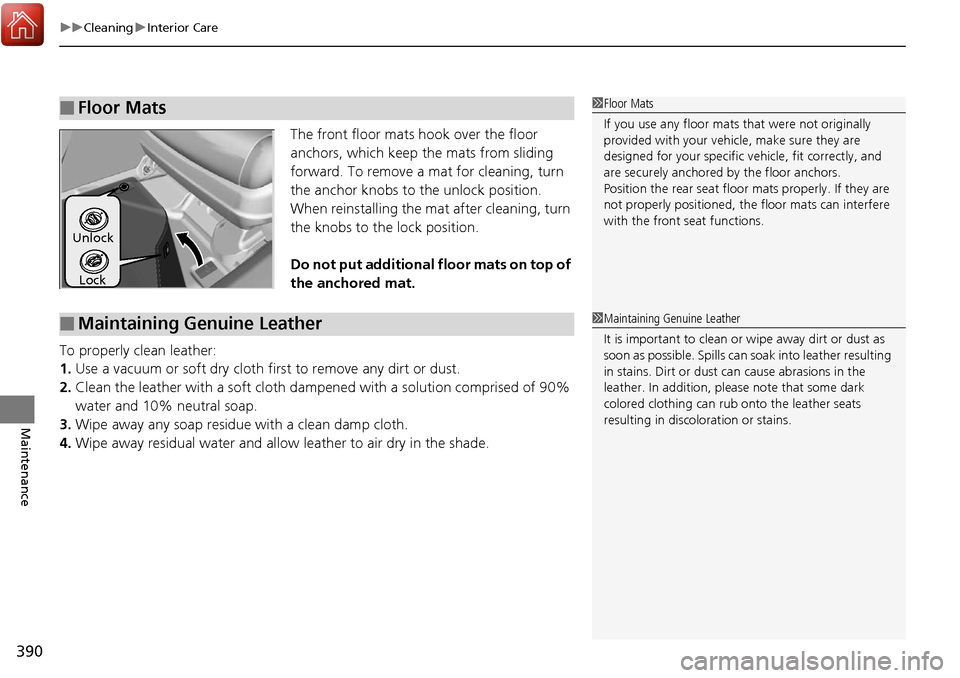
The front floor mats hook over the floor
anchors, which keep the mats from sliding
forward. To remove a mat for cleaning, turn
the anchor knobs to the unlock position.
When reinstalling the mat after cleaning, turn
the knobs to the lock position.
Do not put additional floor mats on top of
the anchored mat.
To properly clean leather:
1. Use a vacuum or soft dry cloth first to remove any dirt or dust.
2. Clean the leather with a soft cloth dampen ed with a solution comprised of 90%
water and 10% neutral soap.
3. Wipe away any soap residu e with a clean damp cloth.
4. Wipe away residual water and allow leather to air dry in the shade.
■Floor Mats1Floor Mats
If you use any floor mats that were not originally
provided with your vehicle, make sure they are
designed for your specific ve hicle, fit correctly, and
are securely anchored by the floor anchors.
Position the rear seat floor mats properly. If they are
not properly positioned, the floor mats can interfere
with the front seat functions.
Lock
Unlock
■Maintaining Genuine Leather1
Maintaining Genuine Leather
It is important to clean or wipe away dirt or dust as
soon as possible. Spills can soak into leather resulting
in stains. Dirt or dust ca n cause abrasions in the
leather. In addition, pl ease note that some dark
colored clothing can rub onto the leather seats
resulting in discol oration or stains.
Page 392 of 453
391
uuCleaning uExterior Care
Continued
Maintenance
Exterior Care
Dust off the vehicle body after you drive.
Regularly inspect your vehicle for scra tches on painted surfaces. A scratch on a
painted surface can result in body rust. If you find a scratch, promptly repair it.
Wash the vehicle regularly. Wash more frequently when driving in the following
conditions:
• If driving on roads with road salt.
• If driving in coastal areas.
• If tar, soot, bird droppings, insects, or tree sap are stuck to painted surfaces.
Fold in the door mirrors.
Make sure to follow the instructions indicated on the automated car wash.
• Keep sufficient distance between the cleaning nozzle and the vehicle body.
• Take particular care around the windows. Standing too close may cause water to
enter the vehicle interior.
• Do not spray high pressure water directly into the engine compartment. Instead,
use low pressure water and a mild detergent.
■Washing the Vehicle
■Using an Automated Car Wash
■Using High Pressure Cleaners
1Washing the Vehicle
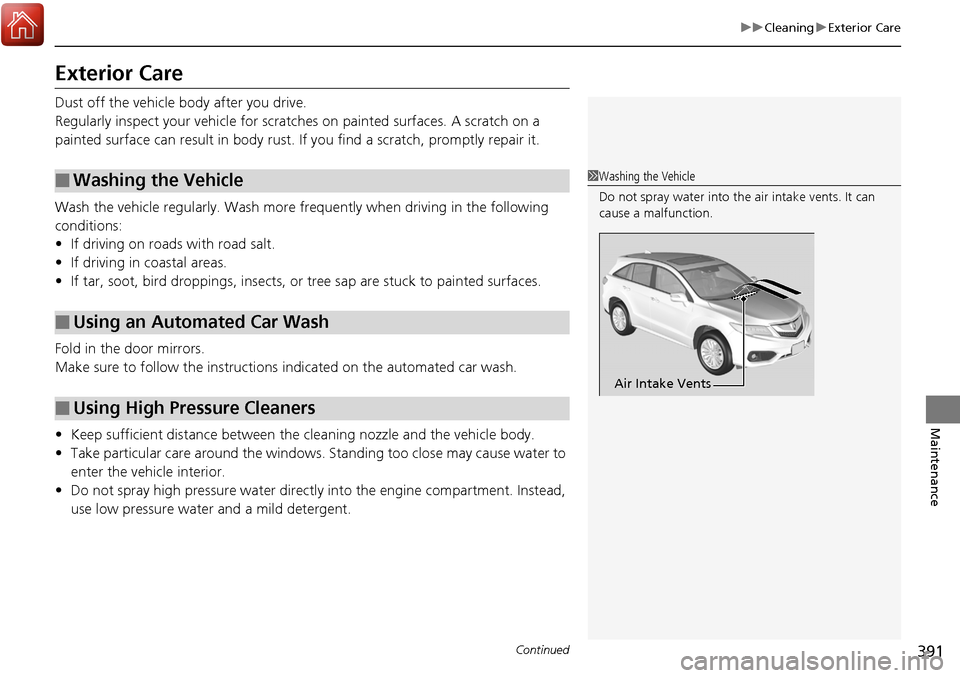
Do not spray water into the air intake vents. It can
cause a malfunction.
Air Intake Vents
Page 393 of 453
uuCleaning uExterior Care
392
Maintenance
A good coat of automotive body wax helps protect your vehicle’s paint from the
elements. Wax will wear off over time an d expose your vehicle’s paint to the
elements, so reapply as necessary.
If you get gasoline, oil, engine coolant, or battery fluid on resin coated parts, they
may be stained or the coating may peel. Prom ptly wipe it away using a soft cloth and
clean water.
Wipe using a glass cleaner.
Aluminum is susceptible to deteriorat ion caused by salt and other road
contaminants. Use a sponge and mild detergent to wipe away promptly.
Be careful not to use harsh chemicals (inc luding some commercial wheel cleaners) or
a stiff brush. They can damage the clear coat of the aluminum alloy wheels that
helps keep the aluminum from corroding and tarnishing.
■Applying Wax
■Maintaining the Bumpers and Other Resin Coated Parts
■Cleaning the Window
■Maintaining Aluminum Wheels
1 Applying Wax
NOTICE
Chemical solvents and strong cleaners can damage
the paint, metal, and plasti c on your vehicle. Wipe up
spills immediately.
1 Maintaining the Bumpers an d Other Resin Coated Parts
Ask a dealer about the correct coating material when
you want to repair the pa inted surface of the parts
made of resin.
Page 394 of 453
393
uuCleaning uExterior Care
Maintenance
The inside lenses of exterior lights (headlights, brake light s, etc.) may fog temporarily
if you have driven in the rain, or after the vehicle has been run through a car wash.
Dew condensation also may build up inside the lenses when there is a significant
enough difference between the ambient and inside lens temperatures (similar to
vehicle windows fogging up in rainy conditions).
These conditions are natura l processes, not structural design problems in the
exterior lights.
Lens design characteristics ma y result in moisture developing on the light lens frame
surfaces. This also is not a malfunction.
However, if you see large amounts wate r accumulation, or large water drops
building up inside the lenses, have your vehicle inspected by a dealer.
■Fogged Exterior Light Lenses
Page 395 of 453
394
Maintenance
Accessories and Modifications
Accessories
When installing accessories, check the following:
• Do not install accessories on the windsh ield. They can obstruct your view and
delay your reaction to driving conditions.
• Do not install any accessorie s over areas marked SRS Airbag, on the sides or backs
of the front seats, on front or side pillars, or near the side windows.
Accessories installed in these areas may interfere with proper operation of the
vehicle’s airbags or may be propelled into you or another occupant if the airbags
deploy.
• Be sure electronic accessories do not over load electrical circuits or interfere with
proper operation of your vehicle.
2 Fuses P. 426
•Before installing any electronic accessory, have the inst aller contact a dealer for
assistance. If possible, have a d ealer inspect the final installation.
Modifications
Do not modify your vehicle in a manner that may affect its handling, stability, or
reliability, or install non-genuine Acura parts or accessories that may have a similar
effect.
Even minor modifications to vehicle systems can affect overall vehicle performance.
Always make sure all equipment is prop erly installed and maintained, and do not
make any modification to your vehicle or its systems that might cause your vehicle
to no longer meet federal, state, prov ince, territory, and local regulations.
Do not modify or attempt to repair any of the electrical components.
1Accessories and Modifications
Acura Genuine accessori es are recommended to
ensure proper operati on on your vehicle.
3WARNING
Improper accessories or modifications can
affect your vehicle’s handling, stability, and
performance, and cause a crash in which
you can be seriously hurt or killed.
Follow all instruction s in this owner’s
manual regarding accessories and
modifications.
Page 444 of 453
Index
443
Index
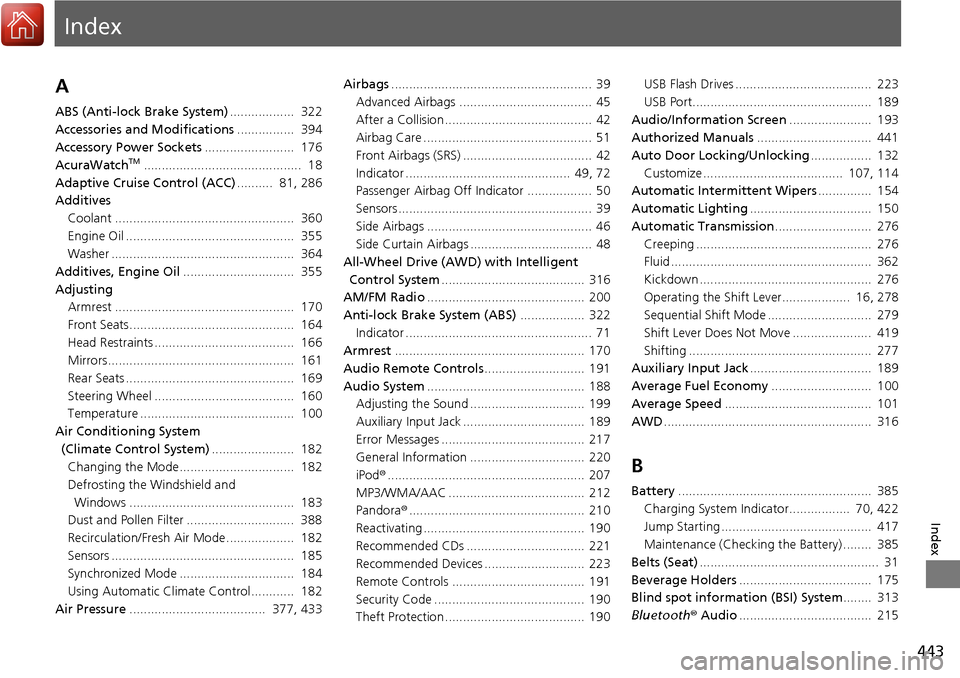
Index
A
ABS (Anti-lock Brake System).................. 322
Accessories and Modifications ................ 394
Accessory Power Sockets ......................... 176
AcuraWatch
TM............................................ 18
Adaptive Cruise Control (ACC) .......... 81, 286
Additives Coolant .................................................. 360
Engine Oil ............................................... 355
Washer ................................................... 364
Additives, Engine Oil ............................... 355
Adjusting Armrest .................................................. 170
Front Seats.............................................. 164
Head Restraints ....................................... 166
Mirrors.................................................... 161
Rear Seats ............................................... 169
Steering Wheel ....................................... 160
Temperature ........................................... 100
Air Conditioning System (Climate Control System) ....................... 182
Changing the Mode................................ 182
Defrosting the Windshield and Windows .............................................. 183
Dust and Pollen Filter .............................. 388
Recirculation/Fresh Air Mode................... 182
Sensors ................................................... 185
Synchronized Mode ................................ 184
Using Automatic Climate Control............ 182
Air Pressure ...................................... 377, 433 Airbags
........................................................ 39
Advanced Airbags ..................................... 45
After a Collision ......................................... 42
Airbag Care ............................................... 51
Front Airbags (SRS) .................................... 42
Indicator .............................................. 49, 72
Passenger Airbag Off Indicator .................. 50
Sensors ...................................................... 39
Side Airbags .............................................. 46
Side Curtain Airbags .................................. 48
All-Wheel Drive (AWD) with Intelligent
Control System ........................................ 316
AM/FM Radio ............................................ 200
Anti-lock Brake System (ABS) .................. 322
Indicator .................................................... 71
Armrest ..................................................... 170
Audio Remote Controls ............................ 191
Audio System ............................................ 188
Adjusting the Sound ................................ 199
Auxiliary Input Jack .................................. 189
Error Messages ........................................ 217
General Information ................................ 220
iPod ®....................................................... 207
MP3/WMA/AAC ...................................... 212
Pandora ®................................................. 210
Reactivating ............................................. 190
Recommended CDs ................................. 221
Recommended Devices ............................ 223
Remote Controls ..................................... 191
Security Code .......................................... 190
Theft Protection ....................................... 190 USB Flash Drives ...................................... 223
USB Port.................................................. 189
Audio/Information Screen ....................... 193
Authorized Manuals ................................ 441
Auto Door Locking/Unlocking ................. 132
Customize ....................................... 107, 114
Automatic Intermittent Wipers ............... 154
Automatic Lighting .................................. 150
Automatic Transmission ........................... 276
Creeping ................................................. 276
Fluid ........................................................ 362
Kickdown ................................................ 276
Operating the Shift Lever................... 16, 278
Sequential Shift Mode ............................. 279
Shift Lever Does Not Move ...................... 419
Shifting ................................................... 277
Auxiliary Input Jack .................................. 189
Average Fuel Economy ............................ 100
Average Speed ......................................... 101
AWD .......................................................... 316
B
Battery ...................................................... 385
Charging System Indicator................. 70, 422
Jump Starting .......................................... 417
Maintenance (Checki ng the Battery) ........ 385
Belts (Seat) .................................................. 31
Beverage Holders ..................................... 175
Blind spot information (BSI) System ........ 313
Bluetooth ® Audio ..................................... 215
Page 448 of 453
447
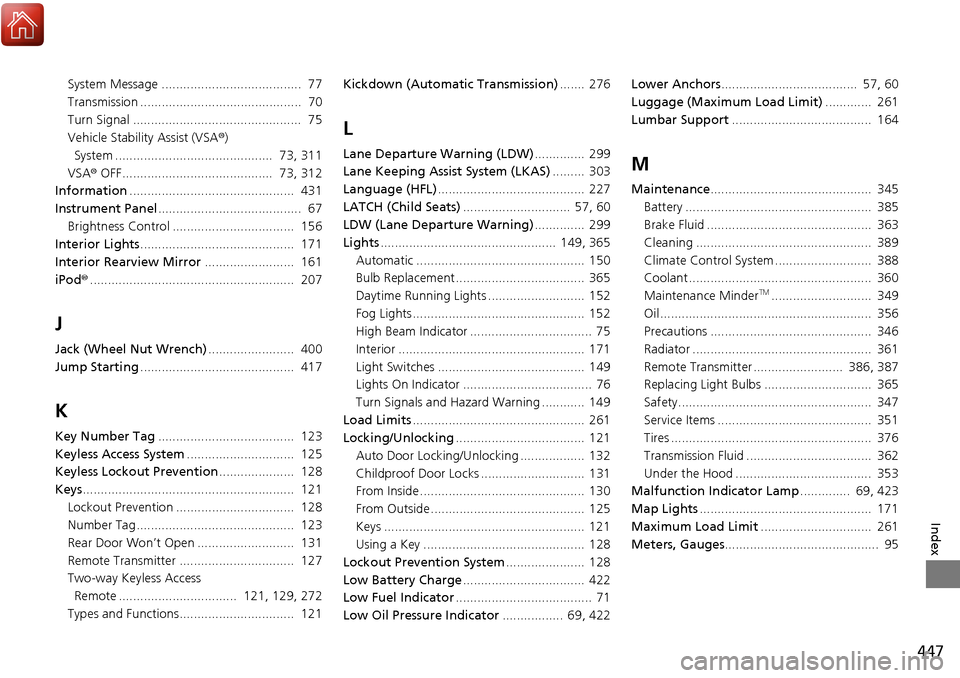
Index
System Message ....................................... 77
Transmission ............................................. 70
Turn Signal ............................................... 75
Vehicle Stability Assist (VSA®)
System ............................................ 73, 311
VSA ® OFF.......................................... 73, 312
Information .............................................. 431
Instrument Panel ........................................ 67
Brightness Control .................................. 156
Interior Lights ........................................... 171
Interior Rearview Mirror ......................... 161
iPod ®......................................................... 207
J
Jack (Wheel Nut Wrench) ........................ 400
Jump Starting ........................................... 417
K
Key Number Tag ...................................... 123
Keyless Access System .............................. 125
Keyless Lockout Prevention ..................... 128
Keys ........................................................... 121
Lockout Prevention ................................. 128
Number Tag............................................ 123
Rear Door Won’t Open ........................... 131
Remote Transmitter ................................ 127
Two-way Keyless Access
Remote ................................. 121, 129, 272
Types and Functions................................ 121 Kickdown (Automatic Transmission)
....... 276
L
Lane Departure Warning (LDW).............. 299
Lane Keeping Assist System (LKAS) ......... 303
Language (HFL) ......................................... 227
LATCH (Child Seats) .............................. 57, 60
LDW (Lane Departure Warning) .............. 299
Lights ................................................. 149, 365
Automatic ............................................... 150
Bulb Replacement .................................... 365
Daytime Running Lights ........................... 152
Fog Lights ................................................ 152
High Beam Indicator .................................. 75
Interior .................................................... 171
Light Switches ......................................... 149
Lights On Indicator .................................... 76
Turn Signals and Hazard Warning ............ 149
Load Limits ................................................ 261
Locking/Unlocking .................................... 121
Auto Door Locking/Unlocking .................. 132
Childproof Door Locks ............................. 131
From Inside .............................................. 130
From Outside ........................................... 125
Keys ........................................................ 121
Using a Key ............................................. 128
Lockout Prevention System ...................... 128
Low Battery Charge .................................. 422
Low Fuel Indicator ...................................... 71
Low Oil Pressure Indicator ................. 69, 422Lower Anchors
...................................... 57, 60
Luggage (Maximum Load Limit) ............. 261
Lumbar Support ....................................... 164M
Maintenance............................................. 345
Battery .................................................... 385
Brake Fluid .............................................. 363
Cleaning ................................................. 389
Climate Control System ........................... 388
Coolant ................................................... 360
Maintenance Minder
TM............................ 349
Oil ........................................................... 356
Precautions ............................................. 346
Radiator .................................................. 361
Remote Transmitter ......................... 386, 387
Replacing Light Bulbs .............................. 365
Safety...................................................... 347
Service Items ........................................... 351
Tires ........................................................ 376
Transmission Fluid ................................... 362
Under the Hood ...................................... 353
Malfunction Indicator Lamp .............. 69, 423
Map Lights ................................................ 171
Maximum Load Limit ............................... 261
Meters, Gauges ........................................... 95