Instrument panel Acura RDX 2019 Owner's Guide
[x] Cancel search | Manufacturer: ACURA, Model Year: 2019, Model line: RDX, Model: Acura RDX 2019Pages: 649, PDF Size: 33 MB
Page 88 of 649
87
uuIndicators u
Continued
Instrument Panel
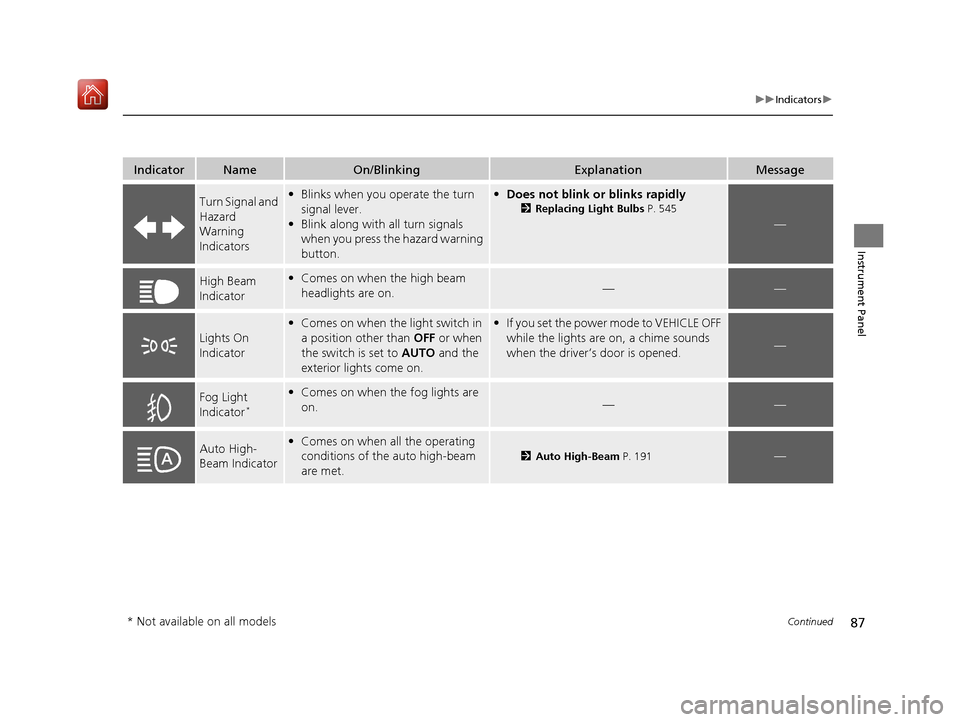
IndicatorNameOn/BlinkingExplanationMessage
Turn Signal and
Hazard
Warning
Indicators•Blinks when you operate the turn
signal lever.
• Blink along with all turn signals
when you press the hazard warning
button.•Does not blink or blinks rapidly
2 Replacing Light Bulbs P. 545
—
High Beam
Indicator•Comes on when the high beam
headlights are on.——
Lights On
Indicator
•Comes on when the light switch in
a position other than OFF or when
the switch is set to AUTO and the
exterior lights come on.• If you set the power mode to VEHICLE OFF
while the lights are on, a chime sounds
when the driver’s door is opened.
—
Fog Light
Indicator*
•Comes on when the fog lights are
on.——
Auto High-
Beam Indicator•Comes on when all the operating
conditions of the auto high-beam
are met.
2 Auto High-Beam P. 191—
* Not available on all models
19 ACURA RDX-31TJB6000.book 87 ページ 2018年4月26日 木曜日 午後4時51分
Page 89 of 649
88
uuIndicators u
Instrument Panel
*1:Canadian models only: Apply and hold the brake pedal before selecting the ON mode.
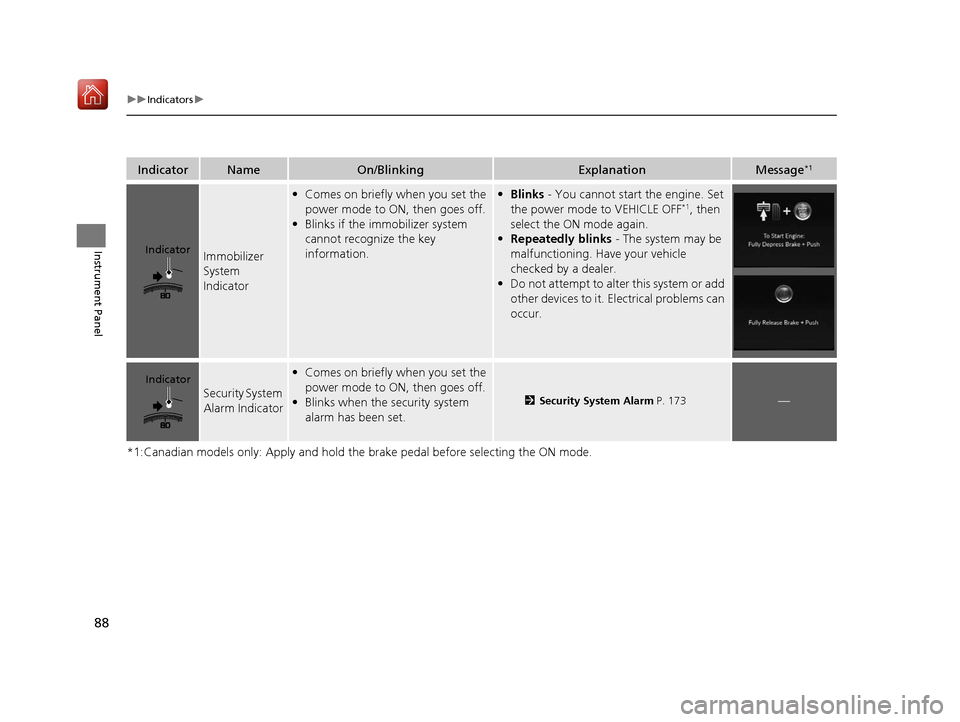
IndicatorNameOn/BlinkingExplanationMessage*1
Immobilizer
System
Indicator
•Comes on briefly when you set the
power mode to ON, then goes off.
• Blinks if the immobilizer system
cannot recognize the key
information.• Blinks - You cannot start the engine. Set
the power mode to VEHICLE OFF*1, then
select the ON mode again.
• Repeatedly blinks - The system may be
malfunctioning. Have your vehicle
checked by a dealer.
• Do not attempt to alter this system or add
other devices to it. Electrical problems can
occur.
Security System
Alarm Indicator
•Comes on briefly when you set the
power mode to ON, then goes off.
• Blinks when the security system
alarm has been set.
2 Security System Alarm P. 173—
Indicator
Indicator
19 ACURA RDX-31TJB6000.book 88 ページ 2018年4月26日 木曜日 午後4時51分
Page 90 of 649

89
uuIndicators u
Continued
Instrument Panel
IndicatorNameOn/BlinkingExplanationMessage
System
Message
Indicator
•Comes on along with a beep when
a problem is detected. A system
message on the multi-information
display appears at the same time.•While the indicator is on, roll the right
selector wheel to see the message again.
2 Switching the Display P. 129
•Refer to the Indicators information in this
chapter when a system message appears
on the multi-informat ion display. Take the
appropriate action for the message.
• The multi-information display does not
return to the normal screen unless the
warning is canceled, or the right selector
wheel is pressed.
—
19 ACURA RDX-31TJB6000.book 89 ページ 2018年4月26日 木曜日 午後4時51分
Page 91 of 649
90
uuIndicators u
Instrument Panel
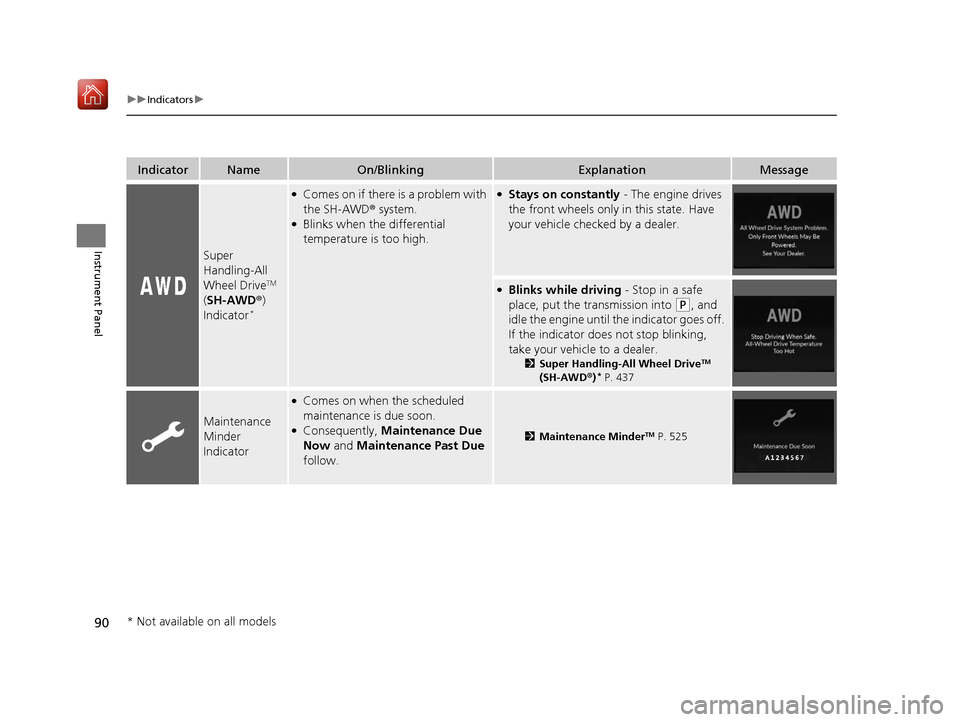
IndicatorNameOn/BlinkingExplanationMessage
Super
Handling-All
Wheel Drive
TM
( SH-AWD ®)
Indicator
*
●Comes on if there is a problem with
the SH-AWD ® system.
●Blinks when the differential
temperature is too high.
●Stays on constantly - The engine drives
the front wheels only in this state. Have
your vehicle checked by a dealer.
●Blinks while driving - Stop in a safe
place, put the transmission into
(P, and
idle the engine until th e indicator goes off.
If the indicator does not stop blinking,
take your vehicle to a dealer.
2 Super Handling-All Wheel DriveTM
(SH-AWD ®)* P. 437
Maintenance
Minder
Indicator
●Comes on when the scheduled
maintenance is due soon.
●Consequently, Maintenance Due
Now and Maintenance Past Due
follow.2 Maintenance MinderTM P. 525
* Not available on all models
19 ACURA RDX-31TJB6000.book 90 ページ 2018年4月26日 木曜日 午後4時51分
Page 92 of 649
91
uuIndicators u
Continued
Instrument Panel
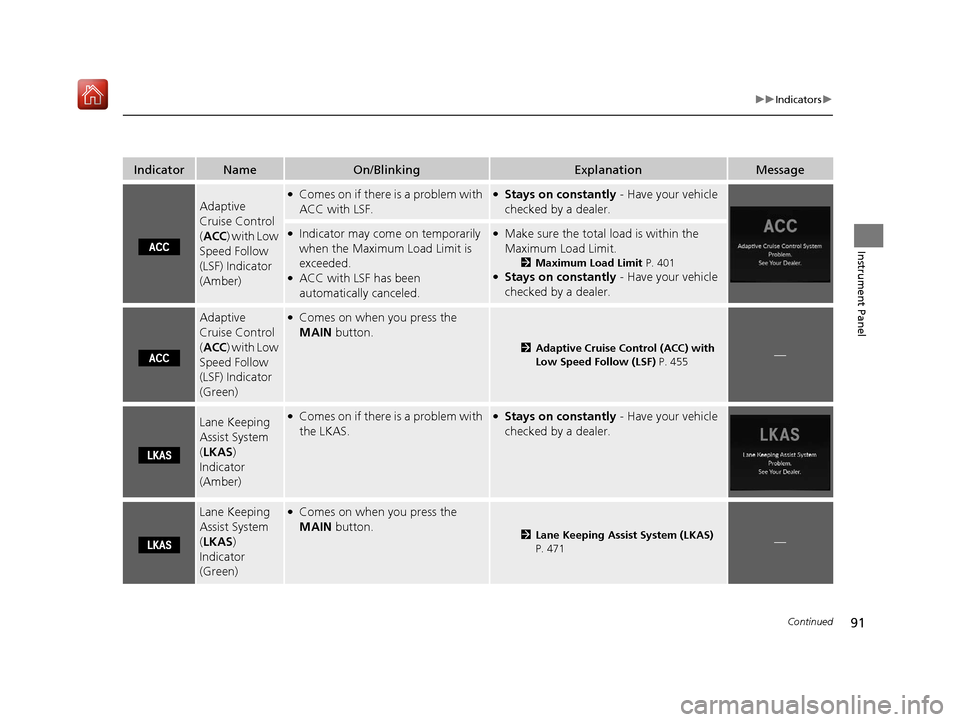
IndicatorNameOn/BlinkingExplanationMessage
Adaptive
Cruise Control
(ACC ) with Low
Speed Follow
(LSF) Indicator
(Amber)
●Comes on if there is a problem with
ACC with LSF.●Stays on constantly - Have your vehicle
checked by a dealer.
●Indicator may come on temporarily
when the Maximum Load Limit is
exceeded.
●ACC with LSF has been
automatically canceled.
●Make sure the total load is within the
Maximum Load Limit.
2 Maximum Load Limit P. 401●Stays on constantly - Have your vehicle
checked by a dealer.
Adaptive
Cruise Control
( ACC ) with Low
Speed Follow
(LSF) Indicator
(Green)●Comes on when you press the
MAIN button.
2Adaptive Cruise Control (ACC) with
Low Speed Follow (LSF) P. 455—
Lane Keeping
Assist System
(LKAS )
Indicator
(Amber)●Comes on if there is a problem with
the LKAS.●Stays on constantly - Have your vehicle
checked by a dealer.
Lane Keeping
Assist System
( LKAS )
Indicator
(Green)●Comes on when you press the
MAIN button.
2Lane Keeping Assist System (LKAS)
P. 471—
19 ACURA RDX-31TJB6000.book 91 ページ 2018年4月26日 木曜日 午後4時51分
Page 93 of 649
92
uuIndicators u
Instrument Panel
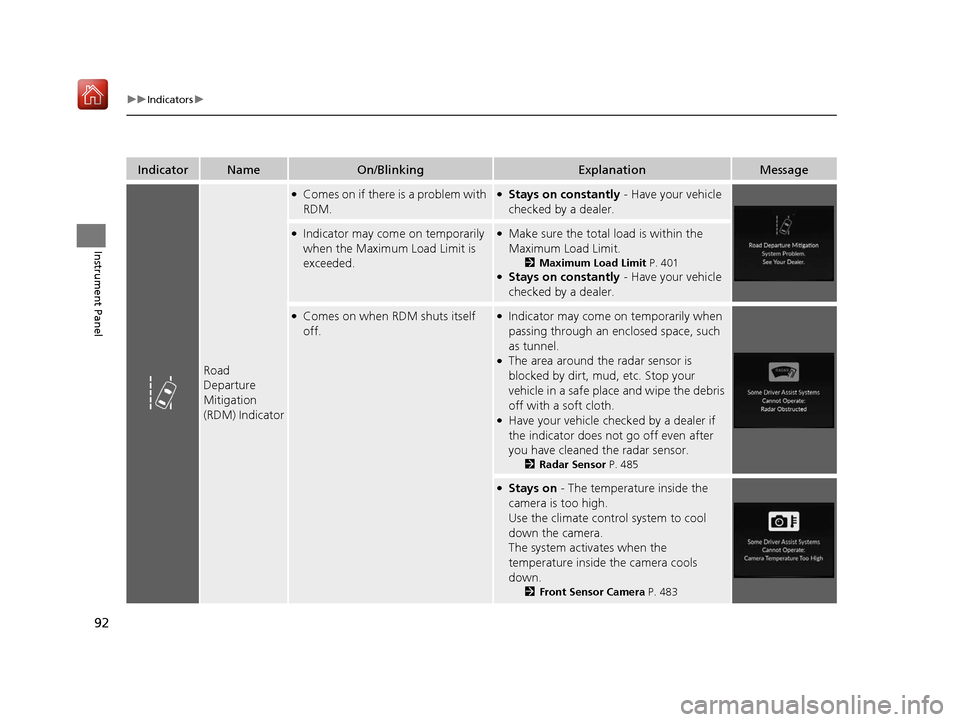
IndicatorNameOn/BlinkingExplanationMessage
Road
Departure
Mitigation
(RDM) Indicator
●Comes on if there is a problem with
RDM.●Stays on constantly - Have your vehicle
checked by a dealer.
●Indicator may come on temporarily
when the Maximum Load Limit is
exceeded.●Make sure the total load is within the
Maximum Load Limit.
2 Maximum Load Limit P. 401●Stays on constantly - Have your vehicle
checked by a dealer.
●Comes on when RDM shuts itself
off.●Indicator may come on temporarily when
passing through an enclosed space, such
as tunnel.
●The area around the radar sensor is
blocked by dirt, mud, etc. Stop your
vehicle in a safe place and wipe the debris
off with a soft cloth.
●Have your vehicle checked by a dealer if
the indicator does not go off even after
you have cleaned the radar sensor.
2 Radar Sensor P. 485
●Stays on - The temperature inside the
camera is too high.
Use the climate control system to cool
down the camera.
The system activates when the
temperature inside the camera cools
down.
2 Front Sensor Camera P. 483
19 ACURA RDX-31TJB6000.book 92 ページ 2018年4月26日 木曜日 午後4時51分
Page 94 of 649
93
uuIndicators u
Continued
Instrument Panel
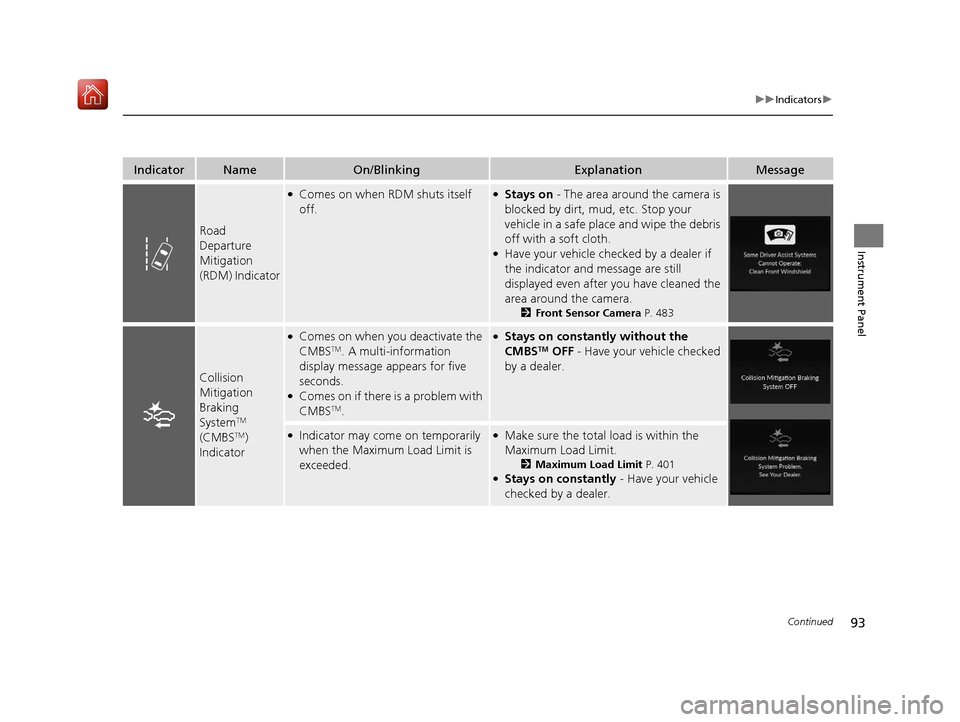
IndicatorNameOn/BlinkingExplanationMessage
Road
Departure
Mitigation
(RDM) Indicator
●Comes on when RDM shuts itself
off.●Stays on - The area around the camera is
blocked by dirt, mud, etc. Stop your
vehicle in a safe place and wipe the debris
off with a soft cloth.
●Have your vehicle checked by a dealer if
the indicator and message are still
displayed even after you have cleaned the
area around the camera.
2 Front Sensor Camera P. 483
Collision
Mitigation
Braking
System
TM
(CMBSTM)
Indicator
●Comes on when you deactivate the
CMBSTM. A multi-information
display message appears for five
seconds.
●Comes on if there is a problem with
CMBSTM.
●Stays on constantly without the
CMBSTM OFF - Have your vehicle checked
by a dealer.
●Indicator may come on temporarily
when the Maximum Load Limit is
exceeded.●Make sure the total load is within the
Maximum Load Limit.
2 Maximum Load Limit P. 401●Stays on constantly - Have your vehicle
checked by a dealer.
19 ACURA RDX-31TJB6000.book 93 ページ 2018年4月26日 木曜日 午後4時51分
Page 95 of 649
94
uuIndicators u
Instrument Panel
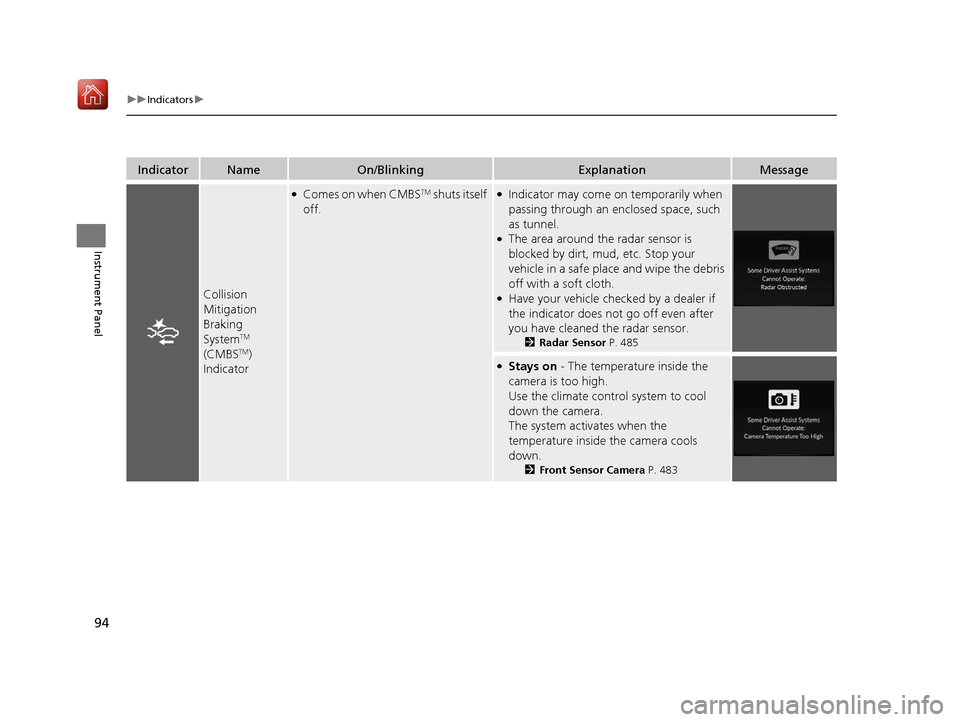
IndicatorNameOn/BlinkingExplanationMessage
Collision
Mitigation
Braking
System
TM
(CMBSTM)
Indicator
●Comes on when CMBSTM shuts itself
off.●Indicator may come on temporarily when
passing through an enclosed space, such
as tunnel.
●The area around the radar sensor is
blocked by dirt, mud, etc. Stop your
vehicle in a safe place and wipe the debris
off with a soft cloth.
●Have your vehicle checked by a dealer if
the indicator does not go off even after
you have cleaned the radar sensor.
2 Radar Sensor P. 485
●Stays on - The temperature inside the
camera is too high.
Use the climate control system to cool
down the camera.
The system activates when the
temperature inside the camera cools
down.
2 Front Sensor Camera P. 483
19 ACURA RDX-31TJB6000.book 94 ページ 2018年4月26日 木曜日 午後4時51分
Page 96 of 649
95
uuIndicators u
Continued
Instrument Panel
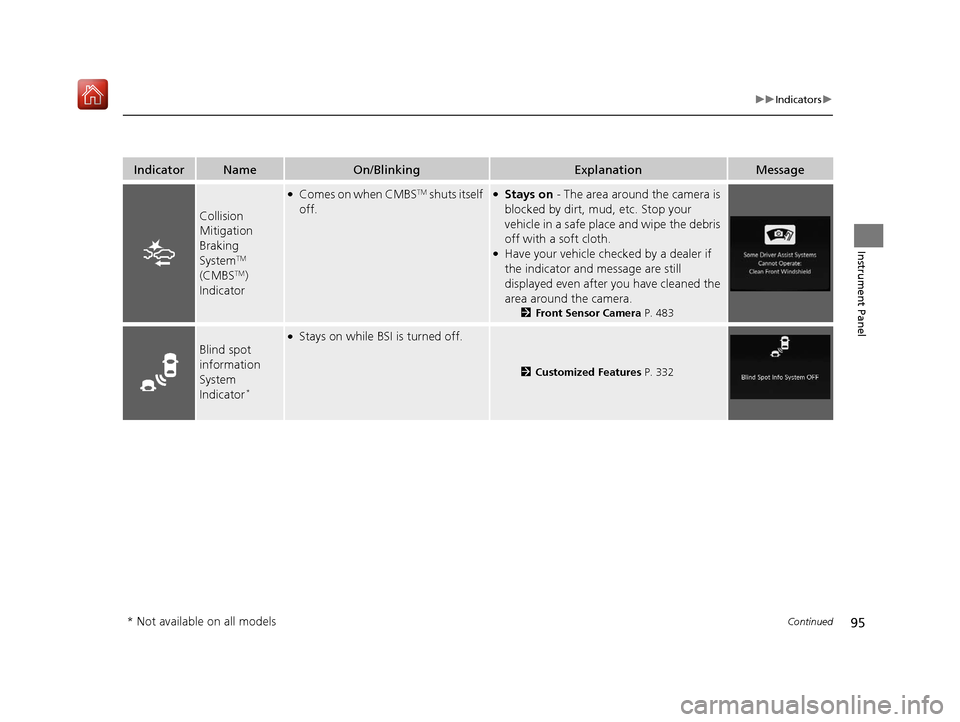
IndicatorNameOn/BlinkingExplanationMessage
Collision
Mitigation
Braking
System
TM
(CMBSTM)
Indicator
●Comes on when CMBSTM shuts itself
off.●Stays on - The area around the camera is
blocked by dirt, mud, etc. Stop your
vehicle in a safe place and wipe the debris
off with a soft cloth.
●Have your vehicle checked by a dealer if
the indicator and message are still
displayed even after you have cleaned the
area around the camera.
2 Front Sensor Camera P. 483
Blind spot
information
System
Indicator
*
●Stays on while BSI is turned off.
2Customized Features P. 332
* Not available on all models
19 ACURA RDX-31TJB6000.book 95 ページ 2018年4月26日 木曜日 午後4時51分
Page 97 of 649

96
uuIndicators u
Instrument Panel
IndicatorNameOn/BlinkingExplanationMessage
Blind spot
information
System
Indicator
*
●Comes on when mud, snow, or ice
accumulates in the vicinity of
sensor.●Comes on while driving - Remove the
obstacle in the vi cinity of sensor.
2Blind spot information System*
P. 438
●Comes on if there is a problem with
the system.●Comes on while driving - Have your
vehicle checked by a dealer.
U.S.
Canada
U.S.
Canada
* Not available on all models
19 ACURA RDX-31TJB6000.book 96 ページ 2018年4月26日 木曜日 午後4時51分