phone Acura RDX 2019 Owner's Guide
[x] Cancel search | Manufacturer: ACURA, Model Year: 2019, Model line: RDX, Model: Acura RDX 2019Pages: 649, PDF Size: 33 MB
Page 306 of 649
Continued305
uuAudio System Basic Operation uApple CarPlayTM
Features
After you have connected your iPhone to the system via the USB port in the console
compartment, use the follow ing procedure to set up Apple CarPlay. Use of Apple
CarPlay will result in the transmission of certain user and vehicle information (such
as vehicle location, speed, an d status) to your iPhone to enhance the Apple CarPlay
experience. You will n eed to consent to the sharing of this information on the audio/
information screen.
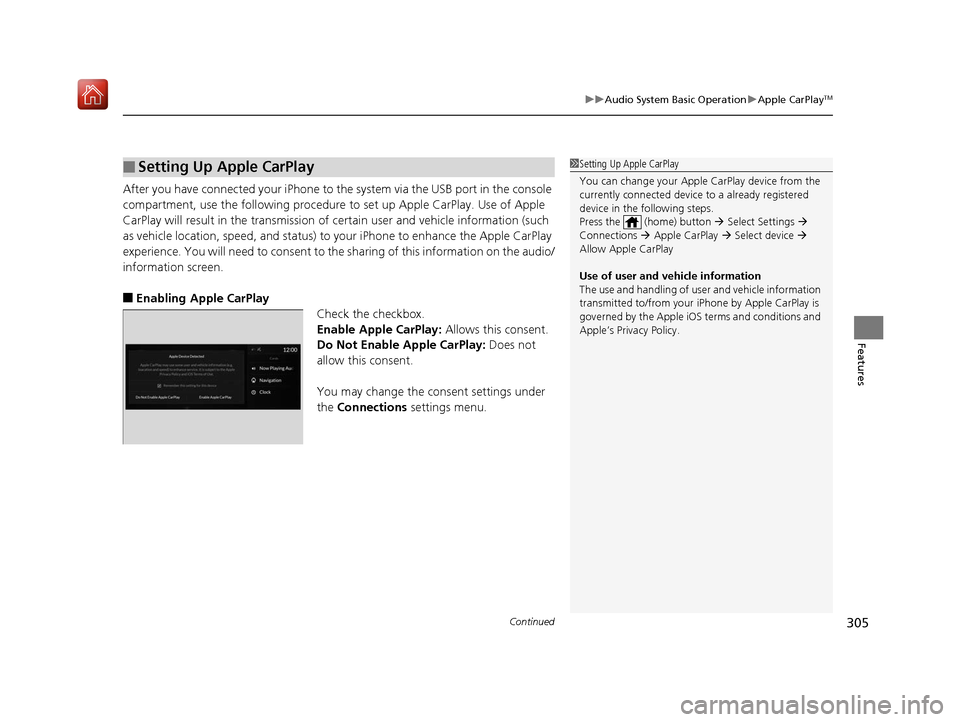
■Enabling Apple CarPlay Check the checkbox.
Enable Apple CarPlay: Allows this consent.
Do Not Enable Apple CarPlay: Does not
allow this consent.
You may change the consent settings under
the Connections settings menu.
■Setting Up Apple CarPlay1Setting Up Apple CarPlay
You can change your Appl e CarPlay device from the
currently connected device to a already registered
device in the following steps.
Press the (home) button Select Settings
Connections Apple CarPlay Select device
Allow Apple CarPlay
Use of user and vehicle information
The use and handling of user and vehicle information
transmitted to/from your iP hone by Apple CarPlay is
governed by the Apple iOS terms and conditions and
Apple’s Privacy Policy.
19 ACURA RDX-31TJB6000.book 305 ページ 2018年4月26日 木曜日 午後4時51分
Page 310 of 649
309
uuAudio Error Messages uApple CarPlay
Features
Apple CarPlay
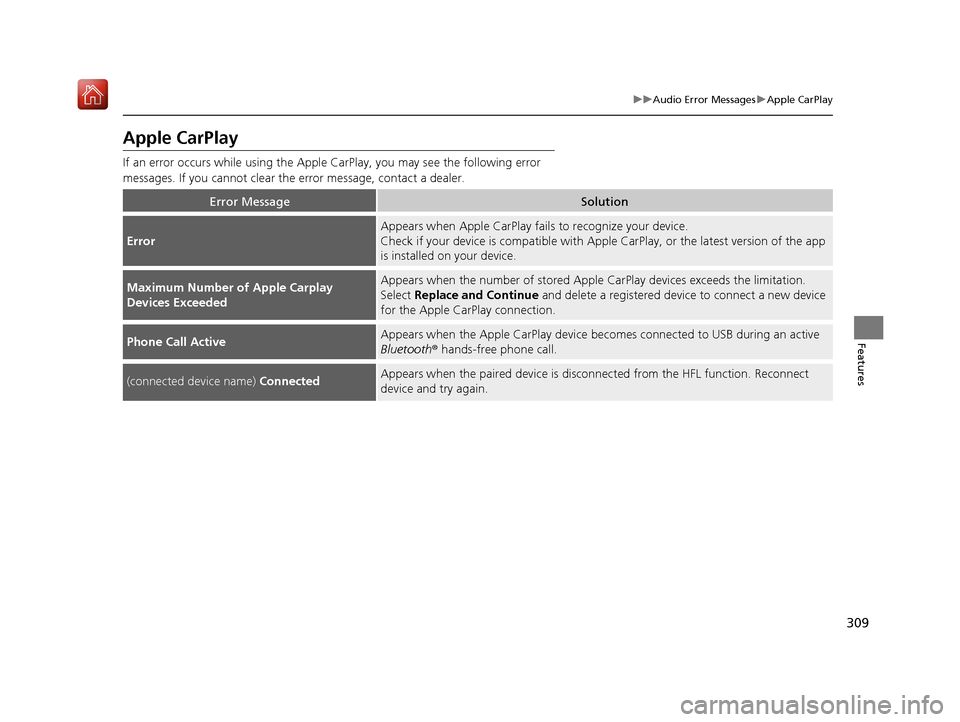
If an error occurs while using the Apple CarPlay, you may see the following error
messages. If you cannot clear th e error message, contact a dealer.
Error MessageSolution
Error
Appears when Apple CarPlay fails to recognize your device.
Check if your device is compatible with Appl e CarPlay, or the latest version of the app
is installed on your device.
Maximum Number of Apple Carplay
Devices ExceededAppears when the number of stored Apple CarPlay devices exceeds the limitation.
Select Replace and Continue and delete a registered device to connect a new device
for the Apple CarPlay connection.
Phone Call ActiveAppears when the Apple CarPlay device beco mes connected to USB during an active
Bluetooth ® hands-free phone call.
(connected device name) ConnectedAppears when the paired device is disc onnected from the HFL function. Reconnect
device and try again.
19 ACURA RDX-31TJB6000.book 309 ページ 2018年4月26日 木曜日 午後4時51分
Page 312 of 649
311
uuGeneral Information on the Audio System uCompatible iPod, iPad, iPhone, and USB Flash Drives
Continued
Features
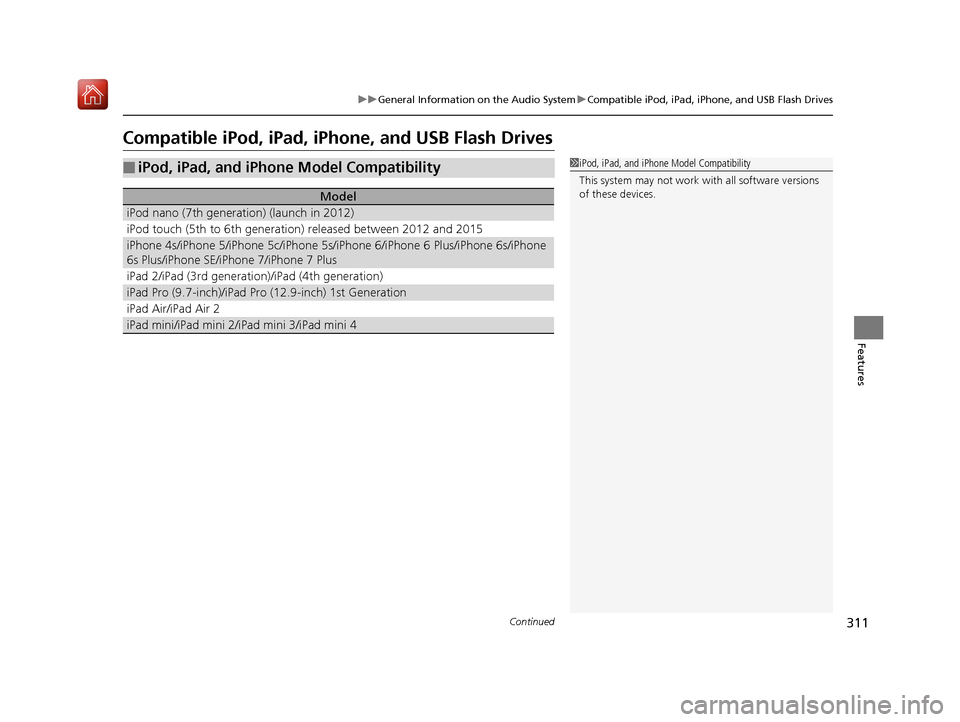
Compatible iPod, iPad, iP hone, and USB Flash Drives
■iPod, iPad, and iPhone Model Compatibility
Model
iPod nano (7th generation) (launch in 2012)
iPod touch (5th to 6th generation) released between 2012 and 2015
iPhone 4s/iPhone 5/iPhone 5c/iPhone 5s/iPhone 6/iPhone 6 Plus/iPhone 6s/iPhone
6s Plus/iPhone SE/iPhone 7/iPhone 7 Plus
iPad 2/iPad (3rd generation)/iPad (4th generation)
iPad Pro (9.7-inch)/iPad Pro (12.9-inch) 1st Generation
iPad Air/iPad Air 2
iPad mini/iPad mini 2/iPad mini 3/iPad mini 4
1iPod, iPad, and iPhone Model Compatibility
This system may not work with all software versions
of these devices.
19 ACURA RDX-31TJB6000.book 311 ページ 2018年4月26日 木曜日 午後4時51分
Page 313 of 649
uuGeneral Information on the Audio System uCompatible iPod, iPad, iPhone, and USB Flash Drives
312
Features
• A USB flash drive of 256 MB or higher is recommended.
• Some digital audio players may not be compatible.
• Some USB flash drives (e.g., a device with security lockout) may not work.
• Some software files may not allow for audio play or text data display.
• Some versions of playable file formats may be unsupported.
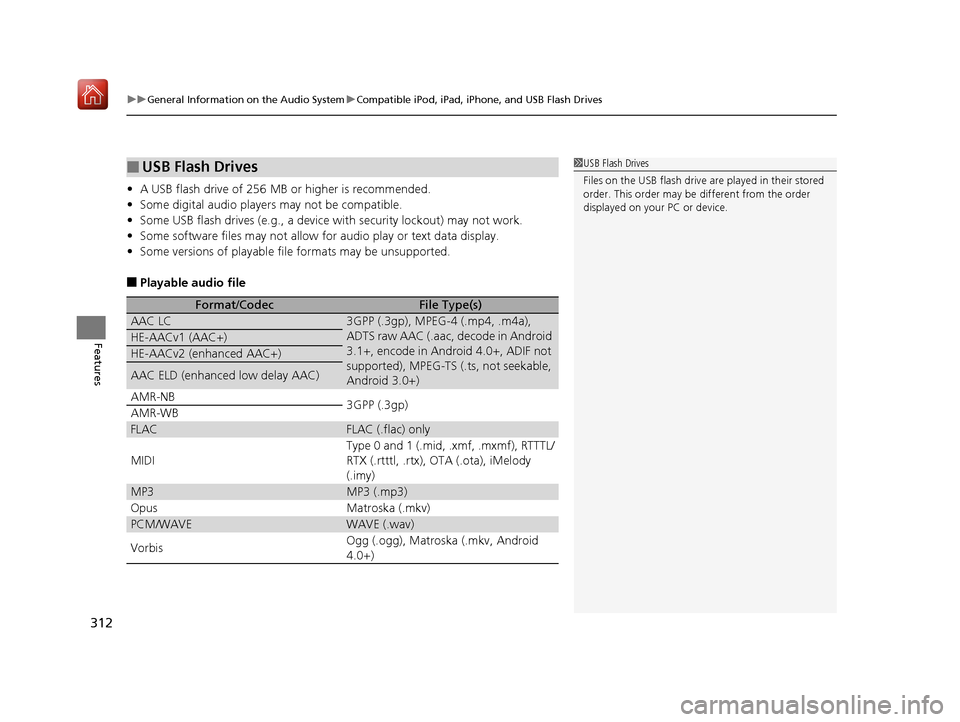
■Playable audio file
■USB Flash Drives
Format/CodecFile Type(s)
AAC LC3GPP (.3gp), MPEG-4 (.mp4, .m4a),
ADTS raw AAC (.aac, decode in Android
3.1+, encode in Android 4.0+, ADIF not
supported), MPEG-TS (.ts, not seekable,
Android 3.0+)
HE-AACv1 (AAC+)
HE-AACv2 (enhanced AAC+)
AAC ELD (enhanced low delay AAC)
AMR-NB
3GPP (.3gp)
AMR-WB
FLACFLAC (.flac) only
MIDI
Type 0 and 1 (.mid, .xmf, .mxmf), RTTTL/
RTX (.rtttl, .rtx), OTA (.ota), iMelody
(.imy)
MP3MP3 (.mp3)
OpusMatroska (.mkv)
PCM/WAVEWAVE (.wav)
VorbisOgg (.ogg), Matroska (.mkv, Android
4.0+)
1 USB Flash Drives
Files on the USB flash drive are played in their stored
order. This order may be different from the order
displayed on your PC or device.
19 ACURA RDX-31TJB6000.book 312 ページ 2018年4月26日 木曜日 午後4時51分
Page 324 of 649
323
uuGeneral Information on the Audio System uHonda App License Agreement
Continued
Features
L. Changes to the SOFT WARE or SERVICES. WE may change, modify, or update the SOFTWARE or SERVICES from time to time. Unless
explicitly stated otherwise, any new featur es or services that augment or enhance the SOFTWARE or SERVICES in the future shall
respectively be considered part of the SOFTWARE or SERVICES and s ubject to this AGREEMENT. WE reserve the right at any time and from
time to time to interrupt, res trict, modify, suspend, discontinue, temporarily or permanently, the SOFTWARE or SERVICES (or any portion
thereof), with or without notice to you, and you agree that HONDA shall not be li able to you or to any third party for any modification,
suspension or discontinuance of the SOFTWARE or SERVICES.
M. ARBITRATION:
PLEASE READ THIS ARBITRATION PROVISION CAREFULLY TO UNDER STAND YOUR RIGHTS. YOU AGREE THAT ANY CLAIM THAT YOU
MAY HAVE IN THE FUTURE MUST BE RESOLVED THROUGH BIND ING ARBITRATION. YOU WAIVE THE RIGHT TO HAVE YOUR DISPUTE
HEARD IN COURT AND WAIVE THE RIGHT TO BRING CLASS CL AIMS. YOU UNDERSTAND THAT DISCOVERY AND APPEAL RIGHTS ARE
MORE LIMITED IN ARBITRATION.
Arbitration is a method of resolving a claim, dispute or controversy without filing a lawsuit. By agreeing to arbitrate, the right to go to
court is waived and instead clai ms, disputes or controversies are submitted to binding arbitration. This provision sets forth t he terms and
conditions of our agreement. YOU and HONDA agree and acknowle dge that this Agreement affects interstate commerce and the
Federal Arbitration Act (“FAA”) applies. By using the Software, Vehicle, or Services, YO U elect to have disputes resolved by arbitration.
YOU, HONDA or any involved third party may pursue a Claim. “Claim” means any dispute between YOU, HONDA, or any involved third
party relating to your use of the Software , the Vehicle, or the Services, this Agreement, or our relationship, including any
representations, omissions or warranties. “Claim” does not include personal injury or wrongful death claims. YOU or HONDA may s eek
remedies in small claims court or provisional judicial remedies without arbitrating. In addition, notwithstanding anything here in to the
contrary, YOU or HONDA may seek equitable re lief in a court of competent jurisdiction.
YOU or HONDA may select arbitration with American Arbitration Asso ciation, JAMS or National Arbitration and Mediation. Contact
these sponsors for their rules. The hearing will be in the federal district where YOU reside. If agreed, it may be by telephone or written
submissions. Filing and arbitrator fees to be paid per the sponsor rules. You may contact the sponsor for a fee waiver. If no fee waivers,
HONDA will pay filing and arbitrator fees up to $5,000, unless law requires more. Each party is responsible for other fees. Arbitrator
may award costs or fees to pr evailing party, if permitted by law. HONDA will not seek fees, unless the claims are frivolous.
19 ACURA RDX-31TJB6000.book 323 ページ 2018年4月26日 木曜日 午後4時51分
Page 334 of 649
333
uuCustomized Features u
Continued
Features
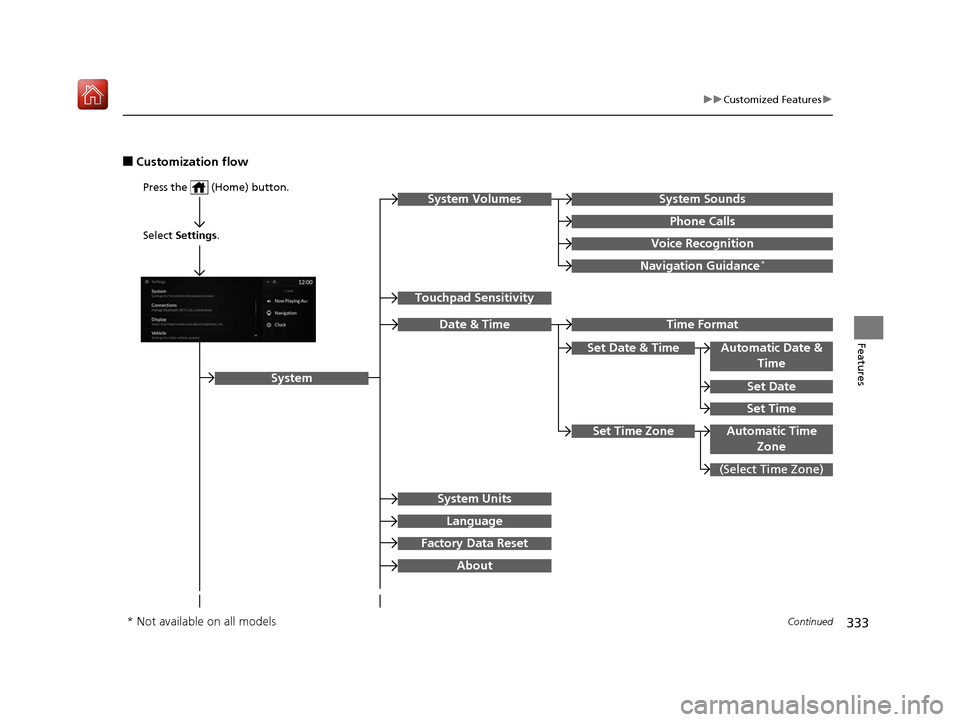
■Customization flow
Press the (Home) button.
Select Settings.
Touchpad Sensitivity
System
System SoundsSystem Volumes
Phone Calls
Voice Recognition
Navigation Guidance*
Date & Time
System Units
Factory Data Reset
Language
Time Format
Set Date & Time
Set Time
Set Date
Automatic Date &
Time
About
(Select Time Zone)
Automatic Time ZoneSet Time Zone
* Not available on all models
19 ACURA RDX-31TJB6000.book 333 ページ 2018年4月26日 木曜日 午後4時51分
Page 340 of 649
339
uuCustomized Features u
Continued
Features
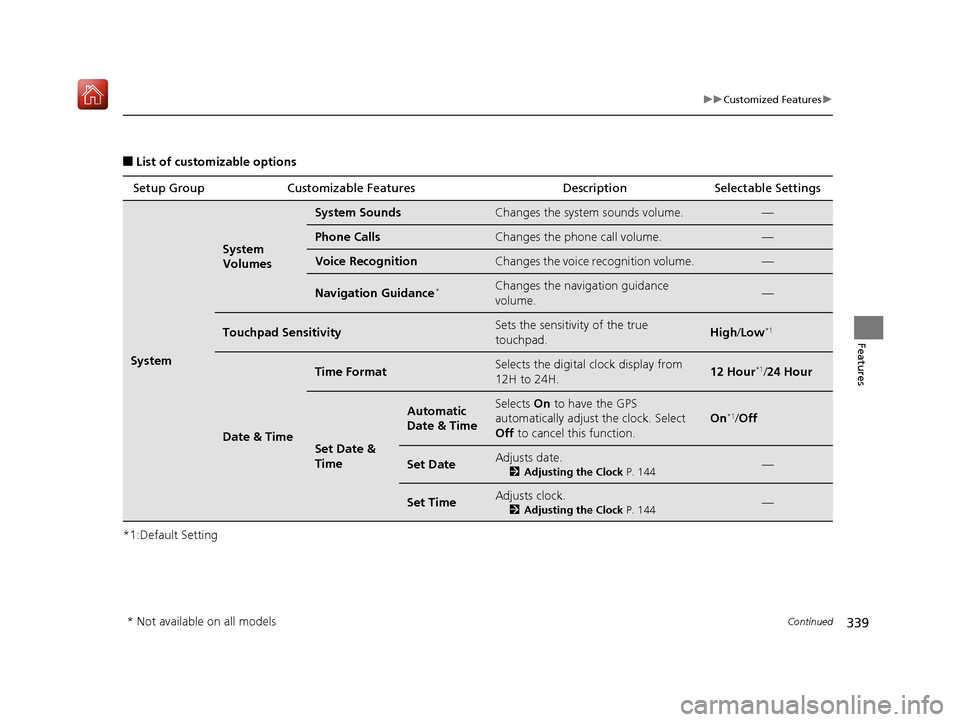
■List of customizable options
*1:Default Setting Setup Group Customizable Features
Description Selectable Settings
System
System
Volumes
System SoundsChanges the system sounds volume.—
Phone CallsChanges the phone call volume.—
Voice RecognitionChanges the voice recognition volume.—
Navigation Guidance*Changes the navigation guidance
volume.—
Touchpad SensitivitySets the sensitivity of the true
touchpad.High/Low*1
Date & Time
Time FormatSelects the digital clock display from
12H to 24H.12 Hour*1/24 Hour
Set Date &
Time
Automatic
Date & TimeSelects On to have the GPS
automatically adjust the clock. Select
Off to cancel this function.
On*1/Off
Set DateAdjusts date.
2 Adjusting the Clock P. 144—
Set TimeAdjusts clock.
2Adjusting the Clock P. 144—
* Not available on all models
19 ACURA RDX-31TJB6000.book 339 ページ 2018年4月26日 木曜日 午後4時51分
Page 343 of 649
342
uuCustomized Features u
Features
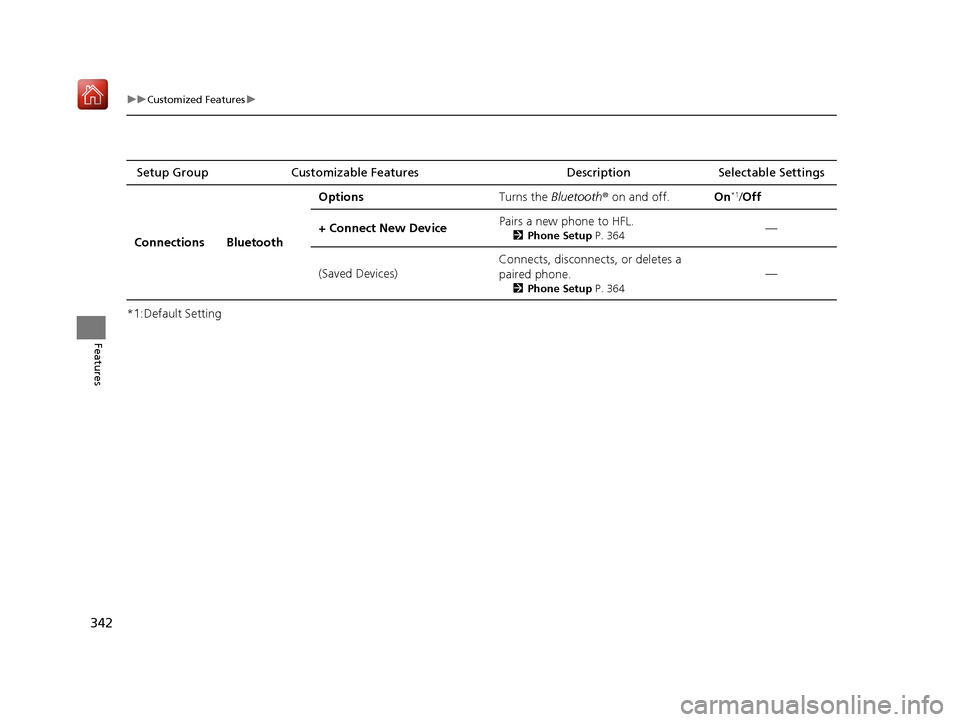
*1:Default SettingSetup Group Customizable Features
Description Selectable Settings
Connections Bluetooth Options
Turns the Bluetooth® on and off. On
*1/Off
+ Connect New Device Pairs a new phone to HFL.
2
Phone Setup P. 364—
(Saved Devices) Connects, disconnects, or deletes a
paired phone.
2
Phone Setup P. 364
—
19 ACURA RDX-31TJB6000.book 342 ページ 2018年4月26日 木曜日 午後4時51分
Page 359 of 649
358
Features
Bluetooth® HandsFreeLink ®
Bluetooth® HandsFreeLink ® (HFL) allows you to place and receive phone calls using
your vehicle’s audio system, without handling your cell phone.
Using HFL
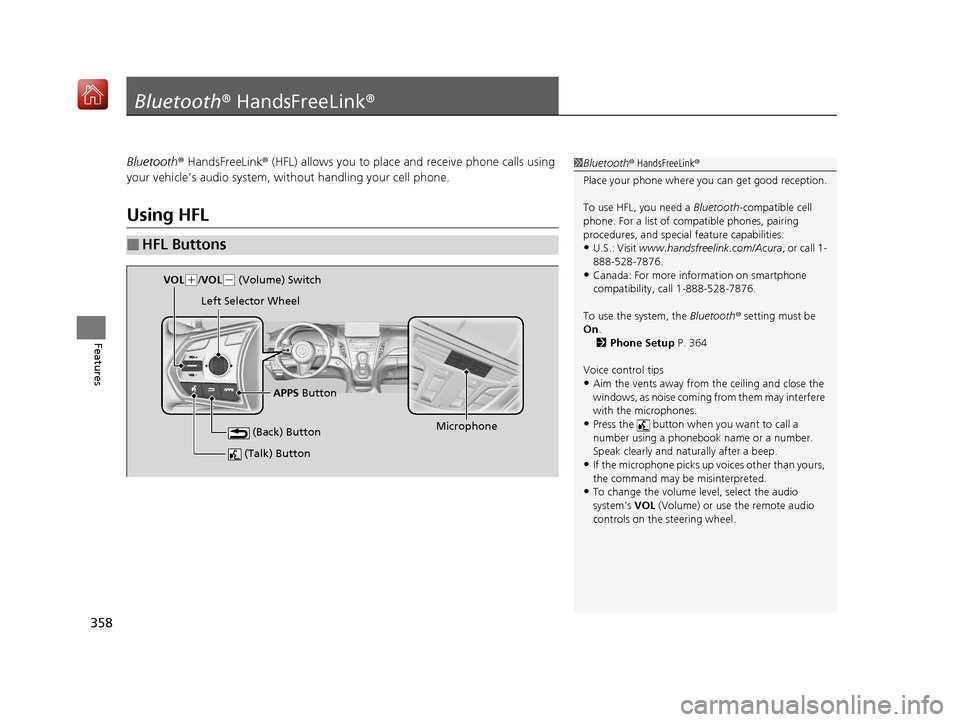
■HFL Buttons
1 Bluetooth ® HandsFreeLink ®
Place your phone where y ou can get good reception.
To use HFL, you need a Bluetooth-compatible cell
phone. For a list of compatible phones, pairing
procedures, and special feature capabilities:
•U.S.: Visit www.handsfreelink.com/Acura, or call 1-
888-528-7876.
•Canada: For more info rmation on smartphone
compatibility, call 1-888-528-7876.
To use the system, the Bluetooth® setting must be
On .
2 Phone Setup P. 364
Voice control tips
•Aim the vents away from the ceiling and close the
windows, as noise coming fr om them may interfere
with the microphones.
•Press the button when you want to call a
number using a phonebook name or a number.
Speak clearly and naturally after a beep.
•If the microphone picks up vo ices other than yours,
the command may be misinterpreted.
•To change the volume level, select the audio
system’s VOL (Volume) or use the remote audio
controls on the steering wheel.
(Talk) Button
Microphone
(Back) Button
VOL( +/VOL(- (Volume) Switch
Left Selector Wheel
APPS Button
19 ACURA RDX-31TJB6000.book 358 ページ 2018年4月26日 木曜日 午後4時51分
Page 360 of 649
Continued359
uuBluetooth ® HandsFreeLink ®u Using HFL
Features
Left Selector Wheel:
• Incomming call: Move the selector wheel to the ri ght to answer the call. Move it
to the left to decline the call.
• During a call: Move the selector wheel to the ri ght to display the call options
menu. Move it to the left to end the call.
• (back) button: Press the button to go back to the previous screen or to
cancel a command.
• (talk) button: Press the button to start voice recognition.
To go to the phone screen of the multi-information display or the head-up display
*:
1. Press the APPS button on the steering wheel.
2. Using the selector wheel, scroll to Phone on the multi-information display or the
head-up display
*, and then press the left selector wheel.
u You can select Favorites or Recents by moving the selector wheel to the left
or the right.
1 Bluetooth ® HandsFreeLink ®
Bluetooth ® Wireless Technology
The Bluetooth ® word mark and logos are registered
trademarks owned by Bluetooth SIG, Inc., and any
use of such marks by Honda Motor Co., Ltd., is under
license. Other trademarks and trade names are those
of their respective owners.
HFL Limitations
An incoming call on HFL will interrupt the audio
system when it is playing. It will resume when the call
is ended.
* Not available on all models
19 ACURA RDX-31TJB6000.book 359 ページ 2018年4月26日 木曜日 午後4時51分