rear camera Acura RDX 2019 Owner's Guide
[x] Cancel search | Manufacturer: ACURA, Model Year: 2019, Model line: RDX, Model: Acura RDX 2019Pages: 649, PDF Size: 33 MB
Page 509 of 649
508
uuSurround View Camera System*uDisplaying an Image From the Surround View Cameras
Driving
Displaying an Image From the Surround View
Cameras
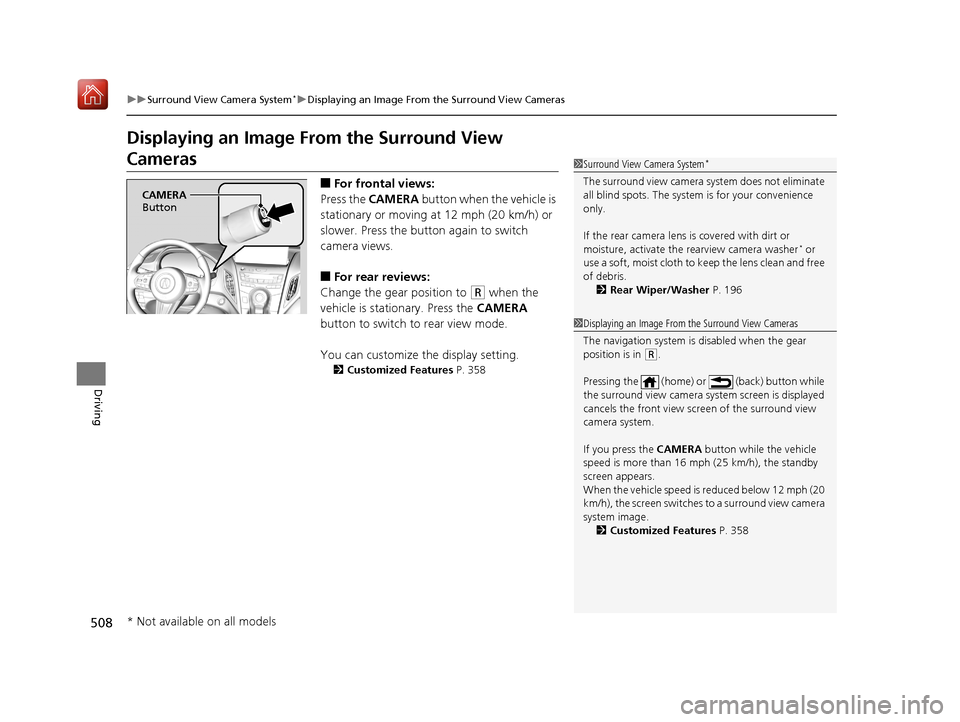
■For frontal views:
Press the CAMERA button when the vehicle is
stationary or moving at 12 mph (20 km/h) or
slower. Press the butto n again to switch
camera views.
■For rear reviews:
Change the gear position to
(R when the
vehicle is stationary. Press the CAMERA
button to switch to rear view mode.
You can customize the display setting.
2 Customized Features P. 358
1Surround View Camera System*
The surround view ca mera system does not eliminate
all blind spots. The system is for your convenience
only.
If the rear camera lens is covered with dirt or
moisture, activate the rearview camera washer
* or
use a soft, moist cloth to keep the lens clean and free
of debris.
2 Rear Wiper/Washer P. 196
CAMERA
Button
1 Displaying an Image From the Surround View Cameras
The navigation system is disabled when the gear
position is in
(R.
Pressing the (home) or (back) button while
the surround view camera system screen is displayed
cancels the front view sc reen of the surround view
camera system.
If you press the CAMERA button while the vehicle
speed is more than 16 mph (25 km/h), the standby
screen appears.
When the vehicle speed is reduced below 12 mph (20
km/h), the screen switches to a surround view camera
system image. 2 Customized Features P. 358
* Not available on all models
19 ACURA RDX-31TJB6000.book 508 ページ 2018年4月26日 木曜日 午後4時51分
Page 510 of 649
509
uuSurround View Camera System*uDisplaying an Image From the Surround View Cameras
Continued
Driving
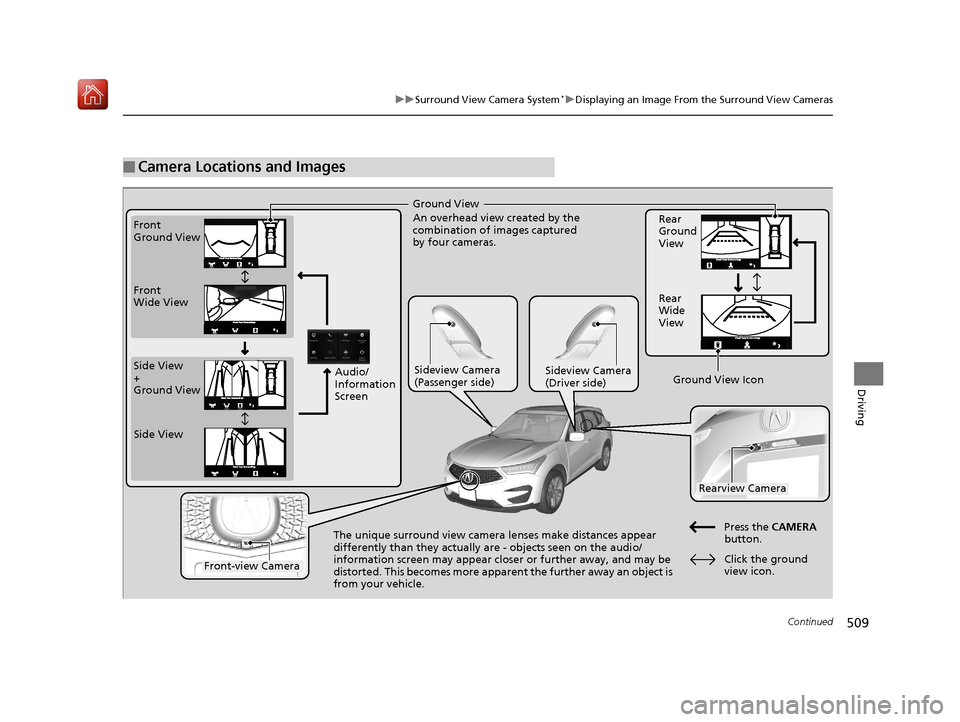
■Camera Locations and Images
Ground View
An overhead view created by the
combination of images captured
by four cameras.
Front
Ground View
Side View
+
Ground View Front
Wide View
Sideview Camera
(Passenger side)Sideview Camera
(Driver side)
The unique surround view camera lenses make distances appear
differently than they actually are - objects seen on the audio/
information screen may appear closer or further away, and may be
distorted. This becomes more apparent
the further away an object is
from your vehicle. Rear
Ground
View
Rear
Wide
View
Press the CAMERA
button.
Rearview Camera
Front-view Camera
Side View
Audio/
Information
Screen
Click the ground
view icon.
Ground View Icon
19 ACURA RDX-31TJB6000.book 509 ページ 2018年4月26日 木曜日 午後4時51分
Page 511 of 649
uuSurround View Camera System*uDisplaying an Image From the Surround View Cameras
510
Driving
Following can be displayed when the system is on.
Guide lines: Help you to get a sense of a distance between your vehicle and the
rear surroundings. The distan ce may appear differently than the actual distance.
Projection lines: Indicate vehicle direction while the steering wheel is in the current
position.
■Reference Lines and Guides1 Reference Lines and Guides
The positions/distances indi cated by the guide lines
and camera views on the display may differ from the
actual positions/distances due to the changes in the
vehicle height, road conditions, and other factors.
The guide lines should be used as a reference only.
The guide lines can be tu rned on and off using the
audio/information screen.
2 Customized Features P. 358
If you turn the guide lines off, they remain off until
you turn them back on.
19 ACURA RDX-31TJB6000.book 510 ページ 2018年4月26日 木曜日 午後4時51分
Page 512 of 649
511
uuSurround View Camera System*uUsing the Surround View Camera System
Continued
Driving
Using the Surround View Camera System
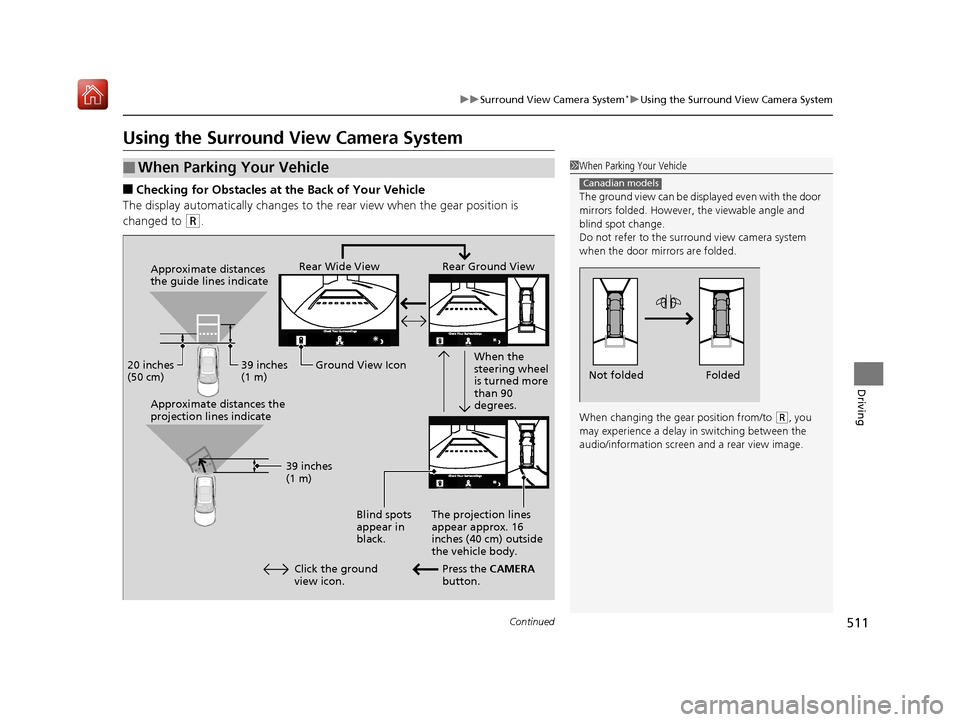
■Checking for Obstacles at the Back of Your Vehicle
The display automatically changes to the rear view when the gear position is
changed to
(R.
■When Parking Your Vehicle1 When Parking Your Vehicle
The ground view can be disp layed even with the door
mirrors folded. However, the viewable angle and
blind spot change.
Do not refer to the surround view camera system
when the door mirrors are folded.
When changing the gear position from/to
( R, you
may experience a delay in switching between the
audio/information screen and a rear view image.
Canadian models
Folded
Not folded
Rear Wide View Rear Ground View
When the
steering wheel
is turned more
than 90
degrees.
The projection lines
appear approx. 16
inches (40 cm) outside
the vehicle body.
Blind spots
appear in
black.
Press the CAMERA
button.
Approximate distances
the guide lines indicate
Approximate distances the
projection lines indicate
39 inches
(1 m)
20 inches
(50 cm)
39 inches
(1 m)
Ground View Icon
Click the ground
view icon.
19 ACURA RDX-31TJB6000.book 511 ページ 2018年4月26日 木曜日 午後4時51分
Page 515 of 649
514
uuSurround View Camera System*uUsing the Surround View Camera System
Driving
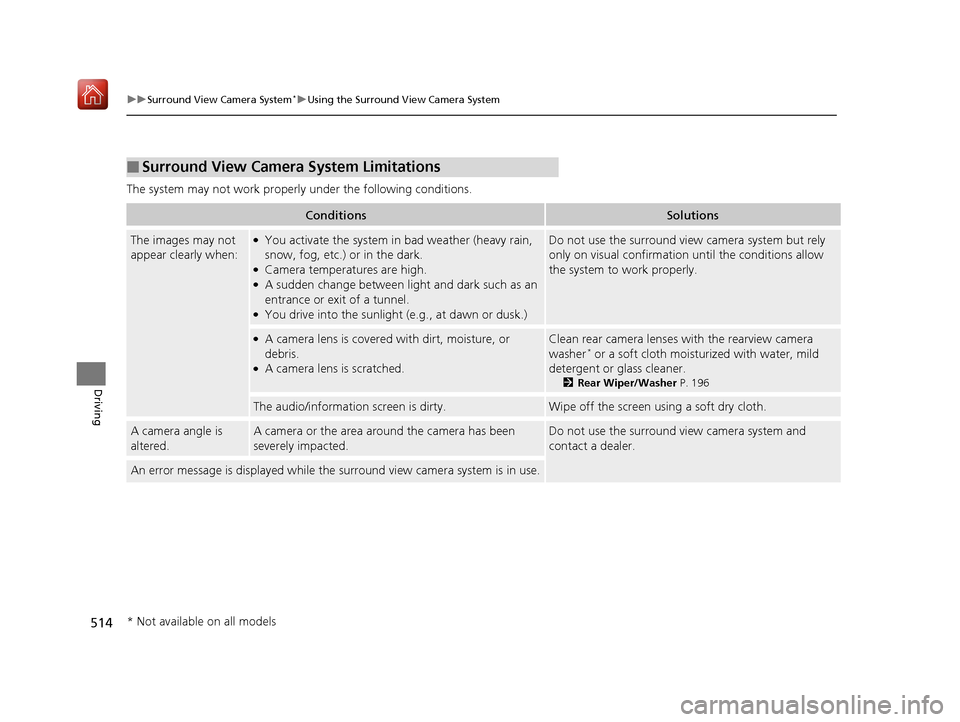
The system may not work properly under the following conditions.
■Surround View Camera System Limitations
ConditionsSolutions
The images may not
appear clearly when:●You activate the system in bad weather (heavy rain,
snow, fog, etc.) or in the dark.
●Camera temperatures are high.●A sudden change between lig ht and dark such as an
entrance or exit of a tunnel.
●You drive into the sunlight (e.g., at dawn or dusk.)
Do not use the surround view camera system but rely
only on visual confirmation until the conditions allow
the system to work properly.
●A camera lens is covered with dirt, moisture, or
debris.
●A camera lens is scratched.
Clean rear camera lenses with the rearview camera
washer* or a soft cloth moisturized with water, mild
detergent or glass cleaner.
2 Rear Wiper/Washer P. 196
The audio/information screen is dirty.Wipe off the screen using a soft dry cloth.
A camera angle is
altered.A camera or the area around the camera has been
severely impacted.Do not use the surround view camera system and
contact a dealer.
An error message is displayed while the surround view camera system is in use.
* Not available on all models
19 ACURA RDX-31TJB6000.book 514 ページ 2018年4月26日 木曜日 午後4時51分
Page 571 of 649
uuCleaning uInterior Care
570
Maintenance
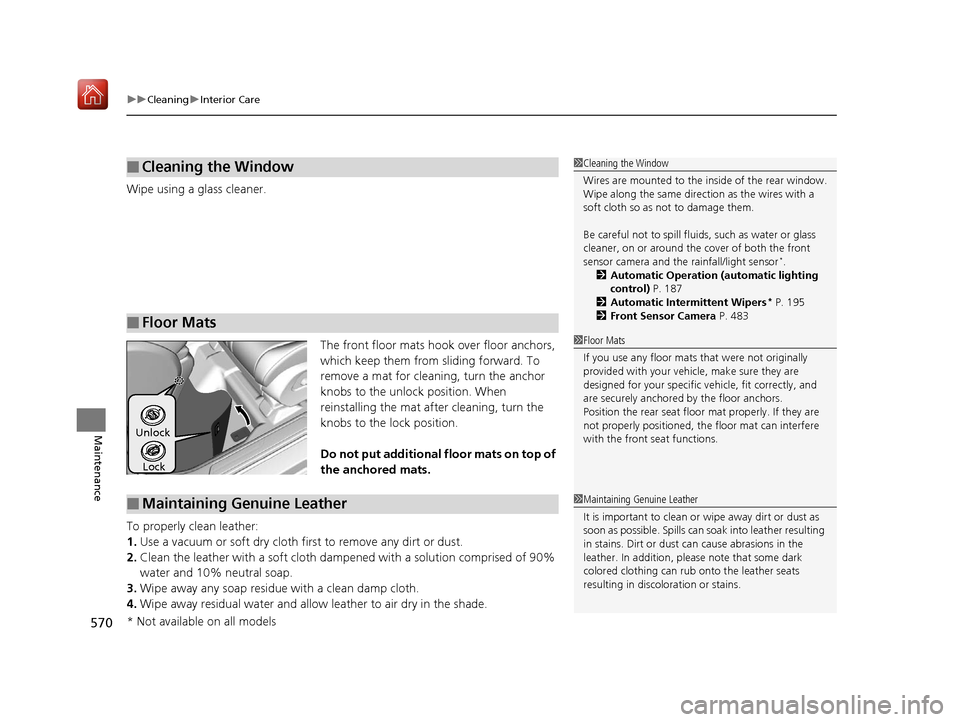
Wipe using a glass cleaner.
The front floor mats hook over floor anchors,
which keep them from sliding forward. To
remove a mat for cleaning, turn the anchor
knobs to the unlock position. When
reinstalling the mat after cleaning, turn the
knobs to the lock position.
Do not put additional floor mats on top of
the anchored mats.
To properly clean leather:
1. Use a vacuum or soft dry cloth first to remove any dirt or dust.
2. Clean the leather with a soft cloth dampen ed with a solution comprised of 90%
water and 10% neutral soap.
3. Wipe away any soap residu e with a clean damp cloth.
4. Wipe away residual water and allow leather to air dry in the shade.
■Cleaning the Window
■Floor Mats
1Cleaning the Window
Wires are mounted to the in side of the rear window.
Wipe along the same direct ion as the wires with a
soft cloth so as not to damage them.
Be careful not to spill flui ds, such as water or glass
cleaner, on or around the co ver of both the front
sensor camera and the rainfall/light sensor
*.
2 Automatic Operation (automatic lighting
control) P. 187
2 Automatic Intermittent Wipers
* P. 195
2 Front Sensor Camera P. 483
1Floor Mats
If you use any floor mats that were not originally
provided with your vehicle, make sure they are
designed for your specific ve hicle, fit correctly, and
are securely anchored by the floor anchors.
Position the rear seat floor mat properly. If they are
not properly positioned, th e floor mat can interfere
with the front seat functions.
Lock
Unlock
■Maintaining Genuine Leather1
Maintaining Genuine Leather
It is important to clean or wipe away dirt or dust as
soon as possible. Spills can soak into leather resulting
in stains. Dirt or dust ca n cause abrasions in the
leather. In addition, pl ease note that some dark
colored clothing can rub onto the leather seats
resulting in discol oration or stains.
* Not available on all models
19 ACURA RDX-31TJB6000.book 570 ページ 2018年4月26日 木曜日 午後4時51分
Page 642 of 649
641
Index
Auxiliary Input Jack................................. 241
Average Fuel Economy ............................ 131
AWD ......................................................... 437
B
Battery ...................................................... 563
Charging System Indicator ................ 79, 609
Jump Starting ......................................... 604
Maintenance (Checking the Battery) ....... 563
Belts (Seat) .................................................. 35
Beverage Holders ..................................... 223
Blind spot information System ................ 438
Bluetooth ® Audio ..................................... 297
Bluetooth ® HandsFreeLink ®.................... 358
Booster Seats (For Children) ...................... 70
Brake System ............................................ 486
Anti-lock Brake System (ABS) .................. 493
Automatic Brake Hold ............................. 491
Brake Assist System................................. 494
Fluid ....................................................... 543
Foot Brake .............................................. 490
Indicator ..................................... 75, 76, 610
Indicator (Red) ........................................ 612
Parking Brake.......................................... 486
Brightness Control (Instrument Panel) ... 198
Built-in Key ............................................... 147
Bulb Replacement .................................... 545
Back-Up Light and Taillight ..................... 548
Fog Lights ............................................... 545 Front Turn Signal,
Parking/Daytime
Running and Front Side Marker Lights ... 545
Headlights ............................................... 545
High-Mount Brake Light .......................... 548
Puddle Lights ........................................... 548
Rear License Plate Light ........................... 548
Rear Turn Signal Light Bulbs .................... 546
Side Turn Signal/Em ergency Indicator
Lights .................................................... 545
Taillights, Brake and Rear Side Marker
Lights .................................................... 547
Taillights/Brake and Back-Up Lights .......... 548
Bulb Specifications ................................... 628
C
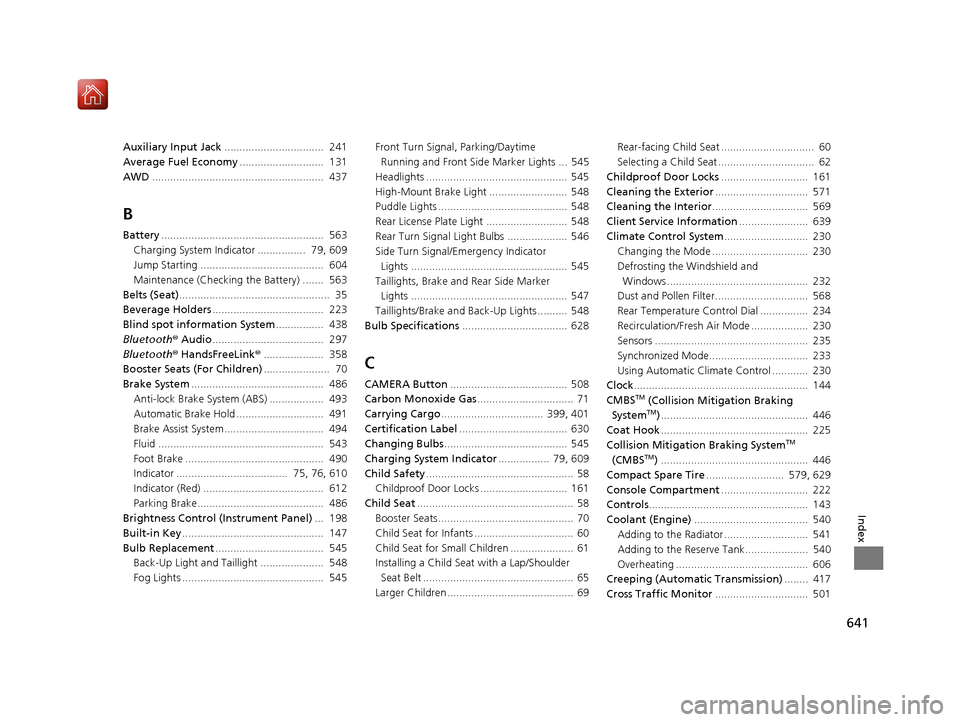
CAMERA Button....................................... 508
Carbon Monoxide Gas ................................ 71
Carrying Cargo .................................. 399, 401
Certification Label .................................... 630
Changing Bulbs ......................................... 545
Charging System Indicator ................. 79, 609
Child Safety ................................................. 58
Childproof Door Locks ............................. 161
Child Seat .................................................... 58
Booster Seats ............................................. 70
Child Seat for Infants ................................. 60
Child Seat for Small Children ..................... 61
Installing a Child Seat with a Lap/Shoulder Seat Belt .................................................. 65
Larger Children .......................................... 69 Rear-facing Child Seat ............................... 60
Selecting a Child Seat ................................ 62
Childproof Door Locks ............................. 161
Cleaning the Exterior ............................... 571
Cleaning the Interior ................................ 569
Client Service Information ....................... 639
Climate Control System ............................ 230
Changing the Mode ................................ 230
Defrosting the Windshield and Windows ............................................... 232
Dust and Pollen Filter............................... 568
Rear Temperature Control Dial ................ 234
Recirculation/Fresh Air Mode ................... 230
Sensors ................................................... 235
Synchronized Mode................................. 233
Using Automatic Climate Control ............ 230
Clock .......................................................... 144
CMBSTM (Collision Mitigation Braking
SystemTM) ................................................. 446
Coat Hook ................................................. 225
Collision Mitigation Braking System
TM
(CMBSTM) ................................................. 446
Compact Spare Tire .......................... 579, 629
Console Compartment ............................. 222
Controls ..................................................... 143
Coolant (Engine) ...................................... 540
Adding to the Radiator ............................ 541
Adding to the Reserve Tank..................... 540
Overheating ............................................ 606
Creeping (Automatic Transmission) ........ 417
Cross Traffic Monitor ............................... 501
19 ACURA RDX-31TJB6000.book 641 ページ 2018年4月26日 木曜日 午後4時51分
Page 643 of 649
642
Index
Cup Holders............................................... 223
Customized Features ................................ 332
D
Daytime Running Lights ........................... 190
Dead Battery ............................................. 604
Defaulting All the Settings ...................... 354
Defrosting the Windshield and Windows .................................................. 232
Devices that Emit Radio Waves ................ 631
Dimming Headlights ............................................... 186
Rearview Mirror ....................................... 204
Dipstick (Engine Oil) ................................. 536
Directional Signals (Turn Signal) .............. 185
Door Mirrors ............................................. 205
Doors ......................................................... 146
Auto Door Locking .................................. 162
Auto Door Unlocking ............................... 162
Keys ........................................................ 146
Locking/Unlocking the Doors from the Inside ..................................................... 159
Locking/Unlocking the Doors from the
Outside .................................................. 150
Lockout Prevention System ...................... 157
DOT Tire Quality Grading ........................ 557
Driving ....................................................... 397
Automatic Transmission ........................... 417
Braking .................................................... 486
Off-Highway Driving Guidelines ............... 409 Shifting Gear ........................................... 418
Starting the Engine.................................. 411
Driving Position Memory System ............ 201
Dust and Pollen Filter ............................... 568
Dynamic Mode Switch ............................. 426
E
Electric Parking Brake
Switch ..................................................... 486
Electric Power Steering (EPS) System Indicator............................................ 84, 611
Electronic Stability Control (ESC) ............. 434
Emergency ................................................ 622
Emissions Testing (Readiness Codes) ....... 634
Engine ....................................................... 630
Coolant ................................................... 540
Jump Starting .......................................... 604
Oil ........................................................... 535
Remote Engine Start................................ 413
Starting ................................................... 411
Engine Compartment Cover .................... 534
Engine Coolant ......................................... 540
Adding to the Radiator ............................ 541
Adding to the Reserve Tank..................... 540
Overheating ............................................ 606
Temperature Gauge ................................ 126
Engine Oil ................................................. 535
Adding .................................................... 537
Checking................................................. 536
Displaying Oil Life .................................... 526 Low Oil Pressure Indicator ....................... 608
Recommended Engine Oil ....................... 535
ENGINE START/STOP Button .................... 182
EPS (Electric Power Steering) System ...... 611
Exhaust Gas Hazard (Carbon Monoxide) .. 71
Exterior Care (Cleaning) .......................... 571
Exterior Mirrors ........................................ 205F
Features.................................................... 237
Filters Dust and Pollen....................................... 568
Oil .......................................................... 538
Flat Tire ............................................. 579, 587
Floor Mats ................................................ 570
Fluids Automatic Transmission .......................... 542
Brake ...................................................... 543
Engine Coolant ....................................... 540
Windshield Washer ................................. 544
FM/AM Radio ........................................... 274
Fog Lights Indicator ................................................... 87
Folding Down the Rear Seats .................. 216
Foot Brake ................................................ 490
Front Airbags (SRS) .................................... 45
Front Seats ................................................ 207
Adjusting ................................................ 207
Front Sensor Camera ............................... 483
19 ACURA RDX-31TJB6000.book 642 ページ 2018年4月26日 木曜日 午後4時51分
Page 646 of 649
645
Index
High Beam Indicator ................................. 87
Interior.................................................... 219
Light Switches......................................... 186
Lights On Indicator.................................... 87
Turn Signals and Hazard Warning ........... 185
Load Limits ............................................... 401
Locking/Unlocking ................................... 146
Auto Door Locking/Unlocking ................. 162
Childproof Door Locks ............................ 161
From Inside ............................................. 159
From Outside .......................................... 150
Keys........................................................ 146
Using a Key............................................. 156
Lockout Prevention System ..................... 157
Low Battery Charge ................................. 609
Low Fuel Indicator ..................................... 83
Low Oil Pressure Indicator ....................... 608
Lower Anchors ..................................... 63, 67
Luggage (Maximum Load Limit) ............. 401
Lumbar Support ....................................... 207
M
Maintenance.................................... 133, 521
Battery .................................................... 563
Brake Fluid .............................................. 543
Cleaning ................................................. 569
Climate Control System .......................... 567
Coolant .................................................. 540
Maintenance Minder
TM............................ 525
Oil .......................................................... 536 Precautions .............................................. 522
Radiator .................................................. 541
Remote Transmitter ......................... 565, 566
Replacing Light Bulbs ............................... 545
Safety ...................................................... 523
Service Items ........................................... 529
Tires ........................................................ 554
Transmission Fluid ................................... 542
Under the Hood ...................................... 532
Malfunction Indicator Lamp .............. 78, 609
Map Lights ................................................ 220
Maximum Load Limit ............................... 401
Meters, Gauges ......................................... 126
Mirrors ....................................................... 204
Adjusting ................................................. 204
Door........................................................ 205
Exterior .................................................... 205
Interior Rearview ..................................... 204
Modifications (and Accessories) .............. 574
MP3 ........................................................... 294
MP3/WMA/AAC ........................................ 294
Multi-Information Display ....................... 127
Switching the Display .............................. 129
Warning and Information Messages .......... 97
Multi-View Rear Camera .......................... 505
N
Navigation................................................ 132
Numbers (Identification) .......................... 630
O
Odometer................................................. 127
Off-Highway Driving Guidelines ............. 409
Oil (Engine) ............................................... 535
Adding .................................................... 537
Checking................................................. 536
Displaying Oil Life .................................... 526
Low Oil Pressure Indicator ....................... 608
Oil Life .................................................... 133
Recommended Engine Oil ............... 535, 629
Viscosity .......................................... 535, 629
Open Source Licenses ............................... 327
Opening/Closing Hood....................................................... 533
Moonroof ............................................... 179
Power Windows ...................................... 176
Tailgate ................................................... 163
Outside Temperature Display .................. 127
Overheating .............................................. 606
P
Paddle Shifters (Sequential
Shift Mode) ............................................. 424
Panic Mode ............................................... 175
Panoramic Roof ........................................ 179
Parking ...................................................... 495
Parking Brake ........................................... 486
Parking Brake and Brake System Indicator .................................................. 610
19 ACURA RDX-31TJB6000.book 645 ページ 2018年4月26日 木曜日 午後4時51分