settings Acura RDX 2019 Owner's Guide
[x] Cancel search | Manufacturer: ACURA, Model Year: 2019, Model line: RDX, Model: Acura RDX 2019Pages: 649, PDF Size: 33 MB
Page 289 of 649
288
uuAudio System Basic Operation uPlaying SiriusXM ® Radio
Features
You can change settings for the alert function.
■To enable the alert function
1. Select MENU .
2. Select SiriusXM Settings .
3. Select Manage Program Alerts.
4. Select Notifications.
5. Select On or Off .
■To remove an alert
1. Select MENU .
2. Select SiriusXM Settings .
3. Select Manage Program Alerts.
4. Select Alerts Set .
5. Select an item you want to delete.
u A confirmation message appears on the screen. Select Delete.
■Manage Program Alert
19 ACURA RDX-31TJB6000.book 288 ページ 2018年4月26日 木曜日 午後4時51分
Page 290 of 649
Continued289
uuAudio System Basic Operation uPlaying SiriusXM ® Radio
Features
Sample each channel on the selected mode for 10 seconds.
1. Select More.
2. Select Scan.
You can change a scan mode by the following procedure.
1. Select MENU .
2. Select SiriusXM Settings.
3. Select Scan Mode .
4. Select Channels or Favorites.
To turn off scan, select Stop.
■Scan1Scan
The favorites scan func tion is based on TuneScan
TM
technology of SiriusXM ®.
The “Featured Channels ” function is based on
Featured Favorites
TM technology of SiriusXM ®.
TuneScan
TM and Featured FavoritesTM are registered
trademarks of SiriusXM ® Radio, Inc.
19 ACURA RDX-31TJB6000.book 289 ページ 2018年4月26日 木曜日 午後4時51分
Page 291 of 649
290
uuAudio System Basic Operation uPlaying SiriusXM ® Radio
Features
You can set the SiriusXM ® notifications setting for receiving a SiriusXM ® notification.
1. Select MENU .
2. Select SiriusXM Notifications .
3. Select On.
Change the SiriusXM ® settings.
1. Select MENU .
2. Select SiriusXM Settings .
3. Select an option.
• Tune Mode: Choose whether to group by category or channel number when
changing channels.
• Scan Mode: Select the scan mode from all channels or favorites.
• Tune Start: Start the currently playing song at the beginning when you switch to
a music channel favorite.
• Sports Notifi cation Setup: Set to receive sports alerts such as scores from your
favorite teams.
2 Live Sports Alert P. 284
•Traffic & Weather Setup: Set to receive traffic and weather information.
2Traffic and Weather Information P. 286
•Manage Program Alerts: Change settings for the alert function.
2Manage Program Alert P. 288
■SiriusXM Notifications Setting
■SiriusXM Settings
19 ACURA RDX-31TJB6000.book 290 ページ 2018年4月26日 木曜日 午後4時51分
Page 292 of 649
291
uuAudio System Basic Operation uPlaying an iPod
Continued
Features
Playing an iPod
Using your USB connector, connect the iPod to the USB port, then select the USB
mode.
2 USB Ports P. 239
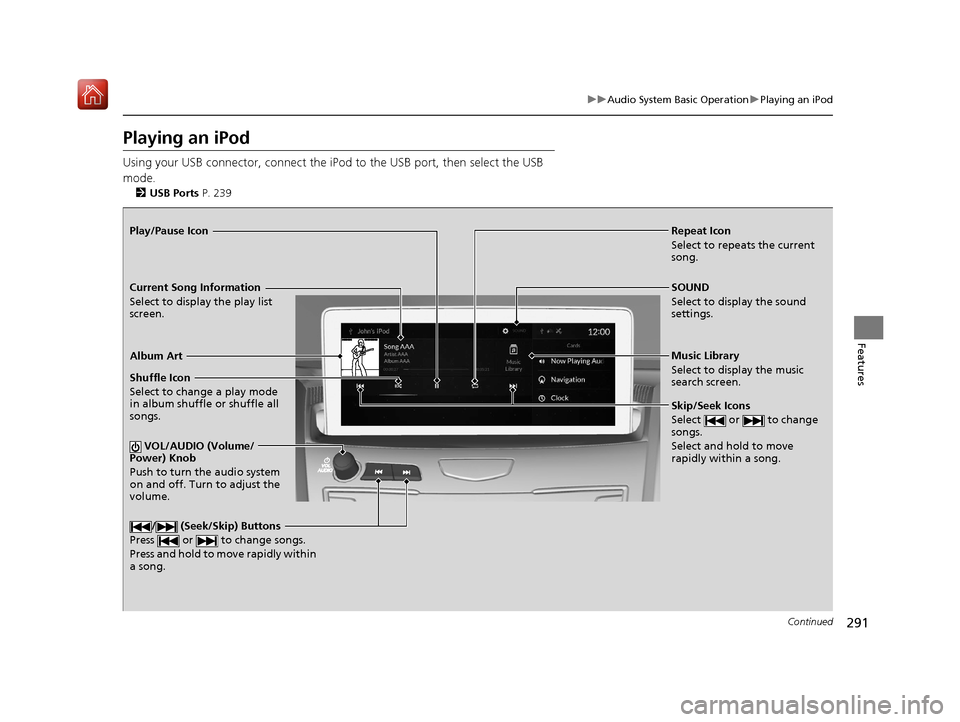
Repeat Icon
Select to repeats the current
song.
SOUND
Select to display the sound
settings.
Music Library
Select to display the music
search screen.
Skip/Seek Icons
Select or to change
songs.
Select and hold to move
rapidly within a song.
Shuffle Icon
Select to change a play mode
in album shuffle or shuffle all
songs.
VOL/AUDIO (Volume/
Power) Knob
Push to turn the audio system
on and off. Turn to adjust the
volume.
/ (Seek/Skip) Buttons
Press or to change songs.
Press and hold to move rapidly within
a song.
Play/Pause Icon
Album Art
Current Song Information
Select to display the play list
screen.
19 ACURA RDX-31TJB6000.book 291 ページ 2018年4月26日 木曜日 午後4時51分
Page 295 of 649
294
uuAudio System Basic Operation uPlaying a USB Flash Drive
Features
Playing a USB Flash Drive
Your audio system reads and plays audio file s on a USB flash drive in either format
of MP3, WMA, AAC*1, etc.
2 Playable audio file P. 312
Connect your USB flash drive to the USB port, then select the USB mode.
2USB Ports P. 239
*1:Only AAC format files recorded with iTunes are playable on this unit.
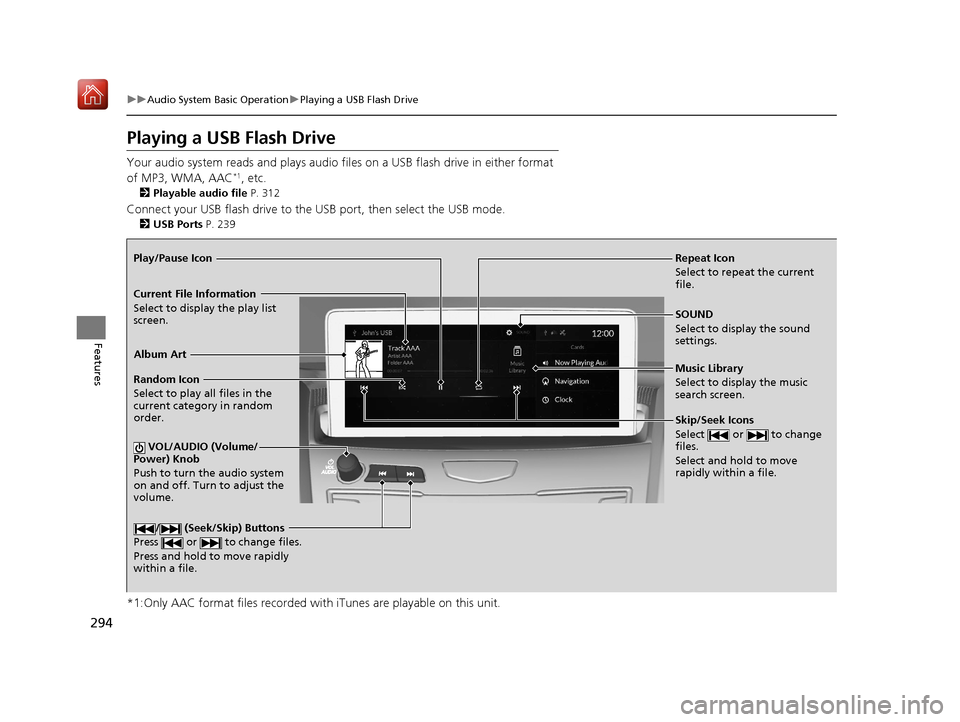
Repeat Icon
Select to repeat the current
file.
SOUND
Select to display the sound
settings.
Music Library
Select to display the music
search screen.
Skip/Seek Icons
Select or to change
files.
Select and hold to move
rapidly within a file.
Random Icon
Select to play all files in the
current category in random
order.
VOL/AUDIO (Volume/
Power) Knob
Push to turn the audio system
on and off. Turn to adjust the
volume.
/ (Seek/Skip) Buttons
Press or to change files.
Press and hold to move rapidly
within a file.
Play/Pause Icon
Album Art
Current File Information
Select to display the play list
screen.
19 ACURA RDX-31TJB6000.book 294 ページ 2018年4月26日 木曜日 午後4時51分
Page 301 of 649
300
uuAudio System Basic Operation uWi-Fi Connection
Features
Wi-Fi Connection
You can connect the audio system to the Internet using Wi-Fi on the audio/
information screen. If your phone has wire less hotspot capabilities, the system can
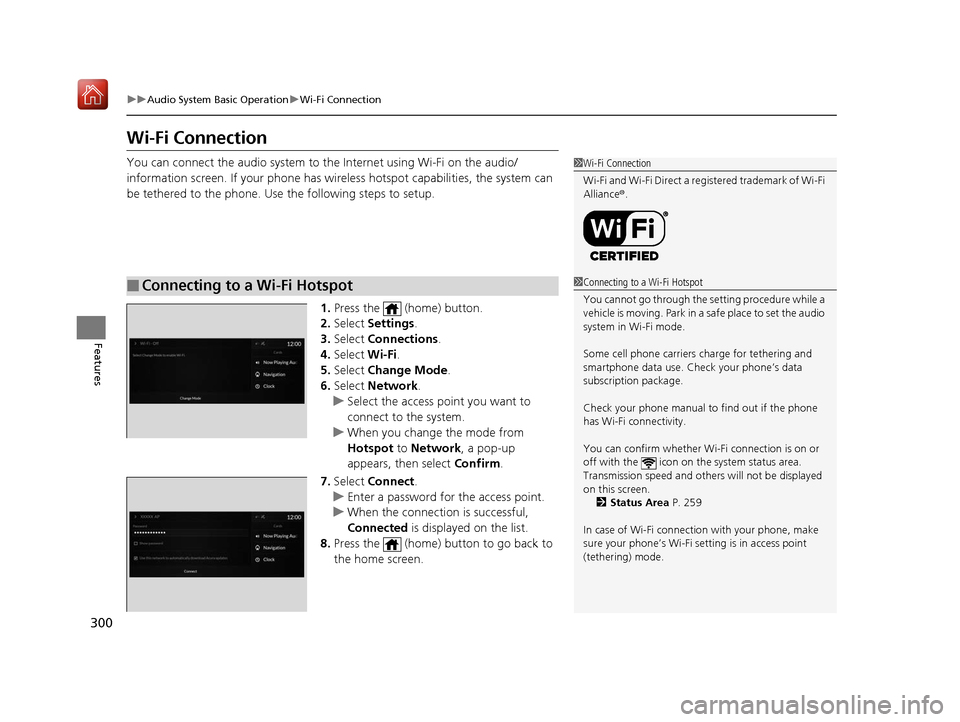
be tethered to the phone. Use the following steps to setup.
1.Press the (home) button.
2. Select Settings .
3. Select Connections.
4. Select Wi-Fi.
5. Select Change Mode .
6. Select Network.
u Select the access point you want to
connect to the system.
u When you change the mode from
Hotspot to Network, a pop-up
appears, then select Confirm.
7. Select Connect .
u Enter a password for the access point.
u When the connection is successful,
Connected is displayed on the list.
8. Press the (home) button to go back to
the home screen.
■Connecting to a Wi-Fi Hotspot
1Wi-Fi Connection
Wi-Fi and Wi-Fi Direct a registered trademark of Wi-Fi
Alliance® .
1Connecting to a Wi-Fi Hotspot
You cannot go through the setting procedure while a
vehicle is moving. Park in a safe place to set the audio
system in Wi-Fi mode.
Some cell phone carriers charge for tethering and
smartphone data use. Check your phone’s data
subscription package.
Check your phone manual to find out if the phone
has Wi-Fi connectivity.
You can confirm whether Wi -Fi connection is on or
off with the icon on the system status area.
Transmission speed and others will not be displayed
on this screen. 2 Status Area P. 259
In case of Wi-Fi connect ion with your phone, make
sure your phone’s Wi-Fi se tting is in access point
(tethering) mode.
19 ACURA RDX-31TJB6000.book 300 ページ 2018年4月26日 木曜日 午後4時51分
Page 302 of 649
301
uuAudio System Basic Operation uWi-Fi Connection
Features
Make sure your phone’s Wi-Fi setting is in access point (tethering) mode.
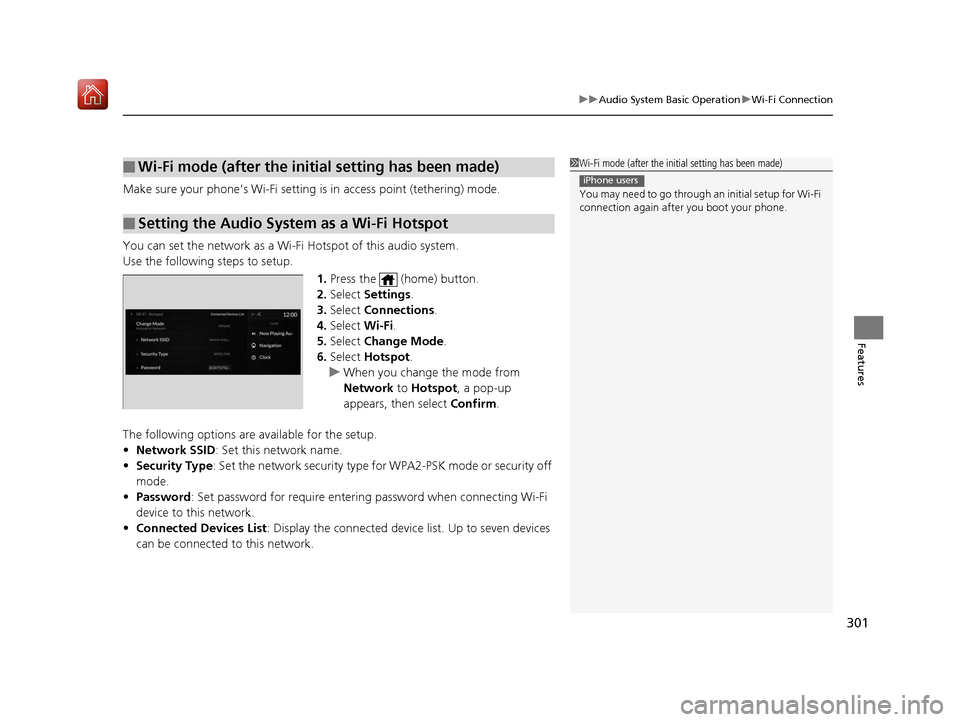
You can set the network as a Wi-F i Hotspot of this audio system.
Use the following steps to setup.
1.Press the (home) button.
2. Select Settings .
3. Select Connections .
4. Select Wi-Fi.
5. Select Change Mode .
6. Select Hotspot .
u When you change the mode from
Network to Hotspot, a pop-up
appears, then select Confirm.
The following options are available for the setup.
• Network SSID : Set this network name.
• Security Type: Set the network security type fo r WPA2-PSK mode or security off
mode.
• Password : Set password for require entering password when connecting Wi-Fi
device to this network.
• Connected Devices List : Display the connected device list. Up to seven devices
can be connected to this network.
■Wi-Fi mode (after the init ial setting has been made)
■Setting the Audio System as a Wi-Fi Hotspot
1Wi-Fi mode (after the initial setting has been made)
You may need to go through an initial setup for Wi-Fi
connection again afte r you boot your phone.
iPhone users
19 ACURA RDX-31TJB6000.book 301 ページ 2018年4月26日 木曜日 午後4時51分
Page 306 of 649
Continued305
uuAudio System Basic Operation uApple CarPlayTM
Features
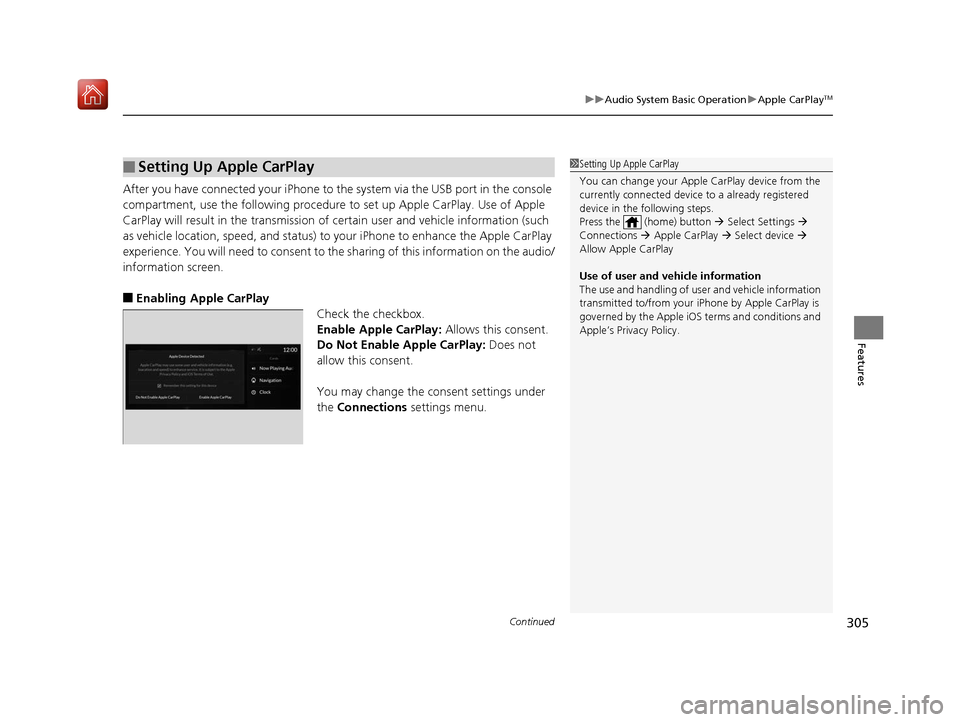
After you have connected your iPhone to the system via the USB port in the console
compartment, use the follow ing procedure to set up Apple CarPlay. Use of Apple
CarPlay will result in the transmission of certain user and vehicle information (such
as vehicle location, speed, an d status) to your iPhone to enhance the Apple CarPlay
experience. You will n eed to consent to the sharing of this information on the audio/
information screen.
■Enabling Apple CarPlay Check the checkbox.
Enable Apple CarPlay: Allows this consent.
Do Not Enable Apple CarPlay: Does not
allow this consent.
You may change the consent settings under
the Connections settings menu.
■Setting Up Apple CarPlay1Setting Up Apple CarPlay
You can change your Appl e CarPlay device from the
currently connected device to a already registered
device in the following steps.
Press the (home) button Select Settings
Connections Apple CarPlay Select device
Allow Apple CarPlay
Use of user and vehicle information
The use and handling of user and vehicle information
transmitted to/from your iP hone by Apple CarPlay is
governed by the Apple iOS terms and conditions and
Apple’s Privacy Policy.
19 ACURA RDX-31TJB6000.book 305 ページ 2018年4月26日 木曜日 午後4時51分
Page 309 of 649
308
uuAudio Error Messages uAndroid/Apps
Features
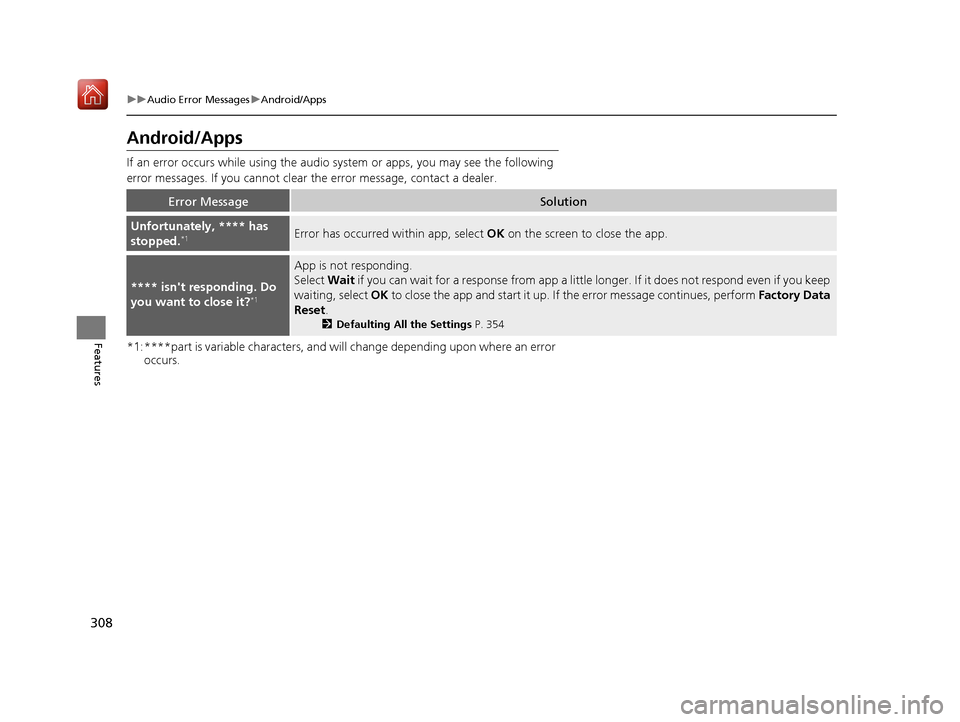
Android/Apps
If an error occurs while us ing the audio system or apps , you may see the following
error messages. If you cannot clear the error message, contact a dealer.
*1:****part is variable characters, and will change depending upon where an error occurs.
Error MessageSolution
Unfortunately, **** has
stopped.*1Error has occurred within app, select OK on the screen to close the app.
**** isn't responding. Do
you want to close it?*1
App is not responding.
Select Wait if you can wait for a response from app a littl e longer. If it does not respond even if you keep
waiting, select OK to close the app and start it up. If the error message continues, perform Factory Data
Reset .
2Defaulting All the Settings P. 354
19 ACURA RDX-31TJB6000.book 308 ページ 2018年4月26日 木曜日 午後4時51分
Page 328 of 649
327
uuGeneral Information on the Audio System uAbout Open Source Licenses
Features
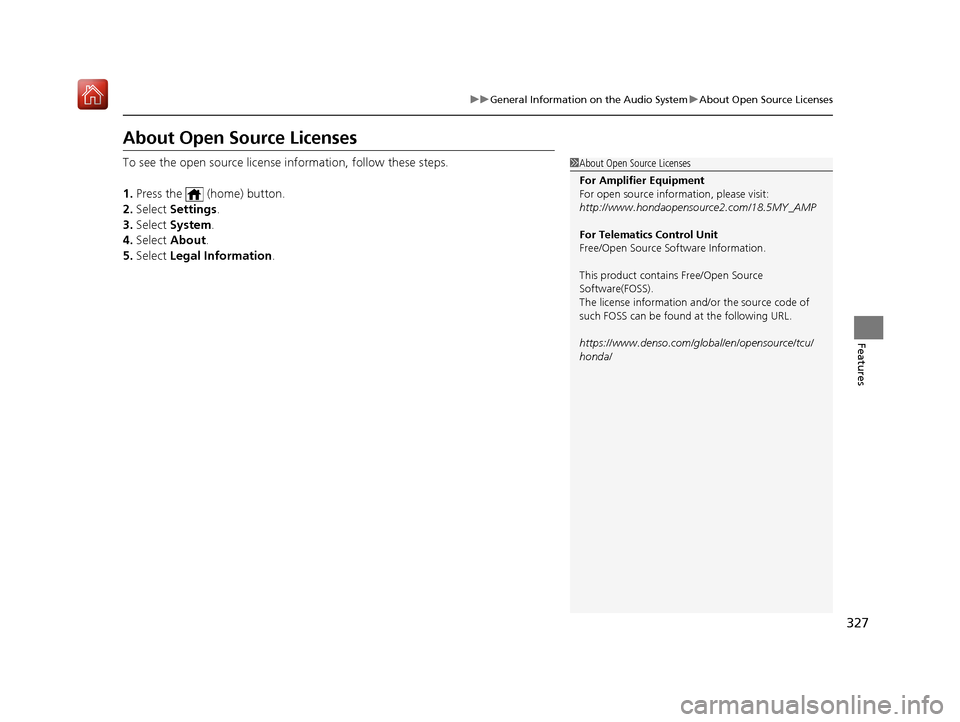
About Open Source Licenses
To see the open source license information, follow these steps.
1. Press the (home) button.
2. Select Settings .
3. Select System.
4. Select About .
5. Select Legal Information.1About Open Source Licenses
For Amplifier Equipment
For open source information, please visit:
http://www.hondaopensource2.com/18.5MY_AMP
For Telematics Control Unit
Free/Open Source Software Information.
This product contains Free/Open Source
Software(FOSS).
The license information and/ or the source code of
such FOSS can be found at the following URL.
https://www.denso.com/global/en/opensource/tcu/
honda/
19 ACURA RDX-31TJB6000.book 327 ページ 2018年4月26日 木曜日 午後4時51分