parking Acura RDX 2019 Owner's Guide
[x] Cancel search | Manufacturer: ACURA, Model Year: 2019, Model line: RDX, Model: Acura RDX 2019Pages: 649, PDF Size: 33 MB
Page 452 of 649
451
uuAcuraWatchTMuCollision Mitigation Braking SystemTM (CMBSTM)
Continued
Driving
■Vehicle conditions
• Headlight lenses are dirty or the h eadlights are not properly adjusted.
• The outside of the windshield is blocked by dirt, mud, leaves, wet snow, etc.
• The inside of the windshield is fogged.
• An abnormal tire or wheel condition (wro ng sized, varied size or construction,
improperly inflated, compact spare tire
*, etc.).
• When tire chains are installed.
• The vehicle is tilted due to a heavy load or suspension modifications.
• The camera temperature gets too high.
• Driving with the parking brake applied.
• When the radar sensor behind the emblem gets dirty.
■Detection limitations
• A vehicle or pedestrian suddenly crosses in front of you.
• The distance between your vehicle and the vehicle or pedestrian ahead of you is
too short.
• A vehicle cuts in front of you at a slow speed, and it brakes suddenly.
• When you accelerate rapidly and approach the vehicle or pedestrian ahead of you
at high speed.
• The vehicle ahead of you is a motorcycle, bicycle, mobility scooter or other small
vehicle.
• When there are animals in front of your vehicle.
• When you drive on a curved, winding or und ulating road that makes it difficult for
the sensor to properly detect a vehicle in front of you.
• The speed difference between your vehicle an d a vehicle or pedestrian in front of
you is significantly large.
• An oncoming vehicle suddenly comes in front of you.
• Another vehicle suddenly comes in front of you at an intersection, etc.
• Your vehicle abruptly crosses over in front of an oncoming vehicle.
• When driving through a narrow iron bridge.
• When the lead vehicl e suddenly slows down.
* Not available on all models
19 ACURA RDX-31TJB6000.book 451 ページ 2018年4月26日 木曜日 午後4時51分
Page 455 of 649
454
uuAcuraWatchTMuCollision Mitigation Braking SystemTM (CMBSTM)
Driving
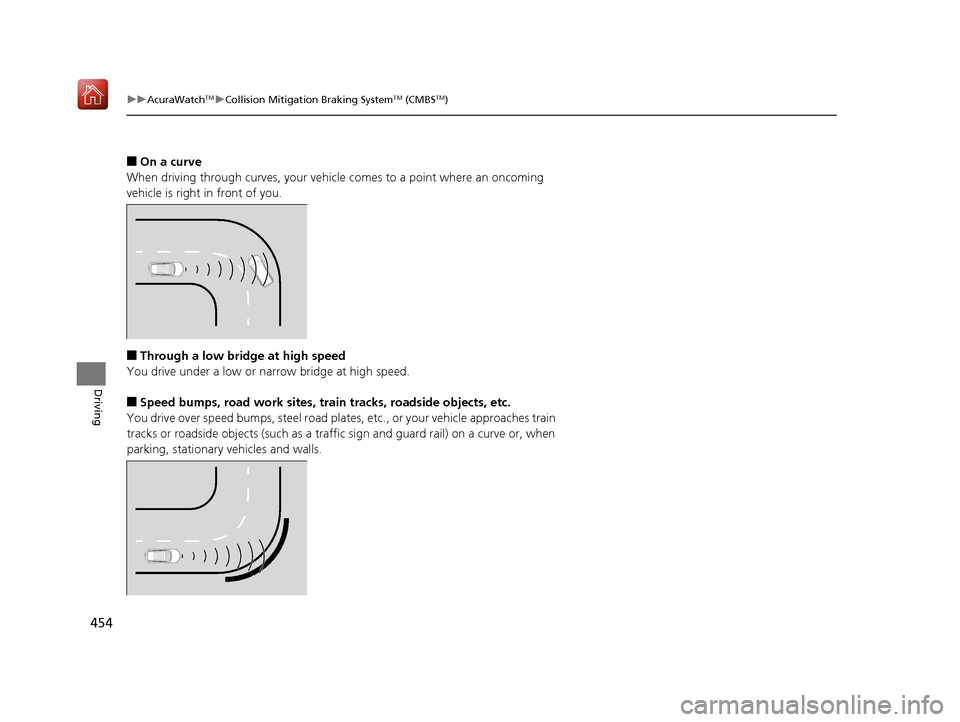
■On a curve
When driving through curves, your vehicle comes to a point where an oncoming
vehicle is right in front of you.
■Through a low bridge at high speed
You drive under a low or narrow bridge at high speed.
■Speed bumps, road work sites, tr ain tracks, roadside objects, etc.
You drive over speed bumps, steel road plates, etc., or yo ur vehicle approaches train
tracks or roadside objects (such as a traffi c sign and guard rail) on a curve or, when
parking, stationary vehicles and walls.
19 ACURA RDX-31TJB6000.book 454 ページ 2018年4月26日 木曜日 午後4時51分
Page 457 of 649
uuAcuraWatchTMuAdaptive Cruise Control (ACC) with Low Speed Follow (LSF)
456
Driving
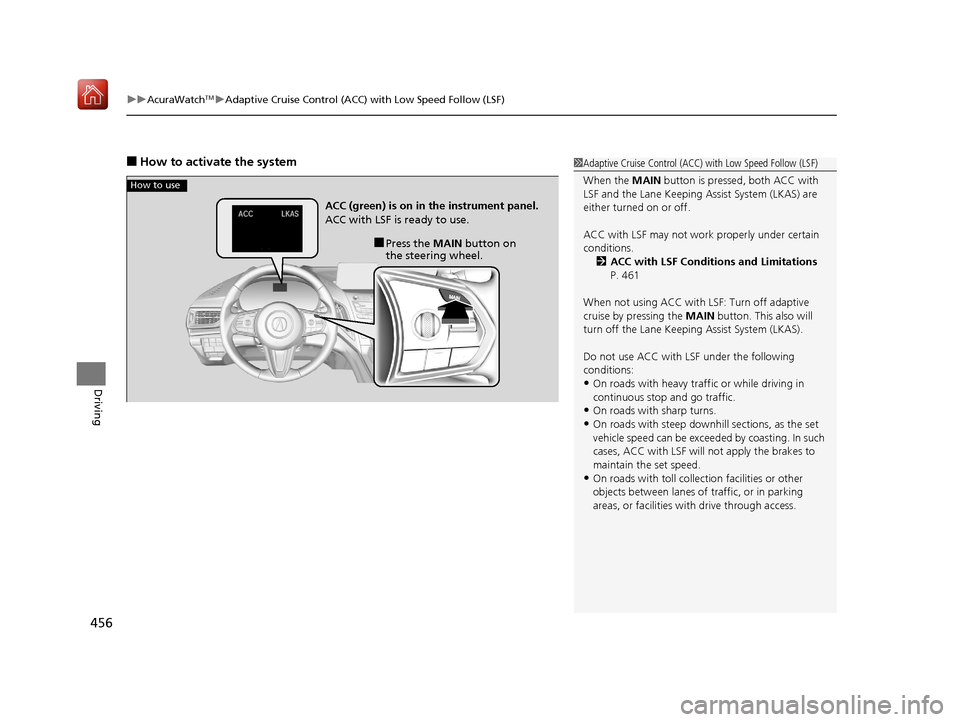
■How to activate the system1Adaptive Cruise Control (ACC) with Low Speed Follow (LSF)
When the MAIN button is pressed, both ACC with
LSF and the Lane Keeping Assist System (LKAS) are
either turned on or off.
ACC with LSF may not work properly under certain
conditions. 2 ACC with LSF Conditions and Limitations
P. 461
When not using ACC with LSF: Turn off adaptive
cruise by pressing the MAIN button. This also will
turn off the Lane Keeping Assist System (LKAS).
Do not use ACC with LSF under the following
conditions:
•On roads with heavy traf fic or while driving in
continuous stop and go traffic.
•On roads with sharp turns.
•On roads with steep downhill sections, as the set
vehicle speed can be exceeded by coasting. In such
cases, ACC with LSF will not apply the brakes to
maintain the set speed.
•On roads with toll collection facilities or other
objects between lanes of traffic, or in parking
areas, or faci lities with driv e through access.
How to use
■Press the MAIN button on
the steering wheel.
ACC (green) is on in the instrument panel.
ACC with LSF is ready to use.
19 ACURA RDX-31TJB6000.book 456 ページ 2018年4月26日 木曜日 午後4時51分
Page 462 of 649
Continued461
uuAcuraWatchTMuAdaptive Cruise Control (ACC) with Low Speed Follow (LSF)
Driving
The system may automatically shut off and the ACC with LSF indicator will come on
under certain conditions. Some examples of these conditions are listed below. Other
conditions may reduce some of the ACC with LSF functions.
■Environmental conditions
Driving in bad weather (r ain, fog, snow, etc.).
■Roadway conditions
Driving on a snowy or wet roadway (obscure d lane marking, vehicle tracks, reflected
lights, road spra y, high contrast).
■Vehicle conditions
• The outside of the windshield is blocked by dirt, mud, leaves, wet snow, etc.
• An abnormal tire or wheel condition (Wro ng sized, varied size or construction,
improperly inflated, compact spare tire
*, etc.).
• The camera temperature gets too high.
• The parking brake is applied.
• When the radar sensor cover is dirty.
• The vehicle is tilted due to a heavy load or suspension modifications.
• When tire chains are installed.
■ACC with LSF Conditions and Limitations1ACC with LSF Conditions and Limitations
For directions on the prop er handling of the radar
sensor, refer to the following page.
2 Radar Sensor P. 485
You can read about handling information for the
camera equipped with this system. 2 Front Sensor Camera P. 483
Have your vehicle checked by a dealer if you find any
unusual behavior of the system (e.g., the warning
message appears too frequently).
* Not available on all models
19 ACURA RDX-31TJB6000.book 461 ページ 2018年4月26日 木曜日 午後4時51分
Page 469 of 649
uuAcuraWatchTMuAdaptive Cruise Control (ACC) with Low Speed Follow (LSF)
468
Driving
■Automatic cancellation
The beeper sounds and a message appears on the multi-information display when
ACC with LSF is automatically canceled. An y of these conditions may cause the ACC
with LSF to automatically cancel:
• Bad weather (rain, fog, snow, etc.)
• When the radar sensor behind the emblem gets dirty.
• The vehicle ahead of you cannot be detected.
• An abnormal tire condition is detected, or the tires are skidding.
• Driving on a mountainous road, or driving off road for extended periods.
• Abrupt steering wheel movement.
• When the ABS, VSA ® or CMBS
TM is activated.
• When the ABS or VSA ® system indicator comes on.
• When the vehicle is stopped on a very steep slope.
• When you manually apply the parking brake.
• When the detected vehicle within the ACC with LSF range is too close to your
vehicle.
• When a detected vehicle goes out of th e ACC with LSF range while your vehicle
is stationary.
• The camera behind the rearview mirror, or the area around the camera, including
the windshield, gets dirty.
• When the Maximum Load Limit is exceeded.
• When passing through an enclosed space, such as tunnel.
The ACC with LSF automatic cancellation can be also triggered by the following
causes. In these cases, the parking brake will be automatically applied.
• The driver’s seat belt is unfastened when the vehicl e is stationary.
• The vehicle stops for mo re than 10 minutes.
• The engine is turned off.
1Automatic cancellation
Even though ACC with LSF has been automatically
canceled, you can still resu me the prior set speed.
Wait until the condition that caused ACC with LSF to
cancel improves, then press the RES/+/SET/– switch
down.
19 ACURA RDX-31TJB6000.book 468 ページ 2018年4月26日 木曜日 午後4時51分
Page 487 of 649
486
Driving
Braking
Brake System
Use the parking brake to keep the vehicle stationary when parked. When the
parking brake is applied, you can manually or automatically release it.
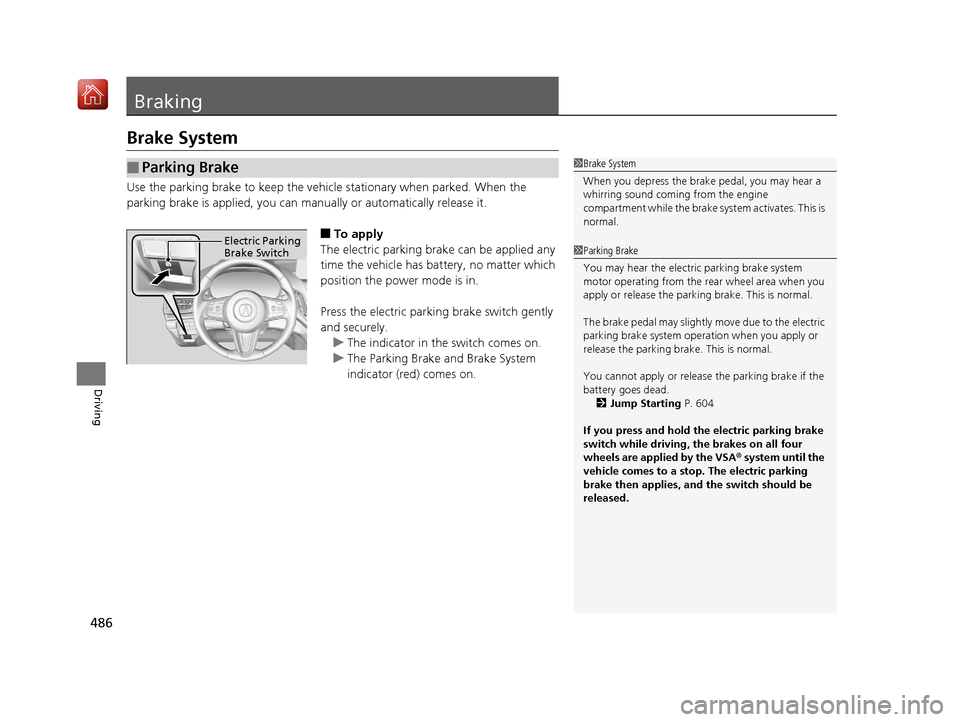
■To apply
The electric parking brake can be applied any
time the vehicle has battery, no matter which
position the power mode is in.
Press the electric parking brake switch gently
and securely. u The indicator in th e switch comes on.
u The Parking Brake and Brake System
indicator (red) comes on.
■Parking Brake1Brake System
When you depress the brak e pedal, you may hear a
whirring sound coming from the engine
compartment while the brake system activates. This is
normal.
1 Parking Brake
You may hear the electric parking brake system
motor operating from the re ar wheel area when you
apply or release the parki ng brake. This is normal.
The brake pedal may slightly move due to the electric
parking brake system opera tion when you apply or
release the parking br ake. This is normal.
You cannot apply or release the parking brake if the
battery goes dead.
2 Jump Starting P. 604
If you press and hold the electric parking brake
switch while driving, the brakes on all four
wheels are applied by the VSA ® system until the
vehicle comes to a stop. The electric parking
brake then applies, and the switch should be
released.Electric Parking
Brake Switch
19 ACURA RDX-31TJB6000.book 486 ページ 2018年4月26日 木曜日 午後4時51分
Page 488 of 649

Continued487
uuBraking uBrake System
Driving
■Automatic parking br ake feature operation
If the automatic parking brake feature has been activated:
• The parking brake is applied automatica lly when you set the power mode to
VEHICLE OFF.
• To confirm that the parking brake is applied, check if the Parking Brake and Brake
System indicator (red) is on.
2 Activating and deactivating the automatic parking brake feature P. 489
■To release
The power mode must be in ON in order to
release the electric parking brake.
1. Depress the brake pedal.
2. Pull the electric parking brake switch up
gently and securely.
u The indicator in the switch goes off.
u The Parking Brake and Brake System
indicator (red) goes off.
Manually releasing the parking brake using
the switch helps your vehicle start slowly and
smoothly when facing down hill on steep hills.
1 Parking Brake
In the following situations, the parking brake
automatically operates.
•When the vehicle stops more than 10 minutes
while ACC with LSF is activated.
•When the driver’s seat belt is unfastened while
your vehicle is stopped au tomatically by ACC with
LSF.
•When the engine is turned off, except by Auto Idle
Stop system, while ACC with LSF is activated.
•When the vehicle stops with the automatic brake
hold system activated for more than 10 minutes.
•When the driver’s seat belt is unfastened while
your vehicle is stopped and brake hold is applied.
•When the engine is turned off, except by Auto Idle
Stop system, while brake hold system is applied.
•When there is a problem with the automatic brake
hold system while Brake Hold is applied.
Electric Parking
Brake Switch
19 ACURA RDX-31TJB6000.book 487 ページ 2018年4月26日 木曜日 午後4時51分
Page 489 of 649
uuBraking uBrake System
488
Driving
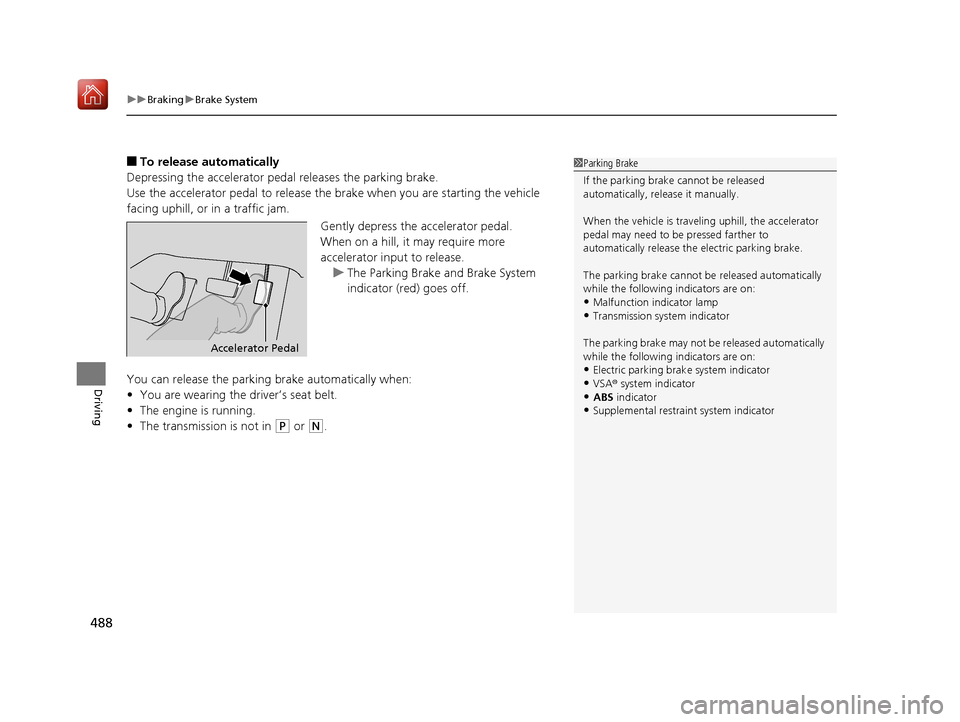
■To release automatically
Depressing the accelerator pedal releases the parking brake.
Use the accelerator pedal to release the brake when you are starting the vehicle
facing uphill, or in a traffic jam.
Gently depress the accelerator pedal.
When on a hill, it may require more
accelerator input to release.u The Parking Brake and Brake System
indicator (red) goes off.
You can release the parki ng brake automatically when:
• You are wearing the driver’s seat belt.
• The engine is running.
• The transmission is not in
(P or (N.
1Parking Brake
If the parking brake cannot be released
automatically, release it manually.
When the vehicle is travel ing uphill, the accelerator
pedal may need to be pressed farther to
automatically release the electric parking brake.
The parking brake cannot be released automatically
while the following indicators are on:
•Malfunction indicator lamp•Transmission system indicator
The parking brake may not be released automatically
while the following indicators are on:
•Electric parking brak e system indicator
•VSA® system indicator•ABS indicator
•Supplemental restraint system indicator
Accelerator Pedal
19 ACURA RDX-31TJB6000.book 488 ページ 2018年4月26日 木曜日 午後4時51分
Page 490 of 649

Continued489
uuBraking uBrake System
Driving
■Activating and deactivating the automatic parking brake feature
With the power mode is in ON, carry out th e following steps to either activate or
deactivate the automatic parking brake feature.
1. Put the transmission into
(P.
2. Without depressing the brake pedal, pres s and release the parking brake switch.
u Check that the Parking Brake and Brake System indicator (red) has come on.
3. Press and hold the parking brake switch. Wh en you hear a beeping sound, release
the switch and within 3 seconds pu ll up and hold the switch again.
4. When you hear a sound indicating that the procedure is completed, release the
switch.
u Two beeps indicates that the feature has been activated.
u One beep indicates that the feature has been deactivated.
u When you have completed activating the feature, the parking brake will
remain applied after you turn off the engine.
u To confirm that the parkin g brake is applied, check if the Parking Brake and
Brake System indicator (red) is on.
If you need to temporarily deactivate th e feature for when putting your vehicle
through a conveyor type car wash, you can follow the procedure explained below.
1. Depress the brake pedal and bring the vehicle to a stop.
2. Set the power mode to VEHICLE OFF and then within 2 seconds pull up the
parking brake switch.
u Activation and deactivation settings for the feature will not be affected.
u Before temporarily deactivating the feat ure, make sure to first turn off both
ACC with LSF and the automatic brake hold system.
u To confirm that the parkin g brake is applied, check if the Parking Brake and
Brake System indicator (red) is on.
1 Parking Brake
In cold climates, the parking brake may freeze in
place if applied.
When parking the vehicle, chock the wheels and
make sure the automatic parking brake feature is
deactivated.
Also, when putting your vehicle through a conveyor-
type car wash or when ha ving your vehicle towed,
deactivate the automatic parking brake feature and
leave the parking brake released.
19 ACURA RDX-31TJB6000.book 489 ページ 2018年4月26日 木曜日 午後4時51分
Page 492 of 649

Continued491
uuBraking uBrake System
Driving
Keeps the brake applied after releasing the brake pedal until the accelerator pedal is
pressed. You can use this system while th e vehicle is temporarily stopped, like at
traffic lights and in heavy traffic.
■Automatic Brake Hold1 Automatic Brake Hold
3WARNING
Activating the automatic brake hold system
on steep hills or slippery roads may still
allow the vehicle to move if you remove
your foot from the brake pedal.
If a vehicle unexpectedly moves, it may
cause a crash resulting in serious injury or
death.
Never activate the automatic brake hold
system or rely on it to keep a vehicle from
moving when stopped on a steep hill or
slippery roads.
3WARNING
Using the automatic brake hold system to
park the vehicle may result in the vehicle
unexpectedly moving.
If a vehicle moves unexpectedly, it may
cause a crash, resulting in serious injury or
death.
Never leave the vehicle when braking is
temporarily kept by automatic brake hold
and always park the vehicle by putting the
transmission in
( P and applying the parking
brake.
■Turning on the system
Fasten your seat belt
properly, then start the
engine. Press the
automatic brake hold
button.
●The automatic brake
hold system indicator
comes on. The system
is turned on.
■Activating the system
Depress the brake pedal
to come to a complete
stop. The transmission
must be in
( D, (S or (N.●The automatic brake
hold indicator comes
on. Braking is kept for
up to 10 minutes.
●Release the brake
pedal after the
automatic brake hold
indicator comes on.
■Canceling the system
Depress the accelerator
pedal while the
transmission is in
( D or (S. The system is
canceled and the vehicle
starts to move.
●The automatic brake
hold indicator goes
off. The system
continues to be on.
Accelerator PedalBrake PedalAutomatic Brake
Hold Button
Goes
Off
Comes
OnOn On
Comes
On
Comes
On
U.S.
Canada
19 ACURA RDX-31TJB6000.book 491 ページ 2018年4月26日 木曜日 午後4時51分