wheel Acura RDX 2019 Repair Manual
[x] Cancel search | Manufacturer: ACURA, Model Year: 2019, Model line: RDX, Model: Acura RDX 2019Pages: 649, PDF Size: 33 MB
Page 303 of 649
302
uuAudio System Basic Operation uSiri ® Eyes Free
Features
Siri ® Eyes Free
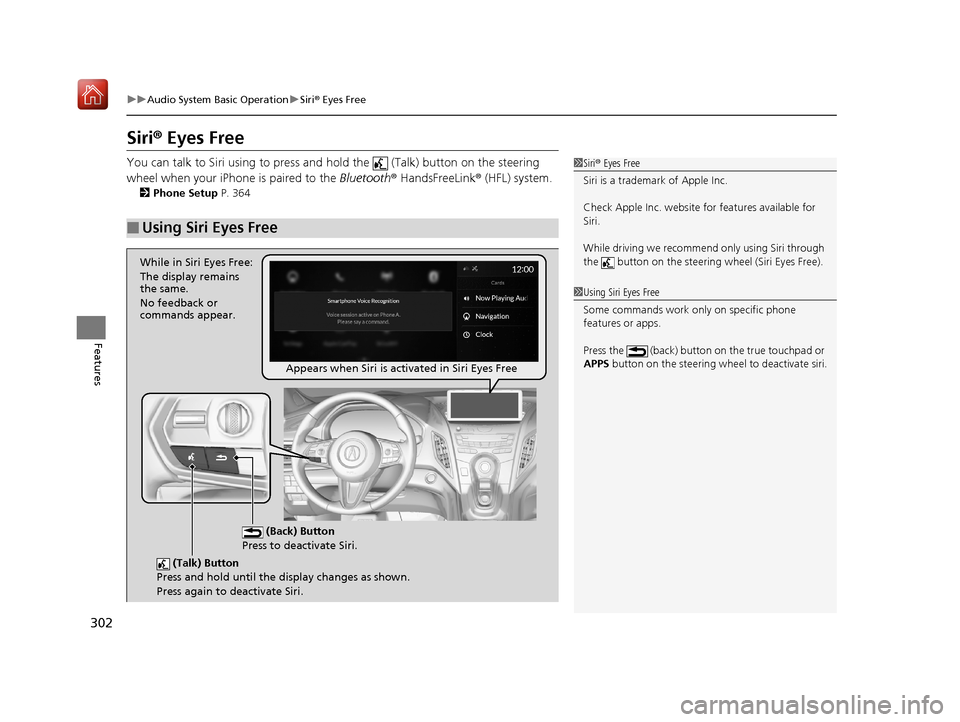
You can talk to Siri using to press and hold the (Talk) button on the steering
wheel when your iPhone is paired to the Bluetooth® HandsFreeLink ® (HFL) system.
2Phone Setup P. 364
■Using Siri Eyes Free
1Siri ® Eyes Free
Siri is a trademark of Apple Inc.
Check Apple Inc. website for features available for
Siri.
While driving we recomme nd only using Siri through
the button on the steering wheel (Siri Eyes Free).
1Using Siri Eyes Free
Some commands work only on specific phone
features or apps.
Press the (back) button on the true touchpad or
APPS button on the steering whee l to deactivate siri.
(Talk) Button
Press and hold until the display changes as shown.
Press again to deactivate Siri.
(Back) Button
Press to deactivate Siri.
While in Siri Eyes Free:
The display remains
the same.
No feedback or
commands appear.
Appears when Siri is activated in Siri Eyes Free
19 ACURA RDX-31TJB6000.book 302 ページ 2018年4月26日 木曜日 午後4時51分
Page 311 of 649
310
Features
General Information on the Audio System
SiriusXM® Radio Service
1. You need your radio ID ready before regist ering for subscription. To see the ID in
the screen, select channel up/down icons to Ch.0.
2. Have your radio ID ready, and either call or visit the SiriusXM® website to
subscribe.
Switch to the SiriusXM ® mode by using the audio remote controls on the steering
wheel, or through the audio/information screen, and stay in this mode for about 30
minutes until the service is activated. Make sure your vehicle is in an open area with
good reception.
Channel **** not subscribed. Ca ll SiriusXM to subscribe.
*1
You are not subscribed to the channel selected.
Subscription updated:
SiriusXM® radio is receiving information update from the network.
Channel Not Available:
No such channel exits, or the artist or title information is unavailable.
No Signal:
The signal is too weak in the current location.
Check Tuner:
There is a problem with the SiriusXM ® tuner. Contact a dealer.
Check Antenna:
There is a problem with the SiriusXM ® antenna. Contact a dealer.
*1 : ****part is variable characters, and w ill change depending upon where an subscribe.
■Subscribing to SiriusXM® Radio
■Receiving SiriusXM® Radio
■SiriusXM® Radio Display Messages
1 Subscribing to SiriusXM ® Radio
Contact Information for SiriusXM ® Radio:
•US: SiriusXM ® Radio at
www.siriusxm.com/subscribenow or 1-866-635-
2349
•Canada: SiriusXM ® Canada at
www.siriusxm.ca/subscribe-now , or 1-877-209-
0079
1 Receiving SiriusXM ® Radio
The SiriusXM ® satellites are in orbit over the equator;
therefore, objects south of the vehicle may cause
satellite reception interruptions. Sa tellite signals are
more likely to be blocked by tall buildings and
mountains the farther north you travel from the
equator.
You may experience rece ption problems under the
following circumstances:
•In a location with an obstruction to the south of
your vehicle.
•In tunnels
•On the lower level of a multi-tiered road•Large items carried on the roof rack
19 ACURA RDX-31TJB6000.book 310 ページ 2018年4月26日 木曜日 午後4時51分
Page 359 of 649
358
Features
Bluetooth® HandsFreeLink ®
Bluetooth® HandsFreeLink ® (HFL) allows you to place and receive phone calls using
your vehicle’s audio system, without handling your cell phone.
Using HFL
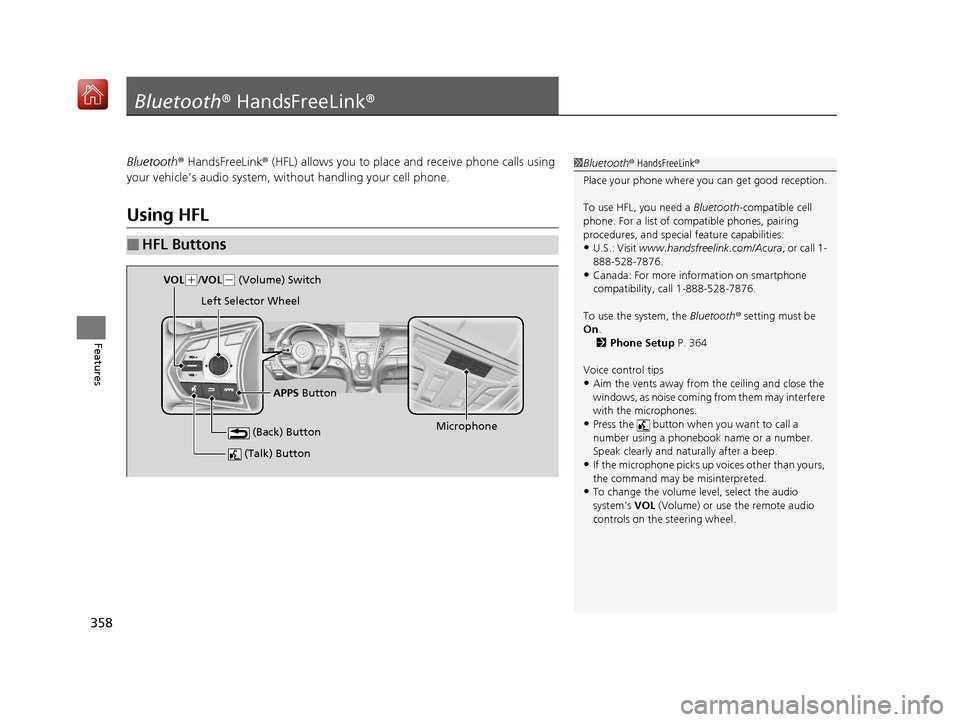
■HFL Buttons
1 Bluetooth ® HandsFreeLink ®
Place your phone where y ou can get good reception.
To use HFL, you need a Bluetooth-compatible cell
phone. For a list of compatible phones, pairing
procedures, and special feature capabilities:
•U.S.: Visit www.handsfreelink.com/Acura, or call 1-
888-528-7876.
•Canada: For more info rmation on smartphone
compatibility, call 1-888-528-7876.
To use the system, the Bluetooth® setting must be
On .
2 Phone Setup P. 364
Voice control tips
•Aim the vents away from the ceiling and close the
windows, as noise coming fr om them may interfere
with the microphones.
•Press the button when you want to call a
number using a phonebook name or a number.
Speak clearly and naturally after a beep.
•If the microphone picks up vo ices other than yours,
the command may be misinterpreted.
•To change the volume level, select the audio
system’s VOL (Volume) or use the remote audio
controls on the steering wheel.
(Talk) Button
Microphone
(Back) Button
VOL( +/VOL(- (Volume) Switch
Left Selector Wheel
APPS Button
19 ACURA RDX-31TJB6000.book 358 ページ 2018年4月26日 木曜日 午後4時51分
Page 360 of 649
Continued359
uuBluetooth ® HandsFreeLink ®u Using HFL
Features
Left Selector Wheel:
• Incomming call: Move the selector wheel to the ri ght to answer the call. Move it
to the left to decline the call.
• During a call: Move the selector wheel to the ri ght to display the call options
menu. Move it to the left to end the call.
• (back) button: Press the button to go back to the previous screen or to
cancel a command.
• (talk) button: Press the button to start voice recognition.
To go to the phone screen of the multi-information display or the head-up display
*:
1. Press the APPS button on the steering wheel.
2. Using the selector wheel, scroll to Phone on the multi-information display or the
head-up display
*, and then press the left selector wheel.
u You can select Favorites or Recents by moving the selector wheel to the left
or the right.
1 Bluetooth ® HandsFreeLink ®
Bluetooth ® Wireless Technology
The Bluetooth ® word mark and logos are registered
trademarks owned by Bluetooth SIG, Inc., and any
use of such marks by Honda Motor Co., Ltd., is under
license. Other trademarks and trade names are those
of their respective owners.
HFL Limitations
An incoming call on HFL will interrupt the audio
system when it is playing. It will resume when the call
is ended.
* Not available on all models
19 ACURA RDX-31TJB6000.book 359 ページ 2018年4月26日 木曜日 午後4時51分
Page 375 of 649

uuBluetooth ® HandsFreeLink ®u HFL Menus
374
Features
When there is an incoming call, an audible
notification sounds (i f activated) and the
Incoming Call... screen appears.
Move the left selector wheel to the right to
answer the call. Move it to the left to decline
or end the call. u You can also select Answer or Ignore
on the audio/information screen to use
hands-free calling.
■Receiving a Call1 Receiving a Call
Call Waiting
To put a call on hold so that you can answer an
incoming call, move the left selector wheel to the
right.
Move the left selector wheel to the right to resume
the call.
Select Ignore to ignore the incoming call if you do
not want to answer it.
Move the left selector wheel to the left to end a call.
Instead of using the selector wheel, you can use the
icons on the audio/information screen to perform the
above mentione d functions.
When a screen other than the phone screen is
displayed in the primar y information area, the
incoming call screen is displayed in the secondary
information area.
19 ACURA RDX-31TJB6000.book 374 ページ 2018年4月26日 木曜日 午後4時51分
Page 386 of 649

385
uuBluetooth ® HandsFreeLink ®u Text Message
Continued
Features
■Displaying message on the head-up display
You can read a text message on the head- up display only when text message is
received.
1. Move right the left selector wheel to select Open.
2. Roll up or down the left selector wheel to select Reply, and then press the left
selector wheel.
u Select Call to dialing a call.
u Select Play to start reading the message from the beginning. Select Stop to
stop reading.
3. Roll up or down the left selector wheel to select a message, and then press the
left selector wheel.
4. Roll up or down the left selector wheel to select Send, and then press the left
selector wheel.
u Message sent appears on the head-up displa y when the reply message was
successfully sent.
Models with head-up display
19 ACURA RDX-31TJB6000.book 385 ページ 2018年4月26日 木曜日 午後4時51分
Page 394 of 649
Continued393
uuAcuraLink ®u
Features
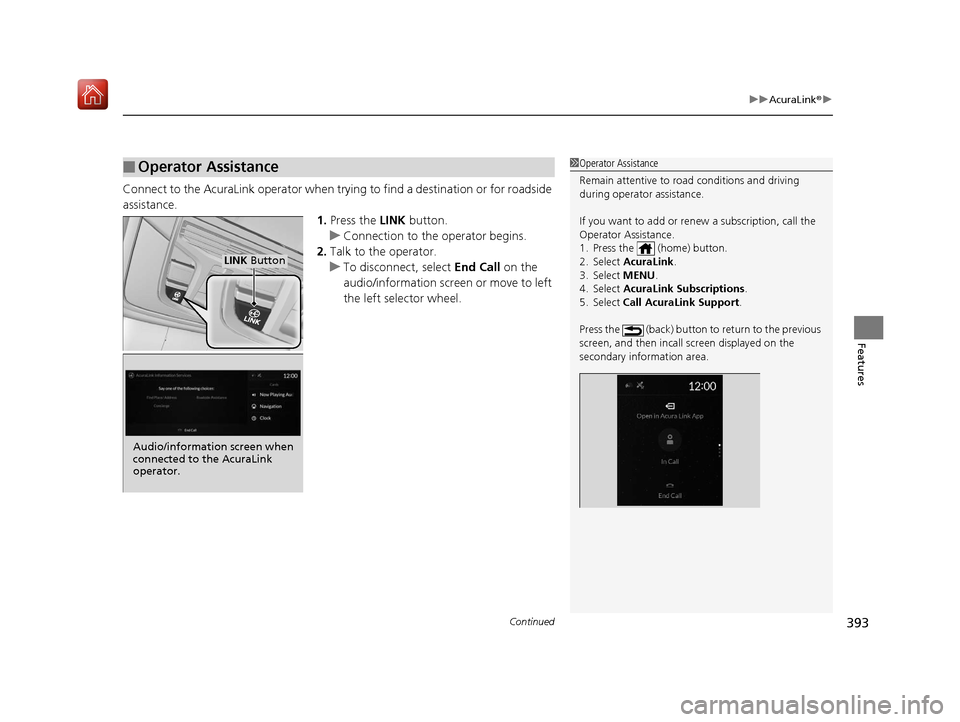
Connect to the AcuraLink operator when trying to find a destination or for roadside
assistance.
1.Press the LINK button.
u Connection to the operator begins.
2. Talk to the operator.
u To disconnect, select End Call on the
audio/information screen or move to left
the left selector wheel.
■Operator Assistance1 Operator Assistance
Remain attentive to road conditions and driving
during operator assistance.
If you want to add or re new a subscription, call the
Operator Assistance.
1. Press the (home) button.
2. Select AcuraLink .
3. Select MENU .
4. Select AcuraLink Subscriptions.
5. Select Call AcuraLink Support .
Press the (back) button to return to the previous
screen, and then incall screen displayed on the
secondary information area.
LINK Button
Audio/information screen when
connected to the AcuraLink
operator.
19 ACURA RDX-31TJB6000.book 393 ページ 2018年4月26日 木曜日 午後4時51分
Page 398 of 649
397
Driving
This chapter discusses driving and refueling.
Before Driving................................... 398
Towing a Trailer ................................ 403
Off-Highway Driving Guidelines ..... 409
When Driving Starting the Engine .......................... 411
Precautions While Driving................. 416
Automatic Transmission ................... 417
Shifting ............................................ 418
Integrated Dynamics System............. 426
Auto Idle Stop .................................. 428
Vehicle Stability Assist® (VSA®), aka Electronic
Stability Control (ESC), System ................. 434
Agile Handling Assist ....................... 436
Super Handling-All Wheel DriveTM (SH-AWD®)*.. 437
Blind spot information System*........ 438
Tire Pressure Monitoring System (TPMS) with Tire Fill Assist .......................... 441
Tire Pressure Monitoring System (TPMS) - Required Federal Explanation ......... 443
AcuraWatch
TM................................... 445
Collision Mitigati on Braking SystemTM
(CMBSTM) ....................................... 446
Adaptive Cruise Control (ACC) with Low Speed Follow (LSF) ......................... 455 Lane Keeping Assist System (LKAS) .. 471
Road Departure Mi
tigation (RDM)
System ........................................ 479
Front Sensor Camera ....................... 483
Radar Sensor ................................... 485
Braking .............................................. 486
Parking Your Vehicle ........................ 495
Multi-View Rear Camera .................. 505
Surround View Camera System
*..... 507
Refueling ........................................... 515
Fuel Economy and CO
2 Emissions .... 518
Turbo Engine Vehicle ....................... 519
* Not available on all models
19 ACURA RDX-31TJB6000.book 397 ページ 2018年4月26日 木曜日 午後4時51分
Page 399 of 649
398
Driving
Before Driving
Driving Preparation
Check the following items before you start driving.
• Make sure there are no obstructions on th e windows, door mirrors, exterior
lights, or other parts of the vehicle.
u Remove any frost, snow, or ice.
u Remove any snow on the roof, as this can slip down and obstruct your field of
vision while driving. If frozen solid , remove ice once it has softened.
u When removing ice from around the wheel s, be sure not to damage the wheel
or wheel components.
• Make sure the hood is securely closed.
u If the hood opens while driving, your front view will be blocked.
• Make sure the tires are in good condition.
u Check air pressures, and check for damage and excessive wear.
2Checking and Maintaining Tires P. 554
•Make sure there are no people or ob jects behind or around the vehicle.
u There are blind spots from the inside.
■Exterior Checks1Exterior Checks
NOTICE
When doors are frozen s hut, use warm water around
the door edges to melt any ice. Do not try to force
them open, as this can damage the rubber trim
around the doors. When done, wipe dry to avoid
further freezing.
Do not pour warm water into the key cylinder.
You will be unable to insert the key if the water
freezes in the hole.
Heat from the engine and exhaust can ignite
flammable material s left under the hood, causing a
fire. If you’ve parked y our vehicle for an extended
period, inspect and remove any debris that may have
collected, such as dried grass and leaves that have
fallen or have been carried in for use as a nest by a
small animal. Also check under the hood for leftover
flammable materials after you or someone else has
performed maintenance on your vehicle.
19 ACURA RDX-31TJB6000.book 398 ページ 2018年4月26日 木曜日 午後4時51分
Page 400 of 649
Continued399
uuBefore Driving uDriving Preparation
Driving
• Store or secure all items on board properly.
u Carrying too much cargo, or improperly storing it, can affect your vehicle’s
handling, stability, sto pping distance, and tires, and make it unsafe.
2Maximum Load Limit P. 401
•Do not pile items higher than the seat height.
u They can block your view and may be thrown forward in the event of sudden
braking.
• Do not place anything in the front seat footwells. Make sure to secure the floor
mat.
u An object or unsecured floor mat can in terfere with your brake and accelerator
pedal operation while driving.
• If you have any animals on board, do not let them move around in the vehicle.
u They may interfere with driv ing and a crash could occur.
• Securely close and lock al l doors and the tailgate.
2Locking/Unlocking the Doors from the Inside P. 159
•Adjust your seating position properly.
u Adjust the head restraint, too.
2Adjusting the Seats P. 207
2 Adjusting the Front and Rear Outer Head Restraint Positions P. 212
•Adjust the mirrors and steering wheel properly.
u Adjust them while sitting in the proper driving position.
2 Adjusting the Steering Wheel P. 203
2 Adjusting the Mirrors P. 204
■Interior Checks1Interior Checks
The headlight aim is set by the factory, and does not
need to be adjusted. Howeve r, if you regularly carry
heavy items in the cargo area or tow a trailer, have
the aiming readjusted at a dealer or by a qualified
technician.
19 ACURA RDX-31TJB6000.book 399 ページ 2018年4月26日 木曜日 午後4時51分