ON mode Acura RDX 2020 Owner's Manual
[x] Cancel search | Manufacturer: ACURA, Model Year: 2020, Model line: RDX, Model: Acura RDX 2020Pages: 657, PDF Size: 33.2 MB
Page 3 of 657
Contents
This owner’s manual should be considered a permanent part of the
vehicle and should remain with the vehicle when it is sold.
This owner’s manual covers all models of your vehicle. You may find
descriptions of equipment and features that are not on your
particular model.
Images throughout this owner’s manual (including the front cover)
represent features and equipment that are available on some, but
not all, models. Your particular mo del may not have some of these
features.
This owner’s manual is for vehicles sold in the United States and
Canada.
The information and specifications in cluded in this publication were
in effect at the time of approval for printing. Honda Motor Co., Ltd.
reserves the right, however, to discontinue or change specifications
or design at any time without notice and without incurring any
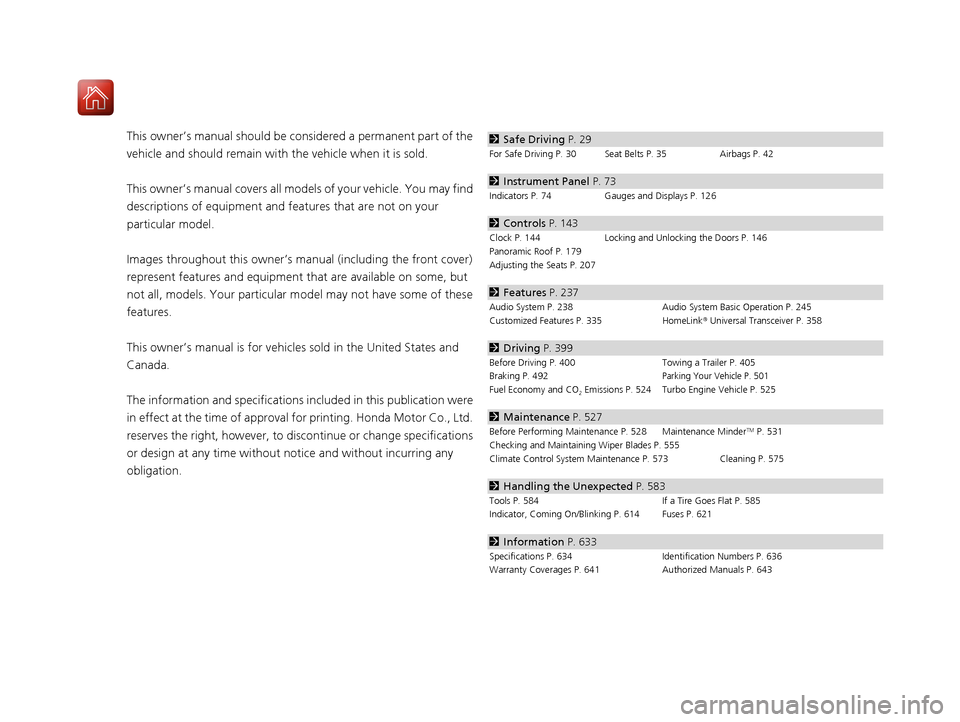
obligation.2 Safe Driving P. 29
For Safe Driving P. 30 Seat Belts P. 35 Airbags P. 42
2Instrument Panel P. 73
Indicators P. 74 Gauges and Displays P. 126
2Controls P. 143
Clock P. 144 Locking and Unlocking the Doors P. 146
Panoramic Roof P. 179
Adjusting the Seats P. 207
2 Features P. 237
Audio System P. 238 Audio System Basic Operation P. 245
Customized Features P. 335 HomeLink® Universal Transceiver P. 358
2 Driving P. 399
Before Driving P. 400 Towing a Trailer P. 405
Braking P. 492Parking Your Vehicle P. 501
Fuel Economy and CO2 Emissions P. 524 Turbo Engine Vehicle P. 525
2 Maintenance P. 527
Before Performing Maintenance P. 528 Maintenance MinderTM P. 531
Checking and Maintaining Wiper Blades P. 555
Climate Control System Main tenance P. 573 Cleaning P. 575
2Handling the Unexpected P. 583
Tools P. 584 If a Tire Goes Flat P. 585
Indicator, Coming On/Blinking P. 614 Fuses P. 621
2 Information P. 633
Specifications P. 634 Identification Numbers P. 636
Warranty Coverages P. 641 Authorized Manuals P. 643
20 ACURA RDX-31TJB6111.book 2 ページ 2020年2月11日 火曜日 午後2時6分
Page 6 of 657
5
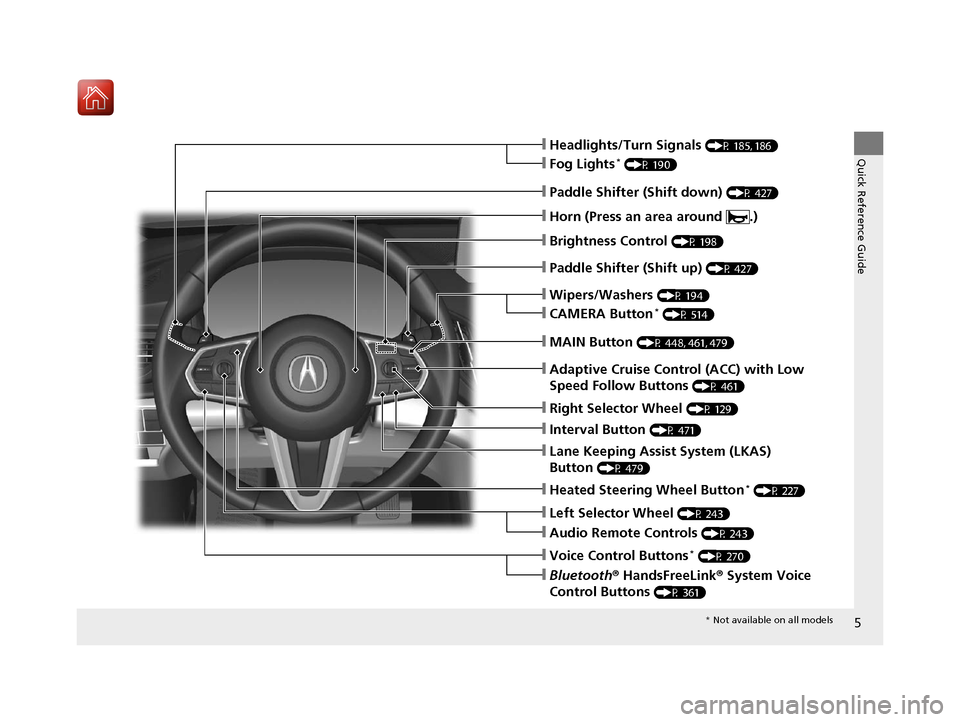
Quick Reference Guide❙Headlights/Turn Signals (P 185, 186)
❙Fog Lights* (P 190)
❙Brightness Control (P 198)
❙Paddle Shifter (Shift down) (P 427)
❙Paddle Shifter (Shift up) (P 427)
❙Wipers/Washers (P 194)
❙Lane Keeping Assist System (LKAS)
Button
(P 479)
❙Horn (Press an area around .)
❙CAMERA Button* (P 514)
❙Interval Button (P 471)
❙Adaptive Cruise Control (ACC) with Low
Speed Follow Buttons
(P 461)
❙Heated Steering Wheel Button* (P 227)
❙Left Selector Wheel (P 243)
❙Audio Remote Controls (P 243)
❙Voice Control Buttons* (P 270)
❙Bluetooth® HandsFreeLink ® System Voice
Control Buttons
(P 361)
❙MAIN Button (P 448, 461, 479)
❙Right Selector Wheel (P 129)
* Not available on all models
20 ACURA RDX-31TJB6111.book 5 ページ 2020年2月11日 火曜日 午後2時6分
Page 7 of 657
Visual Index
6
Quick Reference Guide
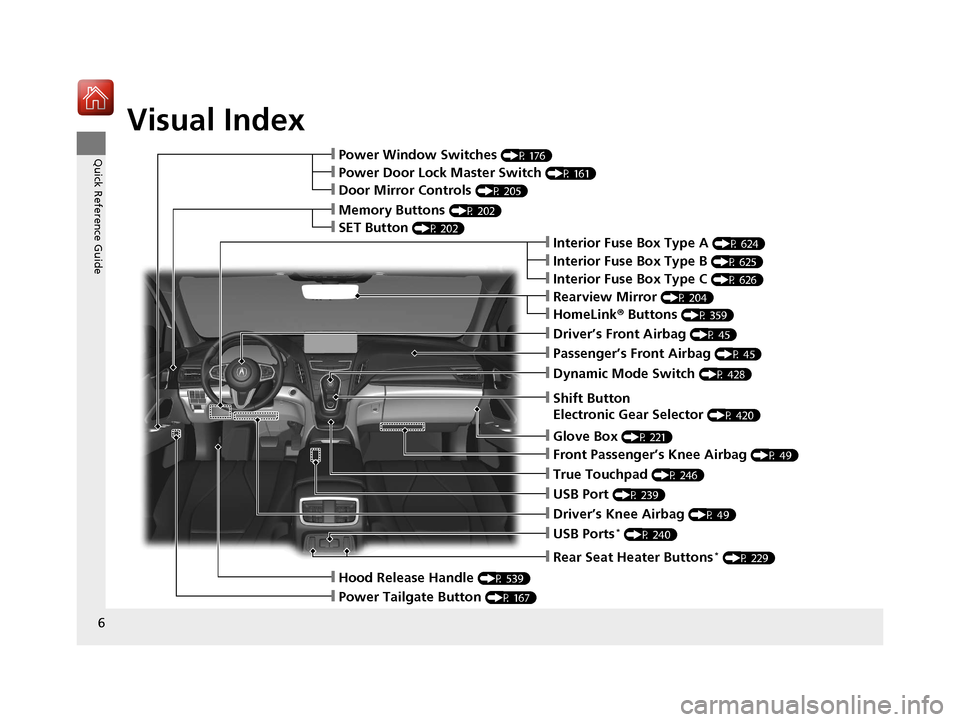
❙Rearview Mirror (P 204)
❙Shift Button
Electronic Gear Selector
(P 420)
❙Driver’s Front Airbag (P 45)
❙Glove Box (P 221)
❙Passenger’s Front Airbag (P 45)
❙HomeLink® Buttons (P 359)
❙Interior Fuse Box Type A (P 624)
❙Dynamic Mode Switch (P 428)
❙Front Passenger’s Knee Airbag (P 49)
❙True Touchpad (P 246)
❙USB Port (P 239)
❙Driver’s Knee Airbag (P 49)
❙USB Ports* (P 240)
❙Power Window Switches (P 176)
❙Memory Buttons (P 202)
❙SET Button (P 202)
❙Power Door Lock Master Switch (P 161)
❙Door Mirror Controls (P 205)
❙Hood Release Handle (P 539)
❙Power Tailgate Button (P 167)
❙Interior Fuse Box Type C (P 626)
❙Rear Seat Heater Buttons* (P 229)
❙Interior Fuse Box Type B (P 625)
20 ACURA RDX-31TJB6111.book 6 ページ 2020年2月11日 火曜日 午後2時6分
Page 8 of 657
7
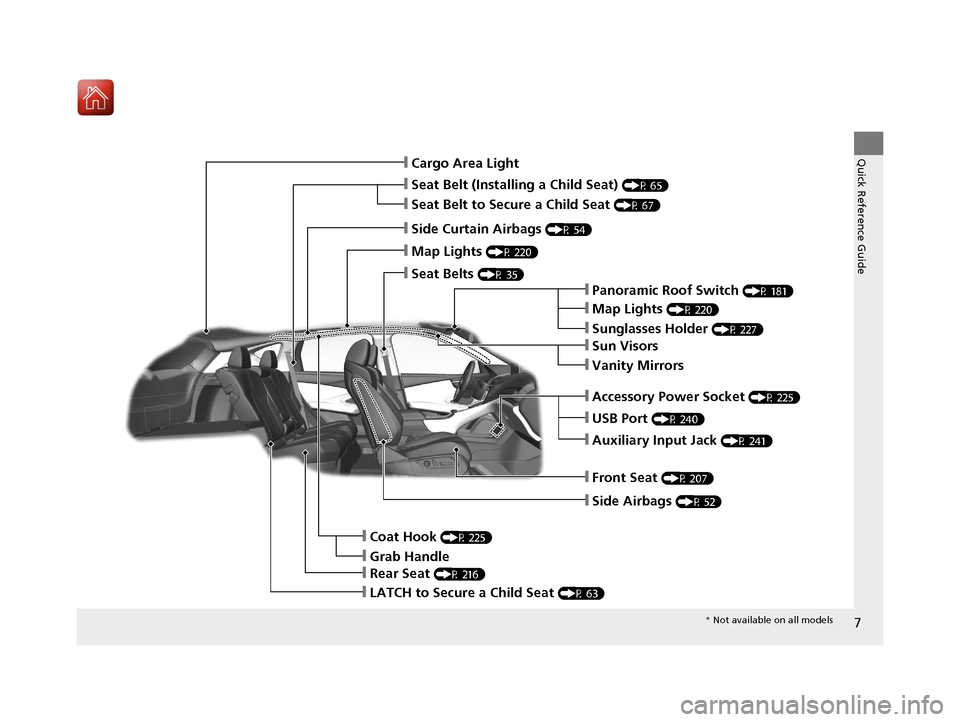
Quick Reference Guide❙Cargo Area Light
❙Seat Belt (Installing a Child Seat) (P 65)
❙Side Curtain Airbags (P 54)
❙Map Lights (P 220)
❙Seat Belts (P 35)
❙Panoramic Roof Switch (P 181)
❙Map Lights (P 220)
❙Sunglasses Holder (P 227)
❙USB Port (P 240)
❙Auxiliary Input Jack (P 241)
❙Front Seat (P 207)
❙Side Airbags (P 52)
❙Coat Hook (P 225)
❙LATCH to Secure a Child Seat (P 63)
❙Accessory Power Socket (P 225)
❙Rear Seat (P 216)
❙Sun Visors
❙Vanity Mirrors
❙Seat Belt to Secure a Child Seat (P 67)
❙Grab Handle
* Not available on all models
20 ACURA RDX-31TJB6111.book 7 ページ 2020年2月11日 火曜日 午後2時6分
Page 10 of 657
9
Quick Reference Guide
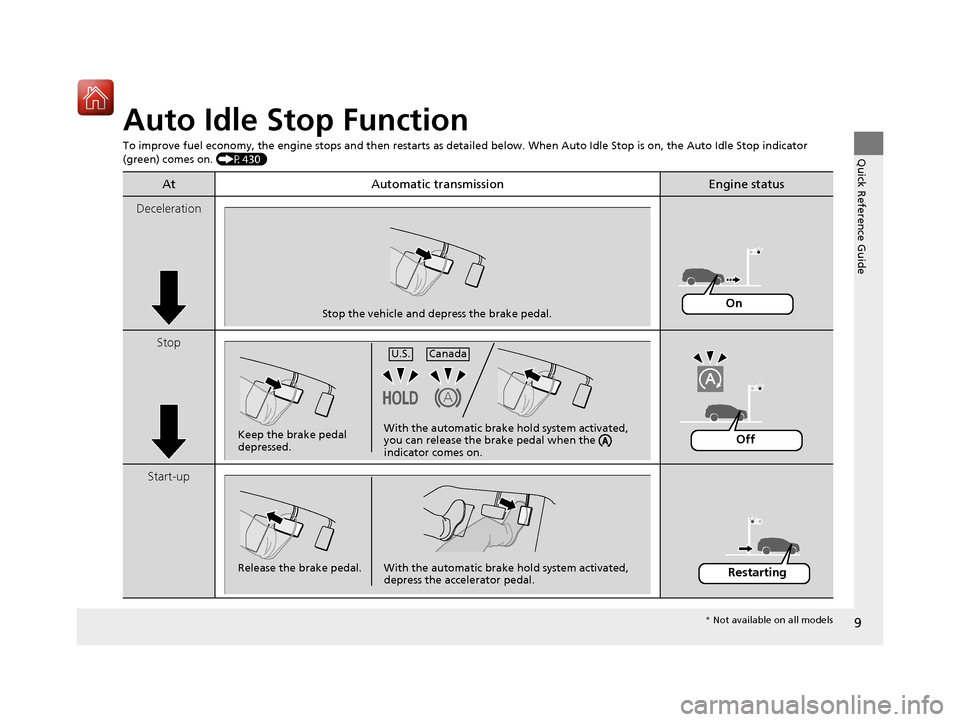
Auto Idle Stop Function
To improve fuel economy, the engine stops and then restarts as detailed below. When Auto Idle Stop is on, the Auto Idle Stop in dicator
(green) comes on. (P430)
At Automatic transmissionEngine status
Deceleration
Stop
Start-up
Stop the vehicle and depress the brake pedal.On
Keep the brake pedal
depressed.U.S.
Canada
With the automatic brake hold system activated,
you can release the brake pedal when the
indicator comes on.Off
Release the brake pedal. With the automatic brake hold system activated,
depress the accelerator pedal.Restarting
* Not available on all models
20 ACURA RDX-31TJB6111.book 9 ページ 2020年2月11日 火曜日 午後2時6分
Page 11 of 657

10
Quick Reference Guide
Safe Driving (P 29)
Airbags (P 42)
● Your vehicle is fitted with ai rbags to help protect you and
your passengers during a moderate-to-severe collision.
Child Safety (P 58)
● All children 12 and younger should be seated in the rear seat.
● Smaller children should be properly restra ined in a forward-facing child seat.
● Infants must be properly restrained in a rear-facing child seat.
Exhaust Gas Hazard (P 71)
● Your vehicle emits dangerous exhaust gases that contain carbon
monoxide. Do not run the engine in confined spaces where carbon
monoxide gas can accumulate.
Before Driving Checklist (P 34)
● Before driving, check that the front seats, head restraints,
steering wheel, and mirrors have been properly adjusted.
Seat Belts (P 35)
● Fasten your seat belt and sit upright well
back in the seat.
● Check that your passengers are wearing
their seat belts correctly.
Fasten your lap belt as
low as possible.
20 ACURA RDX-31TJB6111.book 10 ページ 2020年2月11日 火曜日 午後2時6分
Page 12 of 657
11
Quick Reference Guide
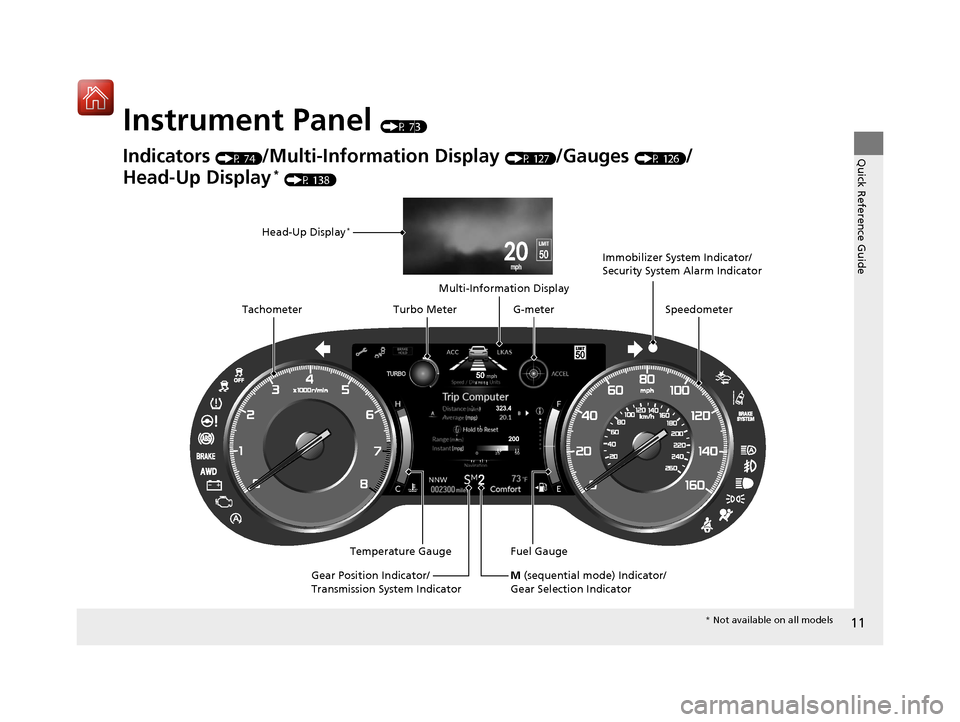
Instrument Panel (P 73)
Indicators (P 74)/Multi-Information Display (P 127)/Gauges (P 126)/
Head-Up Display
* (P 138)
Speedometer
Fuel Gauge
Multi-Information Display
Temperature Gauge
Tachometer
Head-Up Display
*
Immobilizer System Indicator/
Security System Alarm Indicator
Gear Position Indicator/
Transmission System Indicator Turbo Meter
M (sequential mode) Indicator/
Gear Selection Indicator
G-meter
* Not available on all models
20 ACURA RDX-31TJB6111.book 11 ページ 2020年2月11日 火曜日 午後2時6分
Page 13 of 657
12
Quick Reference Guide
Controls (P 143)
Clock (P 144)
The clock is automatically updated through
the audio system.
You can adjust the time using the true
touchpad A.
aPress the (home) button.
bSelect Settings .
cSelect System .
dSelect Date & Time .
eSelect Set Date & Time .
fSelect Automatic Date & Time .
gSelect Off.
hSelect Set Date or Set Time .
iSelect (+/(- to adjust the dates, hours
and minutes.
jPress the (back) button to set the
date or time.
ENGINE START/STOP
Button
(P 182)
Press the button to change the vehicle’s
power mode.
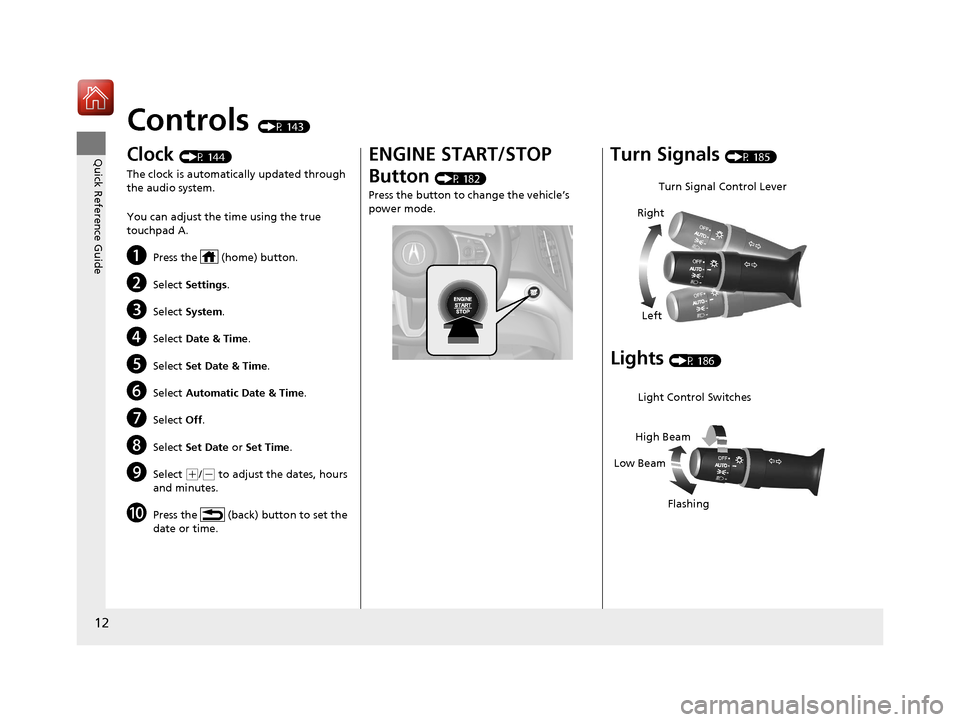
Turn Signals (P 185)
Lights (P 186)
Turn Signal Control Lever
Right
Left
Light Control Switches
Low Beam High Beam
Flashing
20 ACURA RDX-31TJB6111.book 12 ページ 2020年2月11日 火曜日 午後2時6分
Page 14 of 657
13
Quick Reference Guide
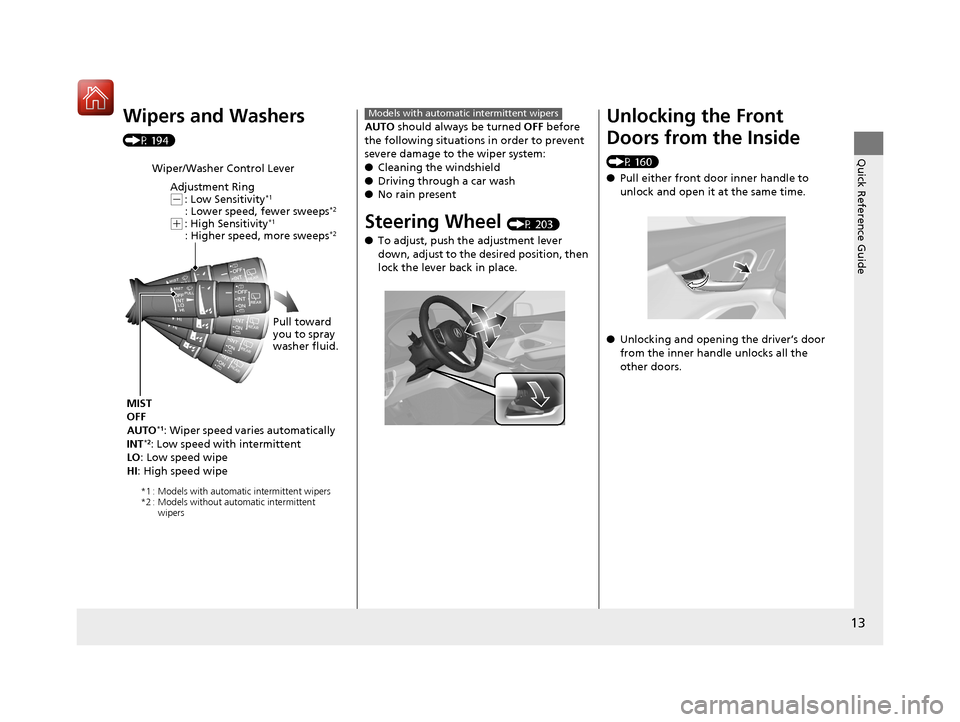
Wipers and Washers
(P 194)
Wiper/Washer Control LeverAdjustment Ring
(-: Low Sensitivity*1
: Lower speed, fewer sweeps*2
(+: High Sensitivity*1
: Higher speed, more sweeps*2
MIST
OFF
AUTO
*1: Wiper speed varies automatically
INT*2: Low speed with intermittent
LO : Low speed wipe
HI : High speed wipe Pull toward
you to spray
washer fluid.
*1 : Models with automatic intermittent wipers
*2 : Models without automatic intermittent
wipers
AUTO should always be turned OFF before
the following situations in order to prevent
severe damage to the wiper system:
● Cleaning the windshield
● Driving through a car wash
● No rain present
Steering Wheel (P 203)
● To adjust, push the adjustment lever
down, adjust to the desired position, then
lock the lever back in place.
Models with automatic intermittent wipersUnlocking the Front
Doors from the Inside
(P 160)
●Pull either front door inner handle to
unlock and open it at the same time.
● Unlocking and opening the driver’s door
from the inner handle unlocks all the
other doors.
20 ACURA RDX-31TJB6111.book 13 ページ 2020年2月11日 火曜日 午後2時6分
Page 15 of 657
14
Quick Reference Guide
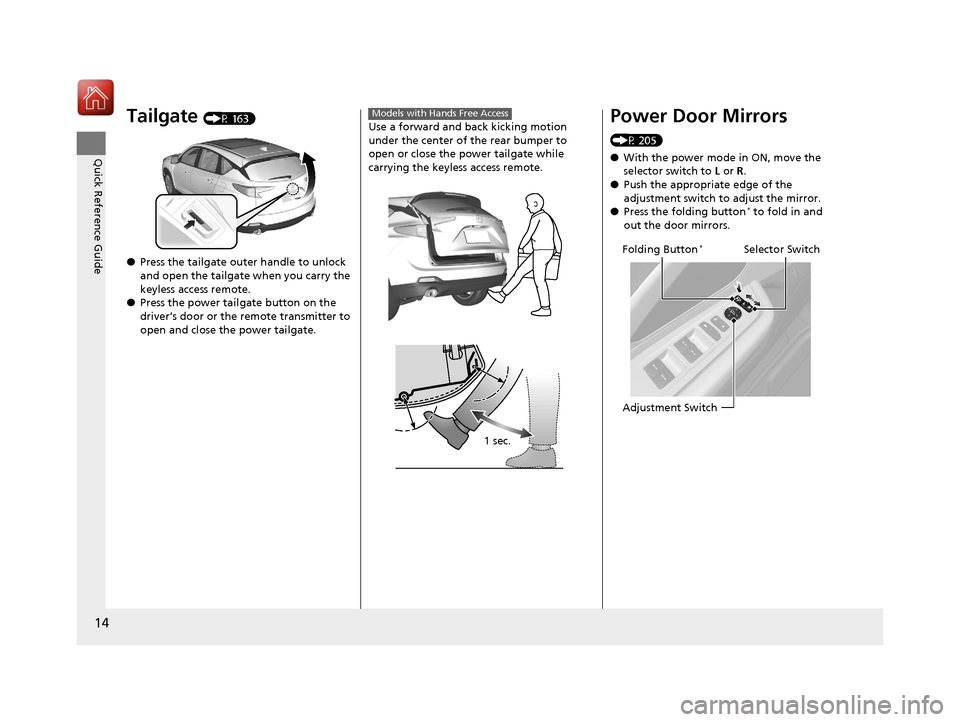
Tailgate (P 163)
● Press the tailgate outer handle to unlock
and open the tailgate when you carry the
keyless access remote.
● Press the power tailgate button on the
driver’s door or the remote transmitter to
open and close the power tailgate.Use a forward and back kicking motion
under the center of the rear bumper to
open or close the power tailgate while
carrying the keyless access remote.
Models with Hands Free Access
1 sec.
Power Door Mirrors
(P 205)
●With the power mode in ON, move the
selector switch to L or R .
● Push the appropriate edge of the
adjustment switch to adjust the mirror.
● Press the folding button
* to fold in and
out the door mirrors.
Selector Switch
Adjustment SwitchFolding Button*
20 ACURA RDX-31TJB6111.book 14 ページ 2020年2月11日 火曜日 午後2時6分