Acc Acura RDX 2020 Owner's Manual
[x] Cancel search | Manufacturer: ACURA, Model Year: 2020, Model line: RDX, Model: Acura RDX 2020Pages: 657, PDF Size: 33.2 MB
Page 435 of 657
uuWhen Driving uAuto Idle Stop
434
Driving
• The brake pedal is released (without the automatic brake hold system activated).
• The accelerator pedal is depressed (with the automatic brake hold system
activated).
2 Automatic Brake Hold P. 497
■The engine restarts even if the brake pedal is depressed*1 when:
• The Auto Idle Stop OFF button is pressed.
• A steering wheel is operated.
• The transmission is put into
(R, (S, and (P, or taken out of (N and put into (D.
• The pressure on the brake pedal is redu ced and the vehicle starts moving while
stopped on an incline.
• The brake pedal is released slightly during a stop.
• The battery charge becomes low.
• The accelerator pedal is depressed.
• The driver’s seat belt is unlatched.
• is ON (indicator on).
• The climate control system is in us e, and the difference between the set
temperature and actual interior temperature becomes significant.
• The climate control system is bein g used to dehumidify the interior.
• The vehicle ahead of you starts again when your vehicle stops automatically with
ACC with Low Speed Follow.
• The dynamic mode is changed to Snow or Sport+ mode.
■The Engine Automatically Restarts When:1The Engine Automatically Restarts When:
If you are using an electroni c device during Auto Idle
Stop, the device may tempor arily be turned off when
the engine restarts.
1 The engine restarts even if the brake pedal is depressed*1 when:
*1: With the automatic brake hold system activated,
you can release the brake pe dal during Auto Idle Stop
is in operation.
If the automatic brake hold system has been turned
off, or if there is a problem with the system, the
engine will restart automatically when you release
the brake pedal. 2 Automatic Brake Hold P. 497
20 ACURA RDX-31TJB6111.book 434 ページ 2020年2月11日 火曜日 午後2時6分
Page 437 of 657
436
uuWhen Driving uVehicle Stability AssistTM (VSA ®), aka Electronic Stability Control (ESC), System
Driving
Vehicle Stability AssistTM (VSA ®), aka Electronic
Stability Control (ESC), System
VSA ® helps to stabilize the vehicle during cornering if the vehicle turns more or less
than what was intended. It also assists in maintaining traction on slippery surfaces.
It does so by regulating engine output and select ively applying the brakes.
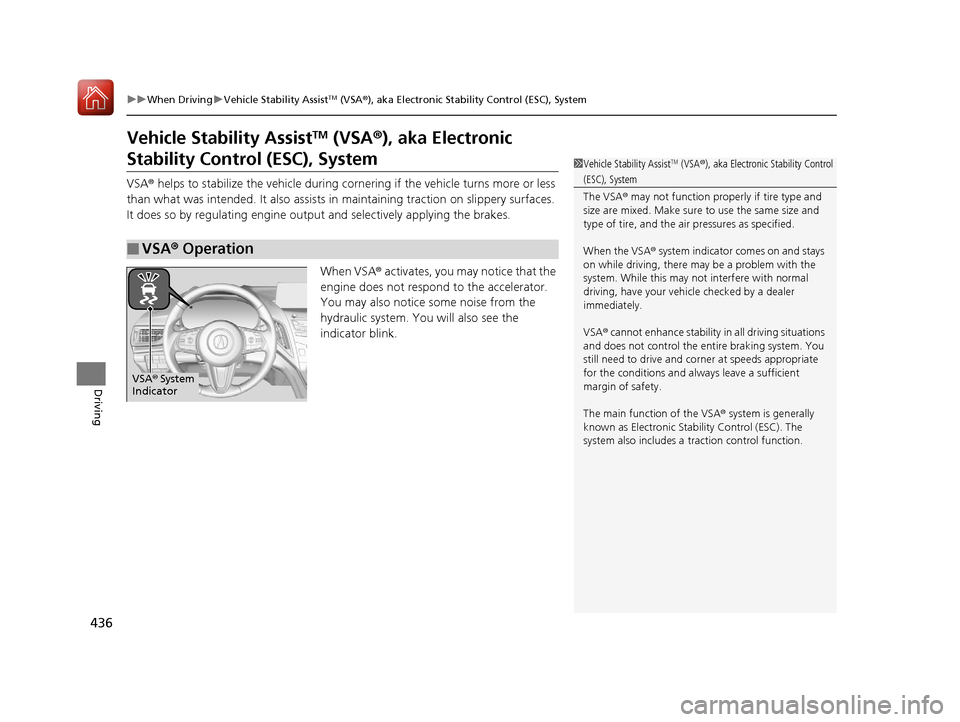
When VSA ® activates, you may notice that the
engine does not respond to the accelerator.
You may also notice some noise from the
hydraulic system. You will also see the
indicator blink.
■VSA ® Operation
1 Vehicle Stability AssistTM (VSA ®), aka Electronic Stability Control
(ESC), System
The VSA ® may not function properl y if tire type and
size are mixed. Make sure to use the same size and
type of tire, and the air pressures as specified.
When the VSA ® system indicator comes on and stays
on while driving, there ma y be a problem with the
system. While this may not interfere with normal
driving, have your vehi cle checked by a dealer
immediately.
VSA ® cannot enhance stability in all driving situations
and does not control the entire braking system. You
still need to drive and corner at speeds appropriate
for the conditions and always leave a sufficient
margin of safety.
The main function of the VSA ® system is generally
known as Electronic Stability Control (ESC). The
system also includes a traction control function.
VSA® System
Indicator
20 ACURA RDX-31TJB6111.book 436 ページ 2020年2月11日 火曜日 午後2時6分
Page 440 of 657
439
uuWhen Driving uSuper Handling-All Wheel DriveTM (SH-AWD ®)*
Driving
Super Handling-All Wheel DriveTM (SH-AWD ®)*
The system controls and trans fers varying amounts of engine torque to each wheel
in accordance with the driving conditions.
SH-AWD ® helps to enhance driving stability, and lets you handle situations like
slippery surfaces, such as snow, sand, mud, and steep hill, better than when driving
with two wheel drive. However, the system does not help to enhance braking. Be
precautious about the following:
• It is still your responsibility to drive sa fely when you steer, accelerate, and apply
brakes.
• Leave a sufficient margin when braking on slippery surfaces.1Super Handling-All Wheel DriveTM (SH-AWD ®)*
The SH-AWD ® system may not function properly if
tire type and size are mixed.
Make sure to use the same size and type of tire, and
the air pressures as specified. 2 Tire and Wheel Replacement P. 566
Do not continuously spin the front tires of your
vehicle. Continuously spinning the front tires can
cause damage to the transmission and SH-AWD ®
unit.
If the Super Handling-All Wheel Drive
TM (SH-AWD® )
indicator blinks while driving, it indicates the
differential temperature is too high. If this happens,
pull to the side of the road when it is safe, change the
gear position to
( P, and idle the engine until the
indicator goes out.
* Not available on all models
20 ACURA RDX-31TJB6111.book 439 ページ 2020年2月11日 火曜日 午後2時6分
Page 443 of 657
442
uuWhen Driving uTire Pressure Monitoring System (TPMS) - Required Federal Explanation
Driving
Tire Pressure Monitoring System (TPMS) - Required
Federal Explanation
Each tire, including the spare (i f provided), should be checked
monthly when cold and inflated to the inflation pressure
recommended by the vehicle manufacturer on the vehicle placard
or tire inflation pressure label.
(If your vehicle has tires of a different size than the size indicated
on the vehicle placard or tire infl ation pressure label, you should
determine the proper tire inflat ion pressure for those tires.)
As an added safety feature, your vehicle has been equipped with
a tire pressure monitoring system (TPMS) that illuminates a low
tire pressure telltale
when one or more of your tire s is significantly under-inflated.
Accordingly, when the low tire pr essure telltale illuminates, you
should stop and check your tires as soon as possible, and inflate
them to the proper pressure.
Driving on a significantly under-in flated tire causes the tire to
overheat and can lead to tire failure. Under-inflat ion also reduces
fuel efficiency and tire tread li fe, and may affect the vehicle’s
handling and stopping ability.
20 ACURA RDX-31TJB6111.book 442 ページ 2020年2月11日 火曜日 午後2時6分
Page 448 of 657
447Continued
Driving
AcuraWatchTM
AcuraWatchTM is a driver support system which employs the use of two distinctly
different kinds of sensors: a radar sensor located behind the emblem and a front
sensor camera mounted to the interior side of the windshield, behind the rearview
mirror.
AcuraWatch
TM has following functions.
■The functions which do not requir e switch operations to activate
• Collision Mitigation Braking SystemTM (CMBSTM) 2 P. 450
• Road Departure Mitigation (RDM) System 2 P. 485
■The functions wh ich require switch ope rations to activate
• Adaptive Cruise Control ( ACC) with Low Speed Follow
2 P. 460
• Lane Keeping Assist System (LKAS) 2 P. 477
20 ACURA RDX-31TJB6111.book 447 ページ 2020年2月11日 火曜日 午後2時6分
Page 449 of 657
448
uuAcuraWatchTMu
Driving
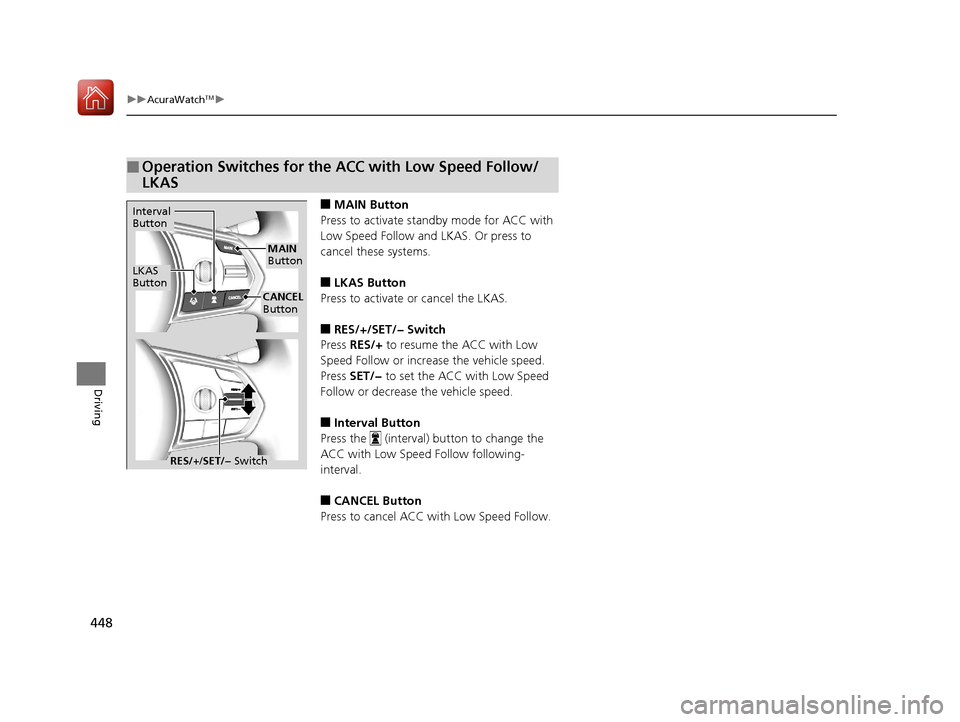
■MAIN Button
Press to activate standby mode for ACC with
Low Speed Follow and LKAS. Or press to
cancel these systems.
■LKAS Button
Press to activate or cancel the LKAS.
■RES/+/SET/− Switch
Press RES/+ to resume the ACC with Low
Speed Follow or increase the vehicle speed.
Press SET/− to set the ACC with Low Speed
Follow or decrease the vehicle speed.
■Interval Button
Press the (interval) button to change the
ACC with Low Speed Follow following-
interval.
■CANCEL Button
Press to cancel ACC with Low Speed Follow.
■Operation Switches for the ACC with Low Speed Follow/
LKAS
Interval
Button
LKAS
Button
MAIN
Button
CANCEL
Button
RES/+ /SET/− Switch
20 ACURA RDX-31TJB6111.book 448 ページ 2020年2月11日 火曜日 午後2時6分
Page 450 of 657
449
uuAcuraWatchTMu
Driving
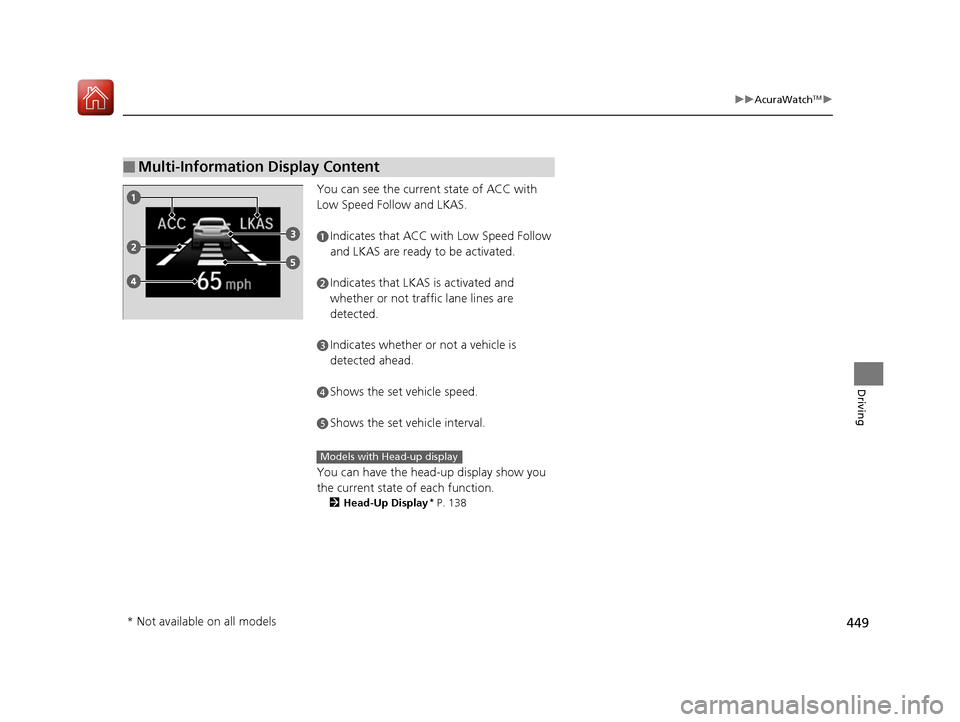
You can see the current state of ACC with
Low Speed Follow and LKAS.
You can have the head-up display show you
the current state of each function.
2Head-Up Display* P. 138
■Multi-Information Display Content
aIndicates that ACC with Low Speed Follow
and LKAS are ready to be activated.
bIndicates that LKAS is activated and
whether or not traffic lane lines are
detected.
cIndicates whether or not a vehicle is
detected ahead.
dShows the set vehicle speed.
eShows the set vehicle interval.
Models with Head-up display
* Not available on all models
20 ACURA RDX-31TJB6111.book 449 ページ 2020年2月11日 火曜日 午後2時6分
Page 451 of 657
450
uuAcuraWatchTMuCollision Mitigation Braking SystemTM (CMBSTM)
Driving
Collision Mitigati on Braking SystemTM (CMBSTM)
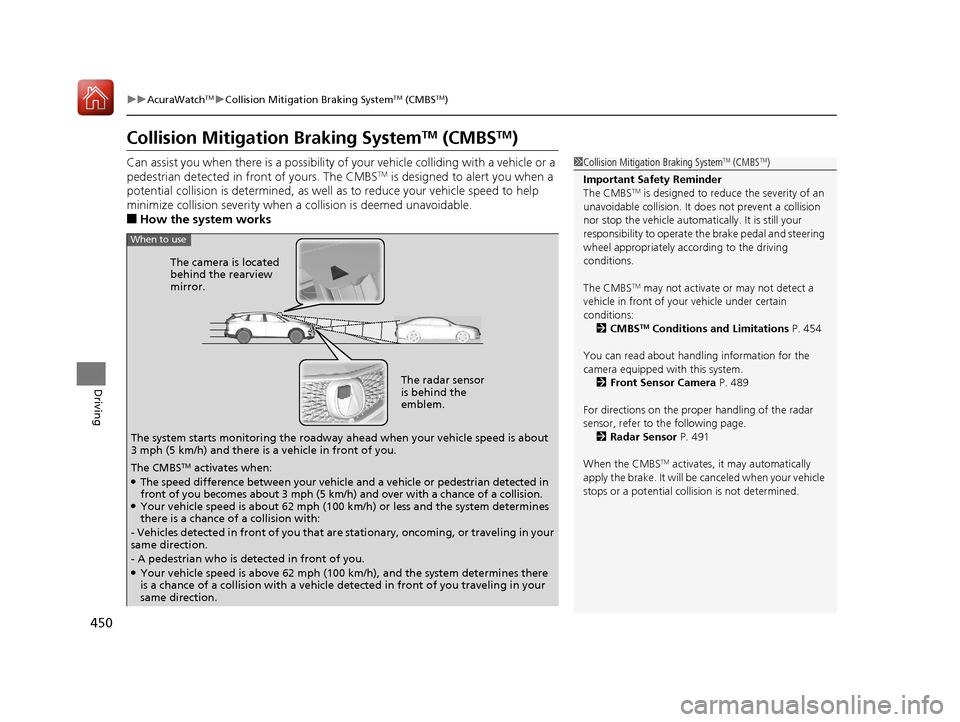
Can assist you when there is a possibility of your vehicle colliding with a vehicle or a
pedestrian detected in front of yours. The CMBSTM is designed to alert you when a
potential collision is determined, as well as to reduce your vehicle speed to help
minimize collision severity when a collision is deemed unavoidable.
■How the system works
1 Collision Mitigation Braking SystemTM (CMBSTM)
Important Safety Reminder
The CMBS
TM is designed to reduce the severity of an
unavoidable collision. It do es not prevent a collision
nor stop the vehicle automati cally. It is still your
responsibility to operate the brake pedal and steering
wheel appropriately acco rding to the driving
conditions.
The CMBS
TM may not activate or may not detect a
vehicle in front of y our vehicle under certain
conditions: 2 CMBS
TM Conditions and Limitations P. 454
You can read about handling information for the
camera equipped with this system. 2 Front Sensor Camera P. 489
For directions on the prop er handling of the radar
sensor, refer to the following page. 2 Radar Sensor P. 491
When the CMBS
TM activates, it may automatically
apply the brake. It will be canceled when your vehicle
stops or a potential coll ision is not determined.
The radar sensor
is behind the
emblem.
The camera is located
behind the rearview
mirror.
The system starts monitoring the roadway ah ead when your vehicle speed is about
3 mph (5 km/h) and there is a vehicle in front of you.
When to use
The CMBSTM activates when:●The speed difference between your vehicle and a vehicle or pedestrian detected in
front of you becomes about 3 mph (5 km/h) and over with a chance of a collision.
●Your vehicle speed is about 62 mph (100 km/h) or less and the system determines
there is a chance of a collision with:
- Vehicles detected in front of you that ar e stationary, oncoming, or traveling in your
same direction.
- A pedestrian who is detected in front of you.
●Your vehicle speed is above 62 mph (100 km/h), and the system determines there
is a chance of a collision with a vehicle detected in front of you traveling in your
same direction.
20 ACURA RDX-31TJB6111.book 450 ページ 2020年2月11日 火曜日 午後2時6分
Page 454 of 657
Continued453
uuAcuraWatchTMuCollision Mitigation Braking SystemTM (CMBSTM)
Driving
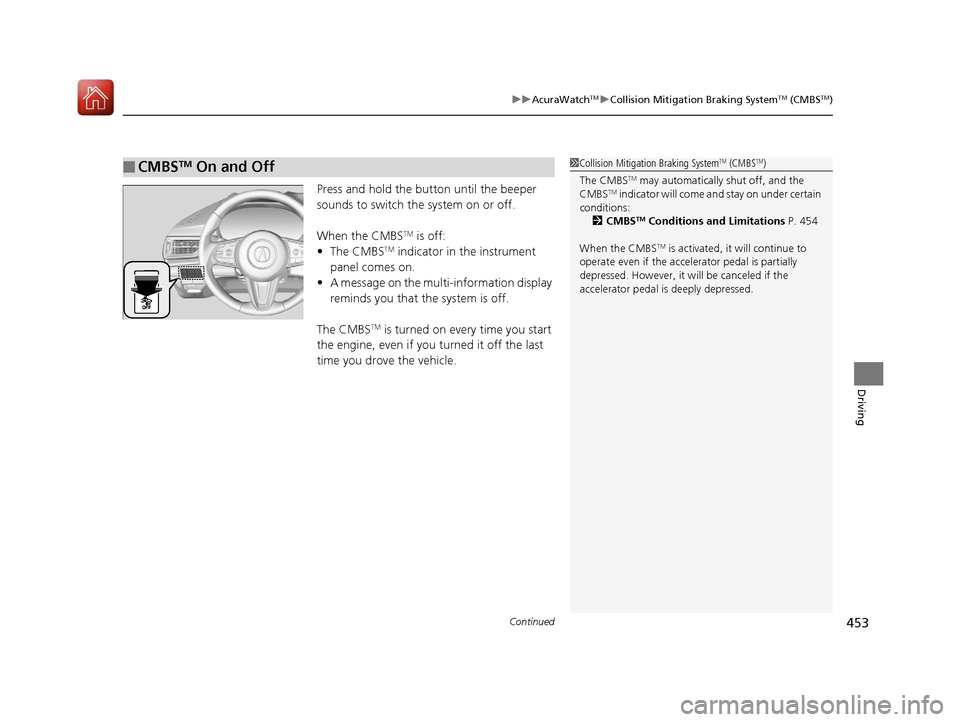
Press and hold the butt on until the beeper
sounds to switch the system on or off.
When the CMBS
TM is off:
• The CMBSTM indicator in the instrument
panel comes on.
• A message on the multi-information display
reminds you that the system is off.
The CMBS
TM is turned on every time you start
the engine, even if you turned it off the last
time you drove the vehicle.
■CMBSTM On and Off1 Collision Mitigation Braking SystemTM (CMBSTM)
The CMBS
TM may automatically shut off, and the
CMBSTM indicator will come and stay on under certain
conditions:
2 CMBS
TM Conditions and Limitations P. 454
When the CMBS
TM is activated, it will continue to
operate even if the accele rator pedal is partially
depressed. However, it w ill be canceled if the
accelerator pedal is deeply depressed.
20 ACURA RDX-31TJB6111.book 453 ページ 2020年2月11日 火曜日 午後2時6分
Page 457 of 657
456
uuAcuraWatchTMuCollision Mitigation Braking SystemTM (CMBSTM)
Driving
■Detection limitations
• A vehicle or pedestrian suddenly crosses in front of you.
• The distance between your vehicle and the vehicle or pedestrian ahead of you is
too short.
• A vehicle cuts in front of you at a slow speed, and it brakes suddenly.
• When you accelerate rapidly and approach the vehicle or pedestrian ahead of you
at high speed.
• The vehicle ahead of you is a motorcycle, bicycle, mobility scooter or other small
vehicle.
• When there are animals in front of your vehicle.
• When you drive on a curved, wi nding or undulating road that makes it difficult for
the sensor to properly detect a vehicle in front of you.
• The speed difference between your vehicle an d a vehicle or pedestrian in front of
you is significantly large.
• An oncoming vehicle suddenly comes in front of you.
• Another vehicle suddenly comes in front of you at an intersection, etc.
• Your vehicle abruptly crosses over in front of an oncoming vehicle.
• When driving through a narrow iron bridge.
• When the lead vehicle suddenly slows down.
20 ACURA RDX-31TJB6111.book 456 ページ 2020年2月11日 火曜日 午後2時6分