Acc Acura RDX 2020 Owner's Manual
[x] Cancel search | Manufacturer: ACURA, Model Year: 2020, Model line: RDX, Model: Acura RDX 2020Pages: 657, PDF Size: 33.2 MB
Page 338 of 657
337
uuCustomized Features u
Continued
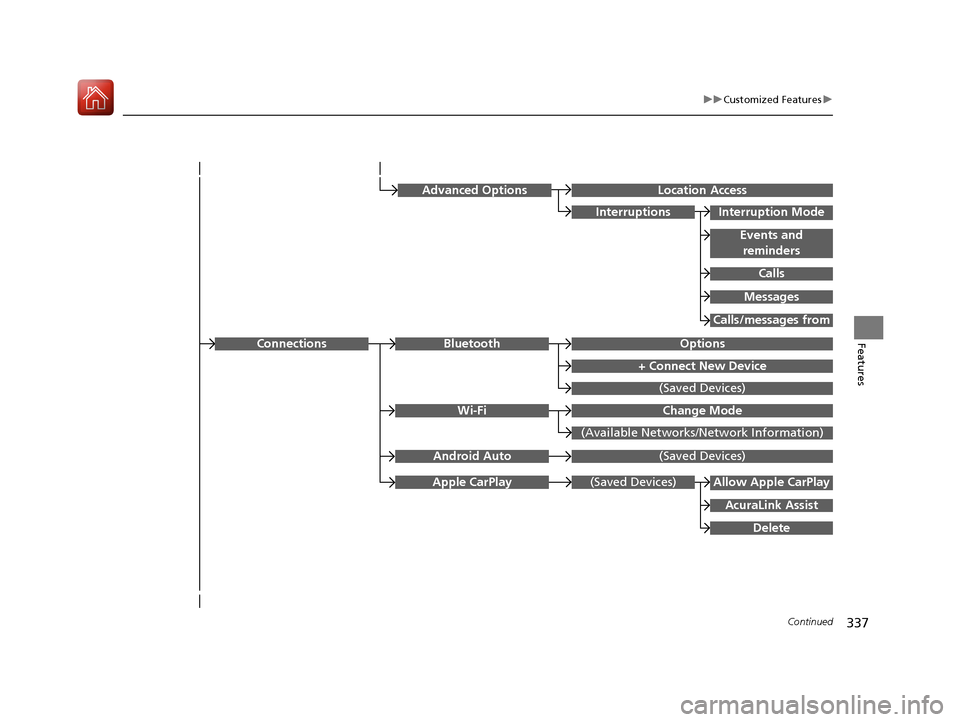
FeaturesOptionsBluetooth
+ Connect New Device
(Saved Devices)
Change Mode
(Available Networks/N etwork Information)
Wi-Fi
Connections
(Saved Devices)
AcuraLink Assist
Allow Apple CarPlay
Delete
Apple CarPlay
Advanced OptionsLocation Access
Events and
reminders
Interruption Mode
Calls
Interruptions
Messages
Calls/messages from
(Saved Devices)Android Auto
20 ACURA RDX-31TJB6111.book 337 ページ 2020年2月11日 火曜日 午後2時6分
Page 339 of 657
338
uuCustomized Features u
Features
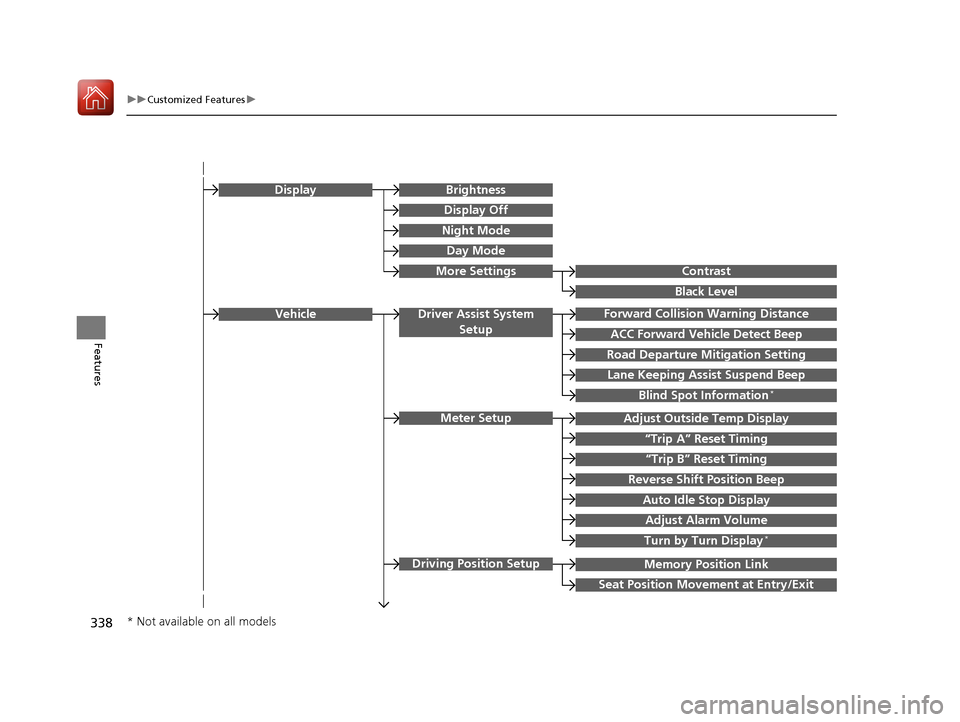
Memory Position Link
“Trip B” Reset Timing
Seat Position Movement at Entry/Exit
Adjust Outside Temp Display
“Trip A” Reset Timing
Meter Setup
Vehicle
Driving Position Setup
Reverse Shift Position Beep
Auto Idle Stop Display
Adjust Alarm Volume
Turn by Turn Display*
Road Departure Mitigation Setting
Forward Collision Warning Distance
ACC Forward Vehicle Detect Beep
Lane Keeping Assist Suspend Beep
Blind Spot Information*
Driver Assist System
Setup
Night Mode
Day Mode
BrightnessDisplay
Contrast
Black Level
More Settings
Display Off
* Not available on all models
20 ACURA RDX-31TJB6111.book 338 ページ 2020年2月11日 火曜日 午後2時6分
Page 340 of 657
339
uuCustomized Features u
Continued
Features
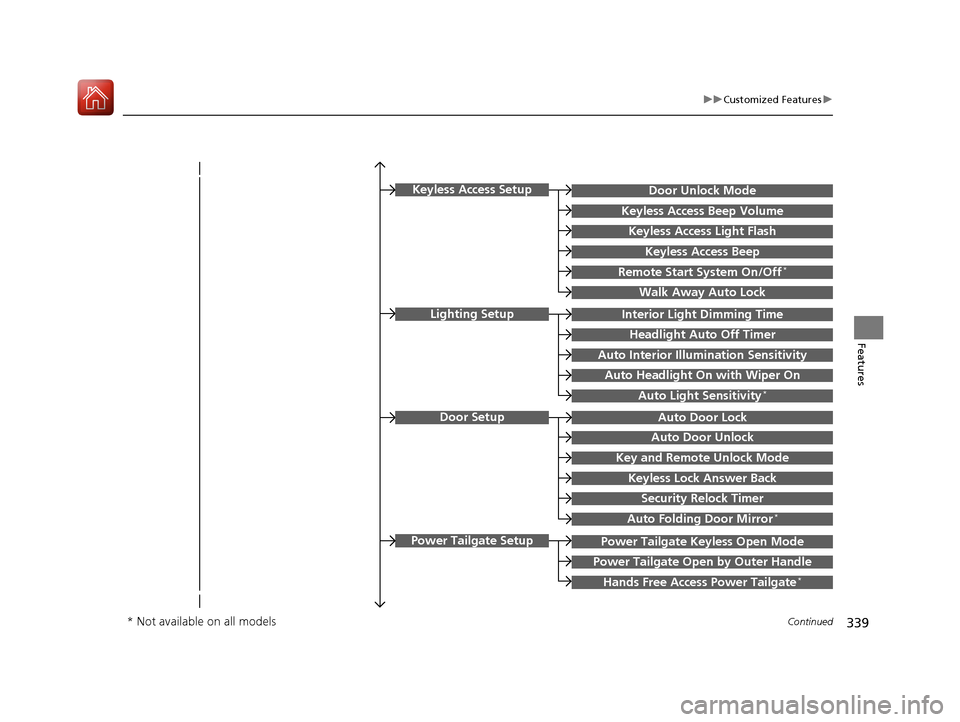
Key and Remote Unlock Mode
Auto Door Lock
Auto Door Unlock
Door Setup
Keyless Lock Answer Back
Security Relock Timer
Interior Light Dimming Time
Headlight Auto Off Timer
Auto Interior Illu mination Sensitivity
Auto Headlight On with Wiper On
Auto Light Sensitivity*
Lighting Setup
Auto Folding Door Mirror*
Power Tailgate Keyless Open Mode
Power Tailgate Open by Outer Handle
Hands Free Access Power Tailgate*
Power Tailgate Setup
Door Unlock Mode
Keyless Access Beep Volume
Keyless Access Light Flash
Keyless Access Beep
Remote Start System On/Off*
Walk Away Auto Lock
Keyless Access Setup
* Not available on all models
20 ACURA RDX-31TJB6111.book 339 ページ 2020年2月11日 火曜日 午後2時6分
Page 344 of 657
343
uuCustomized Features u
Continued
Features
*1:Default SettingSetup Group Customizable Features
Description Selectable Settings
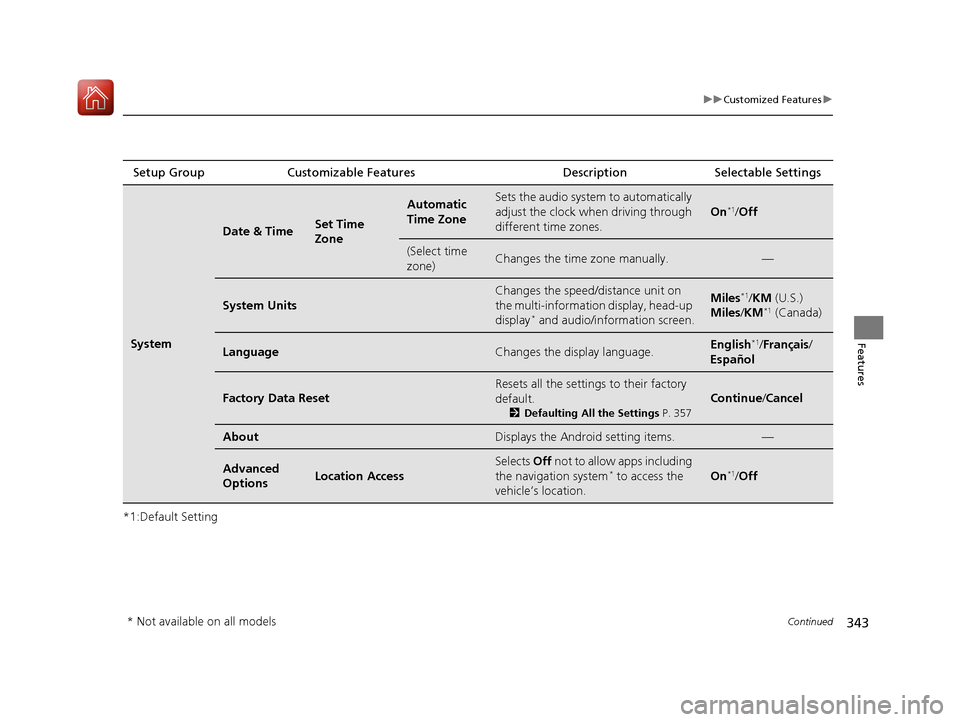
System
Date & TimeSet Time
Zone
Automatic
Time ZoneSets the audio system to automatically
adjust the clock when driving through
different time zones.
On*1/Off
(Select time
zone)Changes the time zone manually.—
System Units
Changes the speed/distance unit on
the multi-information display, head-up
display
* and audio/information screen.
Miles*1/KM (U.S.)
Miles/ KM*1 (Canada)
LanguageChanges the display language.English*1/Français /
Español
Factory Data Reset
Resets all the settings to their factory
default.
2 Defaulting All the Settings P. 357
Continue/Cancel
AboutDisplays the Android setting items.—
Advanced
OptionsLocation Access
Selects Off not to allow apps including
the navigation system* to access the
vehicle’s location.On*1/ Off
* Not available on all models
20 ACURA RDX-31TJB6111.book 343 ページ 2020年2月11日 火曜日 午後2時6分
Page 349 of 657
348
uuCustomized Features u
Features
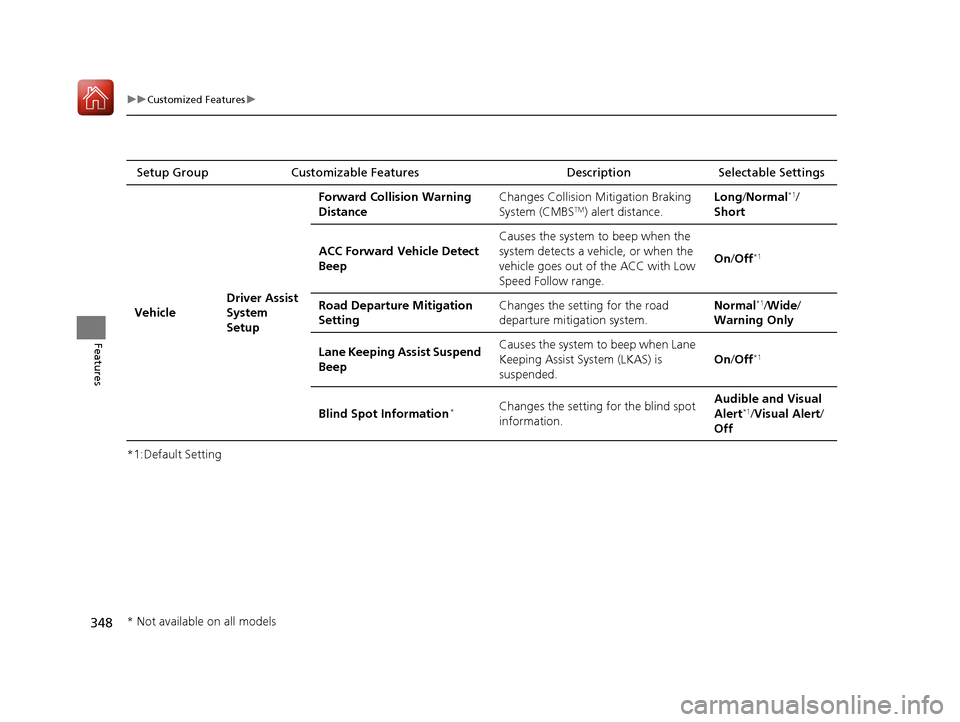
*1:Default SettingSetup Group Customizable Features Description Selectable Settings
Vehicle Driver Assist
System
SetupForward Collision Warning
Distance
Changes Collision Mitigation Braking
System (CMBS
TM) alert distance.Long
/Normal
*1/
Short
ACC Forward Vehicle Detect
Beep Causes the system to beep when the
system detects a vehicle, or when the
vehicle goes out of the ACC with Low
Speed Follow range.
On
/Off
*1
Road Departure Mitigation
Setting Changes the setting for the road
departure mitigation system. Normal*1/
Wide /
Warning Only
Lane Keeping As sist Suspend
Beep Causes the system to beep when Lane
Keeping Assist Sy
stem (LKAS) is
suspended. On
/Off
*1
Blind Spot Information*Changes the setting for the blind spot
information. Audible and Visual
Alert*1/
Visual Alert /
Off
* Not available on all models
20 ACURA RDX-31TJB6111.book 348 ページ 2020年2月11日 火曜日 午後2時6分
Page 351 of 657
350
uuCustomized Features u
Features
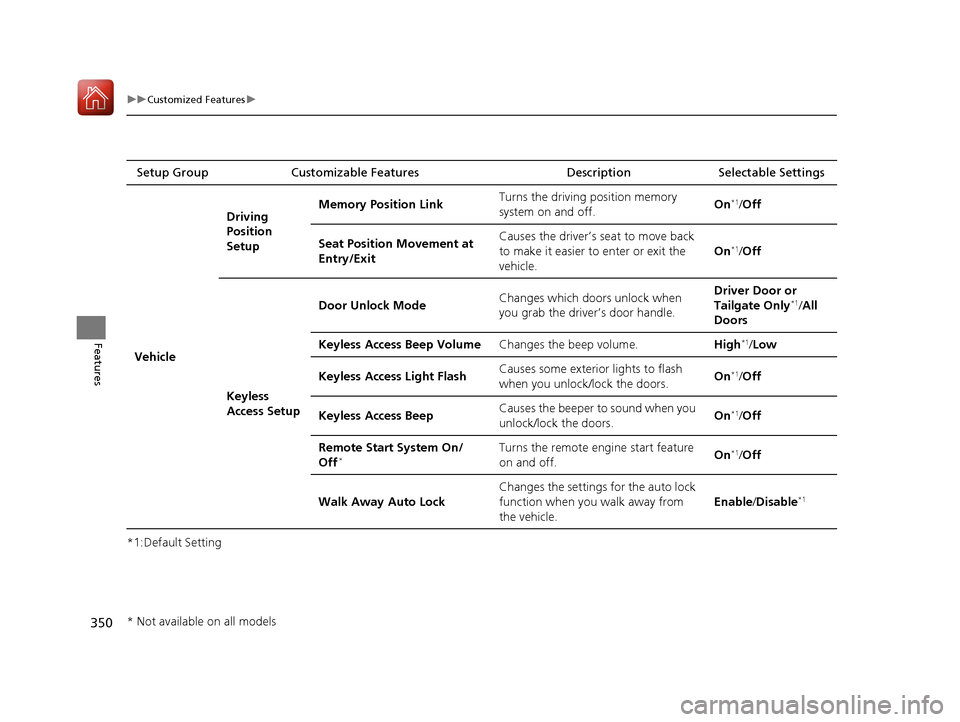
*1:Default SettingSetup Group Customizable Features Description Selectable Settings
Vehicle Driving
Position
Setup
Memory Position Link
Turns the driving position memory
system on and off. On
*1/
Off
Seat Position Movement at
Entry/Exit Causes the driver’s seat to move back
to make it easier to enter or exit the
vehicle.
On
*1/
Off
Keyless
Access Setup Door Unlock Mode
Changes which doors unlock when
you grab the driver’s door handle. Driver Door or
Tailgate Only
*1/
All
Doors
Keyless Access Beep Volume Changes the beep volume. High
*1/Low
Keyless Access Light Flash Causes some exterior lights to flash
when you unlock/lock the doors.
On
*1/
Off
Keyless Access Beep Causes the beeper to sound when you
unlock/lock the doors. On
*1/
Off
Remote Start System On/
Off
*Turns the remote engine start feature
on and off. On*1/
Off
Walk Away Auto Lock Changes the settings for the auto lock
function when you walk away from
the vehicle. Enable
/Disable
*1
* Not available on all models
20 ACURA RDX-31TJB6111.book 350 ページ 2020年2月11日 火曜日 午後2時6分
Page 353 of 657
352
uuCustomized Features u
Features
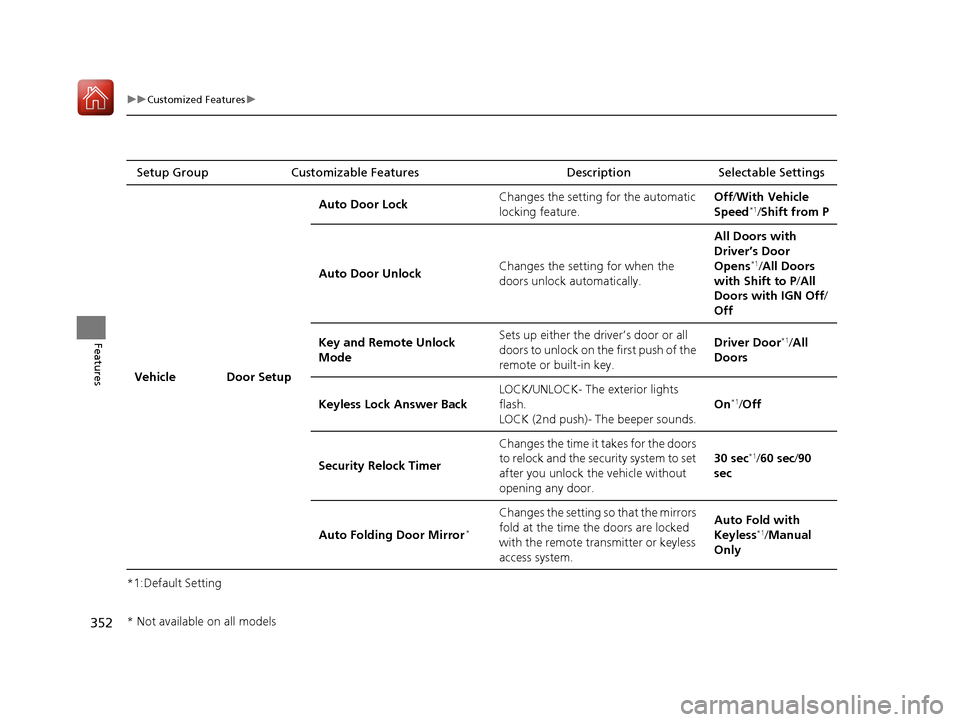
*1:Default SettingSetup Group Customizable Features Description Selectable Settings
Vehicle Door Setup Auto Door Lock
Changes the setting for the automatic
locking feature. Off
/With Vehicle
Speed
*1/ Shift from P
Auto Door Unlock Changes the setting for when the
doors unlock automatically. All Doors with
Driver’s Door
Opens
*1/
All Doors
with Shift to P /All
Doors with IGN Off /
Off
Key and Remote Unlock
Mode Sets up either the driver’s door or all
doors to unlock on the first push of the
remote or built-in key. Driver Door
*1/
All
Doors
Keyless Lock Answer Back LOCK/UNLOCK- The exterior lights
flash.
LOCK (2nd push)- The beeper sounds. On
*1/
Off
Security Relock Timer Changes the time it takes for the doors
to relock and the security system to set
after you unlock the vehicle without
opening any door. 30 sec
*1/
60 sec /90
sec
Auto Folding Door Mirror
*
Changes the setting so that the mirrors
fold at the time the doors are locked
with the remote transmitter or keyless
access system. Auto Fold with
Keyless
*1/
Manual
Only
* Not available on all models
20 ACURA RDX-31TJB6111.book 352 ページ 2020年2月11日 火曜日 午後2時6分
Page 354 of 657
353
uuCustomized Features u
Continued
Features
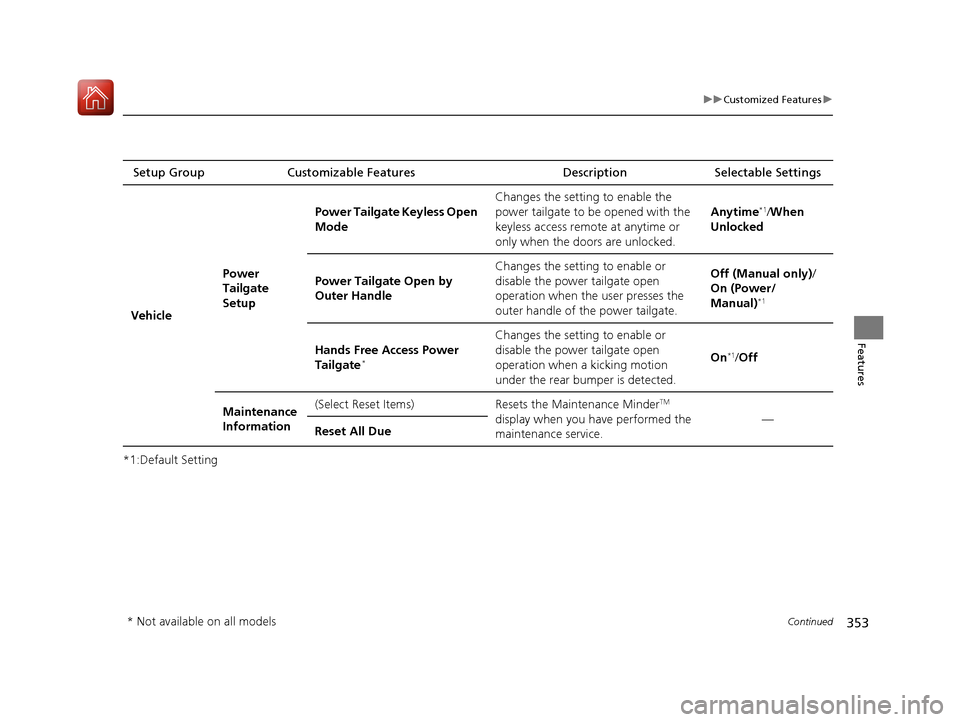
*1:Default SettingSetup Group Customizable Features
Description Selectable Settings
Vehicle Power
Tailgate
SetupPower Tailgate Keyless Open
Mode
Changes the setting to enable the
power tailgate to be opened with the
keyless access remote at anytime or
only when the doors are unlocked.
Anytime
*1/
When
Unlocked
Power Tailgate Open by
Outer Handle Changes the setting to enable or
disable the power tailgate open
operation when the user presses the
outer handle of the power tailgate. Off (Manual only)
/
On (Power/
Manual)
*1
Hands Free Access Power
Tailgate*
Changes the setting to enable or
disable the power tailgate open
operation when a kicking motion
under the rear bumper is detected. On
*1/
Off
Maintenance
Information (Select Reset Items) Resets the Maintenance Minder
TM
display when you have performed the
maintenance service. —
Reset All Due
* Not available on all models
20 ACURA RDX-31TJB6111.book 353 ページ 2020年2月11日 火曜日 午後2時6分
Page 366 of 657

365
uuBluetooth ® HandsFreeLink ®u HFL Menus
Continued
Features
HFL Menus
The power mode must be in ACCESSO RY or ON to use the system.
■Phone screen
1.Press the (home) button.
2. Select Phone .
1HFL Menus
To use HFL, you must first pair your Bluetooth-
compatible cell phone to th e system while the vehicle
is parked.
Some functions are limited while driving.
Display the last outgoing, incoming and missed calls.RecentsAll
Dialed
Received
Display the last outgoing calls.
Display the last incoming calls.
MissedDisplay the last missed calls.
Enter NumberEnter a phone number to dial.
ContactsDisplay the phonebook of the paired phone.
Add Favorite
(Favorite Contact List)
MENU
From Recents
From Contacts
Using Enter Number
Dial the selected number in the favorite contact list.
Display the Phone Menu screen.Select a phone number from the call history to store as a
favorite contact number.
Select a phone number from the phonebook to store as a
favorite contact number.
Enter a phone number to store as a favorite contact number.
20 ACURA RDX-31TJB6111.book 365 ページ 2020年2月11日 火曜日 午後2時6分
Page 396 of 657
Continued395
uuAcuraLink ®u
Features
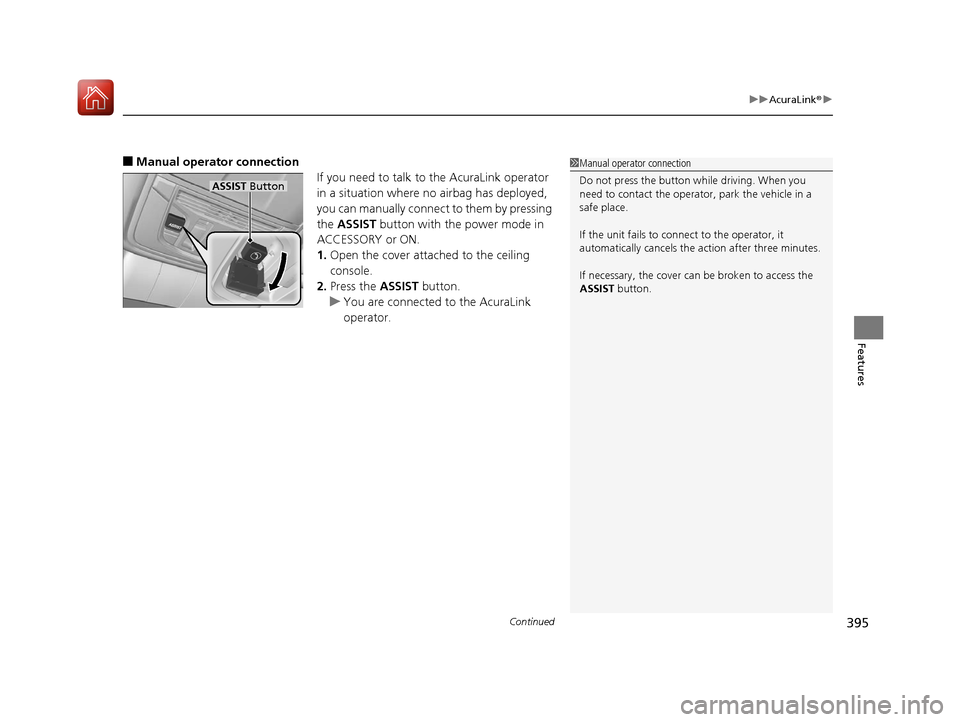
■Manual operator connection
If you need to talk to the AcuraLink operator
in a situation where no airbag has deployed,
you can manually connect to them by pressing
the ASSIST button with the power mode in
ACCESSORY or ON.
1. Open the cover attached to the ceiling
console.
2. Press the ASSIST button.
u You are connected to the AcuraLink
operator.1Manual operator connection
Do not press the button while driving. When you
need to contact the operato r, park the vehicle in a
safe place.
If the unit fails to connect to the operator, it
automatically cancels the action after three minutes.
If necessary, the cover can be broken to access the
ASSIST button.
ASSIST Button
20 ACURA RDX-31TJB6111.book 395 ページ 2020年2月11日 火曜日 午後2時6分