audio Acura RDX 2020 Owner's Manual
[x] Cancel search | Manufacturer: ACURA, Model Year: 2020, Model line: RDX, Model: Acura RDX 2020Pages: 657, PDF Size: 33.2 MB
Page 504 of 657

503
uuParking Your Vehicle uParking Sensor System*
Continued
Driving
Parking Sensor System*
The corner and center sensors monitor obstacles around your vehicle, and the
beeper and audio/information screen le t you know the approximate distance
between your vehicle and the obstacle.
■The sensor location and range
1 Parking Sensor System*
Even when the system is on, always confirm if there is
no obstacle near your ve hicle before parking.
The system may not work properly when:
•The sensors are covered with snow, ice, mud or
dirt.
•The vehicle is on uneven su rface, such as grass,
bumps, or a hill.
•The vehicle has been out in hot or cold weather.•The system is affected by devices that emit
ultrasonic waves.
•Driving in bad weather.
The system may not sense:
•Thin or low objects.•Sonic-absorptive materials, such as snow, cotton,
or sponge.
•Objects directly under the bumper.
Do not put any accessories on or around the sensors.Forward
Front: 24 in (60 cm) or less
Rear: 28 in (70 cm) or less
Front Corner Sensors
Rear Corner Sensors
Rear Center Sensors
Forward
Front: 30 in (75 cm) or less
Rear: 43 in (110 cm) or lessFront Center Sensors
Backward
Front: 26 in (65 cm) or less
Rear: 30 in (75 cm) or less Backward
Front: 32 in (80 cm) or less
Rear: 45 in (115 cm) or less
* Not available on all models
20 ACURA RDX-31TJB6111.book 503 ページ 2020年2月11日 火曜日 午後2時6分
Page 506 of 657
505
uuParking Your Vehicle uParking Sensor System*
Continued
Driving
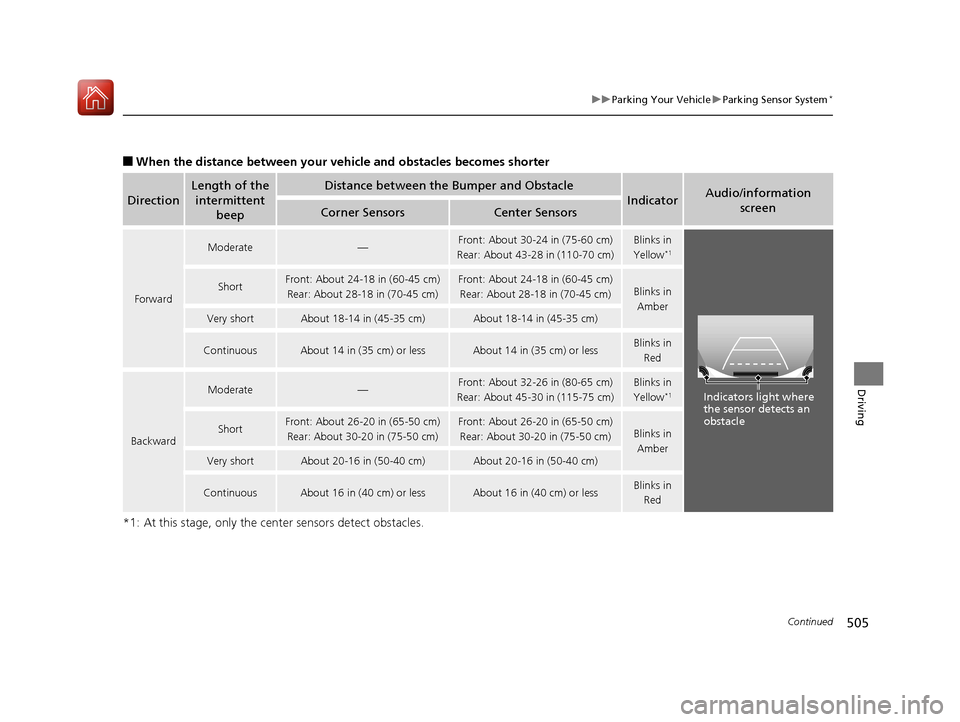
■When the distance between your ve hicle and obstacles becomes shorter
*1: At this stage, only the center sensors detect obstacles.
Direction
Length of the intermittent beepDistance between the Bumper and Obstacle
IndicatorAudio/information
screen
Corner SensorsCenter Sensors
Forward
Moderate—Front: About 30-24 in (75-60 cm)
Rear: About 43-28 in (110-70 cm)Blinks in
Yellow*1
ShortFront: About 24-18 in (60-45 cm) Rear: About 28-18 in (70-45 cm)Front: About 24-18 in (60-45 cm)Rear: About 28-18 in (70-45 cm)Blinks in Amber
Very shortAbout 18-14 in (45-35 cm)About 18-14 in (45-35 cm)
ContinuousAbout 14 in (35 cm) or lessAbout 14 in (35 cm) or lessBlinks in Red
Backward
Moderate—Front: About 32-26 in (80-65 cm)
Rear: About 45-30 in (115-75 cm)Blinks in
Yellow*1
ShortFront: About 26-20 in (65-50 cm) Rear: About 30-20 in (75-50 cm)Front: About 26-20 in (65-50 cm)Rear: About 30-20 in (75-50 cm)Blinks in Amber
Very shortAbout 20-16 in (50-40 cm)About 20-16 in (50-40 cm)
ContinuousAbout 16 in (40 cm) or lessAbout 16 in (40 cm) or lessBlinks in Red
Indicators light where
the sensor detects an
obstacle
20 ACURA RDX-31TJB6111.book 505 ページ 2020年2月11日 火曜日 午後2時6分
Page 510 of 657

Continued509
uuParking Your Vehicle uCross Traffic Monitor*
Driving
An arrow icon appears on the side a vehicle is approaching on the audio/information
screen.
■When the System Detects a Vehicle1When the System Detects a Vehicle
If the on the lower right changes to in amber
when the gear position is in
( R, obstructions (mud,
snow, ice, etc.) may have ac cumulated in the vicinity
of the sensor. The system is temporarily canceled.
Check the bumper corners for any obstructions, and
thoroughly clean the area if necessary.
If the comes on in ambe r when the gear position
is in
( R, there may be a problem with the Cross
Traffic Monitor system. Do not use the system and
have your vehicle ch ecked by a dealer.
If the display remains the same with the transmission
in
( R, there may be a problem with the rear camera
system and the Cross Traffic Monitor system.
Do not use the system and have your vehicle checked
by a dealer.
Wide View Normal View
Arrow IconTop Down View
Models with multi-view rear camera system
Models with surround view camera system
Arrow Icon
Rear Wide View Rear Ground View
20 ACURA RDX-31TJB6111.book 509 ページ 2020年2月11日 火曜日 午後2時6分
Page 511 of 657
510
uuParking Your Vehicle uCross Traffic Monitor*
Driving
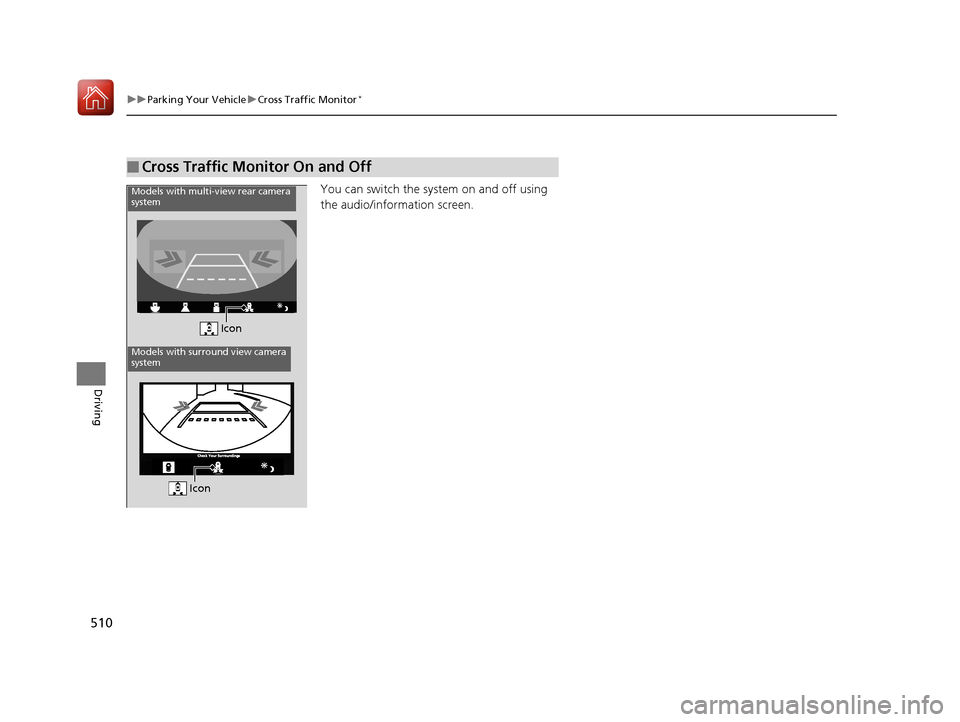
You can switch the system on and off using
the audio/information screen.
■Cross Traffic Monitor On and Off
Icon
Models with multi-view rear camera
system
Models with surround view camera
system
Icon
20 ACURA RDX-31TJB6111.book 510 ページ 2020年2月11日 火曜日 午後2時6分
Page 512 of 657
511Continued
Driving
Multi-View Rear Camera
About Your Multi-View Rear Camera
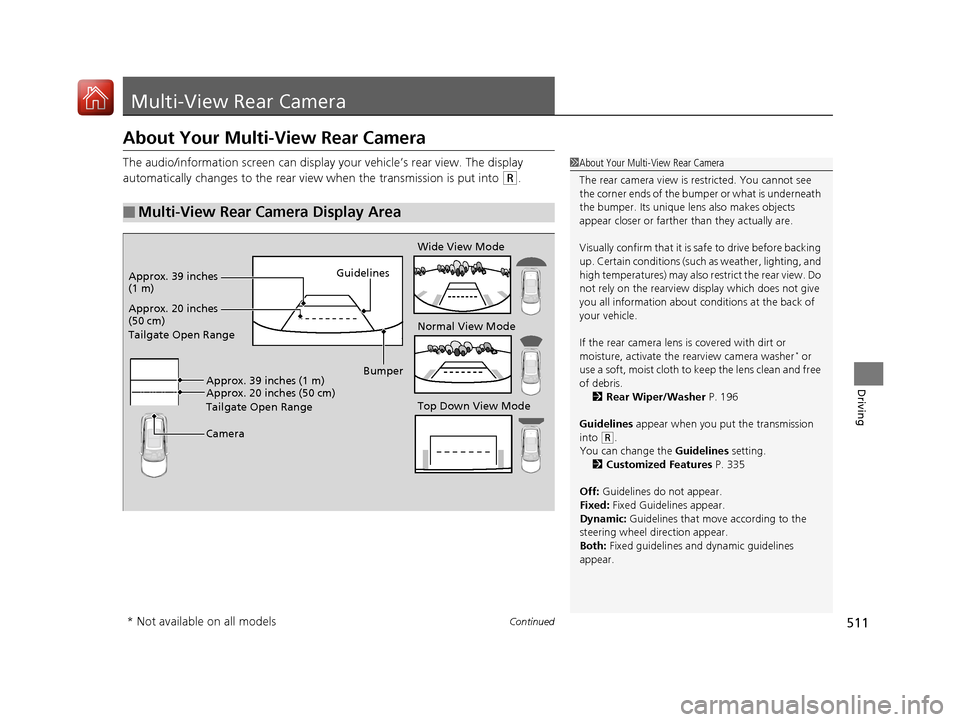
The audio/information screen can display your vehicle’s rear view. The display
automatically changes to the rear view when the transmission is put into
(R.
■Multi-View Rear Camera Display Area
1About Your Multi-View Rear Camera
The rear camera view is restricted. You cannot see
the corner ends of the bum per or what is underneath
the bumper. Its unique le ns also makes objects
appear closer or farther than they actually are.
Visually confirm that it is safe to drive before backing
up. Certain conditions (such as weather, lighting, and
high temperatures) may also restrict the rear view. Do
not rely on the rearview display which does not give
you all information about conditions at the back of
your vehicle.
If the rear camera lens is covered with dirt or
moisture, activate the rearview camera washer
* or
use a soft, moist cloth to keep the lens clean and free
of debris. 2 Rear Wiper/Washer P. 196
Guidelines appear when you put the transmission
into
( R.
You can change the Guidelines setting. 2 Customized Features P. 335
Off: Guidelines do not appear.
Fixed: Fixed Guidelines appear.
Dynamic: Guidelines that move according to the
steering wheel direction appear.
Both: Fixed guidelines and dynamic guidelines
appear.
Guidelines
Bumper
Camera
Approx. 20 inches
(50 cm)
Tailgate Open Range Approx. 39 inches
(1 m)
Wide View Mode
Normal View Mode
Top Down View Mode
Approx. 20 inches (50 cm)
Tailgate Open Range Approx. 39 inches (1 m)
* Not available on all models
20 ACURA RDX-31TJB6111.book 511 ページ 2020年2月11日 火曜日 午後2時6分
Page 514 of 657
513
Driving
Surround View Camera System*
Is a four camera system that views areas commonly known as “blind spots” from
different angles, then displa ys the images on the audio/information screen. This
system can be used to:
• Check the right and left sides of the vehi cle while crossing at intersections with
poor visibility (fog, heavy rain, obstructed view, etc.).
2Checking from the front wide view at intersections P. 519
•Check for obstacles in front of the vehicle when parking or maneuvering in
confined areas.
2 Checking the sides of your vehicle P. 519
•Check for obstacles wh en you are moving in (R.
2When Parking Your Vehicle P. 517
1Surround View Camera System*
3WARNING
Failure to visually assess the area around
the vehicle (directly or by use of the
mirrors) may result in a crash causing
serious injury or death.
The areas shown in the surround view
camera system display are limited. The
display may not show all pedestrians or
other objects around your vehicle.
Do not solely rely only on the surround
view camera system display to assess
whether it is safe to move your vehicle.
3WARNING
Failure to pay proper attention to your
surroundings while driving may result in a
crash causing serious injury or death.
To help mitigate the ch ances of a collision,
only look at the surround view camera
system display when it is safe to do so.
* Not available on all models
20 ACURA RDX-31TJB6111.book 513 ページ 2020年2月11日 火曜日 午後2時6分
Page 516 of 657
515
uuSurround View Camera System*uDisplaying an Image From the Surround View Cameras
Continued
Driving
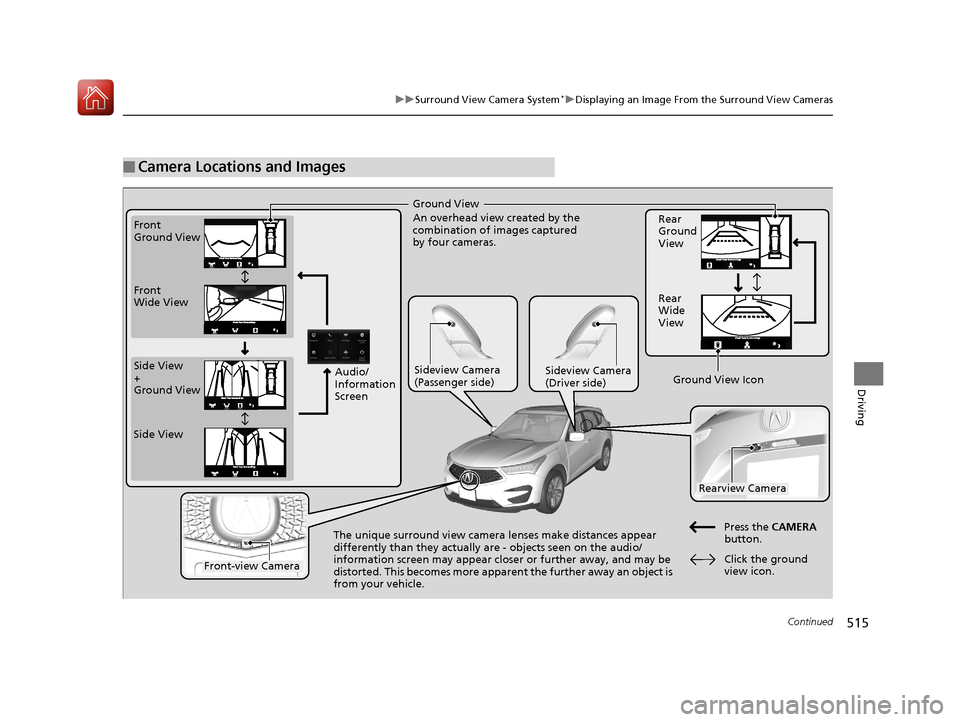
■Camera Locations and Images
Ground View
An overhead view created by the
combination of images captured
by four cameras.
Front
Ground View
Side View
+
Ground View Front
Wide View
Sideview Camera
(Passenger side)Sideview Camera
(Driver side)
The unique surround view camera lenses make distances appear
differently than they actually
are - objects seen on the audio/
information screen may appear closer or further away, and may be
distorted. This becomes more apparent the further away an object is
from your vehicle. Rear
Ground
View
Rear
Wide
View
Press the CAMERA
button.
Rearview Camera
Front-view Camera
Side View
Audio/
Information
Screen
Click the ground
view icon.
Ground View Icon
20 ACURA RDX-31TJB6111.book 515 ページ 2020年2月11日 火曜日 午後2時6分
Page 517 of 657

uuSurround View Camera System*uDisplaying an Image From the Surround View Cameras
516
Driving
The following can be displaye d when the system is on.
Guide lines : Help you to get a sense of a distance between your vehicle and the
rear surroundings. The distan ce may appear differently than the actual distance.
Projection lines : Indicate vehicle direction while th e steering wheel is in the current
position.
■Reference Lines and Guides1 Reference Lines and Guides
The positions/distances indi cated by the guide lines
and camera views on the display may differ from the
actual positions/distances due to the changes in the
vehicle height, road condi tions, and other factors.
The guide lines should be used as a reference only.
The guide lines can be tu rned on and off using the
audio/information screen.
2 Customized Features P. 335
If you turn the guide lines off, they remain off until
you turn them back on.
20 ACURA RDX-31TJB6111.book 516 ページ 2020年2月11日 火曜日 午後2時6分
Page 518 of 657
517
uuSurround View Camera System*uUsing the Surround View Camera System
Continued
Driving
Using the Surround View Camera System
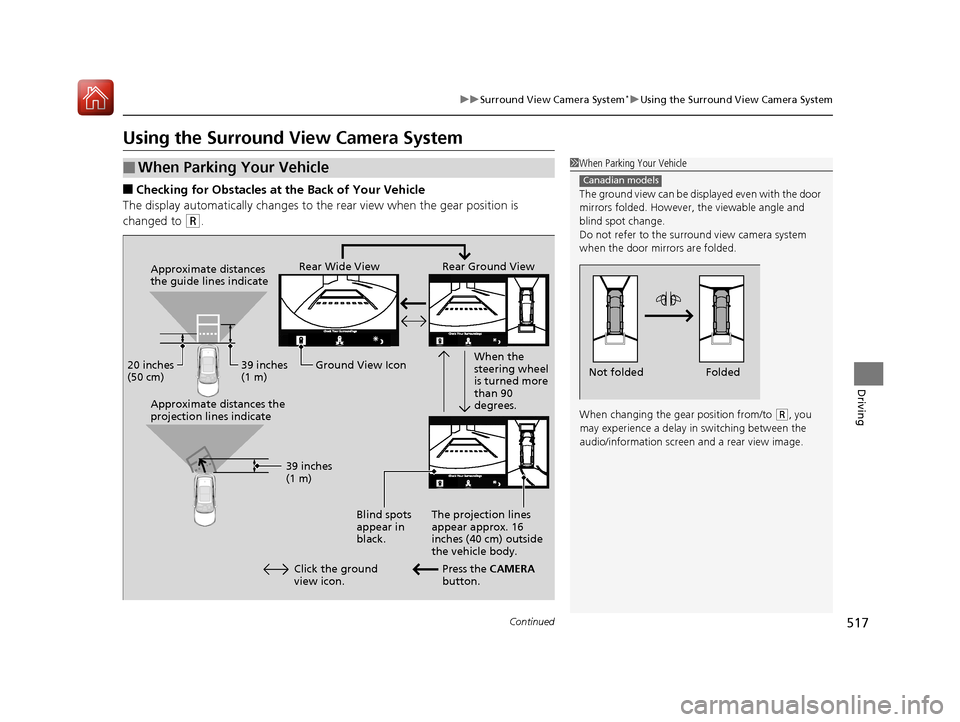
■Checking for Obstacles at the Back of Your Vehicle
The display automatically changes to the rear view when the gear position is
changed to
(R.
■When Parking Your Vehicle1 When Parking Your Vehicle
The ground view can be disp layed even with the door
mirrors folded. However, the viewable angle and
blind spot change.
Do not refer to the surround view camera system
when the door mirrors are folded.
When changing the gear position from/to
( R, you
may experience a delay in switching between the
audio/information screen and a rear view image.
Canadian models
Folded
Not folded
Rear Wide View Rear Ground View
When the
steering wheel
is turned more
than 90
degrees.
The projection lines
appear approx. 16
inches (40 cm) outside
the vehicle body.
Blind spots
appear in
black.
Press the CAMERA
button.
Approximate distances
the guide lines indicate
Approximate distances the
projection lines indicate
39 inches
(1 m)
20 inches
(50 cm)
39 inches
(1 m)
Ground View Icon
Click the ground
view icon.
20 ACURA RDX-31TJB6111.book 517 ページ 2020年2月11日 火曜日 午後2時6分
Page 519 of 657
uuSurround View Camera System*uUsing the Surround View Camera System
518
Driving
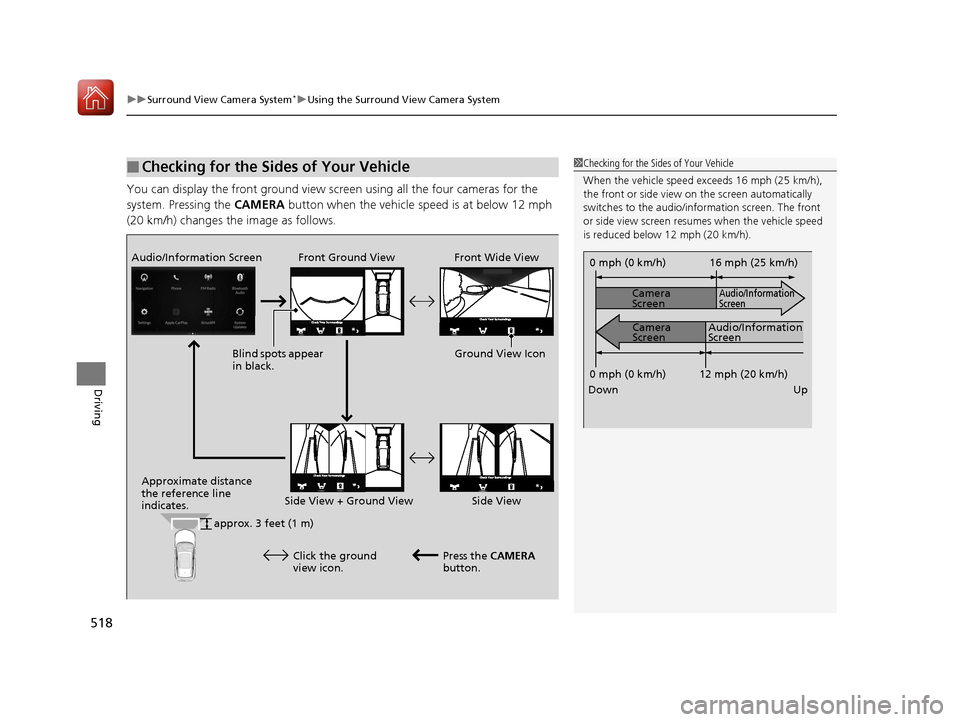
You can display the front ground view screen using all the four cameras for the
system. Pressing the CAMERA button when the vehicle speed is at below 12 mph
(20 km/h) changes the image as follows.
■Checking for the Sides of Your Vehicle1 Checking for the Sides of Your Vehicle
When the vehicle speed exceeds 16 mph (25 km/h),
the front or side view on the screen automatically
switches to the audio/information screen. The front
or side view screen resumes when the vehicle speed
is reduced below 12 mph (20 km/h).
0 mph (0 km/h)
Down Up Camera
Screen
Camera
Screen
Audio/Information
Screen
Audio/Information
Screen 16 mph (25 km/h)
12 mph (20 km/h)
0 mph (0 km/h)
Front Ground View Front Wide View
Audio/Information Screen
Approximate distance
the reference line
indicates. Press the CAMERA
button.
approx. 3 feet (1 m) Blind spots appear
in black.
Click the ground
view icon. Ground View Icon
Side View + Ground View Side View
20 ACURA RDX-31TJB6111.book 518 ページ 2020年2月11日 火曜日 午後2時6分