Rain Acura RDX 2020 Owner's Guide
[x] Cancel search | Manufacturer: ACURA, Model Year: 2020, Model line: RDX, Model: Acura RDX 2020Pages: 657, PDF Size: 33.2 MB
Page 65 of 657

uuChild Safety uSafety of Infants and Small Children
64
Safe Driving
5. Route the tether strap between the head
restraint legs, and secure the tether strap
hook to the anchor.
5. Route the tether strap outside the head
restraint legs, and secure the tether strap
hook to the anchor.
6. Tighten the tether strap as instructed by the
child seat manufacturer.
7. Make sure the child seat is firmly secured by
rocking it forward and back and side to
side; little movement should be felt.
8. Make sure any unused seat belt that a child
can reach is buckled, the lockable retractor
is activated, and the be lt is fully retracted
and locked.
2 Protecting Child Passengers P. 58
1Installing a LATCH-Compatible Child Seat
Installing a LATCH-compatible child seat in the
rear center seat
Each outer rear seat is equi pped with a pair of lower
anchors which are used to secure a LATCH-
compatible child seat. The rear center seat, however,
is not equipped with anchors of any kind.
The inner and outer anchors are spaced apart at a
standard distance of 11 inches (280 mm). The
distance between the two inner anchors is 16.3
inches (415 mm).
LATCH-compatible restraint systems that are fitted
with rigid-type attachments cannot be installed in the
rear center seat. However, a system fitted with
flexible-type attachments can be installed in the
center seat, provided that the manufacturer’s
instructions for that system permit the use of the
inner anchors with the stated spacing.
Before seating a child, make sure that the system is
properly attached to both the lower anchors and
tether anchors.
3WARNING
Do not use the lower inner anchors of the
outer rear seats to secure a LATCH-
compatible child seat to the rear center
seat, unless the manufacturer’s instructions
for that system permit the use of inner
anchors with the stated spacing.
Flexible Type
Tether Strap Hook
Anchor
Straight Top Tether Type
Other Top Tether Type
Tether Strap Hook
Anchor
Straight Top Tether Type
Other Top Tether Type
All Types
20 ACURA RDX-31TJB6111.book 64 ページ 2020年2月11日 火曜日 午後2時6分
Page 68 of 657
Continued67
uuChild Safety uSafety of Infants and Small Children
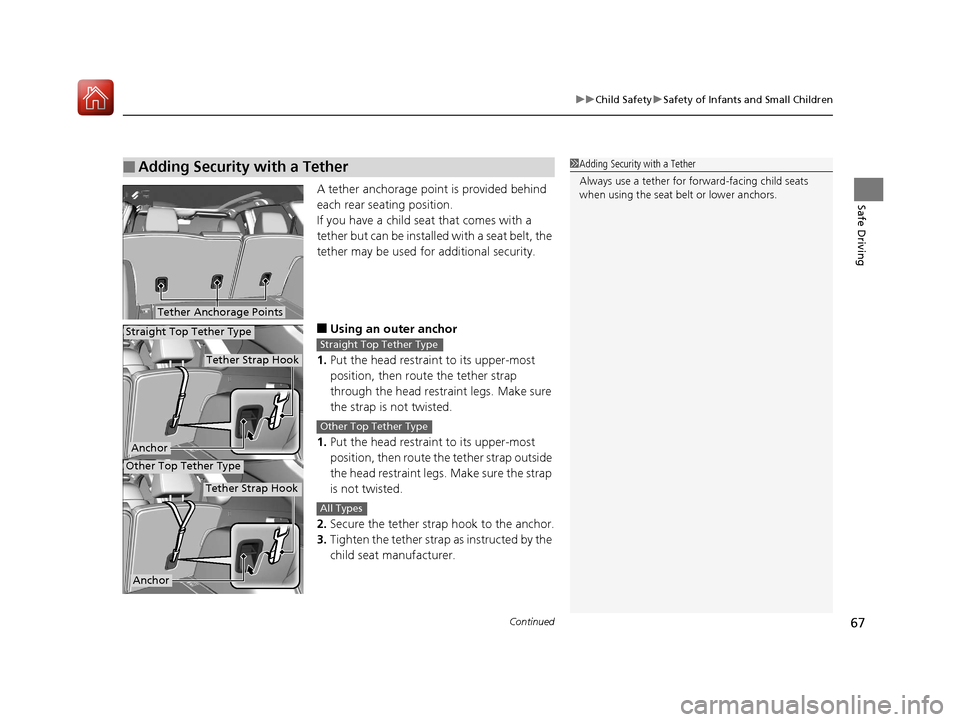
Safe DrivingA tether anchorage point is provided behind
each rear seating position.
If you have a child s eat that comes with a
tether but can be installed with a seat belt, the
tether may be used for additional security.
■Using an outer anchor
1. Put the head restraint to its upper-most
position, then route the tether strap
through the head restraint legs. Make sure
the strap is not twisted.
1. Put the head restraint to its upper-most
position, then route th e tether strap outside
the head restraint legs. Make sure the strap
is not twisted.
2. Secure the tether strap hook to the anchor.
3. Tighten the tether strap as instructed by the
child seat manufacturer.
■Adding Security with a Tether1 Adding Security with a Tether
Always use a tether for forward-facing child seats
when using the seat be lt or lower anchors.
Tether Anchorage Points
Tether Strap Hook
Anchor
Tether Strap Hook
Anchor
Straight Top Tether Type
Other Top Tether Type
Straight Top Tether Type
Other Top Tether Type
All Types
20 ACURA RDX-31TJB6111.book 67 ページ 2020年2月11日 火曜日 午後2時6分
Page 69 of 657
68
uuChild Safety uSafety of Infants and Small Children
Safe Driving
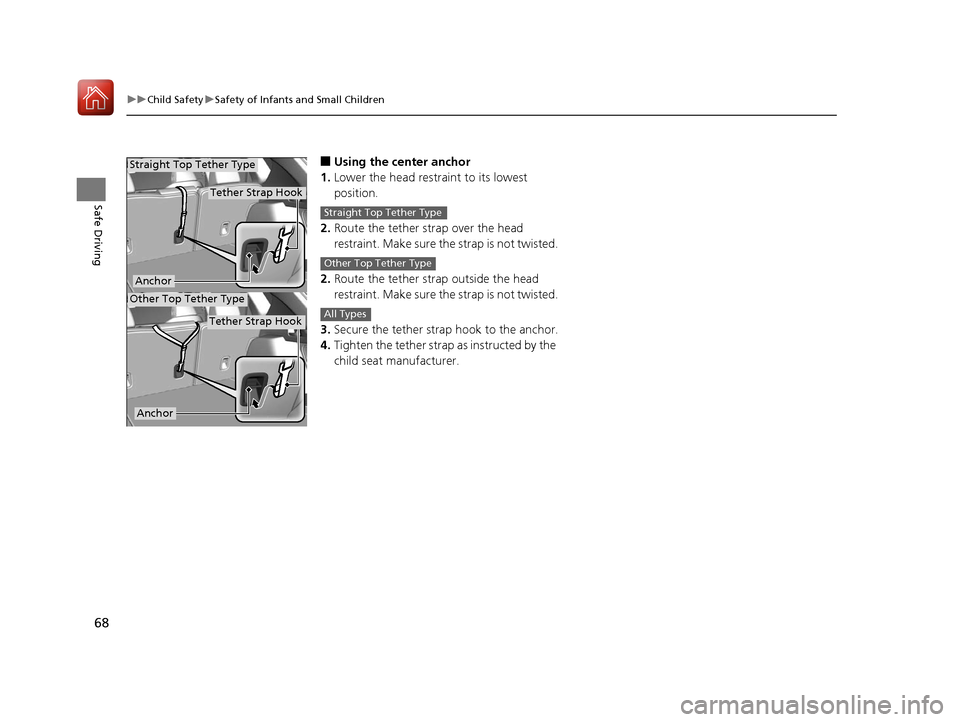
■Using the center anchor
1. Lower the head restra int to its lowest
position.
2. Route the tether strap over the head
restraint. Make sure the strap is not twisted.
2. Route the tether strap outside the head
restraint. Make sure the strap is not twisted.
3. Secure the tether strap hook to the anchor.
4. Tighten the tether strap as instructed by the
child seat manufacturer.
Tether Strap Hook
Anchor
Tether Strap Hook
Anchor
Straight Top Tether Type
Other Top Tether Type
Straight Top Tether Type
Other Top Tether Type
All Types
20 ACURA RDX-31TJB6111.book 68 ページ 2020年2月11日 火曜日 午後2時6分
Page 71 of 657

uuChild Safety uSafety of Larger Children
70
Safe DrivingIf a lap/shoulder seat belt cannot be used
properly, position the child in a booster seat in
the rear seat. For the ch ild’s safety, check that
the child meets the booster seat
manufacturer’s recommendations.
Your vehicle has a rear seat where children can be properly restrained. If you ever
have to carry a group of children, and a child must ride in front:
• Make sure you read and full y understand the instructions and safety information
in this manual.
• Move the front passenger seat as far back as possible.
• Have the child sit upright and well back in the seat.
• Check that the seat belt is properly positi oned so that the child is secure in the
seat.
■Monitoring child passengers
We strongly recommend that you keep an eye on child passengers. Even older, more
mature children sometimes need to be remind ed to fasten their seat belts and sit up
properly.
■Booster Seats1 Booster Seats
When installing a booster seat, make sure to read the
instructions that came with it, and install the seat
accordingly.
There are high- and low-type booster seats. Choose a
booster seat that allows the child to wear the seat
belt correctly.
Some U.S. states and Canadian provinces and
territories require children to use a booster seat until
they reach a given age or weight (e.g. 6 years or 60
lbs). Be sure to check current laws in the state or
province, or territory where you intend to drive.
■Protecting Larger Children-Final Checks
20 ACURA RDX-31TJB6111.book 70 ページ 2020年2月11日 火曜日 午後2時6分
Page 75 of 657
74
Instrument Panel
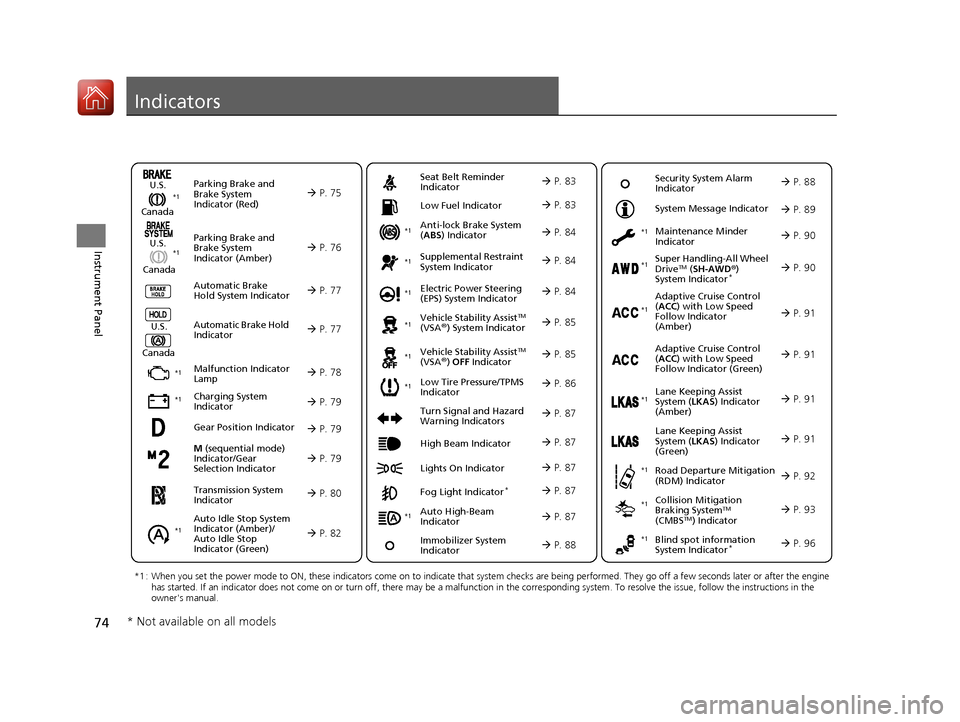
Indicators
M (sequential mode)
Indicator/Gear
Selection Indicator P. 79
Parking Brake and
Brake System
Indicator (Red)
Parking Brake and
Brake System
Indicator (Amber)
U.S.
Canada
U.S.
Canada Automatic Brake
Hold System Indicator
Automatic Brake Hold
IndicatorU.S.
Canada
*1 : When you set the power mode to ON, these indicators come on to indicate that system checks are being performed. They go off a few seconds later or after the engine
has started. If an indicator does not come on or turn off, ther e may be a malfunction in the corresponding system. To resolve the issue, follow the instructions in the
owner's manual.
P. 75*1
Malfunction Indicator
Lamp
Charging System
Indicator
Anti-lock Brake System
(ABS ) Indicator
Seat Belt Reminder
Indicator
Low Fuel Indicator
Vehicle Stability AssistTM
(VSA®) System Indicator
Vehicle Stability Assist
TM
(VSA®) OFF Indicator
Supplemental Restraint
System Indicator
Auto High-Beam
Indicator
Low Tire Pressure/TPMS
Indicator Electric Power Steering
(EPS) System Indicator
Turn Signal and Hazard
Warning Indicators
Lights On Indicator High Beam Indicator
Fog Light Indicator*
Maintenance Minder
Indicator
System Message Indicator
Super Handling-All Wheel
DriveTM (
SH-AWD ®)
System Indicator*
Adaptive Cruise Control
( ACC ) with Low Speed
Follow Indicator
(Amber)
Lane Keeping Assist
System ( LKAS) Indicator
(Amber)
Road Departure Mitigation
(RDM) Indicator
Blind spot information
System Indicator*
P. 76
P. 77
P. 77
P. 78
P. 79*1
*1
P. 86*1
*1
Gear Position Indicator P. 79
Transmission System
Indicator P. 80
Auto Idle Stop System
Indicator (Amber)/
Auto Idle Stop
Indicator (Green)
P. 82
P. 83
P. 83
P. 84
P. 84
P. 87
P. 85
*1
*1
*1
P. 85
*1 P. 84
P. 87
P. 91
*1
P. 87
P. 87
P. 90
P. 87
Immobilizer System
Indicator P. 88
Security System Alarm
Indicator P. 88
P. 89
P. 90
P. 91
P. 92
P. 96
*1
Adaptive Cruise Control
(ACC ) with Low Speed
Follow Indicator (Green) P. 91
*1
Lane Keeping Assist
System ( LKAS) Indicator
(Green) P. 91
*1
*1 *1 *1
*1
Collision Mitigation
Braking SystemTM
(CMBSTM) Indicator
*1 P. 93*1
* Not available on all models
20 ACURA RDX-31TJB6111.book 74 ページ 2020年2月11日 火曜日 午後2時6分
Page 85 of 657
84
uuIndicators u
Instrument Panel
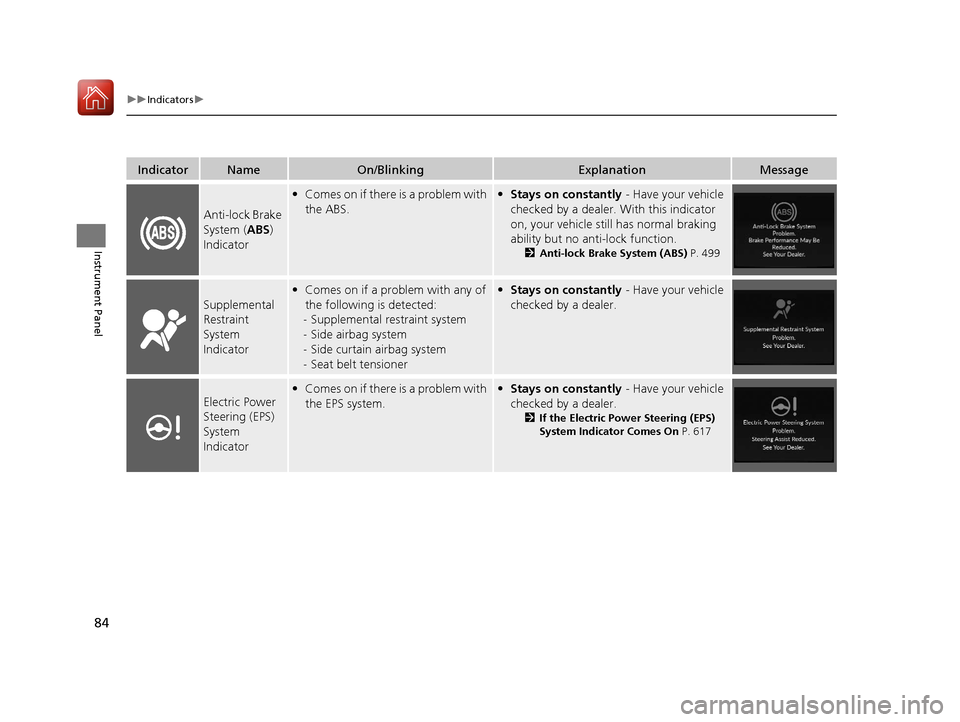
IndicatorNameOn/BlinkingExplanationMessage
Anti-lock Brake
System (ABS)
Indicator
• Comes on if there is a problem with
the ABS.• Stays on constantly - Have your vehicle
checked by a dealer. With this indicator
on, your vehicle still has normal braking
ability but no anti-lock function.
2 Anti-lock Brake System (ABS) P. 499
Supplemental
Restraint
System
Indicator
•Comes on if a problem with any of
the following is detected:
- Supplemental restraint system
- Side airbag system
- Side curtain airbag system
- Seat belt tensioner• Stays on constantly - Have your vehicle
checked by a dealer.
Electric Power
Steering (EPS)
System
Indicator• Comes on if there is a problem with
the EPS system.• Stays on constantly - Have your vehicle
checked by a dealer.
2 If the Electric Power Steering (EPS)
System Indicator Comes On P. 617
20 ACURA RDX-31TJB6111.book 84 ページ 2020年2月11日 火曜日 午後2時6分
Page 122 of 657
121
uuIndicators uMulti-Information Display Warning and Information Messages
Continued
Instrument Panel
MessageConditionExplanation
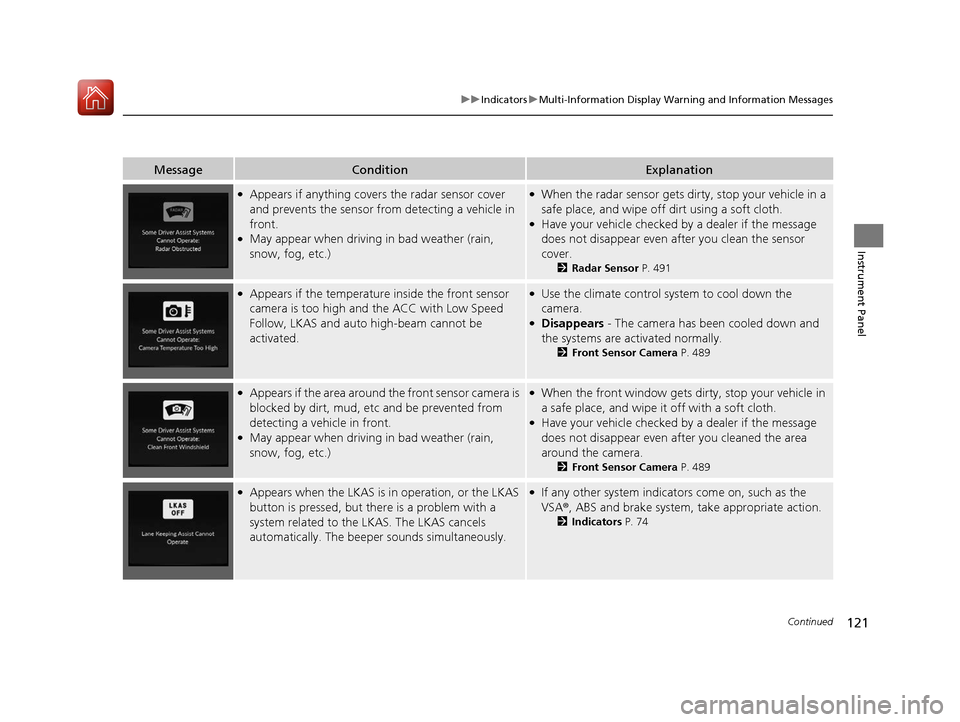
●Appears if anything covers the radar sensor cover
and prevents the sensor fro m detecting a vehicle in
front.
●May appear when driving in bad weather (rain,
snow, fog, etc.)
●When the radar sensor gets dirty, stop your vehicle in a
safe place, and wipe off dirt using a soft cloth.
●Have your vehicle checked by a dealer if the message
does not disappear even after you clean the sensor
cover.
2 Radar Sensor P. 491
●Appears if the temperature inside the front sensor
camera is too high and the ACC with Low Speed
Follow, LKAS and auto high-beam cannot be
activated.●Use the climate control sy stem to cool down the
camera.
●Disappears - The camera has b een cooled down and
the systems are activated normally.
2 Front Sensor Camera P. 489
●Appears if the area around the front sensor camera is
blocked by dirt, mud, etc and be prevented from
detecting a vehicle in front.
●May appear when driving in bad weather (rain,
snow, fog, etc.)
●When the front window gets dirty, stop your vehicle in
a safe place, and wipe it off with a soft cloth.
●Have your vehicle checked by a dealer if the message
does not disappear even a fter you cleaned the area
around the camera.
2 Front Sensor Camera P. 489
●Appears when the LKAS is in operation, or the LKAS
button is pressed, but there is a problem with a
system related to the LKAS. The LKAS cancels
automatically. The beeper sounds simultaneously.●If any other system indicato rs come on, such as the
VSA ®, ABS and brake system, take appropriate action.
2Indicators P. 74
20 ACURA RDX-31TJB6111.book 121 ページ 2020年2月11日 火曜日 午後2時6分
Page 152 of 657
Continued151
uuLocking and Unlocking the Doors uLocking/Unlocking the Doors from the Outside
Controls
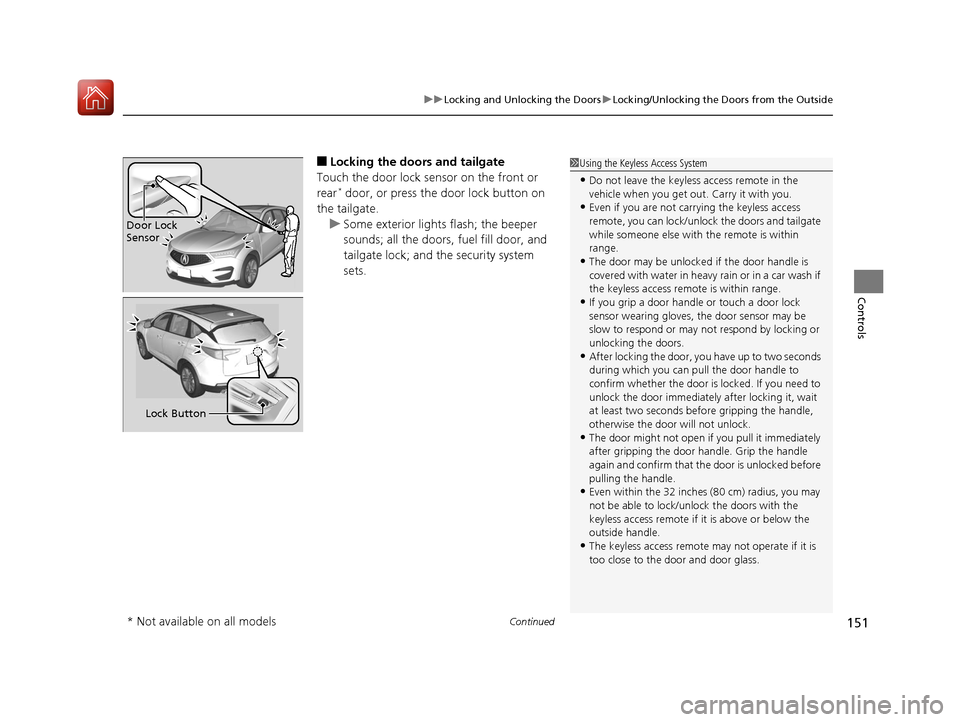
■Locking the doors and tailgate
Touch the door lock sensor on the front or
rear
* door, or press the door lock button on
the tailgate. u Some exterior lights flash; the beeper
sounds; all the doors, fuel fill door, and
tailgate lock; and the security system
sets.
1Using the Keyless Access System
•Do not leave the keyless access remote in the
vehicle when you get out . Carry it with you.
•Even if you are not carrying the keyless access
remote, you can lock/unlock the doors and tailgate
while someone else with the remote is within
range.
•The door may be unlocked if the door handle is
covered with water in heavy rain or in a car wash if
the keyless access remote is within range.
•If you grip a door handle or touch a door lock
sensor wearing gloves, the door sensor may be
slow to respond or may no t respond by locking or
unlocking the doors.
•After locking the door, you have up to two seconds
during which you can pull the door handle to
confirm whether the door is locked. If you need to
unlock the door immediately after locking it, wait
at least two seconds befo re gripping the handle,
otherwise the door will not unlock.
•The door might not open if you pull it immediately
after gripping the door handle. Grip the handle
again and confirm that th e door is unlocked before
pulling the handle.
•Even within the 32 inches (80 cm) radius, you may
not be able to lock/unl ock the doors with the
keyless access remote if it is above or below the
outside handle.
•The keyless access remote may not operate if it is
too close to the door and door glass.
Door Lock
Sensor
Lock Button
* Not available on all models
20 ACURA RDX-31TJB6111.book 151 ページ 2020年2月11日 火曜日 午後2時6分
Page 166 of 657

165
uuOpening and Closing the Tailgate uOpening/Closing the Power Tailgate
Continued
Controls
Opening/Closing the Power Tailgate
Use a forward and back kicking motion under
the center of the rear bumper to open or close
the power tailgate while carrying the keyless
access remote.
u Some exterior lights flash twice and a
beeper sounds once, then the tailgate
begins to move.
■Using the Hands Free Access*1Opening/Closing the Power Tailgate
During rain or in other instances when the vehicle
becomes wet, the sensor may not properly detect
your foot motion.
When performing work on or around the rear section
of the vehicle, you may in advertently open or close
the tailgate.
To prevent this from happe ning, select Customized
Features on the audio/information screen and then
select OFF for the feature. 2 Customized Features P. 335
If you hold your foot under the bumper for too long,
the power tailgate doe s not open or close.
This function will not opera te if you don’t have the
keyless access remote on you. Please make sure you
have the keyless access remote on you.
The duration of the kicking motion should be
approximately one second.
Models with Hands Free Access
1 sec.
* Not available on all models
20 ACURA RDX-31TJB6111.book 165 ページ 2020年2月11日 火曜日 午後2時6分
Page 184 of 657
183
uuOperating the Switches Around the Steering Wheel uENGINE START/STOP Button
Continued
Controls
If you leave the vehicle for 30 to 60 minutes with the transmission in (P and the
power mode in ACCESSORY, the vehicle automa tically goes into the mode similar to
VEHICLE OFF (LOCK) to avoid draining the battery.
When in this mode:
The steering wheel does not lock.
You cannot lock or unlock doors with the remote transmitter or the keyless access
system.
Press the ENGINE START/STOP button twice to switch the mode to VEHICLE OFF
(LOCK).
If you open the driver’s door when the power mode is set to ACCESSORY, a warning
beep sounds.
■Automatic Power Off
■Power Mode Reminder
Canadian models
20 ACURA RDX-31TJB6111.book 183 ページ 2020年2月11日 火曜日 午後2時6分