change time Acura RDX 2020 Owner's Guide
[x] Cancel search | Manufacturer: ACURA, Model Year: 2020, Model line: RDX, Model: Acura RDX 2020Pages: 657, PDF Size: 33.2 MB
Page 330 of 657
329
uuGeneral Information on the Audio System uLegal Information on Apple CarPlay/Android Auto
Features
YOU EXPRESSLY ACKNOWLEDGE AND AGREE THAT USE OF APPLE CARPLAY OR ANDROID AUTO (“THE APPLICATIONS”) IS AT YOUR
SOLE RISK AND THAT THE ENTIRE RISK AS TO SATISFACTORY Q UALITY, PERFORMANCE, ACCURACY AND EFFORT IS WITH YOU TO THE
MAXIMUM EXTENT PERMITTED BY APPLICABLE LAW, AND THAT TH E APPLICATIONS AND INFORMATION ON THE APPLICATIONS IS
PROVIDED “AS IS” AND “AS AVAILABLE,” WITH ALL FAUL TS AND WITHOUT WARRANTY OF ANY KIND, AND HONDA HEREBY
DISCLAIMS ALL WARRANTIES AND CONDITIONS WITH RESPECT TO THE APPLICATIONS AND INFORMATION ON THE APPLICATIONS,
EITHER EXPRESS, IMPLIED OR STATUTORY, INCLUDING, BUT NOT LIMITED TO, THE IMPLIED WARRANTIES AND/OR CONDITIONS OF
MERCHANTABILITY, SATISFACTORY QUALITY, FITNESS FOR A PA RTICULAR PURPOSE, ACCURACY, QUIET ENJOYMENT, AND NON-
INFRINGEMENT OF THIRD PARTY RIGHTS. NO ORAL OR WRITTEN INFORMATION OR ADVICE GIVEN BY HONDA OR AN AUTHORIZED
REPRESENTATIVE SHALL CREATE A WARRANTY. AS EXAMPLES, AND WITHOUT LIMITATION, HONDA DISCLAIMS ANY WARRANTY
REGARDING THE ACCURACY OF DATA PROVIDED BY THE APPLI CATIONS, SUCH AS THE ACCURACY OF DIRECTIONS, ESTIMATED
TRAVEL TIME, SPEED LIMITS, ROAD CONDITIONS, NEWS, WEATHER, TRAF FIC, OR OTHER CONTENT PROVIDED BY APPLE, GOOGLE, THEIR
AFFILIATES, OR THIRD PARTY PROVIDERS; HONDA DOES NOT GUARANTEE AGAINST LO SS OF APPLICATION DATA, WHICH MAY BE LOST
AT ANY TIME; HONDA DOES NOT GUARANTEE THAT THE APPLICATIO NS OR ANY SERVICES PROVIDED THROUGH THEM WILL BE
PROVIDED AT ALL TIMES OR THAT ANY OR ALL SERVICES WILL BE AVAILABLE AT ANY PA RTICULAR TIME OR LOCATION. FOR EXAMPLE,
SERVICES MAY BE SUSPENDED OR INTERRUPTED WITHOUT NOTICE FOR REPAIR, MAINTENANCE, SECURITY FIXES, UPDATES, ETC.,
SERVICES MAY BE UNAVAILABLE IN YOUR AREA OR LOCATION, ETC. IN ADDITION, YOU UNDERSTAND THAT CHANGES IN THIRD PARTY
TECHNOLOGY OR GOVERNMENT REGULATION MAY RENDER THE SERVICES AND/OR APPLICATIONS OBSOLETE AND/OR UNUSABLE.
TO THE EXTENT NOT PROHIBITED BY LAW, IN NO EVENT SHALL HONDA OR ITS AFFILIATES BE LIABLE FOR PERSONAL INJURY, OR ANY
INCIDENTAL, SPECIAL, INDIRECT OR CO NSEQUENTIAL DAMAGES WHATSOEVER, INCLUDING, WITHOUT LIMITATION, DAMAGES FOR
LOSS OF PROFITS, CORRUPTION OR LOSS OF DATA, FAILURE TO TRANSMIT OR RECEIVE ANY DATA, BUSINESS INTERRUPTION OR ANY
OTHER COMMERCIAL DAMAGES OR LOSSES, ARISIN G OUT OF OR RELATED TO THE APPLICATIONS OR YOUR USE OF OR INABILITY TO
USE THE APPLICATIONS OR INFORMATION ON THE APPLICATIONS, HOWEVER CAUSED, REGARDLESS OF THE THEORY OF LIABILITY
(CONTRACT, TORT OR OTHERWISE) AND EVEN IF HONDA WERE ADVISED OF THE POSSIBILITY OF SUCH DAMAGES. SOME STATES AND
JURISDICTIONS DISALLOW THE EXCLUSION OR LIMITATION OF LI ABILITY FOR DAMAGES, SO THESE LIMITATIONS AND EXCLUSIONS MAY
NOT APPLY TO YOU. IN NO EVENT SHALL HONDA’S TOTAL LIABILITY TO YOU FOR ALL DAM AGES (OTHER THAN AS MAY BE REQUIRED
BY APPLICABLE LAW IN CASES INVOLVING PERSONAL INJURY) EXCE ED THE AMOUNT OF FIVE DOLLARS ($5.00). THE FOREGOING
LIMITATIONS WILL APPLY EVEN IF THE ABOVE STATED REMEDY FAILS OF ITS ESSENTIAL PURPOSE.
■DISCLAIMER OF WARRANTIES; LIMITATION ON LIABILITY
20 ACURA RDX-31TJB6111.book 329 ページ 2020年2月11日 火曜日 午後2時6分
Page 343 of 657
342
uuCustomized Features u
Features
■List of customizable options
*1:Default Setting Setup Group Customizable Features Description Selectable Settings
System
System
Volumes
System SoundsChanges the system sounds volume.—
Phone CallsChanges the phone call volume.—
Voice RecognitionChanges the voice recognition volume.—
Navigation GuidanceChanges the navigation guidance
volume.—
Touchpad SensitivitySets the sensitivity of the true
touchpad.High
/Low*1
Date & Time
Time FormatSelects the digital clock display from
12H to 24H.12 Hour*1/ 24 Hour
Set Date &
Time
Automatic
Date & TimeSelects On to have the GPS
automatically adjust the clock. Select
Off to cancel this function.
On*1/Off
Set DateAdjusts date.
2 Adjusting the Clock P. 144—
Set TimeAdjusts clock.
2Adjusting the Clock P. 144—
20 ACURA RDX-31TJB6111.book 342 ページ 2020年2月11日 火曜日 午後2時6分
Page 344 of 657
343
uuCustomized Features u
Continued
Features
*1:Default SettingSetup Group Customizable Features
Description Selectable Settings
System
Date & TimeSet Time
Zone
Automatic
Time ZoneSets the audio system to automatically
adjust the clock when driving through
different time zones.
On*1/Off
(Select time
zone)Changes the time zone manually.—
System Units
Changes the speed/distance unit on
the multi-information display, head-up
display
* and audio/information screen.
Miles*1/KM (U.S.)
Miles/ KM*1 (Canada)
LanguageChanges the display language.English*1/Français /
Español
Factory Data Reset
Resets all the settings to their factory
default.
2 Defaulting All the Settings P. 357
Continue/Cancel
AboutDisplays the Android setting items.—
Advanced
OptionsLocation Access
Selects Off not to allow apps including
the navigation system* to access the
vehicle’s location.On*1/ Off
* Not available on all models
20 ACURA RDX-31TJB6111.book 343 ページ 2020年2月11日 火曜日 午後2時6分
Page 348 of 657
347
uuCustomized Features u
Continued
Features
*1:Default SettingSetup Group Customizable Features
Description Selectable Settings
Connections Android
Auto
(Saved
Devices)Sets up the Android Auto connection.
Disable/Enable
Delete Delete an Android Auto device. Cancel/Delete
Apple
CarPlay (Saved
Devices)Allow Apple
CarPlay
Sets up the Apple CarPlay connection.
Disable/Enable
AcuraLink
Assist Turn AcuraLink Assist on and off.
On
*1/Off
Delete Delete an Apple CarPlay device. Cancel/Delete
Display
BrightnessChanges the brightness of the audio/
information screen.—
Display OffTurns the audio/information screen
brightness off.—
Night ModeChanges between the daytime mode
and nighttime mode.
2 Display Setup P. 269
—Day Mode
More
SettingsContrastChanges the contrast of the audio/
information screen.—
Black LevelChanges the black level of the audio/
information screen.—
20 ACURA RDX-31TJB6111.book 347 ページ 2020年2月11日 火曜日 午後2時6分
Page 352 of 657
351
uuCustomized Features u
Continued
Features
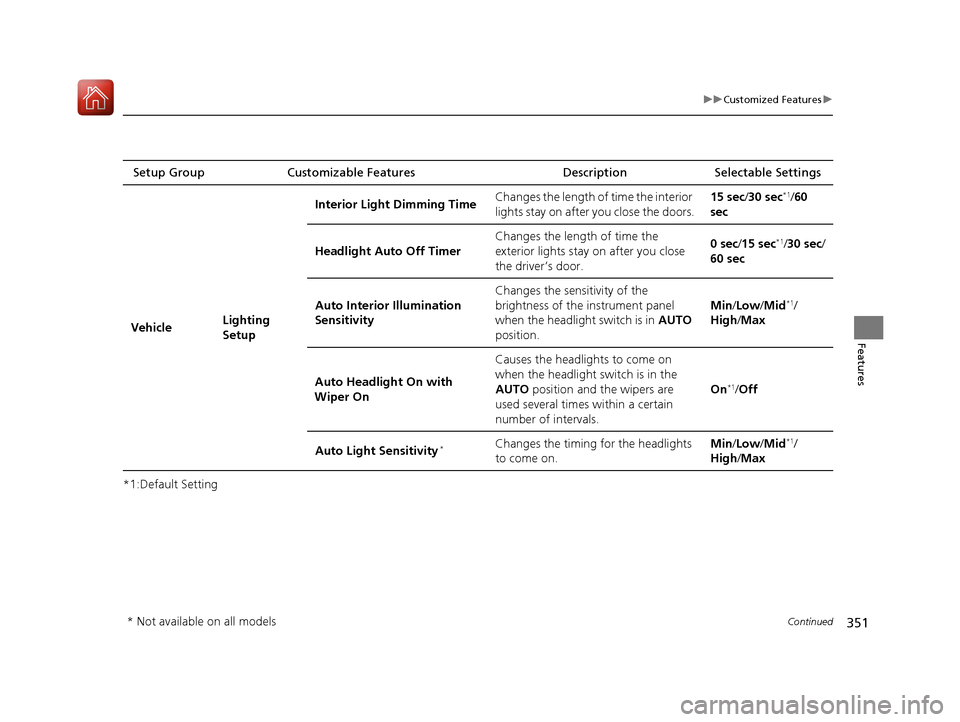
*1:Default SettingSetup Group Customizable Features
Description Selectable Settings
Vehicle Lighting
SetupInterior Ligh
t Dimming Time Changes the length of time the interior
lights stay on after you close the doors. 15 sec/
30 sec
*1/60
sec
Headlight Auto Off Timer Changes the length of time the
exterior lights stay on after you close
the driver’s door. 0 sec
/15 sec
*1/30 sec /
60 sec
Auto Interior Illumination
Sensitivity Changes the sensitivity of the
brightness of the instrument panel
when the headlight switch is in
AUTO
position. Min/
Low/ Mid
*1/
High /Max
Auto Headligh t On with
Wiper On Causes the headlights to come on
when the headlight switch is in the
AUTO
position and the wipers are
used several times within a certain
number of intervals. On
*1/
Off
Auto Light Sensitivity
*Changes the timing for the headlights
to come on. Min/
Low/ Mid*1/
High /Max
* Not available on all models
20 ACURA RDX-31TJB6111.book 351 ページ 2020年2月11日 火曜日 午後2時6分
Page 353 of 657
352
uuCustomized Features u
Features
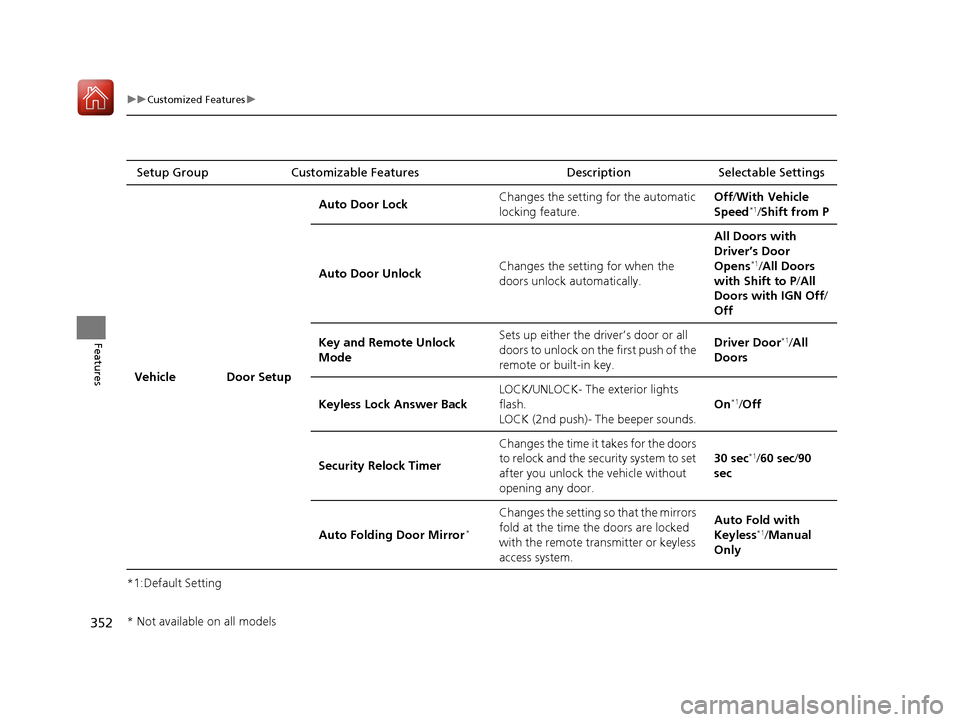
*1:Default SettingSetup Group Customizable Features Description Selectable Settings
Vehicle Door Setup Auto Door Lock
Changes the setting for the automatic
locking feature. Off
/With Vehicle
Speed
*1/ Shift from P
Auto Door Unlock Changes the setting for when the
doors unlock automatically. All Doors with
Driver’s Door
Opens
*1/
All Doors
with Shift to P /All
Doors with IGN Off /
Off
Key and Remote Unlock
Mode Sets up either the driver’s door or all
doors to unlock on the first push of the
remote or built-in key. Driver Door
*1/
All
Doors
Keyless Lock Answer Back LOCK/UNLOCK- The exterior lights
flash.
LOCK (2nd push)- The beeper sounds. On
*1/
Off
Security Relock Timer Changes the time it takes for the doors
to relock and the security system to set
after you unlock the vehicle without
opening any door. 30 sec
*1/
60 sec /90
sec
Auto Folding Door Mirror
*
Changes the setting so that the mirrors
fold at the time the doors are locked
with the remote transmitter or keyless
access system. Auto Fold with
Keyless
*1/
Manual
Only
* Not available on all models
20 ACURA RDX-31TJB6111.book 352 ページ 2020年2月11日 火曜日 午後2時6分
Page 354 of 657
353
uuCustomized Features u
Continued
Features
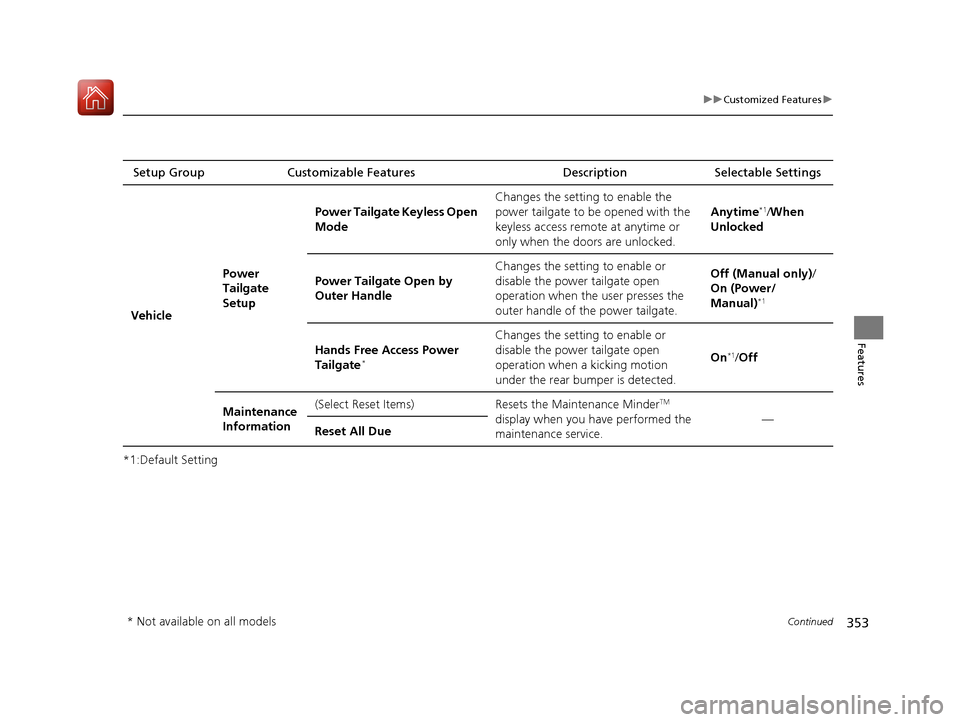
*1:Default SettingSetup Group Customizable Features
Description Selectable Settings
Vehicle Power
Tailgate
SetupPower Tailgate Keyless Open
Mode
Changes the setting to enable the
power tailgate to be opened with the
keyless access remote at anytime or
only when the doors are unlocked.
Anytime
*1/
When
Unlocked
Power Tailgate Open by
Outer Handle Changes the setting to enable or
disable the power tailgate open
operation when the user presses the
outer handle of the power tailgate. Off (Manual only)
/
On (Power/
Manual)
*1
Hands Free Access Power
Tailgate*
Changes the setting to enable or
disable the power tailgate open
operation when a kicking motion
under the rear bumper is detected. On
*1/
Off
Maintenance
Information (Select Reset Items) Resets the Maintenance Minder
TM
display when you have performed the
maintenance service. —
Reset All Due
* Not available on all models
20 ACURA RDX-31TJB6111.book 353 ページ 2020年2月11日 火曜日 午後2時6分
Page 384 of 657
Continued383
uuBluetooth ® HandsFreeLink ®u Text Message
Features
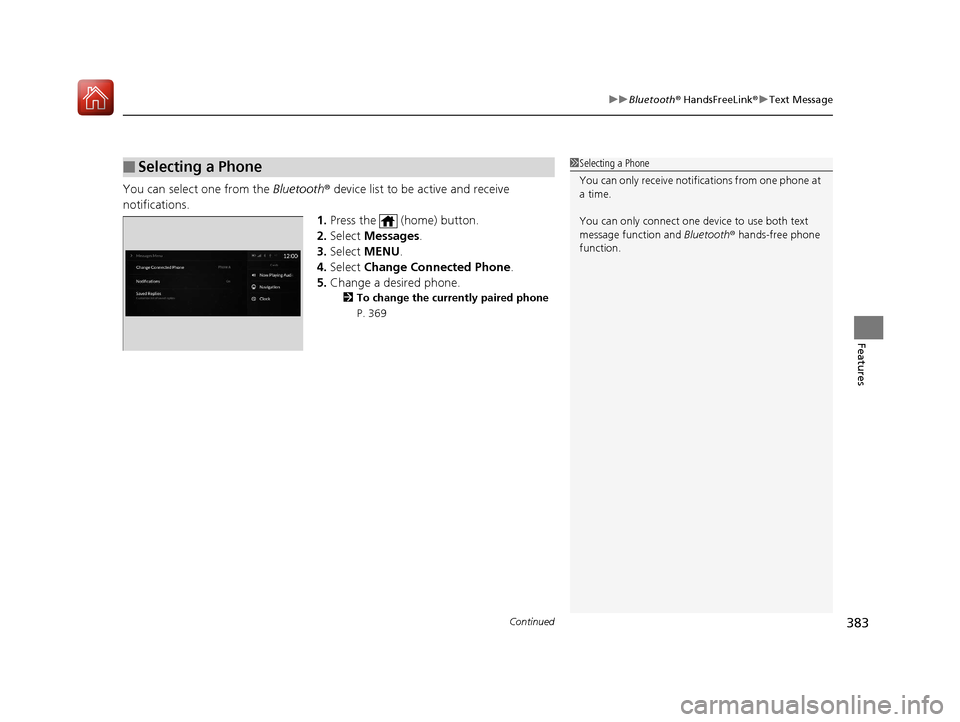
You can select one from the Bluetooth® device list to be active and receive
notifications. 1.Press the (home) button.
2. Select Messages.
3. Select MENU .
4. Select Change Connected Phone .
5. Change a desired phone.
2 To change the currently paired phone
P. 369
■Selecting a Phone1 Selecting a Phone
You can only receive notifications from one phone at
a time.
You can only connect one de vice to use both text
message function and Bluetooth® hands-free phone
function.
20 ACURA RDX-31TJB6111.book 383 ページ 2020年2月11日 火曜日 午後2時6分
Page 395 of 657
uuAcuraLink ®u
394
Features
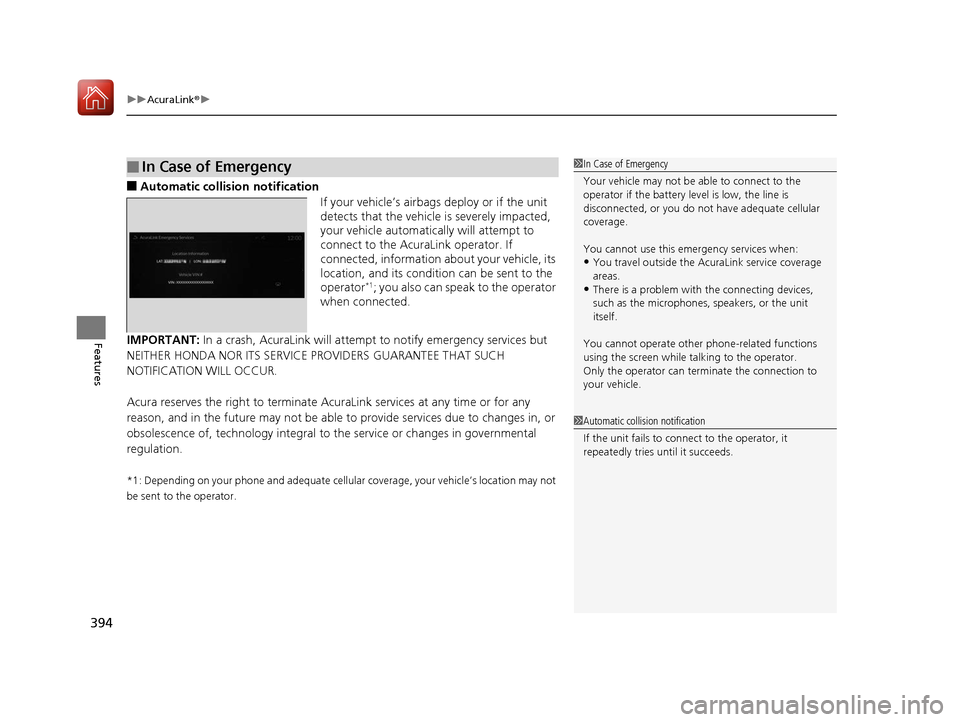
■Automatic collisi on notification
If your vehicle’s airbags deploy or if the unit
detects that the vehicle is severely impacted,
your vehicle automatically will attempt to
connect to the AcuraLink operator. If
connected, information about your vehicle, its
location, and its condition can be sent to the
operator
*1; you also can speak to the operator
when connected.
IMPORTANT: In a crash, AcuraLink will attempt to notify emergency services but
NEITHER HONDA NOR ITS SERVICE PROVIDERS GUARANTEE THAT SUCH
NOTIFICATION WILL OCCUR.
Acura reserves the right to terminate Acur aLink services at any time or for any
reason, and in the future may not be able to provide services due to changes in, or
obsolescence of, technology integral to the service or changes in governmental
regulation.
*1: Depending on your phone and ad equate cellular coverage, your vehicle’s location may not
be sent to the operator.
■In Case of Emergency1 In Case of Emergency
Your vehicle may not be able to connect to the
operator if the battery level is low, the line is
disconnected, or you do not have adequate cellular
coverage.
You cannot use this emergency services when:
•You travel outside the AcuraLink service coverage
areas.
•There is a problem with the connecting devices,
such as the microphones, speakers, or the unit
itself.
You cannot operate othe r phone-related functions
using the screen while talking to the operator.
Only the operator can terminate the connection to
your vehicle.
1 Automatic collision notification
If the unit fails to connect to the operator, it
repeatedly tries until it succeeds.
20 ACURA RDX-31TJB6111.book 394 ページ 2020年2月11日 火曜日 午後2時6分
Page 421 of 657

420
uuWhen Driving uShifting
Driving
Shifting
Change the gear position in acco rdance with your driving needs.
■Shift button positions
1Shifting
To prevent malfunc tion and unintended
engagement:
•Do not spill any liquids on or around shift buttons.
•Do not place or drop any objects on or around shift
buttons.
•Do not let passengers or ch ildren operate the shift
buttons.
The beeper sounds and the message appears on the
multi-information display when you depress the
accelerator pedal with the gear position in
( N.
2 Multi-Information Display Warning and
Information Messages P. 97
Change the gear position to
( D or (R with the brake
pedal depressed.
3WARNING
The vehicle can roll aw ay if left unattended
without confirming that Park is engaged.
A vehicle that rolls away could cause a crash
resulting in seriou s injury or death.
Always keep your foot on the brake pedal
until you have confirmed that
( P is shown
on the gear position indicator.
Reverse
Used when reversing
Park
Used when parking, be fore turning off or
starting the engine
Neutral
Transmission is not locked
Drive/S Position
Each time you press the button, the
mode switches between Drive and S Position
mode.
Used for:
●Normal driving (gears change between
1st and 10th automatically)
●Temporarily driving in the sequential
mode
●Automatically changing gears between
1st and 8th (8th gear is used only at high
speed)
●Driving in the sequential mode
D/S
Drive
S Position
20 ACURA RDX-31TJB6111.book 420 ページ 2020年2月11日 火曜日 午後2時6分