adjust Acura RDX 2020 Service Manual
[x] Cancel search | Manufacturer: ACURA, Model Year: 2020, Model line: RDX, Model: Acura RDX 2020Pages: 657, PDF Size: 33.2 MB
Page 216 of 657

215
uuAdjusting the Seats uMaintain a Proper Sitting Position
Controls
Maintain a Proper Sitting Position
After all occupants have adjusted their s eats and head restraints, and put on their
seat belts, it is very important that they continue to sit upright, well back in their
seats, with their feet on the floor, until the vehicle is safe ly parked and the engine is
off.
Sitting improperly can increase the chance of injury during a crash. For example, if
an occupant slouches, lies down, turns si deways, sits forward, leans forward or
sideways, or puts one or both feet up, the chance of injury during a crash is greatly
increased.
In addition, an occupant who is out of posi tion in the front seat can be seriously or
fatally injured in a crash by striking interior parts of the vehicle or being struck by an
inflating front airbag.1 Maintain a Proper Sitting Position
3WARNING
Sitting improperly or out of position can
result in serious injury or death in a crash.
Always sit upright, well back in the seat,
with your feet on the floor.
20 ACURA RDX-31TJB6111.book 215 ページ 2020年2月11日 火曜日 午後2時6分
Page 217 of 657
216
uuAdjusting the Seats uRear Seats
Controls
Rear Seats
Separately fold down the left and right halv es of the rear seat to make room for
cargo.
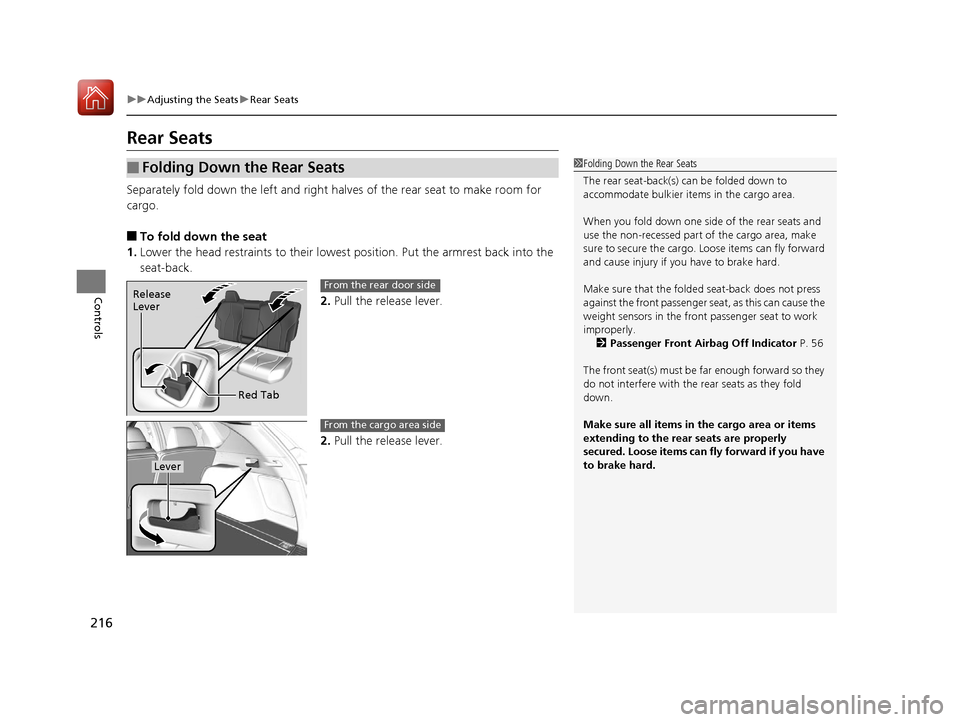
■To fold down the seat
1. Lower the head restraints to their lowest position. Put the armrest back into the
seat-back.
2.Pull the release lever.
2. Pull the release lever.
■Folding Down the Rear Seats1Folding Down the Rear Seats
The rear seat-back(s) can be folded down to
accommodate bulkier items in the cargo area.
When you fold down one side of the rear seats and
use the non-recessed part of the cargo area, make
sure to secure the cargo. Loose items can fly forward
and cause injury if you have to brake hard.
Make sure that the folded seat-back does not press
against the front passenger se at, as this can cause the
weight sensors in the front passenger seat to work
improperly.
2 Passenger Front Airbag Off Indicator P. 56
The front seat(s) must be far enough forward so they
do not interfere with the rear seats as they fold
down.
Make sure all items in the cargo area or items
extending to the rear seats are properly
secured. Loose items can fly forward if you have
to brake hard.
Release
Lever
Red TabFrom the rear door side
Lever
From the cargo area side
20 ACURA RDX-31TJB6111.book 216 ページ 2020年2月11日 火曜日 午後2時6分
Page 218 of 657
217
uuAdjusting the Seats uRear Seats
Controls
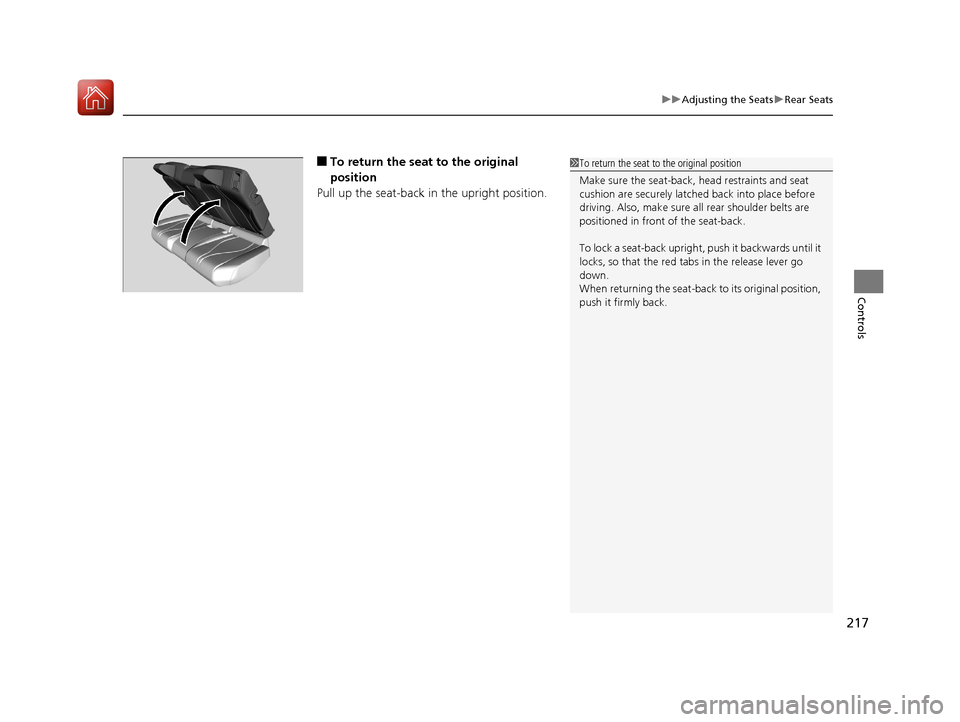
■To return the seat to the original
position
Pull up the seat-back in the upright position.1 To return the seat to the original position
Make sure the seat-back, head restraints and seat
cushion are securely latche d back into place before
driving. Also, make sure all rear shoulder belts are
positioned in front of the seat-back.
To lock a seat-back upright, push it backwards until it
locks, so that the red tabs in the release lever go
down.
When returning the seat-back to its original position,
push it firmly back.
20 ACURA RDX-31TJB6111.book 217 ページ 2020年2月11日 火曜日 午後2時6分
Page 219 of 657
218
uuAdjusting the Seats uArmrest
Controls
Armrest
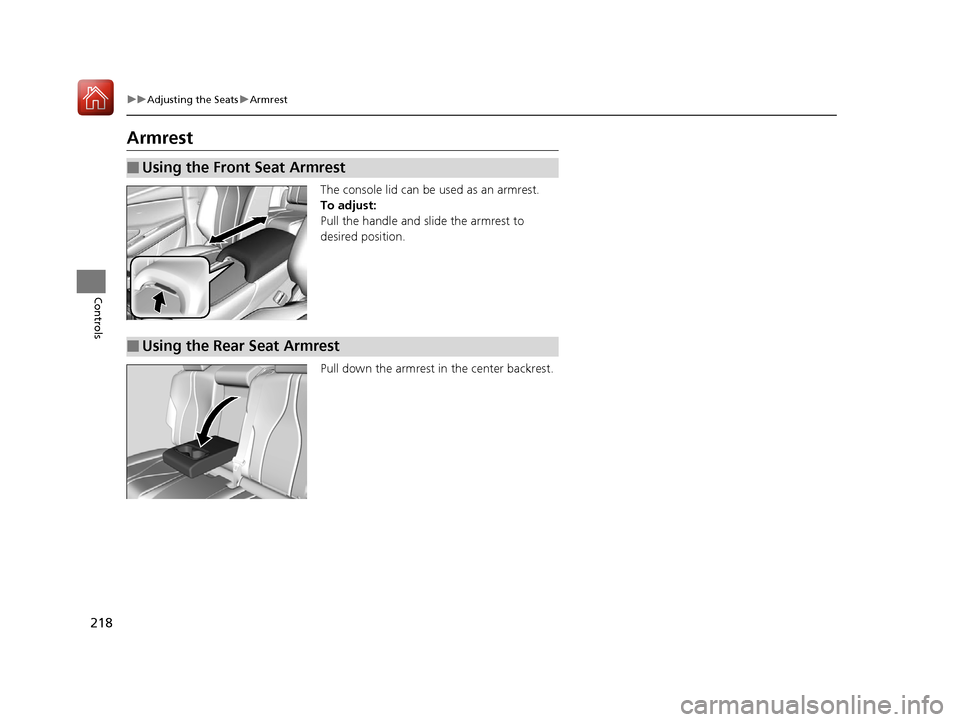
The console lid can be used as an armrest.
To adjust:
Pull the handle and slide the armrest to
desired position.
Pull down the armrest in the center backrest.
■Using the Front Seat Armrest
■Using the Rear Seat Armrest
20 ACURA RDX-31TJB6111.book 218 ページ 2020年2月11日 火曜日 午後2時6分
Page 231 of 657
230
Controls
Climate Control System
Using Automatic Climate Control
The automatic climate control system maintains the interior temperature you select.
The system also selects the proper mix of heated or cooled air that raises or lowers
the interior temperature to your preference as quickly as possible.
Use the system when the engine is running.
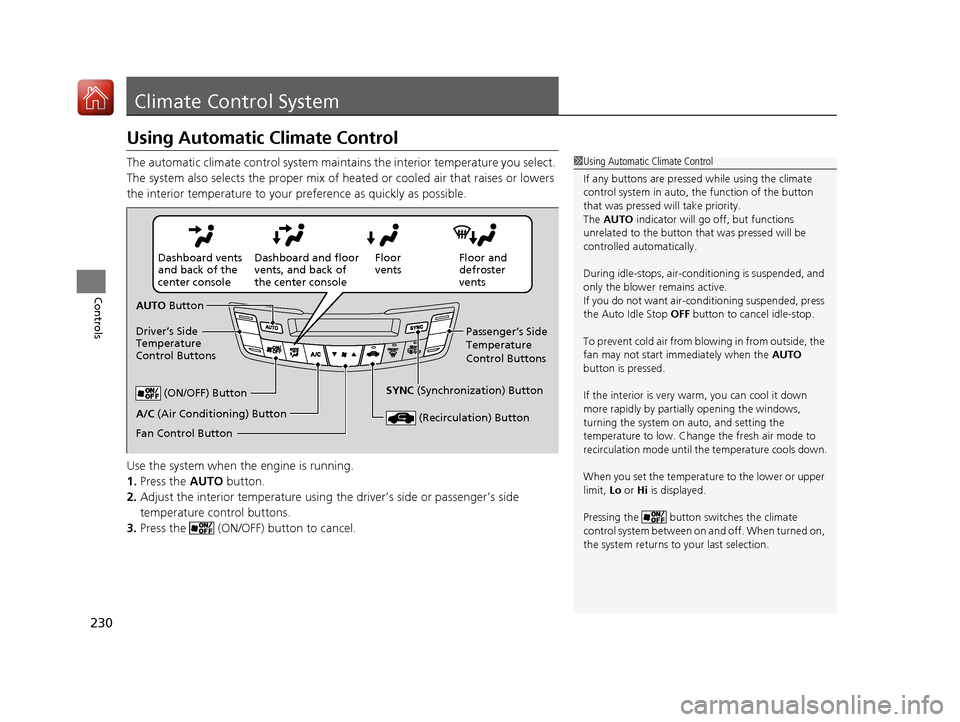
1. Press the AUTO button.
2. Adjust the interior temperature using the driver’s side or passenger’s side
temperature control buttons.
3. Press the (ON/OFF) button to cancel.1Using Automatic Climate Control
If any buttons are presse d while using the climate
control system in auto, the function of the button
that was pressed will take priority.
The AUTO indicator will go off, but functions
unrelated to the button th at was pressed will be
controlled automatically.
During idle-stops, air-conditioning is suspended, and
only the blower remains active.
If you do not want air-cond itioning suspended, press
the Auto Idle Stop OFF button to cancel idle-stop.
To prevent cold air from bl owing in from outside, the
fan may not start i mmediately when the AUTO
button is pressed.
If the interior is very warm, you can cool it down
more rapidly by partial ly opening the windows,
turning the system on auto, and setting the
temperature to low. Change the fresh air mode to
recirculation mode until the temperature cools down.
When you set the temperat ure to the lower or upper
limit, Lo or Hi is displayed.
Pressing the button switches the climate
control system between on and off. When turned on,
the system returns to your last selection.
Floor and
defroster
vents
Floor
vents
Dashboard and floor
vents, and back of
the center console
Dashboard vents
and back of the
center console
AUTO Button
Driver’s Side
Temperature
Control Buttons Passenger’s Side
Temperature
Control Buttons
A/C (Air Conditioning) Button (ON/OFF) Button
Fan Control Button SYNC
(Synchronization) Button
(Recirculation) Button
20 ACURA RDX-31TJB6111.book 230 ページ 2020年2月11日 火曜日 午後2時6分
Page 233 of 657
uuClimate Control System u
232
Controls
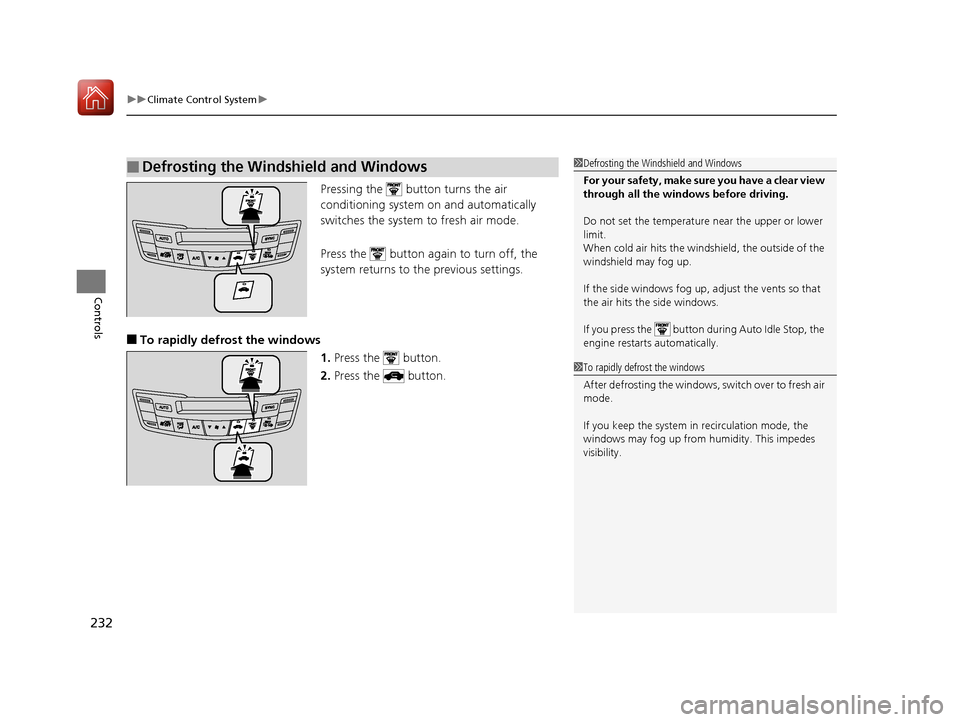
Pressing the button turns the air
conditioning system on and automatically
switches the system to fresh air mode.
Press the button again to turn off, the
system returns to the previous settings.
■To rapidly defrost the windows 1.Press the button.
2. Press the button.
■Defrosting the Windshield and Windows1Defrosting the Windshield and Windows
For your safety, make sure you have a clear view
through all the windows before driving.
Do not set the temperatur e near the upper or lower
limit.
When cold air hits the windshield, the outside of the
windshield may fog up.
If the side windows fog up, adjust the vents so that
the air hits the side windows.
If you press the button during Auto Idle Stop, the
engine restarts automatically.
1 To rapidly defrost the windows
After defrosting the windows, switch over to fresh air
mode.
If you keep the system in recirculation mode, the
windows may fog up from humidity. This impedes
visibility.
20 ACURA RDX-31TJB6111.book 232 ページ 2020年2月11日 火曜日 午後2時6分
Page 234 of 657
Continued233
uuClimate Control System u
Controls
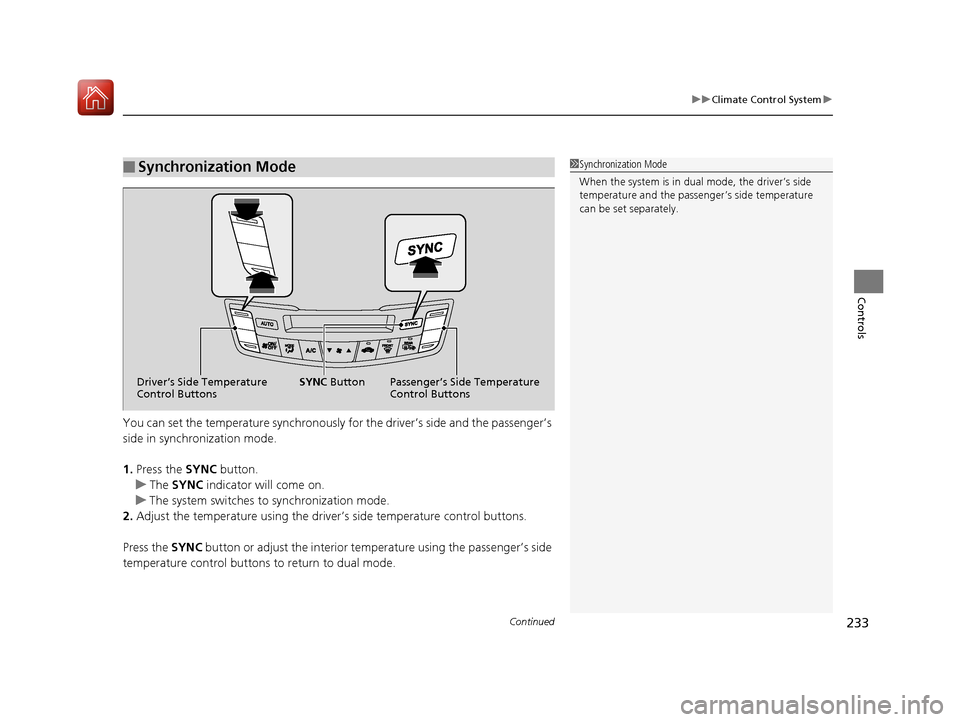
You can set the temperature synchronously for the driver’s side and the passenger’s
side in synchronization mode.
1.Press the SYNC button.
u The SYNC indicator will come on.
u The system switches to synchronization mode.
2. Adjust the temperature using the driver’s side temperature control buttons.
Press the SYNC button or adjust the interior temp erature using the passenger’s side
temperature control buttons to return to dual mode.
■Synchronization Mode1Synchronization Mode
When the system is in dua l mode, the driver’s side
temperature and the passe nger’s side temperature
can be set separately.
Driver’s Side Temperature
Control Buttons Passenger’s Side Temperature
Control Buttons
SYNC
Button
20 ACURA RDX-31TJB6111.book 233 ページ 2020年2月11日 火曜日 午後2時6分
Page 235 of 657
uuClimate Control System u
234
Controls
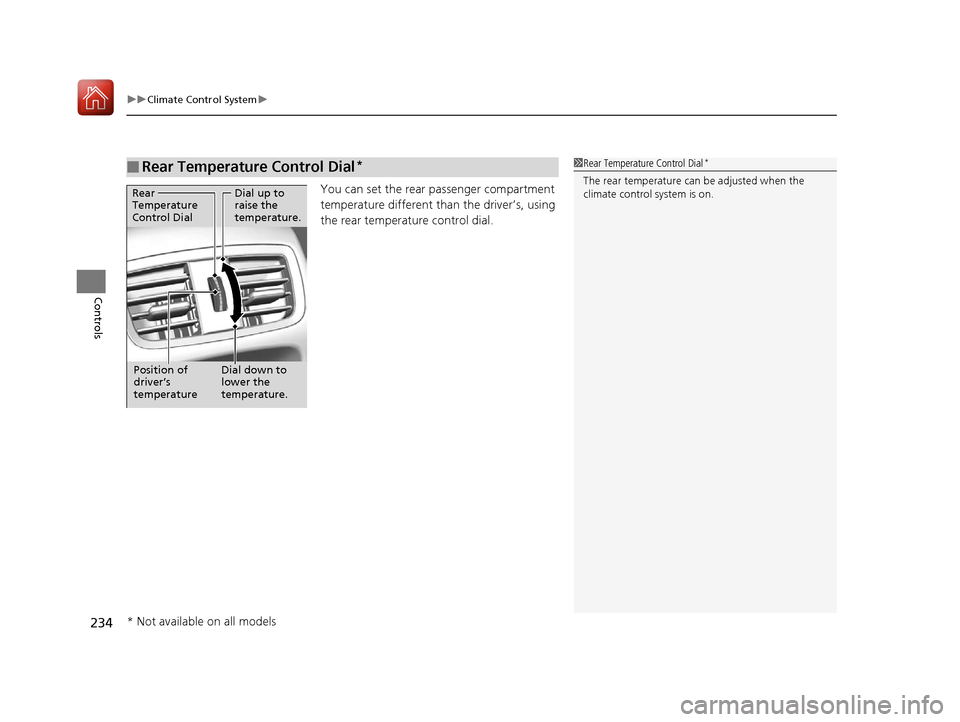
You can set the rear passenger compartment
temperature different than the driver’s, using
the rear temperature control dial.
■Rear Temperature Control Dial*1 Rear Temperature Control Dial*
The rear temperature can be adjusted when the
climate control system is on.Dial up to
raise the
temperature.
Dial down to
lower the
temperature.
Rear
Temperature
Control Dial
Position of
driver’s
temperature
* Not available on all models
20 ACURA RDX-31TJB6111.book 234 ページ 2020年2月11日 火曜日 午後2時6分
Page 238 of 657
237
Features
This chapter describes how to operate technology features.
Audio SystemAbout Your Audio System ................ 238
USB Ports ......................................... 239
Auxiliary Input Jack .......................... 241
Audio System Theft Protection ......... 242
Audio Remote Controls .................... 243
Audio System Basic Operation ........ 245
True Touchpad Operation ................ 246
Audio/Information Screen ................ 249
System Updates ............................... 262
Adjusting the Sound ........................ 268
Display Setup ................................... 269 Voice Control Operation .................. 270
Playing AM/FM Radio ....................... 273
Playing SiriusXM
® Radio ................... 277
Playing an iPod ................................ 290
Playing a USB Flash Drive ................. 293
Playing Bluetooth ® Audio................. 296
Wi-Fi Connection ............................. 299
Siri Eyes Free .................................... 301
Apple CarPlay .................................. 302
Android Auto................................... 306
Audio Error Messages ...................... 310 General Information on the Audio
System ............................................. 313
Customized Features ........................ 335
HomeLink ® Universal Transceiver ... 358
Bluetooth® HandsFreeLink® ............. 361
AcuraLink® ........................................ 390
20 ACURA RDX-31TJB6111.book 237 ページ 2020年2月11日 火曜日 午後2時6分
Page 246 of 657
245
Features
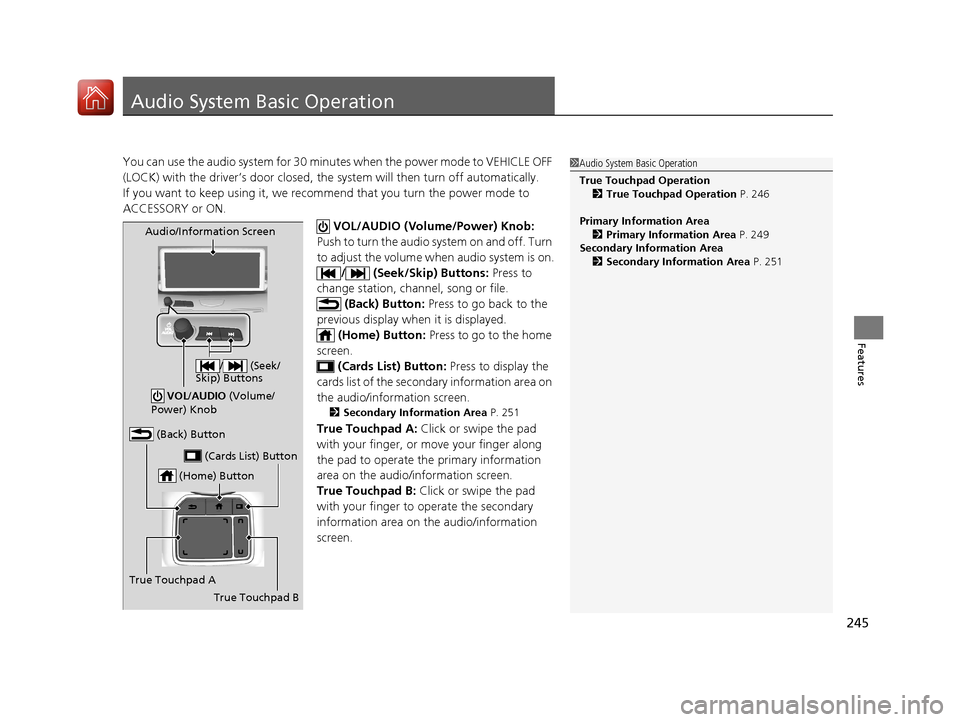
Audio System Basic Operation
You can use the audio system for 30 minutes when the power mode to VEHICLE OFF
(LOCK) with the driver’s door closed, the system will then turn off automatically.
If you want to keep using it, we recomme nd that you turn the power mode to
ACCESSORY or ON.
VOL/AUDIO (Volume/Power) Knob:
Push to turn the audio system on and off. Turn
to adjust the volume wh en audio system is on.
/ (Seek/Skip) Buttons: Press to
change station, channel, song or file.
(Back) Button: Press to go back to the
previous display when it is displayed. (Home) Button: Press to go to the home
screen. (Cards List) Button: Press to display the
cards list of the second ary information area on
the audio/information screen.
2 Secondary Information Area P. 251
True Touchpad A: Click or swipe the pad
with your finger, or move your finger along
the pad to operate the primary information
area on the audio/information screen.
True Touchpad B: Click or swipe the pad
with your finger to operate the secondary
information area on th e audio/information
screen.
1 Audio System Basic Operation
True Touchpad Operation
2 True Touchpad Operation P. 246
Primary Information Area 2 Primary Information Area P. 249
Secondary Information Area 2 Secondary Information Area P. 251
(Home) Button
(Back) Button
True Touchpad A (Cards List) Button
Audio/Information Screen
/ (Seek/
Skip) Buttons
VOL /AUDIO (Volume/
Power) Knob
True Touchpad B
20 ACURA RDX-31TJB6111.book 245 ページ 2020年2月11日 火曜日 午後2時6分