auto lock Acura RDX 2020 Service Manual
[x] Cancel search | Manufacturer: ACURA, Model Year: 2020, Model line: RDX, Model: Acura RDX 2020Pages: 657, PDF Size: 33.2 MB
Page 417 of 657
uuWhen Driving uStarting the Engine
416
Driving
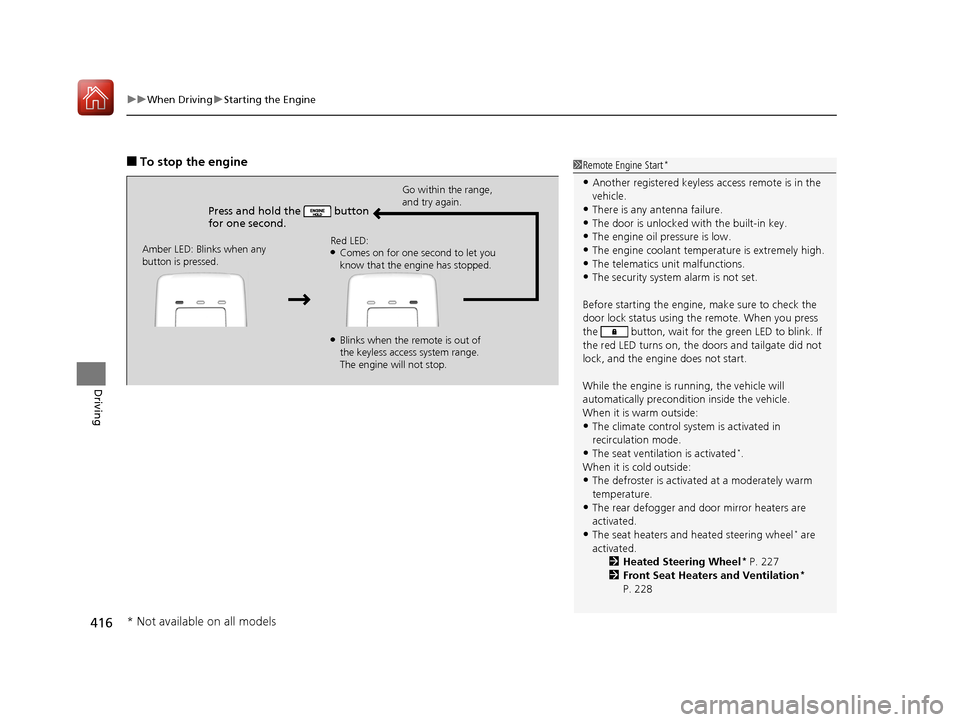
■To stop the engine
Press and hold the button
for one second.
Go within the range,
and try again.
Amber LED: Blinks when any
button is pressed. Red LED:
●Comes on for one second to let you
know that the engine has stopped.
●Blinks when the remote is out of
the keyless access system range.
The engine will not stop.
1
Remote Engine Start*
•Another registered keyless access remote is in the
vehicle.
•There is any antenna failure.
•The door is unlocked with the built-in key.•The engine oil pressure is low.
•The engine coolant temper ature is extremely high.
•The telematics unit malfunctions.•The security system alarm is not set.
Before starting the engine, make sure to check the
door lock status using the remote. When you press
the button, wait for the green LED to blink. If
the red LED turns on, the doors and tailgate did not
lock, and the engine does not start.
While the engine is running, the vehicle will
automatically preconditi on inside the vehicle.
When it is warm outside:
•The climate control system is activated in
recirculation mode.
•The seat ventilation is activated*.
When it is cold outside:
•The defroster is activated at a moderately warm
temperature.
•The rear defogger and door mirror heaters are
activated.
•The seat heaters and heated steering wheel* are
activated. 2Heated Steering Wheel
* P. 227
2 Front Seat Heaters and Ventilation*
P. 228
* Not available on all models
20 ACURA RDX-31TJB6111.book 416 ページ 2020年2月11日 火曜日 午後2時6分
Page 421 of 657

420
uuWhen Driving uShifting
Driving
Shifting
Change the gear position in acco rdance with your driving needs.
■Shift button positions
1Shifting
To prevent malfunc tion and unintended
engagement:
•Do not spill any liquids on or around shift buttons.
•Do not place or drop any objects on or around shift
buttons.
•Do not let passengers or ch ildren operate the shift
buttons.
The beeper sounds and the message appears on the
multi-information display when you depress the
accelerator pedal with the gear position in
( N.
2 Multi-Information Display Warning and
Information Messages P. 97
Change the gear position to
( D or (R with the brake
pedal depressed.
3WARNING
The vehicle can roll aw ay if left unattended
without confirming that Park is engaged.
A vehicle that rolls away could cause a crash
resulting in seriou s injury or death.
Always keep your foot on the brake pedal
until you have confirmed that
( P is shown
on the gear position indicator.
Reverse
Used when reversing
Park
Used when parking, be fore turning off or
starting the engine
Neutral
Transmission is not locked
Drive/S Position
Each time you press the button, the
mode switches between Drive and S Position
mode.
Used for:
●Normal driving (gears change between
1st and 10th automatically)
●Temporarily driving in the sequential
mode
●Automatically changing gears between
1st and 8th (8th gear is used only at high
speed)
●Driving in the sequential mode
D/S
Drive
S Position
20 ACURA RDX-31TJB6111.book 420 ページ 2020年2月11日 火曜日 午後2時6分
Page 424 of 657

Continued423
uuWhen Driving uShifting
Driving
■When opening the driver’s door
If you open the driver’s door under the following conditions, the gear position
automatically changes to
(P.
• The vehicle is in stationary with the engi ne running, or moving at 1 mph (2 km/h)
or slower.
• The transmission is in other than
(P.
• You have unfastened the driver side seat belt.
u If you manually change the gear position from
(P with the brake pedal
depressed, the gear position will automatically return to
(P once you release
the brake pedal.
■When turning off the power mode
If you turn the engine off wh ile the vehicle is stationary, and the transmission is in
other than
(P, the gear position au tomatically changes to (P.
1When opening the driver’s door
While the system is designed to automatically change
the gear position to
(P under the described
conditions, in the interest of safety you should always
select
( P before opening the driver’s door.
Make sure to park the vehicle in a safe place. 2 When Stopped P. 501
If you want to drive the ve hicle after the gear position
has automatically changed to
( P under the described
conditions, close the door, fasten the seat belt,
depress the brake pedal, then change the gear
position.
If you leave the vehicle, tu rn off the engine and lock
the doors.
20 ACURA RDX-31TJB6111.book 423 ページ 2020年2月11日 火曜日 午後2時6分
Page 468 of 657
Continued467
uuAcuraWatchTMuAdaptive Cruise Control (ACC) with Low Speed Follow
Driving
The system may automatically shut off and the ACC with Low Speed Follow
indicator will come on under certain conditions. Some examples of these conditions
are listed below. Other conditions may reduce some of the ACC with Low Speed
Follow functions.
2 Front Sensor Camera P. 489
■Environmental conditions
Driving in bad weather (r ain, fog, snow, etc.).
■Roadway conditions
Driving on a snowy or wet roadway (obscure d lane marking, vehicle tracks, reflected
lights, road spra y, high contrast).
■Vehicle conditions
• The outside of the windshield is blocked by dirt, mud, leaves, wet snow, etc.
• An abnormal tire or wheel condition (Wrong sized, varied size or construction,
improperly inflated, compact spare tire
*, etc.).
• The camera temperature gets too high.
• The parking brake is applied.
• When the radar sensor cover is dirty.
• The vehicle is tilted due to a heavy load or suspension modifications.
• When tire chains are installed.
■ACC with Low Speed Follow Conditions and Limitations1ACC with Low Speed Follow Conditions and Limitations
Have your vehicle checked by a dealer if you find any
unusual behavior of the system (e.g., the warning
message appears too frequently).
* Not available on all models
20 ACURA RDX-31TJB6111.book 467 ページ 2020年2月11日 火曜日 午後2時6分
Page 497 of 657
uuBraking uBrake System
496
Driving
Your vehicle is equipped with disc brakes at all four wh eels. The brake assist system
increases the stopping force when you depress the brake pedal hard in an
emergency situation. The anti-lock brake system (ABS) helps you retain steering
control when braking very hard.
2 Brake Assist System P. 500
2 Anti-lock Brake System (ABS) P. 499
■Foot Brake1Foot Brake
Check the brakes after driving through deep water,
or if there is a buildup of road surface water. If
necessary, dry the brakes by lightly depressing the
pedal several times.
If you hear a continuous me tallic friction sound when
applying the brakes, this is caused by the brake wear
indicator rubbing on the brake rotor and indicates
that the brake pads need to be replaced. Have the
vehicle checked by a deal er. If you hear only an
occasional squeak or squeal when you initially apply
the brake pedal, this may be normal and caused by
high frequency vibr ation of the brake pads against
the rotating brake disc.
Constantly using the brak e pedal while going down a
long hill builds up heat, which reduces the brake
effectiveness. Apply engine braking by taking your
foot off the accelerator pe dal and downshifting to a
lower gear.
Do not rest your foot on the brake pedal while
driving, as it will lightly apply the brakes and cause
them to lose effectiveness over time and reduce pad
life. It will also conf use drivers behind you.
Whenever the brakes are activated by CMBS
TM or
another system that automa tically controls braking,
the brake pedal is depressed and released in
accordance with braking function.
20 ACURA RDX-31TJB6111.book 496 ページ 2020年2月11日 火曜日 午後2時6分
Page 523 of 657
522
uuRefueling uHow to Refuel
Driving
How to Refuel
Your fuel tank is not equipped with a fuel filler cap. You can insert the filler nozzle
directly into the filler neck. The tank seal s itself again when you pull out the filler
nozzle.
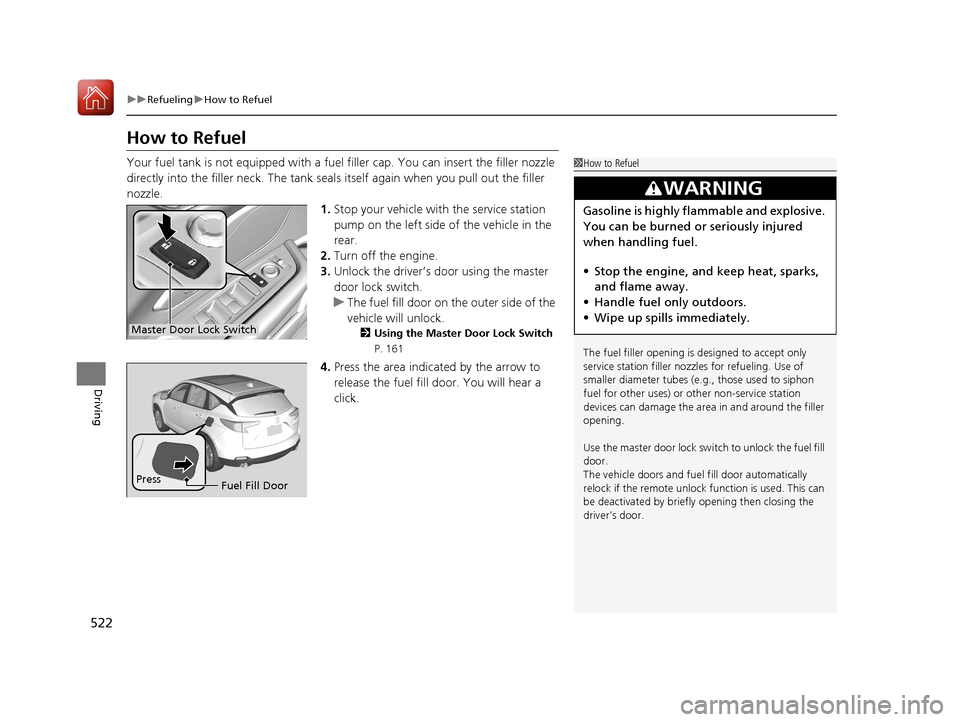
1.Stop your vehicle with the service station
pump on the left side of the vehicle in the
rear.
2. Turn off the engine.
3. Unlock the driver’s door using the master
door lock switch.
u The fuel fill door on the outer side of the
vehicle will unlock.
2 Using the Master Door Lock Switch
P. 161
4.Press the area indicated by the arrow to
release the fuel fill door. You will hear a
click.
1How to Refuel
The fuel filler opening is designed to accept only
service station filler nozzles for refueling. Use of
smaller diamet er tubes (e.g., those used to siphon
fuel for other uses) or other non-service station
devices can damage the area in and around the filler
opening.
Use the master door lock switch to unlock the fuel fill
door.
The vehicle doors and fuel fill door automatically
relock if the remote unlock function is used. This can
be deactivated by briefl y opening then closing the
driver’s door.
3WARNING
Gasoline is highly flammable and explosive.
You can be burned or seriously injured
when handling fuel.
• Stop the engine, and keep heat, sparks,
and flame away.
• Handle fuel only outdoors.
• Wipe up spills immediately.
Master Door Lock Switch
Press
Fuel Fill Door
20 ACURA RDX-31TJB6111.book 522 ページ 2020年2月11日 火曜日 午後2時6分
Page 577 of 657

uuCleaning uInterior Care
576
Maintenance
Wipe using a glass cleaner.
The front floor mats hook over floor anchors,
which keep them from sliding forward. To
remove a mat for cleaning, turn the anchor
knobs to the unlock position. When
reinstalling the mat after cleaning, turn the
knobs to the lock position.
Do not put additional floor mats on top of
the anchored mats.
To properly clean leather:
1. Use a vacuum or soft dry cloth first to remove any dirt or dust.
2. Clean the leather with a soft cloth dampen ed with a solution comprised of 90%
water and 10% neutral soap.
3. Wipe away any soap residu e with a clean damp cloth.
4. Wipe away residual water and allow leather to air dry in the shade.
■Cleaning the Window
■Floor Mats
1Cleaning the Window
Wires are mounted to the in side of the rear window.
Wipe along the same direct ion as the wires with a
soft cloth so as not to damage them.
Be careful not to spill fluids, such as water or glass
cleaner, on or around the co ver of both the front
sensor camera and the rainfall/light sensor
*.
2 Automatic Operation (automatic lighting
control) P. 187
2 Automatic Intermittent Wipers
* P. 195
2 Front Sensor Camera P. 489
1Floor Mats
If you use any floor mats that were not originally
provided with your vehicle, make sure they are
designed for your specific ve hicle, fit correctly, and
are securely anchored by the floor anchors.
Position the rear seat floor mat properly. If they are
not properly positioned, th e floor mat can interfere
with the front seat functions.
Lock
Unlock
■Maintaining Genuine Leather1
Maintaining Genuine Leather
It is important to clean or wipe away dirt or dust as
soon as possible. Spills can soak into leather resulting
in stains. Dirt or dust ca n cause abrasions in the
leather. In addition, pl ease note that some dark
colored clothing can rub onto the leather seats
resulting in discol oration or stains.
* Not available on all models
20 ACURA RDX-31TJB6111.book 576 ページ 2020年2月11日 火曜日 午後2時6分
Page 610 of 657

609
uuEngine Does Not Start uEmergency Engine Stop
Handling the Unexpected
Emergency Engine Stop
The ENGINE START/STOP button may be used to stop the engine due to an
emergency situation even while driving. If you must stop the engine, do either of the
following operations:
• Press and hold the ENGINE START/STOP button for two seconds.
• Firmly press the ENGINE START/STOP button three times.
The steering wheel will not lock. However, because turning off the engine disables
the power assist the engine provides to the steering and braking systems, it will
require significantly more physical effort an d time to steer and slow the vehicle. Use
both feet on the brake pedal to slow down the vehicle and stop immediately in a
safe place.
The gear position auto matically changes to
(P after the vehicle comes to a complete
stop. Then, the power mode changes to VEHICLE OFF.
The gear position auto matically changes to
(P after the vehicle comes to a complete
stop. Then press the ENGINE START/STOP button twice without depressing the
brake pedal to change the mode to VEHICLE OFF.
1 Emergency Engine Stop
Do not press the ENGINE START/STOP button while
driving unless it is absolute ly necessary for the engine
to be turned off.
If you press the ENGINE START/STOP button while
driving, the beeper sounds.
Vehicles with U.S. models
Vehicles with Canada models
20 ACURA RDX-31TJB6111.book 609 ページ 2020年2月11日 火曜日 午後2時6分
Page 646 of 657
Index
645
Index
Index
A
ABS (Anti-lock Brake System).................. 499
Accessories and Modifications ................ 580
Accessory Power Socket ........................... 225
AcuraLink® ................................................ 390
AcuraWatch
TM.................................... 22, 447
Adaptive Cruise Control (ACC) .................. 91
Adaptive Cruise Control (ACC) with
Low Speed Follow ............................ 91, 460
Adaptive Front Lighting System (AFS) .... 189
Additives
Coolant .................................................. 546
Engine Oil ............................................... 541
Washer ................................................... 550
Additives, Engine Oil ............................... 541
Adjusting Armrest .................................................. 218
Front Seats.............................................. 207
Head Restraints ....................................... 212
Mirrors.................................................... 204
Rear Seats ............................................... 216
Steering Wheel ....................................... 203
Agile Handling Assist ............................... 438
Air Conditioning System (Climate Control System) .................................................... 230
Changing the Mode................................ 230
Defrosting the Windshield and Windows .............................................. 232
Dust and Pollen Filter .............................. 574
Rear Temperature Control Dial ................ 234
Recirculation/Fresh Air Mode................... 230 Sensors .................................................... 235
Synchronized Mode ................................. 233
Using Automatic Climate Control ............ 230
Air Pressure ....................................... 561, 635
Airbags ........................................................ 42
Advanced Airbags ..................................... 48
After a Collision ......................................... 45
Airbag Care ............................................... 57
Front Airbags (SRS) .................................... 45
Indicator .............................................. 55, 84
Knee Airbags ............................................. 49
Passenger Airbag Off Indicator .................. 56
Sensors ...................................................... 42
Side Airbags .............................................. 52
Side Curtain Airbags .................................. 54
AM/FM Radio ............................................ 273
Android Auto ............................................ 306
Anti-lock Brake System (ABS) .................. 499
Indicator .................................................... 84
Apple CarPlay ........................................... 302
Armrest ..................................................... 218
Audio Remote Controls ............................ 243
Audio System ............................................ 238
Adjusting the Sound ................................ 268
Audio/Information Screen ........................ 249
Auxiliary Input Jack .................................. 241
Display Setup ........................................... 269
Error Messages ........................................ 310
General Information ................................ 313
Home Screen ........................................... 253
How to Update Wirelessly ........................ 262 How to Update with a USB Device........... 266
How to use Siri Eyes Free ......................... 301
iPod ........................................................ 290
Limitations for Manual Operation ............ 269
MP3/WMA/AAC ...................................... 293
Reactivating ............................................ 242
Remote Controls ..................................... 243
Security Code .......................................... 242
Status Area ............................................. 258
System Updates....................................... 262
Theft Protection ...................................... 242
USB Flash Drives .............................. 293, 315
USB Ports ................................................ 239
Audio/Information Screen ....................... 249
Authorized Manuals ................................ 643
Auto Door Locking/Unlocking ................. 162
Auto High-Beam ....................................... 191
Indicator.................................................... 87
Auto Idle Stop .......................................... 430
OFF Button .............................................. 431
Automatic Brake Hold ............................. 497
Indicator............................................ 77, 497
Automatic Folding Door Mirror .............. 206
Automatic Intermittent Wipers ............... 195
Automatic Lighting .................................. 187
20 ACURA RDX-31TJB6111.book 645 ページ 2020年2月11日 火曜日 午後2時6分
Page 647 of 657
646
Index
Automatic Transmission........................... 419
Creeping ................................................. 419
Fluid ........................................................ 548
Kickdown ................................................ 419
Operating the Shift Button....................... 422
Sequential Shift Mode ............................. 426
Shifting.................................................... 420
Auxiliary Input Jack .................................. 241
Average Fuel Economy ............................. 131
AWD .......................................................... 439
B
Battery ....................................................... 569
Charging System Indicator ................. 79, 615
Jump Starting .......................................... 610
Maintenance (Checking the Battery) ........ 569
Belts (Seat) .................................................. 35
Beverage Holders ...................................... 223
Blind spot information System ................ 444
Bluetooth ® Audio ..................................... 296
Bluetooth ® HandsFreeLink ®..................... 361
Booster Seats (For Children) ....................... 70
Brake System ............................................. 492
Anti-lock Brake System (ABS) ................... 499
Automatic Brake Hold.............................. 497
Brake Assist System ................................. 500
Fluid ........................................................ 549
Foot Brake ............................................... 496
Indicator ...................................... 75, 76, 616
Indicator (Red) ......................................... 618 Parking Brake .......................................... 492
Brightness Control (Instrument Panel) .... 198
Built-in Key ............................................... 147
Bulb Replacement .................................... 551
Fog Lights ............................................... 551
Front Turn Signal, Parking/Daytime Running and Front Side Marker Lights ... 551
Headlights ............................................... 551
High-Mount Brake Light .......................... 554
Puddle Lights........................................... 554
Rear License Plate Light ........................... 554
Rear Turn Signal Light Bulbs .................... 552
Side Turn Signal/Emergency Indicator Lights .................................................... 551
Taillights, Brake and Rear Side Marker Lights .................................................... 553
Taillights/Brake and Back-Up Lights ......... 554
Bulb Specifications ................................... 634
C
CAMERA Button....................................... 514
Carbon Monoxide Gas ............................... 71
Carrying Cargo ................................. 401, 403
Certification Label .................................... 636
Changing Bulbs ........................................ 551
Charging System Indicator ................. 79, 615
Child Safety ................................................. 58
Childproof Door Locks............................. 161
Child Seat .................................................... 58
Booster Seats ............................................ 70 Child Seat for Infants ................................ 60
Child Seat for Small Children .................... 61
Installing a Child Seat
with a Lap/Shoulder
Seat Belt ................................................. 65
Larger Children ......................................... 69
Rear-facing Child Seat............................... 60
Selecting a Child Seat ............................... 62
Childproof Door Locks ............................. 161
Cleaning the Exterior ............................... 577
Cleaning the Interior ............................... 575
Client Service Information ....................... 644
Climate Control System ........................... 230
Changing the Mode................................ 230
Defrosting the Windshield and
Windows .............................................. 232
Dust and Pollen Filter .............................. 574
Rear Temperature Control Dial ................ 234
Recirculation/Fresh Air Mode................... 230
Sensors ................................................... 235
Synchronized Mode ................................ 233
Using Automatic Climate Control............ 230
Clock ......................................................... 144
CMBSTM (Collision Mitigation Braking
SystemTM) ................................................ 450
Coat Hook ................................................ 225
Collision Mitigation Braking System
TM
(CMBSTM) ................................................. 450
Compact Spare Tire .......................... 585, 635
Console Compartment ............................. 222
Controls .................................................... 143
20 ACURA RDX-31TJB6111.book 646 ページ 2020年2月11日 火曜日 午後2時6分