auto lock Acura RDX 2020 User Guide
[x] Cancel search | Manufacturer: ACURA, Model Year: 2020, Model line: RDX, Model: Acura RDX 2020Pages: 657, PDF Size: 33.2 MB
Page 145 of 657
144
Controls
Clock
Adjusting the Clock
You can adjust the time manually in the audio/information screen, with the power
mode in ON.
You can adjust the time using the true touchpad A.
2 True Touchpad Operation P. 246
1.Press the (home) button.
2. Select Settings .
3. Select System.
4. Select Date & Time .
5. Select Set Date & Time .
6. Select Automatic Date & Time .
7. Select Off.
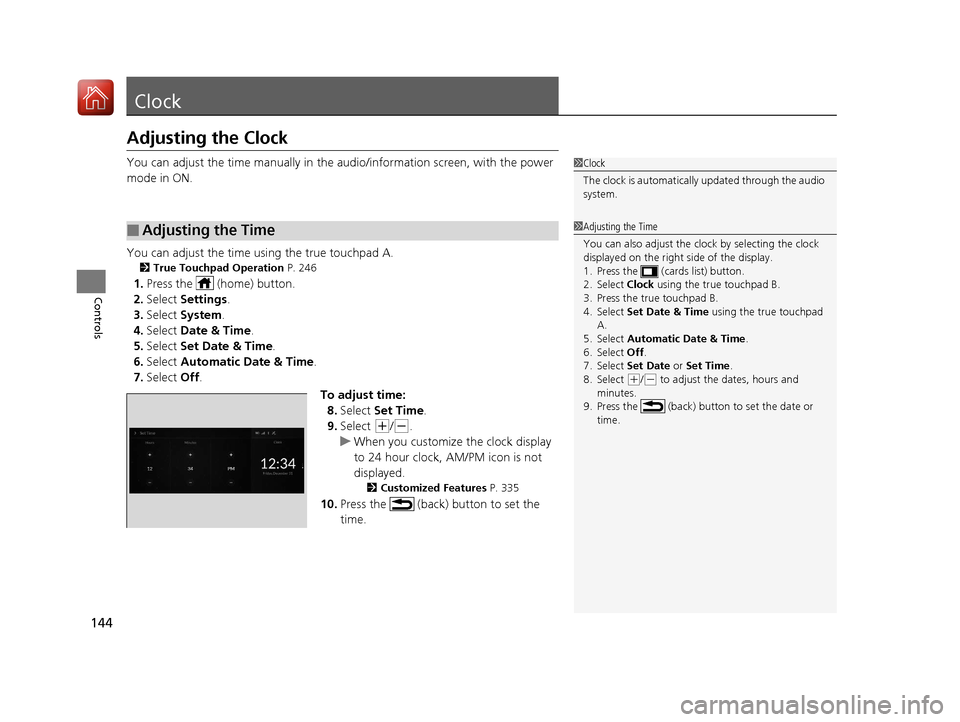
To adjust time:8. Select Set Time .
9. Select
(+/(-.
u When you customize the clock display
to 24 hour clock, AM/PM icon is not
displayed.
2 Customized Features P. 335
10.Press the (back) button to set the
time.
■Adjusting the Time
1Clock
The clock is automatically updated through the audio
system.
1Adjusting the Time
You can also adjust the clock by selecting the clock
displayed on the right side of the display.
1. Press the (cards list) button.
2. Select Clock using the true touchpad B.
3. Press the true touchpad B.
4. Select Set Date & Time using the true touchpad
A.
5. Select Automatic Date & Time .
6. Select Off .
7. Select Set Date or Set Time.
8. Select
( +/(- to adjust the dates, hours and
minutes.
9. Press the (back) button to set the date or
time.
20 ACURA RDX-31TJB6111.book 144 ページ 2020年2月11日 火曜日 午後2時6分
Page 151 of 657
150
uuLocking and Unlocking the Doors uLocking/Unlocking the Doors from the Outside
Controls
Locking/Unlocking the Doors from the Outside
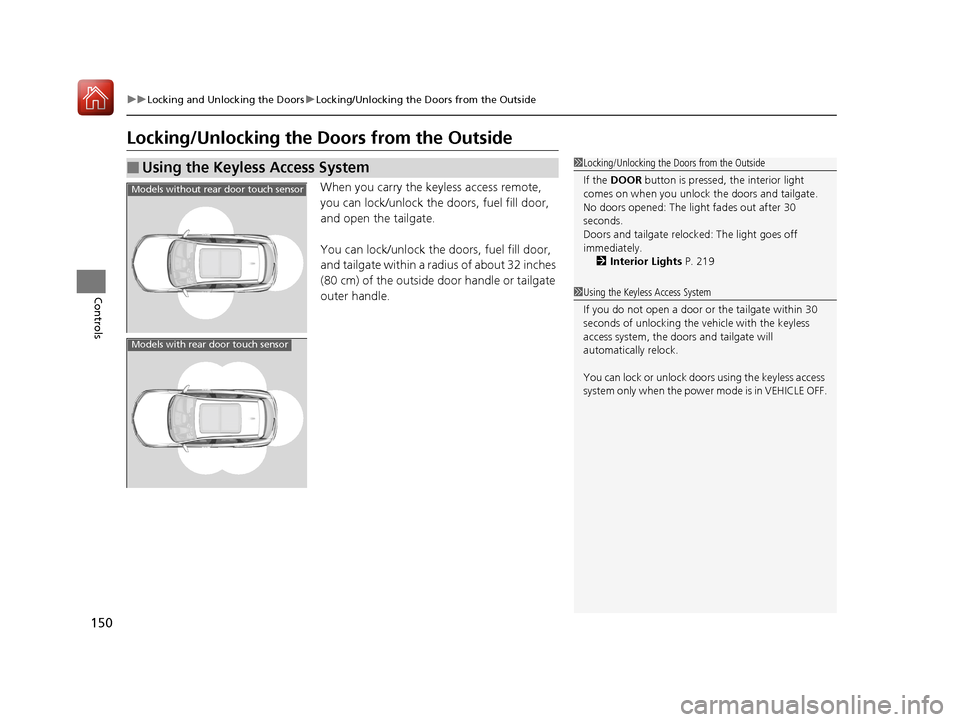
When you carry the keyless access remote,
you can lock/unlock the doors, fuel fill door,
and open the tailgate.
You can lock/unlock the doors, fuel fill door,
and tailgate within a radius of about 32 inches
(80 cm) of the outside door handle or tailgate
outer handle.
■Using the Keyless Access System1Locking/Unlocking the Doors from the Outside
If the DOOR button is pressed, the interior light
comes on when you unlock the doors and tailgate.
No doors opened: The li ght fades out after 30
seconds.
Doors and tailgate relo cked: The light goes off
immediately.
2 Interior Lights P. 219
1Using the Keyless Access System
If you do not open a door or the tailgate within 30
seconds of unlocking the vehicle with the keyless
access system, the doors and tailgate will
automatically relock.
You can lock or unlock doors using the keyless access
system only when the power mode is in VEHICLE OFF.
Models without rear door touch sensor
Models with rear door touch sensor
20 ACURA RDX-31TJB6111.book 150 ページ 2020年2月11日 火曜日 午後2時6分
Page 154 of 657

Continued153
uuLocking and Unlocking the Doors uLocking/Unlocking the Doors from the Outside
Controls
■Locking the doors and tailgate (Walk
away auto lock ®)
When you walk away from the vehicle while
carrying the keyless acce ss remote, the doors
will automatically lock.
The auto lock function activates when all
doors and tailgate are closed, and the keyless
access remote is within about 5 feet (1.5 m)
radius of the outside door handle.
Exit vehicle while carrying keyless access
remote and close door(s).
1. While within about 5 feet (1.5 m) radius of
the vehicle.
u The beeper sounds; the auto lock
function will be activated.
2. Carry the keyless access remote beyond
about 5 feet (1.5 m) from the vehicle and
remain outside this range for 2 or more
seconds.
u Some exterior lights flash; the beeper
sounds; all doors and tailgate will then
lock.1Locking the doors and tailg ate (Walk away auto lock®)
The auto lock function is set to OFF as the factory
default setting. The auto lo ck function can be set to
ON using the audio/information screen.
If you set the auto lock function to ON using the
audio/information screen, only the remote
transmitter that was used to unlock the driver’s door
prior to the setting change can activate auto lock. 2 Customized Features P. 335
After the auto lock function has been activated,
when you stay within the locking/unlocking
operation range, the indica tor on the keyless access
remote will continue to flash until the doors are
locked.
When you stay beside the vehicle within the
operation range, the doors wi ll automatically lock
approximately 30 seconds after the auto lock
function activating beeper sounds.
When you open a door after the auto lock function
activating beeper sounds, the auto lock function will
be delayed until all doors and tailgate are closed.
Under the following circumstances, the auto lock
function will not activate:
•The keyless access remote is inside the vehicle.
•The keyless access remote is taken out of its
operational range be fore all the doors and tailgate
are closed.
u
The beeper will not sound.
u The beeper will sound.
The activation range of
the auto lock function is
about 5 feet (1.5 m)
20 ACURA RDX-31TJB6111.book 153 ページ 2020年2月11日 火曜日 午後2時6分
Page 155 of 657
uuLocking and Unlocking the Doors uLocking/Unlocking the Doors from the Outside
154
Controls
To temporarily deactivate the function:
1. Set the power mode to OFF.
2. Open the driver’s door.
3. Using the master door lock switch, operate
the lock as follows:
Lock Unlock Lock Unlock.
u The beeper sounds and the function is
deactivated.
To restore the function:
• Set the power mode to ON.
• Lock the vehicle without using the auto lock
function.
• With the keyless access remote on you,
move out of the auto lock function
operation range.
• Open any door.1Locking the doors and tailg ate (Walk away auto lock®)
You must wait until the pow er tailgate fully closes
before the auto lock function will be activated.
The auto lock function does not operate when any of
the following conditions are met.
•The keyless access remote is inside the vehicle.
•A door or the hood is not closed.
•The power mode is set to any mode other than
OFF.
•The keyless access remote is not located within a
radius of about 5 feet (1 .5 m) from the vehicle
when you get out of the vehicle and close the
doors.
Auto lock function operation stop beeper
After the auto lock function has been activated, the
auto lock operation stop beeper sounds for
approximately two seconds in the following cases.
•The keyless access remote is put inside the vehicle
through a window.
•You are located too close to the vehicle.
•The keyless access remote is put inside the tailgate.
If the warning beeper sounds, check that you are
carrying the keyless access remote. Then, open/close
a door and confirm the auto lock activation beeper
sounds once.
20 ACURA RDX-31TJB6111.book 154 ページ 2020年2月11日 火曜日 午後2時6分
Page 156 of 657
Continued155
uuLocking and Unlocking the Doors uLocking/Unlocking the Doors from the Outside
Controls
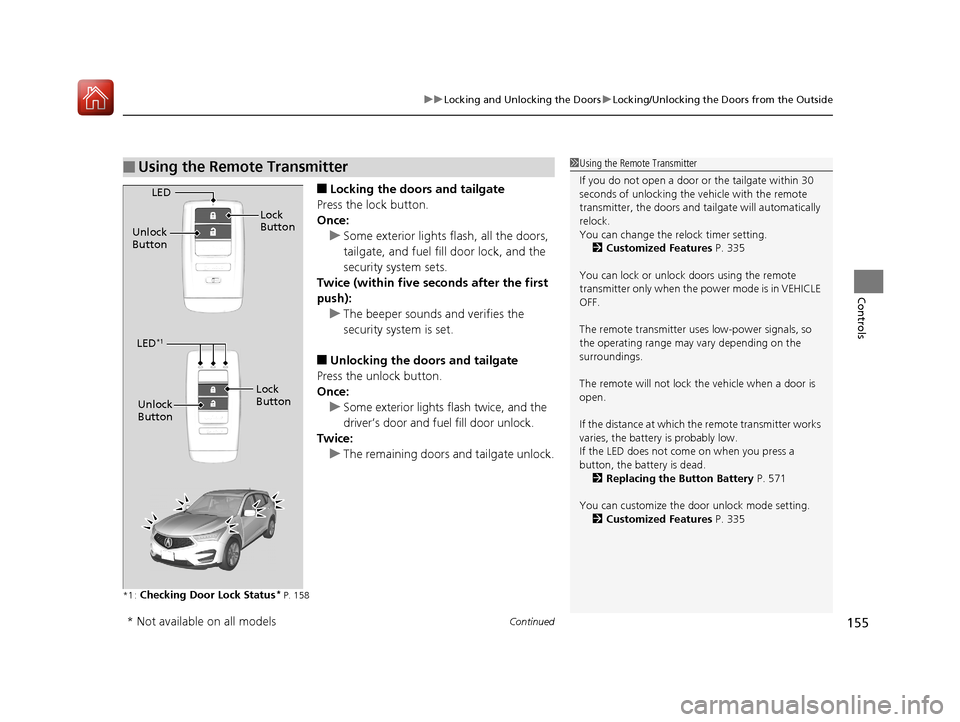
■Locking the doors and tailgate
Press the lock button.
Once: u Some exterior lights flash, all the doors,
tailgate, and fuel fill door lock, and the
security system sets.
Twice (within five se conds after the first
push):
u The beeper sounds and verifies the
security system is set.
■Unlocking the doors and tailgate
Press the unlock button.
Once: u Some exterior lights flash twice, and the
driver’s door and fuel fill door unlock.
Twice:
u The remaining doors and tailgate unlock.
*1 :Checking Door Lock Status* P. 158
■Using the Remote Transmitter1Using the Remote Transmitter
If you do not open a door or the tailgate within 30
seconds of unlocking the vehicle with the remote
transmitter, the doors and ta ilgate will automatically
relock.
You can change the relock timer setting. 2 Customized Features P. 335
You can lock or unlock doors using the remote
transmitter only when the power mode is in VEHICLE
OFF.
The remote transmitter us es low-power signals, so
the operating range may vary depending on the
surroundings.
The remote will not lock th e vehicle when a door is
open.
If the distance at which the remote transmitter works
varies, the batter y is probably low.
If the LED does not come on when you press a
button, the battery is dead.
2 Replacing the Button Battery P. 571
You can customize the door unlock mode setting. 2 Customized Features P. 335
LED
Unlock
Button Lock
Button
LED*1
Unlock
Button
Lock
Button
* Not available on all models
20 ACURA RDX-31TJB6111.book 155 ページ 2020年2月11日 火曜日 午後2時6分
Page 161 of 657
uuLocking and Unlocking the Doors uLocking/Unlocking the Doors from the Inside
160
Controls
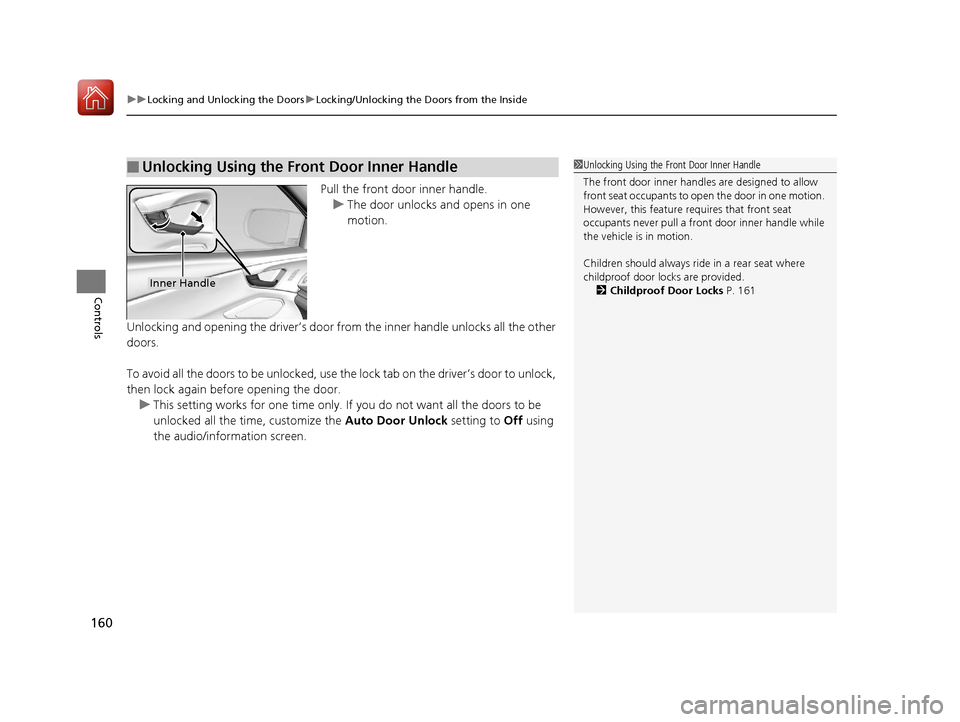
Pull the front door inner handle.
u The door unlocks and opens in one
motion.
Unlocking and opening the driver’s door from the inner handle unlocks all the other
doors.
To avoid all the doors to be unlocked, use the lock tab on the driver’s door to unlock,
then lock again before opening the door. u This setting works for one time only. If you do not want all the doors to be
unlocked all the time, customize the Auto Door Unlock setting to Off using
the audio/information screen.
■Unlocking Using the Front Door Inner Handle1 Unlocking Using the Front Door Inner Handle
The front door inne r handles are designed to allow
front seat occupants to open the door in one motion.
However, this feature requires that front seat
occupants never pull a front door inner handle while
the vehicle is in motion.
Children should always ride in a rear seat where
childproof door locks are provided.
2 Childproof Door Locks P. 161
Inner Handle
20 ACURA RDX-31TJB6111.book 160 ページ 2020年2月11日 火曜日 午後2時6分
Page 163 of 657
162
uuLocking and Unlocking the Doors uAuto Door Locking/Unlocking
Controls
Auto Door Locking/Unlocking
Your vehicle locks or unlocks all doors auto matically when a certain condition is met.
■Drive lock mode
All doors and tailgate lock when the vehicle’s speed reaches about 10 mph (15 km/h).
■Driver’s door open mode
All doors and tailgate unlock when the driver’s door is opened.
■Auto Door Locking
■Auto Door Unlocking
1Auto Door Locking/Unlocking
You can turn off or cha nge to another auto door
locking/unlocking sett ing using the audio/
information screen. 2 Customized Features P. 335
20 ACURA RDX-31TJB6111.book 162 ページ 2020年2月11日 火曜日 午後2時6分
Page 167 of 657
uuOpening and Closing the Tailgate uOpening/Closing the Power Tailgate
166
Controls
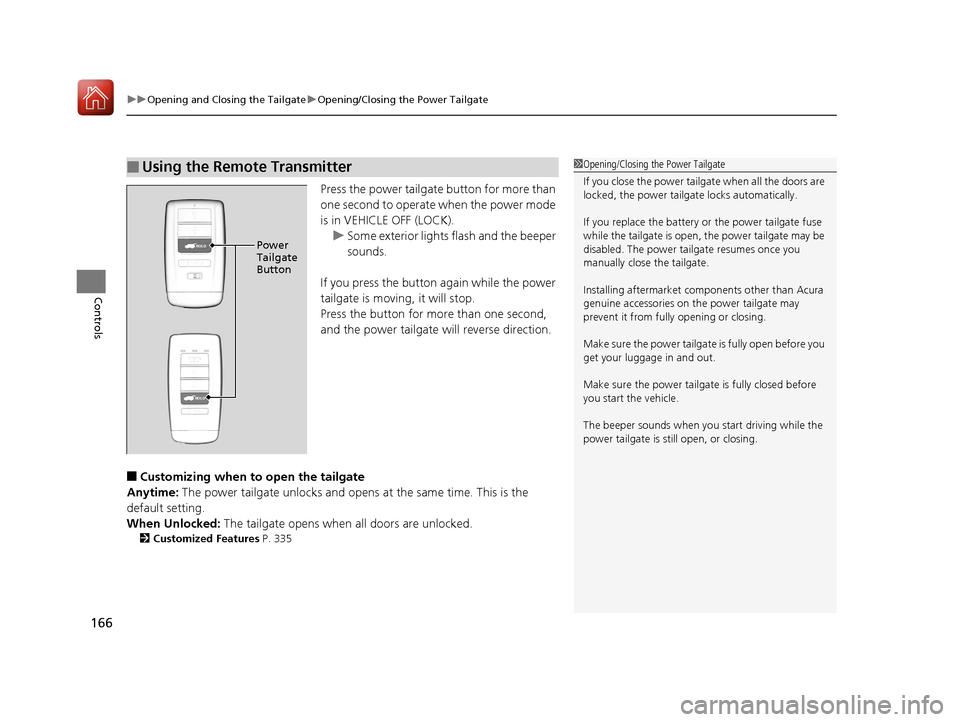
Press the power tailgate button for more than
one second to operate when the power mode
is in VEHICLE OFF (LOCK).
u Some exterior lights flash and the beeper
sounds.
If you press the button again while the power
tailgate is moving, it will stop.
Press the button for more than one second,
and the power tailgate will reverse direction.
■Customizing when to open the tailgate
Anytime: The power tailgate unlocks and opens at the same time. This is the
default setting.
When Unlocked: The tailgate opens when all doors are unlocked.
2Customized Features P. 335
■Using the Remote Transmitter1Opening/Closing the Power Tailgate
If you close the power tail gate when all the doors are
locked, the power tailgate locks automatically.
If you replace the battery or the power tailgate fuse
while the tailgate is open, the power tailgate may be
disabled. The power tail gate resumes once you
manually close the tailgate.
Installing aftermarket com ponents other than Acura
genuine accessories on the power tailgate may
prevent it from fully opening or closing.
Make sure the power tailgate is fully open before you
get your luggage in and out.
Make sure the power tailgate is fully closed before
you start the vehicle.
The beeper sounds when you start driving while the
power tailgate is still open, or closing.
HOLDPower
Tailgate
Button
HOLD
20 ACURA RDX-31TJB6111.book 166 ページ 2020年2月11日 火曜日 午後2時6分
Page 169 of 657

uuOpening and Closing the Tailgate uOpening/Closing the Power Tailgate
168
Controls
If you press the outer handle of the tailgate for
no longer than one second, the tailgate opens
automatically.
u The beeper sounds.
u If you want to open the tailgate
manually, press the button for more than
one second.
2 Opening/Closing the Tailgate P. 172
If you are carrying the keyless access remote,
you do not have to unlock the tailgate before
opening it.
If you press the outer handle again while the
power tailgate is moving, it will stop.
Press the outer handle again, and the power
tailgate will reverse direction.
■Using the Tailgate Outer Handle1Opening/Closing the Power Tailgate
Do not leave the keyless access remote in the cargo
area before closing the tailgate.
Even if you are not carrying the keyless access
remote, you can lock/unl ock the tailgate while
someone else with the remote is within range.
You can change the power tailgate operation setting
on and off. 2 Customized Features P. 335
Outer Handle
20 ACURA RDX-31TJB6111.book 168 ページ 2020年2月11日 火曜日 午後2時6分
Page 173 of 657

172
uuOpening and Closing the Tailgate uOpening/Closing the Tailgate
Controls
Opening/Closing the Tailgate
When all the doors are unlocked, the tailgate
is unlocked.
Press the outer handle of the tailgate and lift
open the tailgate.
If you are carrying the keyless access remote,
you do not have to unlock the tailgate before
opening it.
To close the tailgate, grab the inner handle,
pull the tailgate down, and push it closed
from outside.
If you close the tailgate when the driver's door
is locked, the tailgate locks automatically. u Some exterior lights flash.
■Using the Tailgate Outer Handle1Opening/Closing the Tailgate
Do not leave the keyless access remote in the cargo
area before closing the tailgate.
Even if you are not carrying the keyless access
remote, you can lock/unl ock the tailgate while
someone else with the remote is within range.
Outer Handle
Inner Handle
20 ACURA RDX-31TJB6111.book 172 ページ 2020年2月11日 火曜日 午後2時6分