Console Acura RDX 2020 Owner's Manual
[x] Cancel search | Manufacturer: ACURA, Model Year: 2020, Model line: RDX, Model: Acura RDX 2020Pages: 657, PDF Size: 33.2 MB
Page 17 of 657
16
Quick Reference Guide
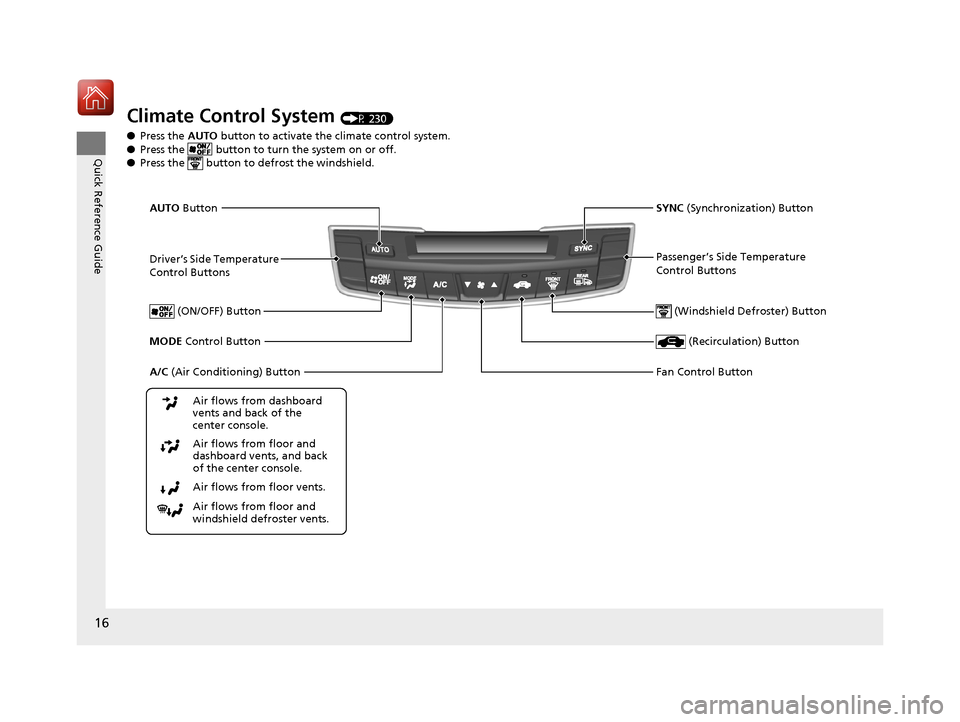
Climate Control System (P 230)
● Press the AUTO button to activate the climate control system.
● Press the button to turn the system on or off.
● Press the button to de frost the windshield.
Driver’s Side Temperature
Control Buttons
(Windshield Defroster) Button
A/C (Air Conditioning) Button
Air flows from floor and
windshield defroster vents. Air flows from floor vents. Air flows from floor and
dashboard vents, and back
of the center console. Air flows from dashboard
vents and back of the
center console. SYNC
(Synchronization) Button
(Recirculation) Button
AUTO Button
Passenger’s Side Temperature
Control Buttons
MODE Control Button (ON/OFF) Button
Fan Control Button
20 ACURA RDX-31TJB6111.book 16 ページ 2020年2月11日 火曜日 午後2時6分
Page 44 of 657
43
uuAirbags uAirbag System Components
Continued
Safe Driving
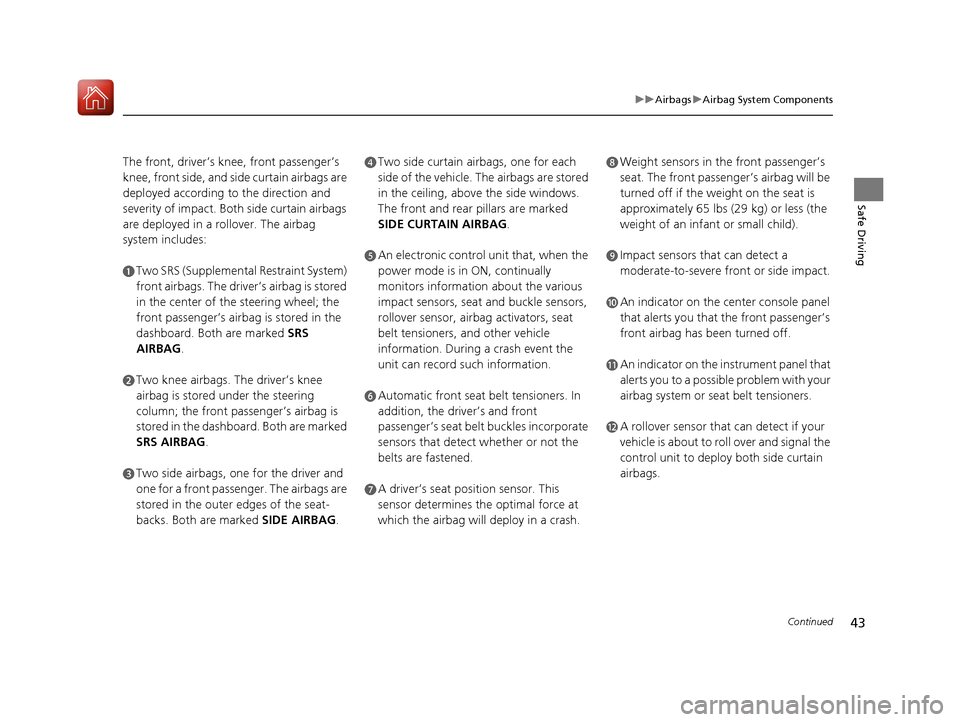
The front, driver’s kn ee, front passenger’s
knee, front side, and si de curtain airbags are
deployed according to the direction and
severity of impact. Both side curtain airbags
are deployed in a rollover. The airbag
system includes:
aTwo SRS (Supplemental Restraint System)
front airbags. The driver’s airbag is stored
in the center of the steering wheel; the
front passenger’s airbag is stored in the
dashboard. Both are marked SRS
AIRBAG.
bTwo knee airbags. The driver’s knee
airbag is stored under the steering
column; the front passenger’s airbag is
stored in the dashboard. Both are marked
SRS AIRBAG .
cTwo side airbags, one for the driver and
one for a front passenger. The airbags are
stored in the outer edges of the seat-
backs. Both are marked SIDE AIRBAG.
dTwo side curtain airbags, one for each
side of the vehicle. The airbags are stored
in the ceiling, abov e the side windows.
The front and rear pillars are marked
SIDE CURTAIN AIRBAG .
eAn electronic control unit that, when the
power mode is in ON, continually
monitors information about the various
impact sensors, seat and buckle sensors,
rollover sensor, airbag activators, seat
belt tensioners, and other vehicle
information. During a crash event the
unit can record such information.
fAutomatic front seat belt tensioners. In
addition, the driver’s and front
passenger’s seat belt buckles incorporate
sensors that detect whether or not the
belts are fastened.
gA driver’s seat position sensor. This
sensor determines the optimal force at
which the airbag will deploy in a crash.
hWeight sensors in the front passenger’s
seat. The front passenger’s airbag will be
turned off if the weight on the seat is
approximately 65 lbs (29 kg) or less (the
weight of an infant or small child).
iImpact sensors that can detect a
moderate-to-severe front or side impact.
jAn indicator on the center console panel
that alerts you that the front passenger’s
front airbag has been turned off.
kAn indicator on the instrument panel that
alerts you to a possible problem with your
airbag system or seat belt tensioners.
lA rollover sensor that can detect if your
vehicle is about to ro ll over and signal the
control unit to deploy both side curtain
airbags.
20 ACURA RDX-31TJB6111.book 43 ページ 2020年2月11日 火曜日 午後2時6分
Page 57 of 657

uuAirbags uAirbag System Indicators
56
Safe Driving■When the passenger front airbag off
indicator comes on
The indicator comes on to alert you that the
passenger’s front airbag has been turned off.
This occurs when the weight sensors detect
about 65 lbs (29 kg) or less, the weight of an
infant or small child, on the seat.
Children age 12 or under should always ri de properly restrained in a back seat.
2Child Safety P. 58
If the front passenger’s seat is empty, the indicator will come on and, in the event of
a crash, the front passenger’s airbag will not deploy. The front passenger’s knee
airbag will not deploy either.
■Passenger Front Airbag Off Indicator1 Passenger Front Airbag Off Indicator
To ensure the passenger is detected properly, confirm that:•There is no child seat or other object pressing
against the rear of the seat-back.
•There is no rear passenger pushing or pulling on
the back of the front passenger’s seat.
•The front seat or seat-back is not forced back
against an object on the s eat or floor behind it.
•There is no object placed under or beside the front
passenger’s seat.
•The occupant is sitting in an upright position and
the seat back is not excessively reclined.
•The occupant is not leaning against the door or
center console.
•The occupant’s feet are plac ed on the floor in front
of them.
•There are no objects ha nging from the front
passenger’s seat.
•Only small, lightweight objects are in the seat-back
pocket.
The passenger front airbag off indicator may come
on and go off periodically if the total weight on the
seat is near the airbag cutoff threshold.
Have your vehicle checked by a dealer as soon as
possible if:
•All of the above conditions are met, and the
indicator comes on with an adult seated in the
front passenger seat.
•The seat is empty and the indicator is off.
Do not allow an adult passe nger to ride in the front
seat when the indicator is on.
U.S. Canada
20 ACURA RDX-31TJB6111.book 56 ページ 2020年2月11日 火曜日 午後2時6分
Page 219 of 657
218
uuAdjusting the Seats uArmrest
Controls
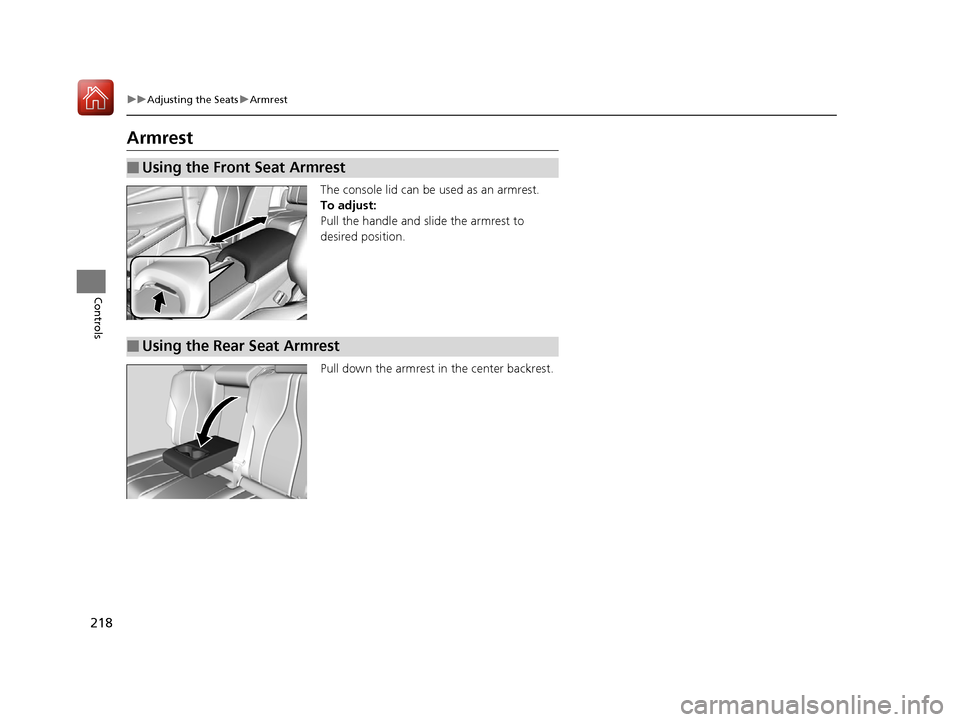
Armrest
The console lid can be used as an armrest.
To adjust:
Pull the handle and slide the armrest to
desired position.
Pull down the armrest in the center backrest.
■Using the Front Seat Armrest
■Using the Rear Seat Armrest
20 ACURA RDX-31TJB6111.book 218 ページ 2020年2月11日 火曜日 午後2時6分
Page 223 of 657
222
uuInterior Lights/Interior Convenience Items uInterior Convenience Items
Controls
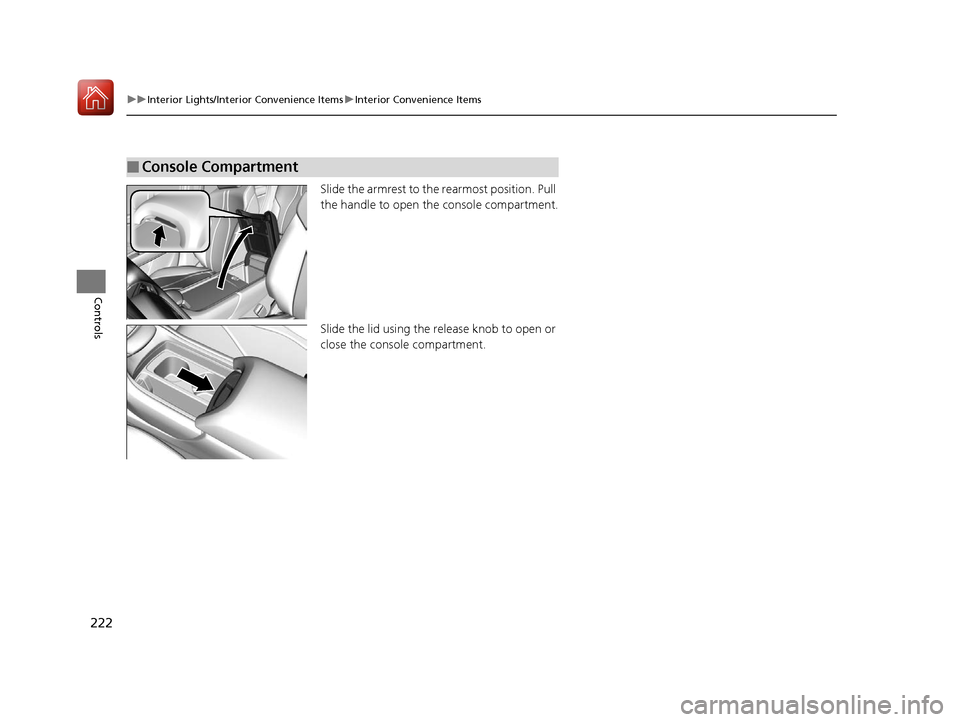
Slide the armrest to the rearmost position. Pull
the handle to open th e console compartment.
Slide the lid using the re lease knob to open or
close the console compartment.
■Console Compartment
20 ACURA RDX-31TJB6111.book 222 ページ 2020年2月11日 火曜日 午後2時6分
Page 231 of 657
230
Controls
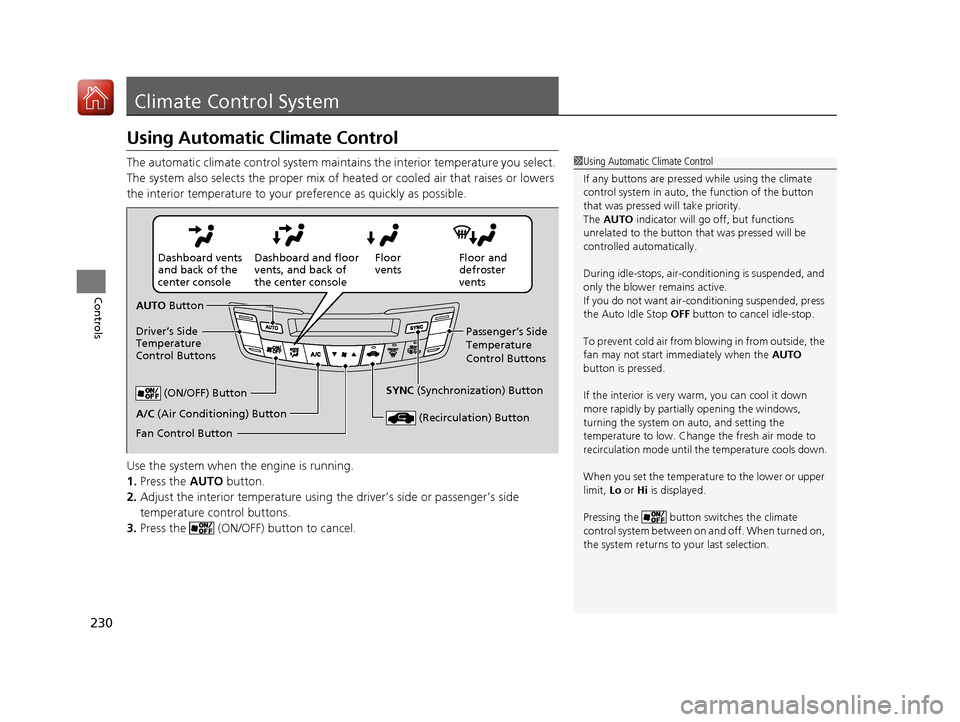
Climate Control System
Using Automatic Climate Control
The automatic climate control system maintains the interior temperature you select.
The system also selects the proper mix of heated or cooled air that raises or lowers
the interior temperature to your preference as quickly as possible.
Use the system when the engine is running.
1. Press the AUTO button.
2. Adjust the interior temperature using the driver’s side or passenger’s side
temperature control buttons.
3. Press the (ON/OFF) button to cancel.1Using Automatic Climate Control
If any buttons are presse d while using the climate
control system in auto, the function of the button
that was pressed will take priority.
The AUTO indicator will go off, but functions
unrelated to the button th at was pressed will be
controlled automatically.
During idle-stops, air-conditioning is suspended, and
only the blower remains active.
If you do not want air-cond itioning suspended, press
the Auto Idle Stop OFF button to cancel idle-stop.
To prevent cold air from bl owing in from outside, the
fan may not start i mmediately when the AUTO
button is pressed.
If the interior is very warm, you can cool it down
more rapidly by partial ly opening the windows,
turning the system on auto, and setting the
temperature to low. Change the fresh air mode to
recirculation mode until the temperature cools down.
When you set the temperat ure to the lower or upper
limit, Lo or Hi is displayed.
Pressing the button switches the climate
control system between on and off. When turned on,
the system returns to your last selection.
Floor and
defroster
vents
Floor
vents
Dashboard and floor
vents, and back of
the center console
Dashboard vents
and back of the
center console
AUTO Button
Driver’s Side
Temperature
Control Buttons Passenger’s Side
Temperature
Control Buttons
A/C (Air Conditioning) Button (ON/OFF) Button
Fan Control Button SYNC
(Synchronization) Button
(Recirculation) Button
20 ACURA RDX-31TJB6111.book 230 ページ 2020年2月11日 火曜日 午後2時6分
Page 241 of 657

uuAudio System uUSB Ports
240
Features
■On the front panel
The USB port (2.5A) is only for charging
devices.
■On the back of the console
compartment*
The USB ports (2.5A) are only for charging
devices.
1 On the front panel
This port is for battery charge only. You cannot play
music even if you have connected music players to
them.
Under certain condi tions, a device connected to the
port may generate noise in the radio you are listening
to.
1 On the back of the console compartment*
These ports are for battery charge only. You cannot
play music even if you ha ve connected music players
to them.
Under certain condi tions, a device connected to the
port may generate noise in the radio you are listening
to.
* Not available on all models
20 ACURA RDX-31TJB6111.book 240 ページ 2020年2月11日 火曜日 午後2時6分
Page 267 of 657

uuAudio System Basic Operation uSystem Updates
266
Features
■Download the update files from the server
1.Press the (home) button.
2. Select System Updates .
3. Select via USB .
u A notification appears on the screen.
4. Connect a USB device into the USB port in
the console compartment.
u The inventory data is copied into the USB
device.
2 USB Ports P. 239
5.Remove the USB device from the USB port.
6. Connect the USB device into your
computer, and then download the update
files.
u Follow the link to download the required
software update files. Refer to
https://usb.acura.com for instructions.
■How to Update with a USB Device1How to Update with a USB Device
A USB device with a minimum of 8 GB of free space
or more is recommended.
Be sure to delete any pr evious inventory or update
files from the USB device before starting the USB
update process.
20 ACURA RDX-31TJB6111.book 266 ページ 2020年2月11日 火曜日 午後2時6分
Page 303 of 657
302
uuAudio System Basic Operation uApple CarPlay
Features
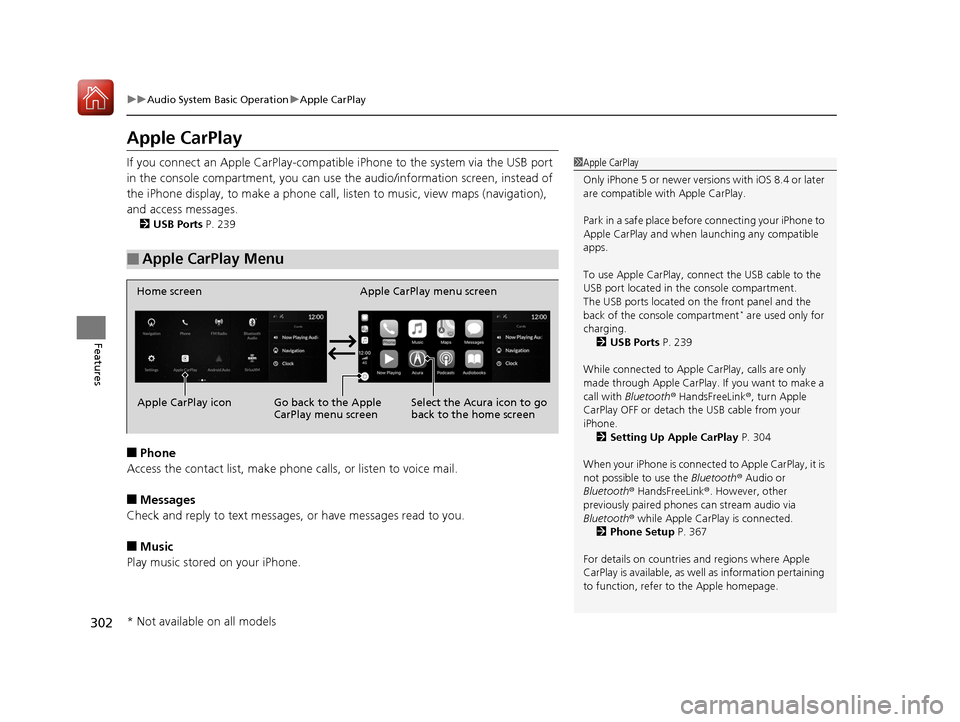
Apple CarPlay
If you connect an Apple CarPlay-compatible iPhone to the system via the USB port
in the console compartment, you can use the audio/information screen, instead of
the iPhone display, to make a phone call, listen to music, view maps (navigation),
and access messages.
2 USB Ports P. 239
■Phone
Access the contact list, make phone calls, or listen to voice mail.
■Messages
Check and reply to text messages, or have messages read to you.
■Music
Play music stored on your iPhone.
■Apple CarPlay Menu
1 Apple CarPlay
Only iPhone 5 or newer versi ons with iOS 8.4 or later
are compatible with Apple CarPlay.
Park in a safe place before connecting your iPhone to
Apple CarPlay and when launching any compatible
apps.
To use Apple CarPlay, connect the USB cable to the
USB port located in the console compartment.
The USB ports located on the front panel and the
back of the console compartment
* are used only for
charging. 2 USB Ports P. 239
While connected to Apple CarPlay, calls are only
made through Apple CarPlay. If you want to make a
call with Bluetooth ® HandsFreeLink ®, turn Apple
CarPlay OFF or detach th e USB cable from your
iPhone.
2 Setting Up Apple CarPlay P. 304
When your iPhone is connected to Apple CarPlay, it is
not possible to use the Bluetooth® Audio or
Bluetooth ® HandsFreeLink ®. However, other
previously paired phones can stream audio via
Bluetooth ® while Apple CarPlay is connected.
2 Phone Setup P. 367
For details on c ountries and regions where Apple
CarPlay is available, as well as information pertaining
to function, refer to the Apple homepage.
Home screen
Apple CarPlay icon Apple CarPlay menu screen
Go back to the Apple
CarPlay menu screen
Select the Acura icon to go
back to the home screen
* Not available on all models
20 ACURA RDX-31TJB6111.book 302 ページ 2020年2月11日 火曜日 午後2時6分
Page 305 of 657
uuAudio System Basic Operation uApple CarPlay
304
Features
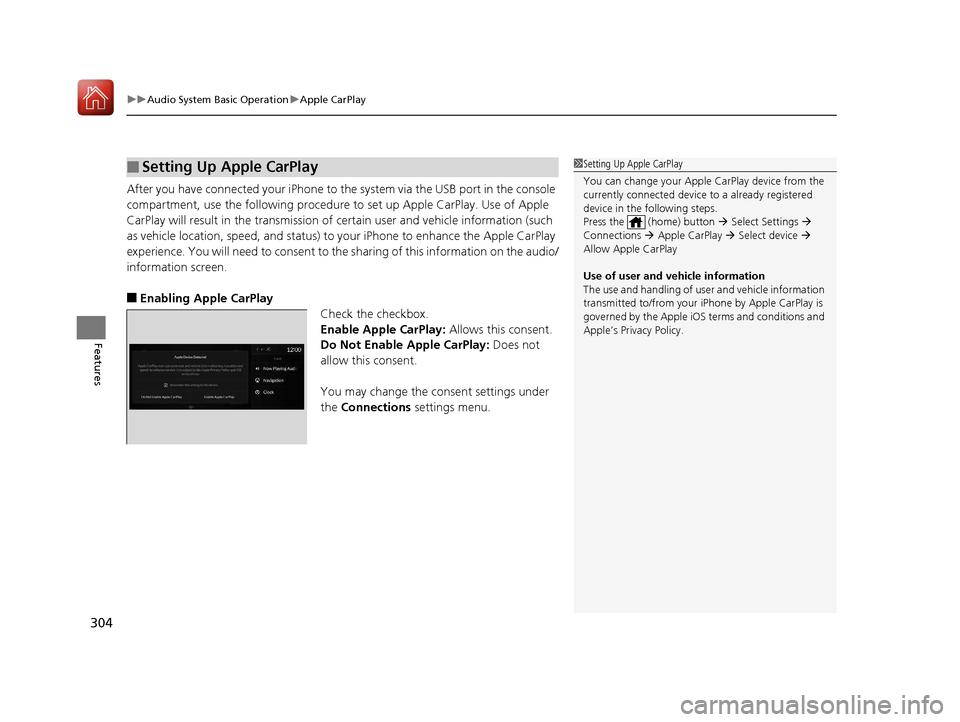
After you have connected your iPhone to the system via the USB port in the console
compartment, use the following procedure to set up Apple CarPlay. Use of Apple
CarPlay will result in the transmission of certain user and vehicle information (such
as vehicle location, speed, and status) to your iPhone to enhance the Apple CarPlay
experience. You will need to consent to th e sharing of this information on the audio/
information screen.
■Enabling Apple CarPlay Check the checkbox.
Enable Apple CarPlay: Allows this consent.
Do Not Enable Apple CarPlay: Does not
allow this consent.
You may change the consent settings under
the Connections settings menu.
■Setting Up Apple CarPlay1Setting Up Apple CarPlay
You can change your Appl e CarPlay device from the
currently connected device to a already registered
device in the following steps.
Press the (home) button Select Settings
Connections Apple CarPlay Select device
Allow Apple CarPlay
Use of user and vehicle information
The use and handling of user and vehicle information
transmitted to/from your iP hone by Apple CarPlay is
governed by the Apple iOS terms and conditions and
Apple’s Privacy Policy.
20 ACURA RDX-31TJB6111.book 304 ページ 2020年2月11日 火曜日 午後2時6分