audio ACURA RDX 2022 Owners Manual
[x] Cancel search | Manufacturer: ACURA, Model Year: 2022, Model line: RDX, Model: ACURA RDX 2022Pages: 709, PDF Size: 25.22 MB
Page 427 of 709
Continued425
uuAcuraLink ®u
Features
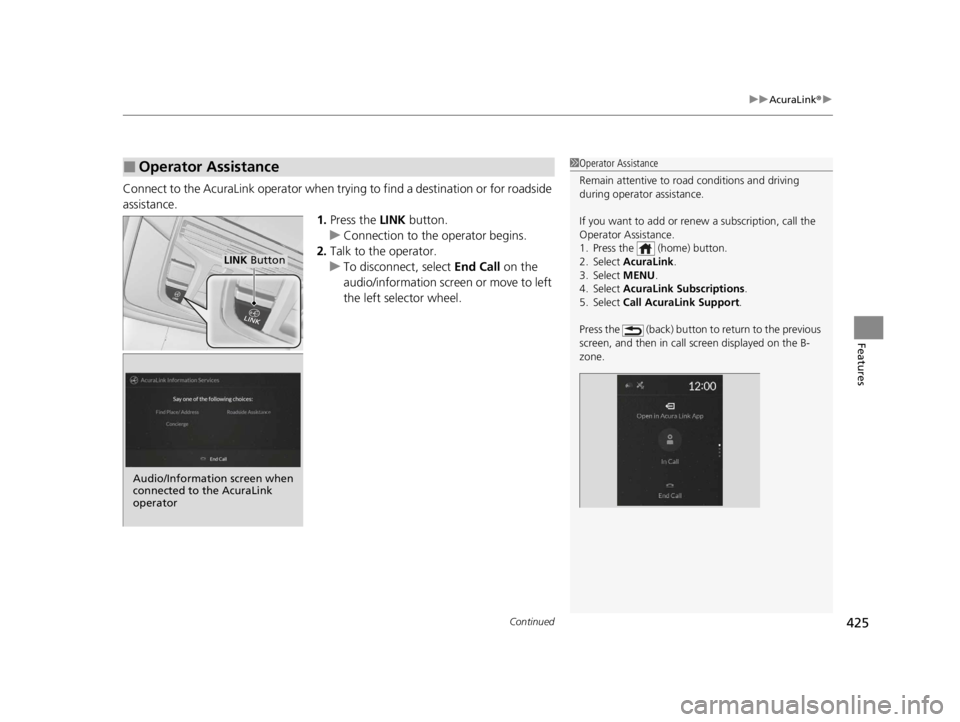
Connect to the AcuraLink operator when trying to find a destination or for roadside
assistance.
1.Press the LINK button.
u Connection to the operator begins.
2. Talk to the operator.
u To disconnect, select End Call on the
audio/information screen or move to left
the left selector wheel.
■Operator Assistance1 Operator Assistance
Remain attentive to road conditions and driving
during operator assistance.
If you want to add or re new a subscription, call the
Operator Assistance.
1. Press the (home) button.
2. Select AcuraLink .
3. Select MENU .
4. Select AcuraLink Subscriptions.
5. Select Call AcuraLink Support .
Press the (back) button to return to the previous
screen, and then in call screen displayed on the B-
zone.
LINK Button
Audio/Information screen when
connected to the AcuraLink
operator
22 ACURA RDX-31TJB6300.book 425 ページ 2021年8月2日 月曜日 午前11時0分
Page 448 of 709
uuWhen Driving uStarting the Engine
446
Driving
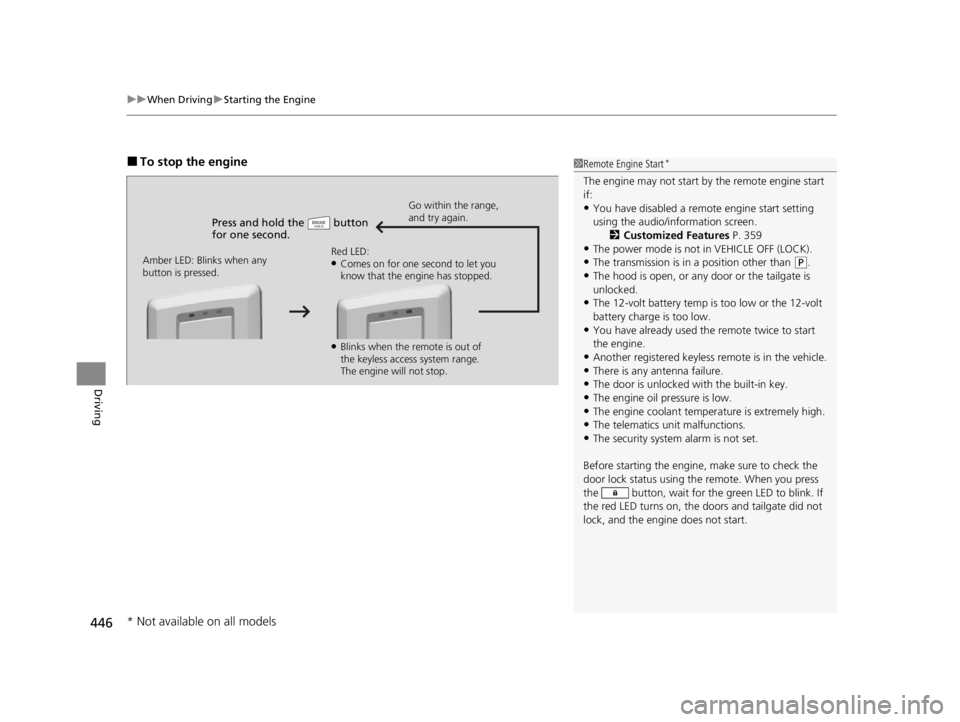
■To stop the engine
Press and hold the button
for one second.
Go within the range,
and try again.
Amber LED: Blinks when any
button is pressed. Red LED:
●Comes on for one second to let you
know that the engine has stopped.
●Blinks when the remote is out of
the keyless access system range.
The engine will not stop.
1
Remote Engine Start*
The engine may not start by the remote engine start
if:
•You have disabled a remo te engine start setting
using the audio/information screen. 2Customized Features P. 359
•The power mode is not in VEHICLE OFF (LOCK).
•The transmission is in a position other than (P.
•The hood is open, or any door or the tailgate is
unlocked.
•The 12-volt battery temp is too low or the 12-volt
battery charge is too low.
•You have already used the remote twice to start
the engine.
•Another registered keyless remote is in the vehicle.
•There is any antenna failure.•The door is unlocked with the built-in key.
•The engine oil pressure is low.
•The engine coolant temper ature is extremely high.•The telematics unit malfunctions.
•The security system alarm is not set.
Before starting the engine, make sure to check the
door lock status using the remote. When you press
the button, wait for the green LED to blink. If
the red LED turns on, the doors and tailgate did not
lock, and the engine does not start.
* Not available on all models
22 ACURA RDX-31TJB6300.book 446 ページ 2021年8月2日 月曜日 午前11時0分
Page 461 of 709
459
uuWhen Driving uAcura Integrated Dynamics System
Continued
Driving
Acura Integrated Dynamics System
Modifies the dynamic character of the vehicl e. There are four modes to select from:
COMFORT , NORMAL , SPORT, and SNOW .
Turn the Dynamic Mode switch to select a mode. The mode you have selected
appears on the audio/information screen.1 Acura Integrated Dynamics System
The mode may not be able to be change when:
•The vehicle is turning
•The VSA ® system is activating
•There is a problem with the engine, transmission,
the brake system, the VSA® , the EPS, the Active
Damper System
*, and the SH-AWD ®*
* Not available on all models
22 ACURA RDX-31TJB6300.book 459 ページ 2021年8月2日 月曜日 午前11時0分
Page 462 of 709
460
uuWhen Driving uAcura Integrated Dynamics System
Driving
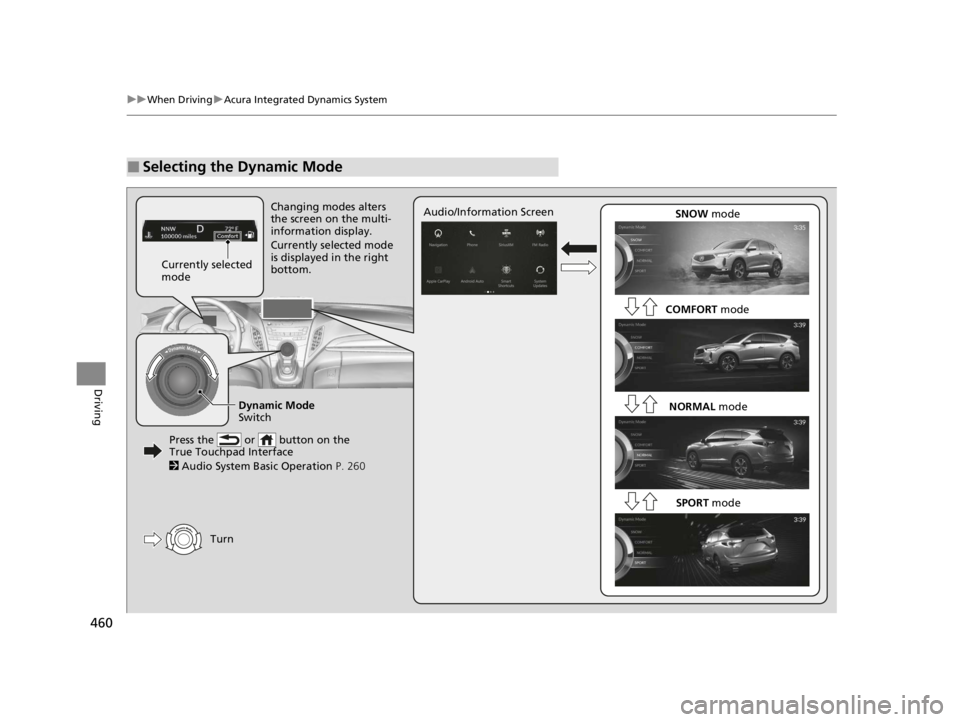
■Selecting the Dynamic Mode
SNOW mode
COMFORT mode
NORMAL mode
Changing modes alters
the screen on the multi-
information display.
Currently selected mode
is displayed in the right
bottom.
Audio/Information Screen
Turn
Currently selected
mode
Press the or button on the
True Touchpad Interface
2 Audio System Basic Operation P. 260
SPORT mode
Dynamic Mode
Switch
22 ACURA RDX-31TJB6300.book 460 ページ 2021年8月2日 月曜日 午前11時0分
Page 490 of 709

uuAcuraWatchTMuCollision Mitigation Braking SystemTM (CMBSTM)
488
Driving
■When the system activates
You can change the distance ( Long/Normal /Short ) between vehicles at which the
system’s earliest collision alert will co me on through audio/information screen
setting options.
2 Customized Features P. 359
1Collision Mitigation Braking SystemTM (CMBSTM)
The camera in the CMBS
TM is also designed to detect
pedestrians.
However, this pedestrian detection feature may not
activate or may not detect a pedestrian in front of
your vehicle under certain conditions.
Refer to the ones indicating the pedestrian detection
limitations from the list. 2 CMBS
TM Conditions and Limitations P. 491
The head-up warning uses a lens located at the front
end of the dashboard.
Do not cover the lens or spill any liquid on it.
Models with Head-up display
Lens
The system provides visual and audible alerts of a possible collision, and stops if the
collision is avoided.
u Take appropriate action to prevent a collision (apply the brakes, change
lanes, etc.).
Beep Head-up Warning
Lights
*Visual Alerts
Audible Alert
* Not available on all models
22 ACURA RDX-31TJB6300.book 488 ページ 2021年8月2日 月曜日 午前11時0分
Page 506 of 709
uuAcuraWatchTMuAdaptive Cruise Control (ACC) with Low Speed Follow
504
Driving
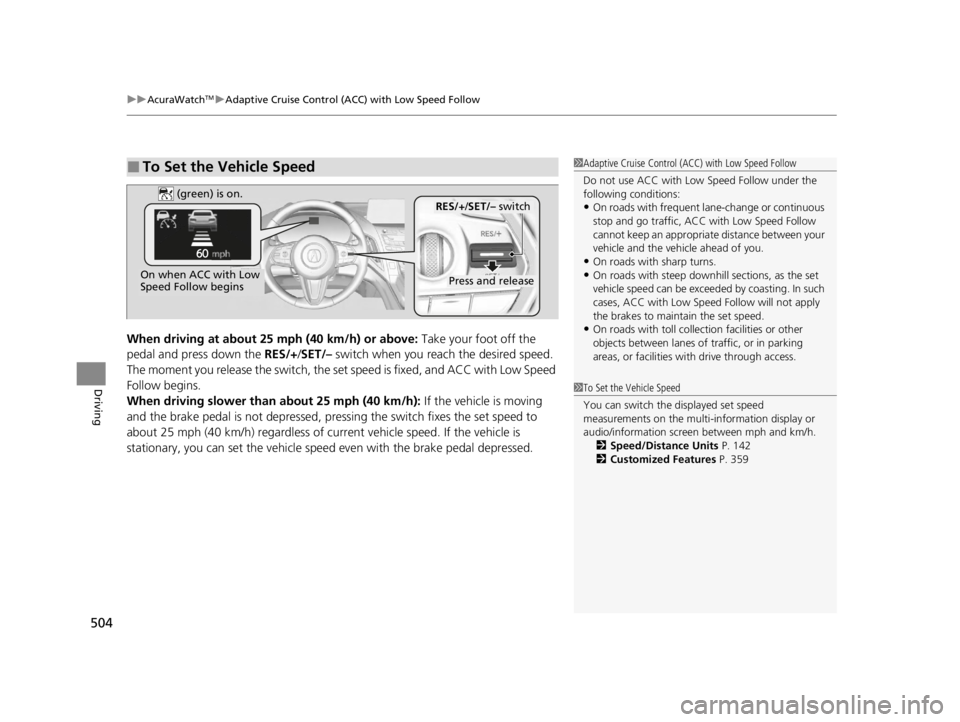
When driving at about 25 mph (40 km/h) or above: Take your foot off the
pedal and press down the RES/+/ SET/– switch when you re ach the desired speed.
The moment you release the switch, the set speed is fixed, and ACC with Low Speed
Follow begins.
When driving slower than about 25 mph (40 km/h): If the vehicle is moving
and the brake pedal is not depressed, pres sing the switch fixes the set speed to
about 25 mph (40 km/h) regardless of current vehicle speed. If the vehicle is
stationary, you can set the vehicle speed even with the brake pedal depressed.
■To Set the Vehicle Speed1 Adaptive Cruise Control (ACC) with Low Speed Follow
Do not use ACC with Low Speed Follow under the
following conditions:
•On roads with frequent la ne-change or continuous
stop and go traffic, ACC with Low Speed Follow
cannot keep an appropriate distance between your
vehicle and the vehicle ahead of you.
•On roads with sharp turns.•On roads with steep downhill sections, as the set
vehicle speed can be exceeded by coasting. In such
cases, ACC with Low Speed Follow will not apply
the brakes to maintain the set speed.
•On roads with toll collection facilities or other
objects between lanes of traffic, or in parking
areas, or faci lities with driv e through access.
1To Set the Vehicle Speed
You can switch the displayed set speed
measurements on the multi- information display or
audio/information screen between mph and km/h. 2 Speed/Distance Units P. 142
2 Customized Features P. 359
On when ACC with Low
Speed Follow beginsPress and release
RES/+/SET/– switch (green) is on.
22 ACURA RDX-31TJB6300.book 504 ページ 2021年8月2日 月曜日 午前11時0分
Page 514 of 709
uuAcuraWatchTMuAdaptive Cruise Control (ACC) with Low Speed Follow
512
Driving
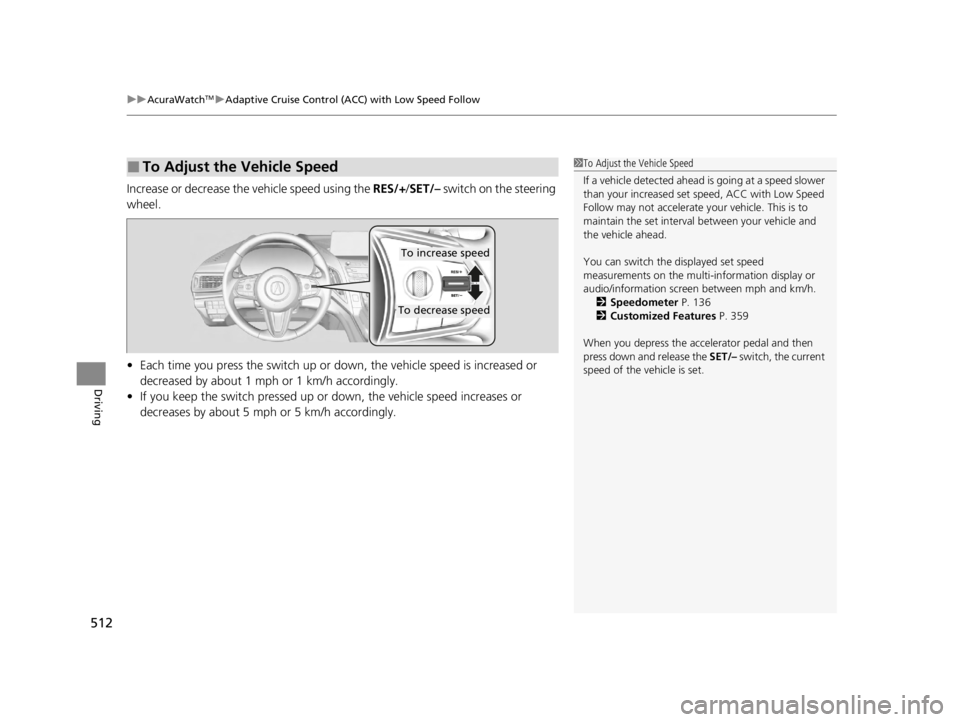
Increase or decrease the vehicle speed using the RES/+/SET/– switch on the steering
wheel.
• Each time you press the switch up or do wn, the vehicle speed is increased or
decreased by about 1 mph or 1 km/h accordingly.
• If you keep the switch pressed up or down, the vehicle speed increases or
decreases by about 5 mph or 5 km/h accordingly.
■To Adjust the Vehicle Speed1 To Adjust the Vehicle Speed
If a vehicle detected ahead is going at a speed slower
than your increased set speed, ACC with Low Speed
Follow may not accelerate y our vehicle. This is to
maintain the set interval between your vehicle and
the vehicle ahead.
You can switch the displayed set speed
measurements on the multi- information display or
audio/information screen between mph and km/h. 2 Speedometer P. 136
2 Customized Features P. 359
When you depress the accelerator pedal and then
press down and release the SET/– switch, the current
speed of the vehicle is set.
To increase speed
To decrease speed
22 ACURA RDX-31TJB6300.book 512 ページ 2021年8月2日 月曜日 午前11時0分
Page 520 of 709
uuAcuraWatchTMuAdaptive Cruise Control (ACC) with Low Speed Follow
518
Driving
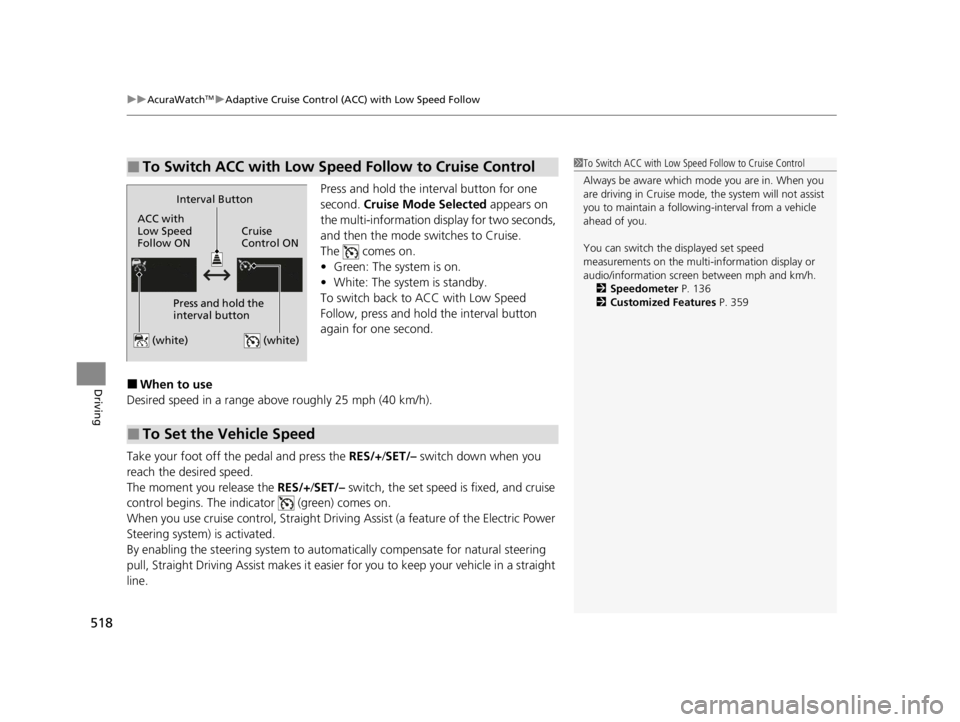
Press and hold the interval button for one
second. Cruise Mode Selected appears on
the multi-information display for two seconds,
and then the mode switches to Cruise.
The comes on.
• Green: The system is on.
• White: The system is standby.
To switch back to ACC with Low Speed
Follow, press and hold the interval button
again for one second.
■When to use
Desired speed in a range above roughly 25 mph (40 km/h).
Take your foot off the pedal and press the RES/+/SET/– switch down when you
reach the desired speed.
The moment you release the RES/+/SET/– switch, the set speed is fixed, and cruise
control begins. The indicator (green) comes on.
When you use cruise control, Straight Driv ing Assist (a feature of the Electric Power
Steering system) is activated.
By enabling the steering system to automa tically compensate for natural steering
pull, Straight Driving Assist makes it easier for you to keep your vehicle in a straight
line.
■To Switch ACC with Low Speed Follow to Cruise Control1 To Switch ACC with Low Speed Follow to Cruise Control
Always be aware which mode you are in. When you
are driving in Cruise mode, the system will not assist
you to maintain a following-interval from a vehicle
ahead of you.
You can switch the displayed set speed
measurements on the multi- information display or
audio/information screen between mph and km/h.
2 Speedometer P. 136
2 Customized Features P. 359
ACC with
Low Speed
Follow ONCruise
Control ON
Press and hold the
interval button
(white) (white)
Interval Button
■To Set the Vehicle Speed
22 ACURA RDX-31TJB6300.book 518 ページ 2021年8月2日 月曜日 午前11時0分
Page 534 of 709

uuAcuraWatchTMuRoad Departure Mitigation System
532
Driving
When you turn the Road Departure Mitigation
on and off, do the following.
1. Press the safety support switch.
2. Roll the right selector wheel to the
symbol and push it.
u The message appears on the multi-
information display when the system
turns on or off.
u A check mark appears in the box and the
color of the symbol changes green
when the system is on. The check mark
disappears and the color of the
symbol changes gray when the system is
off.
The Road Departure Mitigation is in the
previously selected on (checked) or off
(unchecked) setting each time you start the
engine.
■Road Departure Mitigation On and Off1 Road Departure Mitigation On and Off
When you have selected Warning Only from the
customized options using the audio/information
screen, the system does not operate the steering
wheel and braking. 2 Customized Features P. 359
You can also sele ct safety support content from the
multi-information display. 2 Multi-Information Display P. 137
Safety Support Switch
Right Selector Wheel
22 ACURA RDX-31TJB6300.book 532 ページ 2021年8月2日 月曜日 午前11時0分
Page 560 of 709

558
uuParking Your Vehicle uParking Sensor System*
Driving
■When the distance between your ve hicle and obstacles becomes shorter
*1: At this stage, only the ce nter sensors detect obstacles.
Interval between
beepsDistance between the Bumper and ObstacleIndicatorMulti-Information Display
Audio/information Screen
Corner SensorsCenter Sensors
Moderate—
Rear: About 43-24 in (110-60 cm)
Front: About 39-24 in
(100-60 cm)
Blinks in Yellow*1
ShortAbout 24-18 in (60-45 cm) About 24-18 in (60-45 cm)
Blinks in Amber
Very shortAbout 18-14 in (45-35 cm) About 18-14 in (45-35 cm)
ContinuousAbout 14 in
(35 cm) or lessAbout 14 in
(35 cm) or lessBlinks in Red
Multi-Information Display
Indicators light
up where the
sensor detects
an obstacle.
Audio/information screen
Models with multi-view rear camera system
Indicators light up where the
sensor detects an obstacle.
Models with surround view camera system
Indicators light up where the
sensor detects an obstacle.
22 ACURA RDX-31TJB6300.book 558 ページ 2021年8月2日 月曜日 午前11時0分