carplay ACURA RDX 2022 User Guide
[x] Cancel search | Manufacturer: ACURA, Model Year: 2022, Model line: RDX, Model: ACURA RDX 2022Pages: 709, PDF Size: 25.22 MB
Page 325 of 709
Continued323
uuAudio System Basic Operation uApple CarPlay
Features
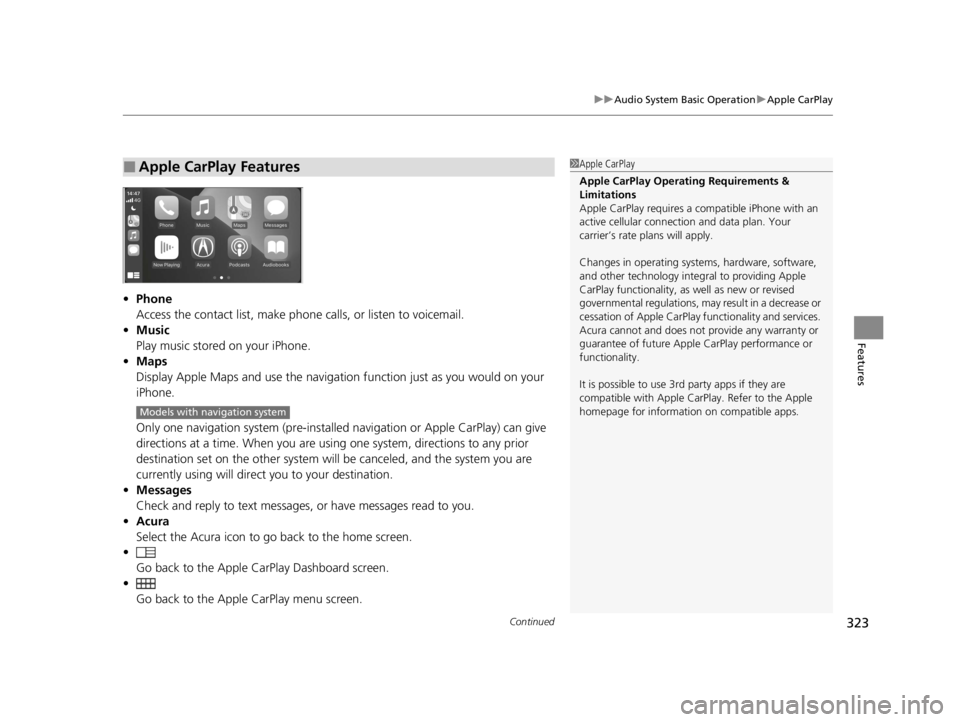
• Phone
Access the contact list, make phone calls, or listen to voicemail.
• Music
Play music stored on your iPhone.
• Maps
Display Apple Maps and use the navigation function just as you would on your
iPhone.
Only one navigation system (pre-installed navigation or Apple CarPlay) can give
directions at a time. When you are usin g one system, directions to any prior
destination set on the other system wi ll be canceled, and the system you are
currently using will direct you to your destination.
• Messages
Check and reply to text messages, or have messages read to you.
• Acura
Select the Acura icon to go back to the home screen.
•
Go back to the Apple Ca rPlay Dashboard screen.
• Go back to the Apple CarPlay menu screen.
■Apple CarPlay Features1Apple CarPlay
Apple CarPlay Operating Requirements &
Limitations
Apple CarPlay requi res a compatible iPhone with an
active cellular connecti on and data plan. Your
carrier’s rate plans will apply.
Changes in operating systems, hardware, software,
and other technology integral to providing Apple
CarPlay functionality, as well as new or revised
governmental regulations, may result in a decrease or
cessation of Apple CarPlay functionality and services.
Acura cannot and does not provide any warranty or
guarantee of future Appl e CarPlay performance or
functionality.
It is possible to use 3r d party apps if they are
compatible with Apple CarPlay. Refer to the Apple
homepage for information on compatible apps.
Models with navigation system
22 ACURA RDX-31TJB6300.book 323 ページ 2021年8月2日 月曜日 午前11時0分
Page 326 of 709
uuAudio System Basic Operation uApple CarPlay
324
Features
■Connecting Apple CarPlay using the USB cable to the USB port in the
console compartment
1. Ensure Siri is enabled on your iPhone.
2. Connect the iPhone to the USB port using the USB cable.
2 USB Ports P. 255
uThe confirmation screen will be displayed.
3. Select Enable Apple CarPlay .
u If prompted on your device, click Allow to allow Apple CarPlay while your
phone is locked.
You may change the cons ent settings under the Connections settings menu.
■Set up Apple CarPlay wirelessly by Bluetooth® pairing
1. Ensure Siri is enabled on your iPhone.
2. Pair and connect the iPhone to the vehicle’s Bluetooth® HandsFreeLink ®.
2Phone Setup P. 395
3.A screen with option to select Continue with Bluetooth or Change to CarPlay
is provided.
4. Select Change to CarPlay .
5. Your iPhone will request your permission to accept wireless Apple CarPlay. Accept
the request to complete setup.
■Enabling Apple CarPlay1 Enabling Apple CarPlay
You can use the method below to access Apple
CarPlay settings. Here you can connect to/
disconnect from devices, de lete a device or change
permissions to enable or disable a device:
Press the (home) button Select Settings
Connections Apple CarPlay Select device
Use of user and vehicle information
The use and handling of user and vehicle information
transmitted to/from your iP hone by Apple CarPlay is
governed by the Apple iOS terms and conditions and
Apple’s Privacy Policy.
22 ACURA RDX-31TJB6300.book 324 ページ 2021年8月2日 月曜日 午前11時0分
Page 327 of 709

325
uuAudio System Basic Operation uApple CarPlay
Continued
Features
■Set up Apple CarPlay wirele ssly on the home screen
1. Ensure Siri is enabled on your iPhone.
2. Select Apple CarPlay on the home screen, then select Connect Phone.
3. Select + Connect New Device .
4. Start Bluetooth ® pairing.
5. Select Enable Apple CarPlay on the disclaimer.
6. Your iPhone will request your permission to accept wireless Apple CarPlay. Accept
the request to complete setup.
22 ACURA RDX-31TJB6300.book 325 ページ 2021年8月2日 月曜日 午前11時0分
Page 328 of 709
uuAudio System Basic Operation uApple CarPlay
326
Features
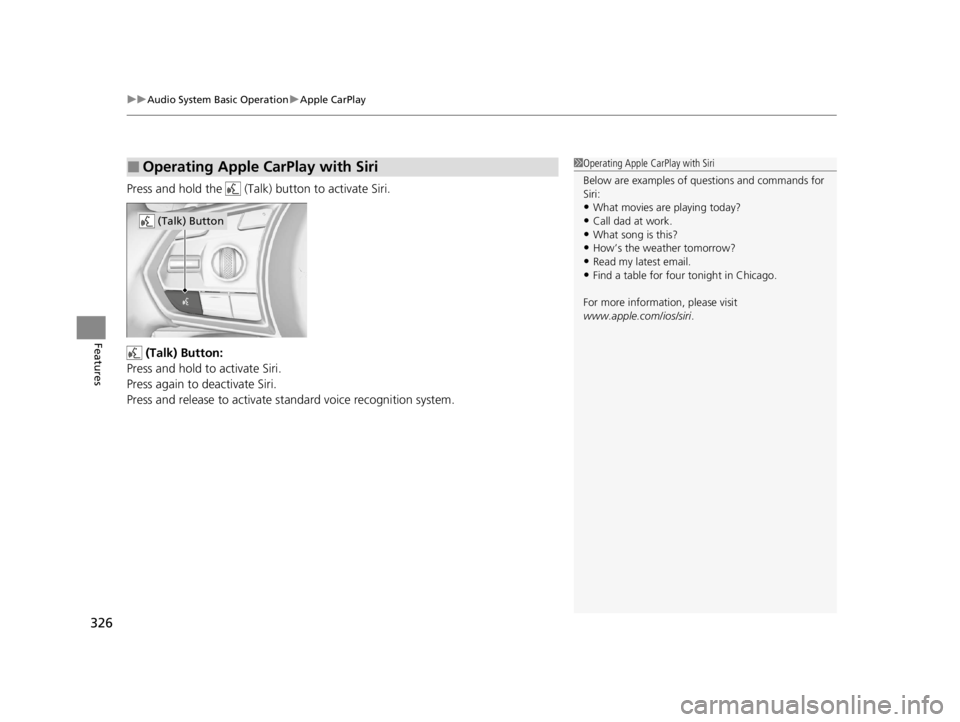
Press and hold the (Talk) button to activate Siri.
(Talk) Button:
Press and hold to activate Siri.
Press again to deactivate Siri.
Press and release to activate st andard voice recognition system.
■Operating Apple CarPlay with Siri1Operating Apple CarPlay with Siri
Below are examples of questions and commands for
Siri:
•What movies are playing today?
•Call dad at work.•What song is this?
•How’s the weather tomorrow?
•Read my latest email.•Find a table for four tonight in Chicago.
For more information, please visit
www.apple.com/ios/siri .
(Talk) Button
22 ACURA RDX-31TJB6300.book 326 ページ 2021年8月2日 月曜日 午前11時0分
Page 329 of 709
327
uuAudio System Basic Operation uAndroid Auto
Continued
Features
Android Auto
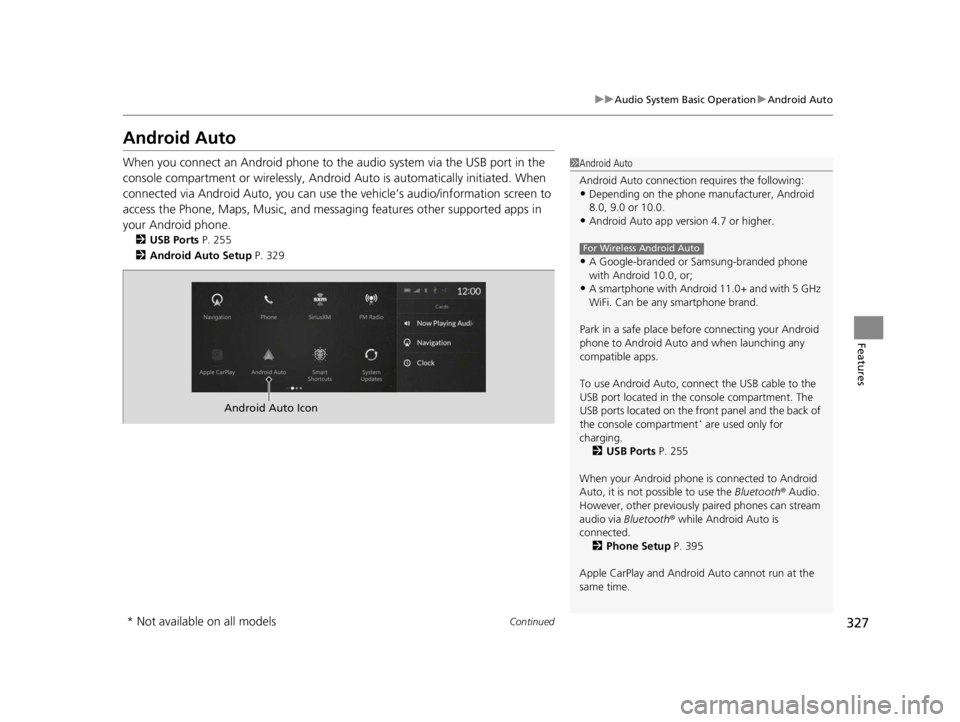
When you connect an Android phone to the audio system via the USB port in the
console compartment or wirelessly, Android Auto is automatically initiated. When
connected via Android Auto, you can use th e vehicle’s audio/information screen to
access the Phone, Maps, Music, and messaging features other supported apps in
your Android phone.
2 USB Ports P. 255
2 Android Auto Setup P. 329
1Android Auto
Android Auto connection requires the following:
•Depending on the phone ma nufacturer, Android
8.0, 9.0 or 10.0.
•Android Auto app version 4.7 or higher.
•A Google-branded or Samsung-branded phone
with Android 10.0, or;
•A smartphone with Androi d 11.0+ and with 5 GHz
WiFi. Can be any smartphone brand.
Park in a safe place befo re connecting your Android
phone to Android Auto and when launching any
compatible apps.
To use Android Auto, connect the USB cable to the
USB port located in the console compartment. The
USB ports located on the front panel and the back of
the console compartment
* are used only for
charging. 2 USB Ports P. 255
When your Android phone is connected to Android
Auto, it is not possible to use the Bluetooth® Audio.
However, other previously paired phones can stream
audio via Bluetooth ® while Android Auto is
connected.
2 Phone Setup P. 395
Apple CarPlay and Android Auto cannot run at the
same time.
For Wireless Android Auto
Android Auto Icon
* Not available on all models
22 ACURA RDX-31TJB6300.book 327 ページ 2021年8月2日 月曜日 午前11時0分
Page 336 of 709
334
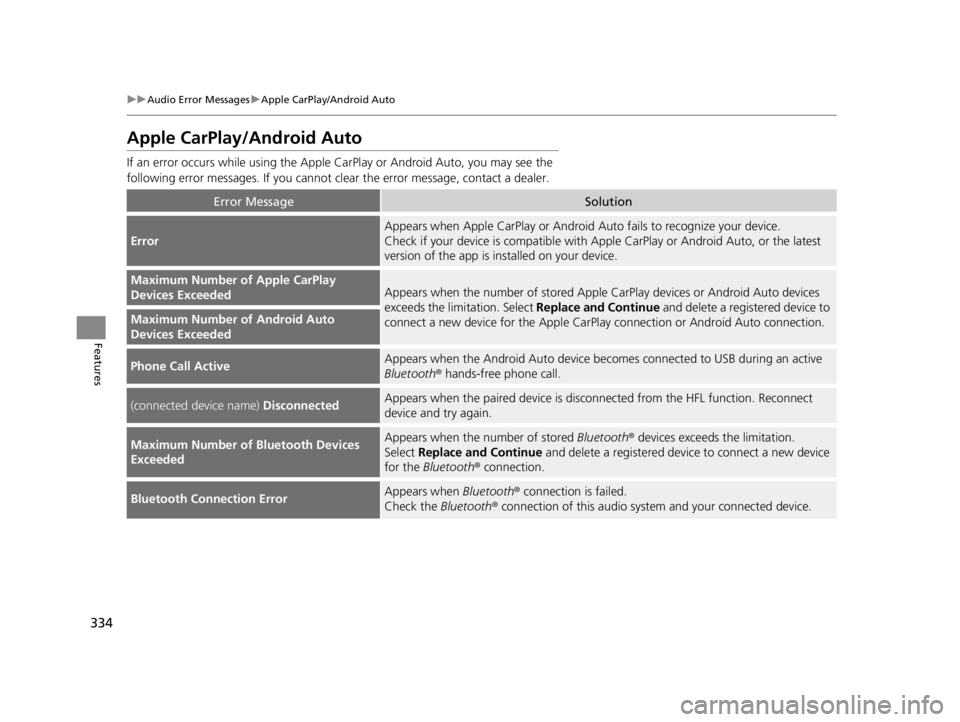
uuAudio Error Messages uApple CarPlay/Android Auto
Features
Apple CarPlay/Android Auto
If an error occurs while using the Apple CarPlay or Android Auto, you may see the
following error messages. If you cannot clear the error message, contact a dealer.
Error MessageSolution
Error
Appears when Apple CarPlay or Android Auto fails to recognize your device.
Check if your device is compatible with Apple CarPlay or Android Auto, or the latest
version of the app is installed on your device.
Maximum Number of Apple CarPlay
Devices ExceededAppears when the number of stored Apple CarPlay devices or Android Auto devices
exceeds the limitation. Select Replace and Continue and delete a registered device to
connect a new device for the Apple CarPlay connection or Android Auto connection.
Maximum Number of Android Auto
Devices Exceeded
Phone Call ActiveAppears when the Android Auto device beco mes connected to USB during an active
Bluetooth ® hands-free phone call.
(connected device name) DisconnectedAppears when the paired device is disc onnected from the HFL function. Reconnect
device and try again.
Maximum Number of Bluetooth Devices
ExceededAppears when the number of stored Bluetooth® devices exceeds the limitation.
Select Replace and Continue and delete a registered devi ce to connect a new device
for the Bluetooth ® connection.
Bluetooth Connection ErrorAppears when Bluetooth® connection is failed.
Check the Bluetooth® connection of this audio system and your connected device.
22 ACURA RDX-31TJB6300.book 334 ページ 2021年8月2日 月曜日 午前11時0分
Page 337 of 709
335
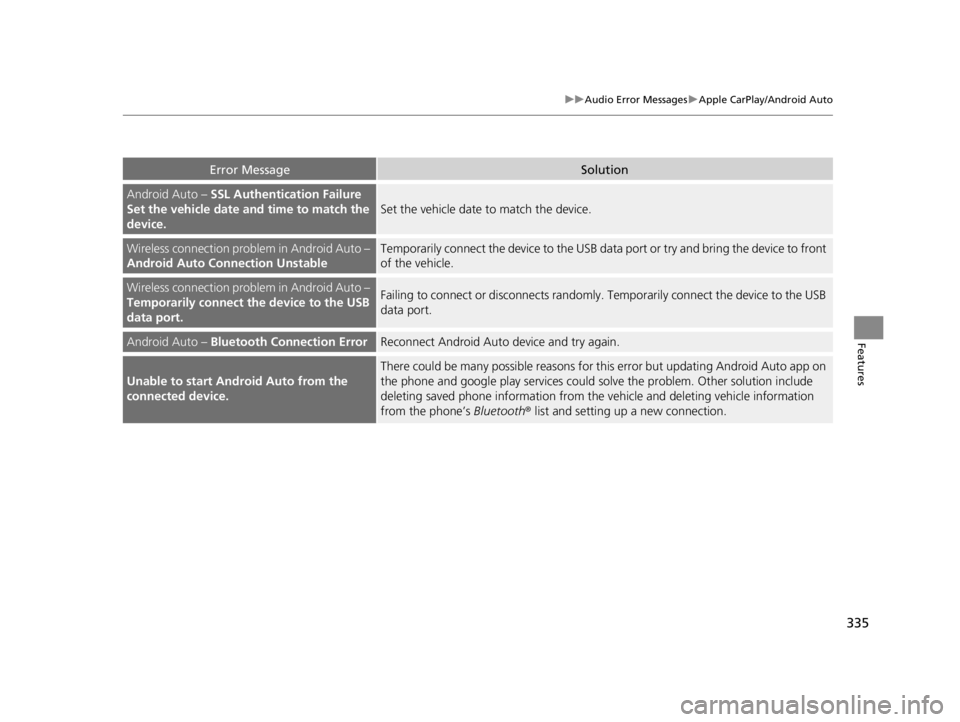
uuAudio Error Messages uApple CarPlay/Android Auto
Features
Error MessageSolution
Android Auto – SSL Authentication Failure
Set the vehicle date and time to match the
device.
Set the vehicle date to match the device.
Wireless connection problem in Android Auto –
Android Auto Connection UnstableTemporarily connect the device to the USB data port or try and bring the device to front
of the vehicle.
Wireless connection problem in Android Auto –
Temporarily connect the device to the USB
data port.Failing to connect or disconnects randomly. Temporarily connect the device to the USB
data port.
Android Auto – Bluetooth Connection ErrorReconnect Android Auto device and try again.
Unable to start Android Auto from the
connected device.
There could be many possible reasons for this error but updating Android Auto app on
the phone and google play services could solve the problem. Other solution include
deleting saved phone information from the vehicle and deleting vehicle information
from the phone’s Bluetooth® list and setting up a new connection.
22 ACURA RDX-31TJB6300.book 335 ページ 2021年8月2日 月曜日 午前11時0分
Page 353 of 709

351
uuGeneral Information on the Audio System uLegal Information on Apple CarPlay/Android Auto
Continued
Features
Legal Information on Appl e CarPlay/Android Auto
USE OF APPLE CARPLAY IS SUBJECT TO YOUR AGREEMENT TO THE CARPLAY TERMS OF USE, WHICH ARE INCLUDED AS PART OF THE
APPLE iOS TERMS OF USE. IN SUMMARY, THE CARPLAY TERMS OF USE DISCLAIM APPLE AND ITS SERVICE PROVIDERS’ LIABILITY IF THE
SERVICES FAIL TO PERFORM CORRECTLY OR ARE DISCONTINUED, STRICTLY LIMIT APPLE AND ITS SERVICE PROVIDERS’ OTHER
LIABILITIES, DESCRIBE THE KINDS OF USER INFORMATION (INCLUDING, FOR EXAMPL E, VEHICLE LOCATION, VEHICLE SPEED, AND
VEHICLE STATUS) BEING GATHERED AND STORED BY APPLE AND IT S SERVICE PROVIDERS, AND DISCLOSE CERTAIN POSSIBLE RISKS
ASSOCIATED WITH THE USE OF CARPLAY, INCLUDING THE POTENTIAL FOR DRIVER DISTRACTION. SEE APPLE’S PRIVACY POLICY FOR
DETAILS REGARDING APPLE’S USE AND HANDL ING OF DATA UPLOADED BY CARPLAY.
USE OF ANDROID AUTO IS SUBJECT TO YOUR AGREEMENT TO THE ANDROID AUTO TERMS OF USE WHICH MUST BE AGREED TO WHEN\
THE ANDROID AUTO APPLICATION IS DOWNLOADED TO YOUR ANDR OID PHONE. IN SUMMARY, THE ANDROID AUTO TERMS OF USE
DISCLAIM GOOGLE AND ITS SERVICE PROVIDERS’ LIABILITY IF THE SERVICES FAIL TO PERFORM CORRECTLY OR ARE DISCONTINUED,
STRICTLY LIMIT GOOGLE AND ITS SERVICE PROV IDERS’ OTHER LIABILITIES, DESCRIBE THE KINDS OF USER INFORMATION (INCLUDING,
FOR EXAMPLE, VEHICLE LOCATION, VEHI CLE SPEED, AND VEHICLE STATUS) BEING GATHERED AND STORED BY GOOGLE AND ITS
SERVICE PROVIDERS, AND DISCLOSE CERTAIN POSSIBLE RISKS ASSOCIATED WITH THE USE OF ANDROID AUTO, INCLUDING THE
POTENTIAL FOR DRIVER DISTRACTION. SEE GOOGLE’S PRIVACY PO LICY FOR DETAILS REGARDING GOOGLE’S USE AND HANDLING OF
DATA UPLOADED BY ANDROID AUTO.
■OWNER’S MANUAL LICENSE/LIABILITY STATEMENTS
22 ACURA RDX-31TJB6300.book 351 ページ 2021年8月2日 月曜日 午前11時0分
Page 354 of 709

352
uuGeneral Information on the Audio System uLegal Information on Apple CarPlay/Android Auto
Features
YOU EXPRESSLY ACKNOWLEDGE AND AGREE THAT USE OF APPLE CARPLAY OR ANDROID AUTO (“THE APPLICATIONS”) IS AT YOUR
SOLE RISK AND THAT THE ENTIRE RISK AS TO SATISFACTORY QUALITY, PERFORMANCE, ACCURACY AND EFFORT IS WITH YOU TO THE
MAXIMUM EXTENT PERMITTED BY APPLICABLE LAW, AND THAT TH E APPLICATIONS AND INFORMATION ON THE APPLICATIONS IS
PROVIDED “AS IS” AND “AS AVAILABLE,” WITH ALL FAULTS AND WITHOUT WARRANTY OF ANY KIND, AND HONDA HEREBY
DISCLAIMS ALL WARRANTIES AND CONDITIONS WITH RESPECT TO TH E APPLICATIONS AND INFORMATION ON THE APPLICATIONS,
EITHER EXPRESS, IMPLIED OR STATUTORY, INCLUDING, BUT NOT LIMITED TO, TH E IMPLIED WARRANTIES AND/OR CONDITIONS OF
MERCHANTABILITY, SATISFACTORY QUALITY, FITNESS FOR A PART ICULAR PURPOSE, ACCURACY, QUIET ENJOYMENT, AND NON-
INFRINGEMENT OF THIRD PARTY RIGHTS. NO ORAL OR WRI TTEN INFORMATION OR ADVICE GIVEN BY HONDA OR AN AUTHORIZED
REPRESENTATIVE SHALL CREATE A WARRANT Y. AS EXAMPLES, AND WITHOUT LIMITATION, HONDA DISCLAIMS ANY WARRANTY
REGARDING THE ACCURACY OF DATA PROVIDED BY THE APPL ICATIONS, SUCH AS THE ACCURACY OF DIRECTIONS, ESTIMATED
TRAVEL TIME, SPEED LIMITS, ROAD CONDITIONS, NEWS, WEATHER, TRAFFIC, OR OTHER CONTENT PROVIDED BY APPLE, GOOGLE, THEIR
AFFILIATES, OR THIRD PARTY PROVIDERS; HONDA DOES NOT GUARANTEE AGAINST LOSS OF APPLICATION DATA, WHICH MAY BE LOST
AT ANY TIME; HONDA DOES NOT GUARANTEE THAT THE APPLICATION S OR ANY SERVICES PROVIDED THROUGH THEM WILL BE
PROVIDED AT ALL TIMES OR THAT ANY OR ALL SERVICES WILL BE AVAILABLE AT ANY PA RTICULAR TIME OR LOCATION. FOR EXAMPLE,
SERVICES MAY BE SUSPENDED OR INTERRUPTED WITHOUT NOTICE FOR REPAIR, MAINTENANCE, SECURITY FIXES, UPDATES, ETC.,
SERVICES MAY BE UNAVAILABLE IN YOUR AREA OR LOCATION, ETC. IN ADDITION, YOU UNDERSTAND THAT CHANGES IN THIRD PARTY
TECHNOLOGY OR GOVERNMENT REGULATION MAY RENDER THE SERVICES AND/OR APPLICATIONS OBSOLETE AND/OR UNUSABLE.
TO THE EXTENT NOT PROHIBITED BY LAW, IN NO EVENT SHALL HONDA OR ITS AFFILIATES BE LIABLE FOR PERSONAL INJURY, OR ANY
INCIDENTAL, SPECIAL, INDIRECT OR CONSEQUENTIAL DAMAG ES WHATSOEVER, INCLUDING, WITHOUT LIMITATION, DAMAGES FOR
LOSS OF PROFITS, CORRUPTION OR LOSS OF DATA, FAILURE TO TRANSMIT OR RECEIV E ANY DATA, BUSINESS INTERRUPTION OR ANY
OTHER COMMERCIAL DAMAGES OR LOSSES, ARISING OUT OF OR RELATE D TO THE APPLICATIONS OR YOUR USE OF OR INABILITY TO
USE THE APPLICATIONS OR INFORMATION ON THE APPLICATIONS, HOWEVER CAUSED, REGARDLESS OF THE THEORY OF LIABILITY
(CONTRACT, TORT OR OTHERWISE) AND EVEN IF HONDA WERE AD VISED OF THE POSSIBILITY OF SUCH DAMAGES. SOME STATES AND
JURISDICTIONS DISALLOW THE EXCLUSION OR LIMITATION OF LI ABILITY FOR DAMAGES, SO THESE LIMITATIONS AND EXCLUSIONS MAY
NOT APPLY TO YOU. IN NO EVENT SHALL HONDA’S TOTAL LIABILIT Y TO YOU FOR ALL DAMAGES (OTHER THAN AS MAY BE REQUIRED
BY APPLICABLE LAW IN CASES INVOLVING PERSONAL INJURY) EXC EED THE AMOUNT OF FIVE DOLLARS ($5.00). THE FOREGOING
LIMITATIONS WILL APPLY EVEN IF THE ABOVE STA TED REMEDY FAILS OF ITS ESSENTIAL PURPOSE.
■DISCLAIMER OF WARRANTIES; LIMITATION ON LIABILITY
22 ACURA RDX-31TJB6300.book 352 ページ 2021年8月2日 月曜日 午前11時0分
Page 357 of 709

355
uuGeneral Information on the Audio System uLicense Information
Continued
Features
“Made for iPod,” “Made for iPhone,” and “Made for iPad” mean that an electronic
accessory has been designed to connect specifically to iPod, iPhone, or iPad,
respectively, and has been certified by the developer to meet Apple performance
standards. Apple is not responsible for the operation of this device or its compliance
with safety and regulatory st andards. Please note that the use of this accessory with
iPod, iPhone, or iPad may affect wireless performance.
Apple, the Apple Logo, iPad, iPhone, iPod touch are trademarks of Apple Inc.,
registered in the U.S. and other countries . iPad Air, iPad mini, iPad Pro, Apple
CarPlay, and Lightning are trademarks of A pple Inc. App Store is a service mark of
Apple Inc.
■Apple
22 ACURA RDX-31TJB6300.book 355 ページ 2021年8月2日 月曜日 午前11時0分