carplay ACURA RDX 2022 Owner's Manual
[x] Cancel search | Manufacturer: ACURA, Model Year: 2022, Model line: RDX, Model: ACURA RDX 2022Pages: 709, PDF Size: 25.22 MB
Page 364 of 709

362
uuCustomized Features u
Features
Advanced Options
Password
Network SSIDApple CarPlay
(Saved Devices)Options
+ Connect New Device
Android AutoAdvanced Options
Password
Network SSID
(Saved Devices)Options
+ Connect New Device
22 ACURA RDX-31TJB6300.book 362 ページ 2021年8月2日 月曜日 午前11時0分
Page 375 of 709

373
uuCustomized Features u
Continued
Features
*1:Default SettingSetup Group
Customizable Features DescriptionSelectable Settings
Connections Apple
CarPlayAdvanced Options
Network
SSID
Sets this network name.
—
Password Sets password for require entering
password when connecting Wi-Fi
device to this network. —
+ Connect New Device Pairs a new phone to Apple CarPlay.
2
Enabling Apple CarPlay P. 324—
(Saved
Devices) OptionsAllow
Apple
CarPlay
Sets up the Apple CarPlay
connection.
Disable
/Enable
AcuraLink
Assist Turn AcuraLink Assist on and off.
Disable/Enable
*1
Delete Delete an Apple CarPlay device. Cancel/Delete
22 ACURA RDX-31TJB6300.book 373 ページ 2021年8月2日 月曜日 午前11時0分
Page 397 of 709
Continued395
uuBluetooth ® HandsFreeLink ®u HFL Menus
Features
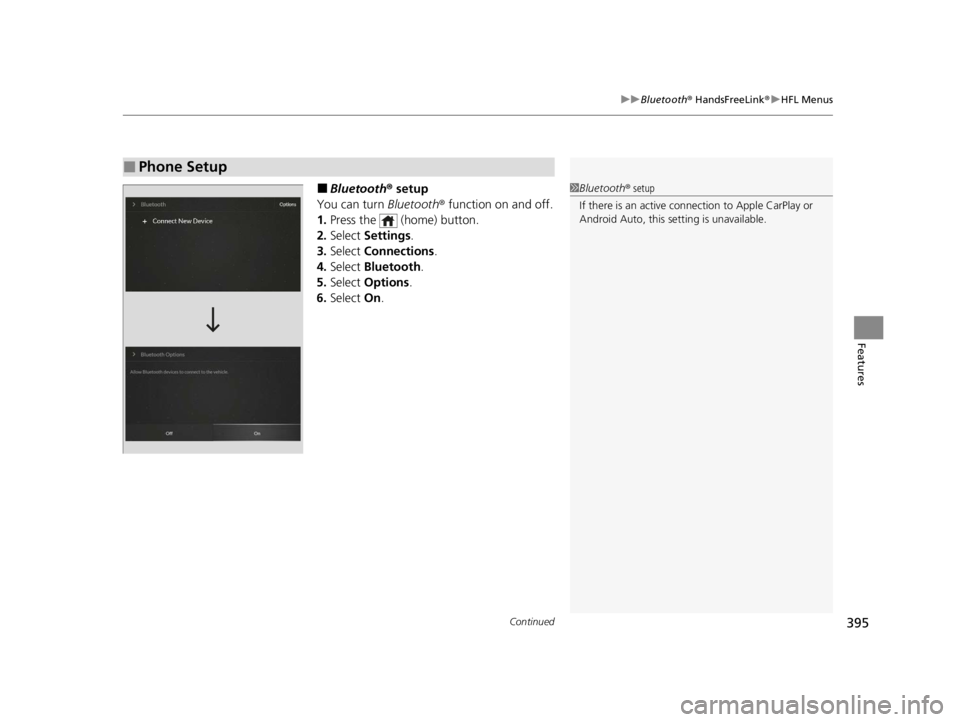
■Bluetooth ® setup
You can turn Bluetooth® function on and off.
1. Press the (home) button.
2. Select Settings .
3. Select Connections.
4. Select Bluetooth .
5. Select Options .
6. Select On.
■Phone Setup
1Bluetooth ® setup
If there is an active connection to Appl e CarPlay or
Android Auto, this se tting is unavailable.
22 ACURA RDX-31TJB6300.book 395 ページ 2021年8月2日 月曜日 午前11時0分
Page 398 of 709
uuBluetooth ® HandsFreeLink ®u HFL Menus
396
Features
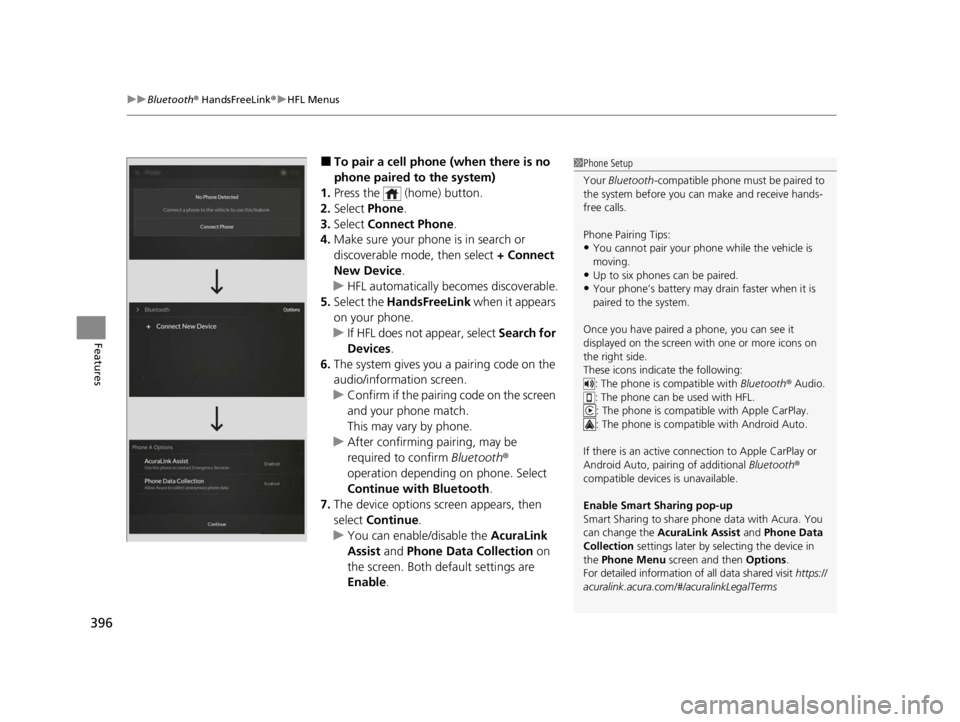
■To pair a cell phone (when there is no
phone paired to the system)
1. Press the (home) button.
2. Select Phone .
3. Select Connect Phone .
4. Make sure your phone is in search or
discoverable mode, then select + Connect
New Device .
u HFL automatically becomes discoverable.
5. Select the HandsFreeLink when it appears
on your phone.
u If HFL does not appear, select Search for
Devices.
6. The system gives you a pairing code on the
audio/information screen.
u Confirm if the pairing code on the screen
and your phone match.
This may vary by phone.
u After confirming pairing, may be
required to confirm Bluetooth®
operation depending on phone. Select
Continue with Bluetooth.
7. The device options screen appears, then
select Continue .
u You can enable/disable the AcuraLink
Assist and Phone Data Collection on
the screen. Both default settings are
Enable .1Phone Setup
Your Bluetooth -compatible phone must be paired to
the system before you ca n make and receive hands-
free calls.
Phone Pairing Tips:
•You cannot pair your phone while the vehicle is
moving.
•Up to six phones can be paired.
•Your phone’s battery may dr ain faster when it is
paired to the system.
Once you have paired a phone, you can see it
displayed on the screen with one or more icons on
the right side.
These icons indicate the following: : The phone is compatible with Bluetooth ® Audio.
: The phone can be used with HFL.
: The phone is compatib le with Apple CarPlay.
: The phone is compatible with Android Auto.
If there is an active connection to Appl e CarPlay or
Android Auto, pairing of additional Bluetooth®
compatible devices is unavailable.
Enable Smart Sharing pop-up
Smart Sharing to share phone data with Acura. You
can change the AcuraLink Assist and Phone Data
Collection settings later by se lecting the device in
the Phone Menu screen and then Options .
For detailed information of all data shared visit https://
acuralink.acura.com/#/acuralinkLegalTerms
22 ACURA RDX-31TJB6300.book 396 ページ 2021年8月2日 月曜日 午前11時0分
Page 404 of 709

uuBluetooth ® HandsFreeLink ®u HFL Menus
402
Features
■To edit a Favorite Contact
1. Go to the phone screen.
2 Phone screen P. 393
2.Select and hold a desired favorite contact.
3. Select the following options:
• Remove Favorite : Delete the favorite
contact.
• Add to Home Page : Add a favorite
contact shortcut icon to the home
screen.
• Add to Heads-Up Display
*: Add a
favorite contact shortcut icon to the
head-up display menu.
4. Press the (back) button on the True
Touchpad Interface.
u The screen will return to the previous
screen.
You can make calls by inputting any phone
number, or by using the imported
phonebook, call history, or Favorite Contact
entries.
■Making a Call1 Making a Call
Once a call is connected, you can hear the voice of
the person you are call ing through the audio
speakers.
While there is an active connection with Apple
CarPlay, phone calls ca nnot be made with
HandsFreeLink ® and are only made from Apple
CarPlay.
* Not available on all models
22 ACURA RDX-31TJB6300.book 402 ページ 2021年8月2日 月曜日 午前11時0分
Page 413 of 709

Continued411
uuBluetooth ® HandsFreeLink ®u Text Message
Features
You can select one from the Bluetooth® device list to be active and receive
notifications. 1.Press the (home) button.
2. Select Messages.
3. Select MENU .
4. Select Change Connected Phone .
5. Change a desired phone.
2 To change the currently paired phone
P. 397
■Selecting a Phone1 Selecting a Phone
You can only receive notifications from one phone at
a time.
You can only connect one de vice to use both text
message function and Bluetooth® hands-free phone
function.
If there is a connection to Apple CarPlay or Android
Auto, a message will appear if this setting is selected
allowing the user to e nd the Apple CarPlay or
Android Auto session and continue with the setting.
22 ACURA RDX-31TJB6300.book 411 ページ 2021年8月2日 月曜日 午前11時0分
Page 700 of 709

Index
698
Index
Index
A
ABS (Anti-lock Brake System)................... 552
Accessories and Modifications ................. 633
Accessory Power Socket ........................... 239
Acura Integrated Dynamics System ......... 459
Dynamic Mode Switch ............................. 460
AcuraLink® ............................................... 419
AcuraWatch
TM........................................... 483
Adaptive Cruise Control (ACC) with Low Speed Follow ........................... 102, 502
Additives
Coolant ................................................... 598
Engine Oil ................................................ 593
Washer .................................................... 602
Additives, Engine Oil ................................ 593
Adjusting Armrest ................................................... 229
Front Seats .............................................. 216
Head Restraints........................................ 225
Mirrors .................................................... 213
Rear Seats................................................ 222
Steering Wheel ........................................ 212
Agile Handling Assist ................................ 473
Air Conditioning System (Climate Control System) .................................................... 247
Changing the Mode ................................ 247
Defrosting the Windshield and Windows ............................................... 249
Dust and Pollen Filter ............................... 626
Rear Temperature Control Dial................. 251
Recirculation/Fresh Air Mode ................... 247 Sensors ................................................... 252
Synchronized Mode................................. 250
Using Automatic Climate Control ............ 247
Air Pressure ....................................... 613, 687
Airbags ........................................................ 46
Advanced Airbags ..................................... 52
After a Collision ........................................ 49
Airbag Care............................................... 63
Front Airbags (SRS) .................................... 49
Indicator.............................................. 60, 95
Knee Airbags............................................. 54
Passenger Airbag Off Indicator .................. 61
Sensors ..................................................... 46
Side Airbags .............................................. 57
Side Curtain Airbags.................................. 59
AM/FM Radio ............................................ 293
Amazon Alexa .......................................... 289
Android Auto ........................................... 327
Anti-lock Brake System (ABS) .................. 552
Indicator.................................................... 94
Apple CarPlay ........................................... 322
Armrest ..................................................... 229
AT&T Hotspot ........................................... 321
Audio Remote Controls ........................... 258
Audio System ............................................ 254
Adjusting the Sound................................ 287
Audio/Information Screen........................ 264
Display Setup .......................................... 288
Error Messages ........................................ 332
General Information ................................ 336
Home Screen........................................... 269 How to Update Wirelessly ....................... 281
How to Update with a USB Device .......... 285
iPod ........................................................ 310
Limitations for Manual Operation ............ 288
MP3/WMA/AAC ..................................... 313
Reactivating ............................................ 257
Remote Controls ..................................... 258
Security Code ......................................... 257
Status Area ............................................. 274
System Updates ...................................... 281
Theft Protection ...................................... 257
True Touchpad Interface ......................... 261
USB Flash Drives.............................. 313, 338
USB Ports ................................................ 255
Audio/Information Screen ....................... 264
Authorized Manuals ................................ 696
Auto Door Locking/Unlocking ................ 172
Auto High-Beam ...................................... 201
Indicator ................................................... 98
Auto Idle Stop .......................................... 464
OFF Button ............................................. 466
Automatic Brake Hold ............................. 550
Indicator ........................................... 85, 550
Automatic Folding Door Mirror .............. 215
Automatic Intermittent Wipers .............. 205
Automatic Lighting .................................. 198
Automatic Transmission .......................... 450
Creeping................................................. 450
Fluid ....................................................... 600
Kickdown ............................................... 450
Operating the Shift Button ...................... 453
22 ACURA RDX-31TJB6300.book 698 ページ 2021年8月2日 月曜日 午前11時0分