lights ACURA RDX 2022 User Guide
[x] Cancel search | Manufacturer: ACURA, Model Year: 2022, Model line: RDX, Model: ACURA RDX 2022Pages: 709, PDF Size: 25.22 MB
Page 108 of 709

106
uuIndicators u
Instrument Panel
IndicatorNameOn/BlinkingExplanationMessage
Safety Support
Indicator
(Green/Gray)
●Lights up in green when Road
Departure Mitigation system,
CMBS
TM, Low Speed Braking
Control*, and blind spot
information system are on.
●Lights up in green and gray when
Road Departure Mitigation system,
CMBS
TM, Low Speed Braking
Control*, or blind spot information
system, or any two or three of these
systems are off.
●Lights up in gr ay when Road
Departure Mitigation system,
CMBS
TM, Low Speed Braking
Control*, and blind spot
information system are off.
2 Road Departure Mitigation On and
Off P. 532
2 CMBS
TM On and Off P. 490
2 System On and Off P. 499
2 Blind Spot Information System On
and Off P. 481
* Not available on all models
22 ACURA RDX-31TJB6300.book 106 ページ 2021年8月2日 月曜日 午前11時0分
Page 113 of 709
111
uuIndicators uMulti-Information Display Warning and Information Messages
Continued
Instrument Panel
MessageConditionExplanation
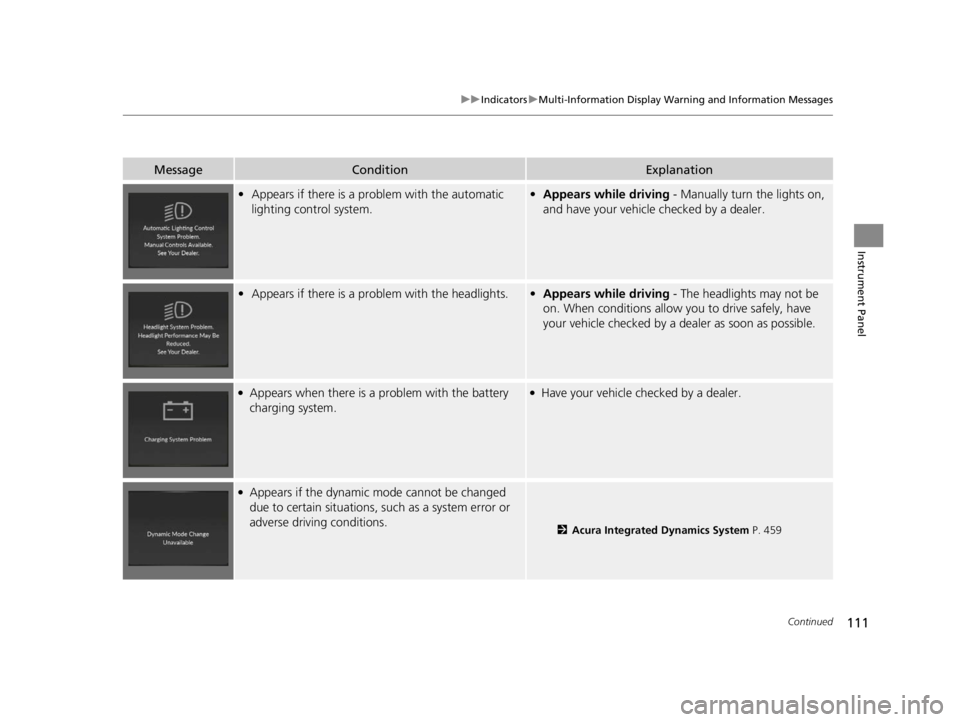
• Appears if there is a pr oblem with the automatic
lighting control system.• Appears while driving - Manually turn the lights on,
and have your vehicle checked by a dealer.
• Appears if there is a pr oblem with the headlights.•Appears while driving - The headlights may not be
on. When conditions allow you to drive safely, have
your vehicle checked by a d ealer as soon as possible.
●Appears when there is a problem with the battery
charging system.●Have your vehicle checked by a dealer.
●Appears if the dynamic mode cannot be changed
due to certain situations, su ch as a system error or
adverse driving conditions.
2 Acura Integrated Dynamics System P. 459
22 ACURA RDX-31TJB6300.book 111 ページ 2021年8月2日 月曜日 午前11時0分
Page 122 of 709

120
uuIndicators uMulti-Information Display Warn ing and Information Messages
Instrument Panel
MessageConditionExplanation
•Appears when you press and hold (N button for
more than two seconds.• Disappears when you set the shift position to other
than
(N.
2 If you want to keep the transmission in (N
position [car wash mode] P. 455
• Appears for a few seconds if you have not pressed
the
(N button long enough to initiate Neutral-Hold
mode.
2 If you want to keep the transmission in (N
position [car wash mode] P. 455
• Appears when neutral hold mode is not available
due to the transmission being too hot.• When the transmission is too hot, neutral hold mode
may not be available. Let the engine idle until the
transmission has cooled down.
2 If you want to keep the transmission in (N
position [car wash mode] P. 455
• Appears if there is a prob lem with the auto high-
beam.• Manually operate the headlight switch.
• If you are driving with the high-beam headlights when
this happens, the headlights are changed to low beams.
22 ACURA RDX-31TJB6300.book 120 ページ 2021年8月2日 月曜日 午前11時0分
Page 151 of 709

149
uuGauges and Displays uHead-Up Display*
Continued
Instrument Panel
The display also shows the following
warnings.
• Lane Departure Warning: When your
vehicle is too close to the traffic lane lines,
the lane departure warning appears.
2 Lane Keeping Assist System (LKAS)
P. 522
• Head-Up Warning Lights:
Flash when the BRAKE message appears
on the multi-information display.
2 Collision Mitigation Braking SystemTM
(CMBSTM) P. 486
2 Low Speed Braking Control
* P. 497
2 Adaptive Cruise Control (ACC) with
Low Speed Follow P. 502
Lane Departure Warning
* Not available on all models
22 ACURA RDX-31TJB6300.book 149 ページ 2021年8月2日 月曜日 午前11時0分
Page 155 of 709

153
Controls
This chapter explains how to operate the various controls necessary for driving.
Clock.................................................. 154
Locking and Unlocking the Doors Key .................................................. 156
Low Keyless Remote Signal Strength ... 159
Locking/Unlocking the Doors from the Outside .......................................... 160
Locking/Unlocking the Doors from the Inside ............................................. 169
Childproof Door Locks ..................... 171
Auto Door Locking/Unlocking .......... 172
Tailgate .............................................. 173
Security System Immobilizer System .......................... 183 Security System Alarm...................... 183
Windows ........................................... 186
Panoramic Roof ................................. 189
Operating the Switches Around the Steering Wheel ENGINE START/STOP Button............. 193
Turn Signals ..................................... 196
Light Switches.................................. 197
Fog Lights
*...................................... 200
Daytime Running Lights ................... 200
Auto High-Beam .............................. 201
Wipers and Washers ........................ 204
Brightness Control ........................... 208
Rear Defogger/Heated Door Mirror Button ........................................ 207
Heated Windshield Button*............. 207
Driving Position Memory System ...... 210
Adjusting the Steering Wheel .......... 212
Mirrors Interior Rearview Mirror ................... 213
Power Door Mirrors ......................... 214
Seats .................................................. 216
Interior Convenience Items .............. 230
Climate Control System Using Automatic Climate Control .... 247
Automatic Climate Control Sensors ... 252
* Not available on all models
22 ACURA RDX-31TJB6300.book 153 ページ 2021年8月2日 月曜日 午前11時0分
Page 162 of 709
160
uuLocking and Unlocking the Doors uLocking/Unlocking the Doors from the Outside
Controls
Locking/Unlocking the Doors from the Outside
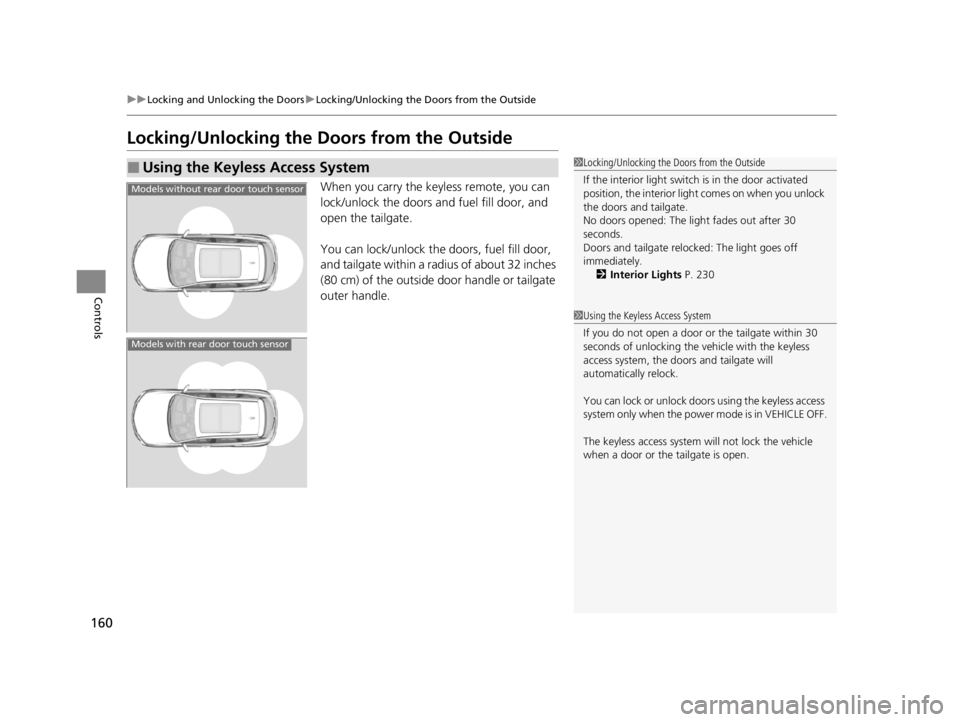
When you carry the keyless remote, you can
lock/unlock the doors and fuel fill door, and
open the tailgate.
You can lock/unlock the doors, fuel fill door,
and tailgate within a radius of about 32 inches
(80 cm) of the outside door handle or tailgate
outer handle.
■Using the Keyless Access System1Locking/Unlocking the Doors from the Outside
If the interior light switch is in the door activated
position, the interior light comes on when you unlock
the doors and tailgate.
No doors opened: The li ght fades out after 30
seconds.
Doors and tailgate relo cked: The light goes off
immediately. 2 Interior Lights P. 230
1Using the Keyless Access System
If you do not open a door or the tailgate within 30
seconds of unlocking the vehicle with the keyless
access system, the doors and tailgate will
automatically relock.
You can lock or unlock doors using the keyless access
system only when the power mode is in VEHICLE OFF.
The keyless access system will not lock the vehicle
when a door or the tailgate is open.
Models without rear door touch sensor
Models with rear door touch sensor
22 ACURA RDX-31TJB6300.book 160 ページ 2021年8月2日 月曜日 午前11時0分
Page 163 of 709

Continued161
uuLocking and Unlocking the Doors uLocking/Unlocking the Doors from the Outside
Controls
■Locking the doors and tailgate
Touch the door lock sensor on the front or
rear
* door, or press the lock button on the
tailgate. u Some exterior lights flash; the beeper
sounds; all the doors, fuel fill door, and
tailgate lock; and the security system
sets.
1Using the Keyless Access System
•Do not leave the keyless remote in the vehicle
when you get out. Carry it with you.
•Even if you are not carrying the keyless remote, you
can lock/unlock the doors and tailgate while
someone else with the remote is within range.
•The door may be unlocked if the door handle is
covered with water in heavy rain or in a car wash if
the keyless remote is within range.
•If you grip a door handle or touch a door lock
sensor wearing gloves, the door sensor may be
slow to respond or may not respond by unlocking
or locking the doors.
•After locking the door, you have up to 2 seconds
during which you can pull the door handle to
confirm whether the door is locked. If you need to
unlock the door immediately after locking it, wait
at least 2 seconds befo re gripping the handle,
otherwise the door will not unlock.
•The door might not open if you pull it immediately
after gripping the door handle. Grip the handle
again and confirm that th e door is unlocked before
pulling the handle.
•Even within the 32 inches (80 cm) radius, you may
not be able to lock/unloc k the doors and tailgate
with the keyless remote if it is above or below the
outside handle.
•The keyless remote may not operate if it is too close
to the door, door glass and tailgate.
Door Lock
Sensor
Lock Button
* Not available on all models
22 ACURA RDX-31TJB6300.book 161 ページ 2021年8月2日 月曜日 午前11時0分
Page 164 of 709
uuLocking and Unlocking the Doors uLocking/Unlocking the Doors from the Outside
162
Controls
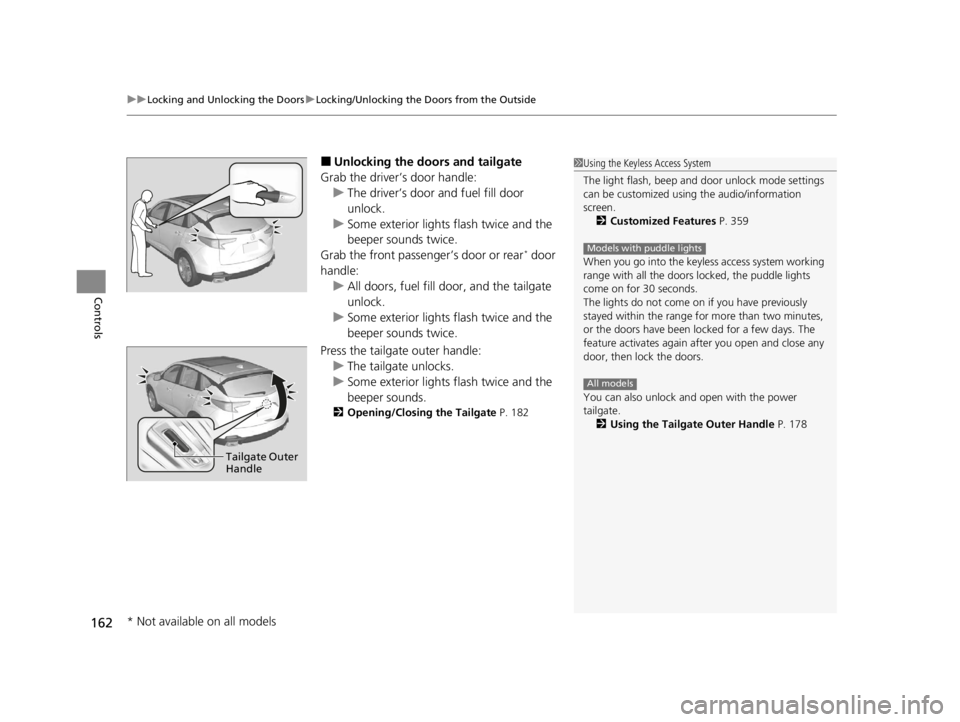
■Unlocking the doors and tailgate
Grab the driver’s door handle: u The driver’s door and fuel fill door
unlock.
u Some exterior lights flash twice and the
beeper sounds twice.
Grab the front passenger’s door or rear
* door
handle: u All doors, fuel fill door, and the tailgate
unlock.
u Some exterior lights flash twice and the
beeper sounds twice.
Press the tailgate outer handle: u The tailgate unlocks.
u Some exterior lights flash twice and the
beeper sounds.
2 Opening/Closing the Tailgate P. 182
1Using the Keyless Access System
The light flash, beep and door unlock mode settings
can be customized using the audio/information
screen.
2 Customized Features P. 359
When you go into the keyless access system working
range with all the doors locked, the puddle lights
come on for 30 seconds.
The lights do not come on if you have previously
stayed within the range for more than two minutes,
or the doors have been locked for a few days. The
feature activates again after you open and close any
door, then lock the doors.
You can also unlock and open with the power
tailgate.
2 Using the Tailgate Outer Handle P. 178
Models with puddle lights
All models
Tailgate Outer
Handle
* Not available on all models
22 ACURA RDX-31TJB6300.book 162 ページ 2021年8月2日 月曜日 午前11時0分
Page 165 of 709

Continued163
uuLocking and Unlocking the Doors uLocking/Unlocking the Doors from the Outside
Controls
■Locking the doors and tailgate (Walk
away auto lock ®)
When you walk away fro m the vehicle with all
doors and tailgate closed and while carrying
the keyless remote, the doors will
automatically lock.
The auto lock function activates when all
doors and tailgate are closed, and the keyless
remote is within about 5 feet (1.5 m) radius of
the outside door handle or tailgate outer
handle.
Exit vehicle while carrying keyless remote and
close door(s).
1. While within about 5 feet (1.5 m) radius of
the vehicle.
u The beeper sounds; the auto lock
function will be activated.
2. Carry the keyless remote beyond about 5
feet (1.5 m) from the vehicle and remain
outside this range for 2 or more seconds.
u Some exterior lights flash; the beeper
sounds; all doors and tailgate will then
lock.1Locking the doors and tailg ate (Walk away auto lock®)
The auto lock function is set to OFF as the factory
default setting. The auto lo ck function can be set to
ON using the audio/information screen.
If you set the auto lock function to ON using the
audio/information screen, only the remote
transmitter that was used to unlock the driver’s door
prior to the setting change can activate auto lock. 2 Customized Features P. 359
After the auto lock function has been activated,
when you stay within the locking/unlocking
operation range, the indicato r on the keyless remote
will continue to flash until the doors are locked.
When you stay beside the vehicle within the
operation range, the doors wi ll automatically lock
approximately 30 seconds after the auto lock
function activating beeper sounds.
When you open a door after the auto lock function
activating beeper sounds, the auto lock function will
be canceled.
Under the following circumstances, the auto lock
function will not activate:
•The keyless remote is inside the vehicle.
•The keyless remote is taken out of its operational
range before all the doors and tailgate are closed.
u
The beeper will not sound.
u The beeper will sound.
The activation range of
the auto lock function is
about 5 feet (1.5 m)
22 ACURA RDX-31TJB6300.book 163 ページ 2021年8月2日 月曜日 午前11時0分
Page 167 of 709

Continued165
uuLocking and Unlocking the Doors uLocking/Unlocking the Doors from the Outside
Controls
■Locking the doors and tailgate
Press the lock button.
Once: u Some exterior lights flash, all the doors,
tailgate, and fuel fill door lock, and the
security system sets.
Twice (within five se conds after the first
push): u The beeper sounds and verifies the
security system is set.
■Unlocking the doors and tailgate
Press the unlock button.
Once:
u Some exterior lights flash twice, and the
driver’s door and fuel fill door unlock.
Twice: u The remaining doors and tailgate unlock.
*1 :Checking Door Lock Status* P. 168
■Using the Remote Transmitter1Using the Remote Transmitter
If you do not open a door or the tailgate within 30
seconds of unlocking the vehicle with the remote
transmitter, the doors and ta ilgate will automatically
relock.
You can change the relock timer setting. 2 Customized Features P. 359
You can lock or unlock doors using the remote
transmitter only when the power mode is in VEHICLE
OFF.
The remote transmitter us es low-power signals, so
the operating range may vary depending on the
surroundings.
The remote will not lock th e vehicle when a door or
the tailgate is open.
If the distance at which the remote transmitter works
varies, the batter y is probably low.
If the LED does not come on when you press a
button, the battery is dead.
2 Replacing the Remote Battery P. 623
LED
Unlock
ButtonLock
Button
LED*1
Unlock
Button
Lock
Button
* Not available on all models
22 ACURA RDX-31TJB6300.book 165 ページ 2021年8月2日 月曜日 午前11時0分