lights ACURA RDX 2022 Owner's Manual
[x] Cancel search | Manufacturer: ACURA, Model Year: 2022, Model line: RDX, Model: ACURA RDX 2022Pages: 709, PDF Size: 25.22 MB
Page 177 of 709

175
uuTailgate uOpening/Closing the Power Tailgate
Continued
Controls
Opening/Closing the Power Tailgate
Use a forward and back kicking motion for
about 1 second under the center of the rear
bumper to open or close the power tailgate
while carrying the keyless remote. u Some exterior lights will flash and a
beeper will sound, then the tailgate
begins to move.
■Using the Hands Free Access*1Opening/Closing the Power Tailgate
During rain or in other instances when the vehicle
becomes wet, the sensor may not properly detect
your foot motion.
When performing work on or around the rear section
of the vehicle, you may in advertently open or close
the tailgate.
To prevent this from happe ning, select Customized
Features on the audio/information screen and then
select OFF for the feature. 2 Customized Features P. 359
If you hold your foot under the bumper for too long
or sweep your foot from side to side, the power
tailgate does not open or close.
This function will not opera te if you don’t have the
keyless remote on you. Please make sure you have
the keyless remote on you.
3WARNING
Opening or closing a power tailgate while
any part of a passenger is in the tailgate’s
operating path can cause serious injury.
Make sure all passengers or objects are
clear of the tailgate operating range
before opening or closing the tailgate.
Models with Hands Free Access
1 sec.
* Not available on all models
22 ACURA RDX-31TJB6300.book 175 ページ 2021年8月2日 月曜日 午前11時0分
Page 178 of 709

uuTailgate uOpening/Closing the Power Tailgate
176
Controls
Press the power tailgate button for more than
one second to operate when the power mode
is in VEHICLE OFF (LOCK).
u Some exterior lights flash and the beeper
sounds.
If you press the button again while the power
tailgate is moving, it will stop.
Press the button for more than one second,
and the power tailgate will reverse direction.
■Customizing when to open the tailgate
Anytime: The power tailgate unlocks and opens at the same time. This is the
default setting.
When Unlocked: The tailgate opens when all doors are unlocked.
2Customized Features P. 359
■Using the Remote Transmitter1Opening/Closing the Power Tailgate
If you close the power tail gate when all the doors are
locked, the power tailgate locks automatically.
If you replace the battery or the power tailgate fuse
while the tailgate is open, the power tailgate may be
disabled. The power tail gate resumes once you
manually close the tailgate.
Installing aftermarket com ponents other than Acura
genuine accessories on the power tailgate may
prevent it from fully opening or closing.
Make sure the power tailgate is fully open before you
get your luggage in and out.
The beeper sounds when you start driving while the
power tailgate is still open, or closing.
Power
Tailgate
Button
22 ACURA RDX-31TJB6300.book 176 ページ 2021年8月2日 月曜日 午前11時0分
Page 179 of 709

Continued177
uuTailgate uOpening/Closing the Power Tailgate
Controls
To open or close the power tailgate, press the
power tailgate button for about one second.
u Some exterior lights flash and the beeper
sounds.
If you press the button again while the power
tailgate is moving, it will stop.
Press the button for about one second, and
the power tailgate will reverse direction.
■Using the Power Tailgate Button1 Opening/Closing the Power Tailgate
If the power tailgate meet s resistance while opening
or closing, the auto reverse feature reverses the
direction. The beeper sounds three times.
The auto reverse function stops sensing when the
tailgate is almost closed to make sure that it fully
closes.
Do not touch the sensors located on both sides of the
tailgate. The power tailga te does not close if you
touch either sensor when you are trying to close the
tailgate.
Be careful not to scratch the sensors with a sharp
object. If scratched, they can be damaged, and the
power tailgate closing feature malfunctions.
Power Tailgate Button
22 ACURA RDX-31TJB6300.book 177 ページ 2021年8月2日 月曜日 午前11時0分
Page 184 of 709

182
uuTailgate uOpening/Closing the Tailgate
Controls
Opening/Closing the Tailgate
When all the doors are unlocked, the tailgate
is unlocked.
Press the outer handle of the tailgate and lift
open the tailgate.
If you are carrying the keyless remote, you do
not have to unlock the tailgate before
opening it.
To close the tailgate, grab the inner handle,
pull the tailgate down, and push it closed
from outside.
If you close the tailgate when the driver's door
is locked, the tailgate locks automatically.
u Some exterior lights flash.1Opening/Closing the Tailgate
•Do not leave the keyless remote in the vehicle
when you get out. Carry it with you.
•Even if you are not carrying the keyless remote, you
can unlock the tailgate wh ile someone else with
the remote is within range.
•Do not leave the keyless re mote inside the cargo
area and close the tailgate. The beeper sounds and
the tailgate cannot be closed.
Outer Handle
Inner Handle
22 ACURA RDX-31TJB6300.book 182 ページ 2021年8月2日 月曜日 午前11時0分
Page 185 of 709

183Continued
Controls
Security System
Immobilizer System
This system prevents a key that has not been pre-registered from starting the
engine.
Pay attention to the follo wing when pressing the ENGINE START/STOP button:
• Do not allow objects that emit strong radio waves near the ENGINE START/
STOP button.
• Make sure the key is not covered by or touching a metal object.
• Do not bring a key from another vehicle’s immobilizer system near the ENGINE
START/STOP button.
• Do not put the key near magnetic items. Electronic devices, such as televisions
and audio systems emit strong magnetic fields. Note that even a key chain can
become magnetic.
Security System Alarm
The security system alarm activates when the tailgate, hood or doors are forcibly
opened. The alarm does not activate if the tailgate or doors are opened with the key,
remote transmitter or keyless access system.
However, the alarm activates if a door is op ened with the key and then the hood is
opened before the power mode is set to ON.
■When the security system alarm activates
The horn sounds intermittently and some exterior lights flash.
■To deactivate the security system alarm
Unlock the vehicle using the key, remote tra nsmitter or keyless access system or set
the power mode to ON. The system, along with the horn and flashing lights, is
deactivated.
1 Immobilizer System
NOTICE
Leaving the key in the vehicl e can result in theft or
accidental movement of the vehicle.
Always take the key with you whenever you leave the
vehicle unattended.
Do not alter the system or add other devices to it.
Doing so may damage the system and make your
vehicle inoperable.
Canadian models only : Apply and hold the brake
pedal before turning the vehicle on the first time after
the battery has been disconnected.
1 Security System Alarm
Do not alter the system or add other devices to it.
Doing so may damage the system and make your
vehicle inoperable.
The security system alarm continues for a maximum
of two minutes until the security system alarm
deactivates.
22 ACURA RDX-31TJB6300.book 183 ページ 2021年8月2日 月曜日 午前11時0分
Page 187 of 709

185
uuSecurity System uSecurity System Alarm
Controls
■The panic button on the remote
transmitter
If you press the panic button for
approximately one second, the following will
occur for about 30 seconds:
• The horn sounds.
• Some exterior lights flash.
■Canceling panic mode
• Press any button on the remote transmitter.
• Set the power mode to ON.
■Panic Mode
Panic
Button
Panic
Button
22 ACURA RDX-31TJB6300.book 185 ページ 2021年8月2日 月曜日 午前11時0分
Page 199 of 709

197
uuOperating the Switches Around the Steering Wheel uLight Switches
Continued
Controls
Light Switches
Rotating the light switch turns the lights on
and off, regardless of the power mode
setting.
■High beams
Push the lever forward until you hear a click.
■Low beams
When in high beams, pull the lever back to
return to low beams.
■Flashing the high beams
Pull the lever back, and release it.
■Lights off
Turn the lever to OFF either when:
• The transmission is in
(P.
• The parking brake is applied.
To turn the light s on again, turn the lever to
OFF to cancel the lights off mode. Even if you
do not cancel the lights off mode, the lights
come on automatically when:
• The transmission is taken out of
(P and the
parking brake is released.
• The vehicle starts to move.
■Manual Operation1Light Switches
If you leave the power mode in VEHICLE OFF (LOCK)
while the lights are on, a chime sounds when the
driver’s door is opened.
When the lights are on, the lights on indicator in the
instrument pane l will be on.
2 Lights On Indicator P. 98
Do not leave the lights on when the engine is off
because it will cause the battery to discharge.
If you sense that the le vel of the headlights is
abnormal, have the vehicl e inspected by a dealer.
High Beams
Flashing the high beams
Low Beams
Turns on parking, side marker,
tail, and rear license plate lights
Turns on headlights, parking,
side marker, tail, and rear
license plate lights
22 ACURA RDX-31TJB6300.book 197 ページ 2021年8月2日 月曜日 午前11時0分
Page 200 of 709

uuOperating the Switches Around the Steering Wheel uLight Switches
198
Controls
Automatic lighting control can be used when
the power mode is in ON.
When the light switch is in AUTO, the
headlights and other exterior lights will switch
on and off automatica lly depending on the
ambient brightness.
The headlights come on when you unlock a
door in dark areas with the headlight switch in
AUTO .
u Once you lock the door, the headlights
will go off.
■Automatic Operation (automatic lighting control)1Automatic Operation (aut omatic lighting control)
We recommend that you tu rn on the lights manually
when driving at night, in a de nse fog, or in dark areas
such as long tunnels or parking facilities.
The light sensor is in the location shown below.
Do not cover this light sensor with anything;
otherwise, the automatic lighting system may not
work properly.
Light Sensor
Models with automatic
intermittent wipers
Models without automatic
intermittent wipers
Light Sensor
22 ACURA RDX-31TJB6300.book 198 ページ 2021年8月2日 月曜日 午前11時0分
Page 201 of 709
199
uuOperating the Switches Around the Steering Wheel uLight Switches
Controls
The headlights automatically come on when the wipers are used several times within
a certain number of intervals with the headlight switch in AUTO.
The headlights automatically go off a few minutes later if the wipers are stopped.
The headlights, all other exterior lights, a nd the instrument panel lights turn off 15
seconds after you set the power mode to VEHICLE OFF (LOCK), take the remote with
you, and close the driver’s door.
If you set the power mode to VEHICLE OFF (LOCK) with the headlight switch on, but
do not open the door, the lights turn off a fter 10 minutes (3 minutes, if the switch
is in the AUTO position).
The lights turn on again when you unlock or open the driver’s door. If you unlock
the door, but do not open it within 15 seconds, the lights go off. If you open the
driver’s door, you will hear a reminder chime alerting you that the lights are on.
■Headlight Integration with Wiper
■Automatic Lighting Off Feature
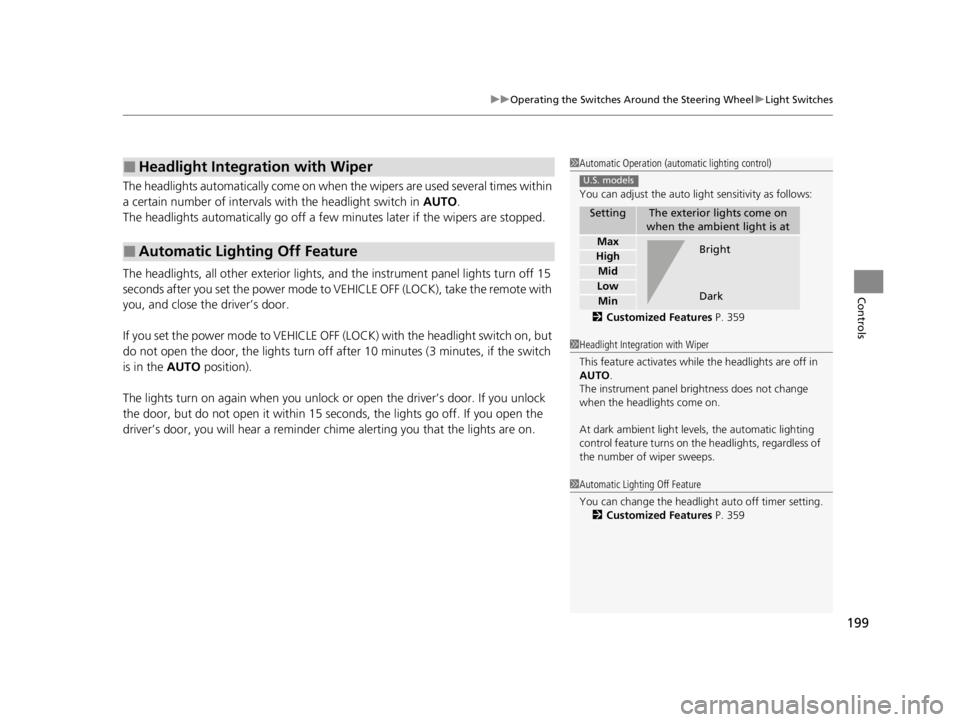
1Automatic Operation (aut omatic lighting control)
You can adjust the auto li ght sensitivity as follows:
2 Customized Features P. 359
SettingThe exterior lights come on
when the ambient light is at
Max
High
Mid
Low
Min
U.S. models
Bright
Dark
1 Headlight Integration with Wiper
This feature activates while the headlights are off in
AUTO .
The instrument panel br ightness does not change
when the headlights come on.
At dark ambient light levels, the automatic lighting
control feature turns on the headlights, regardless of
the number of wiper sweeps.
1 Automatic Lighting Off Feature
You can change the headlight auto off timer setting.
2 Customized Features P. 359
22 ACURA RDX-31TJB6300.book 199 ページ 2021年8月2日 月曜日 午前11時0分
Page 202 of 709

200
uuOperating the Switches Around the Steering Wheel uFog Lights*
Controls
Fog Lights*
When the low beam headlights are on, turn
the fog light switch on to use the fog lights.
Daytime Running Lights
The parking/daytime running lights come on when the following conditions have
been met:
• The power mode is in ON.
• The headlight switch is in AUTO.
• The parking brake is released.
The lights remain on even if you set the parking brake. Setting the power mode to
VEHICLE OFF (LOCK) will turn off the daytime running lights.
The daytime running lights are off once the headlight switch is turned on, or when
the headlight switch is in AUTO and it is getting darker outside.
Fog Light Switch
* Not available on all models
22 ACURA RDX-31TJB6300.book 200 ページ 2021年8月2日 月曜日 午前11時0分