change wheel ACURA RDX 2022 Owner's Manual
[x] Cancel search | Manufacturer: ACURA, Model Year: 2022, Model line: RDX, Model: ACURA RDX 2022Pages: 709, PDF Size: 25.22 MB
Page 492 of 709
uuAcuraWatchTMuCollision Mitigation Braking SystemTM (CMBSTM)
490
Driving
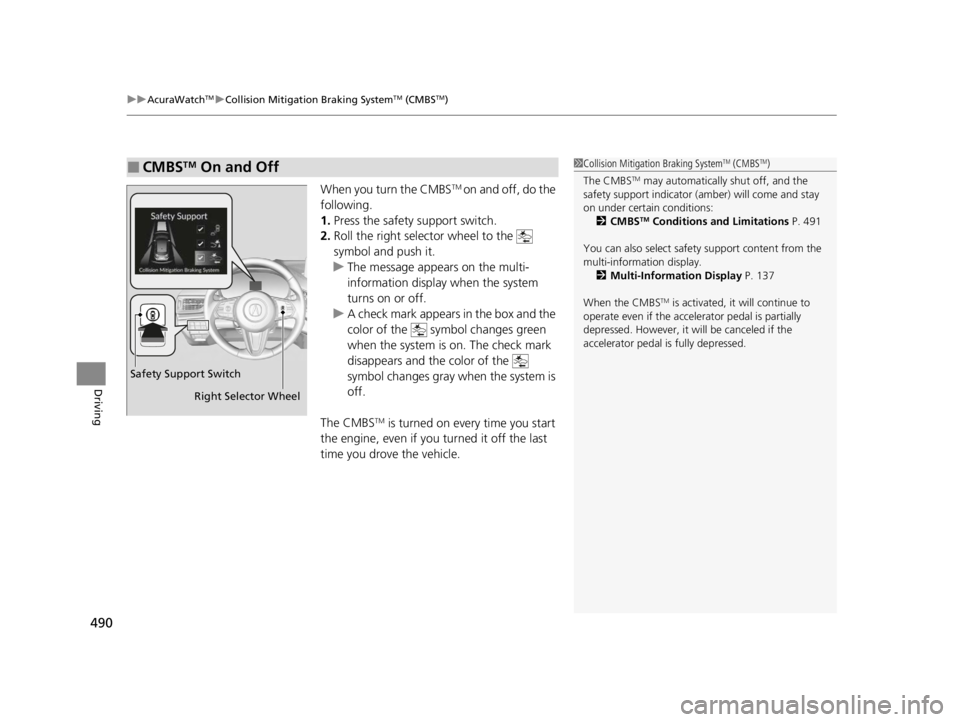
When you turn the CMBSTM on and off, do the
following.
1. Press the safety support switch.
2. Roll the right selector wheel to the
symbol and push it.
u The message appears on the multi-
information display when the system
turns on or off.
u A check mark appears in the box and the
color of the symbol changes green
when the system is on. The check mark
disappears and the color of the
symbol changes gray when the system is
off.
The CMBS
TM is turned on every time you start
the engine, even if you turned it off the last
time you drove the vehicle.
■CMBSTM On and Off1 Collision Mitigation Braking SystemTM (CMBSTM)
The CMBS
TM may automatically shut off, and the
safety support indicator (amb er) will come and stay
on under certain conditions:
2 CMBS
TM Conditions and Limitations P. 491
You can also sele ct safety support content from the
multi-information display. 2 Multi-Information Display P. 137
When the CMBS
TM is activated, it will continue to
operate even if the accele rator pedal is partially
depressed. However, it w ill be canceled if the
accelerator pedal is fully depressed.
Safety Support Switch
Right Selector Wheel
22 ACURA RDX-31TJB6300.book 490 ページ 2021年8月2日 月曜日 午前11時0分
Page 501 of 709
Continued499
uuAcuraWatchTMuLow Speed Braking Control*
Driving
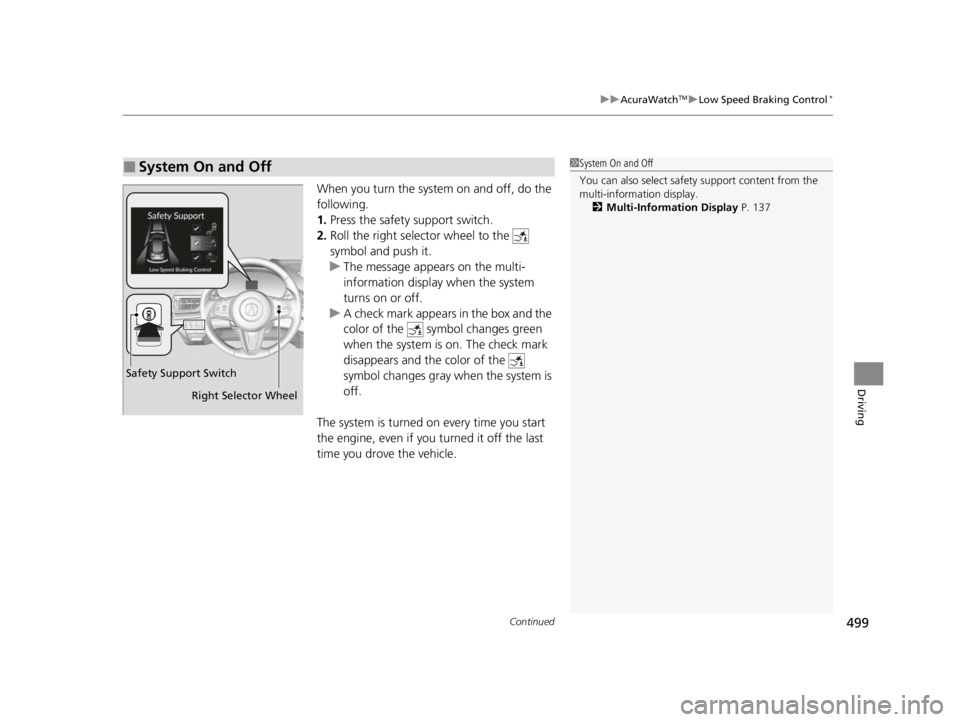
When you turn the system on and off, do the
following.
1. Press the safety support switch.
2. Roll the right selector wheel to the
symbol and push it.
u The message appears on the multi-
information display when the system
turns on or off.
u A check mark appears in the box and the
color of the symbol changes green
when the system is on. The check mark
disappears and the color of the
symbol changes gray when the system is
off.
The system is turned on every time you start
the engine, even if you turned it off the last
time you drove the vehicle.
■System On and Off 1 System On and Off
You can also sele ct safety support content from the
multi-information display.
2 Multi-Information Display P. 137
Right Selector Wheel
Safety Support Switch
22 ACURA RDX-31TJB6300.book 499 ページ 2021年8月2日 月曜日 午前11時0分
Page 524 of 709

522
uuAcuraWatchTMuLane Keeping Assist System (LKAS)
Driving
Lane Keeping Assist System (LKAS)
Provides steering input to help keep the vehicle in the middle of a detected lane and
provides tactile and visual alerts if the ve hicle is detected drifting out of its lane.1Lane Keeping Assist System (LKAS)
Important Safety Reminders
The LKAS is for your convenience only. It is not an
autonomous driving system and always requires
driver attention and control. The system does not
work if you take your hands off the steering wheel or
fail to steer the vehicle. 2 Multi-Information Display Warning and
Information Messages P. 107
The LKAS is convenient when it is used on
expressways or freeways.
Do not place objects on the instrument panel.
Objects may reflect on th e windshield and prevent
correct detection of the traffic lanes.
The LKAS only alerts you when lane drift is detected
without a turn signal in use. The LKAS may not detect
all lane markings or lane departures; accuracy will
vary based on weather, speed, and lane marker
condition.
It is always your responsibility to safely operate the
vehicle and avoid collisions.
The LKAS may not work properly or may work
improperly under the certain conditions: 2 LKAS Conditions and Limitations P. 527
You can read about handling information for the
camera equipped with this system. 2 Front Sensor Camera P. 541
When you operate the turn signals to chan ge lanes, the system is suspended, and
resumes after the signals are off.
If you make a lane change without operating the turn signals, the LKAS alerts
activate, and torque is applied to the steering.
■Front Sensor Camera
Monitors the lane
lines.■Tactile and visual alerts
Rapid vibrations on the steering
wheel and a warning display alert
you that the vehicle is drifting out of
a detected lane.
■Steering input assist
The system applies torque to the steering to keep the vehicle between the left and
right lane lines. The applied torque become s stronger as the vehicle gets closer to
either of the lane lines.
22 ACURA RDX-31TJB6300.book 522 ページ 2021年8月2日 月曜日 午前11時0分
Page 528 of 709

uuAcuraWatchTMuLane Keeping Assist System (LKAS)
526
Driving
■The system operation is suspended if
you:
• Set the wipers to HI.
u Turning the wipers off or setting it to LO
resumes the LKAS.
• Set the wiper switch to AUTO and the
wipers operate at high speed.
u The LKAS resumes when the wipers stop
or operate at low speed.
• Decrease the vehicle speed to about 40 mph
(64 km/h) or less.
u Increasing the vehicle speed to about
45 mph (72 km/h) or more resumes the
LKAS.
• Depress the brake pedal.
u The LKAS resumes and starts detecting
the lane lines again once you release the
brake pedal.
■The LKAS may be automa tically suspended when:
• The system fails to detect lane lines.
• The steering wheel is quickly turned.
• You fail to steer the vehicle.
• Driving through a sharp curve.
• Driving at a speed in excess of approximately 90 mph (145 km/h).
Once these conditions no longer exis t, the LKAS automatically resumes.
1The system operation is suspended if you:
You can change the setting for the LKAS.
LKAS suspended beep on and off can be selected.
2 Customized Features P. 359
When the LKAS is suspended,
the lane lines on the multi-
information display change to
lane outlines, and the beeper
sounds (if activated). (white) is on.
Models with automatic intermittent wipers
All models
22 ACURA RDX-31TJB6300.book 526 ページ 2021年8月2日 月曜日 午前11時0分
Page 531 of 709
529
uuAcuraWatchTMuLane Keeping Assist System (LKAS)
Driving
• When objects on the road (curb, guard rail, pylons, etc.) are recognized as white
(or yellow) lines.
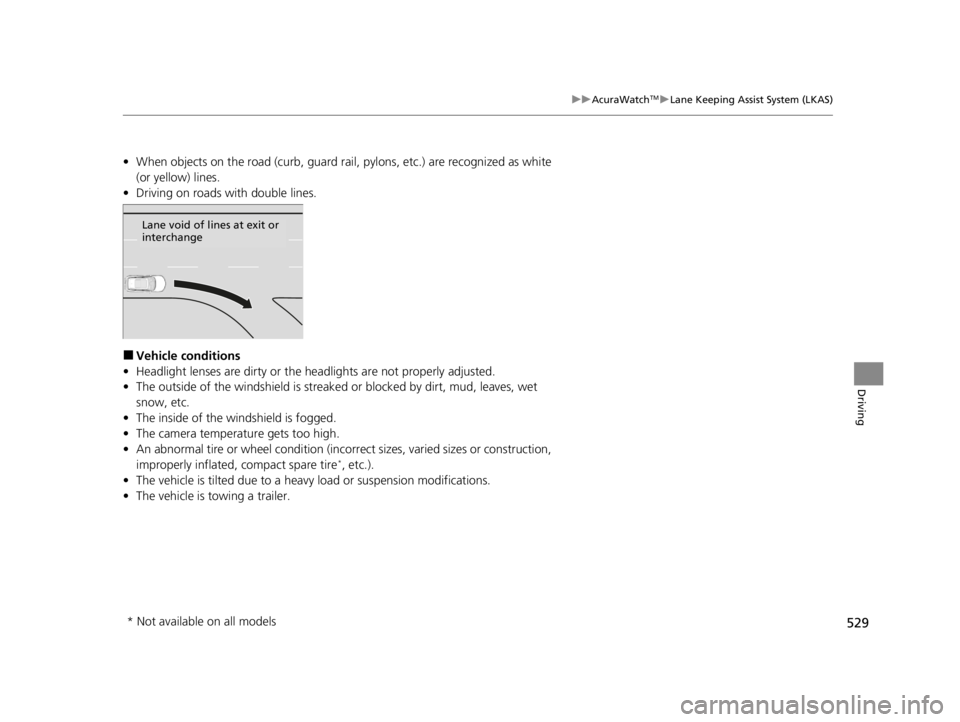
• Driving on roads with double lines.
■Vehicle conditions
• Headlight lenses are dirty or the h eadlights are not properly adjusted.
• The outside of the windshield is streaked or blocked by dirt, mud, leaves, wet
snow, etc.
• The inside of the windshield is fogged.
• The camera temperature gets too high.
• An abnormal tire or wheel condition (inco rrect sizes, varied sizes or construction,
improperly inflated, compact spare tire
*, etc.).
• The vehicle is tilted due to a heavy load or suspension modifications.
• The vehicle is towing a trailer.
Lane void of lines at exit or
interchange
* Not available on all models
22 ACURA RDX-31TJB6300.book 529 ページ 2021年8月2日 月曜日 午前11時0分
Page 534 of 709

uuAcuraWatchTMuRoad Departure Mitigation System
532
Driving
When you turn the Road Departure Mitigation
on and off, do the following.
1. Press the safety support switch.
2. Roll the right selector wheel to the
symbol and push it.
u The message appears on the multi-
information display when the system
turns on or off.
u A check mark appears in the box and the
color of the symbol changes green
when the system is on. The check mark
disappears and the color of the
symbol changes gray when the system is
off.
The Road Departure Mitigation is in the
previously selected on (checked) or off
(unchecked) setting each time you start the
engine.
■Road Departure Mitigation On and Off1 Road Departure Mitigation On and Off
When you have selected Warning Only from the
customized options using the audio/information
screen, the system does not operate the steering
wheel and braking. 2 Customized Features P. 359
You can also sele ct safety support content from the
multi-information display. 2 Multi-Information Display P. 137
Safety Support Switch
Right Selector Wheel
22 ACURA RDX-31TJB6300.book 532 ページ 2021年8月2日 月曜日 午前11時0分
Page 539 of 709
Continued537
uuAcuraWatchTMuTraffic Sign Recognition System
Driving
The traffic sign recognition system may not be able to recognize a traffic sign in the
following cases.
■Vehicle conditions
• Headlight lenses are dirty or the h eadlights are not properly adjusted.
• The outside of the windshield is blocked by dirt, mud, leaves, wet snow, etc.
• The inside of the windshield is fogged.
• There are portions remaining to be wiped.
• An abnormal tire or wheel condition (inco rrect sizes, varied sizes or construction,
improperly inflated, compact spare tire
*, etc.).
• The vehicle is tilted due to a heavy load or suspension modifications.
■Environmental conditions
• Driving into low sunlight (e.g., at dawn or dusk).
• Strong light is reflec ted onto the roadway.
• Sudden changes between light and dark, such as an entrance or exit of a tunnel.
• When you drive in the shad ows of trees, buildings, etc.
• Driving at night, in dark areas such as long tunnels.
• Driving in bad weather (rain, fog, snow, etc.).
• A vehicle in front of you is kicking up spray or snow.
■Traffic Sign Recognition System Conditions and Limitations1Traffic Sign Recognition System Conditions and Limitations
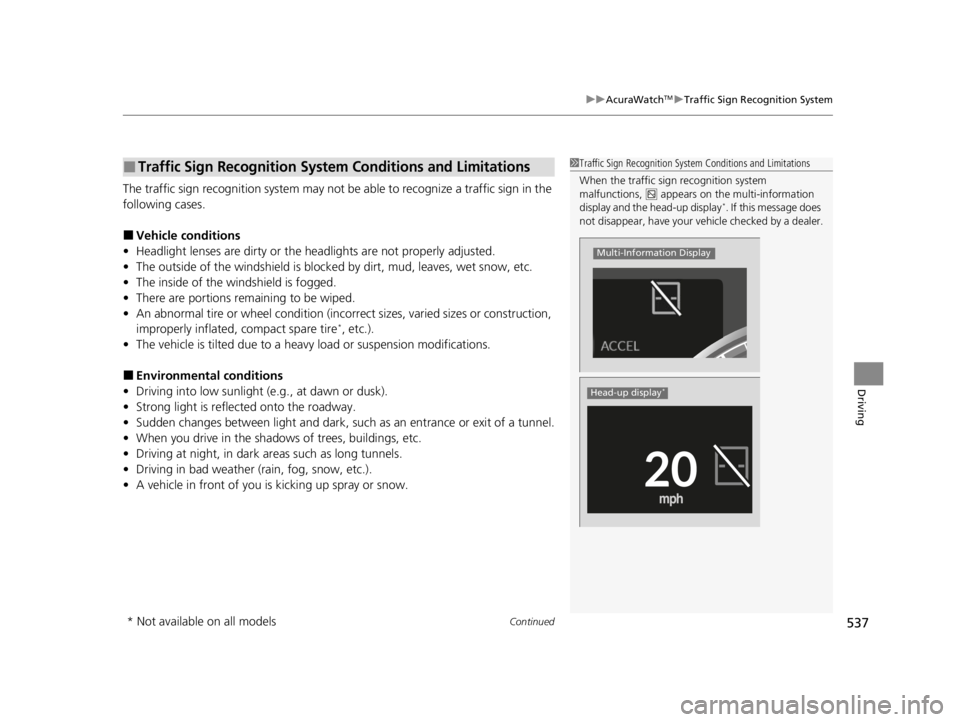
When the traffic sign recognition system
malfunctions, appears on the multi-information
display and the head-up display
*. If this message does
not disappear, have your ve hicle checked by a dealer.
Multi-Information Display
Head-up display*
* Not available on all models
22 ACURA RDX-31TJB6300.book 537 ページ 2021年8月2日 月曜日 午前11時0分
Page 566 of 709

564
Driving
Multi-View Rear Camera*
About Your Multi-View Rear Camera
The audio/information screen can display your vehicle’s rear view. The display
automatically changes to the rear view when the transmission is put into
(R.
■Multi-View Rear Camera Display Area
1About Your Multi-View Rear Camera
The rear camera view is restricted. You cannot see
the corner ends of the bumper or what is underneath
the bumper. Its unique le ns also makes objects
appear closer or farther than they actually are.
Visually confirm that it is safe to drive before backing
up. Certain conditions (such as weather, lighting, and
high temperatures) may also restrict the rear view. Do
not rely on the rearview display which does not give
you all information about conditions at the back of
your vehicle.
If the rear camera lens is covered with dirt or
moisture, activate the rearview camera washer
* or
use a soft, moist cloth to keep the lens clean and free
of debris. 2 Rear Wiper/Washer P. 206
Guidelines appear when you put the transmission
into
( R.
You can change the Guidelines setting.
2 Customized Features P. 359
Off: Guidelines do not appear.
Fixed: Fixed Guidelines appear.
Dynamic: Guidelines that move according to the
steering wheel direction appear.
Both: Fixed guidelines and dynamic guidelines
appear.
Guidelines
Bumper
Camera
Approx. 20 inches
(50 cm)
Tailgate Open Range Approx. 39 inches
(1 m)
Wide View Mode
Normal View Mode
Top Down View Mode
Approx. 20 inches (50 cm)
Tailgate Open Range Approx. 39 inches (1 m)
* Not available on all models
22 ACURA RDX-31TJB6300.book 564 ページ 2021年8月2日 月曜日 午前11時0分
Page 571 of 709
Continued569
uuSurround View Camera System*uDisplaying an Image From the Surround View Cameras
Driving
Following can be displayed when the system is on.
Guidelines : Help you to get a sense of a distance between your vehicle and the rear
surroundings. The distance may appear differently than the actual distance.
Projection lines : Indicate vehicle direction while th e steering wheel is in the current
position.
■Reference Lines and Guides1 Reference Lines and Guides
The positions/distances i ndicated by the guidelines
and camera views on the display may differ from the
actual positions/distances due to the changes in the
vehicle height, road conditions, and other factors.
The guidelines should be us ed as a reference only.
The guidelines can be turn ed on and off using the
audio/information screen.
2 Customized Features P. 359
If you turn the guidelines off, they remain off until
you turn them back on.
22 ACURA RDX-31TJB6300.book 569 ページ 2021年8月2日 月曜日 午前11時0分
Page 572 of 709
uuSurround View Camera System*uDisplaying an Image From the Surround View Cameras
570
Driving
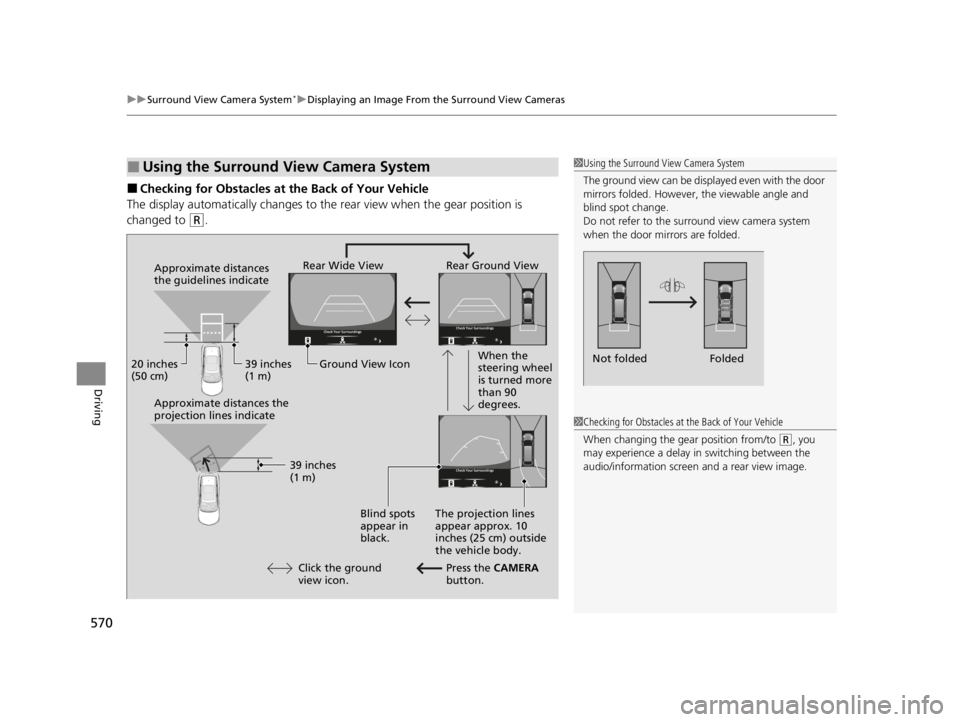
■Checking for Obstacles at the Back of Your Vehicle
The display automatically changes to the rear view when the gear position is
changed to
(R.
■Using the Surround View Camera System1 Using the Surround View Camera System
The ground view can be displayed even with the door
mirrors folded. However, the viewable angle and
blind spot change.
Do not refer to the surround view camera system
when the door mirrors are folded.
Folded
Not folded
Rear Wide View Rear Ground View
When the
steering wheel
is turned more
than 90
degrees.
The projection lines
appear approx. 10
inches (25 cm) outside
the vehicle body.
Blind spots
appear in
black.
Press the CAMERA
button.
Approximate distances
the guidelines indicate
Approximate distances the
projection lines indicate
39 inches
(1 m)
20 inches
(50 cm)
39 inches
(1 m)
Ground View Icon
Click the ground
view icon.
1 Checking for Obstacles at the Back of Your Vehicle
When changing the gear position from/to
(R, you
may experience a delay in switching between the
audio/information screen and a rear view image.
22 ACURA RDX-31TJB6300.book 570 ページ 2021年8月2日 月曜日 午前11時0分