driver ACURA RDX 2022 Owner's Guide
[x] Cancel search | Manufacturer: ACURA, Model Year: 2022, Model line: RDX, Model: ACURA RDX 2022Pages: 709, PDF Size: 25.22 MB
Page 119 of 709

117
uuIndicators uMulti-Information Display Warning and Information Messages
Continued
Instrument Panel
MessageConditionExplanation
• Appears when you try to change the transmission
without depressing the brake pedal.• Depress the brake pedal, then change the transmission.
• Appears when you try to change the transmission
without releasing your foot off the accelerator pedal.• Release your foot off the accelerator pedal, then
change the transmission.
• Appears when you try to change the shift position
after the position has automa tically been changed to
(P with the driver’s door open and the driver’s seat
belt unfastened.
●Press the (P button if you leave the vehicle.
U.S.
Canada
22 ACURA RDX-31TJB6300.book 117 ページ 2021年8月2日 月曜日 午前11時0分
Page 120 of 709

118
uuIndicators uMulti-Information Display Warn ing and Information Messages
Instrument Panel
MessageConditionExplanation
•Appears when the (P button is pressed while the
vehicle is moving.• Make sure that the vehicl e comes to a stop before
operating the select button.
●Appears if you put the transmission into (R while the
vehicle is moving forward, or into
(D while the
vehicle is reversing.
• Appears when you set the power mode to OFF while
driving.•Immediately stop in a safe place, set the parking brake,
then restart the engine. If the message disappears,
continue driving.
•Appears when the vehicle is stopped with the
driver’s seat belt unfastened and there is a chance
that the vehicle may roll unintentionally.•Press the (P button before release the brake pedal
when idling, parking or exiting the vehicle.
2 Shift Operation P. 453
●Appears when you attempt to change to another
gear position with the transmission in
(P and the
engine OFF.
●To select another gear position while in (P, the engine
must be ON.
22 ACURA RDX-31TJB6300.book 118 ページ 2021年8月2日 月曜日 午前11時0分
Page 129 of 709

127
uuIndicators uMulti-Information Display Warning and Information Messages
Continued
Instrument Panel
MessageConditionExplanation
●Appears when the driver’s seat belt is unfastened
while your vehicle is au tomatically stopped by ACC.●ACC has been automatically canceled.
2Adaptive Cruise Control (ACC) with Low Speed
Follow P. 502
●Appears when pressing the RES/+ or SET/– button
while the driver’s seat belt is unfastened.●ACC cannot be set.
2 Adaptive Cruise Control (ACC) with Low Speed
Follow P. 502
●Appears when the transmi ssion is put into any
position other than
(D or (S while ACC is in
operation.
●ACC has been automatically canceled.
2 Adaptive Cruise Control (ACC) with Low Speed
Follow P. 502
●Appears when pressing the RES/+ or SET/– button
while the transmission is in any position other than
(D or (S.
●ACC cannot be set.
2Adaptive Cruise Control (ACC) with Low Speed
Follow P. 502
22 ACURA RDX-31TJB6300.book 127 ページ 2021年8月2日 月曜日 午前11時0分
Page 131 of 709

129
uuIndicators uMulti-Information Display Warning and Information Messages
Continued
Instrument Panel
MessageConditionExplanation
●Appears if anything covers the radar sensor cover
and prevents the sensor fro m detecting a vehicle in
front.
●May appear when driving in bad weather (rain,
snow, fog, etc.)
●When the radar sensor gets dirty, stop your vehicle in a
safe place, and wipe off dirt using a soft cloth. The
message may take some time to go off.
●Have your vehicle checked by a dealer if the message
does not disappear even after you clean the sensor
cover.
2 Radar Sensor P. 543
2 AcuraWatchTM P. 483
●Appears if the temperature inside the front sensor
camera is too high and some driver assist systems
cannot be activated.●Use the climate control sy stem to cool down the
camera.
●Disappears - The camera has been cooled down and
the systems are activated normally.
2 Front Sensor Camera P. 541
2 AcuraWatchTM P. 483
●Appears if the area around the front sensor camera is
blocked by dirt, mud, etc. and be prevented from
detecting a vehicle in front.
●May appear when driving in bad weather (rain,
snow, fog, etc.)
●When the front window gets dirty, stop your vehicle in
a safe place, and wipe it off with a soft cloth.
●Have your vehicle checked by a dealer if the message
does not disappear even a fter you cleaned the area
around the camera.
2 Front Sensor Camera P. 541
2 AcuraWatchTM P. 483
22 ACURA RDX-31TJB6300.book 129 ページ 2021年8月2日 月曜日 午前11時0分
Page 136 of 709

134
uuIndicators uMulti-Information Display Warn ing and Information Messages
Instrument Panel
MessageConditionExplanation
●Appears if there is a problem with the climate control
system.●Turn off the climate control system until the message
disappears. If the message appears again, take your
vehicle to a dealer.
MessageConditionExplanation
●Appears when you unlock and open the driver’s door
while the engine is running by remote engine start.
2 Remote Engine Start* P. 445
MessageConditionExplanation
●Appears if there is a pr oblem with the adaptive
damper system.●Have your vehicle checked by a dealer. Your vehicle will
have normal damping ability without the adaptive
damper feature.
Models with remote engine start
Models with head-up display
* Not available on all models
22 ACURA RDX-31TJB6300.book 134 ページ 2021年8月2日 月曜日 午前11時0分
Page 150 of 709
148
uuGauges and Displays uHead-Up Display*
Instrument Panel
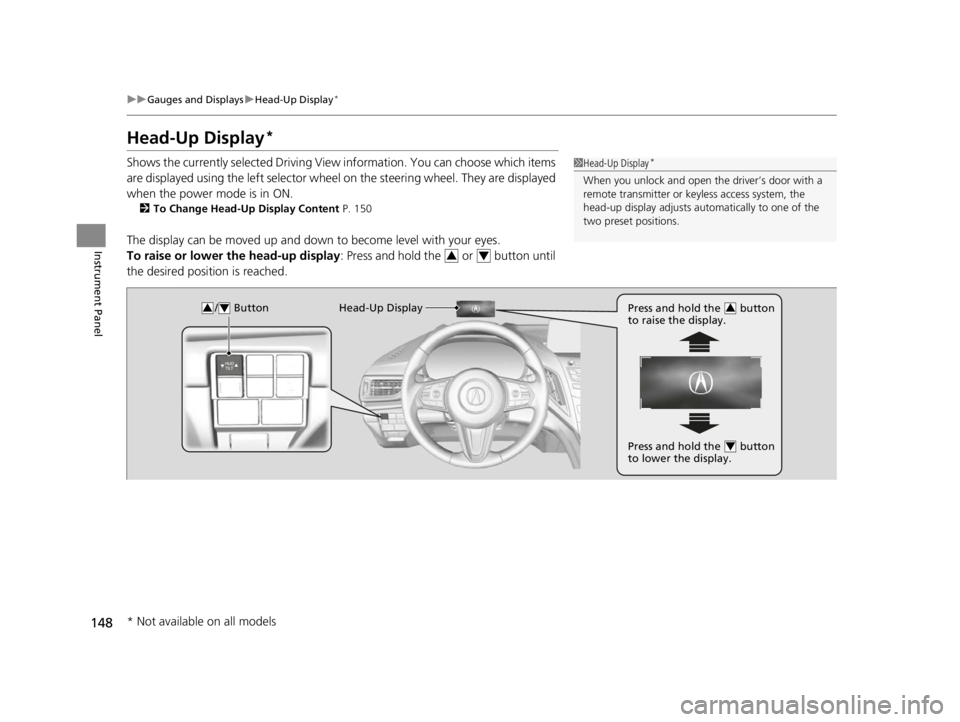
Head-Up Display*
Shows the currently selected Driving View information. You can choose which items
are displayed using the left selector wheel on the steering wheel. They are displayed
when the power mode is in ON.
2 To Change Head-Up Display Content P. 150
The display can be moved up and down to become level with your eyes.
To raise or lower the head-up display : Press and hold the or button until
the desired position is reached.
1 Head-Up Display*
When you unlock and open the driver’s door with a
remote transmitter or keyless access system, the
head-up display adjusts auto matically to one of the
two preset positions.
34
/ Button34Head-Up Display Press and hold the button
to raise the display.3
Press and hold the button
to lower the display.4
* Not available on all models
22 ACURA RDX-31TJB6300.book 148 ページ 2021年8月2日 月曜日 午前11時0分
Page 164 of 709
uuLocking and Unlocking the Doors uLocking/Unlocking the Doors from the Outside
162
Controls
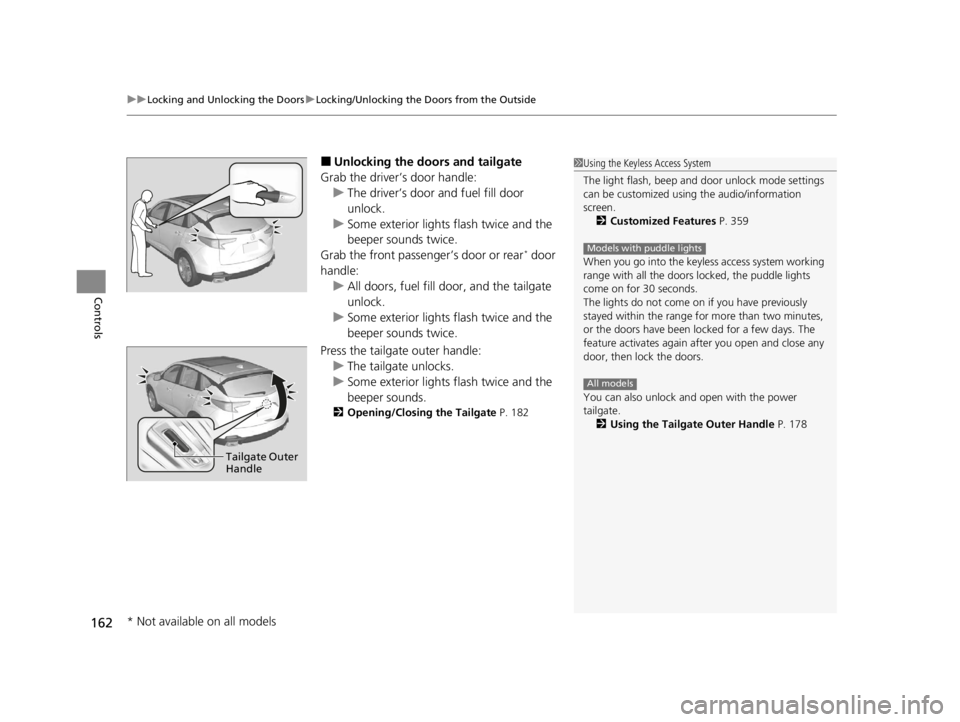
■Unlocking the doors and tailgate
Grab the driver’s door handle: u The driver’s door and fuel fill door
unlock.
u Some exterior lights flash twice and the
beeper sounds twice.
Grab the front passenger’s door or rear
* door
handle: u All doors, fuel fill door, and the tailgate
unlock.
u Some exterior lights flash twice and the
beeper sounds twice.
Press the tailgate outer handle: u The tailgate unlocks.
u Some exterior lights flash twice and the
beeper sounds.
2 Opening/Closing the Tailgate P. 182
1Using the Keyless Access System
The light flash, beep and door unlock mode settings
can be customized using the audio/information
screen.
2 Customized Features P. 359
When you go into the keyless access system working
range with all the doors locked, the puddle lights
come on for 30 seconds.
The lights do not come on if you have previously
stayed within the range for more than two minutes,
or the doors have been locked for a few days. The
feature activates again after you open and close any
door, then lock the doors.
You can also unlock and open with the power
tailgate.
2 Using the Tailgate Outer Handle P. 178
Models with puddle lights
All models
Tailgate Outer
Handle
* Not available on all models
22 ACURA RDX-31TJB6300.book 162 ページ 2021年8月2日 月曜日 午前11時0分
Page 165 of 709

Continued163
uuLocking and Unlocking the Doors uLocking/Unlocking the Doors from the Outside
Controls
■Locking the doors and tailgate (Walk
away auto lock ®)
When you walk away fro m the vehicle with all
doors and tailgate closed and while carrying
the keyless remote, the doors will
automatically lock.
The auto lock function activates when all
doors and tailgate are closed, and the keyless
remote is within about 5 feet (1.5 m) radius of
the outside door handle or tailgate outer
handle.
Exit vehicle while carrying keyless remote and
close door(s).
1. While within about 5 feet (1.5 m) radius of
the vehicle.
u The beeper sounds; the auto lock
function will be activated.
2. Carry the keyless remote beyond about 5
feet (1.5 m) from the vehicle and remain
outside this range for 2 or more seconds.
u Some exterior lights flash; the beeper
sounds; all doors and tailgate will then
lock.1Locking the doors and tailg ate (Walk away auto lock®)
The auto lock function is set to OFF as the factory
default setting. The auto lo ck function can be set to
ON using the audio/information screen.
If you set the auto lock function to ON using the
audio/information screen, only the remote
transmitter that was used to unlock the driver’s door
prior to the setting change can activate auto lock. 2 Customized Features P. 359
After the auto lock function has been activated,
when you stay within the locking/unlocking
operation range, the indicato r on the keyless remote
will continue to flash until the doors are locked.
When you stay beside the vehicle within the
operation range, the doors wi ll automatically lock
approximately 30 seconds after the auto lock
function activating beeper sounds.
When you open a door after the auto lock function
activating beeper sounds, the auto lock function will
be canceled.
Under the following circumstances, the auto lock
function will not activate:
•The keyless remote is inside the vehicle.
•The keyless remote is taken out of its operational
range before all the doors and tailgate are closed.
u
The beeper will not sound.
u The beeper will sound.
The activation range of
the auto lock function is
about 5 feet (1.5 m)
22 ACURA RDX-31TJB6300.book 163 ページ 2021年8月2日 月曜日 午前11時0分
Page 166 of 709

uuLocking and Unlocking the Doors uLocking/Unlocking the Doors from the Outside
164
Controls
To temporarily deactivate the function:
1. Set the power mode to OFF.
2. Open the driver’s door.
3. Using the master door lock switch, operate
the lock as follows:
Lock Unlock Lock Unlock.
u The beeper sounds and the function is
deactivated.
To restore the function:
• Set the power mode to ON.
• Lock the vehicle without using the auto lock
function.
• With the keyless remote on you, move out
of the auto lock function operation range.
• Open any door.1Locking the doors and tailg ate (Walk away auto lock®)
You must wait until the pow er tailgate fully closes
before the auto lock function will be activated.
The auto lock function does not operate when any of
the following conditions are met.
•The keyless remote is inside the vehicle.
•A door or the hood is not closed.•The power mode is set to any mode other than
OFF.
•The keyless remote is not located within a radius of
about 5 feet (1.5 m) from the vehicle when you get
out of the vehicle and close the doors.
Auto lock function operation stop beeper
After the auto lock function has been activated, the
auto lock operation stop beeper sounds for
approximately two seconds in the following cases.
•The keyless remote is put inside the vehicle through
a window.
•You are located too close to the vehicle.•The keyless remote is put inside the tailgate.
If the warning beeper sounds, check that you are
carrying the keyless remote. Then, open/close a door
and confirm the auto lock activation beeper sounds
once.
22 ACURA RDX-31TJB6300.book 164 ページ 2021年8月2日 月曜日 午前11時0分
Page 167 of 709

Continued165
uuLocking and Unlocking the Doors uLocking/Unlocking the Doors from the Outside
Controls
■Locking the doors and tailgate
Press the lock button.
Once: u Some exterior lights flash, all the doors,
tailgate, and fuel fill door lock, and the
security system sets.
Twice (within five se conds after the first
push): u The beeper sounds and verifies the
security system is set.
■Unlocking the doors and tailgate
Press the unlock button.
Once:
u Some exterior lights flash twice, and the
driver’s door and fuel fill door unlock.
Twice: u The remaining doors and tailgate unlock.
*1 :Checking Door Lock Status* P. 168
■Using the Remote Transmitter1Using the Remote Transmitter
If you do not open a door or the tailgate within 30
seconds of unlocking the vehicle with the remote
transmitter, the doors and ta ilgate will automatically
relock.
You can change the relock timer setting. 2 Customized Features P. 359
You can lock or unlock doors using the remote
transmitter only when the power mode is in VEHICLE
OFF.
The remote transmitter us es low-power signals, so
the operating range may vary depending on the
surroundings.
The remote will not lock th e vehicle when a door or
the tailgate is open.
If the distance at which the remote transmitter works
varies, the batter y is probably low.
If the LED does not come on when you press a
button, the battery is dead.
2 Replacing the Remote Battery P. 623
LED
Unlock
ButtonLock
Button
LED*1
Unlock
Button
Lock
Button
* Not available on all models
22 ACURA RDX-31TJB6300.book 165 ページ 2021年8月2日 月曜日 午前11時0分