driver ACURA RDX 2022 Repair Manual
[x] Cancel search | Manufacturer: ACURA, Model Year: 2022, Model line: RDX, Model: ACURA RDX 2022Pages: 709, PDF Size: 25.22 MB
Page 223 of 709

221
uuSeats uFront Seats
Controls
Adjust the driver’s seat-back to a comfortable,
upright position, leaving ample space
between your chest and the airbag cover in
the center of the steering wheel.
The front seat passenger should also adjust
their seat-back to a comfortable, upright
position.
Reclining a seat-back so that the shoulder part of the belt no longer rests against the
occupant’s chest reduces the protective capa bility of the belt. It also increases the
chance of sliding under the belt in a crash and being seriously injured. The farther a
seat-back is reclined, the gr eater the risk of injury.
■Adjusting the Seat-Backs1Adjusting the Seat-Backs
Do not put a cushion, or other object, between the
seat-back and your back.
Doing so may interfere with proper seat belt or airbag
operation.
If you cannot get far e nough away from the steering
wheel and still reach th e controls, we recommend
that you investigate whether some type of adaptive
equipment may help.
3WARNING
Reclining the seat-back too far can result in
serious injury or death in a crash.
Adjust the seat-back to an upright position,
and sit well back in the seat.
22 ACURA RDX-31TJB6300.book 221 ページ 2021年8月2日 月曜日 午前11時0分
Page 232 of 709

230
Controls
Interior Convenience Items
Interior Lights
■ON
The interior lights come on regardless of
whether the tailgate and doors are open or
closed.
■Door activated
The interior lights come on in the following
situations:
• When the tailgate or any doors are opened.
• You unlock the driver’s door.
• When the power mode is set to VEHICLE
OFF (LOCK).
■OFF
The interior lights remain off regardless of
whether the tailgate or any doors are open or
closed.
■Interior Light Switches1 Interior Light Switches
In the door activated position, the interior lights fade
out and go off about 30 se conds after the doors are
closed.
The lights go off after about 30 seconds in the
following situations:
•When you unlock the driver’s door but do not open
it.
•When you set the power mode to VEHICLE OFF
(LOCK) but do not open a door.
You can change the interi or lights dimming time.
2 Customized Features P. 359
The interior lights go off im mediately in the following
situations:
•When you lock the driver’s door.•When you close the driver’s door in ACCESSORY
mode.
•When you set the power mode to ON.
To avoid draining the ba ttery, do not leave the
interior light on for an extended length of time when
the engine is off.
If you leave any of the tailgate or doors open in
VEHICLE OFF (LOCK) mode, th e interior lights go off
after about 15 minutes.
Door Activated Position
OFF
ON
22 ACURA RDX-31TJB6300.book 230 ページ 2021年8月2日 月曜日 午前11時0分
Page 249 of 709

247Continued
Controls
Climate Control System
Using Automatic Climate Control
The automatic climate control system maintains the interior temperature you select.
The system also selects the proper mix of heat ed or cooled air that raises or lowers
the interior temperature to your pr eference as quickly as possible.
Use the system when the engine is running.
1. Press the AUTO button.
2. Adjust the interior temperature using the driver’s side or passenger’s side
temperature control buttons.
3. Press the (ON/OFF) button to cancel.1Using Automatic Climate Control
If any buttons are presse d while using the climate
control system in auto, the function of the button
that was pressed will take priority.
The AUTO indicator will go off, but functions
unrelated to the button th at was pressed will be
controlled automatically.
During idle-stops, air-conditioning is suspended, and
only the blower remains active.
If you do not want air-cond itioning suspended, press
the Auto Idle Stop OFF button to cancel idle-stop.
To prevent cold air from bl owing in from outside, the
fan may not start i mmediately when the AUTO
button is pressed.
If the interior is very warm, you can cool it down
more rapidly by partial ly opening the windows,
turning the system on auto, and setting the
temperature to low. Change the fresh air mode to
recirculation mode until the temperature cools down.
When you set the temperature to the lower or upper
limit, Lo or Hi is displayed.
Pressing the button switches the climate
control system between on and off. When turned on,
the system returns to your last selection.
Floor and
defroster
vents
Floor
vents
Dashboard and floor
vents, and back of
the center console
Dashboard vents
and back of the
center console
AUTO Button
Driver’s Side
Temperature
Control Buttons Passenger’s Side
Temperature
Control Buttons
A/C (Air Conditioning) Button (ON/OFF) Button
Fan Control Button SYNC
(Synchronization) Button
(Recirculation) Button
22 ACURA RDX-31TJB6300.book 247 ページ 2021年8月2日 月曜日 午前11時0分
Page 250 of 709
uuClimate Control System uUsing Automatic Climate Control
248
Controls
■Switching between the recirc ulation and fresh air modes
Press the (recirculation) button and switch the mode depending on
environmental conditions.
Recirculation mode (indicator on): Recirculates air from the vehicle’s interior through
the system.
Fresh air mode (indicator off): Maintains ou tside ventilation. Keep the system in
fresh air mode in normal situations.1 Using Automatic Climate Control
When you unlock the doors with your remote, the
driver’s ID (DRIVER 1 or DRIVER 2) is detected, and
the climate control settings are turned to the
respective mode automatically when you set the
power mode to ON.
22 ACURA RDX-31TJB6300.book 248 ページ 2021年8月2日 月曜日 午前11時0分
Page 252 of 709

uuClimate Control System u
250
Controls
You can set the temperature synchronously fo r the driver’s side and the passenger’s
side in synchronization mode.
1. Press the SYNC button.
u The SYNC indicator will come on.
u The system switches to synchronization mode.
2. Adjust the temperature using the driver ’s side temperature control buttons.
Press the SYNC button or adjust the interior temp erature using the passenger’s side
temperature control buttons to return to dual mode.
■Synchronization Mode1 Synchronization Mode
When the system is in dua l mode, the driver’s side
temperature and the passe nger’s side temperature
can be set separately.
Driver’s Side Temperature
Control Buttons Passenger’s Side Temperature
Control Buttons
SYNC
Button
22 ACURA RDX-31TJB6300.book 250 ページ 2021年8月2日 月曜日 午前11時0分
Page 253 of 709

251
uuClimate Control System u
Controls
You can set the rear passenger compartment
temperature different than the driver’s, using
the rear temperature control dial.
■Rear Temperature Control Dial*1 Rear Temperature Control Dial*
The rear temperature can be adjusted when the
climate control system is on.Dial up to
raise the
temperature.
Dial down to
lower the
temperature.
Rear
Temperature
Control Dial
Position of
driver’s
temperature
* Not available on all models
22 ACURA RDX-31TJB6300.book 251 ページ 2021年8月2日 月曜日 午前11時0分
Page 256 of 709
254
Features
Audio System
About Your Audio System
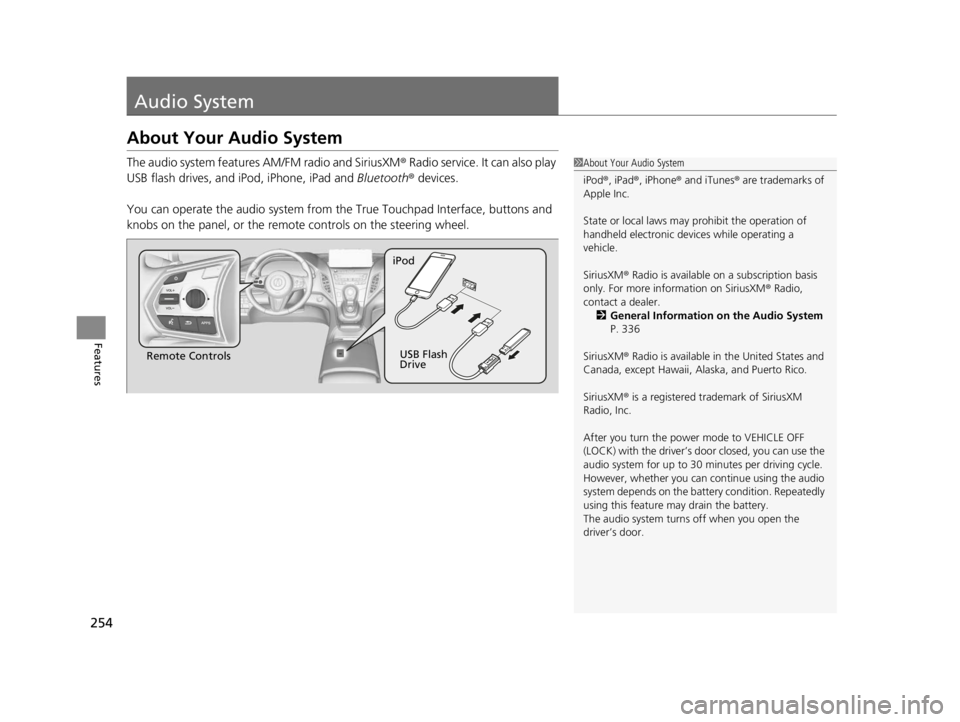
The audio system features AM/FM radio and SiriusXM® Radio service. It can also play
USB flash drives, and iPod, iPhone, iPad and Bluetooth® devices.
You can operate the audio sy stem from the True Touchpad Interface, buttons and
knobs on the panel, or the remote controls on the steering wheel.1About Your Audio System
iPod ®, iPad ®, iPhone ® and iTunes ® are trademarks of
Apple Inc.
State or local laws may prohibit the operation of
handheld electronic devi ces while operating a
vehicle.
SiriusXM ® Radio is available on a subscription basis
only. For more information on SiriusXM ® Radio,
contact a dealer. 2 General Information on the Audio System
P. 336
SiriusXM ® Radio is available in the United States and
Canada, except Ha waii, Alaska, and Puerto Rico.
SiriusXM ® is a registered trademark of SiriusXM
Radio, Inc.
After you turn the power mode to VEHICLE OFF
(LOCK) with the driver’s door closed, you can use the
audio system for up to 30 minutes per driving cycle.
However, whether you can continue using the audio
system depends on the batter y condition. Repeatedly
using this feature ma y drain the battery.
The audio system turns off when you open the
driver’s door.
Remote Controls iPod
USB Flash
Drive
22 ACURA RDX-31TJB6300.book 254 ページ 2021年8月2日 月曜日 午前11時0分
Page 262 of 709
260
Features
Audio System Basic Operation
You can use the audio system for 30 minutes when the power mode is set to
VEHICLE OFF (LOCK) with the driver’s door closed. The system will then turn off
automatically.
If you want to keep using it, we reco mmend that you turn the power mode to
ACCESSORY or ON.
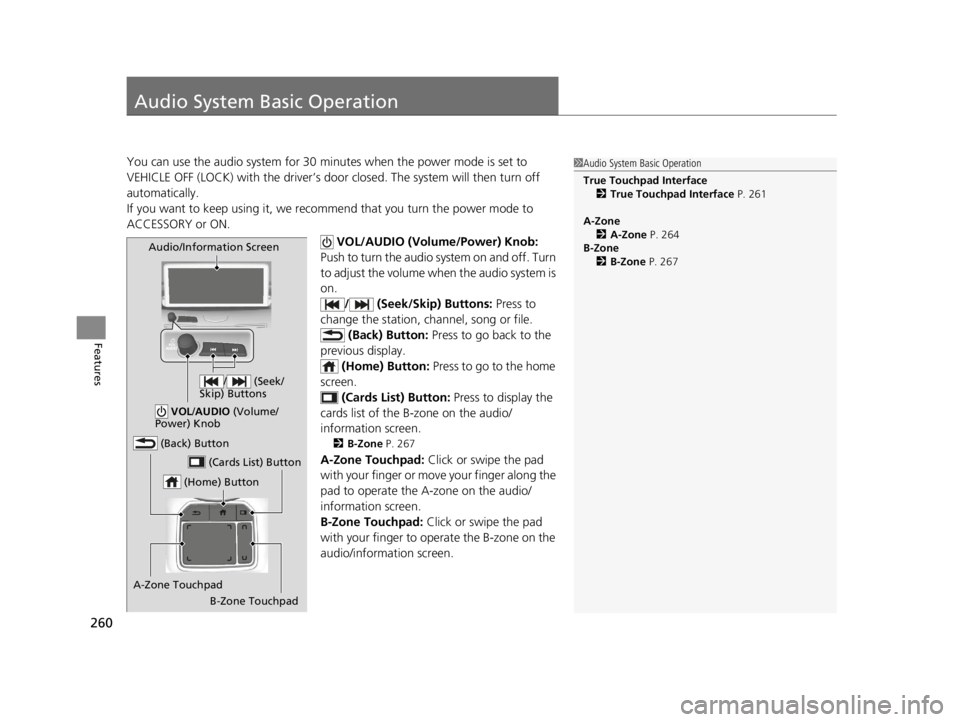
VOL/AUDIO (Volume/Power) Knob:
Push to turn the audio sy stem on and off. Turn
to adjust the volume when the audio system is
on. / (Seek/Skip) Buttons: Press to
change the station, channel, song or file. (Back) Button: Press to go back to the
previous display. (Home) Button: Press to go to the home
screen.
(Cards List) Button: Press to display the
cards list of the B-zone on the audio/
information screen.
2 B-Zone P. 267
A-Zone Touchpad: Click or swipe the pad
with your finger or move your finger along the
pad to operate the A-zone on the audio/
information screen.
B-Zone Touchpad: Click or swipe the pad
with your finger to operate the B-zone on the
audio/information screen.
1 Audio System Basic Operation
True Touchpad Interface
2 True Touchpad Interface P. 261
A-Zone 2 A-Zone P. 264
B-Zone 2 B-Zone P. 267
(Home) Button
(Back) Button
A-Zone Touchpad (Cards List) Button
Audio/Information Screen
/ (Seek/
Skip) Buttons
VOL /AUDIO (Volume/
Power) Knob
B-Zone Touchpad
22 ACURA RDX-31TJB6300.book 260 ページ 2021年8月2日 月曜日 午前11時0分
Page 280 of 709
278
uuAudio System Basic Operation uSmart Shortcuts
Features
Smart Shortcuts
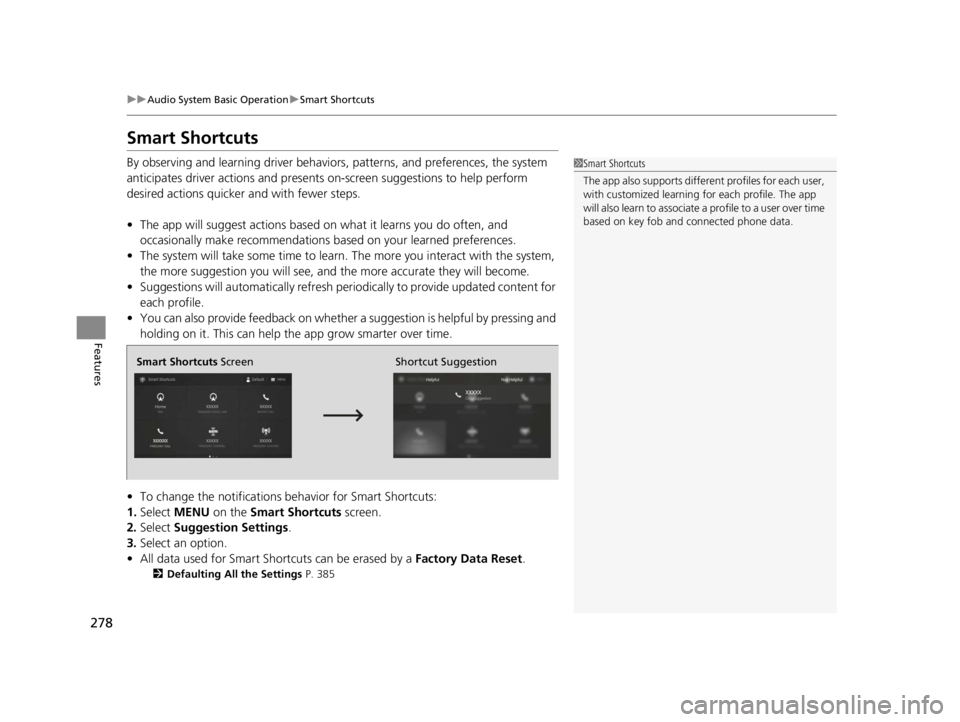
By observing and learning driver behaviors, patterns, and preferences, the system
anticipates driver actions and presents on-screen suggestions to help perform
desired actions quicker and with fewer steps.
• The app will suggest actions based on what it learns you do often, and
occasionally make recommendations ba sed on your learned preferences.
• The system will take some time to learn. The more you interact with the system,
the more suggestion you will see, and the more accurate they will become.
• Suggestions will automatically refresh peri odically to provide updated content for
each profile.
• You can also provide feedback on whether a suggestion is helpful by pressing and
holding on it. This can help the app grow smarter over time.
• To change the notifications behavior for Smart Shortcuts:
1. Select MENU on the Smart Shortcuts screen.
2. Select Suggestion Settings .
3. Select an option.
• All data used for Smart Shortcuts can be erased by a Factory Data Reset.
2Defaulting All the Settings P. 385
1Smart Shortcuts
The app also supports different profiles for each user,
with customized learning for each profile. The app
will also learn to associate a profile to a user over time
based on key fob and connected phone data.
Smart Shortcuts Screen Shortcut Suggestion
22 ACURA RDX-31TJB6300.book 278 ページ 2021年8月2日 月曜日 午前11時0分
Page 289 of 709
287
uuAudio System Basic Operation uAdjusting the Sound
Features
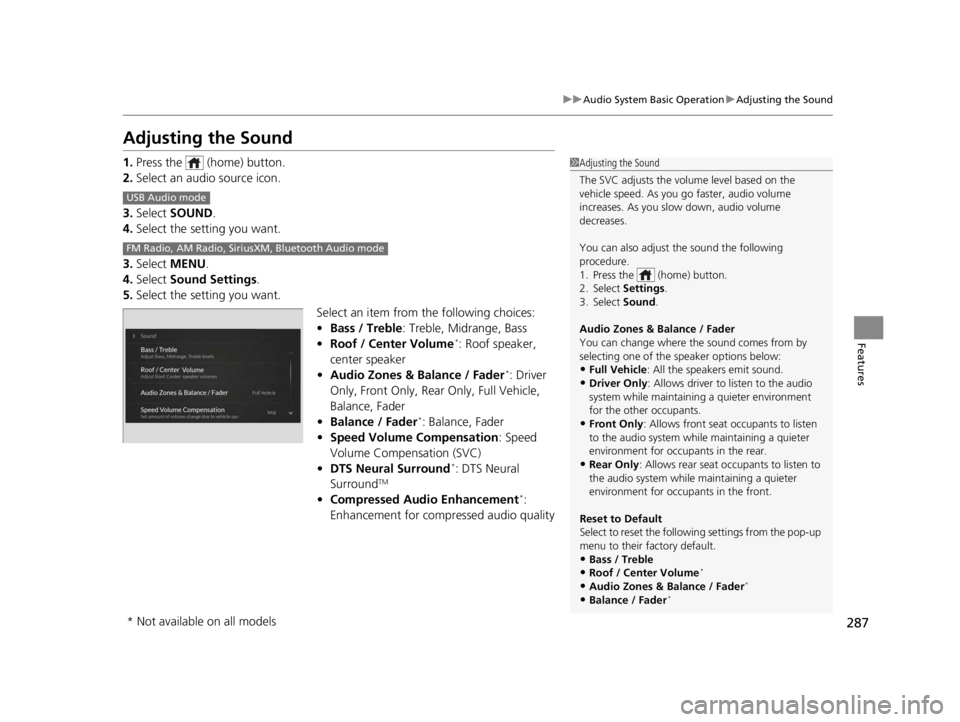
Adjusting the Sound
1. Press the (home) button.
2. Select an audio source icon.
3. Select SOUND.
4. Select the setting you want.
3. Select MENU .
4. Select Sound Settings.
5. Select the setting you want.
Select an item from the following choices:
•Bass / Treble : Treble, Midrange, Bass
• Roof / Center Volume
*: Roof speaker,
center speaker
• Audio Zones & Balance / Fader
*: Driver
Only, Front Only, Rear Only, Full Vehicle,
Balance, Fader
• Balance / Fader
*: Balance, Fader
• Speed Volume Compensation : Speed
Volume Compensation (SVC)
• DTS Neural Surround
*: DTS Neural
SurroundTM
• Compressed Audio Enhancement*:
Enhancement for compressed audio quality
1 Adjusting the Sound
The SVC adjusts the volume level based on the
vehicle speed. As you go faster, audio volume
increases. As you slow down, audio volume
decreases.
You can also adjust the sound the following
procedure.
1. Press the (home) button.
2. Select Settings .
3. Select Sound .
Audio Zones & Balance / Fader
You can change where the sound comes from by
selecting one of the speaker options below:
•Full Vehicle: All the speakers emit sound.•Driver Only: Allows driver to listen to the audio
system while maintaini ng a quieter environment
for the other occupants.
•Front Only : Allows front seat occupants to listen
to the audio system while maintaining a quieter
environment for occupants in the rear.
•Rear Only : Allows rear seat o ccupants to listen to
the audio system while maintaining a quieter
environment for occupants in the front.
Reset to Default
Select to reset the followi ng settings from the pop-up
menu to their factory default.
•Bass / Treble
•Roof / Center Volume*
•Audio Zones & Balance / Fader*
•Balance / Fader*
USB Audio mode
FM Radio, AM Radio, Siri usXM, Bluetooth Audio mode
* Not available on all models
22 ACURA RDX-31TJB6300.book 287 ページ 2021年8月2日 月曜日 午前11時0分