phone ACURA RDX 2022 Owner's Guide
[x] Cancel search | Manufacturer: ACURA, Model Year: 2022, Model line: RDX, Model: ACURA RDX 2022Pages: 709, PDF Size: 25.22 MB
Page 339 of 709
337
uuGeneral Information on the Audio System uCompatible iPod, iPad, iPhone, and USB Flash Drives
Continued
Features
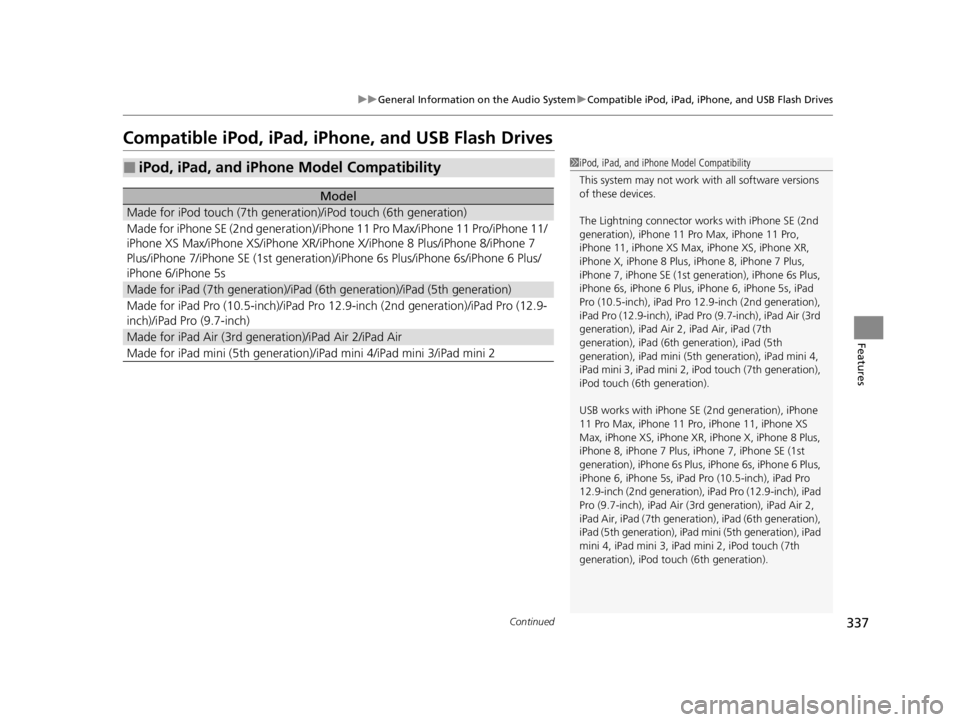
Compatible iPod, iPad, iP hone, and USB Flash Drives
■iPod, iPad, and iPhone Model Compatibility
Model
Made for iPod touch (7th generation)/iPod touch (6th generation)
Made for iPhone SE (2nd generation)/iPho ne 11 Pro Max/iPhone 11 Pro/iPhone 11/
iPhone XS Max/iPhone XS/iPhone XR/iPhone X/iPhone 8 Plus/iPhone 8/iPhone 7
Plus/iPhone 7/iPhone SE (1st generation)/iPhone 6s Plus/iPhone 6s/iPhone 6 Plus/
iPhone 6/iPhone 5s
Made for iPad (7th generation)/iPad (6 th generation)/iPad (5th generation)
Made for iPad Pro (10.5-inch)/iPad Pro 12.9-inch (2nd generation)/iPad Pro (12.9-
inch)/iPad Pro (9.7-inch)
Made for iPad Air (3rd gene ration)/iPad Air 2/iPad Air
Made for iPad mini (5th generation)/i Pad mini 4/iPad mini 3/iPad mini 2
1iPod, iPad, and iPhone Model Compatibility
This system may not work with all software versions
of these devices.
The Lightning connector wo rks with iPhone SE (2nd
generation), iPhone 11 Pro Max, iPhone 11 Pro,
iPhone 11, iPhone XS Max, iPhone XS, iPhone XR,
iPhone X, iPhone 8 Plus, iP hone 8, iPhone 7 Plus,
iPhone 7, iPhone SE (1st ge neration), iPhone 6s Plus,
iPhone 6s, iPhone 6 Plus, iP hone 6, iPhone 5s, iPad
Pro (10.5-inch), iPad Pro 12.9-inch (2nd generation),
iPad Pro (12.9-inch), iPad Pro (9.7-inch), iPad Air (3rd
generation), iPad Air 2, iPad Air, iPad (7th
generation), iPad (6th generation), iPad (5th
generation), iPad mini (5th generation), iPad mini 4,
iPad mini 3, iPad mini 2, iPod touch (7th generation),
iPod touch (6th generation).
USB works with iPhone SE (2nd generation), iPhone
11 Pro Max, iPhone 11 Pro, iPhone 11, iPhone XS
Max, iPhone XS, iPhone XR, iPhone X, iPhone 8 Plus,
iPhone 8, iPhone 7 Plus, iPhone 7, iPhone SE (1st
generation), iPhone 6s Plus , iPhone 6s, iPhone 6 Plus,
iPhone 6, iPhone 5s, iPad Pro (10.5-inch), iPad Pro
12.9-inch (2nd generation), iP ad Pro (12.9-inch), iPad
Pro (9.7-inch), iPad Air (3rd generation), iPad Air 2,
iPad Air, iPad (7th genera tion), iPad (6th generation),
iPad (5th generation), iPad mini (5th generation), iPad
mini 4, iPad mini 3, iPad mini 2, iPod touch (7th
generation), iPod touch (6th generation).
22 ACURA RDX-31TJB6300.book 337 ページ 2021年8月2日 月曜日 午前11時0分
Page 340 of 709
uuGeneral Information on the Audio System uCompatible iPod, iPad, iPhone, and USB Flash Drives
338
Features
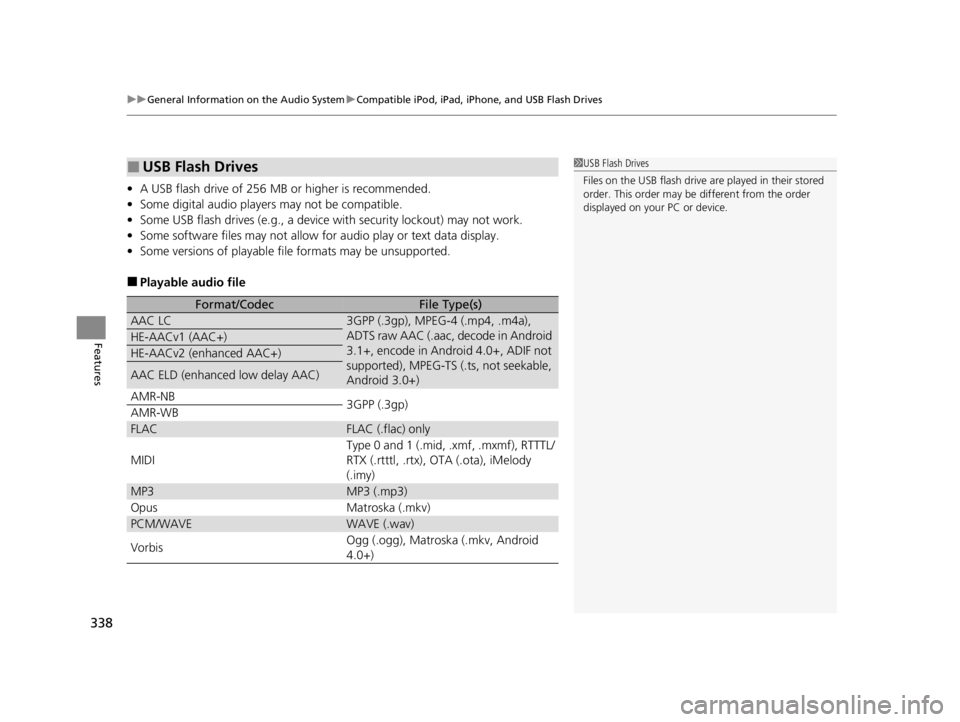
• A USB flash drive of 256 MB or higher is recommended.
• Some digital audio players may not be compatible.
• Some USB flash drives (e.g., a device with security lockout) may not work.
• Some software files may not allow for audio play or text data display.
• Some versions of playable file formats may be unsupported.
■Playable audio file
■USB Flash Drives
Format/CodecFile Type(s)
AAC LC3GPP (.3gp), MPEG-4 (.mp4, .m4a),
ADTS raw AAC (.aac, decode in Android
3.1+, encode in Android 4.0+, ADIF not
supported), MPEG-TS (.ts, not seekable,
Android 3.0+)
HE-AACv1 (AAC+)
HE-AACv2 (enhanced AAC+)
AAC ELD (enhanced low delay AAC)
AMR-NB
3GPP (.3gp)
AMR-WB
FLACFLAC (.flac) only
MIDI
Type 0 and 1 (.mid, .xmf, .mxmf), RTTTL/
RTX (.rtttl, .rtx), OTA (.ota), iMelody
(.imy)
MP3MP3 (.mp3)
OpusMatroska (.mkv)
PCM/WAVEWAVE (.wav)
VorbisOgg (.ogg), Matroska (.mkv, Android
4.0+)
1 USB Flash Drives
Files on the USB flash drive are played in their stored
order. This order may be different from the order
displayed on your PC or device.
22 ACURA RDX-31TJB6300.book 338 ページ 2021年8月2日 月曜日 午前11時0分
Page 351 of 709

349
uuGeneral Information on the Audio System uHonda App License Agreement
Continued
Features
L. Changes to the SOFT WARE or SERVICES. WE may change, modify, or update the SOFTWARE or SERVICES from time to time. Unless
explicitly stated otherwise, any new featur es or services that augment or enhance the SOFTWARE or SERVICES in the future shall
respectively be considered part of the SOFTWARE or SERVICES and s ubject to this AGREEMENT. WE reserve the right at any time and from
time to time to interrupt, res trict, modify, suspend, discontinue, temporarily or permanently, the SOFTWARE or SERVICES (or any portion
thereof), with or without notice to you, and you agree that HONDA shall not be li able to you or to any third party for any modification,
suspension or discontinuance of the SOFTWARE or SERVICES.
M. ARBITRATION:
PLEASE READ THIS ARBITRATION PROVISION CAREFULLY TO UNDER STAND YOUR RIGHTS. YOU AGREE THAT ANY CLAIM THAT YOU
MAY HAVE IN THE FUTURE MUST BE RESOLVED THROUGH BIND ING ARBITRATION. YOU WAIVE THE RIGHT TO HAVE YOUR DISPUTE
HEARD IN COURT AND WAIVE THE RIGHT TO BRING CLASS CL AIMS. YOU UNDERSTAND THAT DISCOVERY AND APPEAL RIGHTS ARE
MORE LIMITED IN ARBITRATION.
Arbitration is a method of resolving a claim, dispute or contro versy without filing a lawsuit. By agreeing to arbitrate, the right to go to
court is waived and instead clai ms, disputes or controversies are submitted to binding arbitration. This provision sets forth t he terms and
conditions of our agreement. YOU and HONDA agree and acknowle dge that this Agreement affects interstate commerce and the
Federal Arbitration Act (“FAA”) applies. By using the Software, Vehicle, or Services, YO U elect to have disputes resolved by arbitration.
YOU, HONDA or any involved third party may pursue a Claim. “Claim” means any dispute between YOU, HONDA, or any involved third
party relating to your use of the Software , the Vehicle, or the Services, this Agreement, or our relationship, including any
representations, omissions or warranties. “Claim” does not include personal injury or wrongful death claims. YOU or HONDA may s eek
remedies in small claims court or provisional judicial remedies without arbitrating. In addition, notwithstanding anything here in to the
contrary, YOU or HONDA may seek equitable re lief in a court of competent jurisdiction.
YOU or HONDA may select arbitration with American Arbitration Asso ciation, JAMS or National Arbitration and Mediation. Contact
these sponsors for their rules. The hearing will be in the federal district where YOU reside. If agreed, it may be by telephone or written
submissions. Filing and arbitrator fees to be paid per the sponsor rules. You may contact the sponsor for a fee waiver. If no fee waivers,
HONDA will pay filing and arbitrator fees up to $5,000, unless law requires more. Each party is responsible for other fees. Arbitrator
may award costs or fees to pr evailing party, if permitted by law. HONDA will not seek fees, unless the claims are frivolous.
22 ACURA RDX-31TJB6300.book 349 ページ 2021年8月2日 月曜日 午前11時0分
Page 353 of 709

351
uuGeneral Information on the Audio System uLegal Information on Apple CarPlay/Android Auto
Continued
Features
Legal Information on Appl e CarPlay/Android Auto
USE OF APPLE CARPLAY IS SUBJECT TO YOUR AGREEMENT TO THE CARPLAY TERMS OF USE, WHICH ARE INCLUDED AS PART OF THE
APPLE iOS TERMS OF USE. IN SUMMARY, THE CARPLAY TERMS OF USE DISCLAIM APPLE AND ITS SERVICE PROVIDERS’ LIABILITY IF THE
SERVICES FAIL TO PERFORM CORRECTLY OR ARE DISCONTINUED, STRICTLY LIMIT APPLE AND ITS SERVICE PROVIDERS’ OTHER
LIABILITIES, DESCRIBE THE KINDS OF USER INFORMATION (INCLUDING, FOR EXAMPL E, VEHICLE LOCATION, VEHICLE SPEED, AND
VEHICLE STATUS) BEING GATHERED AND STORED BY APPLE AND IT S SERVICE PROVIDERS, AND DISCLOSE CERTAIN POSSIBLE RISKS
ASSOCIATED WITH THE USE OF CARPLAY, INCLUDING THE POTENTIAL FOR DRIVER DISTRACTION. SEE APPLE’S PRIVACY POLICY FOR
DETAILS REGARDING APPLE’S USE AND HANDL ING OF DATA UPLOADED BY CARPLAY.
USE OF ANDROID AUTO IS SUBJECT TO YOUR AGREEMENT TO THE ANDROID AUTO TERMS OF USE WHICH MUST BE AGREED TO WHEN\
THE ANDROID AUTO APPLICATION IS DOWNLOADED TO YOUR ANDR OID PHONE. IN SUMMARY, THE ANDROID AUTO TERMS OF USE
DISCLAIM GOOGLE AND ITS SERVICE PROVIDERS’ LIABILITY IF THE SERVICES FAIL TO PERFORM CORRECTLY OR ARE DISCONTINUED,
STRICTLY LIMIT GOOGLE AND ITS SERVICE PROV IDERS’ OTHER LIABILITIES, DESCRIBE THE KINDS OF USER INFORMATION (INCLUDING,
FOR EXAMPLE, VEHICLE LOCATION, VEHI CLE SPEED, AND VEHICLE STATUS) BEING GATHERED AND STORED BY GOOGLE AND ITS
SERVICE PROVIDERS, AND DISCLOSE CERTAIN POSSIBLE RISKS ASSOCIATED WITH THE USE OF ANDROID AUTO, INCLUDING THE
POTENTIAL FOR DRIVER DISTRACTION. SEE GOOGLE’S PRIVACY PO LICY FOR DETAILS REGARDING GOOGLE’S USE AND HANDLING OF
DATA UPLOADED BY ANDROID AUTO.
■OWNER’S MANUAL LICENSE/LIABILITY STATEMENTS
22 ACURA RDX-31TJB6300.book 351 ページ 2021年8月2日 月曜日 午前11時0分
Page 357 of 709

355
uuGeneral Information on the Audio System uLicense Information
Continued
Features
“Made for iPod,” “Made for iPhone,” and “Made for iPad” mean that an electronic
accessory has been designed to connect specifically to iPod, iPhone, or iPad,
respectively, and has been certified by the developer to meet Apple performance
standards. Apple is not responsible for the operation of this device or its compliance
with safety and regulatory st andards. Please note that the use of this accessory with
iPod, iPhone, or iPad may affect wireless performance.
Apple, the Apple Logo, iPad, iPhone, iPod touch are trademarks of Apple Inc.,
registered in the U.S. and other countries . iPad Air, iPad mini, iPad Pro, Apple
CarPlay, and Lightning are trademarks of A pple Inc. App Store is a service mark of
Apple Inc.
■Apple
22 ACURA RDX-31TJB6300.book 355 ページ 2021年8月2日 月曜日 午前11時0分
Page 362 of 709

360
uuCustomized Features u
Features
■Customization flow
Press the (Home) button.
Select Settings.
Touchpad Sensitivity
System
System SoundsSystem Volumes
Phone Calls
Voice Recognition
Navigation Guidance
Date & Time
System Units
Factory Data Reset
Language
Time Format
Set Date & Time
Set Time
Set Date
Automatic Date &
Time
About
(Select Time Zone)
Automatic Time ZoneSet Time Zone
22 ACURA RDX-31TJB6300.book 360 ページ 2021年8月2日 月曜日 午前11時0分
Page 369 of 709

367
uuCustomized Features u
Continued
Features
■List of customizable options
*1:Default Setting Setup Group Customizable Features
DescriptionSelectable Settings
System
System
Volumes
System SoundsChanges the system sounds volume.—
Phone CallsChanges the phone call volume.—
Voice RecognitionChanges the voice recognition volume.—
Navigation GuidanceChanges the navigation guidance
volume.—
Touchpad SensitivitySets the sensitivity of the True
Touchpad Interface.High/Low*1
Date & Time
Time FormatSelects the digital clock display from
12H to 24H.12 Hour*1/24 Hour
Set Date &
Time
Automatic
Date & TimeSelects On to have the GPS
automatically adjust the clock. Select
Off to cancel this function.
On*1/Off
Set DateAdjusts date.
2 Adjusting the Clock P. 154—
Set TimeAdjusts clock.
2Adjusting the Clock P. 154—
22 ACURA RDX-31TJB6300.book 367 ページ 2021年8月2日 月曜日 午前11時0分
Page 372 of 709

370
uuCustomized Features u
Features*1:Default SettingSetup Group Customizable Features Description Selectable Settings
Connections Bluetooth Options
Turns the Bluetooth® on and off. On
*1/Off
+ Connect New Device Pairs a new phone to HFL.
2
Phone Setup P. 395—
(Saved Devices) Connects, disconnects, or deletes a
paired phone.
Changes permissions for
AcuraLink
Assist and Phone Data Collection .
2Phone Setup P. 395
—
22 ACURA RDX-31TJB6300.book 370 ページ 2021年8月2日 月曜日 午前11時0分
Page 374 of 709

372
uuCustomized Features u
Features
*1:Default SettingSetup Group Customizable Features
Description Selectable Settings
Connections Android
AutoAdvanced Options
Network
SSID
Sets this network name.
—
Password Sets password for require entering
password when connecting Wi-Fi
device to this network. —
+ Connect New Device Pairs a new phone to Android Auto.
2
Android Auto Setup P. 329—
(Saved
Devices) OptionsAllow
Android
Auto
Sets up the Android Auto
connection.
Disable
/Enable
AcuraLink
Assist Turn AcuraLink Assist on and off.
Disable/Enable
*1
Phone
Data
Collection Allow Acura to collect phone data.
Disable/Enable*1
Delete Delete an Android Auto device. Cancel/Delete
22 ACURA RDX-31TJB6300.book 372 ページ 2021年8月2日 月曜日 午前11時0分
Page 375 of 709

373
uuCustomized Features u
Continued
Features
*1:Default SettingSetup Group
Customizable Features DescriptionSelectable Settings
Connections Apple
CarPlayAdvanced Options
Network
SSID
Sets this network name.
—
Password Sets password for require entering
password when connecting Wi-Fi
device to this network. —
+ Connect New Device Pairs a new phone to Apple CarPlay.
2
Enabling Apple CarPlay P. 324—
(Saved
Devices) OptionsAllow
Apple
CarPlay
Sets up the Apple CarPlay
connection.
Disable
/Enable
AcuraLink
Assist Turn AcuraLink Assist on and off.
Disable/Enable
*1
Delete Delete an Apple CarPlay device. Cancel/Delete
22 ACURA RDX-31TJB6300.book 373 ページ 2021年8月2日 月曜日 午前11時0分