light ACURA RDX 2022 Workshop Manual
[x] Cancel search | Manufacturer: ACURA, Model Year: 2022, Model line: RDX, Model: ACURA RDX 2022Pages: 709, PDF Size: 25.22 MB
Page 241 of 709

239
uuInterior Convenience Items uOther Interior Convenience Items
Continued
Controls
Other Interior Convenience Items
The accessory power sockets can be used when the power mode is in ACCESSORY
or ON.
■Accessory power socket (front panel)
Open the cover to use it.
■Accessory power socket (cargo area)*
Open the cover to use it.
■Accessory Power Sockets1 Accessory Power Sockets
NOTICE
Do not insert an automotive type cigarette lighter
element.
This can overheat the accessory power socket.
The accessory power socket is designed to supply
power for 12-volt DC accessories that are rated 180
watts (15 amps) or less.
To prevent battery drain, only use the accessory
power socket with the engine running.
When the accessory power soc ket is not in use, close
the cover to prevent any small foreign objects from
getting into the accessory power socket.
* Not available on all models
22 ACURA RDX-31TJB6300.book 239 ページ 2021年8月2日 月曜日 午前11時0分
Page 242 of 709

uuInterior Convenience Items uOther Interior Convenience Items
240
Controls
To use the wireless charger, the power mode must be in ACCESSORY or ON.
Charge any devices compatible with Qi wi reless charging on the area indicated by
the mark as follows:
1.To turn the system on and off, press and
hold the (power) button.
u When the system is activated, the green
indicator light comes on.
2. Place the device you want to charge on the
charging area.
u The system will automatically start
charging the device and the amber
indicator light will come on.
u Make sure that the device is compatible
with the system and placed with the
chargeable side in the center of the
charging area.
3. When charging is completed, the green
indicator light will come on.
u Depending on the device, the amber
indicator light will stay on.
■Wireless Charger*1Wireless Charger*
RF Radiation Exposure Statement:
This equipment complies with FCC RF Radiation
exposure limits set forth for an uncontrolled
environment. This device an d its antenna must not be
co-located or operating in conjunction with any other
antenna or transmitter.
In order to use safely:
•Remove any metal objects from the charge pad
before charging a device.
•Do not open the charger case.
•Do not use the charger if it malfunctions. Contact
your dealer.
If the charger interferes with radio communications,
attempt to correct the interference:
•Press and hold the switch on the charger for a few
seconds to turn off the charger.
appears on the audio/information screen when
the device is being charge d by the wireless charger.Charging Area
(Power)
Button
Amber
Indicator
Green Indicator
* Not available on all models
22 ACURA RDX-31TJB6300.book 240 ページ 2021年8月2日 月曜日 午前11時0分
Page 257 of 709
255
uuAudio System uUSB Ports
Continued
Features
USB Ports
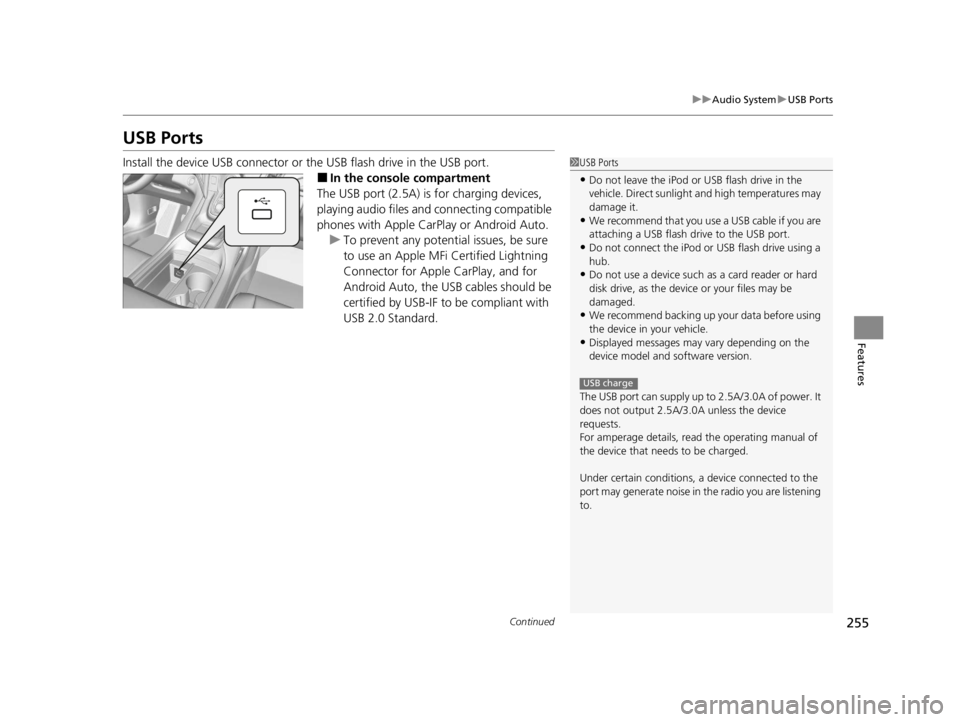
Install the device USB connector or the USB flash drive in the USB port.
■In the consol e compartment
The USB port (2.5A) is for charging devices,
playing audio files and connecting compatible
phones with Apple CarPlay or Android Auto. u To prevent any potenti al issues, be sure
to use an Apple MFi Certified Lightning
Connector for Apple CarPlay, and for
Android Auto, the USB cables should be
certified by USB-IF to be compliant with
USB 2.0 Standard.
1 USB Ports
•Do not leave the iPod or USB flash drive in the
vehicle. Direct sunlight and high temperatures may
damage it.
•We recommend that you us e a USB cable if you are
attaching a USB flash drive to the USB port.
•Do not connect the iPod or USB flash drive using a
hub.
•Do not use a device such as a card reader or hard
disk drive, as the device or your files may be
damaged.
•We recommend backing up yo ur data before using
the device in your vehicle.
•Displayed messages may vary depending on the
device model and software version.
The USB port can supply up to 2.5A/3.0A of power. It
does not output 2.5A/3.0A unless the device
requests.
For amperage details, read the operating manual of
the device that ne eds to be charged.
Under certain condi tions, a device connected to the
port may generate noise in the radio you are listening
to.
USB charge
22 ACURA RDX-31TJB6300.book 255 ページ 2021年8月2日 月曜日 午前11時0分
Page 263 of 709
261
uuAudio System Basic Operation uTrue Touchpad Interface
Continued
Features
True Touchpad Interface
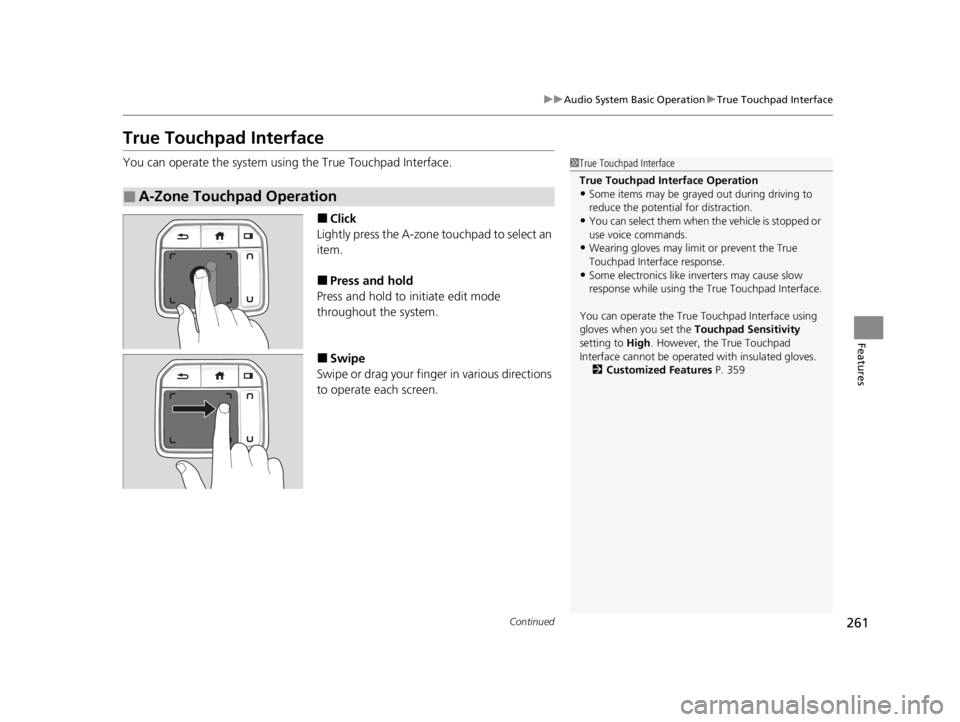
You can operate the system using the True Touchpad Interface.
■Click
Lightly press the A-zone touchpad to select an
item.
■Press and hold
Press and hold to initiate edit mode
throughout the system.
■Swipe
Swipe or drag your finger in various directions
to operate each screen.
■A-Zone Touchpad Operation
1 True Touchpad Interface
True Touchpad Interface Operation
•Some items may be grayed out during driving to
reduce the potential for distraction.
•You can select them when the vehicle is stopped or
use voice commands.
•Wearing gloves may limi t or prevent the True
Touchpad Interfa ce response.
•Some electronics like inverters may cause slow
response while using the True Touchpad Interface.
You can operate the True Touchpad Interface using
gloves when you set the Touchpad Sensitivity
setting to High . However, the True Touchpad
Interface cannot be operated with insulated gloves.
2 Customized Features P. 359
22 ACURA RDX-31TJB6300.book 261 ページ 2021年8月2日 月曜日 午前11時0分
Page 265 of 709
263
uuAudio System Basic Operation uTrue Touchpad Interface
Features
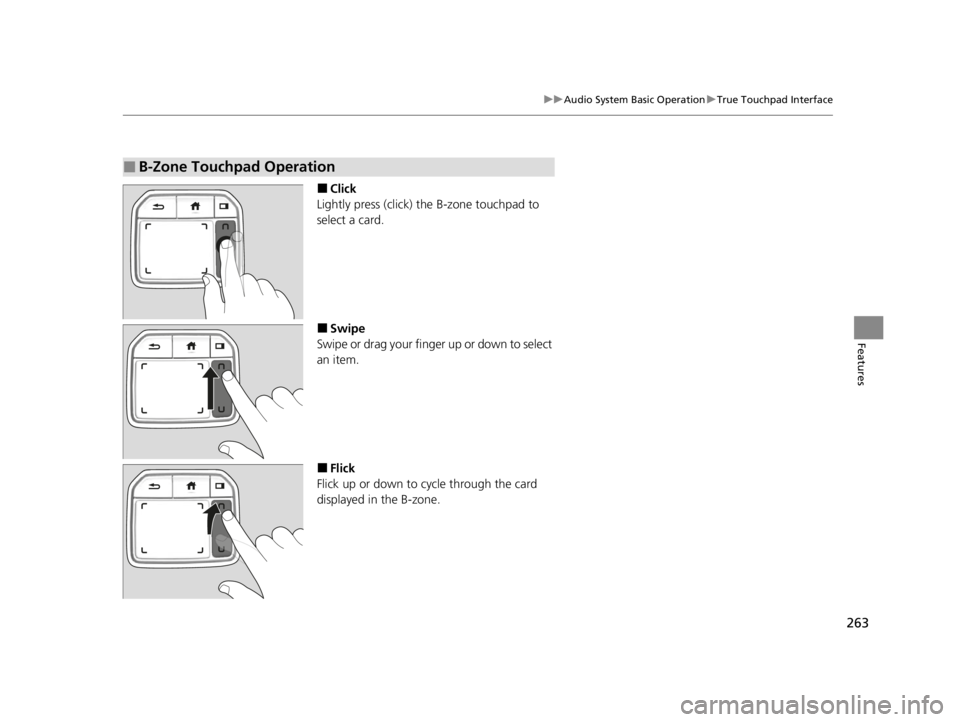
■Click
Lightly press (click) th e B-zone touchpad to
select a card.
■Swipe
Swipe or drag your finger up or down to select
an item.
■Flick
Flick up or down to cycle through the card
displayed in the B-zone.
■B-Zone Touchpad Operation
22 ACURA RDX-31TJB6300.book 263 ページ 2021年8月2日 月曜日 午前11時0分
Page 292 of 709

290
uuAudio System Basic Operation uVoice Control Operation
Features
Voice Control Operation
Your vehicle has a voice control system that allows hands-free operation.
The voice control system uses the (tal k) and (back) buttons on the steering
wheel and a microphone near the map lights on the ceiling.
To achieve optimum voice recognition when using the voice control system:
• The system recognizes natural language and accepts free-form voice commands.
An example of voice commands:
2 Voice Recognition Screen P. 291
•Close the windows and panoramic roof.
• Adjust the dashboard and side vents so air does not blow onto the microphone
on the ceiling.
• Speak clearly in a clear, natural speakin g voice without pausing between words.
• Reduce any background noise if possible. The system may misinterpret your
command if more than one person is speaking at the same time.
■Voice Recognition
1Voice Control Operation
When you press the button, the system beeps and
the display changes to the voice recognition screen.
Press the (home) button, (back) button on
the True Touchpad Interface or APPS button on the
steering wheel to cancel a voice recognition function.
22 ACURA RDX-31TJB6300.book 290 ページ 2021年8月2日 月曜日 午前11時0分
Page 339 of 709
337
uuGeneral Information on the Audio System uCompatible iPod, iPad, iPhone, and USB Flash Drives
Continued
Features
Compatible iPod, iPad, iP hone, and USB Flash Drives
■iPod, iPad, and iPhone Model Compatibility
Model
Made for iPod touch (7th generation)/iPod touch (6th generation)
Made for iPhone SE (2nd generation)/iPho ne 11 Pro Max/iPhone 11 Pro/iPhone 11/
iPhone XS Max/iPhone XS/iPhone XR/iPhone X/iPhone 8 Plus/iPhone 8/iPhone 7
Plus/iPhone 7/iPhone SE (1st generation)/iPhone 6s Plus/iPhone 6s/iPhone 6 Plus/
iPhone 6/iPhone 5s
Made for iPad (7th generation)/iPad (6 th generation)/iPad (5th generation)
Made for iPad Pro (10.5-inch)/iPad Pro 12.9-inch (2nd generation)/iPad Pro (12.9-
inch)/iPad Pro (9.7-inch)
Made for iPad Air (3rd gene ration)/iPad Air 2/iPad Air
Made for iPad mini (5th generation)/i Pad mini 4/iPad mini 3/iPad mini 2
1iPod, iPad, and iPhone Model Compatibility
This system may not work with all software versions
of these devices.
The Lightning connector wo rks with iPhone SE (2nd
generation), iPhone 11 Pro Max, iPhone 11 Pro,
iPhone 11, iPhone XS Max, iPhone XS, iPhone XR,
iPhone X, iPhone 8 Plus, iP hone 8, iPhone 7 Plus,
iPhone 7, iPhone SE (1st ge neration), iPhone 6s Plus,
iPhone 6s, iPhone 6 Plus, iP hone 6, iPhone 5s, iPad
Pro (10.5-inch), iPad Pro 12.9-inch (2nd generation),
iPad Pro (12.9-inch), iPad Pro (9.7-inch), iPad Air (3rd
generation), iPad Air 2, iPad Air, iPad (7th
generation), iPad (6th generation), iPad (5th
generation), iPad mini (5th generation), iPad mini 4,
iPad mini 3, iPad mini 2, iPod touch (7th generation),
iPod touch (6th generation).
USB works with iPhone SE (2nd generation), iPhone
11 Pro Max, iPhone 11 Pro, iPhone 11, iPhone XS
Max, iPhone XS, iPhone XR, iPhone X, iPhone 8 Plus,
iPhone 8, iPhone 7 Plus, iPhone 7, iPhone SE (1st
generation), iPhone 6s Plus , iPhone 6s, iPhone 6 Plus,
iPhone 6, iPhone 5s, iPad Pro (10.5-inch), iPad Pro
12.9-inch (2nd generation), iP ad Pro (12.9-inch), iPad
Pro (9.7-inch), iPad Air (3rd generation), iPad Air 2,
iPad Air, iPad (7th genera tion), iPad (6th generation),
iPad (5th generation), iPad mini (5th generation), iPad
mini 4, iPad mini 3, iPad mini 2, iPod touch (7th
generation), iPod touch (6th generation).
22 ACURA RDX-31TJB6300.book 337 ページ 2021年8月2日 月曜日 午前11時0分
Page 357 of 709

355
uuGeneral Information on the Audio System uLicense Information
Continued
Features
“Made for iPod,” “Made for iPhone,” and “Made for iPad” mean that an electronic
accessory has been designed to connect specifically to iPod, iPhone, or iPad,
respectively, and has been certified by the developer to meet Apple performance
standards. Apple is not responsible for the operation of this device or its compliance
with safety and regulatory st andards. Please note that the use of this accessory with
iPod, iPhone, or iPad may affect wireless performance.
Apple, the Apple Logo, iPad, iPhone, iPod touch are trademarks of Apple Inc.,
registered in the U.S. and other countries . iPad Air, iPad mini, iPad Pro, Apple
CarPlay, and Lightning are trademarks of A pple Inc. App Store is a service mark of
Apple Inc.
■Apple
22 ACURA RDX-31TJB6300.book 355 ページ 2021年8月2日 月曜日 午前11時0分
Page 366 of 709

364
uuCustomized Features u
Features
Auto Door Lock
Auto Door Unlock
Door Setup
Keyless Lock Answer Back
Security Relock Timer
Interior Light Dimming Time
Headlight Auto Off Timer
Auto Interior Illumi nation Sensitivity
Auto Headlight On with Wiper On
Auto Light Sensitivity*
Lighting Setup
Auto Folding Door Mirror*
Door Unlock Mode
Keyless Access Light Flash
Keyless Access Beep
Remote Start System On/Off*
Walk Away Auto Lock
Keyless Access Setup
Accent Light Theme*
Accent Light Brightness*
* Not available on all models
22 ACURA RDX-31TJB6300.book 364 ページ 2021年8月2日 月曜日 午前11時0分
Page 380 of 709

378
uuCustomized Features u
Features
*1:Default SettingSetup Group Customizable Features Description Selectable Settings
Vehicle Driving
Position
Setup
Memory Position Link
Turns the driving position memory
system on and off. On
*1/
Off
Seat Position Movement at
Entry/Exit Causes the driver’s seat to move back
to make it easier to enter or exit the
vehicle.
On
*1/
Off
Keyless
Access Setup Door Unlock Mode
Changes which doors unlock when
you grab the driver’s door handle. Driver Door or
Tailgate Only
*1/
All
Doors
Keyless Access Light Flash Causes some exterior lights to flash
when you unlock/lock the doors.
On
*1/
Off
Keyless Access Beep Causes the beeper to sound when you
unlock/lock the doors. On
*1/
Off
Remote Start System On/
Off
*Turns the remote engine start feature
on and off. On*1/
Off
Walk Away Auto Lock Changes the settings for the auto lock
function when you walk away from
the vehicle. Enable
/Disable
*1
* Not available on all models
22 ACURA RDX-31TJB6300.book 378 ページ 2021年8月2日 月曜日 午前11時0分