light ACURA RDX 2022 Manual PDF
[x] Cancel search | Manufacturer: ACURA, Model Year: 2022, Model line: RDX, Model: ACURA RDX 2022Pages: 709, PDF Size: 25.22 MB
Page 455 of 709

Continued453
uuWhen Driving uShifting
Driving
■Shift Operation1Shift Operation
NOTICE
When you change (D to (R and vice versa, depress
the brake pedal to come to a complete stop, then
select the intended gear position while maintaining
brake pressure.
Use the gear position indicator and the shift button
indicator to check the gear position before selecting
a shift button.
If the indicator of the currently selected gear position,
or all the gear position indicators are blinking
simultaneously, there is a problem with the
transmission.
Avoid sudden acceleration and have the transmission
checked by a dealer as soon as possible.
The fuel supply may be cut of f if you drive at engine
speeds in or over the tachometer’s red zone (engine
speed limit). If this happe ns, you may experience a
slight jolt.
When the engine speed is increased while the
transmission is in
( N, (P or (R, the fuel supply may
be cut off even without the engine speed entering
the tachometer’s red zone.
Gear Position Indicator
Tachometer’s red zone
Press the ( P button.
Pull back the (R button.
Press the
( N button.
Shift Button
Indicator M
(sequential mode)
Indicator
Sequential Mode Gear
Selection Indicator
Press the button.
Each time you press the button,
the mode switches between
Drive and S Position mode.D/S
22 ACURA RDX-31TJB6300.book 453 ページ 2021年8月2日 月曜日 午前11時0分
Page 460 of 709

uuWhen Driving uShifting
458
Driving
■Sequential Mode Operation1Sequential Mode Operation
Each paddle shif t operation makes a single or double
gear change.
To change gears continuously, release the paddle
shifter before pulling it again for the next gear.
If the sequential mode gear selection indicator blinks
when you try to shift up or down, this means your
vehicle speed is not in its allowable gear range or the
protection of transmissi on system is necessary.
Slightly accelerate to shift up and decelerate to shift
down while the indi cator is blinking.
The transmission is in
( S and Sport mode, to
prioritize the engine perf ormance enhancement, the
transmission may not allow for shifting up while the
engine speed is low.
Sequential Mode Gear
Selection Indicator
Paddle Shifter
(Shift down)
Downshifting
when pulling
the
( - paddle
shifter.
(Changes to a
lower gear.) Upshifting
when pulling
the (
+ paddle
shifter.
(Changes to a
higher gear.)
( - (+Paddle Shifter
(Shift up)
22 ACURA RDX-31TJB6300.book 458 ページ 2021年8月2日 月曜日 午前11時0分
Page 463 of 709

461
uuWhen Driving uAcura Integrated Dynamics System
Continued
Driving
■Mode descriptions
Each mode has been crafted for different driv ing styles according to the following chart.
*1:Interior accent light only available if eq uipped. Interior accent light changes with Dynamic Mode only when Accent Light Theme is
set to Dynamic Mode .
2Customized Features P. 359
2 Lighting area of the accent light P. 463
ModeFunctionAccent Light Color*1
SNOWMaximizes controllability through reduced throttle response
When in SNOW, the Auto Idle Stop System will stay disabled regardless of
the Auto Idle Stop OFF button
2Auto Idle Stop P. 464
White
COMFORTMaximizes driver comfort through decrease d steering effort and reduced ride
firmness (if Active Damp er System is equipped)Blue
NORMALBalanced response for everyday useWhite
SPORTEnhances vehicle response through increased steering effort, heightened
throttle response, modified active sound control, and more responsive ride
and/or handling (if Active Da mper System and/or SH-AWD ® is equipped)
When in SPORT, the Auto Idle Stop System w ill stay disabled regardless of
the Auto Idle Stop OFF button
2Auto Idle Stop P. 464
Red
22 ACURA RDX-31TJB6300.book 461 ページ 2021年8月2日 月曜日 午前11時0分
Page 464 of 709

462
uuWhen Driving uAcura Integrated Dynamics System
Driving
■Next start-up mode
The mode for the next start-up is saved according to the following chart. Each keyless remote has its own mode saved.
*1:Interior accent light only available if equipped. Interior accent light changes with Dynamic Mode only when Accent Light Theme is
set to Dynamic Mode .
2Customized Features P. 359
2 Lighting area of the accent light P. 463
Last Dynamic ModeNext Dynamic ModeWelcome Accent Light Color*1
SNOWNORMALWhite
COMFORTCOMFORTBlue
NORMAL or SPORTNORMALWhite
22 ACURA RDX-31TJB6300.book 462 ページ 2021年8月2日 月曜日 午前11時0分
Page 465 of 709
463
uuWhen Driving uAcura Integrated Dynamics System
Driving
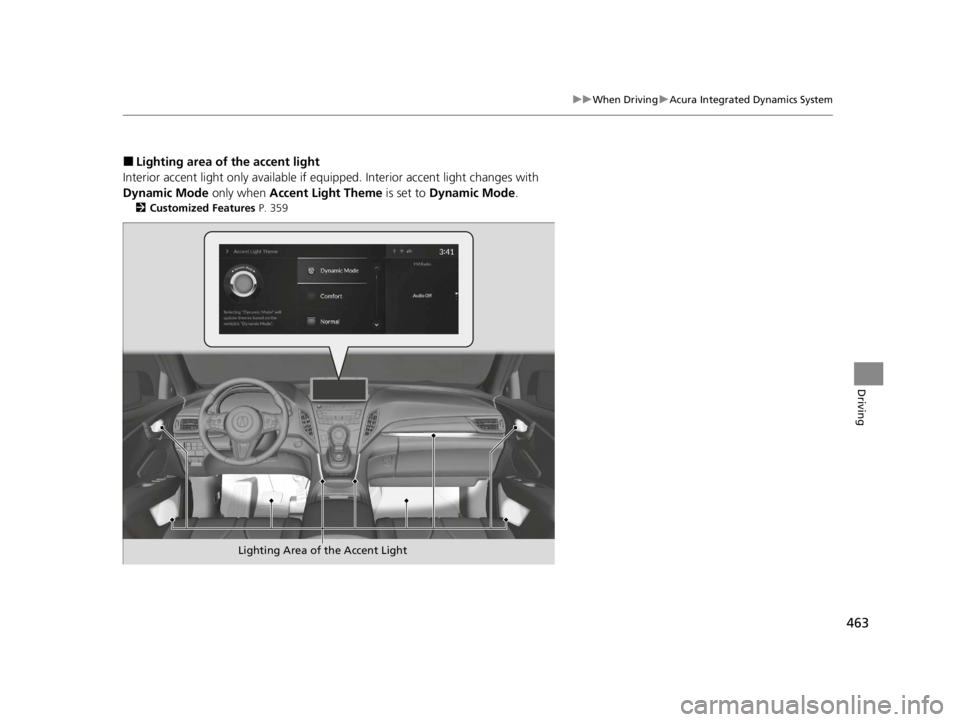
■Lighting area of the accent light
Interior accent light only available if equipped. Interior accent light changes with
Dynamic Mode only when Accent Light Theme is set to Dynamic Mode .
2Customized Features P. 359
Lighting Area of the Accent Light
22 ACURA RDX-31TJB6300.book 463 ページ 2021年8月2日 月曜日 午前11時0分
Page 471 of 709

Continued469
uuWhen Driving uAuto Idle Stop
Driving
• The brake pedal is released (without the automatic brake hold system activated).
• The accelerator pedal is depressed (with the automatic brake hold system
activated).
2 Automatic Brake Hold P. 550
■The engine restarts even if the brake pedal is depressed*1 when:
• The Auto Idle Stop OFF button is pressed.
• The steering wheel is operated.
• The transmission is put into
(R or (S, or when it is set from (N to (D.
u If you put the tra nsmission into
(P after the Auto Idle Stop activates, the Auto
Idle Stop continues to operate. In this case, the engine restarts when you
depress the brake pedal.
• The pressure on the brake pedal is reduced and the vehicle starts moving while
stopped on an incline.
• The brake pedal is released slightly during a stop.
• The battery charge becomes low.
• The accelerator pedal is depressed.
• The driver’s seat belt is unlatched.
• is ON (indicator on).
• The climate control system is in use, and the difference between the set
temperature and actual interior temperature becomes significant.
• The climate control system is being used to dehumidify the interior.
• The Integrated Dynamics Sy stem mode is changed to SNOW or SPORT mode.
• The vehicle ahead of you starts again when your vehicle stops automatically with
ACC with Low Speed Follow.
■The Engine Automatically Restarts When:1 The Engine Automatically Restarts When:
If you are using an electroni c device during Auto Idle
Stop, the device may tempor arily be turned off when
the engine restarts.
1 The engine restarts even if the brake pedal is depressed*1 when:
*1: With the automatic brake hold system activated,
you can release the brake pe dal while Auto Idle Stop
is in operation.
If the automatic brake hold system has been turned
off, or if there is a problem with the system, the
engine will restart automatically when you release
the brake pedal.
2 Automatic Brake Hold P. 550
22 ACURA RDX-31TJB6300.book 469 ページ 2021年8月2日 月曜日 午前11時0分
Page 475 of 709

473
uuWhen Driving uAgile Handling Assist
Driving
Agile Handling Assist
Lightly brakes each of the front and rear wheels, as needed, when you turn the
steering wheel, and helps support the vehi cle’s stability and performance during
cornering.
Lightly brakes the front wheels, as needed , when you turn the steering wheel, and
helps support the vehicle’s stability and performance during cornering.
1 Agile Handling Assist
The agile handling assist ca nnot enhance stability in
all driving situations. You still need to drive and
corner at speeds appropriate for the conditions and
always leave a sufficient margin of safety.
When the VSA ® system indicator comes on and stays
on while driving, the agil e handling assist does not
activate.
You may hear a sound coming from the engine
compartment while the agile handling assist is
activated. This is normal.AWD models
2WD models
22 ACURA RDX-31TJB6300.book 473 ページ 2021年8月2日 月曜日 午前11時0分
Page 477 of 709

475
uuWhen Driving uTire Pressure Monitoring System (TPMS) with Tire Fill Assist
Continued
Driving
Tire Pressure Monitoring System (TPMS) with Tire
Fill Assist
Monitors the tire pr essure while you are
driving. If your vehicle’s tire pressure becomes
significantly low, the low tire pressure/TPMS
indicator comes on and a message appears on
the multi-information display.
1 Tire Pressure Monitoring System (TPMS) with Tire Fill Assist
Conditions such as low ambient temperature and
altitude change directly affect tire pressure and can
trigger the low tire pressure/TPMS indicator to come
on. 2 If the Low Tire Pressure/TPMS Indicator
Comes On or Blinks P. 672
Tire pressure checked and inflated in:
•Warm weather can beco me under-inflated in
colder weather.
•Cold weather can become overinflated in warmer
weather.
The low tire pressure/TPMS indicator will not come
on as a result of overinflation.
The TPMS audibly and visually informs you of
changes in tire pressure of the individual tire that you
are adjusting using audibl e and visual indications.
If a change in tire pressure has been significant, the
system beeps and the hazard lights flash continuously
for five seconds when the specified tire pressure is
reached. Stop filling the tire.Low Tire Pressure/TPMS Indicator
22 ACURA RDX-31TJB6300.book 475 ページ 2021年8月2日 月曜日 午前11時0分
Page 478 of 709

uuWhen Driving uTire Pressure Monitoring System (TPMS) with Tire Fill Assist
476
Driving
To select the tire pressure monitor, set the power
mode to ON, and roll the right selector wheel
until you see the tire pressure screen.
The pressure for each tire is displayed in psi
(U.S.) or kPa (Canada).
Tire Pressures Low is displayed when a tire
has significantly low pressure. The specific tire
is displayed on the screen.
■Tire Pressure Monitor1 Tire Pressure Monitor
The pressure displayed on the multi-information
display can be slightly different from the actual
pressure as measured by a gauge. If there is a
significant di fference between the two values, or if
the low tire pressure/TPMS indicator and the message
on the multi-information di splay do not go off after
you have inflated the tire to the specified pressure,
have the system checked by a dealer.
Tire Pressure Monitor System Problem. Check
Tire Pressure. See Your Dealer. may appear if you
drive with the compact spare tire
*, or there is a
problem with the TPMS.
* Not available on all models
22 ACURA RDX-31TJB6300.book 476 ページ 2021年8月2日 月曜日 午前11時0分
Page 484 of 709

482
uuWhen Driving uBlind Spot Information System
Driving
The blind spot information system alert indicator may not come on under the
following conditions:
• There is a large speed difference betwee n your vehicle and the vehicle in the
adjacent lane.
• A vehicle is parked in a side lane.
• An object not detected by the radar sensors approaches or passes your vehicle.
• The vehicle driving in the adjacent lane is a motorcycle or other small vehicle.
The blind spot information system may not operate correctly under the following
conditions:
• Making a turn at an intersection.
• Objects (guard rails, poles, trees, etc.) are detected.
• An object that does not reflect radio wave s well or a motorcycle, is in the alert
zone.
• Driving on a curved road.
• A vehicle is moving from a far lane to the adjacent lane.
• The system picks up signal interference such as other radar sensors from another
vehicle or strong radio wave transmitted from a facility nearby.
• The rear bumper or the area around the radar sensors is covered by dirt, mud,
snow, ice, etc.
• The rear bumper or the area around the radar sensors has been damaged or
deformed.
• In bad weather (heavy rain, snow, and fog).
• Making a short turn or driving on a bumpy road that slightly tilts the vehicle.
■Blind Spot Information System Conditions and Limitations
22 ACURA RDX-31TJB6300.book 482 ページ 2021年8月2日 月曜日 午前11時0分