Jack ACURA RDX 2022 Owners Manual
[x] Cancel search | Manufacturer: ACURA, Model Year: 2022, Model line: RDX, Model: ACURA RDX 2022Pages: 709, PDF Size: 25.22 MB
Page 7 of 709
Contents
Child Safety P. 64Exhaust Gas Hazard P. 77Safety Labels P. 78
Tailgate P. 173 Security System P. 183Windows P. 186
Operating the Switches Around the Steering Wheel P. 193 Mirrors P. 213
Interior Convenience Items P. 230 Climate Control System P. 247
Audio Error Messages P. 332General Information on the Audio System P. 336
Bluetooth ® HandsFreeLink ® P. 389 AcuraLink ® P. 419
Off-Highway Driving Guidelines P. 441 When Driving P. 443 AcuraWatchTM P. 483
Multi-View Rear Camera* P. 564 Surround View Camera System*P. 566 Refueling P. 574
Maintenance Under the Hood P. 590 Replacing Light Bulbs P. 603
Checking and Maintaining Tires P. 612 Battery P. 621 Remote Transmitter Care P. 623
Accessories and Modifications P. 633
Handling of the Jack P. 659 Engine Does Not Start P. 660 If the Battery Is Dead P. 663
Fuses P. 674 Emergency Towing P. 681
If You Cannot Open the Tailgate P. 683 Refueling P. 684
Devices that Emit Radio Waves P. 689 Reporting Safety Defects P. 690 Emissions Testing P. 691
Client Service Information P. 697
Quick Reference GuideP. 6
Safe DrivingP. 31
Instrument PanelP. 79
ControlsP. 153
FeaturesP. 253
DrivingP. 429
MaintenanceP. 579
Handling the UnexpectedP. 635
InformationP. 685
IndexP. 698
22 ACURA RDX-31TJB6300.book 5 ページ 2021年8月2日 月曜日 午前11時0分
Page 637 of 709
635
Handling the Unexpected
This chapter explains how to handle unexpected troubles.
Tools.................................................. 636
If a Tire Goes Flat
Changing a Flat Tire ......................... 637
Temporarily Repairi ng a Flat Tire....... 645
Handling of the Jack ......................... 659
Engine Does Not Start Checking the Engine ........................ 660
If the Keyless Remote Battery is Weak ...661
Emergency Engine Stop ................... 662
Vehicles with a compact spare tire
Vehicles with temporary tire repair kit
Models with temporary tire repair kit
If the Battery Is DeadJump Starting Procedure .................. 663
Overheating ...................................... 665
Indicator, Coming On/Blinking
If the Engine Oil Pressure Low Warning
Appears ............................................. 667
If the Charging System Indicator Comes On .. 668If the Malfunction Indicator Lamp Comes On or Blinks ................................... 668
If the Brake System Indicator (Red) Comes On or Blinks ....................................... 669
If the Electric Power Steering (EPS) System
Indicator Comes On ........................... 670
If the Brake System Indicator (Red) Comes On or Blinks at the Same Time When the Brake
System Indicator (Amber) Comes On .....671
If the Low Tire Pressure/TPMS Indicator Comes On or Blinks ....................... 672
If the Transmission System Indicator Blinks along with the Warning Message .... 673
Fuses .................................................. 674
Emergency Towing ........................... 681
If You Cannot Unlock the Fuel Fill Door.. 682If You Cannot Open the Tailgate .... 683
Refueling ........................................... 684
22 ACURA RDX-31TJB6300.book 635 ページ 2021年8月2日 月曜日 午前11時0分
Page 638 of 709
636
Handling the Unexpected
Tools
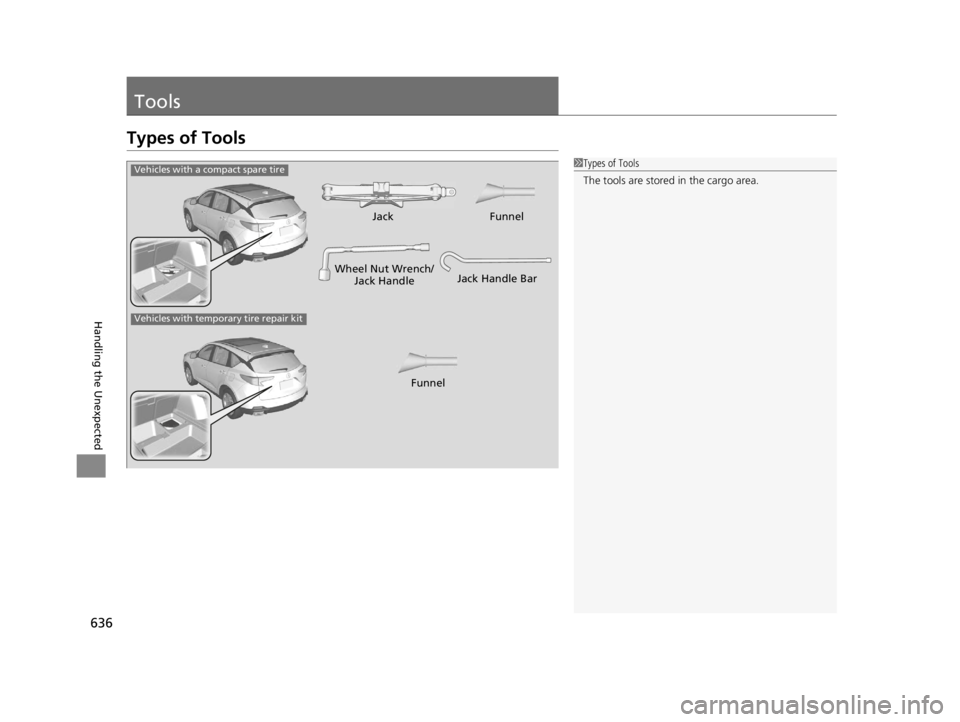
Types of Tools
1Types of Tools
The tools are stored in the cargo area.
Wheel Nut Wrench/
Jack HandleJack
Jack Handle Bar
Vehicles with a compact spare tire
Vehicles with temporary tire repair kit
FunnelFunnel
22 ACURA RDX-31TJB6300.book 636 ページ 2021年8月2日 月曜日 午前11時0分
Page 640 of 709
uuIf a Tire Goes Flat uChanging a Flat Tire
638
Handling the Unexpected
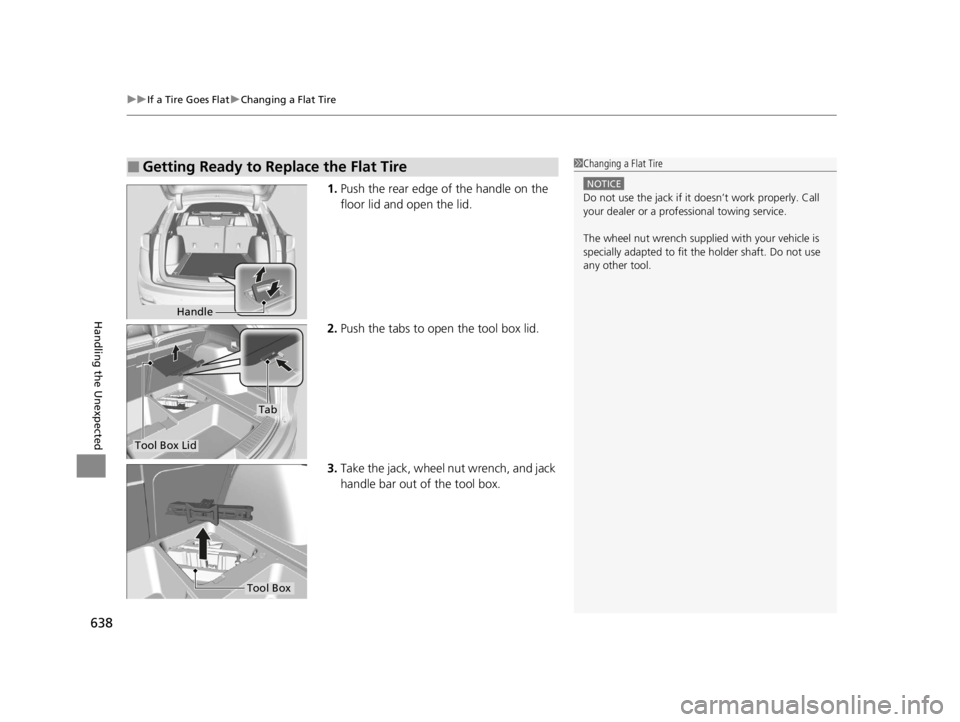
1. Push the rear edge of the handle on the
floor lid and open the lid.
2. Push the tabs to open the tool box lid.
3. Take the jack, wheel nut wrench, and jack
handle bar out of the tool box.
■Getting Ready to Replace the Flat Tire1Changing a Flat Tire
NOTICE
Do not use the jack if it doesn’t work properly. Call
your dealer or a prof essional towing service.
The wheel nut wrench supplied with your vehicle is
specially adapted to fit th e holder shaft. Do not use
any other tool.
Handle
Tool Box Lid
Tab
Tool Box
22 ACURA RDX-31TJB6300.book 638 ページ 2021年8月2日 月曜日 午前11時0分
Page 641 of 709

639
uuIf a Tire Goes Flat uChanging a Flat Tire
Continued
Handling the Unexpected
4. Remove the cover and the rubber plug on
the cargo area lining to access the shaft
for the spare tire hoist.
5. Put the wheel nut wrench with the jack
handle bar on the hoist shaft.
Turn the wrench to the left to lower the
spare tire to the ground.
6. Keep turning the wh eel nut wrench to
create slack in the cable.
7. Remove the bracket from the spare tire.Cover
Rubber plug
Jack Handle Bar
Wheel Nut Wrench
Bracket
22 ACURA RDX-31TJB6300.book 639 ページ 2021年8月2日 月曜日 午前11時0分
Page 643 of 709

Continued641
uuIf a Tire Goes Flat uChanging a Flat Tire
Handling the Unexpected
1. Place the jack under the jacking point
closest to the tire to be changed.
2. Turn the end bracket cl ockwise as shown in
the image until the top of the jack contacts
the jacking point.
u Make sure that the jacking point tab is
resting in the jack notch.
3. Raise the vehicle, using the jack handle bar
and the jack handle, until the tire is off the
ground.
■How to Set Up the Jack1How to Set Up the Jack
Do not use the jack with people or luggage in the
vehicle.
Use the jack provided in your vehicle.
Other jacks may not support the weight (“load”) or
may not fit the jacking point.
The following instructions must be followed to use
the jack safely:
•Do not use while the engine is running.
•Use only where the ground is firm and level.
•Use only at the jacking points.•Do not get in the vehicl e while using the jack.
•Do not put anything on top of or underneath the
jack.
3WARNING
The vehicle can easily roll off the jack,
seriously injuring anyone underneath.
Follow the directions for changing a tire
exactly, and never get under the vehicle
when it is supported only by the jack.
Jack
Handle Bar
Wheel Nut Wrench as Jack Handle
22 ACURA RDX-31TJB6300.book 641 ページ 2021年8月2日 月曜日 午前11時0分
Page 644 of 709

uuIf a Tire Goes Flat uChanging a Flat Tire
642
Handling the Unexpected
1. Remove the wheel nuts and flat tire.
2. Wipe the mounting surfaces of the wheel
with a clean cloth.
3. Mount the compact spare tire.
4. Screw the wheel nuts until they touch the
lips around the mounting holes, then stop
rotating.
5. Lower the vehicle and remove the jack.
Tighten the wheel nuts in the order
indicated in the image. Go around,
tightening the nuts, two to three times in
this order.
Wheel nut torque:
80 lbf∙ft (108 N∙m, 11 kgf∙m)
■Replacing the Flat Tire1Replacing the Flat Tire
Do not over tighten the wheel nuts by applying extra
torque using your foot or a pipe.
22 ACURA RDX-31TJB6300.book 642 ページ 2021年8月2日 月曜日 午前11時0分
Page 645 of 709

Continued643
uuIf a Tire Goes Flat uChanging a Flat Tire
Handling the Unexpected
1. Put the flat tire in the storage bag provided
with your vehicle.
u The storage bag is in the tool box.
2. Knot the top of the storage bag.
3. Securely put the jack, jack handle bar, and
wheel nut wrench back in the tool box.
4. Bore through the bag, and pass the holding
belt through the hole of the bag and the
wheel of the flat tire as shown.
5. Place the flat tire in the cargo area, and
thread the belt through the tie-down
anchor as shown.
6. Pass the belt through the ring, and tighten
the belt to secure the flat tire in place.
■Storing the Flat Tire1Storing the Flat Tire
3WARNING
Loose items can fly around the interior in a
crash and can seriously injure the
occupants.
Store the wheel, jack, and tools securely
before driving.
Belt
Tie-down Anchor
22 ACURA RDX-31TJB6300.book 643 ページ 2021年8月2日 月曜日 午前11時0分
Page 661 of 709

659
Handling the Unexpected
Handling of the Jack
Your vehicle has jacking points as shown.
When replacing your tires, consult a dealer.
Models with temporary tire repair kit
Jacking Points
22 ACURA RDX-31TJB6300.book 659 ページ 2021年8月2日 月曜日 午前11時0分
Page 703 of 709

701
Index
Fuel..................................................... 23, 574
Economy................................................. 577
Gauge .................................................... 136
Instant Fuel Economy .............................. 141
Low Fuel Indicator..................................... 94
Range ..................................................... 141
Recommendation.................................... 574
Refueling ................................................ 574
Fuel Economy ........................................... 577
Fuel Fill Door ...................................... 23, 575
Fuses ......................................................... 674
Inspecting and Changing ........................ 680
Locations ................................ 674, 677, 678
G
Gasoline (Fuel) Economy................................................. 577
Gauge .................................................... 136
Information............................................. 574
Instant Fuel Economy .............................. 141
Low Fuel Indicator..................................... 94
Refueling ................................................ 574
Gauges ...................................................... 136
Gear Position Indicator ...................... 87, 453
Glass (care) ............................................... 631
Glove Box ................................................. 233
H
Handling of the Jack ................................ 659 Handling the Unexpected
........................ 635
HandsFreeLink ® (HFL) ............................... 389
Automatic Import of Phone Contacts and
Call History ............................................ 400
Automatic Transferring ............................ 399
Displaying Messages ................................ 412
Favorite Contacts ..................................... 401
HFL Buttons ............................................. 389
HFL Menus .............................................. 393
HFL Status Display ................................... 391
In Case of Emergency .............................. 423
Limitations for Manua l Operation ............ 392
Making a Call .......................................... 402
Options During a Call .............................. 406
Phone Setup ............................................ 395
Receiving a Call ....................................... 405
Receiving a Text Message ........................ 410
Ring Tone ................................................ 399
Selecting a Phone .................................... 411
To Set Up a Text Message Options ........... 409
Hazard Warning Button ............................... 6
HD Radio
TM................................................ 296
Head Restraints ......................................... 225
Headlights ................................................. 197
Auto High-Beam System .......................... 201
Automatic Operation ............................... 198
Dimming ......................................... 197, 200
Operating ................................................ 197
Head-Up Display ....................................... 148
Heated Steering Wheel ............................ 244
Heaters (Seat) ........................................... 245 HFL (HandsFreeLink
®)............................... 389
High Beam Indicator .................................. 98
Hill Start Assist System ............................. 448
HomeLink ® Universal Transceiver ............ 386
Honda App License Agreement .............. 339
I
Identification Numbers............................ 688
Engine and Transmission ......................... 688
Vehicle Identification ............................... 688
Illumination Control ................................. 208
Knob ....................................................... 208
Immobilizer System .................................. 183
Indicator.................................................... 99
22 ACURA RDX-31TJB6300.book 701 ページ 2021年8月2日 月曜日 午前11時0分