reset ACURA RDX 2023 User Guide
[x] Cancel search | Manufacturer: ACURA, Model Year: 2023, Model line: RDX, Model: ACURA RDX 2023Pages: 713, PDF Size: 21.99 MB
Page 289 of 713

287
uuAudio System Basic Operation uAdjusting the Sound
Features
Adjusting the Sound
1. Press the (home) button.
2. Select an audio source icon.
3. Select SOUND.
4. Select the setting you want.
3. Select MENU .
4. Select Sound Settings .
5. Select the setting you want.
Select an item from the following choices:
•Bass / Treble : Treble, Midrange, Bass
• Roof / Center Volume
*: Roof speaker,
center speaker
• Audio Zones & Balance / Fader
*: Driver
Only, Front Only, Rear Only, Full Vehicle,
Balance, Fader
• Balance / Fader
*: Balance, Fader
• Speed Volume Compensation: Sets the
amount of volume increase.
• DTS Neural Surround
*: DTS Neural
SurroundTM
• Compressed Audio Enhancement*:
Enhancement for compressed audio quality
1 Adjusting the Sound
The Speed Volume Compensation (SVC) adjusts the
volume level based on the vehicle speed. As you go
faster, audio volume increa ses. As you slow down,
audio volume decreases.
You can also adjust the sound the following
procedure.
1. Press the (home) button.
2. Select Settings .
3. Select Sound .
Audio Zones & Balance / Fader
You can change where the sound comes from by
selecting one of the speaker options below:
•Full Vehicle: All the speakers emit sound.•Driver Only: Allows driver to listen to the audio
system while maintaini ng a quieter environment
for the other occupants.
•Front Only : Allows front seat occupants to listen
to the audio system while maintaining a quieter
environment for occupants in the rear.
•Rear Only: Allows rear seat o ccupants to listen to
the audio system while maintaining a quieter
environment for occupants in the front.
Reset to Default
Select to reset the followi ng settings from the pop-up
menu to their factory default.
•Bass / Treble
•Roof / Center Volume*
•Audio Zones & Balance / Fader*
•Balance / Fader*
USB Audio mode
FM Radio, AM Radio, Siri usXM, Bluetooth Audio mode
* Not available on all models
23 ACURA RDX-31TJB6400.book 287 ページ 2022年8月4日 木曜日 午後1時51分
Page 290 of 713
288
uuAudio System Basic Operation uDisplay Setup
Features
Display Setup
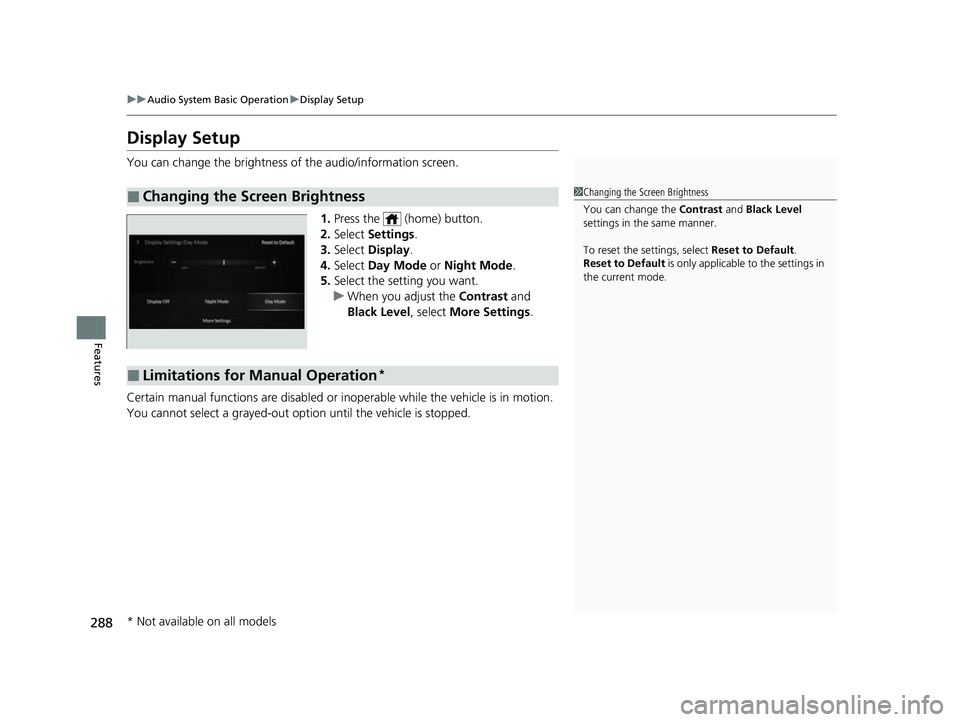
You can change the brightness of the audio/information screen.
1.Press the (home) button.
2. Select Settings .
3. Select Display .
4. Select Day Mode or Night Mode .
5. Select the setting you want.
u When you adjust the Contrast and
Black Level , select More Settings .
Certain manual functions are disabled or inoperable while the vehicle is in motion.
You cannot select a grayed-out option until the vehicle is stopped.
■Changing the Screen Brightness1 Changing the Screen Brightness
You can change the Contrast and Black Level
settings in the same manner.
To reset the settings, select Reset to Default.
Reset to Default is only applicable to the settings in
the current mode.
■Limitations for Manual Operation*
* Not available on all models
23 ACURA RDX-31TJB6400.book 288 ページ 2022年8月4日 木曜日 午後1時51分
Page 302 of 713
uuAudio System Basic Operation uPlaying SiriusXM ® Radio
300
Features
■Create a TuneMix (for music channels only)
A TuneMix is a group of channels saved in one preset. You can store up to 20 of
your preferred music chan nels per TuneMix channel.
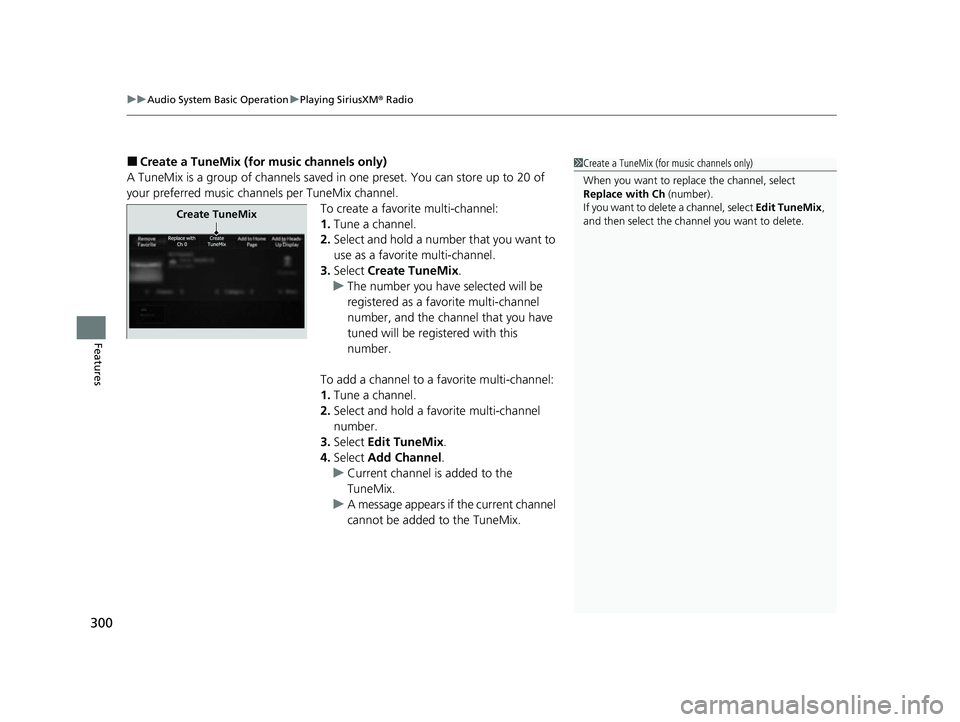
To create a favorite multi-channel:
1.Tune a channel.
2. Select and hold a number that you want to
use as a favorite multi-channel.
3. Select Create TuneMix .
u The number you have selected will be
registered as a favorite multi-channel
number, and the channel that you have
tuned will be registered with this
number.
To add a channel to a favorite multi-channel:
1. Tune a channel.
2. Select and hold a favo rite multi-channel
number.
3. Select Edit TuneMix .
4. Select Add Channel .
u Current channel is added to the
TuneMix.
u A message appears if the current channel
cannot be added to the TuneMix.1Create a TuneMix (for music channels only)
When you want to replac e the channel, select
Replace with Ch (number).
If you want to delete a channel, select Edit TuneMix,
and then select the channel you want to delete.
Create TuneMix
23 ACURA RDX-31TJB6400.book 300 ページ 2022年8月4日 木曜日 午後1時51分
Page 335 of 713
333
uuAudio Error Messages uAndroid/Apps
Features
Android/Apps
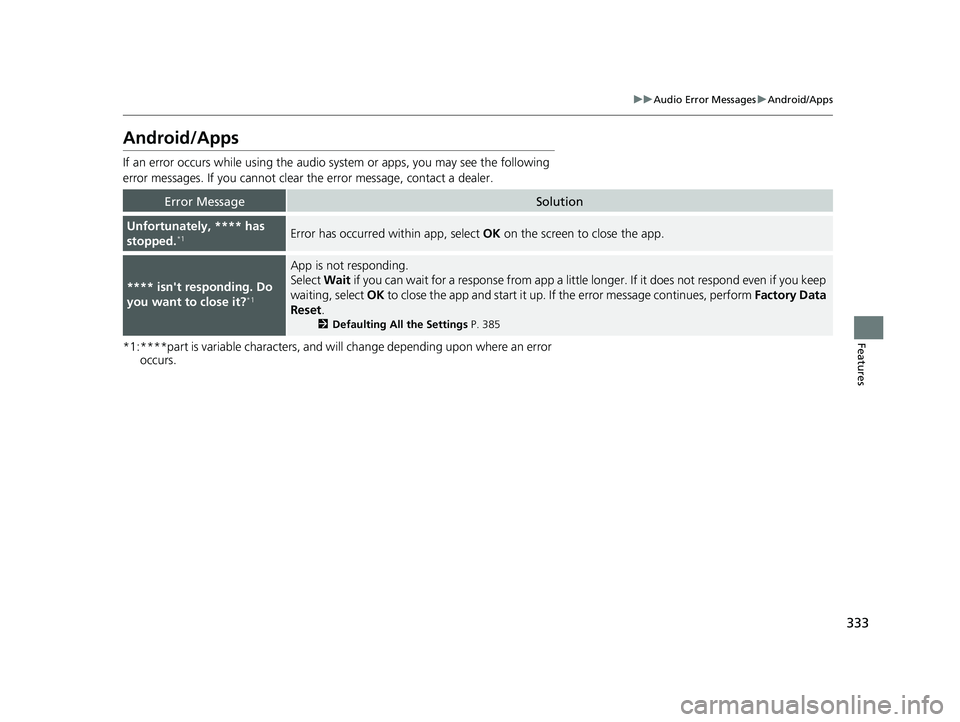
If an error occurs while using the audio system or apps, you may see the following
error messages. If you cannot clear the error message, contact a dealer.
*1:****part is variable characters, and will change depending upon where an error
occurs.
Error MessageSolution
Unfortunately, **** has
stopped.*1Error has occurred within app, select OK on the screen to close the app.
**** isn't responding. Do
you want to close it?*1
App is not responding.
Select Wait if you can wait for a response from app a little longer. If it does not respond even if you keep
waiting, select OK to close the app and start it up. If the error message continues, perform Factory Data
Reset .
2Defaulting All the Settings P. 385
23 ACURA RDX-31TJB6400.book 333 ページ 2022年8月4日 木曜日 午後1時51分
Page 362 of 713

360
uuCustomized Features u
Features
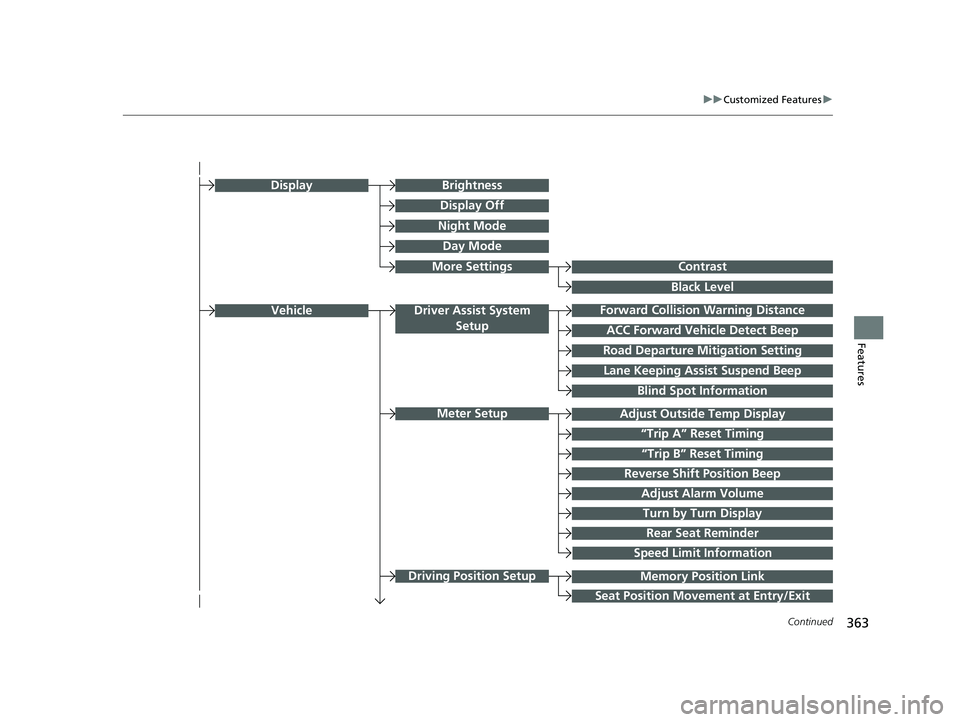
■Customization flow
Press the (Home) button.
Select Settings.
Touchpad Sensitivity
System
System SoundsSystem Volumes
Phone Calls
Voice Recognition
Navigation Guidance
Date & Time
System Units
Factory Data Reset
Language
Time Format
Set Date & Time
Set Time
Set Date
Automatic Date &
Time
About
(Select Time Zone)
Automatic Time ZoneSet Time Zone
23 ACURA RDX-31TJB6400.book 360 ページ 2022年8月4日 木曜日 午後1時51分
Page 365 of 713
363
uuCustomized Features u
Continued
Features
Memory Position Link
“Trip B” Reset Timing
Seat Position Movement at Entry/Exit
Adjust Outside Temp Display
“Trip A” Reset Timing
Meter Setup
Vehicle
Driving Position Setup
Reverse Shift Position Beep
Adjust Alarm Volume
Turn by Turn Display
Road Departure Mitigation Setting
Forward Collision Warning Distance
ACC Forward Vehicle Detect Beep
Lane Keeping Assist Suspend Beep
Blind Spot Information
Driver Assist System
Setup
Night Mode
Day Mode
BrightnessDisplay
Contrast
Black Level
More Settings
Display Off
Rear Seat Reminder
Speed Limit Information
23 ACURA RDX-31TJB6400.book 363 ページ 2022年8月4日 木曜日 午後1時51分
Page 367 of 713

365
uuCustomized Features u
Continued
Features
Guidelines
Cross Traffic Monitor
Guidelines
Cross Traffic Monitor
Rear Camera*Camera
Surround View Camera*
Show after Shifting from Reverse
(Select Reset Items)Maintenance Information
Reset All Due
Power Tailgate Keyless Open Mode
Power Tailgate Open by Outer Handle
Hands Free Access Power Tailgate*
Power Tailgate Setup
* Not available on all models
23 ACURA RDX-31TJB6400.book 365 ページ 2022年8月4日 木曜日 午後1時51分
Page 368 of 713
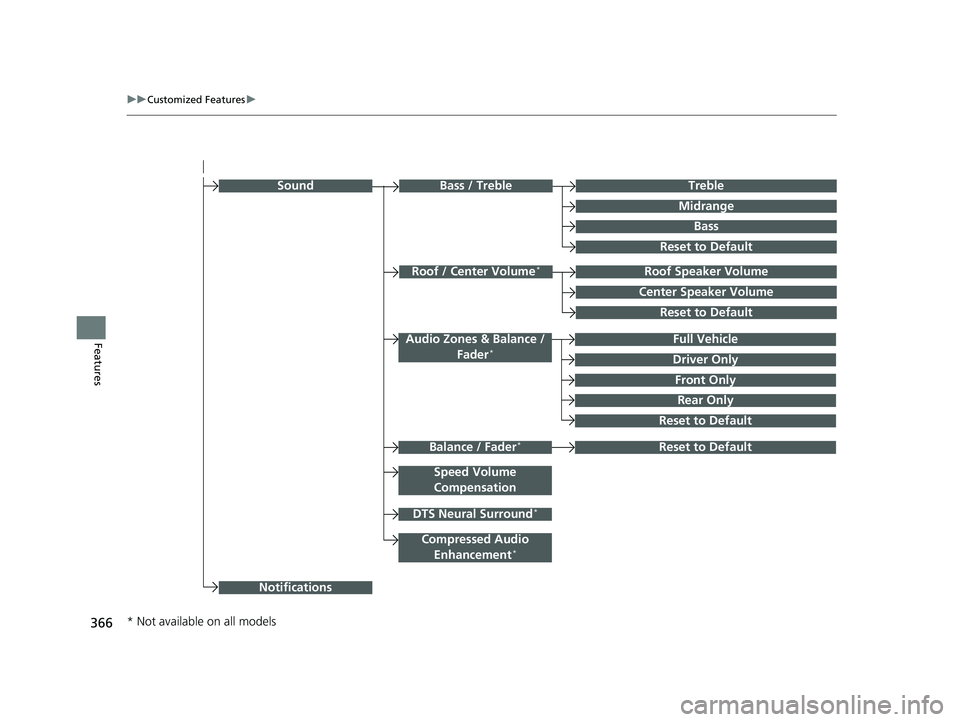
366
uuCustomized Features u
Features
Rear Only
Reset to Default
Front Only
Full Vehicle
Driver Only
Roof Speaker Volume
Center Speaker Volume
Reset to Default
Roof / Center Volume*
Sound
Speed Volume
Compensation
DTS Neural Surround*
Notifications
Compressed Audio Enhancement*
Treble
Midrange
Bass
Bass / Treble
Reset to Default
Audio Zones & Balance / Fader*
Reset to DefaultBalance / Fader*
* Not available on all models
23 ACURA RDX-31TJB6400.book 366 ページ 2022年8月4日 木曜日 午後1時51分
Page 370 of 713

368
uuCustomized Features u
Features
*1:Default SettingSetup Group Customizable Features Description Selectable Settings
System
Date & TimeSet Time
Zone
Automatic
Time ZoneSets the audio system to automatically
adjust the clock when driving through
different time zones.
On*1/
Off
(Select time
zone)Changes the time zone manually.—
System Units
Changes the speed/distance unit on
the multi-information display, head-up
display
* and audio/information screen.
Miles*1/ KM (U.S.)
Miles /KM*1 (Canada)
LanguageChanges the display language.English*1/Français /
Español
Factory Data Reset
Resets all the settings to their factory
default.
2 Defaulting All the Settings P. 385
Continue/Cancel
AboutDisplays the Android setting items.—
Advanced
OptionsLocation Access
Selects Off not to allow apps including
the navigation system* to access the
vehicle’s location.On*1/ Off
* Not available on all models
23 ACURA RDX-31TJB6400.book 368 ページ 2022年8月4日 木曜日 午後1時51分
Page 378 of 713
376
uuCustomized Features u
Features
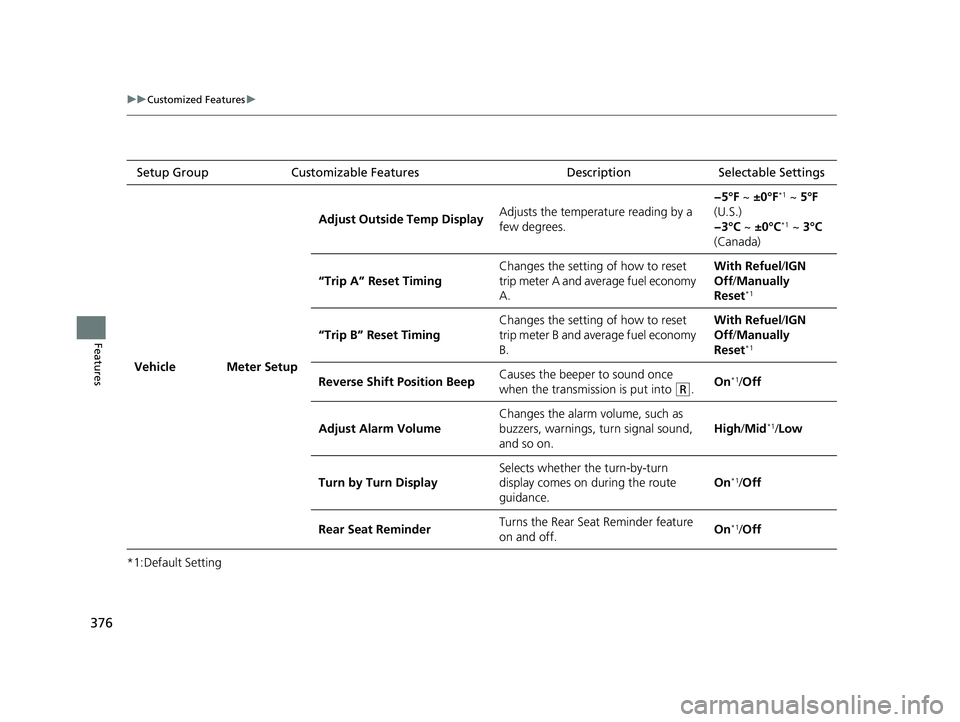
*1:Default SettingSetup Group Customizable Features Description Selectable Settings
Vehicle Meter Setup Adjust Outside Temp Display
Adjusts the temperature reading by a
few degrees. −5°F ~
±0°F
*1 ~ 5°F
(U.S.)
−3°C ~ ±0°C
*1 ~ 3°C
(Canada)
“Trip A” Reset Timing Changes the setting of how to reset
trip meter A and average fuel economy
A. With Refuel
/IGN
Off /Manually
Reset
*1
“Trip B” Reset Timing Changes the setting of how to reset
trip meter B and average fuel economy
B. With Refuel
/IGN
Off /Manually
Reset*1
Reverse Shift Position Beep Causes the beeper to sound once
when the transmission is put into (R.On*1/
Off
Adjust Alarm Volume Changes the alarm volume, such as
buzzers, warnings, turn signal sound,
and so on. High
/Mid
*1/Low
Turn by Turn Display Selects whether the turn-by-turn
display comes on during the route
guidance. On
*1/
Off
Rear Seat Reminder Turns the Rear Seat Reminder feature
on and off. On
*1/
Off
23 ACURA RDX-31TJB6400.book 376 ページ 2022年8月4日 木曜日 午後1時51分