reset ACURA RDX 2023 Owner's Manual
[x] Cancel search | Manufacturer: ACURA, Model Year: 2023, Model line: RDX, Model: ACURA RDX 2023Pages: 713, PDF Size: 21.99 MB
Page 383 of 713

381
uuCustomized Features u
Continued
Features
*1:Default SettingSetup Group Customizable Features
Description Selectable Settings
Vehicle Power
Tailgate
SetupPower Tailgate Keyless Open
Mode
Changes the setting to enable the
power tailgate to be opened with the
keyless remote at anytime or only
when the doors are unlocked.
Anytime
*1/
When
Unlocked
Power Tailgate Open by
Outer Handle Changes the setting to enable or
disable the power tailgate open
operation when the user presses the
outer handle of the power tailgate. Off (Manual only)
/
On (Power/
Manual)
*1
Hands Free Access Power
Tailgate*
Changes the setting to enable or
disable the power tailgate open
operation when a kicking motion
under the rear bumper is detected. On
*1/
Off
Maintenance
Information (Select Reset Items) Resets the Maintenance Minder
TM
display when you have performed the
maintenance service. —
Reset All Due
* Not available on all models
23 ACURA RDX-31TJB6400.book 381 ページ 2022年8月4日 木曜日 午後1時51分
Page 385 of 713
383
uuCustomized Features u
Continued
Features
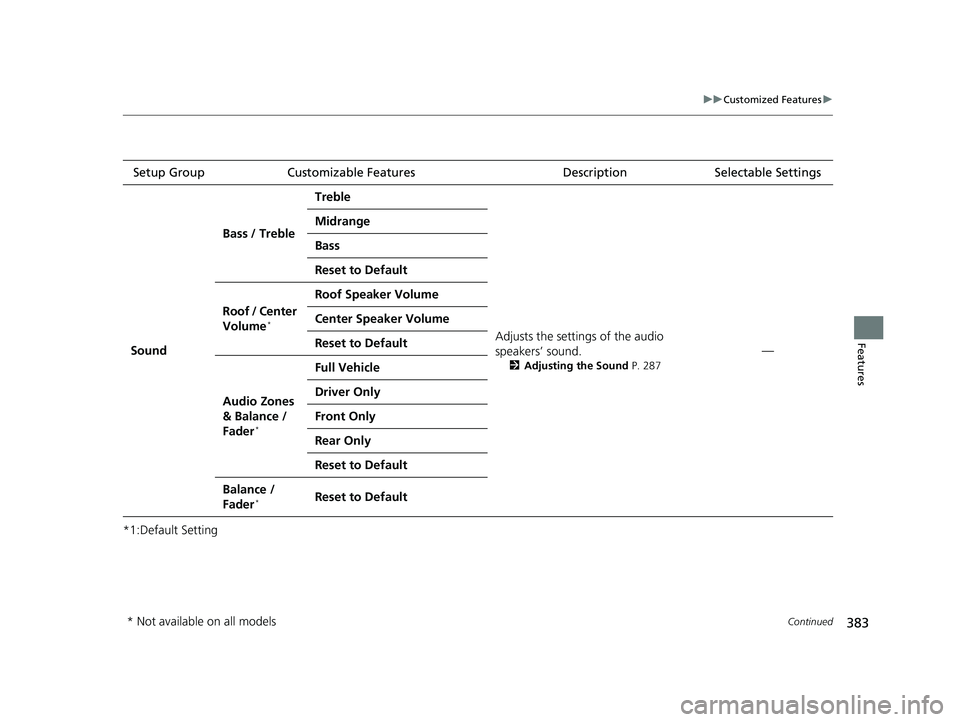
*1:Default SettingSetup Group Customizable Features
Description Selectable Settings
Sound Bass / Treble
Treble
Adjusts the settings of the audio
speakers’ sound.
2Adjusting the Sound P. 287
—
Midrange
Bass
Reset to Default
Roof / Center
Volume
*
Roof Speaker Volume
Center Speaker Volume
Reset to Default
Audio Zones
& Balance /
Fader
*
Full Vehicle
Driver Only
Front Only
Rear Only
Reset to Default
Balance /
Fader*Reset to Default
* Not available on all models
23 ACURA RDX-31TJB6400.book 383 ページ 2022年8月4日 木曜日 午後1時51分
Page 387 of 713

385
uuCustomized Features uDefaulting All the Settings
Features
Defaulting All the Settings
Reset all the menu and customized settings as the factory defaults.
1.Press the (home) button.
2. Select Settings .
3. Select System.
4. Select Factory Data Reset .
u A confirmation message appears on the
screen.
5. Select Continue to reset the settings.
6. Select Reset to reset the settings.
u The system w ill reboot.
1. Press the (home) button.
2. Select Settings .
3. Select Vehicle .
4. Select Reset to Default .
5. Select Reset.
■Defaulting System Settings
1Defaulting All the Settings
When you transfer the vehicle to a third party, reset
all settings to default a nd delete all personal data.
If you perform Factory Data Reset , it will reset the
preinstalled apps to their factory default.
■Defaulting Vehicle Settings
23 ACURA RDX-31TJB6400.book 385 ページ 2022年8月4日 木曜日 午後1時51分
Page 417 of 713
Continued415
uuBluetooth ® HandsFreeLink ®u Text Message
Features
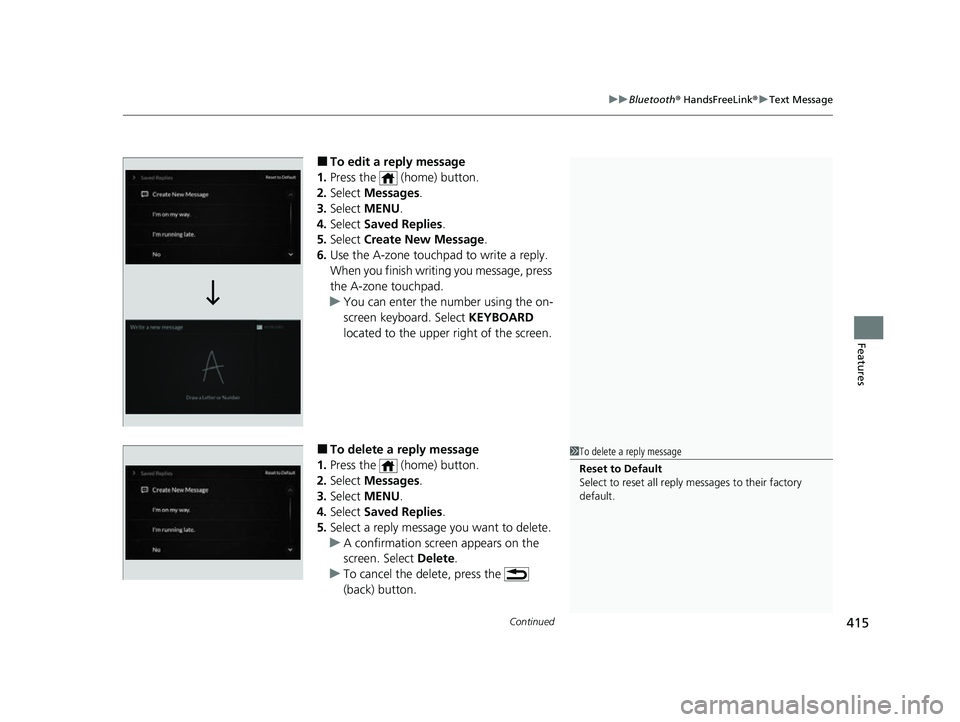
■To edit a reply message
1. Press the (home) button.
2. Select Messages.
3. Select MENU .
4. Select Saved Replies .
5. Select Create New Message .
6. Use the A-zone touchpad to write a reply.
When you finish writ ing you message, press
the A-zone touchpad.
u You can enter the number using the on-
screen keyboard. Select KEYBOARD
located to the upper right of the screen.
■To delete a reply message
1. Press the (home) button.
2. Select Messages.
3. Select MENU .
4. Select Saved Replies .
5. Select a reply message you want to delete.
u A confirmation screen appears on the
screen. Select Delete.
u To cancel the delete, press the
(back) button.1To delete a reply message
Reset to Default
Select to reset all reply messages to their factory
default.
23 ACURA RDX-31TJB6400.book 415 ページ 2022年8月4日 木曜日 午後1時51分
Page 591 of 713

589
uuMaintenance MinderTMuTo Use Maintenance MinderTM
Continued
Maintenance
■Maintenance Service Items
Maintenance Minder Message
Main
Item Sub
ItemsMaintenance Minder Indicator
System Message Indicator
U.S. models
*1: If a Maintenance Minder Indicator and message does not appear more than 12 months after the
display is reset, change the engine oil every year.
# : See information on maintenance and emissions warranty.
*2: If you drive in dusty conditions, replace the air cleaner element every 15,000 miles (24,000 km).
CODEMaintenance Main Items
A
●Replace engine oil*1
B●Replace engine oil*1 and oil filter●Inspect front and rear brakes●Check expiration date for Temporary Tire Repair Kit bottle (If
equipped)
●Inspect tie rod ends, steering gearbox, and boots●Inspect suspension components●Inspect driveshaft boots●Inspect brake hoses and lin es (Including ABS/VSA®)●Inspect all fluid levels and condition of fluids●Inspect exhaust system#
●Inspect fuel lines and connections#
●Adjust the valves during services A, B, 1, 2, or 3 if they are noisy.
*3: If you drive primarily in urban areas that have high concentrations of soot in the air from industry and
from diesel-powered vehicles, replace the dust and pollen filter every 15,000 miles (24,000 km).
*4: Driving in mountainous areas at very low vehicle speeds or trailer towing results in higher level of mechanical (Shear) stress to fluid. This requires differential fluid changes more frequently than
recommended by the Maintenance Minder. If you regularly drive your vehicle under these conditions, have
the differential fluid changed at 7,500 miles (12,000 km), then every 15,000 miles (24,000 km).
*5: If a Maintenance Minder Indicator does not appear more than 36 months after the display for item 7 is reset, change the brake fluid every 3 years.
CODEMaintenance Sub Items
1
●Rotate tires
2●Replace air cleaner element*2
●Replace dust and pollen filter*3
●Inspect drive belt
3
●Replace transmission fluid and transfer* fluid
4●Replace spark plugs●Inspect valve clearance
5
●Replace engine coolant
6●Replace rear differential fluid*, *4
7●Replace brake fluid*5
* Not available on all models
23 ACURA RDX-31TJB6400.book 589 ページ 2022年8月4日 木曜日 午後1時51分
Page 592 of 713

590
uuMaintenance MinderTMuTo Use Maintenance MinderTM
Maintenance
Canadian models
*1: If a Maintenance Minder Indicator and message does not appear more than 12 months after the
display is reset, change the engine oil every year.
*2: If you drive in dusty conditions, replace every 24,000 km (15,000 miles).
*3: If you drive primarily in urban areas that have high concentrations of soot in the air from industry and
from diesel-powered vehicles, replace every 24,000 km (15,000 miles).
*4: Driving in mountainous areas at very low vehicle speeds or trailer towing results in higher level of mechanical (Shear) stress to fluid. This requires differential fluid changes more frequently than
recommended by the Maintenance Minder.
If you regularly drive your vehicle under these conditions, have the differential fluid changed at 12,000
km (7,500 miles), then every 24,000 km (15,000 miles).
*5: If a Maintenance Minder Indicator does not appear more than 36 months after the display for item 7 is reset, change the brake fluid every 3 years.
# : See information on maintenance and emissions warranty.
CODEMaintenance Main Items
A
●Replace engine oil*1
0●Replace engine oil*1 and oil filter
●Adjust the valves during services A, 0, 9, 1, 2, or 3 if they are noisy.
CODEMaintenance Sub Items
1
●Rotate tires
2●Replace air cleaner element*2
●Replace dust and pollen filter*3
●Inspect drive belt
3
●Replace transmission fl uid and transfer fluid
4●Replace spark plugs●Inspect valve clearance
5
●Replace engine coolant
6●Replace rear differential fluid*4
7●Replace brake fluid*5
9●Service front and rear brakes●Inspect these items:
•Tie rod ends, steeri ng gearbox, and boots
•Suspension components
•Driveshaft boots
•Brake hoses and lines (including ABS/VSA®)
•All fluid levels and condition of fluids
•Exhaust system#
•Fuel lines and connections#
23 ACURA RDX-31TJB6400.book 590 ページ 2022年8月4日 木曜日 午後1時51分
Page 593 of 713
591
uuMaintenance MinderTMuTo Use Maintenance MinderTM
Maintenance
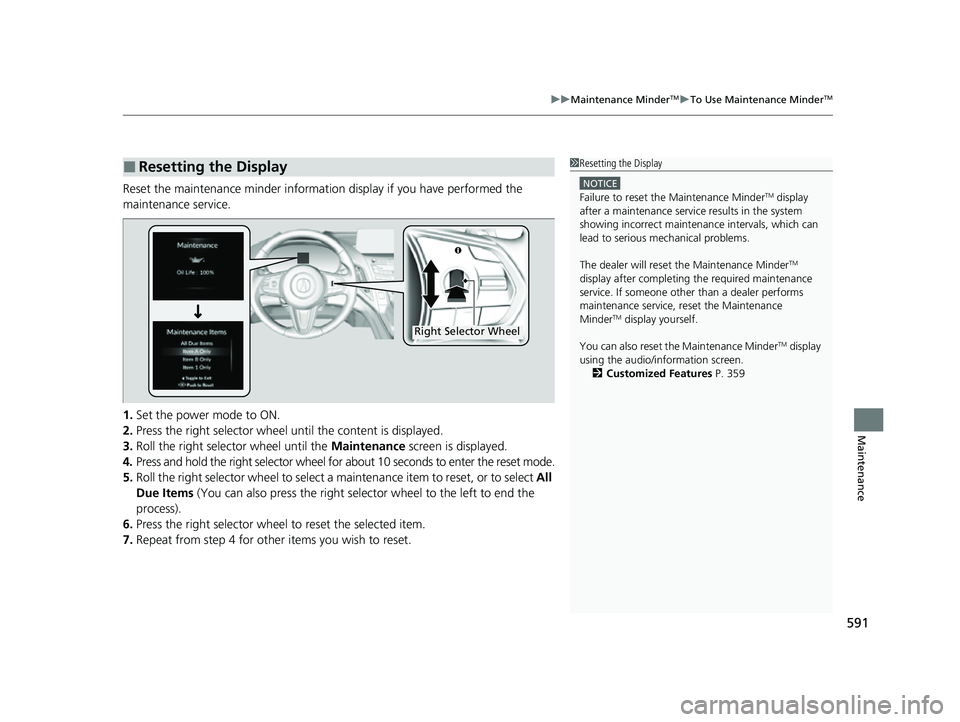
Reset the maintenance minder information display if you have performed the
maintenance service.
1. Set the power mode to ON.
2. Press the right selector wheel until the content is displayed.
3. Roll the right selector wheel until the Maintenance screen is displayed.
4. Press and hold the right selector wheel for about 10 seconds to enter the reset mode.
5. Roll the right selector wheel to select a ma intenance item to reset, or to select All
Due Items (You can also press the right selector wheel to the left to end the
process).
6. Press the right selector wheel to reset the selected item.
7. Repeat from step 4 for other items you wish to reset.
■Resetting the Display1Resetting the Display
NOTICE
Failure to reset the Maintenance MinderTM display
after a maintenance servic e results in the system
showing incorrect maintenance intervals, which can
lead to serious mechanical problems.
The dealer will reset the Maintenance Minder
TM
display after completing th e required maintenance
service. If someone other than a dealer performs
maintenance service, reset the Maintenance
Minder
TM display yourself.
You can also reset the Maintenance Minder
TM display
using the audio/information screen. 2 Customized Features P. 359
Right Selector Wheel
23 ACURA RDX-31TJB6400.book 591 ページ 2022年8月4日 木曜日 午後1時51分
Page 622 of 713

620
uuChecking and Maintaining Tires uTire and Wheel Replacement
Maintenance
Tire and Wheel Replacement
Replace your tires with radials of the sa me size, load range, speed rating, and
maximum cold tire pressure ra ting (as shown on the tire’s sidewall). Using tires of a
different size or construction can cause ce rtain vehicle systems such as the ABS and
Vehicle Stability Assist
TM (VSA ®) system to work incorrectly.
It is best to replace all four tires at the same time. If that isn’t possible, replace the
front or rear tires in pairs.
Whenever you have a tire replaced or reset, make sure that the rubber valve stem is
replaced and that the TPMS sensor is trans ferred from the old valve stem to the new
one.
If you replace a wheel, make sure that the wheel’s specifications match those of the
original wheels.
1 Tire and Wheel Replacement
3WARNING
Installing improper tires on your vehicle can
affect handling and stability. This can cause
a crash in which you can be seriously hurt or
killed.
Always use the size and type of tires
recommended in this owner’s manual.
23 ACURA RDX-31TJB6400.book 620 ページ 2022年8月4日 木曜日 午後1時51分
Page 625 of 713

623
Maintenance
Battery
Checking the Battery
The condition of the battery is monitored by a
sensor located on the negative terminal of the
battery. If there is a problem with this sensor,
the multi-information display will display a
warning message. If this happens, have your
vehicle inspected by a dealer.
Check the battery termi nals for corrosion
monthly.
If your vehicle’s battery is disconnected or goes dead:
• The audio system is disabled.
2 Audio System Theft Protection P. 257
•The clock resets.
2 Clock P. 154
•The immobilizer system needs to be reset.
2 Immobilizer System Indicator P. 99
1Battery
WARNING: Battery post, terminals,
and related accessories contain lead
and lead compounds.
Wash your hands after handling.
When you find corrosion, cl ean the battery terminals
by applying a baking powder and water solution.
Clean the terminals with a damp towel. Cloth/towel
dry the battery. Coat the terminals with grease to
help prevent future corrosion.
When replacing the battery, the replacement must be
of the same specifications.
Consult a dealer for more information.
3WARNING
The battery gives off explosive hydrogen
gas during normal operation.
A spark or flame can cause the battery to
explode with enough force to kill or
seriously hurt you.
When conducting any battery
maintenance, wear prot ective clothing and
a face shield, or have a skilled technician do
it.
Battery
Canadian models only
23 ACURA RDX-31TJB6400.book 623 ページ 2022年8月4日 木曜日 午後1時51分
Page 710 of 713

708
Index
Parking Brake and Brake System Indicator (Red) ............................ 81, 82, 675
Parking Sensor System .............................. 557
Passenger Airbag Off Indicator ................. 61
Passing Indicators ..................................... 197
Playing Bluetooth ® Audio ........................ 316
Power Tailgate .......................................... 175
Power Windows ........................................ 186
Precautions While Driving ........................ 449
Driving Guidelines for Your Utility Vehicle................................................... 449
Rain ......................................................... 450
Pregnant Women ....................................... 44
Puncture (Tire) .................................. 641, 649
R
Radar Sensor............................................. 543
Radiator ..................................................... 601
Radio (AM/FM) .......................................... 293
Radio (SiriusXM ®)...................................... 297
Range ........................................................ 141
Readiness Codes (Emissions Testing) ....... 695
Rear Defogger/Heated Door Mirror
Button ...................................................... 207
Rear Seat Reminder .................................. 224
Rear Seats (Folding Down) ....................... 222
Rear Temperature Control Dial ............... 251
Rearview Mirror ........................................ 213
Refueling ........................................... 575, 688
Fuel Gauge .............................................. 136 Gasoline .......................................... 575, 690
Low Fuel Indicator ..................................... 94
Regulations ............................... 477, 617, 693
Remote Engine Start ................................ 445
Remote Transmitter ................................. 165
Replacement Battery ............................................ 625, 626
Bulbs ....................................................... 605
Fuses ....................................... 678, 681, 682
Rear Wiper Blade Rubber......................... 612
Tires ........................................................ 620
Wiper Blade Rubber ................................ 609
Reporting Safety Defects ......................... 694
Resetting a Trip Meter ............................. 140
Reverse Tilt Door Mirror .......................... 214
Road Departure Mitigation (RDM) ......... 530
On and Off.............................................. 532
S
Safe Driving ................................................ 31
Safety Check ............................................... 36
Safety Labels ............................................... 78
Safety Message ............................................. 3
Safety Support .......................................... 146
Seat Belts .................................................... 37
Adjusting the Shoulder Anchor.................. 43
Automatic Seat Belt Tensioners ................. 41
Checking................................................... 45
Fastening .................................................. 42 Installing a Child Seat
with a Lap/Shoulder
Seat Belt ................................................. 71
Pregnant Women...................................... 44
Reminder .................................................. 39
Warning Indicator ............................... 39, 93
Seat Heaters ............................................. 245
Seat Ventilators ........................................ 245
Seats .......................................................... 216
Adjusting ................................................ 216
Front Seats.............................................. 216
Lumbar Support ...................................... 216
Rear Seats ............................................... 222
Seat Control Interface ............................. 218
Seat Heaters ................................... 245, 246
Ventilators .............................................. 245
Security System ........................................ 183
Immobilizer System Indicator ..................... 99
Security System Alarm Indicator ................ 99
Selecting a Child Seat ................................ 68
Sequential Mode ...................................... 457
Setting the Clock ...................................... 154
SH-AWD ® (Super Handling-All Wheel
Drive
TM) ................................................... 474
Shift Button ........................................ 21, 451
Operation ......................................... 21, 453
Shifting (Transmission) ...................... 21, 451
Shoulder Anchor ........................................ 43
Side Airbags ............................................... 57
Side Curtain Airbags .................................. 59
SiriusXM ® Radio ....................................... 297
Smart Shortcuts ........................................ 278
23 ACURA RDX-31TJB6400.book 708 ページ 2022年8月4日 木曜日 午後1時51分