flat ACURA RDX 2023 Owner's Manual
[x] Cancel search | Manufacturer: ACURA, Model Year: 2023, Model line: RDX, Model: ACURA RDX 2023Pages: 713, PDF Size: 21.99 MB
Page 478 of 713

uuWhen Driving uTire Pressure Monitoring System (TPMS) with Tire Fill Assist
476
Driving
To select the tire pressure monitor, set the power
mode to ON, and roll the right selector wheel
until you see the tire pressure screen.
The pressure for each tire is displayed in psi
(U.S.) or kPa (Canada).
Tire Pressures Low is displayed when a tire
has significantly low pressure. The specific tire
is displayed on the screen.
■Tire Pressure Monitor1Tire Pressure Monitor
The pressure displayed on the multi-information
display can be slightly different from the actual
pressure as measured by a gauge. If there is a
significant di fference between the two values, or if
the low tire pressure/TPMS indicator and the message
on the multi-information di splay do not go off after
you have inflated the tire to the specified pressure,
have the system checked by a dealer.
Tire Pressure Monitor System Problem. Check
Tire Pressure. See Your Dealer. may appear if you
drive with the compact spare tire
*, or there is a
problem with the TPMS.
* Not available on all models
23 ACURA RDX-31TJB6400.book 476 ページ 2022年8月4日 木曜日 午後1時51分
Page 479 of 713

477
uuWhen Driving uTire Pressure Monitoring System (TPMS) - Required Federal Explanation
Continued
Driving
Tire Pressure Monitoring System (TPMS) - Required
Federal Explanation
Each tire, including the spare (if provided), should be checked
monthly when cold and inflated to the inflation pressure
recommended by the vehicle manufa cturer on the vehicle placard
or tire inflation pressure label.
(If your vehicle has tires of a diff erent size than the size indicated
on the vehicle placard or tire inflation pressure label, you should
determine the proper tire inflat ion pressure for those tires.)
As an added safety feature, your vehicle has been equipped with
a tire pressure monitoring system (TPMS) that illuminates a low
tire pressure telltale
when one or more of your tires is significantly under-inflated.
Accordingly, when the low tire pressure telltale illuminates, you
should stop and check your tires as soon as possible, and inflate
them to the proper pressure.
Driving on a significantly under-inf lated tire causes the tire to
overheat and can lead to tire fail ure. Under-inflation also reduces
fuel efficiency and tire tread life, and may affect the vehicle’s
handling and stopping ability.
23 ACURA RDX-31TJB6400.book 477 ページ 2022年8月4日 木曜日 午後1時51分
Page 480 of 713

478
uuWhen Driving uTire Pressure Monitoring System (TPMS) - Required Federal Explanation
Driving
Please note that the TPMS is not a substitute for proper tire
maintenance, and it is the driver ’s responsibility to maintain
correct tire pressure, even if un der-inflation has not reached the
level to trigger illumina tion of the TPMS low ti re pressure telltale.
Your vehicle has also been eq uipped with a TPMS malfunction
indicator to indicate when the sy stem is not operating properly.
The TPMS malfunction indicator is combined with the low tire
pressure telltale. When the system detects a malfunction, the
telltale will flash fo r approximately one minute and then remain
continuously illuminated. This sequence will continue upon
subsequent vehicle start-ups as long as the malfunction exists.
When the malfunction indicator is illuminated, the system may
not be able to detect or signal low tire pressure as intended.
TPMS malfunctions may occur for a variety of reasons, including
the installation of replacement or alternate tires or wheels on the
vehicle that prevent the TPMS from functioning properly.
Always check the TPMS malfunction telltale after replacing one or
more tires or wheels on your vehicle to ensure that the
replacement or alternate tires and wheels allow the TPMS to
continue to function properly.
23 ACURA RDX-31TJB6400.book 478 ページ 2022年8月4日 木曜日 午後1時51分
Page 494 of 713

492
uuAcuraWatchTMuCollision Mitigation Braking SystemTM (CMBSTM)
Driving
■Vehicle conditions
• Headlight lenses are dirty or the headlights are not properly adjusted.
• The outside of the windshie ld is blocked by dirt, mud, leaves, wet snow, etc.
• The inside of the windshield is fogged.
• An abnormal tire or wheel condition (incorre ct sizes, varied sizes or construction,
improperly inflated, compact spare tire
*, etc.).
• When tire chains are installed.
• The vehicle is tilted due to a heav y load or suspension modifications.
• The camera temperature gets too high.
• Driving with the parking brake applied.
• When the radar sensor behind the emblem gets dirty.
• The vehicle is towing a trailer.
* Not available on all models
23 ACURA RDX-31TJB6400.book 492 ページ 2022年8月4日 木曜日 午後1時51分
Page 496 of 713
494
uuAcuraWatchTMuCollision Mitigation Braking SystemTM (CMBSTM)
Driving
• When there is a group of people in front of your vehicle walking together side by
side.
• Surrounding conditions or belongings of the pedestrian alter the pedestrian’s
shape, preventing the system from recogn izing that the person is a pedestrian.
• When the pedestrian is shorter than about 3.3 feet (1 me ter) or taller than about
6.6 feet (2 meters) in height.
• When a pedestrian blends in with the background.
• When a pedestrian is bent over or squa tting, or when their hands are raised or
they are running.
• When several pedestrians are walking ahead in a group.
• When the camera cannot correctly identify that a pedestrian is present due to an
unusual shape (holding luggage, body position, size).
■Automatic shutoff
The CMBSTM may automatically shut itself off and the safety support indicator
(amber) comes and stays on when:
• The temperature inside the system is high.
• You drive off-road or on a mountain ro ad, or curved and winding road for an
extended period.
• An abnormal tire condition is detected (wrong tire size, flat tire, etc.).
• The camera behind the rearview mirror, or the area around the camera, including
the windshield, gets dirty.
Once the conditions that caused the CMBS
TM to shut off improve or are addressed
(e.g., cleaning), the system comes back on.
Limitations applicable to pedestrian detection only
23 ACURA RDX-31TJB6400.book 494 ページ 2022年8月4日 木曜日 午後1時51分
Page 511 of 713

Continued509
uuAcuraWatchTMuAdaptive Cruise Control (ACC) with Low Speed Follow
Driving
The system may automatically shut off u nder certain conditions. Some examples of
these conditions are listed below. Othe r conditions may reduce some of the ACC
with Low Speed Follow functions.
2 Front Sensor Camera P. 541
2 Radar Sensor P. 543
■Environmental conditions
Driving in bad weather (r ain, fog, snow, etc.).
■Roadway conditions
Driving on a snowy or wet roadway (obscured lane marking, vehicle tracks, reflected
lights, road spra y, high contrast).
■Vehicle conditions
• The outside of the windshield is blocked by dirt, mud, leaves, wet snow, etc.
• An abnormal tire or wheel condition (inco rrect sizes, varied sizes or construction,
improperly inflated, compact spare tire
*, etc.).
• The camera temperature gets too high.
• The parking brake is applied.
• The radar sensor cover is dirty.
• The vehicle is tilted due to a heavy load or suspension modifications.
• Tire chains are installed.
• The vehicle is towing a trailer.
■ACC with Low Speed Follow Conditions and Limitations1ACC with Low Speed Follow Conditions and Limitations
If you need the radar sensor to be repaired, or
removed, or the radar se nsor cover is strongly
impacted, turn off the system by pressing the
button and take your vehicle to a dealer.
Have your vehicle checked by a dealer if you find any
unusual behavior of the system (e.g., the warning
message appears too frequently).
If the front of the vehicle is impacted in any of the
following situations, the ra dar sensor may not work
properly. Have your vehi cle checked by a dealer:
•The vehicle mounted onto a bump, curb, chock,
embankment, etc.
•You drive the vehicle where water is deep.
•Your vehicle has a frontal collision.
* Not available on all models
23 ACURA RDX-31TJB6400.book 509 ページ 2022年8月4日 木曜日 午後1時51分
Page 531 of 713
529
uuAcuraWatchTMuLane Keeping Assist System (LKAS)
Driving
• When objects on the road (curb, guard rail, pylons, etc.) are recognized as white
(or yellow) lines.
• Driving on roads with double lines.
■Vehicle conditions
• Headlight lenses are dirty or the h eadlights are not properly adjusted.
• The outside of the windshield is streaked or blocked by dirt, mud, leaves, wet
snow, etc.
• The inside of the windshield is fogged.
• The camera temperature gets too high.
• An abnormal tire or wheel condition (inco rrect sizes, varied sizes or construction,
improperly inflated, compact spare tire
*, etc.).
• The vehicle is tilted due to a heavy load or suspension modifications.
• The vehicle is towing a trailer.
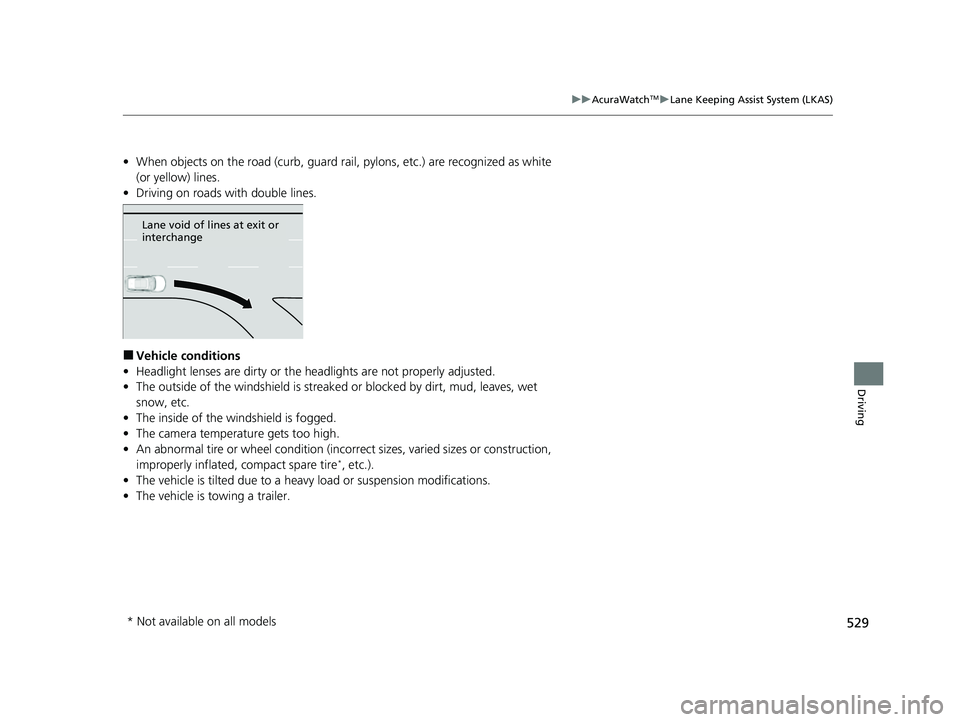
Lane void of lines at exit or
interchange
* Not available on all models
23 ACURA RDX-31TJB6400.book 529 ページ 2022年8月4日 木曜日 午後1時51分
Page 536 of 713
534
uuAcuraWatchTMuRoad Departure Mitigation System
Driving
■Roadway conditions
• Driving on a snowy or wet roadway (obs cured lane marking, vehicle tracks,
reflected lights, road spray, high contrast).
• Driving on a road with temporary lane markings.
• Faint, multiple, or varied lane markings are visible on the roadway due to road
repairs or old lane markings.
• The roadway has merging, split, or crossing lines (e.g., such as at an intersection
or crosswalk).
• The lane markings are extremely narrow, wide, or changing.
• The vehicle in front of you is driving near the lane lines.
• The road is hilly or the vehicle is approaching the crest of a hill.
• Driving on rough or unpaved roads, or over bumpy surfaces.
• When objects on the road (curb, guard rail, pylons, etc.) are recognized as white
(or yellow) lines.
• Driving on roads with double lines.
■Vehicle conditions
• Headlight lenses are dirty or the headlights are not properly adjusted.
• The outside of the windshield is streake d or blocked by dirt, mud, leaves, wet
snow, etc.
• The inside of the windshield is fogged.
• The camera temperature gets too high.
• An abnormal tire or wheel condition (incorre ct sizes, varied sizes or construction,
improperly inflated, compact spare tire
*, etc.).
• The vehicle is tilted due to a heav y load or suspension modifications.
• When tire chains are installed.
• The vehicle is towing a trailer.
* Not available on all models
23 ACURA RDX-31TJB6400.book 534 ページ 2022年8月4日 木曜日 午後1時51分
Page 539 of 713

Continued537
uuAcuraWatchTMuTraffic Sign Recognition System
Driving
The Traffic Sign Recognition system may inco rrectly recognize, be slow to identify,
or fail to recognize the traffic sign in the following cases.
■Vehicle conditions
• Headlight lenses are dirty or the h eadlights are not properly adjusted.
• The outside of the windshield is blocked by dirt, mud, leaves, wet snow, etc.
• The inside of the windshield is fogged.
• There are portions remaining to be wiped.
• An abnormal tire or wheel condition (inco rrect sizes, varied sizes or construction,
improperly inflated, compact spare tire
*, etc.).
• The vehicle is tilted due to a heavy load or suspension modifications.
■Environmental conditions
• Driving into low sunlight (e.g., at dawn or dusk).
• Strong light is reflec ted onto the roadway.
• Sudden changes between light and dark, such as an entrance or exit of a tunnel.
• When you drive in the shad ows of trees, buildings, etc.
• Driving at night, in dark areas such as long tunnels.
• Driving in bad weather (rain, fog, snow, etc.).
• A vehicle in front of you is kicking up spray or snow.
■Traffic Sign Recognition System Conditions and Limitations1Traffic Sign Recognition System Conditions and Limitations
When the Traffic Sign Recognition system
malfunctions, appears on the multi-information
display and the head-up display
*. If this message does
not disappear, have your ve hicle checked by a dealer.
Multi-Information Display
Head-up display*
* Not available on all models
23 ACURA RDX-31TJB6400.book 537 ページ 2022年8月4日 木曜日 午後1時51分
Page 608 of 713
606
uuReplacing Light Bulbs uRear Turn Signal Light Bulbs
Maintenance
Rear Turn Signal Light Bulbs
When replacing, use the following bulbs.
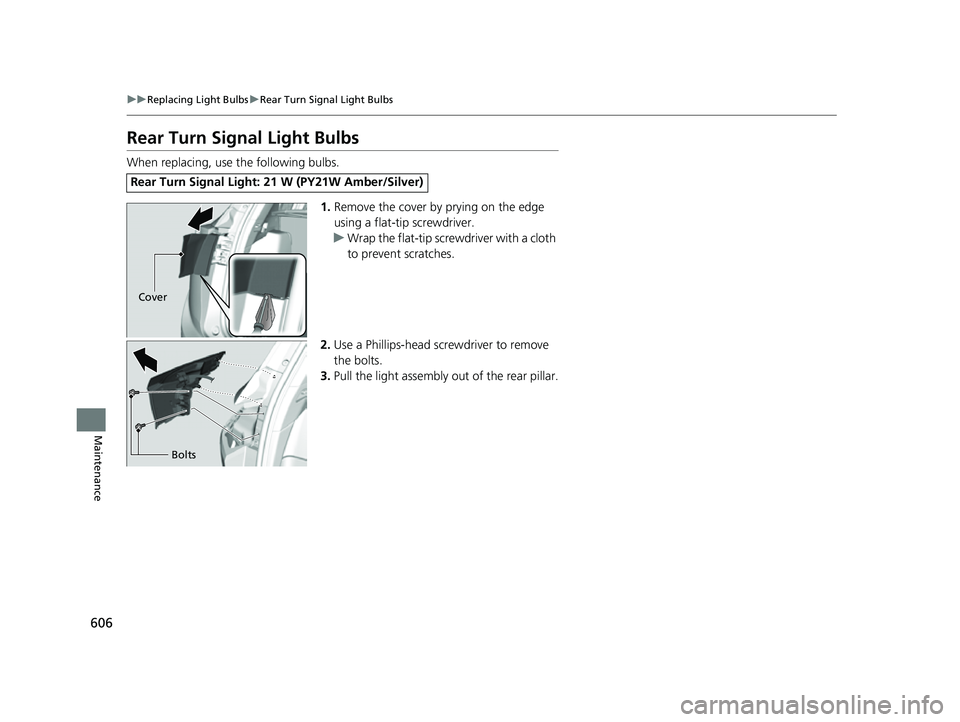
1.Remove the cover by prying on the edge
using a flat-tip screwdriver.
u Wrap the flat-tip screwdriver with a cloth
to prevent scratches.
2. Use a Phillips-head screwdriver to remove
the bolts.
3. Pull the light assembly out of the rear pillar.
Rear Turn Signal Light: 21 W (PY21W Amber/Silver)
Cover
Bolts
23 ACURA RDX-31TJB6400.book 606 ページ 2022年8月4日 木曜日 午後1時51分