instrument panel ACURA RDX 2023 Owner's Guide
[x] Cancel search | Manufacturer: ACURA, Model Year: 2023, Model line: RDX, Model: ACURA RDX 2023Pages: 713, PDF Size: 21.99 MB
Page 105 of 713
103
uuIndicators u
Continued
Instrument Panel
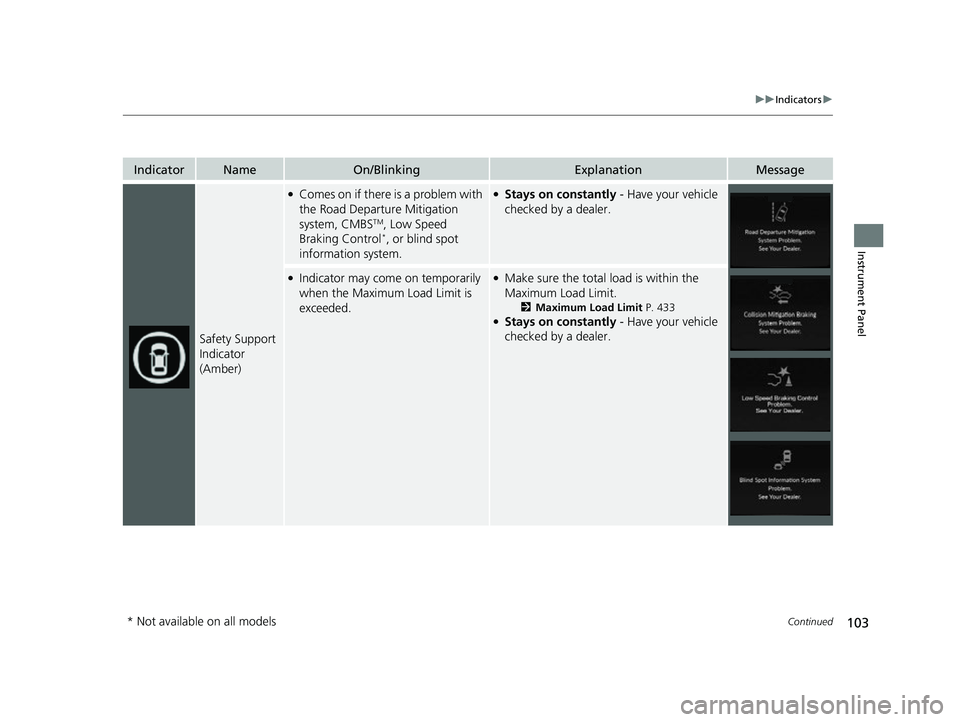
IndicatorNameOn/BlinkingExplanationMessage
Safety Support
Indicator
(Amber)
●Comes on if there is a problem with
the Road Departure Mitigation
system, CMBS
TM, Low Speed
Braking Control*, or blind spot
information system.
●Stays on constantly - Have your vehicle
checked by a dealer.
●Indicator may come on temporarily
when the Maximum Load Limit is
exceeded.●Make sure the total load is within the
Maximum Load Limit.
2 Maximum Load Limit P. 433●Stays on constantly - Have your vehicle
checked by a dealer.
* Not available on all models
23 ACURA RDX-31TJB6400.book 103 ページ 2022年8月4日 木曜日 午後1時51分
Page 106 of 713

104
uuIndicators u
Instrument Panel
IndicatorNameOn/BlinkingExplanationMessage
Safety Support
Indicator
(Amber)
●Comes on when the Road
Departure Mitigation system, Low
Speed Braking Control
* and/or
CMBSTM shuts itself off.
●Indicator may come on temporarily when
passing through an enclosed space, such
as a tunnel.
●The area around the radar sensor is
blocked by dirt, mud, etc. Stop your
vehicle in a safe place and wipe the debris
off with a soft cloth. Indicator may take
some time to go off after the radar sensor
is cleaned.
●Have your vehicle checked by a dealer if
the indicator does not go off even after
you have cleaned the radar sensor.
2 Radar Sensor P. 543
●Stays on - The temperature inside the
camera is too high.
Use the climate control system to cool
down the camera.
The system activates when the
temperature inside the camera cools
down.
2 Front Sensor Camera P. 541
* Not available on all models
23 ACURA RDX-31TJB6400.book 104 ページ 2022年8月4日 木曜日 午後1時51分
Page 107 of 713

105
uuIndicators u
Continued
Instrument Panel
IndicatorNameOn/BlinkingExplanationMessage
Safety Support
Indicator
(Amber)
●Comes on when the Road
Departure Mitigation system, Low
Speed Braking Control
* and/or
CMBSTM shuts itself off.
●Stays on - The area around the camera is
blocked by dirt, mud, etc.
Stop your vehicle in a safe place and wipe
the debris off with a soft cloth.
●Have your vehicle checked by a dealer if
the indicator and message are still
displayed even after you have cleaned the
area around the camera.
2 Front Sensor Camera P. 541
●Comes on when mud, snow, or ice
has accumulated in the vicinity of
the blind spot information system
sensor.
●Comes on when the temperature of
the blind spot information system
sensor is high.
●Comes on while driving - Something
may be interfering wi th the blind spot
information system sensor. Check the
vicinity of the blind spot information
system sensor and remove any obstacles.
●The system will return to normal when the
temperature cools down.
2 Blind Spot Information System P. 479
●Comes on when mud, snow, or ice
accumulates in the vicinity of the
sonar sensor.
●Remove the obstacle in the vicinity of the
sonar sensor.
2Low Speed Braking Control* P. 497
Models with Low Speed Braking Control
* Not available on all models
23 ACURA RDX-31TJB6400.book 105 ページ 2022年8月4日 木曜日 午後1時51分
Page 108 of 713
106
uuIndicators u
Instrument Panel
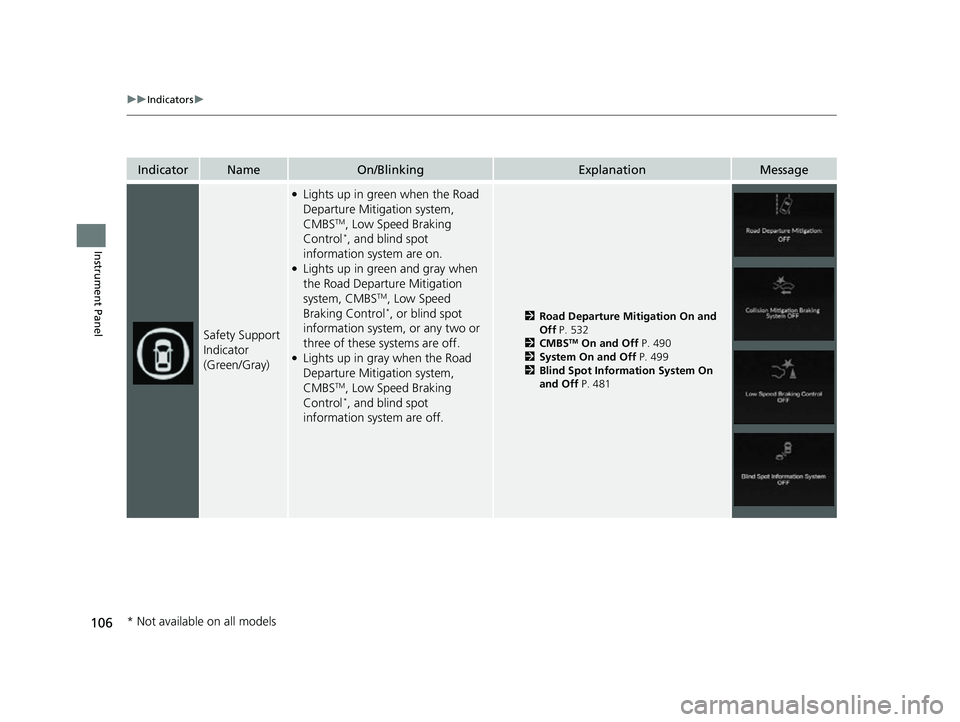
IndicatorNameOn/BlinkingExplanationMessage
Safety Support
Indicator
(Green/Gray)
●Lights up in green when the Road
Departure Mitigation system,
CMBS
TM, Low Speed Braking
Control*, and blind spot
information system are on.
●Lights up in green and gray when
the Road Departure Mitigation
system, CMBS
TM, Low Speed
Braking Control*, or blind spot
information system, or any two or
three of these systems are off.
●Lights up in gray when the Road
Departure Mitigation system,
CMBS
TM, Low Speed Braking
Control*, and blind spot
information system are off.
2 Road Departure Mitigation On and
Off P. 532
2 CMBS
TM On and Off P. 490
2 System On and Off P. 499
2 Blind Spot Information System On
and Off P. 481
* Not available on all models
23 ACURA RDX-31TJB6400.book 106 ページ 2022年8月4日 木曜日 午後1時51分
Page 109 of 713
107
uuIndicators uMulti-Information Display Warning and Information Messages
Continued
Instrument Panel
Multi-Information Display Warn ing and Information Messages
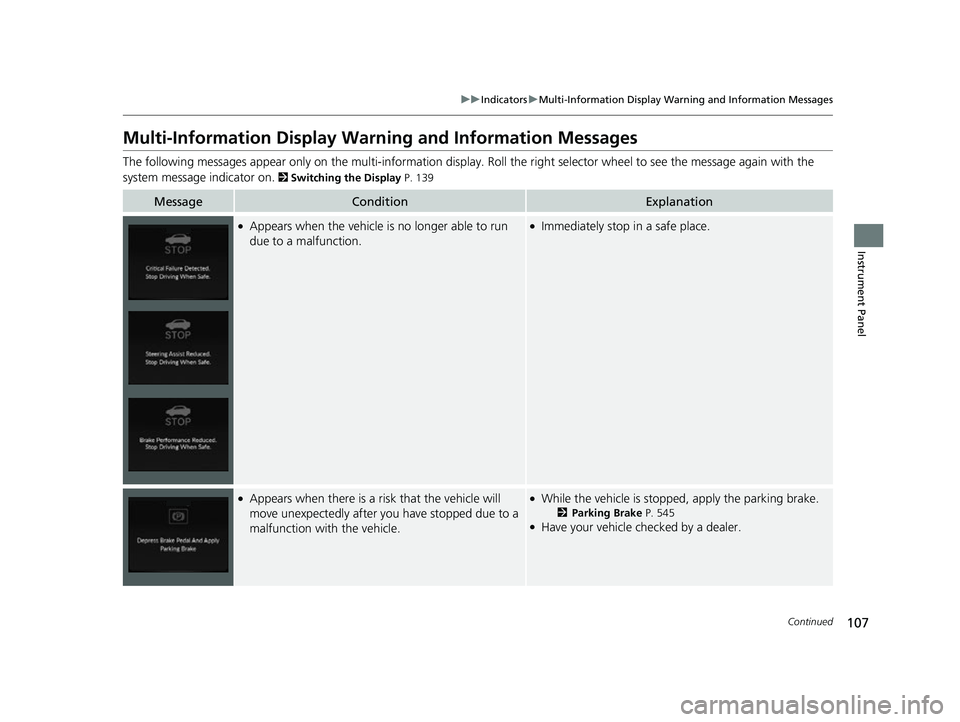
The following messages appear only on the multi-information display. Roll the right selector wheel to see the message again with the
system message indicator on.
2 Switching the Display P. 139
MessageConditionExplanation
●Appears when the vehicle is no longer able to run
due to a malfunction.●Immediately stop in a safe place.
●Appears when there is a ri sk that the vehicle will
move unexpectedly after you have stopped due to a
malfunction with the vehicle.●While the vehicle is stopped, apply the parking brake.
2 Parking Brake P. 545●Have your vehicle checked by a dealer.
23 ACURA RDX-31TJB6400.book 107 ページ 2022年8月4日 木曜日 午後1時51分
Page 110 of 713
108
uuIndicators uMulti-Information Display Warn ing and Information Messages
Instrument Panel
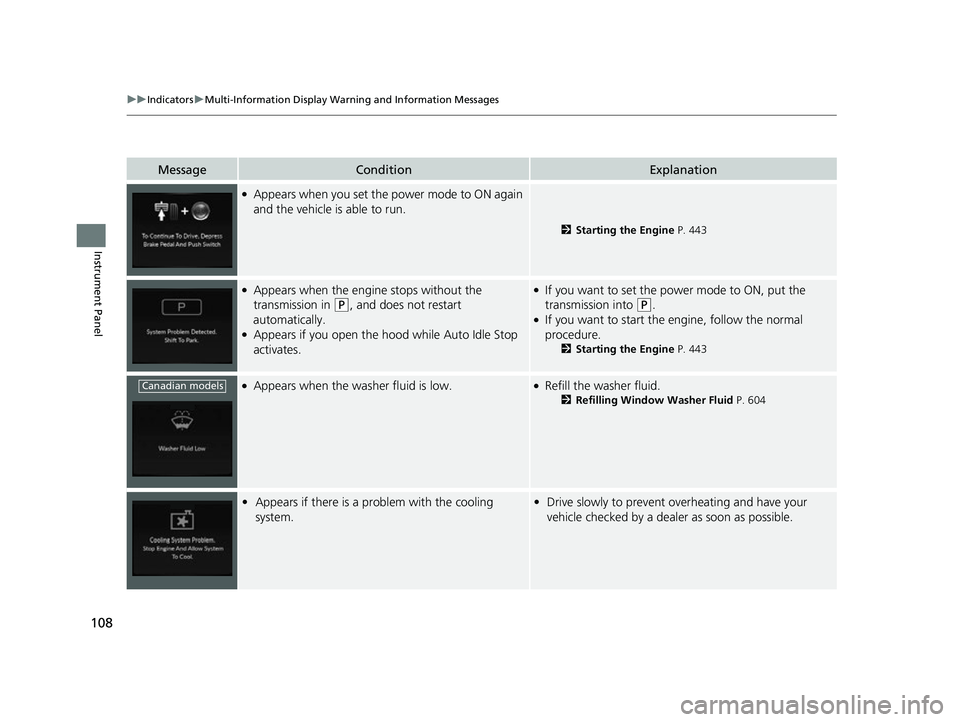
MessageConditionExplanation
●Appears when you set the power mode to ON again
and the vehicle is able to run.
2Starting the Engine P. 443
●Appears when the engine stops without the
transmission in
(P, and does not restart
automatically.
●Appears if you open the hood while Auto Idle Stop
activates.
●If you want to set the power mode to ON, put the
transmission into
(P.●If you want to start the engine, follow the normal
procedure.
2 Starting the Engine P. 443
●Appears when the washer fluid is low.●Refill the washer fluid.
2Refilling Window Washer Fluid P. 604
•Appears if there is a problem with the cooling
system.•Drive slowly to prevent overheating and have your
vehicle checked by a dealer as soon as possible.
Canadian models
23 ACURA RDX-31TJB6400.book 108 ページ 2022年8月4日 木曜日 午後1時51分
Page 111 of 713

109
uuIndicators uMulti-Information Display Warning and Information Messages
Continued
Instrument Panel
MessageConditionExplanation
●Appears when the starter system has a problem.●As a temporary measur e, press and hold the ENGINE
START/STOP button for up to 15 seconds while
pressing the brake pedal, manually start the engine.
Have your vehicle checked by a dealer.
• Appears when the engine oil pressure is low.•Appears while driving - Immediately stop in a safe
place.
2 If the Engine Oil Pressure Low Warning Appears
P. 671
●Appears when the engine coolant temperature gets
abnormally high.
2 Overheating P. 669
U.S.
Canada
23 ACURA RDX-31TJB6400.book 109 ページ 2022年8月4日 木曜日 午後1時51分
Page 112 of 713
110
uuIndicators uMulti-Information Display Warn ing and Information Messages
Instrument Panel
MessageConditionExplanation
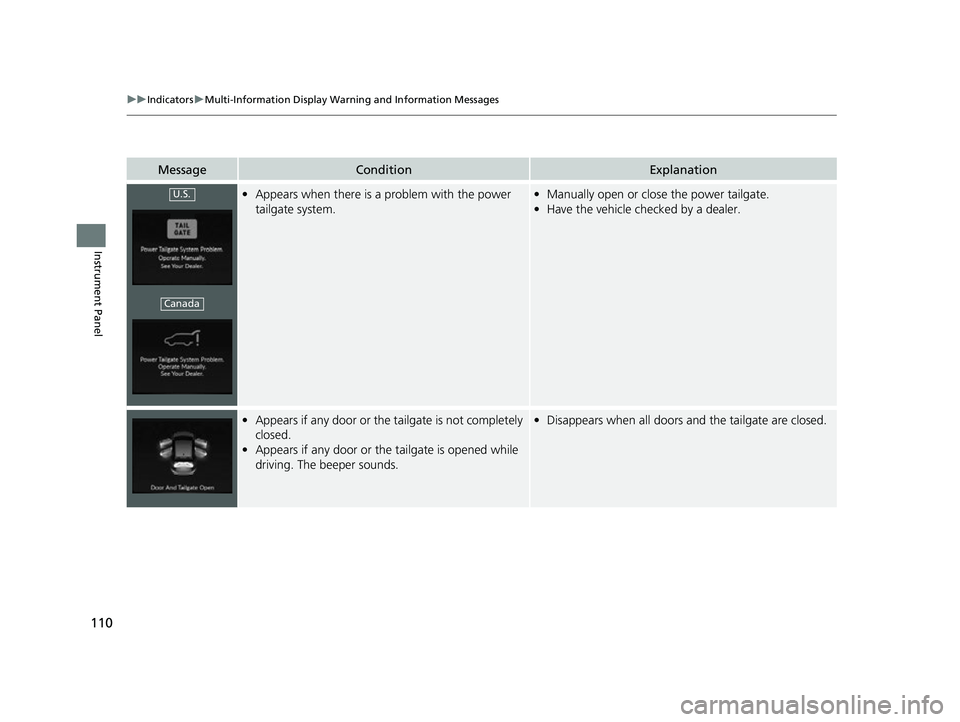
•Appears when there is a problem with the power
tailgate system.•Manually open or close the power tailgate.
• Have the vehicle checked by a dealer.
•Appears if any door or the tailgate is not completely
closed.
• Appears if any door or th e tailgate is opened while
driving. The beeper sounds.• Disappears when all doors and the tailgate are closed.
U.S.
Canada
23 ACURA RDX-31TJB6400.book 110 ページ 2022年8月4日 木曜日 午後1時51分
Page 113 of 713

111
uuIndicators uMulti-Information Display Warning and Information Messages
Continued
Instrument Panel
MessageConditionExplanation
• Appears if there is a pr oblem with the automatic
lighting control system.• Appears while driving - Manually turn the lights on,
and have your vehicle checked by a dealer.
• Appears if there is a pr oblem with the headlights.•Appears while driving - The headlights may not be
on. When conditions allow you to drive safely, have
your vehicle checked by a d ealer as soon as possible.
●Appears when there is a problem with the battery
charging system.●Have your vehicle checked by a dealer.
●Appears if the dynamic mode cannot be changed
due to certain situations, su ch as a system error or
adverse driving conditions.
2 Acura Integrated Dynamics System P. 459
23 ACURA RDX-31TJB6400.book 111 ページ 2022年8月4日 木曜日 午後1時51分
Page 114 of 713
112
uuIndicators uMulti-Information Display Warn ing and Information Messages
Instrument Panel
MessageConditionExplanation
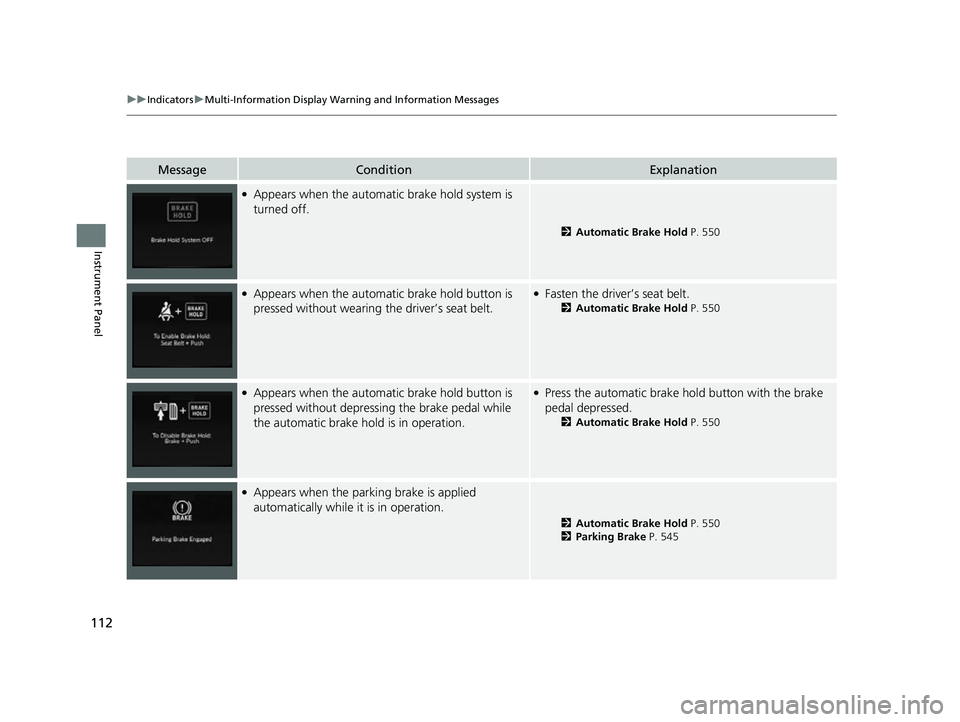
●Appears when the automatic brake hold system is
turned off.
2 Automatic Brake Hold P. 550
●Appears when the automa tic brake hold button is
pressed without wearing the driver’s seat belt.●Fasten the driver’s seat belt.
2 Automatic Brake Hold P. 550
●Appears when the automa tic brake hold button is
pressed without depressing the brake pedal while
the automatic brake hold is in operation.●Press the automatic brake hold button with the brake
pedal depressed.
2 Automatic Brake Hold P. 550
●Appears when the parking brake is applied
automatically while it is in operation.
2Automatic Brake Hold P. 550
2 Parking Brake P. 545
23 ACURA RDX-31TJB6400.book 112 ページ 2022年8月4日 木曜日 午後1時51分