remote control ACURA RDX 2023 Owner's Guide
[x] Cancel search | Manufacturer: ACURA, Model Year: 2023, Model line: RDX, Model: ACURA RDX 2023Pages: 713, PDF Size: 21.99 MB
Page 217 of 713

215
uuMirrors uPower Door Mirrors
Controls
■Folding in th e door mirrors
Lock the driver’s door with the key, press the lock button on the keyless remote,
touch the door lock sensor on any door, or press the lock button on the tailgate
outer handle. u The mirrors start folding in automatically.
■Folding out the door mirrors
Unlock the driver’s door using the key, keyless remote or keyless access system.
u The mirrors start folding out automatically.
■Automatic Folding Door Mirror Function*1Automatic Folding Door Mirror Function*
You cannot turn the automatic folding out
automatically if they have been folded in using the
folding button.
You can turn the automa tic folding door mirror
function on and off. 2 Customized Features P. 359
Door mirrors will not fold automatically when locking
from inside the vehicle usi ng lock tab or master door
lock switch.
* Not available on all models
23 ACURA RDX-31TJB6400.book 215 ページ 2022年8月4日 木曜日 午後1時51分
Page 250 of 713
uuClimate Control System uUsing Automatic Climate Control
248
Controls
■Switching between the recirc ulation and fresh air modes
Press the (recirculation) button and switch the mode depending on
environmental conditions.
Recirculation mode (indicator on): Recirculates air from the vehicle’s interior through
the system.
Fresh air mode (indicator off): Maintains out side ventilation. Keep the system in
fresh air mode in normal situations.1 Using Automatic Climate Control
When you unlock the doors with your remote, the
driver’s ID (DRIVER 1 or DRIVER 2) is detected, and
the climate control settings are turned to the
respective mode automatically when you set the
power mode to ON.
23 ACURA RDX-31TJB6400.book 248 ページ 2022年8月4日 木曜日 午後1時51分
Page 255 of 713
253
Features
This chapter describes how to operate technology features.
Audio SystemAbout Your Audio System ................ 254
USB Ports ......................................... 255
Audio System Theft Protection ......... 257
Audio Remote Controls .................... 258
Audio System Basic Operation ........ 260
True Touchpad Interface .................. 261
Audio/Information Screen ................ 264
Smart Shortcuts ............................... 278
System Updates ............................... 281
Adjusting the Sound ........................ 287
Display Setup ................................... 288 Alexa Built-In*................................. 289
Voice Control Operation .................. 290
Playing AM/FM Radio ....................... 293
Playing SiriusXM ® Radio ................... 297
Playing an iPod ................................ 310
Playing a USB Flash Drive ................. 313
Playing Bluetooth ® Audio................. 316
Wi-Fi Connection ............................. 319
AT&T Hotspot .................................. 321
Apple CarPlay .................................. 322
Android Auto
TM................................ 327
Audio Error Messages ...................... 332 General Information on the Audio
System ............................................. 336
Customized Features ........................ 359
HomeLink ® Universal Transceiver ... 386
Bluetooth® HandsFreeLink® ............. 389
AcuraLink® ........................................ 419
* Not available on all models
23 ACURA RDX-31TJB6400.book 253 ページ 2022年8月4日 木曜日 午後1時51分
Page 256 of 713

254
Features
Audio System
About Your Audio System
The audio system features AM/FM radio and SiriusXM® Radio service. It can also play
USB flash drives, and iPod, iPhone, iPad and Bluetooth® devices.
You can operate the audio system from the True Touchpad Interface, buttons and
knobs on the panel, or the remote controls on the steering wheel.1 About Your Audio System
State or local laws may pr ohibit the operation of
handheld electronic devices while operating a
vehicle.
SiriusXM ® Radio is available on a subscription basis
only. For more information on SiriusXM ® Radio,
contact a dealer. 2 General Information on the Audio System
P. 336
SiriusXM ® Radio is available in the United States and
Canada, except Ha waii, Alaska, and Puerto Rico.
SiriusXM ® is a registered trademark of SiriusXM
Radio, Inc.
After you turn the power mode to VEHICLE OFF
(LOCK) with the driver’s door closed, you can use the
audio system for up to 30 minutes per driving cycle.
However, whether you can continue using the audio
system depends on the batter y condition. Repeatedly
using this feature ma y drain the battery.
The audio system turns off when you open the
driver’s door.
Remote Controls iPod
USB Flash
Drive
23 ACURA RDX-31TJB6400.book 254 ページ 2022年8月4日 木曜日 午後1時51分
Page 260 of 713
258
uuAudio System uAudio Remote Controls
Features
Audio Remote Controls
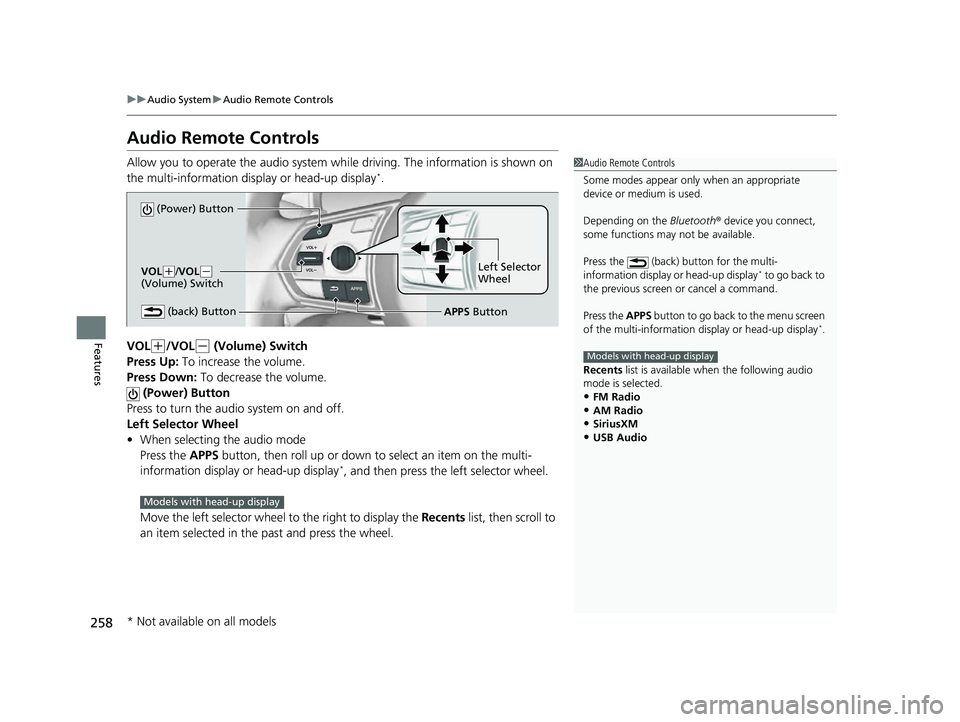
Allow you to operate the audio system wh ile driving. The information is shown on
the multi-information display or head-up display*.
VOL
(+/VOL(- (Volume) Switch
Press Up: To increase the volume.
Press Down: To decrease the volume.
(Power) Button
Press to turn the audio system on and off.
Left Selector Wheel
• When selecting the audio mode
Press the APPS button, then roll up or down to select an item on the multi-
information display or head-up display
*, and then press the left selector wheel.
Move the left selector wheel to the right to display the Recents list, then scroll to
an item selected in the past and press the wheel.
1 Audio Remote Controls
Some modes appear only when an appropriate
device or medium is used.
Depending on the Bluetooth® device you connect,
some functions may not be available.
Press the (back) button for the multi-
information display or head-up display
* to go back to
the previous screen or cancel a command.
Press the APPS button to go back to the menu screen
of the multi-information di splay or head-up display
*.
Recents list is available when the following audio
mode is selected.
•FM Radio
•AM Radio•SiriusXM
•USB Audio
Models with head-up display
(Power) Button
VOL( +/VOL(-
(Volume) Switch
(back) ButtonLeft Selector
Wheel
APPS Button
Models with head-up display
* Not available on all models
23 ACURA RDX-31TJB6400.book 258 ページ 2022年8月4日 木曜日 午後1時51分
Page 261 of 713
259
uuAudio System uAudio Remote Controls
Features
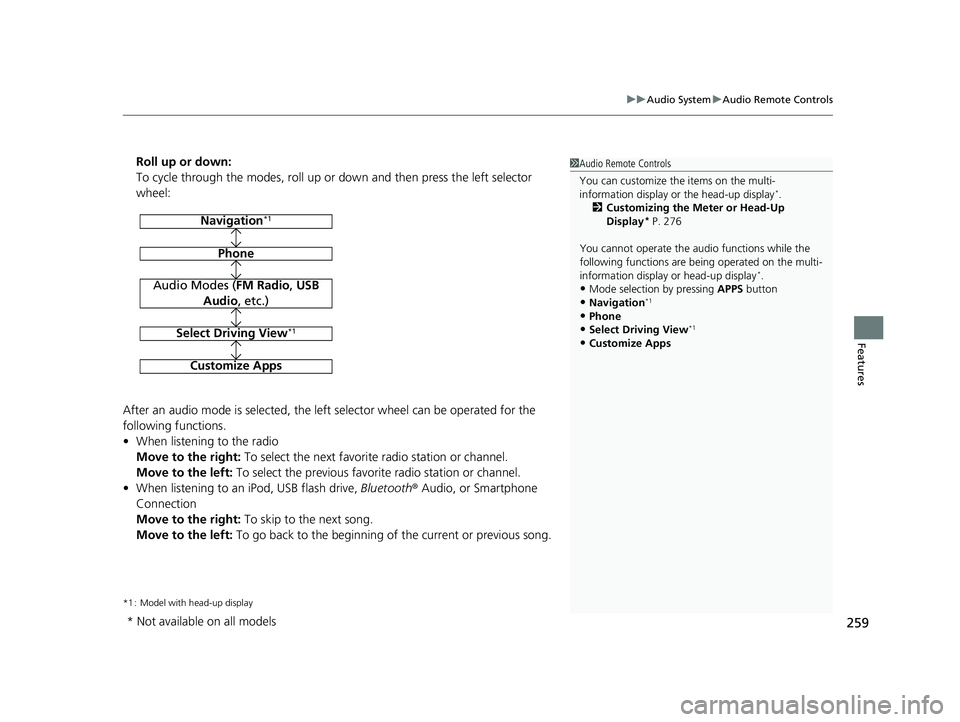
Roll up or down:
To cycle through the modes, roll up or down and then press the left selector
wheel:
After an audio mode is selected, the left selector wheel can be operated for the
following functions.
• When listening to the radio
Move to the right: To select the next favorite radio station or channel.
Move to the left: To select the previous favorite radio station or channel.
• When listening to an iPod, USB flash drive, Bluetooth® Audio, or Smartphone
Connection
Move to the right: To skip to the next song.
Move to the left: To go back to the beginning of the current or previous song.
*1 : Model with head-up display
1Audio Remote Controls
You can customize the items on the multi-
information display or the head-up display
*.
2 Customizing the Meter or Head-Up
Display
* P. 276
You cannot operate the a udio functions while the
following functions are be ing operated on the multi-
information display or head-up display
*.•Mode selection by pressing APPS button
•Navigation*1
•Phone
•Select Driving View*1
•Customize Apps
Navigation*1
Phone
Audio Modes (FM Radio, USB
Audio , etc.)
Select Driving View*1
Customize Apps
* Not available on all models
23 ACURA RDX-31TJB6400.book 259 ページ 2022年8月4日 木曜日 午後1時51分
Page 296 of 713
uuAudio System Basic Operation uPlaying AM/FM Radio
294
Features
To add a favorite station:
1. Tune to the selected station.
2. Select Add Favorite , then select Current Station.
u When you select From Station List , you can store a station from the station
list.
■Editing a favorite station
Select and hold to desire d favorite station icon.
The following items are available:
• Remove Favorite : Delete the favorite station icon from the favorite station list.
• Replace with (number): Replace the stor ed favorite station icon.
• Add to Home Page : Add the shortcut icon of the stored favorite station to the
home screen.
• Add to Heads-Up Display
*: Add the shortcut item of the stored favorite station
to the head-up display menu.
■Favorite Station1 Favorite Station
The ST indicator appears on the display indicating
stereo FM broadcasts.
Stereo reproduction in AM is not available.
Switching the Audio Mode
Press the APPS button on the steering wheel, then
select an item or select the audio source icon on the
home screen.
2 Audio Remote Controls P. 258
You can store 12 AM/FM stati ons as favorite stations.
HD Radio Technology manufactured under license
from iBiquity Digi tal Corporation. U.S. and Foreign
Patents. For patents see http://dts.com/patents. HD
Radio, Artist Experience, and the HD, HD Radio, and
“ARC” logos are registered trademarks or
trademarks of iBiquity Di gital Corporation in the
United States and/ or other countries.
* Not available on all models
23 ACURA RDX-31TJB6400.book 294 ページ 2022年8月4日 木曜日 午後1時51分
Page 300 of 713

uuAudio System Basic Operation uPlaying SiriusXM ® Radio
298
Features
1. Select MENU .
2. Select SiriusXM Settings .
3. Select Tune Mode .
4. Select All Channels or Within Category .
■To Change the Tune Mode1Playing SiriusXM ® Radio
In the channel mode, all available channels are
selectable. In the categor y mode, you can select a
channel within a ca tegory (Jazz, Rock, Classical, etc.).
There may be instances when SiriusXM ® Radio does
not broadcast all the data fi elds (artist name, title).
This does not indicate a problem with your audio
system.
SiriusXM ® Radio stations load in ascending order,
which can take about a minute. Once they have
loaded you will be able to scroll up or down to make
your selections.
Switching the Audio Mode
Press the APPS button on the steering wheel, then
select an item or select the audio source icon on the
home screen. 2 Audio Remote Controls P. 258
Tune Start:
When you change to a favorite channel, a song being
played on that channel restarts from the beginning
with this function. This can be turned on or off by the
following procedure.
1. Select MENU.
2. Select SiriusXM Settings .
3. Select Tune Start .
4. Select On or Off .
To change a category, select Category icons, or
select Channels and then select category item.
23 ACURA RDX-31TJB6400.book 298 ページ 2022年8月4日 木曜日 午後1時51分
Page 338 of 713
336
Features
General Information on the Audio System
SiriusXM® Radio Service
1. You need your radio ID ready before registering for subscription. To see the ID in
the screen, select channel up/down icons to Ch.0.
2. Have your radio ID ready, and either call or visit the SiriusXM ® website to
subscribe.
Switch to the SiriusXM ® mode by using the audio remote controls on the steering
wheel, or through the audio/information screen, and stay in this mode for about 30
minutes until the service is activated. Make sure your vehicle is in an open area with
good reception.
Channel **** not subscribed. Ca ll SiriusXM to subscribe.
*1
You are not subscribed to the channel selected.
Subscription updated:
SiriusXM® radio is receiving informat ion update from the network.
Channel Not Available:
No such channel exits, or the artist or title information is unavailable.
No Signal:
The signal is too weak in the current location.
Check Tuner:
There is a problem with the SiriusXM ® tuner. Contact a dealer.
Check Antenna:
There is a problem with the SiriusXM ® antenna. Contact a dealer.
*1 : ****part is variable characters, and w ill change depending upon where an subscribe.
■Subscribing to SiriusXM® Radio
■Receiving SiriusXM ® Radio
■SiriusXM ® Radio Display Messages
1 Subscribing to SiriusXM ® Radio
Contact Information for SiriusXM ® Radio:
•US: SiriusXM ® Radio at
www.siriusxm.com/subscribenow , or 1-866-635-
2349
•Canada: SiriusXM ® Canada at
www.siriusxm.ca/subscribe-now , or 1-877-209-
0079
1 Receiving SiriusXM ® Radio
The SiriusXM ® satellites are in orbit over the equator;
therefore, objects south of the vehicle may cause
satellite reception interruptions. Sa tellite signals are
more likely to be blocked by tall buildings and
mountains the farther north you travel from the
equator.
You may experience rece ption problems under the
following circumstances:
•In a location with an obstruction to the south of
your vehicle.
•In tunnels•On the lower level of a multi-tiered road
•Large items carried on the roof rack
23 ACURA RDX-31TJB6400.book 336 ページ 2022年8月4日 木曜日 午後1時51分
Page 388 of 713
386
Features
HomeLink® Universal Transceiver
The HomeLink ® Universal Transceiver can be pr ogrammed to operate up to three
remote controlled devices around your home , such as garage doors, lighting, or
home security systems.
Refer to the safety information that came wi th your garage door opener to test that
the safety features are functioning properly. If you do not have the safety
information, contac t the manufacturer.
Before programming HomeLink, make sure th at people and objects are out of the
way of the garage or gate to prevent potential injury or damage.
When programming a garage door opener, park just outside the garage door’s path.
■Important Safety Precautions
1HomeLink ® Universal Transceiver
Before programming HomeLi nk to operate a garage
door opener, confirm that the opener has an external
entrapment protection system , such as an “electronic
eye,” or other safety and reverse stop features. If it
does not, HomeLink may not be able to operate it.
NOTE:
Some LED lightbulbs instal led in the garage door
opener can interfere with th e training and consistent
operation of your HomeLink device. Please consider
use of Low RF interference bulbs in your garage door
opener.
23 ACURA RDX-31TJB6400.book 386 ページ 2022年8月4日 木曜日 午後1時51分