belt ACURA RDX 2023 Service Manual
[x] Cancel search | Manufacturer: ACURA, Model Year: 2023, Model line: RDX, Model: ACURA RDX 2023Pages: 713, PDF Size: 21.99 MB
Page 78 of 713
uuChild Safety uSafety of Larger Children
76
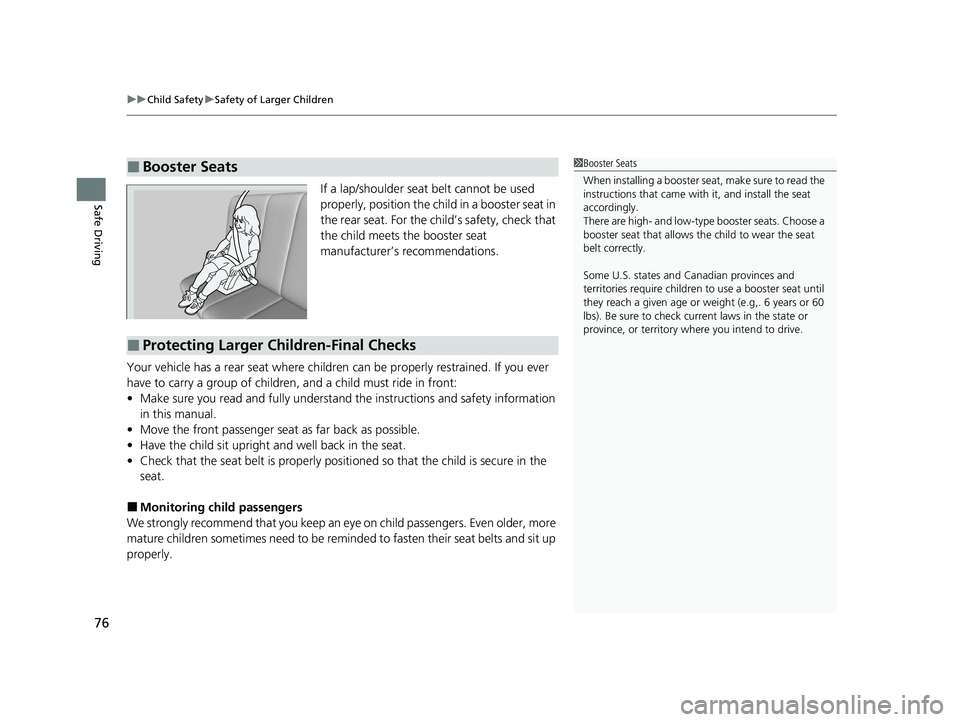
Safe DrivingIf a lap/shoulder seat belt cannot be used
properly, position the child in a booster seat in
the rear seat. For the ch ild’s safety, check that
the child meets the booster seat
manufacturer’s recommendations.
Your vehicle has a rear seat where children can be properly restrained. If you ever
have to carry a group of children, and a child must ride in front:
• Make sure you read and full y understand the instructions and safety information
in this manual.
• Move the front passenger seat as far back as possible.
• Have the child sit upright and well back in the seat.
• Check that the seat belt is properly positi oned so that the child is secure in the
seat.
■Monitoring child passengers
We strongly recommend that you keep an eye on child passengers. Even older, more
mature children sometimes need to be remind ed to fasten their seat belts and sit up
properly.
■Booster Seats1 Booster Seats
When installing a booster seat , make sure to read the
instructions that came with it, and install the seat
accordingly.
There are high- and low-type booster seats. Choose a
booster seat that allows the child to wear the seat
belt correctly.
Some U.S. states and Canadian provinces and
territories require children to use a booster seat until
they reach a given age or weight (e.g,. 6 years or 60
lbs). Be sure to check current laws in the state or
province, or territory where you intend to drive.
■Protecting Larger Children-Final Checks
23 ACURA RDX-31TJB6400.book 76 ページ 2022年8月4日 木曜日 午後1時51分
Page 82 of 713
80
Instrument Panel
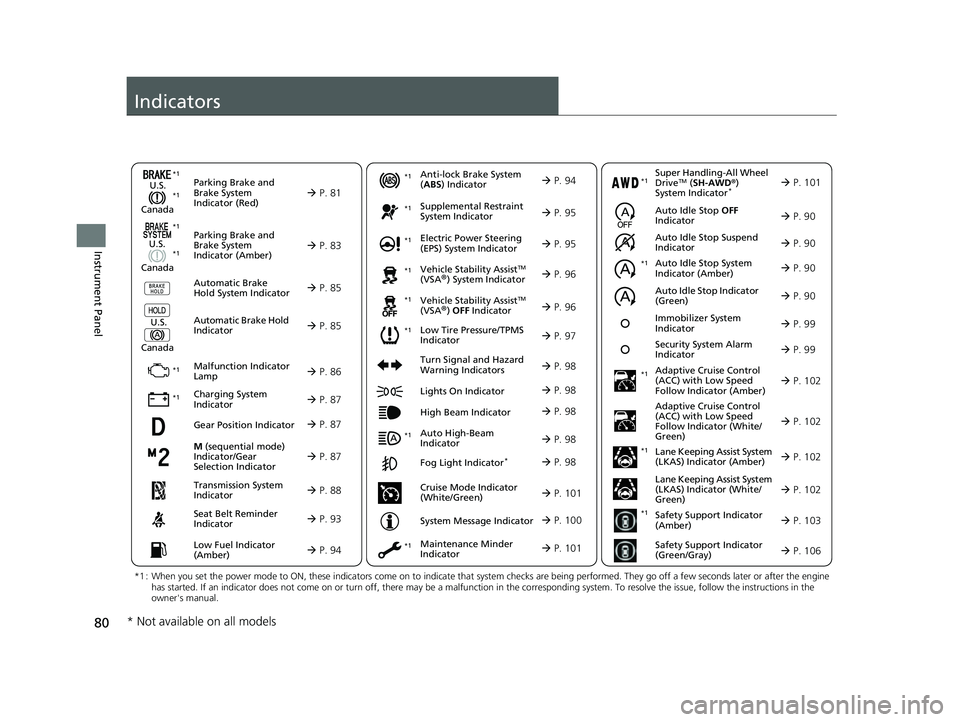
Indicators
M (sequential mode)
Indicator/Gear
Selection Indicator P. 87
Parking Brake and
Brake System
Indicator (Red)
Parking Brake and
Brake System
Indicator (Amber)
U.S.
Canada
U.S.
Canada Automatic Brake
Hold System Indicator
Automatic Brake Hold
IndicatorU.S.
Canada
*1 : When you set the power mode to ON, these indicators come on to indicate that system checks are being performed. They go off a few seconds later or after the engine
has started. If an indicator does not come on or turn off, ther e may be a malfunction in the corresponding system. To resolve the issue, follow the instructions in the
owner's manual.
P. 81*1
Malfunction Indicator
Lamp
Charging System
Indicator
Anti-lock Brake System
(ABS ) Indicator
Seat Belt Reminder
Indicator
Low Fuel Indicator
(Amber)
Vehicle Stability AssistTM
(VSA®) System Indicator
Vehicle Stability Assist
TM
(VSA®) OFF Indicator
Supplemental Restraint
System Indicator
Auto High-Beam
Indicator
Low Tire Pressure/TPMS
Indicator Electric Power Steering
(EPS) System Indicator
Turn Signal and Hazard
Warning Indicators
Lights On Indicator
High Beam Indicator
Fog Light Indicator*
Maintenance Minder
Indicator
System Message Indicator
P. 83
P. 85
P. 85
P. 86
P. 87*1 *1
P. 97
*1
*1
Gear Position Indicator P. 87
Transmission System
Indicator P. 88
P. 93
P. 94
P. 94
P. 95
P. 98
P. 96
*1
*1
*1
P. 96
*1 P. 95
P. 98
*1
P. 98
P. 98
P. 101
P. 98
Immobilizer System
Indicator P. 99
Security System Alarm
Indicator P. 99
P. 100
*1
*1 *1
Super Handling-All Wheel
DriveTM ( SH-AWD ®)
System Indicator* P. 101*1
Cruise Mode Indicator
(White/Green) P. 101
Auto Idle Stop Suspend
Indicator
Auto Idle Stop System
Indicator (Amber)
Auto Idle Stop Indicator
(Green) P. 90
P. 90
P. 90
Adaptive Cruise Control
(ACC) with Low Speed
Follow Indicator (Amber)
Auto Idle Stop OFF
Indicator P. 90
P. 102
P. 102
P. 102
P. 102
P. 103
P. 106
Adaptive Cruise Control
(ACC) with Low Speed
Follow Indicator (White/
Green)
Lane Keeping Assist System
(LKAS) Indicator (Amber)
Lane Keeping Assist System
(LKAS) Indicator (White/
Green)
Safety Support Indicator
(Amber)
Safety Support Indicator
(Green/Gray)
*1
*1
*1
*1
*1
* Not available on all models
23 ACURA RDX-31TJB6400.book 80 ページ 2022年8月4日 木曜日 午後1時51分
Page 95 of 713

93
uuIndicators u
Continued
Instrument Panel
IndicatorNameOn/BlinkingExplanationMessage
Seat Belt
Reminder
Indicator
•Blinks and the beep er sounds for a
few seconds if you are not wearing
a seat belt when you set the power
mode to ON, then the indicator
comes on.
• If the front passenger is not
wearing a seat belt, the indicator
comes on a few seconds later.
• Comes on for a while when the rear
seat belt is unfastened while the
power mode in ON.
• Blinks while driving if you and/or
any passenger has not fastened a
seat belt. The beeper sounds and
the indicator blinks at regular
intervals.•The beeper stops and the indicator goes
off when you and the passengers fasten
their seat belts.
• Stays on after you and/or the
passengers have fastened the seat
belt(s) - A detection error may have
occurred in the sensor. Have your vehicle
checked by a dealer.
2 Seat Belt Reminder P. 39
23 ACURA RDX-31TJB6400.book 93 ページ 2022年8月4日 木曜日 午後1時51分
Page 97 of 713
95
uuIndicators u
Continued
Instrument Panel
IndicatorNameOn/BlinkingExplanationMessage
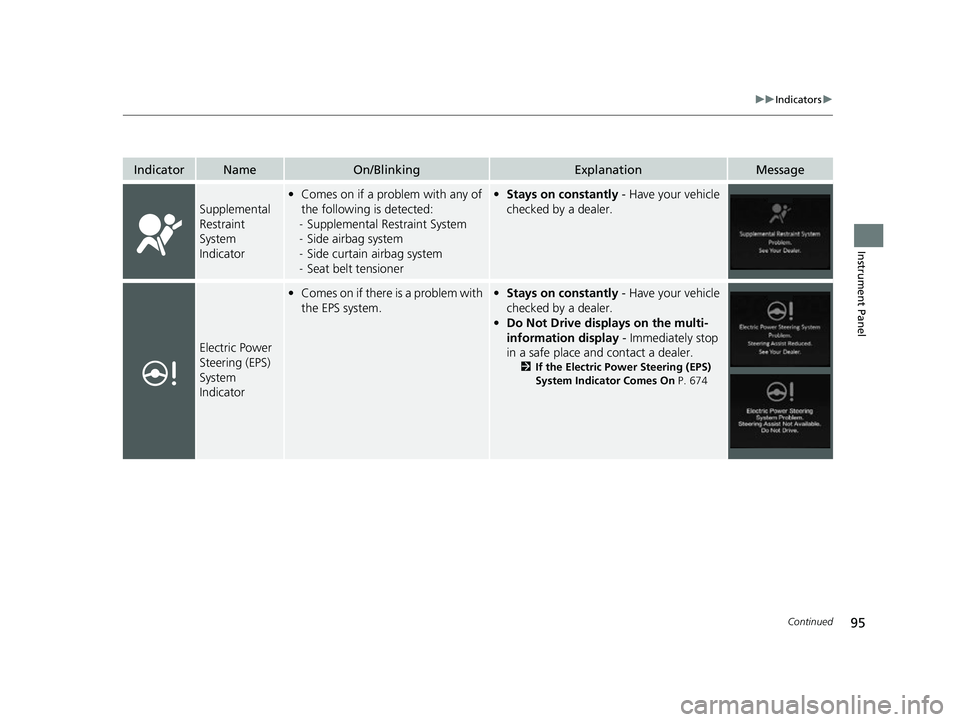
Supplemental
Restraint
System
Indicator
•Comes on if a problem with any of
the following is detected:
- Supplemental Restraint System
- Side airbag system
- Side curtain airbag system
- Seat belt tensioner• Stays on constantly - Have your vehicle
checked by a dealer.
Electric Power
Steering (EPS)
System
Indicator
• Comes on if there is a problem with
the EPS system.•Stays on constantly - Have your vehicle
checked by a dealer.
• Do Not Drive displays on the multi-
information display - Immediately stop
in a safe place and contact a dealer.
2 If the Electric Power Steering (EPS)
System Indicator Comes On P. 674
23 ACURA RDX-31TJB6400.book 95 ページ 2022年8月4日 木曜日 午後1時51分
Page 114 of 713
112
uuIndicators uMulti-Information Display Warn ing and Information Messages
Instrument Panel
MessageConditionExplanation
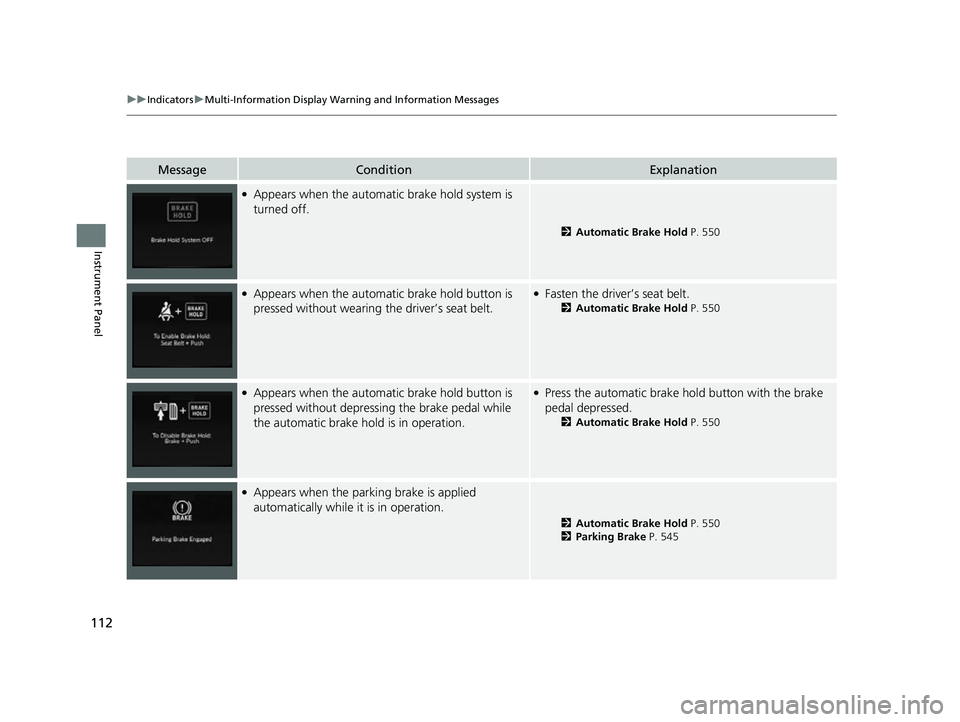
●Appears when the automatic brake hold system is
turned off.
2 Automatic Brake Hold P. 550
●Appears when the automa tic brake hold button is
pressed without wearing the driver’s seat belt.●Fasten the driver’s seat belt.
2 Automatic Brake Hold P. 550
●Appears when the automa tic brake hold button is
pressed without depressing the brake pedal while
the automatic brake hold is in operation.●Press the automatic brake hold button with the brake
pedal depressed.
2 Automatic Brake Hold P. 550
●Appears when the parking brake is applied
automatically while it is in operation.
2Automatic Brake Hold P. 550
2 Parking Brake P. 545
23 ACURA RDX-31TJB6400.book 112 ページ 2022年8月4日 木曜日 午後1時51分
Page 119 of 713

117
uuIndicators uMulti-Information Display Warning and Information Messages
Continued
Instrument Panel
MessageConditionExplanation
• Appears when you try to change the transmission
without depressing the brake pedal.• Depress the brake pedal, then change the transmission.
• Appears when you try to change the transmission
without releasing your foot off the accelerator pedal.• Release your foot off the accelerator pedal, then
change the transmission.
• Appears when you try to change the shift position
after the position has automa tically been changed to
(P with the driver’s door open and the driver’s seat
belt unfastened.
●Press the (P button if you leave the vehicle.
U.S.
Canada
23 ACURA RDX-31TJB6400.book 117 ページ 2022年8月4日 木曜日 午後1時51分
Page 120 of 713

118
uuIndicators uMulti-Information Display Warn ing and Information Messages
Instrument Panel
MessageConditionExplanation
•Appears when the (P button is pressed while the
vehicle is moving.• Make sure that the vehicl e comes to a stop before
operating the select button.
●Appears if you put the transmission into (R while the
vehicle is moving forward, or into
(D while the
vehicle is reversing.
• Appears when you set the power mode to OFF while
driving.•Immediately stop in a safe place, set the parking brake,
then restart the engine. If the message disappears,
continue driving.
•Appears when the vehicle is stopped with the
driver’s seat belt unfastened and there is a chance
that the vehicle may roll unintentionally.•Press the (P button before release the brake pedal
when idling, parking or exiting the vehicle.
2 Shift Operation P. 453
●Appears when you attempt to change to another
gear position with the transmission in
(P and the
engine OFF.
●To select another gear position while in (P, the engine
must be ON.
23 ACURA RDX-31TJB6400.book 118 ページ 2022年8月4日 木曜日 午後1時51分
Page 129 of 713
127
uuIndicators uMulti-Information Display Warning and Information Messages
Continued
Instrument Panel
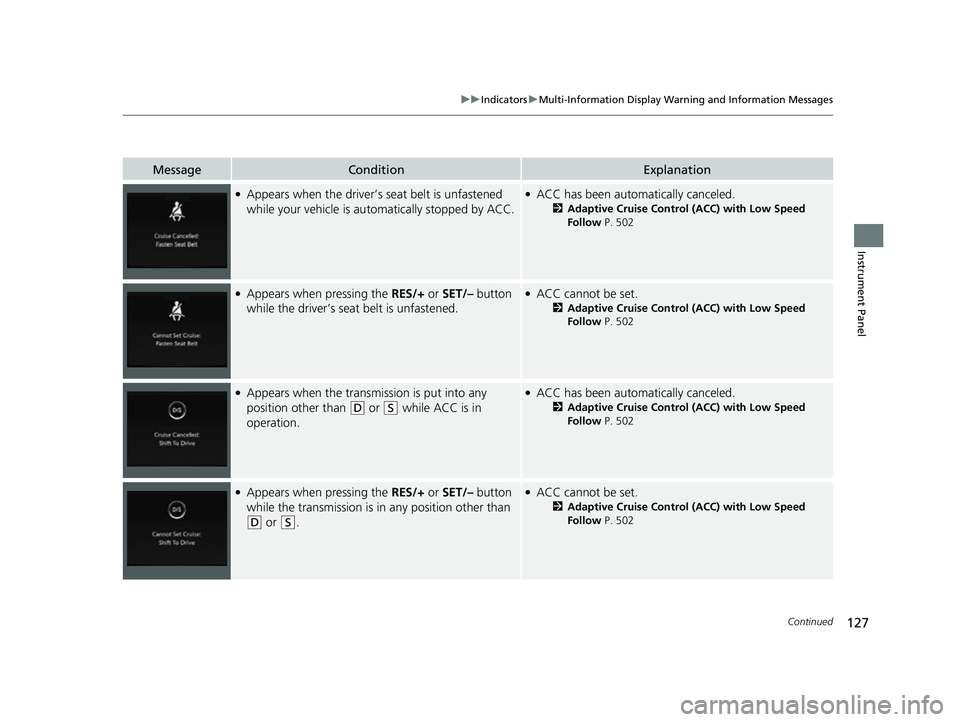
MessageConditionExplanation
●Appears when the driver’s seat belt is unfastened
while your vehicle is au tomatically stopped by ACC.●ACC has been automatically canceled.
2Adaptive Cruise Control (ACC) with Low Speed
Follow P. 502
●Appears when pressing the RES/+ or SET/– button
while the driver’s seat belt is unfastened.●ACC cannot be set.
2 Adaptive Cruise Control (ACC) with Low Speed
Follow P. 502
●Appears when the transmi ssion is put into any
position other than
(D or (S while ACC is in
operation.
●ACC has been automatically canceled.
2 Adaptive Cruise Control (ACC) with Low Speed
Follow P. 502
●Appears when pressing the RES/+ or SET/– button
while the transmission is in any position other than
(D or (S.
●ACC cannot be set.
2Adaptive Cruise Control (ACC) with Low Speed
Follow P. 502
23 ACURA RDX-31TJB6400.book 127 ページ 2022年8月4日 木曜日 午後1時51分
Page 141 of 713

139
uuGauges and Displays uMulti-Information Display
Continued
Instrument Panel
Roll the right selector wheel to view different types of content.
■Switching the Display1Switching the Display
If a warning initially appear s, you can - after reading
it - press the right sele ctor wheel to proceed
immediately to the cont ent or to any other
warning(s).
Right Selector Wheel Warning
Messages
Trip Computer
Speed/Distance
Units Tire Pressure
for Each TireMaintenance
Navigation
Sport Gauge
Settings SH-AWD®
*Minimal
Current Speed
Seat Belts
Integrated Safety
Switch
* Not available on all models
23 ACURA RDX-31TJB6400.book 139 ページ 2022年8月4日 木曜日 午後1時51分
Page 147 of 713

145
uuGauges and Displays uMulti-Information Display
Continued
Instrument Panel
Occurs, under specified conditions, when seat belts are latched or unlatched.
2 Seat Belt Reminder P. 39
The indicators on the display show the
amount of torque being transferred to the
right front, left front, right rear, and left rear
wheels.
2Super Handling-All Wheel DriveTM (SH-
AWD ®)* P. 474
■Seat Belts
■SH-AWD ® Torque Distribution Monitor*
* Not available on all models
23 ACURA RDX-31TJB6400.book 145 ページ 2022年8月4日 木曜日 午後1時51分