belt ACURA RDX 2023 Repair Manual
[x] Cancel search | Manufacturer: ACURA, Model Year: 2023, Model line: RDX, Model: ACURA RDX 2023Pages: 713, PDF Size: 21.99 MB
Page 548 of 713
uuBraking uBrake System
546
Driving
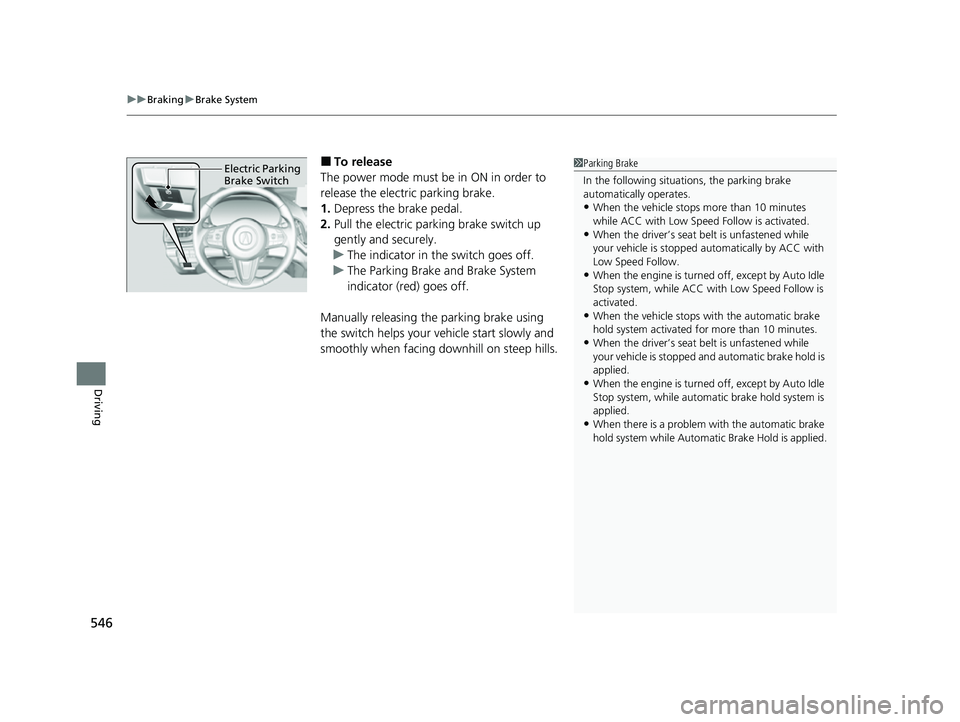
■To release
The power mode must be in ON in order to
release the electric parking brake.
1. Depress the brake pedal.
2. Pull the electric parking brake switch up
gently and securely.
u The indicator in the switch goes off.
u The Parking Brake and Brake System
indicator (red) goes off.
Manually releasing the parking brake using
the switch helps your ve hicle start slowly and
smoothly when facing downhill on steep hills.1 Parking Brake
In the following situations, the parking brake
automatically operates.
•When the vehicle stops more than 10 minutes
while ACC with Low Speed Follow is activated.
•When the driver’s seat belt is unfastened while
your vehicle is stopped au tomatically by ACC with
Low Speed Follow.
•When the engine is turned off, except by Auto Idle
Stop system, while ACC with Low Speed Follow is
activated.
•When the vehicle stops with the automatic brake
hold system activated for more than 10 minutes.
•When the driver’s seat belt is unfastened while
your vehicle is stopped a nd automatic brake hold is
applied.
•When the engine is turned off, except by Auto Idle
Stop system, while automatic brake hold system is
applied.
•When there is a problem with the automatic brake
hold system while Automatic Brake Hold is applied.
Electric Parking
Brake Switch
23 ACURA RDX-31TJB6400.book 546 ページ 2022年8月4日 木曜日 午後1時51分
Page 549 of 713

Continued547
uuBraking uBrake System
Driving
■Automatic parking brake feature operation
If the automatic parking brake feature has been activated:
• The parking brake is applied automatically when you set the power mode to
VEHICLE OFF.
• To confirm that the parking brake is applied, check if the Parking Brake and Brake
System indicator (red) is on.
2 Activating and deactivating the automatic parking brake feature P. 548
■To release automatically
Depressing the accelerator pedal releases the parking brake.
Use the accelerator pedal to release the brake when you are starting the vehicle
facing uphill, or in a traffic jam.
Gently depress the accelerator pedal.
When on a hill, it may require more
accelerator input to release.u The Parking Brake and Brake System
indicator (red) goes off.
You can release the parking brake automatically when:
• You are wearing the driver’s seat belt.
• The engine is running.
• The transmission is not in
(P or (N.
1Parking Brake
If the parking brake cannot be released
automatically, release it manually.
When the vehicle is travel ing uphill, the accelerator
pedal may need to be pressed farther to
automatically release the electric parking brake.
The parking brake cannot be released automatically
while the following indicators are on:
•Malfunction indicator lamp•Transmission system indicator
The parking brake may not be released automatically
while the following indicators are on:
•Parking brake and brake sy stem indicator (amber)
•VSA® system indicator•ABS indicator
•Supplemental restraint system indicator
Accelerator Pedal
23 ACURA RDX-31TJB6400.book 547 ページ 2022年8月4日 木曜日 午後1時51分
Page 552 of 713

uuBraking uBrake System
550
Driving
Keeps the brake applied after releasing the brake pedal until the accelerator pedal is
pressed. You can use this system while the vehicle is temporarily stopped, like at
traffic lights and in heavy traffic.
■Automatic Brake Hold1Automatic Brake Hold
3WARNING
Activating the automatic brake hold system
on steep hills or slippery roads may still
allow the vehicle to move if you remove
your foot from the brake pedal.
If a vehicle unexpectedly moves, it may
cause a crash resulting in serious injury or
death.
Never activate the automatic brake hold
system or rely on it to keep a vehicle from
moving when stopped on a steep hill or
slippery roads.
3WARNING
Using the automatic brake hold system to
park the vehicle may result in the vehicle
unexpectedly moving.
If a vehicle moves unexpectedly, it may
cause a crash, resulting in serious injury or
death.
Never leave the vehicle when braking is
temporarily kept by automatic brake hold
and always park the vehicle by putting the
transmission in
( P and applying the parking
brake.
■Turning on the system
Fasten your seat belt
properly, then start the
engine. Press the
automatic brake hold
button.
●The automatic brake
hold system indicator
comes on. The system
is turned on.
■Activating the system
Depress the brake pedal
to come to a complete
stop. The transmission
must not be in
( P or (R.●The automatic brake
hold system indicator
changes to the
automatic brake hold
indicator. Braking is
kept for up to 10
minutes.
●Release the brake
pedal after the
automatic brake hold
indicator comes on.
■Canceling the system
Depress the accelerator
pedal while the
transmission is in a
position other than
( P
or ( N. The system is
canceled and the vehicle
starts to move.
●The automatic brake
hold indicator changes
to the automatic
brake hold system
indicator. The system
continues to be on. Accelerator
Pedal
Brake
Pedal
Automatic
Brake Hold
Button
Comes On
Changes toChanges to
U.S.Canada
23 ACURA RDX-31TJB6400.book 550 ページ 2022年8月4日 木曜日 午後1時51分
Page 553 of 713
Continued551
uuBraking uBrake System
Driving
■The system automatically cancels when:
• You engage the parking brake.
• You depress the brake pedal a nd put the transmission into
(P or (R.
■The system automatically cancels and the parking brake is applied when:
• Braking is kept for more than 10 minutes.
• The driver’s seat belt is unfastened.
• The engine is turned off.
• There is a problem with automatic brake hold system.
1Automatic Brake Hold
While the system is activated, you can turn off the
engine or park the ve hicle through the same
procedure as you normally do. 2 When Stopped P. 555
Whether the system is on, or the system is activated,
the automatic brake hold turn s off once the engine is
off.
You may hear an operating noi se if the vehicle moves
while the automatic brake hold system is in
operation.
3WARNING
When using the automatic brake hold,
keep your foot on the brake pedal until the
automatic brake hold indicator comes on.
If the vehicle unexpec tedly moves, it may
cause a crash resulting in serious injury or
death.
Release your foot from the brake pedal
after the automatic brake hold indicator
comes on.
23 ACURA RDX-31TJB6400.book 551 ページ 2022年8月4日 木曜日 午後1時51分
Page 591 of 713

589
uuMaintenance MinderTMuTo Use Maintenance MinderTM
Continued
Maintenance
■Maintenance Service Items
Maintenance Minder Message
Main
Item Sub
ItemsMaintenance Minder Indicator
System Message Indicator
U.S. models
*1: If a Maintenance Minder Indicator and message does not appear more than 12 months after the
display is reset, change the engine oil every year.
# : See information on maintenance and emissions warranty.
*2: If you drive in dusty conditions, replace the air cleaner element every 15,000 miles (24,000 km).
CODEMaintenance Main Items
A
●Replace engine oil*1
B●Replace engine oil*1 and oil filter●Inspect front and rear brakes●Check expiration date for Temporary Tire Repair Kit bottle (If
equipped)
●Inspect tie rod ends, steering gearbox, and boots●Inspect suspension components●Inspect driveshaft boots●Inspect brake hoses and lin es (Including ABS/VSA®)●Inspect all fluid levels and condition of fluids●Inspect exhaust system#
●Inspect fuel lines and connections#
●Adjust the valves during services A, B, 1, 2, or 3 if they are noisy.
*3: If you drive primarily in urban areas that have high concentrations of soot in the air from industry and
from diesel-powered vehicles, replace the dust and pollen filter every 15,000 miles (24,000 km).
*4: Driving in mountainous areas at very low vehicle speeds or trailer towing results in higher level of mechanical (Shear) stress to fluid. This requires differential fluid changes more frequently than
recommended by the Maintenance Minder. If you regularly drive your vehicle under these conditions, have
the differential fluid changed at 7,500 miles (12,000 km), then every 15,000 miles (24,000 km).
*5: If a Maintenance Minder Indicator does not appear more than 36 months after the display for item 7 is reset, change the brake fluid every 3 years.
CODEMaintenance Sub Items
1
●Rotate tires
2●Replace air cleaner element*2
●Replace dust and pollen filter*3
●Inspect drive belt
3
●Replace transmission fluid and transfer* fluid
4●Replace spark plugs●Inspect valve clearance
5
●Replace engine coolant
6●Replace rear differential fluid*, *4
7●Replace brake fluid*5
* Not available on all models
23 ACURA RDX-31TJB6400.book 589 ページ 2022年8月4日 木曜日 午後1時51分
Page 592 of 713

590
uuMaintenance MinderTMuTo Use Maintenance MinderTM
Maintenance
Canadian models
*1: If a Maintenance Minder Indicator and message does not appear more than 12 months after the
display is reset, change the engine oil every year.
*2: If you drive in dusty conditions, replace every 24,000 km (15,000 miles).
*3: If you drive primarily in urban areas that have high concentrations of soot in the air from industry and
from diesel-powered vehicles, replace every 24,000 km (15,000 miles).
*4: Driving in mountainous areas at very low vehicle speeds or trailer towing results in higher level of mechanical (Shear) stress to fluid. This requires differential fluid changes more frequently than
recommended by the Maintenance Minder.
If you regularly drive your vehicle under these conditions, have the differential fluid changed at 12,000
km (7,500 miles), then every 24,000 km (15,000 miles).
*5: If a Maintenance Minder Indicator does not appear more than 36 months after the display for item 7 is reset, change the brake fluid every 3 years.
# : See information on maintenance and emissions warranty.
CODEMaintenance Main Items
A
●Replace engine oil*1
0●Replace engine oil*1 and oil filter
●Adjust the valves during services A, 0, 9, 1, 2, or 3 if they are noisy.
CODEMaintenance Sub Items
1
●Rotate tires
2●Replace air cleaner element*2
●Replace dust and pollen filter*3
●Inspect drive belt
3
●Replace transmission fl uid and transfer fluid
4●Replace spark plugs●Inspect valve clearance
5
●Replace engine coolant
6●Replace rear differential fluid*4
7●Replace brake fluid*5
9●Service front and rear brakes●Inspect these items:
•Tie rod ends, steeri ng gearbox, and boots
•Suspension components
•Driveshaft boots
•Brake hoses and lines (including ABS/VSA®)
•All fluid levels and condition of fluids
•Exhaust system#
•Fuel lines and connections#
23 ACURA RDX-31TJB6400.book 590 ページ 2022年8月4日 木曜日 午後1時51分
Page 631 of 713
629Continued
Maintenance
Cleaning
Interior Care
Use a damp cloth with a mixture of mild detergent and warm water to remove dirt.
Use a clean cloth to remove detergent residue.
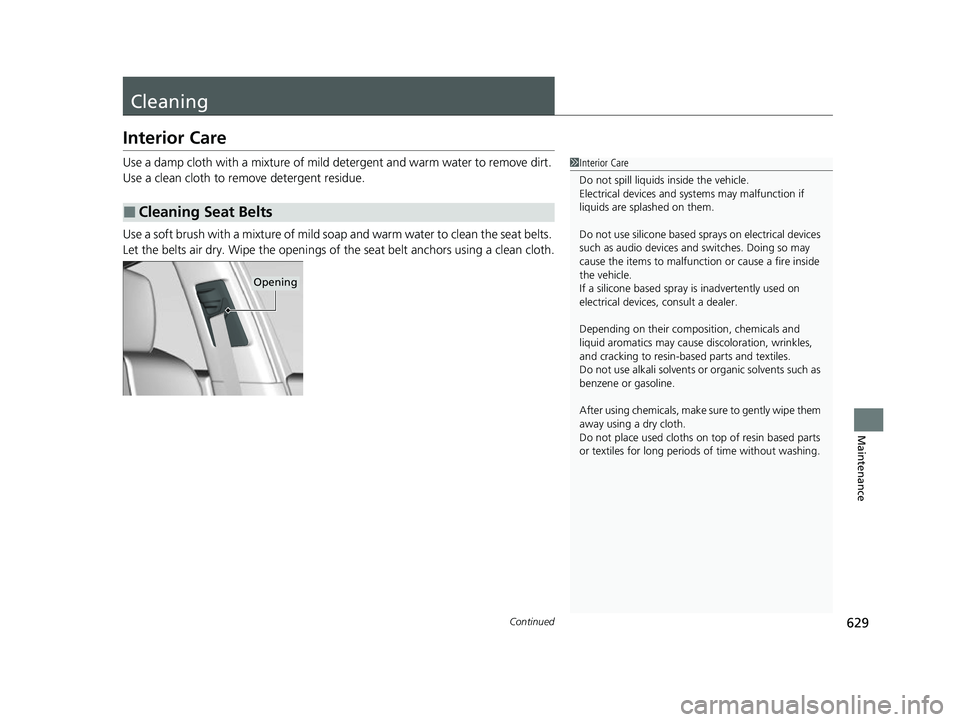
Use a soft brush with a mixture of mild soap and warm water to clean the seat belts.
Let the belts air dry. Wipe the openings of the seat belt anchors using a clean cloth.
■Cleaning Seat Belts
1Interior Care
Do not spill liquids inside the vehicle.
Electrical devices and sy stems may malfunction if
liquids are splashed on them.
Do not use silicone based sprays on electrical devices
such as audio devices and switches. Doing so may
cause the items to malfunction or cause a fire inside
the vehicle.
If a silicone based spray is inadvertently used on
electrical devices, consult a dealer.
Depending on their compos ition, chemicals and
liquid aromatics may cause discoloration, wrinkles,
and cracking to resin-ba sed parts and textiles.
Do not use alkali solvents or organic solvents such as
benzene or gasoline.
After using chemicals, make su re to gently wipe them
away using a dry cloth.
Do not place used cloths on top of resin based parts
or textiles for long periods of time without washing.
Opening
23 ACURA RDX-31TJB6400.book 629 ページ 2022年8月4日 木曜日 午後1時51分
Page 649 of 713
Continued647
uuIf a Tire Goes Flat uChanging a Flat Tire
Handling the Unexpected
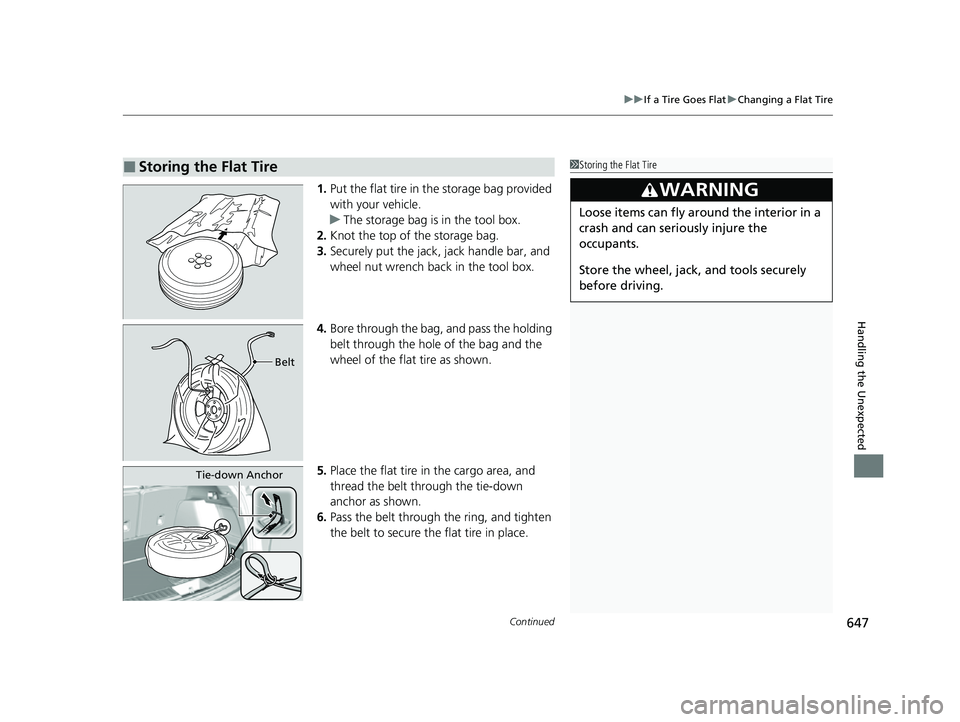
1. Put the flat tire in the storage bag provided
with your vehicle.
u The storage bag is in the tool box.
2. Knot the top of the storage bag.
3. Securely put the jack, jack handle bar, and
wheel nut wrench back in the tool box.
4. Bore through the bag, and pass the holding
belt through the hole of the bag and the
wheel of the flat tire as shown.
5. Place the flat tire in the cargo area, and
thread the belt through the tie-down
anchor as shown.
6. Pass the belt through the ring, and tighten
the belt to secure the flat tire in place.
■Storing the Flat Tire1Storing the Flat Tire
3WARNING
Loose items can fly around the interior in a
crash and can seriously injure the
occupants.
Store the wheel, jack, and tools securely
before driving.
Belt
Tie-down Anchor
23 ACURA RDX-31TJB6400.book 647 ページ 2022年8月4日 木曜日 午後1時51分
Page 699 of 713
697Continued
Information
Warranty Coverages
■U.S. Owners
Your new vehicle is covered by these warranties:
New Vehicle Limited Warranty – covers your new vehicle, except for the
emissions control systems and accessorie s, against defects in materials and
workmanship.
Emissions Control Systems Defects Warranty and Emissions Performance
Warranty – these two warranties cover your ve hicle’s emissions control systems.
Time, mileage, and coverage are conditional. Please read your warranty booklet for
exact information.
Seat Belt Limited Warranty – a seat belt that fails to function properly is covered
by a limited warranty. Please read your warranty booklet for details.
Rust Perforation Limited Warranty – all exterior body panels are covered against
rusting from the inside out for the specified time period, regardless of mileage.
Accessory Limited Warranty – Acura accessories are covered under this warranty.
Time and mileage limits depend on the type of accessory and other factors. Please
read your warranty booklet for details.
Replacement Parts Limited Warranty – covers all Acura replacement parts
against defects in mate rials and workmanship.
23 ACURA RDX-31TJB6400.book 697 ページ 2022年8月4日 木曜日 午後1時51分
Page 705 of 713

703
Index
Sequential Shift Mode............................. 457
Shifting ................................................... 451
Average Fuel Economy ............................ 141
AWD ......................................................... 474
B
Battery ...................................................... 623
Charging System Indicator ................ 87, 672
If the Battery Is Dead............................... 667
Maintenance (Checking the Battery) ....... 623
Belts (Seat) .................................................. 37
Beverage Holders ..................................... 235
Blind Spot Information System ............... 479
Bluetooth ® Audio ..................................... 316
Bluetooth ® HandsFreeLink ®................... 389
Booster Seats (For Children) ...................... 76
Brake System ............................................ 545
Anti-lock Brake System (ABS) .................. 553
Automatic Brake Hold ............................. 550
Brake Assist System................................. 554
Fluid ....................................................... 603
Foot Brake .............................................. 549
Indicator ............................... 81, 82, 83, 673
Indicator (Red) ........................................ 675
Parking Brake.......................................... 545
Brightness Control (Instrument Panel) ... 208
Built-in Key ............................................... 157
Bulb Replacement .................................... 605
Chicane
TM Taillights, Bra ke and Rear Side
Marker Lights ........................................ 607 Chicane
TM Taillights/Brak
e and Back-Up
Lights .................................................... 608
Fog Lights ................................................ 605
Front Turn Signal, Parking/Chicane
TM
Daytime Running and Front Side
Marker Lights ...................................... 605
Headlights ............................................... 605
High-Mount Brake Light .......................... 608
Puddle Lights ........................................... 608
Rear License Plate Light ........................... 608
Rear Turn Signal Light Bulbs .................... 606
Side Turn Signal/Em ergency Indicator
Lights .................................................... 605
Bulb Specifications ................................... 690
C
CAMERA Button....................................... 568
Carbon Monoxide Gas ................................ 77
Carrying Cargo .................................. 431, 433
Certification Label .................................... 692
Changing Bulbs ......................................... 605
Charging System Indicator ................. 87, 672
Chicane
TM Daytime Running Lights ......... 200
Child Safety ................................................. 64
Childproof Door Locks ............................. 171
Child Seat .................................................... 64
Booster Seats ............................................. 76
Child Seat for Infants ................................. 66
Child Seat for Small Children ..................... 67 Installing a Child Seat
with a Lap/Shoulder
Seat Belt .................................................. 71
Larger Children ......................................... 75
Rear-facing Child Seat ............................... 66
Selecting a Child Seat ................................ 68
Childproof Door Locks ............................. 171
Cleaning the Exterior ............................... 632
Cleaning the Interior ................................ 629
Client Service Information ....................... 701
Climate Control System ............................ 247
Changing the Mode ................................ 247
Defrosting the Windshield and Windows ............................................... 249
Dust and Pollen Filter............................... 628
Rear Temperature Control Dial ................ 251
Recirculation/Fresh Air Mode ................... 247
Sensors ................................................... 252
Synchronized Mode................................. 250
Using Automatic Climate Control ............ 247
Clock .......................................................... 154
CMBS
TM (Collision Mitigation Braking
SystemTM) ................................................. 486
Coat Hook ................................................. 237
Collision Mitigation Braking System
TM
(CMBSTM) ................................................. 486
Compact Spare Tire .......................... 641, 691
Console Compartment ............................. 234
Controls ..................................................... 153
23 ACURA RDX-31TJB6400.book 703 ページ 2022年8月4日 木曜日 午後1時51分