tailgate ACURA RDX 2023 Service Manual
[x] Cancel search | Manufacturer: ACURA, Model Year: 2023, Model line: RDX, Model: ACURA RDX 2023Pages: 713, PDF Size: 21.99 MB
Page 380 of 713

378
uuCustomized Features u
Features
*1:Default SettingSetup Group Customizable Features Description Selectable Settings
Vehicle Driving
Position
Setup
Memory Position Link
Turns the driving position memory
system on and off. On
*1/
Off
Seat Position Movement at
Entry/Exit Causes the driver’s seat to move back
to make it easier to enter or exit the
vehicle.
On
*1/
Off
Keyless
Access Setup Door Unlock Mode
Changes which doors unlock when
you grab the driver’s door handle. Driver Door or
Tailgate Only
*1/
All
Doors
Keyless Access Light Flash Causes some exterior lights to flash
when you unlock/lock the doors.
On
*1/
Off
Keyless Access Beep Causes the beeper to sound when you
unlock/lock the doors. On
*1/
Off
Remote Start System On/
Off
*Turns the remote engine start feature
on and off. On*1/
Off
Walk Away Auto Lock Changes the settings for the auto lock
function when you walk away from
the vehicle. Enable
/Disable
*1
* Not available on all models
23 ACURA RDX-31TJB6400.book 378 ページ 2022年8月4日 木曜日 午後1時51分
Page 383 of 713

381
uuCustomized Features u
Continued
Features
*1:Default SettingSetup Group Customizable Features
Description Selectable Settings
Vehicle Power
Tailgate
SetupPower Tailgate Keyless Open
Mode
Changes the setting to enable the
power tailgate to be opened with the
keyless remote at anytime or only
when the doors are unlocked.
Anytime
*1/
When
Unlocked
Power Tailgate Open by
Outer Handle Changes the setting to enable or
disable the power tailgate open
operation when the user presses the
outer handle of the power tailgate. Off (Manual only)
/
On (Power/
Manual)
*1
Hands Free Access Power
Tailgate*
Changes the setting to enable or
disable the power tailgate open
operation when a kicking motion
under the rear bumper is detected. On
*1/
Off
Maintenance
Information (Select Reset Items) Resets the Maintenance Minder
TM
display when you have performed the
maintenance service. —
Reset All Due
* Not available on all models
23 ACURA RDX-31TJB6400.book 381 ページ 2022年8月4日 木曜日 午後1時51分
Page 433 of 713

Continued431
uuBefore Driving uDriving Preparation
Driving
• Store or secure all items on board properly.
u Carrying too much cargo, or improperly storing it, can affect your vehicle’s
handling, stability, sto pping distance, and tires, and make it unsafe.
2Maximum Load Limit P. 433
•Do not pile items higher than the seat height.
u They can block your view and may be thrown forward in the event of sudden
braking.
• Do not place anything in the front seat footwells. Make sure to secure the floor
mat.
u An object or unsecured floor mat can in terfere with your brake and accelerator
pedal operation while driving.
• If you have any animals on board, do not let them move around in the vehicle.
u They may interfere with driving and a crash could occur.
• Securely close and lock al l doors and the tailgate.
2Locking/Unlocking the Doors from the Inside P. 169
•Adjust your seating position properly.
u Adjust the head restraint, too.
2Seats P. 216
2 Adjusting the Front and Rear Outer Head Restraint Positions P. 225
•Adjust the mirrors and steering wheel properly.
u Adjust them while sitting in the proper driving position.
2 Adjusting the Steering Wheel P. 212
2 Mirrors P. 213
■Interior Checks1Interior Checks
The headlight aim is set by the factory, and does not
need to be adjusted. Howeve r, if you regularly carry
heavy items in the cargo area or tow a trailer, have
the aiming readjusted at a dealer or by a qualified
technician.
23 ACURA RDX-31TJB6400.book 431 ページ 2022年8月4日 木曜日 午後1時51分
Page 447 of 713

Continued445
uuWhen Driving uStarting the Engine
Driving
You can remotely start the engine using the two-way keyless remote from extended
distances.
■To start the engine
The engine runs for up to 10 minu tes without you starting the vehicle.
To extend the run time for another 10 mi nutes during the first run, press the
button, then press an d hold the button.
u The amber LED blinks, then the green LED comes back on if a 10-minute
extension request was transmitted successfully.
After pressing the button, wait for the gr een LED to blink. This indicates that
the all the doors and the tailgate are locked.
■Remote Engine Start*1 Remote Engine Start*
The remote engine start may violate local laws.
Before using the remote e ngine start, check your
local laws.
If there are buildings an d obstacles between your
vehicle and the remote, th e range will be reduced.
This distance may vary by external electrical
interference.
3WARNING
Carbon monoxide ga s is toxic and can
rapidly accumulate in closed or even partly
enclosed areas.
Breathing it can cause unconsciousness and
even kill you.
Never use the remote engine starter with
the vehicle parked in a garage or other
areas with limited ventilation.
Press the button, then
press and hold the button.
Amber LED: Blinks when any button is pressed.
Continues to blink
during a vehicle
self check until the
engine starts. Go within the range,
and try again.
Green LED: Comes on while
the engine is running. Red LED: Blinks when the
remote is out of the keyless
access system range.
* Not available on all models
23 ACURA RDX-31TJB6400.book 445 ページ 2022年8月4日 木曜日 午後1時51分
Page 448 of 713

uuWhen Driving uStarting the Engine
446
Driving
■To stop the engine
Press and hold the button
for one second.
Go within the range,
and try again.
Amber LED: Blinks when any
button is pressed. Red LED:
●Comes on for one second to let you
know that the engine has stopped.
●Blinks when the remote is out of
the keyless access system range.
The engine will not stop.
1
Remote Engine Start*
The engine may not start by the remote engine start
if:
•You have disabled a remo te engine start setting
using the audio/information screen. 2Customized Features P. 359
•The power mode is not in VEHICLE OFF.
•The transmission is in a position other than (P.
•The hood is open, or any door or the tailgate is
unlocked.
•The 12-volt battery temp is too low or the 12-volt
battery charge is too low.
•You have already used the remote twice to start
the engine.
•Another registered keyless remote is in the vehicle.
•There is any antenna failure.•The door is unlocked with the built-in key.
•The engine oil pressure is low.
•The engine coolant temper ature is extremely high.•The telematics unit malfunctions.
•The security system alarm is not set.
Before starting the engine, make sure to check the
door lock status using the remote. When you press
the button, wait for the green LED to blink. If
the red LED turns on, the doors and tailgate did not
lock, and the engine does not start.
* Not available on all models
23 ACURA RDX-31TJB6400.book 446 ページ 2022年8月4日 木曜日 午後1時51分
Page 567 of 713

565Continued
Driving
Multi-View Rear Camera*
About Your Multi-View Rear Camera
The audio/information screen can display your vehicle’s rear view.
The display automatically changes to the rear view when the transmission is put into
(R.
■Multi-View Rear Camera Display Area
1About Your Multi-View Rear Camera
The rear camera view is restricted. You cannot see
the corner ends of the bumper or what is underneath
the bumper. Its unique le ns also makes objects
appear closer or farther than they actually are.
Visually confirm that it is safe to drive before backing
up. Certain conditions (such as weather, lighting, and
high temperatures) may also restrict the rear view. Do
not rely on the rearview display which does not give
you all information about conditions at the back of
your vehicle.
If the rear camera lens is covered with dirt or
moisture, activate the rearview camera washer
* or
use a soft, moist cloth to keep the lens clean and free
of debris. 2 Rear Wiper/Washer P. 206
Guidelines appear when you put the transmission
into
( R.
You can change the Guidelines setting. 2 Customized Features P. 359
Off: Guidelines do not appear.
Fixed: Fixed Guidelines appear.
Dynamic: Guidelines that move according to the
steering wheel direction appear.
Both: Fixed guidelines and dynamic guidelines
appear.
Guidelines
Bumper
Camera
Approx. 20 inches
(50 cm)
Tailgate Open Range Approx. 39 inches
(1 m)
Wide View Mode
Normal View Mode
Top Down View Mode
Approx. 20 inches (50 cm)
Tailgate Open Range Approx. 39 inches (1 m)
* Not available on all models
23 ACURA RDX-31TJB6400.book 565 ページ 2022年8月4日 木曜日 午後1時51分
Page 638 of 713
636
Maintenance
Accessories and Modifications
Accessories
When installing accessories, check the following:
• Do not install accessories on the windshield. They can obstruct your view and
delay your reaction to driving conditions.
• Do not install any accessories over areas marked SRS Airbag, on the sides or backs
of the front seats, on front or side pillars, or near the side windows.
Accessories installed in these areas may interfere with proper operation of the
vehicle’s airbags or may be propelled into you or another occupant if the airbags
deploy.
• Be sure electronic accessories do not over load electrical circuits or interfere with
proper operation of your vehicle.
2 Fuses P. 678
•Before installing any electron ic accessory, have the installer contact a dealer for
assistance. If possible, have a dealer inspect the final installation.
• It is recommended to use genuine Acura roof bicycle racks for carrying bicycles.
Do not install load-c arrying (strap-type) accessory racks to the tailgate, as they
may interfere with normal operation, whic h may result in damage to the tailgate.
1Accessories and Modifications
Acura Genuine accessori es are recommended to
ensure proper operati on on your vehicle.
3WARNING
Improper accessories or modifications can
affect your vehicle’s handling, stability, and
performance, and cause a crash in which
you can be seriously hurt or killed.
Follow all instruction s in this owner’s
manual regarding accessories and
modifications.
23 ACURA RDX-31TJB6400.book 636 ページ 2022年8月4日 木曜日 午後1時51分
Page 641 of 713
639
Handling the Unexpected
This chapter explains how to handle unexpected troubles.
Tools.................................................. 640
If a Tire Goes Flat
Changing a Flat Tire ......................... 641
Temporarily Repairi ng a Flat Tire....... 649
Handling of the Jack ......................... 663
Engine Does Not Start Checking the Engine ........................ 664
If the Keyless Remote Battery is Weak ...665
Emergency Engine Stop ................... 666
Vehicles with a compact spare tire
Vehicles with temporary tire repair kit
Models with temporary tire repair kit
If the Battery Is DeadJump Starting Procedure .................. 667
Overheating ...................................... 669
Indicator, Coming On/Blinking
If the Engine Oil Pressure Low Warning
Appears ............................................. 671
If the Charging System Indicator Comes On .. 672If the Malfunction Indicator Lamp Comes On or Blinks ................................... 672
If the Brake System Indicator (Red) Comes On or Blinks ....................................... 673
If the Electric Power Steering (EPS) System
Indicator Comes On ........................... 674
If the Brake System Indicator (Red) Comes On or Blinks at the Same Time When the Brake
System Indicator (Amber) Comes On .....675
If the Low Tire Pressure/TPMS Indicator Comes On or Blinks ....................... 676
If the Transmission System Indicator Blinks along with the Warning Message .... 677
Fuses .................................................. 678
Emergency Towing ........................... 685
If You Cannot Unlock the Fuel Fill Door.. 686If You Cannot Open the Tailgate .... 687
Refueling ........................................... 688
23 ACURA RDX-31TJB6400.book 639 ページ 2022年8月4日 木曜日 午後1時51分
Page 688 of 713
686
Handling the Unexpected
If You Cannot Unlock the Fuel Fill Door
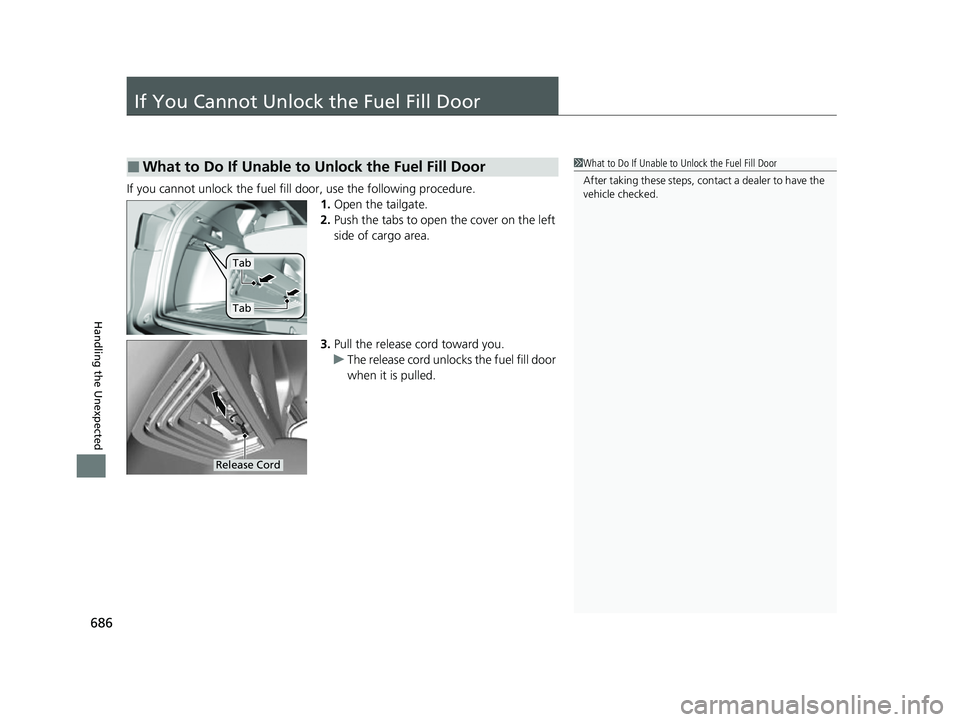
If you cannot unlock the fuel fill door, use the following procedure.1.Open the tailgate.
2. Push the tabs to open the cover on the left
side of cargo area.
3. Pull the release cord toward you.
u The release cord unlocks the fuel fill door
when it is pulled.
■What to Do If Unable to Unlock the Fuel Fill Door1What to Do If Unable to Unlock the Fuel Fill Door
After taking these steps, cont act a dealer to have the
vehicle checked.
Tab
Tab
Release Cord
23 ACURA RDX-31TJB6400.book 686 ページ 2022年8月4日 木曜日 午後1時51分
Page 689 of 713
687
Handling the Unexpected
If You Cannot Open the Tailgate
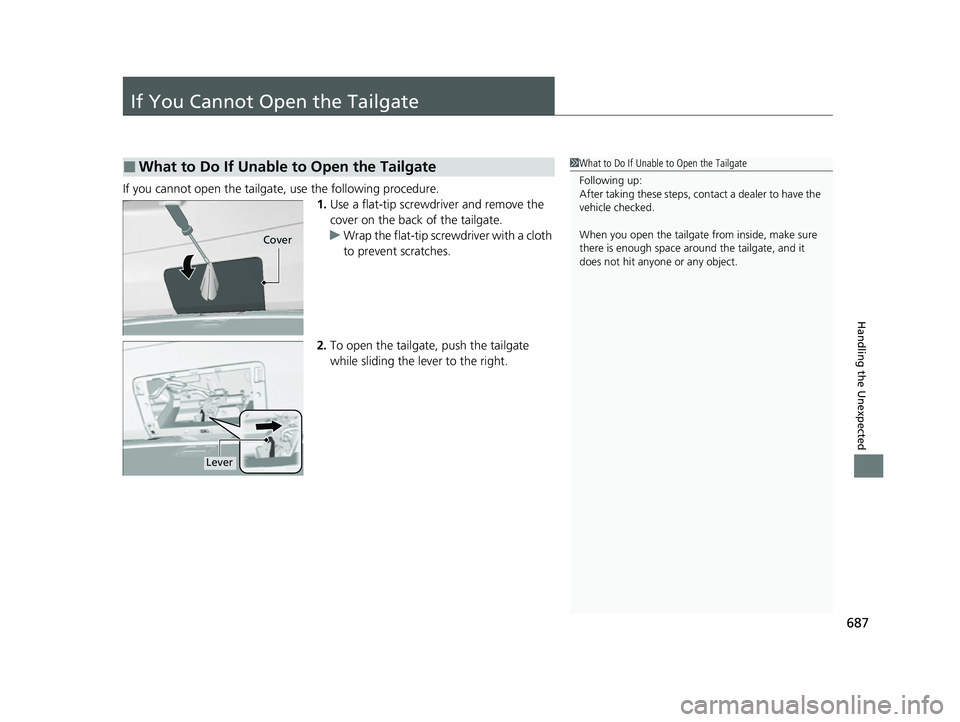
If you cannot open the tailgate, use the following procedure.1.Use a flat-tip screwdriver and remove the
cover on the back of the tailgate.
u Wrap the flat-tip screwdriver with a cloth
to prevent scratches.
2. To open the tailgate, push the tailgate
while sliding the lever to the right.
■What to Do If Unable to Open the Tailgate1What to Do If Unable to Open the Tailgate
Following up:
After taking these steps, cont act a dealer to have the
vehicle checked.
When you open the tailgate from inside, make sure
there is enough space around the tailgate, and it
does not hit anyone or any object.
Cover
Lever
23 ACURA RDX-31TJB6400.book 687 ページ 2022年8月4日 木曜日 午後1時51分