battery ACURA RDX 2023 Owners Manual
[x] Cancel search | Manufacturer: ACURA, Model Year: 2023, Model line: RDX, Model: ACURA RDX 2023Pages: 713, PDF Size: 21.99 MB
Page 7 of 713
Contents
Child Safety P. 64Exhaust Gas Hazard P. 77Safety Labels P. 78
Tailgate P. 173 Security System P. 183 Windows P. 186
Operating the Switches Around the Steering Wheel P. 193 Mirrors P. 213
Interior Convenience Items P. 230 Climate Control System P. 247
Audio Error Messages P. 332General Information on the Audio System P. 336
Bluetooth ® HandsFreeLink ® P. 389 AcuraLink ® P. 419
Off-Highway Driving Guidelines P. 441 When Driving P. 443 AcuraWatchTM P. 483
Multi-View Rear Camera* P. 565 Surround View Camera System*P. 567 Refueling P. 575
Maintenance Under the Hood P. 592 Replacing Light Bulbs P. 605
Checking and Maintaining Tires P. 614 Battery P. 623 Remote Transmitter Care P. 625
Accessories and Modifications P. 636
Handling of the Jack P. 663 Engine Does Not Start P. 664If the Battery Is Dead P. 667
Fuses P. 678 Emergency Towing P. 685
If You Cannot Open the Tailgate P. 687 Refueling P. 688
Devices that Emit Radio Waves P. 693 Reporting Safety Defects P. 694 Emissions Testing P. 695
Client Service Information P. 701
Quick Reference GuideP. 6
Safe DrivingP. 31
Instrument PanelP. 79
ControlsP. 153
FeaturesP. 253
DrivingP. 429
MaintenanceP. 581
Handling the UnexpectedP. 639
InformationP. 689
IndexP. 702
23 ACURA RDX-31TJB6400.book 5 ページ 2022年8月4日 木曜日 午後1時51分
Page 28 of 713
26
Quick Reference Guide
Maintenance (P 581)
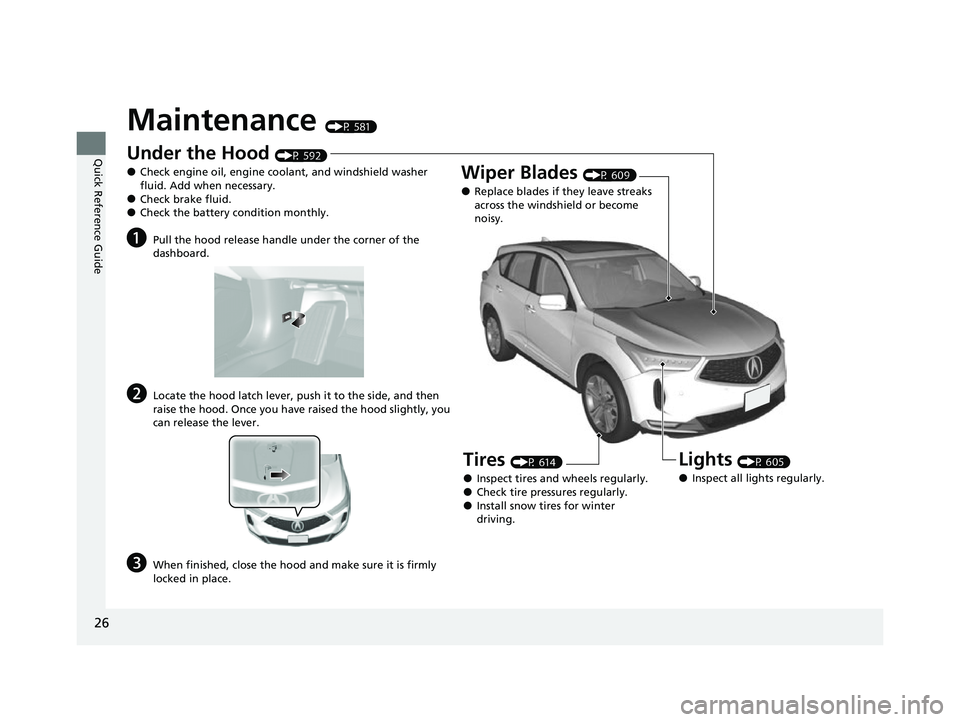
Under the Hood (P 592)
●Check engine oil, engine coolant, and windshield washer
fluid. Add when necessary.
●Check brake fluid.●Check the battery condition monthly.
aPull the hood release handle under the corner of the
dashboard.
bLocate the hood latch lever, push it to the side, and then
raise the hood. Once you have raised the hood slightly, you
can release the lever.
cWhen finished, close the hood and make sure it is firmly
locked in place.
Lights (P 605)
●Inspect all lights regularly.
Wiper Blades (P 609)
●Replace blades if they leave streaks
across the windshield or become
noisy.
Tires (P 614)
●Inspect tires and wheels regularly.●Check tire pressures regularly.●Install snow tires for winter
driving.
23 ACURA RDX-31TJB6400.book 26 ページ 2022年8月4日 木曜日 午後1時51分
Page 29 of 713
Quick Reference Guide
27
Handling the Unexpected (P 639)
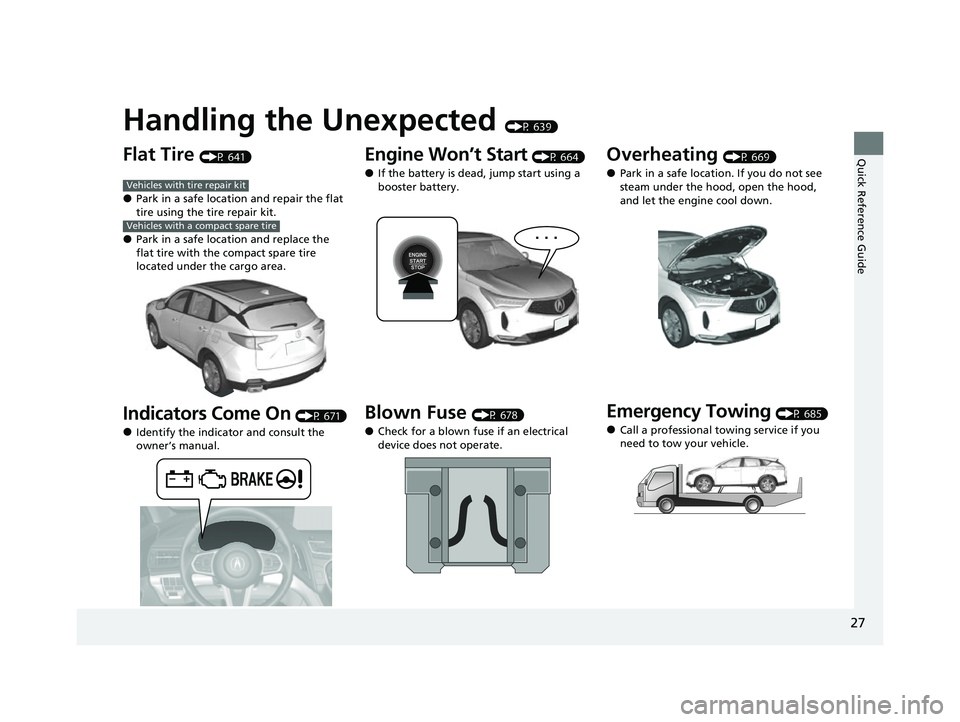
Flat Tire (P 641)
●Park in a safe location and repair the flat
tire using the tire repair kit.
●Park in a safe location and replace the
flat tire with the compact spare tire
located under the cargo area.
Indicators Come On (P 671)
●Identify the indicator and consult the
owner’s manual.
Vehicles with tire repair kit
Vehicles with a compact spare tire
Engine Won’t Start (P 664)
●If the battery is dead, jump start using a
booster battery.
Blown Fuse (P 678)
●Check for a blown fuse if an electrical
device does not operate.
Overheating (P 669)
●Park in a safe location. If you do not see
steam under the hood, open the hood,
and let the engine cool down.
Emergency Towing (P 685)
●Call a professional towing service if you
need to tow your vehicle.
23 ACURA RDX-31TJB6400.book 27 ページ 2022年8月4日 木曜日 午後1時51分
Page 89 of 713
87
uuIndicators u
Continued
Instrument Panel
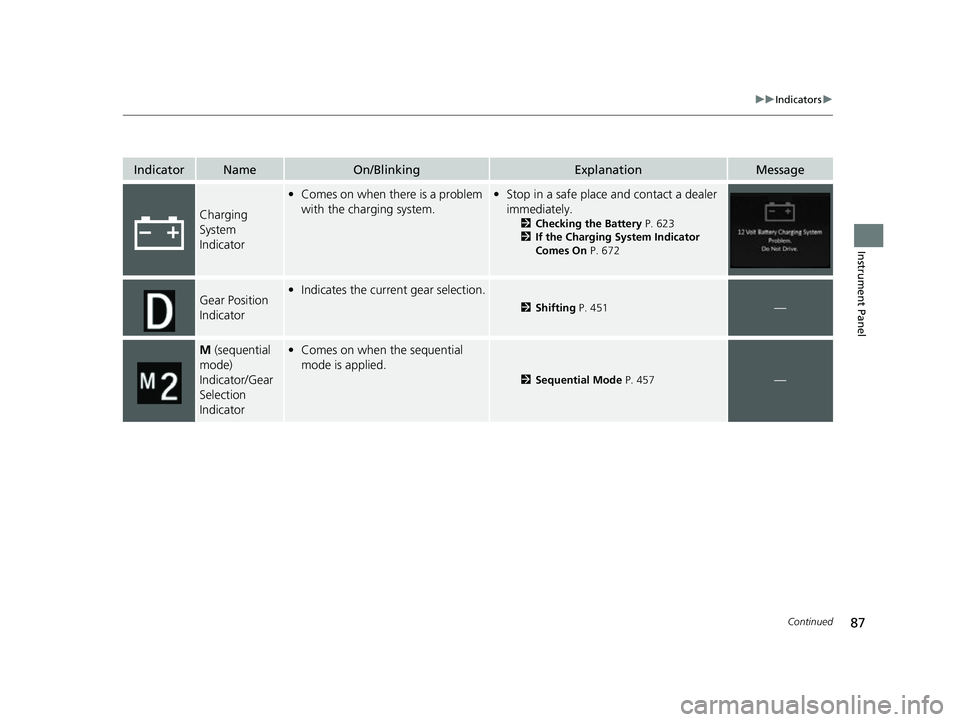
IndicatorNameOn/BlinkingExplanationMessage
Charging
System
Indicator
•Comes on when there is a problem
with the charging system.•Stop in a safe place and contact a dealer
immediately.
2 Checking the Battery P. 623
2 If the Charging System Indicator
Comes On P. 672
Gear Position
Indicator•Indicates the current gear selection.
2 Shifting P. 451—
M (sequential
mode)
Indicator/Gear
Selection
Indicator• Comes on when the sequential
mode is applied.
2 Sequential Mode P. 457—
23 ACURA RDX-31TJB6400.book 87 ページ 2022年8月4日 木曜日 午後1時51分
Page 94 of 713

92
uuIndicators u
Instrument Panel
IndicatorNameOn/BlinkingExplanationMessage
Auto Idle Stop
Suspend
Indicator
-The Integrated Dynamics System
mode is in SPORT or SNOW .
2Auto Idle Stop P. 464
2 Acura Integrated Dynamics System
P. 459
- The battery temperature is too low.
- Auto Idle Stop does not activate for
some reason.
2 Auto Idle Stop P. 464
—
●If you press and hold the Auto Idle Stop
OFF button, you can select whether to
display the status messages or not.
23 ACURA RDX-31TJB6400.book 92 ページ 2022年8月4日 木曜日 午後1時51分
Page 113 of 713

111
uuIndicators uMulti-Information Display Warning and Information Messages
Continued
Instrument Panel
MessageConditionExplanation
• Appears if there is a pr oblem with the automatic
lighting control system.• Appears while driving - Manually turn the lights on,
and have your vehicle checked by a dealer.
• Appears if there is a pr oblem with the headlights.•Appears while driving - The headlights may not be
on. When conditions allow you to drive safely, have
your vehicle checked by a d ealer as soon as possible.
●Appears when there is a problem with the battery
charging system.●Have your vehicle checked by a dealer.
●Appears if the dynamic mode cannot be changed
due to certain situations, su ch as a system error or
adverse driving conditions.
2 Acura Integrated Dynamics System P. 459
23 ACURA RDX-31TJB6400.book 111 ページ 2022年8月4日 木曜日 午後1時51分
Page 116 of 713

114
uuIndicators uMulti-Information Display Warn ing and Information Messages
Instrument Panel
MessageConditionExplanation
●Appears when you close the door with the power
mode in ON without the keyless remote inside the
vehicle.●Disappears when you bring the keyless remote back
inside the vehicle and close the door.
2 Keyless Remote Reminder P. 195
●Appears when the keyless remote battery becomes
weak.
2Replacing the Remote Battery P. 625
●Appears after you set the power mode to
ACCESSORY or ON.
●Appears after you unlock and open the driver’s door.
2Starting the Engine P. 443
•Appears when the engine does not restart
automatically due to the following reasons:
- The hood is open.
- There is a problem in the system that disables Auto
Idle Stop.●Follow the normal procedure to start the engine.
2 Starting the Engine P. 443
Canadian models
23 ACURA RDX-31TJB6400.book 114 ページ 2022年8月4日 木曜日 午後1時51分
Page 117 of 713

115
uuIndicators uMulti-Information Display Warning and Information Messages
Continued
Instrument Panel
MessageConditionExplanation
●Appears after the driver’s door is opened when the
power mode is in ACCESSORY.●Change the power mode to VEHICLE OFF.
2 ENGINE START/STOP Button P. 193
●Appears when the power mode is in ACCESSORY.
—
●Appears if the keyless remote’s battery is too weak
to start the engine or the key is not within operating
range to start the engine.
The beeper sounds six times.●Bring the back of the keyless remote into contact with
the ENGINE START/STOP button.
2If the Keyless Remote Battery is Weak P. 665
23 ACURA RDX-31TJB6400.book 115 ページ 2022年8月4日 木曜日 午後1時51分
Page 158 of 713

156
Controls
Locking and Unlocking the Doors
Key
This vehicle comes with the following keys:Use the keys to start and stop the engine, lock
and unlock all the doors and the fuel fill door,
and open the tailgate.1Key
All the keys have an immobilizer system. The
immobilizer system helps to protect against vehicle
theft. 2 Immobilizer System P. 183
Follow the advice below to prevent damage to the
keys:
•Do not leave the keys in direct sunlight, or in
locations with high temperature or high humidity.
•Do not drop the keys or set heavy objects on them.•Keep the keys away from liquids, dust and sand.
•Do not take the keys apart except for replacing the
battery.
If the circuits in the keys are damaged, the engine
may not start, and the remote transmitter may not
work.
If the keys do not work properly, have them
inspected by a dealer.
You can remotely start the engine using the remote
engine start. 2 Remote Engine Start
* P. 445
Models with two-way keyless remote
Models without two-way keyless
remote
Models with two-way keyless
remote
* Not available on all models
23 ACURA RDX-31TJB6400.book 156 ページ 2022年8月4日 木曜日 午後1時51分
Page 159 of 713

157
uuLocking and Unlocking the Doors uKey
Continued
Controls
The built-in key can be used to lock/unlock the
doors when the keyles s remote battery
becomes weak and the power door lock/
unlock operation is disabled.
To remove the built-in key, pull out the key
while pressing the release button. To reinstall
the built-in key, push the built-in key into the
keyless remote until it clicks.
■Built-in Key
Built-in Key
Release Button
23 ACURA RDX-31TJB6400.book 157 ページ 2022年8月4日 木曜日 午後1時51分