trunk Acura RL 2000 3.5 User Guide
[x] Cancel search | Manufacturer: ACURA, Model Year: 2000, Model line: RL, Model: Acura RL 2000Pages: 330, PDF Size: 4.53 MB
Page 160 of 330
Audi
o Syste m
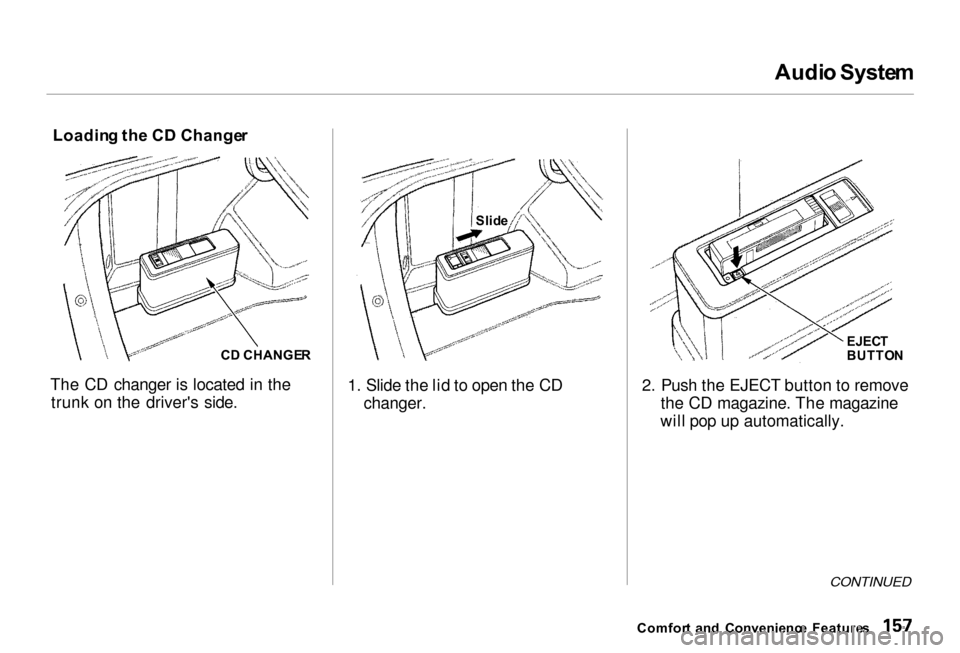
Loadin g th e C D Change r
C D CHANGE R
The CD changer is located in the trunk on the driver's side. 1. Slide the lid to open the CD
changer. 2. Push the EJECT button to remove
the CD magazine. The magazine
will pop up automatically.
CONTINUED
Comfor t an d Convenienc e Feature s
Slid
e
EJECT
BUTTO N
Page 166 of 330
Securit
y Syste m
The security system helps to protect your car and valuables from theft.
The horn sounds and a combination of headlights, parking lights, side
marker lights and taillights flashes if
someone attempts to break into your
car or remove the radio. This alarm continues for two minutes, then the
system resets. To reset an alarming
system before the two minutes have
elapsed, unlock either front door
with the key or the remote
transmitter.
The security system sets auto- matically fifteen seconds after you
lock the doors, hood, and trunk. For
the system to activate, you must lock
the doors from the outside with the key, lock tab, door lock switch, or
remote transmitter. The security
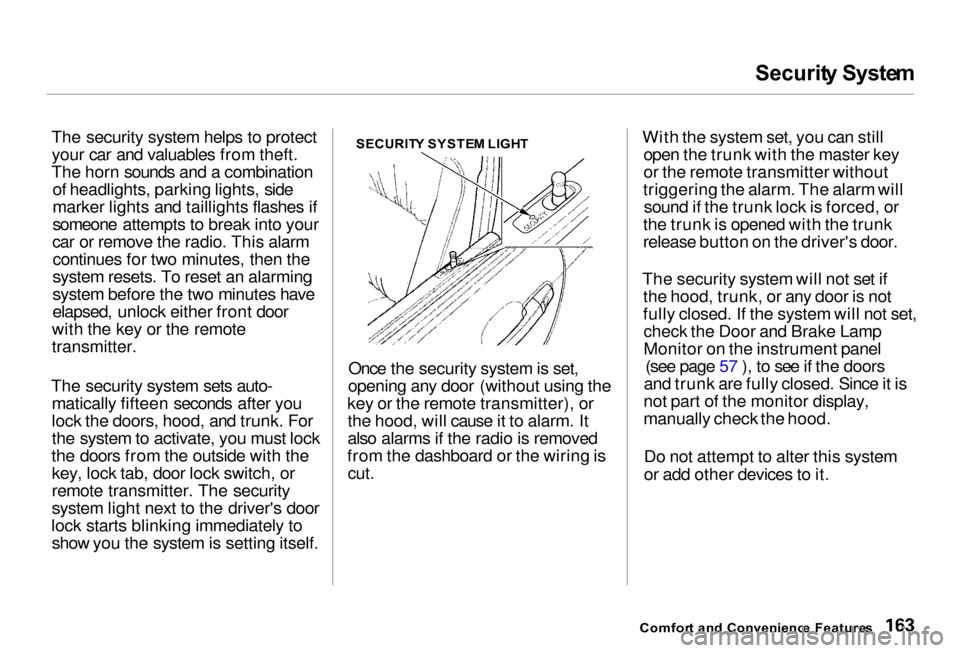
system light next to the driver's door
lock starts blinking immediately to show you the system is setting itself. SECURIT
Y SYSTE M LIGH T
Once the security system is set,
opening any door (without using the
key or the remote transmitter), or the hood, will cause it to alarm. It
also alarms if the radio is removed
from the dashboard or the wiring is
cut.
With the system set, you can still
open the trunk with the master key
or the remote transmitter without
triggering the alarm. The alarm will sound if the trunk lock is forced, or
the trunk is opened with the trunk
release button on the driver's door.
The security system will not set if the hood, trunk, or any door is not
fully closed. If the system will not set,check the Door and Brake Lamp
Monitor on the instrument panel (see page 57 ), to see if the doors
and trunk are fully closed. Since it is
not part of the monitor display,
manually check the hood.
Do not attempt to alter this system
or add other devices to it.
Comfor t an d Convenienc e Feature s
Page 177 of 330
Carryin
g Carg o
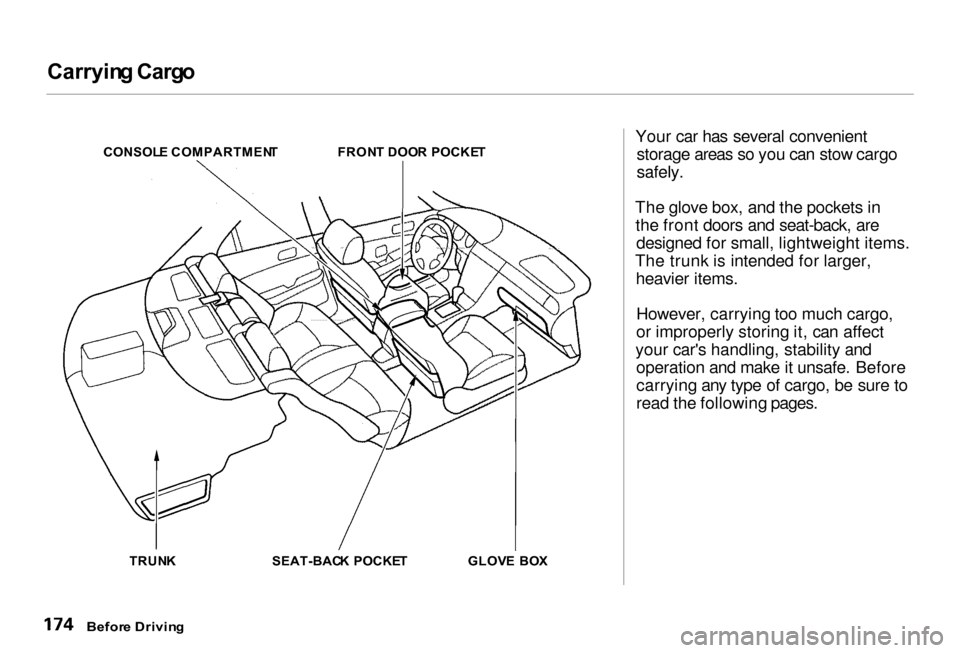
CONSOL E COMPARTMEN T
FRONT DOO R POCKE T
TRUN K SEAT-BACK POCKE T GLOVE BO X Your car has several convenient
storage areas so you can stow cargo
safely.
The glove box, and the pockets in the front doors and seat-back, are designed for small, lightweight items.
The trunk is intended for larger, heavier items.
However, carrying too much cargo,
or improperly storing it, can affect
your car's handling, stability and operation and make it unsafe. Before
carrying any type of cargo, be sure to
read the following pages.
Befor e Drivin g
Page 179 of 330

Carryin
g Carg o
Carryin g Carg o in th e Trunk or on
a Roo f Rac k
Distribute cargo evenly on the
floor of the trunk, placing the
heaviest items on the bottom and as far forward as possible. If you carry large items that
prevent you from closing the trunk
lid, exhaust gas can enter the passenger area. To avoid the
possibility of carbo n monoxid e
poisoning , follow the instructions
on page 49 .
If you can carry any items on a
roof rack, be sure the total weight of the rack and the items does not
exceed the maximum allowable
weight. Please contact your Acura dealer for further information.
Befor e Drivin g
Page 181 of 330
Preparin
g to Driv e
You should do the following checks and adjustments every day before
you drive your car.
1. Make sure all windows, mirrors,
and outside lights are clean and
unobstructed. Remove frost, snow, or ice.
2. Check that the hood and trunk are
fully closed.
3. Visually check the tires. If a tire
looks low, use a gauge to check itspressure.
4. Check that any items you may be
carrying with you inside are stored
properly or fastened down
securely.
5. Check the adjustment of the seat
(see page 93 ).
6. Check the adjustment of the
inside and outside mirrors (see
page 98 ).
7. Check the adjustment of the
steering wheel (see page 71).
8. Make sure the doors are securely
closed and locked.
9. Fasten your seat belt. Check that
your passengers have fastened their seat belts (see page 15 ).
10.Turn the ignition switch ON (II).
Check the indicator lights in the
instrument panel.
11.Start the engine (see page 179 ).
12.Check the gauges and indicator
lights in the instrument panel (see
page 53).
Drivin g
Page 187 of 330
Parkin
g
Always use the parking brake when
you park your car. The indicator on the instrument panel shows that the
parking brake is not fully released; it does not indicate that the parking
brake is firmly set. Make sure the
parking brake is set firmly or your
car may roll if it is parked on an
incline.
Set the parking brake before you put
the transmission in Park. This keeps
the car from moving and putting
pressure on the parking mechanism
in the transmission — making it
easier to move the shift lever out of
Park when you want to drive away. If the car is facing uphill, turn the
front wheels away from the curb.
If the car is facing downhill, turn the
front wheels toward the curb.
Make sure the parking brake is fully
released before driving away. Driving with the parking brake
partially set can overheat or damage
the rear brakes. Parkin
g Tip s
Make sure the moonroof and the
windows are closed. Turn off the lights.
Place any packages, valuables, etc.,
in the trunk or take them with you.
Lock the doors with the key or the
remote transmitter. Check the
indicator on the driver's door to
verify that the security system is set. Never park over dry leaves, tall
grass, or other flammable materials. The three way catalytic
converter gets very hot, and could
cause these materials to catch on
fire.
Drivin g
Page 200 of 330
Towin
g a Traile r
Trailer Lights
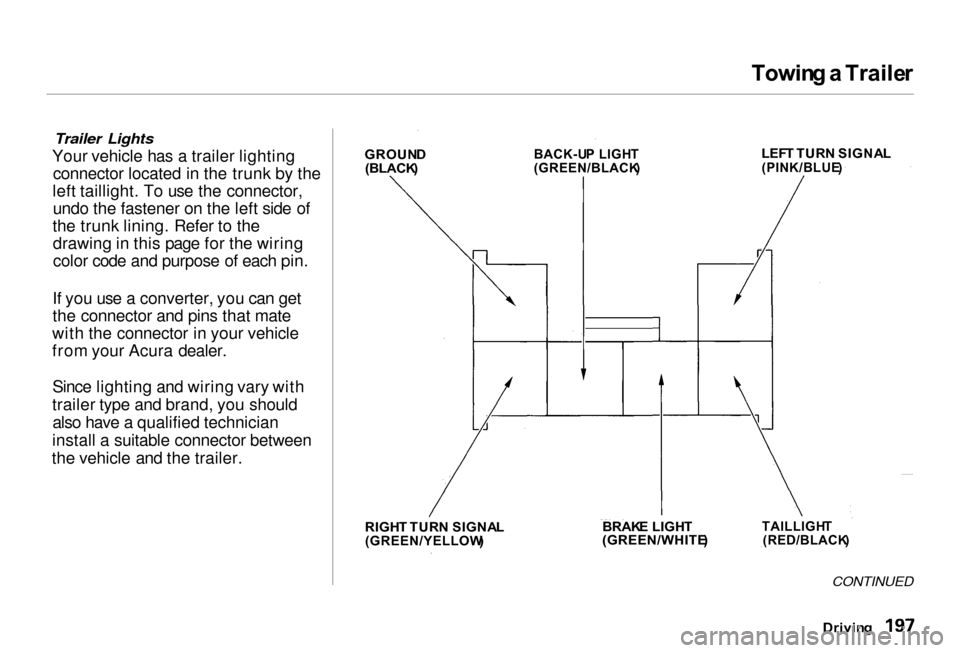
Your vehicle has a trailer lighting connector located in the trunk by the
left taillight. To use the connector, undo the fastener on the left side of
the trunk lining. Refer to the drawing in this page for the wiring
color code and purpose of each pin.
If you use a converter, you can get
the connector and pins that mate
with the connector in your vehicle
from your Acura dealer.
Since lighting and wiring vary with
trailer type and brand, you should also have a qualified technician
install a suitable connector between
the vehicle and the trailer.
CONTINUED
Drivin g
GROUN
D
(BLACK )
BACK-U
P LIGH T
(GREEN/BLACK )
LEF
T TUR N SIGNA L
(PINK/BLUE )
RIGH T TUR N SIGNA L
(GREEN/YELLOW )
BRAK
E LIGH T
(GREEN/WHITE )
TAILLIGH
T
(RED/BLACK )
Page 257 of 330
Light
s
Replacin g Rea r Bulb s
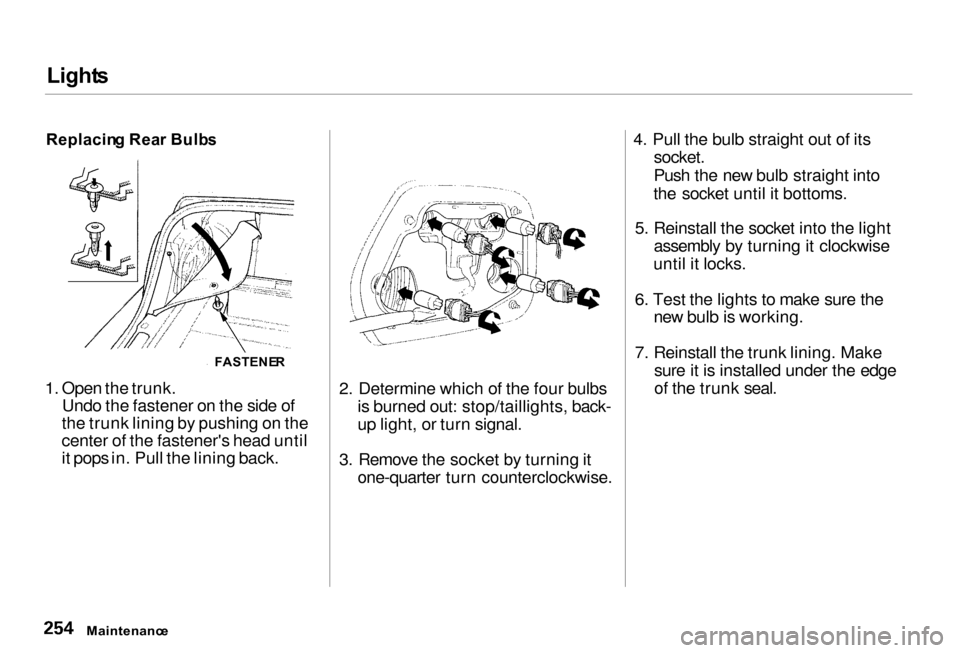
1. Open the trunk. Undo the fastener on the side of
the trunk lining by pushing on the
center of the fastener's head until
it pops in. Pull the lining back. 2. Determine which of the four bulbs
is burned out: stop/taillights, back-
up light, or turn signal.
3. Remove the socket by turning it one-quarter turn counterclockwise. 4. Pull the bulb straight out of its
socket.
Push the new bulb straight into
the socket until it bottoms.
5. Reinstall the socket into the light assembly by turning it clockwise
until it locks.
6. Test the lights to make sure the new bulb is working.
7. Reinstall the trunk lining. Make sure it is installed under the edge
of the trunk seal.
Maintenanc e
FASTENE
R
Page 258 of 330
Light
s
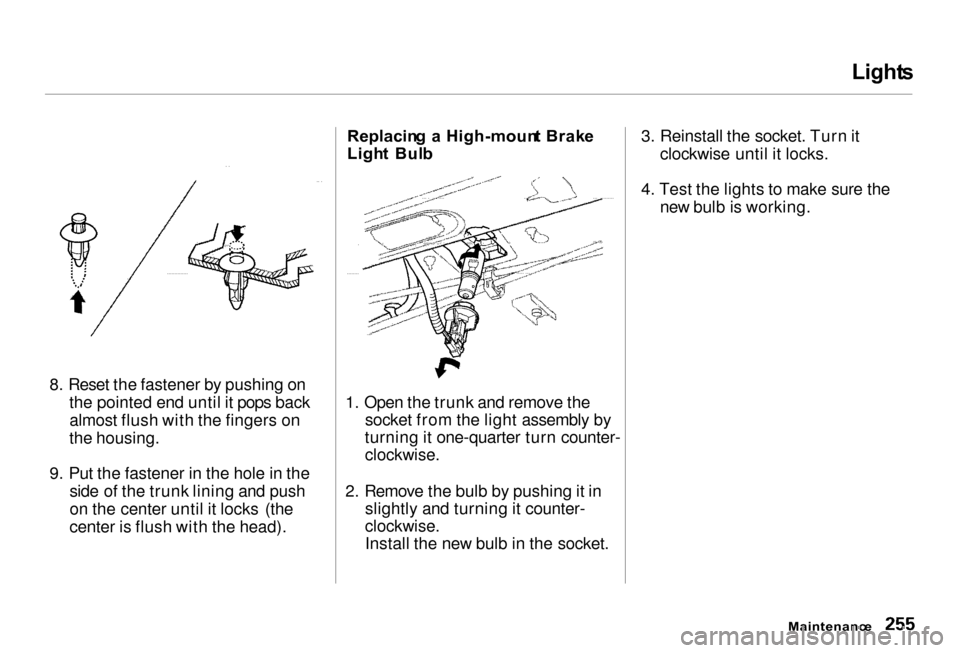
8. Reset the fastener by pushing on the pointed end until it pops backalmost flush with the fingers on
the housing.
9. Put the fastener in the hole in the side of the trunk lining and push
on the center until it locks (the
center is flush with the head). Replacin
g a High-moun t Brak e
Ligh t Bul b
1. Open the trunk and remove the socket from the light assembly by
turning it one-quarter turn counter-
clockwise.
2. Remove the bulb by pushing it in slightly and turning it counter-
clockwise.
Install the new bulb in the socket. 3. Reinstall the socket. Turn it
clockwise until it locks.
4. Test the lights to make sure the new bulb is working.
Maintenance
Page 262 of 330
Storin
g You r Ca r
If you need to park your car for an
extended period (more than one
month), there are several things you
should do to prepare it for storage.
Proper preparation helps prevent
deterioration and makes it easier to
get your car back on the road. If
possible, store your car indoors. Fill the fuel tank.
Change the engine oil and filter
(see page 217). Wash and dry the exterior
completely.
Clean the interior. Make sure the
carpeting, floor mats, etc. are
completely dry. Leave the parking brake off. Put
the transmission in Park. Block the rear wheels.
If the car is to be stored for a
longer period, it should be supported on jackstands so the
tires are off the ground. Leave one window open slightly (if
the car is being stored indoors). Disconnect the battery.
Support the front wiper blade
arms with a folded towel or rag so
they do not touch the windshield.
To minimize sticking, apply a silicone spray lubricant to all door
and trunk seals. Also, apply a
vehicle body wax to the painted surfaces that mate with the door
and trunk seals. Cover the car with a "breathable"
cover, one made from a porous
material such as cotton.
Nonporous materials, such as
plastic sheeting, trap moisture,
which can damage the paint. If possible, run the engine for a
while periodically (preferably once a month).
If you store your car for 12 months or longer, have your Acura dealer
perform the inspections called for in
the 24 months/30,000 miles (48,000
km) maintenance schedule (Normal Conditions) as soon as you take it
out of storage (see page 206). The
replacements called for in the
maintenance schedule are not
needed unless the car has actually
reached that time or mileage.
Maintenance