belt Acura RL 2001 3.5 Service Manual
[x] Cancel search | Manufacturer: ACURA, Model Year: 2001, Model line: RL, Model: Acura RL 2001Pages: 333, PDF Size: 4.28 MB
Page 56 of 333
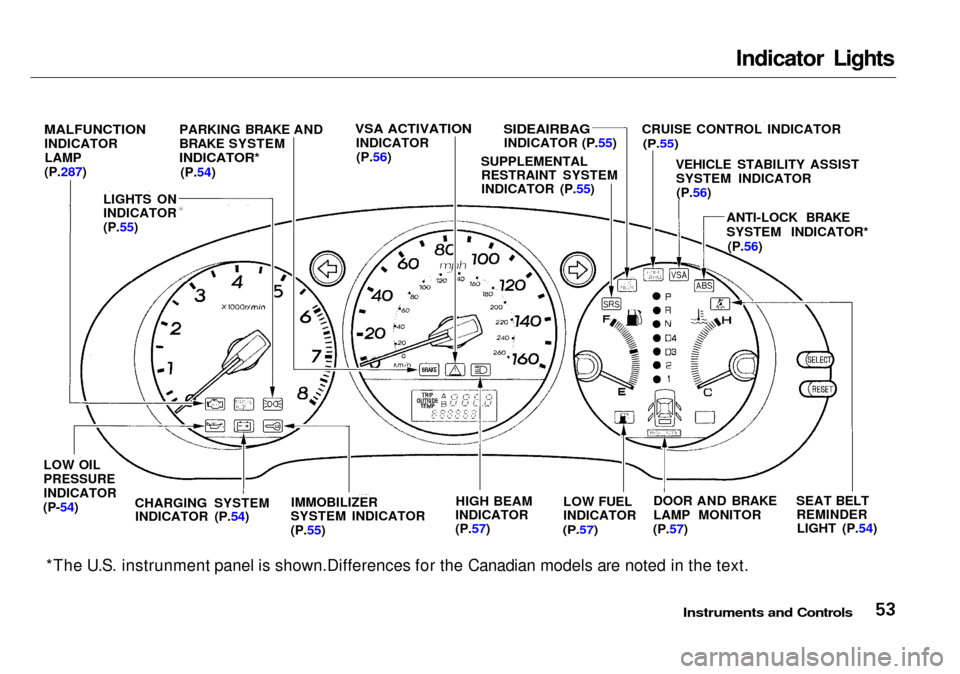
Indicator Lights
*The U.S. instrunment panel is shown.Differences for the Canadian models are noted in the text.
Instruments and Controls
MALFUNCTION
INDICATOR
LAMP
(P.287)
LIGHTS ON
INDICATOR
(P.55) PARKING BRAKE AND
BRAKE SYSTEM
INDICATOR*
(P.54)
VSA ACTIVATION
INDICATOR(P.56)
SIDEAIRBAG
INDICATOR (P.55) CRUISE CONTROL INDICATOR
(P.55)
VEHICLE STABILITY ASSISTSYSTEM INDICATOR(P.56)
ANTI-LOCK BRAKE
SYSTEM INDICATOR*(P.56)
LOW OIL
PRESSURE
INDICATOR
(P-54)
CHARGING SYSTEM
INDICATOR (P.54) IMMOBILIZER
SYSTEM INDICATOR
(P.55) HIGH BEAM
INDICATOR
(P.57) LOW FUEL
INDICATOR
(P.57)
DOOR AND BRAKE
LAMP MONITOR
(P.57) SEAT BELT
REMINDERLIGHT (P.54)
SUPPLEMENTAL
RESTRAINT SYSTEM
INDICATOR (P.55)
Page 57 of 333
Indicator Lights
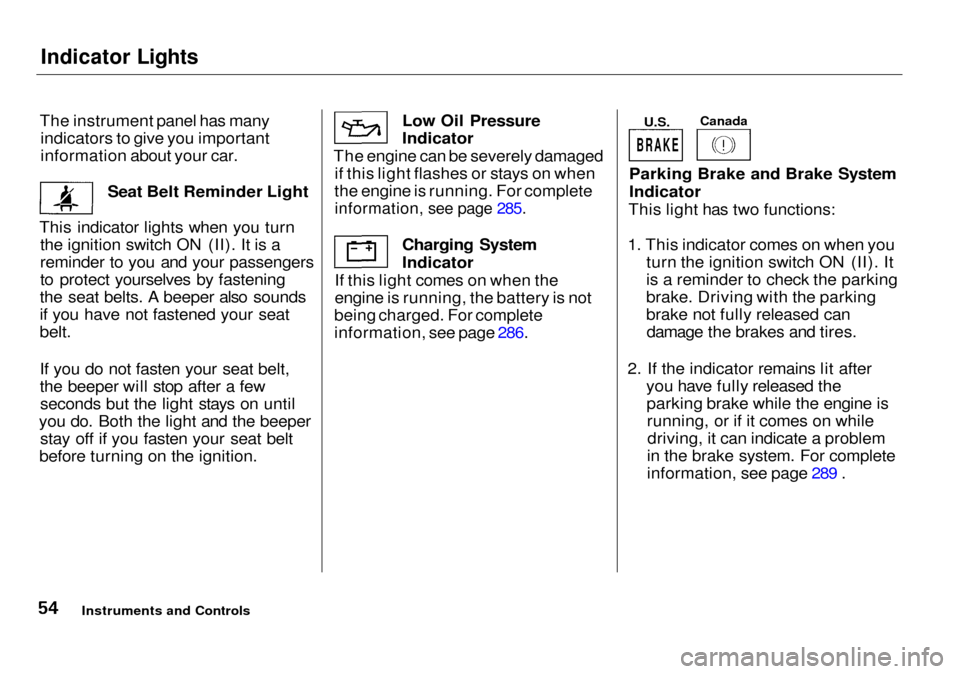
The instrument panel has many indicators to give you important
information about your car.
Seat Belt Reminder Light
This indicator lights when you turn the ignition switch ON (II). It is a
reminder to you and your passengers
to protect yourselves by fastening
the seat belts. A beeper also sounds
if you have not fastened your seat
belt.
If you do not fasten your seat belt,
the beeper will stop after a few seconds but the light stays on until
you do. Both the light and the beeper stay off if you fasten your seat belt
before turning on the ignition. Low Oil Pressure
Indicator
The engine can be severely damaged if this light flashes or stays on when
the engine is running. For complete
information, see page 285.
Charging System
Indicator
If this light comes on when the
engine is running, the battery is not
being charged. For complete
information, see page 286.
U.S.
Canada
Parking Brake and Brake System
Indicator
This light has two functions:
1. This indicator comes on when you turn the ignition switch ON (II). It
is a reminder to check the parking
brake. Driving with the parking
brake not fully released candamage the brakes and tires.
2. If the indicator remains lit after you have fully released theparking brake while the engine isrunning, or if it comes on whiledriving, it can indicate a problem
in the brake system. For complete
information, see page 289 .
Instruments and Controls
BRAKE
Page 58 of 333

Indicator Lights
Lights On Indicator
(U.S. models only)
On cars with automatic lighting (see
page 64)
This indicator reminds you that the exterior lights are on. It comes on
when the light switch is in either the or position. If you turn the
ignition switch to ACCESSORY (I)
or LOCK (0) without turning off the
light switch, this indicator will
remain on. A reminder chime willalso sound when you open the driver's
door.
This indicator will also come on
when the light switch is in AUTO and the lights turn on automatically.
Cruise Control Indicator
This lights when you set the cruise control. See page 73 for information
on operating the cruise control.
Immobilizer System
Indicator
This indicator comes on for a few seconds when you turn the ignition
switch ON (II). It will then go off if
you have inserted a properly-coded ignition key. If it is not a properly-
coded key, the indicator will blink
and the engine will not start (see
page 78).
This indicator also blinks several times when you turn the ignitionswitch from ON (II) to ACCESSORY (I) or LOCK (0).
Malfunction Indicator
Lamp
See page 287.
Supplemental Restraint
System Indicator
This indicator lights when you turn the ignition switch ON (II). If itcomes on at any other time, it
indicates a potential problem with
your front airbags. This light will also alert you to a potential problem
with your side airbags, passenger's side airbag automatic cutoff system
or automatic seat belt tensioners.
For complete information, see page
45.
Side Airbag Indicator
This indicator lights when you turn the ignition switch ON (II). If itcomes on at any other time, it
indicates that the passenger's side airbag has automatically shut off.
For complete information, see page
47.
Instruments and Controls
SRS
SIDE
AIRBAG
CRUISE
CONTROL
Page 91 of 333

Keys and Locks
Glove Box
Open the glove box by pulling the
bottom of the handle. Close it with a
firm push. Lock or unlock the glove box with the master key.
The glove box light comes on only when the parking lights are on.
Instruments and Controls
An open glove box can cause
serious injury to your passenger
in a crash, even if the
passenger is wearing the seat
belt.
Always keep the glove box closed while driving.
Page 183 of 333

Preparing to Drive
You should do the following checks and adjustments every day before
you drive your car.
1. Make sure all windows, mirrors, and outside lights are clean and
unobstructed. Remove frost, snow,or ice.
2. Check that the hood and trunk are
fully closed.
3. Visually check the tires. If a tire
looks low, use a gauge to check its
pressure.
4. Check that any items you may be
carrying with you inside are stored
properly or fastened down
securely.
5. Check the adjustment of the seat (see page 94 ).
6. Check the adjustment of the
inside and outside mirrors (see
page 99 ).
7. Check the adjustment of the
steering wheel (see page 7 1 ).
8. Make sure the doors are securely
closed and locked.
9. Fasten your seat belt. Check that
your passengers have fastened
their seat belts (see page 15 ).
10.Turn the ignition switch ON (II).
Check the indicator lights in the
instrument panel.
11.Start the engine (see page 181).
12.Check the gauges and indicator
lights in the instrument panel (see
page 53).
Driving
Page 206 of 333

Maintenance
This section explains why it is important to keep your car well
maintained and to follow basic
maintenance safety precautions.
This section also includes Maintenance Schedules for normal
driving and severe driving conditions,
a Maintenance Record, and instruc-
tions for simple maintenance tasks
you may want to take care of
yourself.
If you have the skills and tools to per-
form more complex maintenance
tasks on your Acura, you may want
to purchase the Service Manual. See
page 319 for information on how to obtain a copy, or see your Acura
dealer.
Maintenance Safety....................... 204
Important Safety Precautions.. 205
Maintenance Schedule.................. 206
Required Maintenance Record.... 213 Owner Maintenance Checks........ 215
Fluid Locations............................... 216
Engine Oil...................................... 217
Adding Oil................................... 217
Recommended Oil.................... 217
Synthetic Oil.............................. 218
Additives.................................... 218
Changing the Oil and Filter...... 219
Cooling System.............................. 221 Adding Engine Coolant............. 221Replacing Engine Coolant........ 223
Windshield Washers..................... 227
Automatic Transmission Fluid..... 228 Differential Oil.............................. 229
Brake Fluid.................................... 230
Brake System............................. 230
Power Steering............................... 230
Hood Latch.................................... 231
Air Cleaner Element...................... 231 Spark Plugs..................................... 233
Replacement.............................. 233
Specifications............................ 236
Battery............................................ 236
Wiper Blades.................................. 239
Air Conditioning System............... 241
Air Conditioning Filter.................. 242
Drive Belts...................................... 242
Timing Belt..................................... 243
Tires................................................ 243
Inflation..................................... 243
Inspection................................... 245
Maintenance............................... 246
Tire Rotation.............................. 246
Replacing Tires and Wheels .... 247
Wheels and Tires....................... 248
Winter Driving........................... 248
Snow Tires............................ 249
Tire Chains.............................
249
Lights.............................................. 250 Replacing Bulbs......................... 252
Storing Your Car............................
261
Maintenance
Page 213 of 333

U.S. Owners
Follow the Severe Conditions
Maintenance Schedule if youdrive your car MAINLY under
one or more of the following
conditions:
Driving less than 5 miles (8
km) per trip or, in freezing
temperatures, driving less than 10 miles (16 km) per trip.
Driving in extremely hot [over 90°F (32°C) ] conditions.
Extensive idling or long
periods of stop-and-go driving.
Trailer towing, driving with a roof rack, or driving in
mountainous conditions.
Driving on muddy, dusty, orde-iced roads.
Canadian Owners
Follow the Maintenance
Schedule for Severe Conditions.
# :
See information on maintenance and emissions warranty, last column, page 207 .
* 1 : See Timing Belt on page 243 for replacement information under special driving conditions.
* 2 : See Air Conditioning Filter on page 242 for replacement information under special driving conditions.
Maintenance
Page 214 of 333

Service at the indicated distance or time, whichever comes first. Do the items in A, B, C, D, E as required for each distance/time.
U.S. Owners — Refer to page 210 to determine which schedule to use.
Canadian Owners — Use the Maintenance Schedule for Severe Conditions.
* 1 : See Timing Belt on page 243 for replacement information under special driving conditions.
* 2 : See Air Conditioning Filter on page 242 for replacement information under special driving
conditions.
# : See information on maintenance and emissions warranty, last column, page 207 .
NOTE :
Check engine oil and coolant at each fuel stop.
Maintenance
CONTINUED
page 246
Page 215 of 333
*
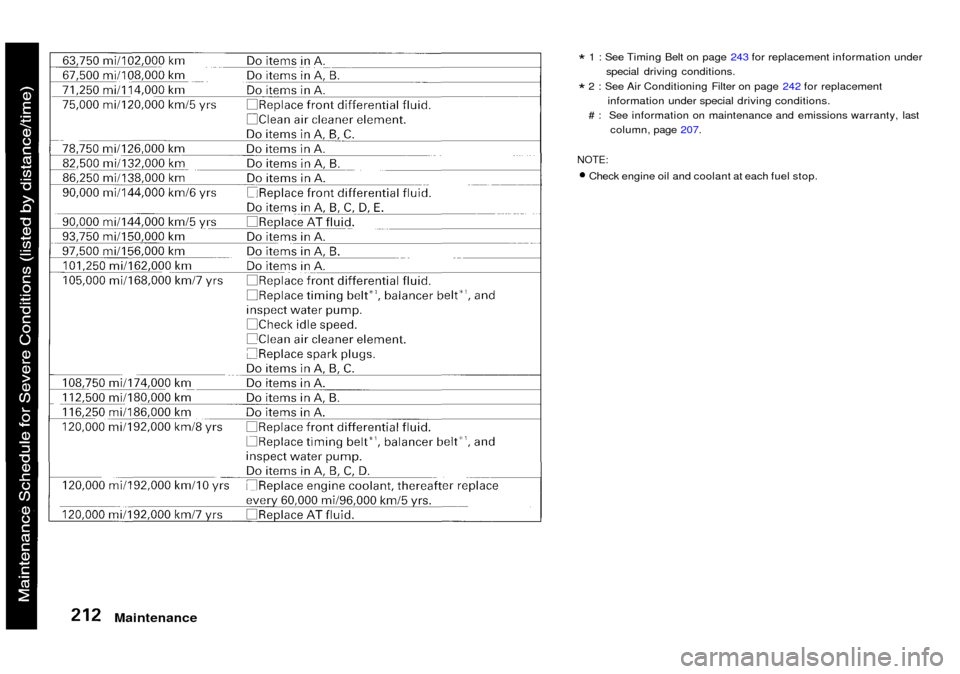
1 : See Timing Belt on page 243 for replacement information under
special driving conditions.
* 2 : See Air Conditioning Filter on page 242 for replacement
information under special driving conditions.
# : See information on maintenance and emissions warranty, last column, page 207.
NOTE:
Check engine oil and coolant at each fuel stop.
Maintenance
Page 245 of 333

Air Conditioning Filter, Drive Belts
Air Conditioning Filter The air conditioning filter removespollen and dust that is brought in
from the outside through the climate control system.
This filter should be replaced every 30,000 miles (48,000 km) under nor-
mal conditions. It should be replaced
every 15,000 miles (24,000 km) if youdrive primarily in urban areas that
have high concentrations of soot in
the air from industry and diesel-pow- ered vehicles. Replace it more often
if air flow from the climate control system becomes less than usual.
Have the air conditioning filter re-
placed by your Acura dealer. Drive Belts
The belts should have the following
"play" or deflection.
Alternator belt:
0.37 — 0.45 in (9.5 — 11.5 mm)
Compressor belt:
0.31 — 0.43 in (8.0 — 11.0 mm)
Power steering belt:
0.41 — 0.49 in (10.5 — 12.5 mm)
If you see signs of wear or looseness,
have your dealer adjust or replace
the belts.
Maintenance
Check the condition of the three
drive belts. Examine the edges of
each belt for cracks or fraying.
Check the tension of each belt by
pushing on it with your thumb midway between the pulleys.
ALTERNATOR BELT
POWER STEERING BELT
COMPRESSOR BELT