light Acura RL 2001 3.5 Manual PDF
[x] Cancel search | Manufacturer: ACURA, Model Year: 2001, Model line: RL, Model: Acura RL 2001Pages: 333, PDF Size: 4.28 MB
Page 168 of 333
Security System
The security system helps to protect your car and valuables from theft.
The horn sounds and a combination of headlights, parking lights, side
marker lights and taillights flashes if someone attempts to break into your
car or remove the radio. This alarm
continues for two minutes, then the system resets. To reset an alarming
system before the two minutes have
elapsed, unlock either front door
with the key or the remote
transmitter.
The security system sets auto- matically fifteen seconds after you
lock the doors, hood, and trunk. For
the system to activate, you must lock
the doors from the outside with the
key, lock tab, door lock switch, or
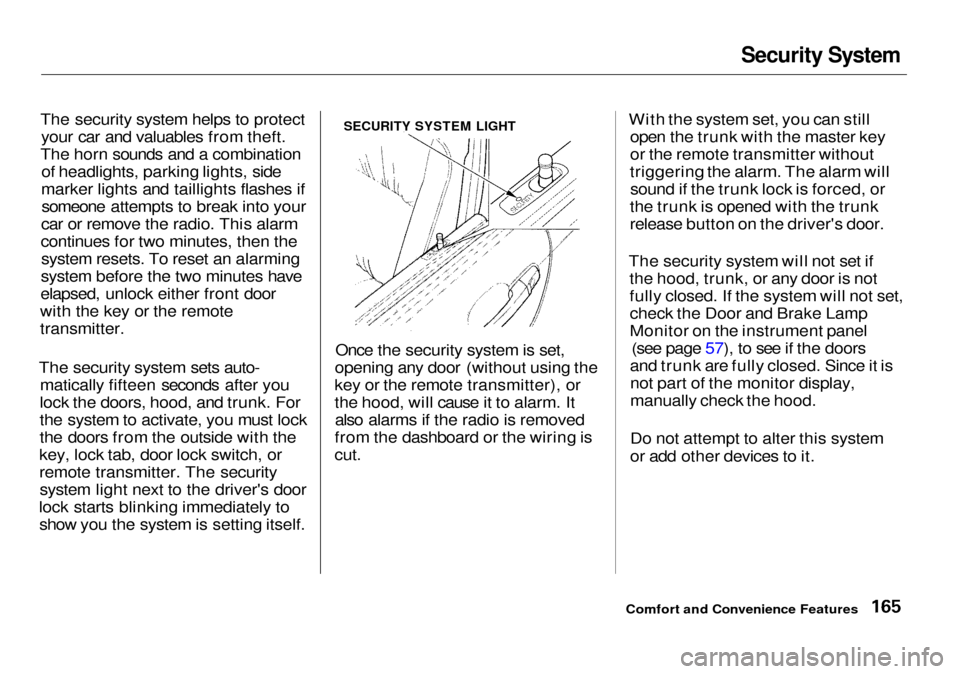
remote transmitter. The security system light next to the driver's door
lock starts blinking immediately to show you the system is setting itself. Once the security system is set,
opening any door (without using the
key or the remote transmitter), or
the hood, will cause it to alarm. It also alarms if the radio is removed
from the dashboard or the wiring is
cut.
With the system set, you can still
open the trunk with the master key
or the remote transmitter without
triggering the alarm. The alarm will sound if the trunk lock is forced, or
the trunk is opened with the trunk
release button on the driver's door.
The security system will not set if the hood, trunk, or any door is not
fully closed. If the system will not set,check the Door and Brake Lamp
Monitor on the instrument panel (see page 57), to see if the doors
and trunk are fully closed. Since it is not part of the monitor display,
manually check the hood.
Do not attempt to alter this system
or add other devices to it.
Comfort and Convenience Features
SECURITY SYSTEM LIGHT
Page 171 of 333

Break-in Period, Gasoline
Break-in Period
Help assure your car's future
reliability and performance by paying
extra attention to how you drive
during the first 600 miles (1,000 km).
During this period: Avoid full-throttle starts and rapid
acceleration.
Avoid hard braking. New brakes
need to be broken-in by moderate
use for the first 200 miles (300
km).
Do not change the oil until the
recommended time or mileage
interval shown in the maintenance
schedule.
You should follow these same re- commendations with an overhauled
or exchanged engine, or when the
brakes are relined.
Gasoline
Your Acura is designed to operate on premium unleaded gasoline with a
pump octane number of 91 or higher.
If you are unable to find premium unleaded gasoline, you may substi-
tute an unleaded regular gasoline.
The engine will compensate for the lower octane, but you may notice aslight decrease in power as a result.
We recommend gasolines containing detergent additives that help prevent
fuel system and engine deposits.
Using gasoline containing lead will
damage your car's emissions
controls. This contributes to air
pollution. In Canada, some gasolines contain
an octane-enhancing additive called
MMT. If you use such gasolines,
your emissions control system performance may deteriorate and
the Malfunction Indicator Lamp on
your instrument panel may turn on. If this happens, contact your
authorized Acura dealer for service.
Before Driving
Page 173 of 333

Service Station Procedures
5. Screw the fuel fill cap back on,
tighten it until it clicks several
times. If you do not properly tighten the cap, the MalfunctionIndicator Lamp may come on (see
page 287).
6. Push the fuel fill door closed until
it latches.
Opening the Hood
1. Shift to Park or Neutral and set
the parking brake. Pull the hood
release handle located under the
lower left corner of the dashboard.
The hood will pop up slightly.
2. Standing in front of the car, reach
in between the hood and the front
bumper with your finger. Slide the
latch handle.
Before Driving
HOOD RELEASE HANDLE
LATCH HANDLE
Page 177 of 333

Accessories and Modifications
Modifying your car, or installing
some non-Acura accessories, can
make your car unsafe. Before you
make any modifications or add any
accessories, be sure to read the
following information.
Accessories
Your dealer has Genuine Acura accessories that allow you to
personalize your car. These accessories have been designed and
approved for your car, and are
covered by warranty.
Non-Acura accessories are usuallydesigned for universal applications.
Although aftermarket accessories may fit on your car, they may not
meet factory specifications, andcould adversely affect your car's
handling and stability. (See "Modifications" on the page 175 for
additional information.) When properly installed, cellular
phones, alarms, two-way radios, and
low-powered audio systems should not interfere with your car's
computer-controlled systems, such
as the SRS and anti-lock brake
system.
However, if electronic accessories
are improperly installed, or exceed
your car's electrical system capacity, they can interfere with the operationof your car, or even cause the
airbags to deploy.
Before installing any accessory:
Make sure the accessory does not
obscure any lights, or interfere
with proper car operation or
performance.
Be sure electronic accessories do
not overload electrical circuits
(see page 292 ). Have the installer contact your
Acura dealer for assistance before
installing any electronic accessory.
If possible, have your dealer inspect
the final installation.
Before Driving
Improper accessories or
modifications can affect your
car's handling, stability and performance, and cause a
crash in which you can be hurt
or killed.
Follow all instructions in this
owner's manual regarding
accessories and modifications.
Page 179 of 333
Carrying Cargo
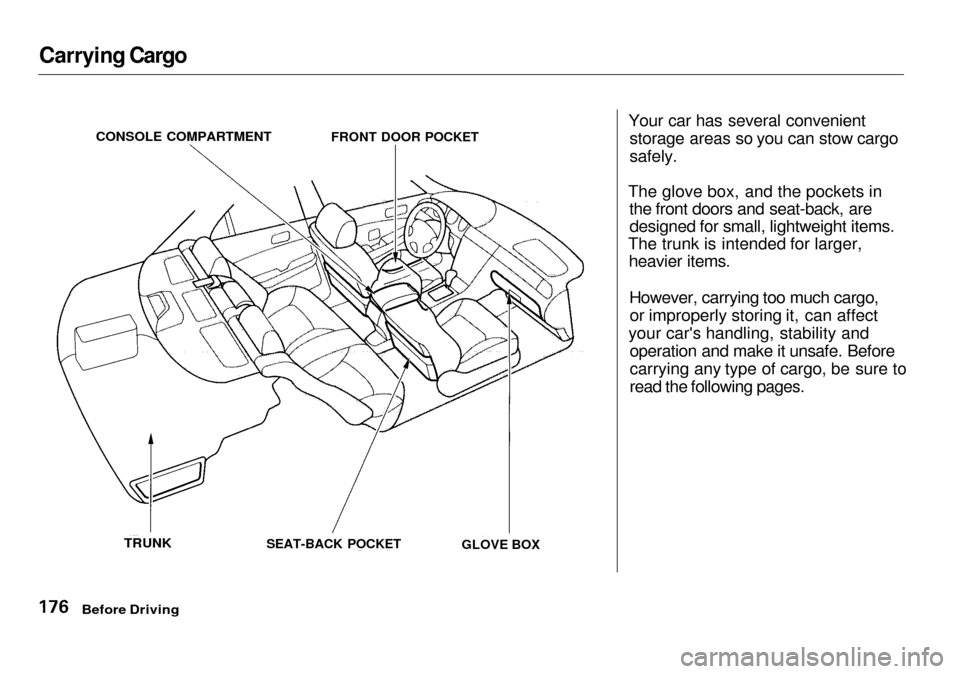
Your car has several convenient
storage areas so you can stow cargo
safely.
The glove box, and the pockets in the front doors and seat-back, aredesigned for small, lightweight items.
The trunk is intended for larger, heavier items.
However, carrying too much cargo,or improperly storing it, can affect
your car's handling, stability and operation and make it unsafe. Before
carrying any type of cargo, be sure to
read the following pages.
Before Driving
CONSOLE COMPARTMENT
FRONT DOOR POCKET
TRUNK
SEAT-BACK POCKET
GLOVE BOX
Page 183 of 333

Preparing to Drive
You should do the following checks and adjustments every day before
you drive your car.
1. Make sure all windows, mirrors, and outside lights are clean and
unobstructed. Remove frost, snow,or ice.
2. Check that the hood and trunk are
fully closed.
3. Visually check the tires. If a tire
looks low, use a gauge to check its
pressure.
4. Check that any items you may be
carrying with you inside are stored
properly or fastened down
securely.
5. Check the adjustment of the seat (see page 94 ).
6. Check the adjustment of the
inside and outside mirrors (see
page 99 ).
7. Check the adjustment of the
steering wheel (see page 7 1 ).
8. Make sure the doors are securely
closed and locked.
9. Fasten your seat belt. Check that
your passengers have fastened
their seat belts (see page 15 ).
10.Turn the ignition switch ON (II).
Check the indicator lights in the
instrument panel.
11.Start the engine (see page 181).
12.Check the gauges and indicator
lights in the instrument panel (see
page 53).
Driving
Page 189 of 333
Parking
Always use the parking brake when
you park your car. The indicator on the instrument panel shows that the
parking brake is not fully released; itdoes not indicate that the parking
brake is firmly set. Make sure the
parking brake is set firmly or your car may roll if it is parked on an
incline.
Set the parking brake before you put
the transmission in Park. This keeps
the car from moving and putting pressure on the parking mechanism
in the transmission — making it
easier to move the shift lever out of
Park when you want to drive away. If the car is facing uphill, turn the
front wheels away from the curb.
If the car is facing downhill, turn the
front wheels toward the curb.
Make sure the parking brake is fully
released before driving away.
Driving with the parking brake
partially set can overheat or damage the rear brakes. Parking Tips Make sure the moonroof and the
windows are closed.
Turn off the lights.Place any packages, valuables, etc.,
in the trunk or take them with you.
Lock the doors with the key or the
remote transmitter. Check the
indicator on the driver's door to
verify that the security system is set.
Never park over dry leaves, tall
grass, or other flammable
materials. The three way catalytic converter gets very hot, and could
cause these materials to catch on
fire.
Driving
Page 190 of 333

The Braking System
Your Acura is equipped with disc brakes at all four wheels. A powerassist helps reduce the effort needed
on the brake pedal. The ABS helps
you retain steering control when
braking very hard.
Put your foot on the brake pedal only
when you intend to brake. Resting
your foot on the pedal keeps the
brakes applied lightly, causing them
to build up heat. Heat build-up can
reduce how well your brakes work. It also keeps your brake lights on all
the time, confusing drivers behind
you.
Constant application of the brakes
when going down a long hill builds up heat and reduces their effective-
ness. Use the engine to assist the
brakes by downshifting to a lower gear and taking your foot off the
accelerator pedal.
Check your brakes after driving
through deep water. Apply the
brakes moderately to see if they feel
normal. If not, apply them gently and
frequently until they do. Since a longer distance is needed to stop
with wet brakes, be extra cautious and alert in your driving. Brake Wear Indicators
All four brakes have audible brake
wear indicators.
When the brake pads need replacing,
you will hear a distinctive metallic "screeching" sound when you apply
the brakes. If you do not have the
brake pads replaced, they will begin screeching all the time.
Your brakes may sometimes squeal or squeak when you apply them
lightly. Do not confuse this with the
brake wear indicators. They make a
very audible "screeching."
Driving
Page 192 of 333

The Braking System
Important Safety Reminders
ABS does not reduce the time or distance it takes to stop the car, it
only helps with steering controlduring braking. You should always
maintain a safe following distance
from other vehicles.
ABS will not prevent a skid that results from changing direction
abruptly, such as trying to take a corner too fast or making a sudden
lane change. Always drive at a safe,
prudent speed for the road and
weather conditions.
ABS cannot prevent a loss of stability. Always steer moderately
when you are braking hard. Severe or sharp steering wheel movement
can still cause your car to veer into
oncoming traffic or off the road. A vehicle with ABS may require a
longer distance to stop on loose or
uneven surfaces, such as gravel or snow, than a vehicle without anti-
lock. Slow down and allow a greater distance between vehicles under
those conditions.
ABS Indicator
U.S. indicator shown
The ABS is self-checking. If anything goes wrong, the ABS indicator on
the instrument panel comes on (see page 56 ). This means the anti-lock function of the braking system has
shut down. The brakes still work like
a conventional system without anti-
lock, providing normal stopping ability. You should have the dealer
inspect your car as soon as possible
if this light stays on after you start
the engine, or comes on whiledriving.
DrivingCONTINUED
ABS INDICATOR*
Page 195 of 333

Vehicle Stability Assist (VSA) System
VSA System Indicator
The VSA system indicator (see page 56 ) comes on and stays on when
there is a problem with the VSA
system.
If the VSA indicator comes on while
driving, pull to the side of the road
when it is safe and turn off the engine. Reset the system by
restarting the engine, and watch the
VSA system indicator. If the indicator remains on, or comes backon while driving, have the VSA
system inspected by your Acura
dealer.
If the indicator does not come on
when the ignition switch is turned ON (II), there may be a problem
with the VSA system. Have your dealer inspect your car as soon as
possible.
Without VSA, your car will have normal braking and cornering ability,
but it will not have VSA traction andstability enhancement. VSA Off Switch
This switch is under the left vent. Press it to turn the Vehicle Stability
Assist system on and off.
When VSA is off, the VSA Activation Indicator light comes on as a
reminder. Pressing the switch again
turns the system back on.
Driving
VSA SYSTEM INDICATOR