brakes Acura RL 2006 Owner's Manual
[x] Cancel search | Manufacturer: ACURA, Model Year: 2006, Model line: RL, Model: Acura RL 2006Pages: 454, PDF Size: 5.58 MB
Page 64 of 454

This indicator has two f unctions:Itcomesonwhenyouturnthe
ignition switch to the ON (II)
position. It is a reminder to check
the parking brake. Driving with
the parking brake not f ully
released can damage the rear
brakes, axles, and tires.
If you drive without releasing the
parking brake, a chime will sound,
and you will also see a ‘‘RELEASE
PARKING BRAKE’’ message on
the multi-information display (see
page ).
If it stays on after you have fully
released the parking brake while
the engine is running, or if it
comes on while driving, it can
indicate a problem in the brake system. You will also see a
‘‘BRAKE FLUID LOW’’ or
‘‘CHECK BRAKE SYSTEM’’
message on the multi-inf ormation
display (see page ). For more
inf ormation, see page .
This indicator comes on when you
turn the ignition switch to the ON
(II) position. If it comes on at any
other time, it indicates that the
passenger’s side airbag has
automatically shut of f . You will also
see a ‘‘PASSENGER SIDE AIRBAG
OFF’’ message on the multi-
inf ormation display (see page ).
For more inf ormation, see page .
This indicator comes on brief ly when
you turn the ignition switch to the
ON (II) position. If it comes on at
any other time, it indicates a
potential problem with your f ront
airbags. This indicator will also alert
you to a potential problem with your
side airbags, passenger’s side airbag
automatic cutoff system, side curtain
airbags, automatic seat belt
tensioners, or, on models with ACC,
seat belt E-pretensioners. You will
also see a ‘‘CHECK AIRBAG
SYSTEM’’ message on the multi-
inf ormation display (see page ).
For more inf ormation, see page .
1.
2.
78 78
411
7835 35
79
Instrument Panel Indicators
Parking Brake and Brake System
Indicator Side Airbag Of f Indicator
Supplemental Restraint
System Indicator
Inst rument s and Cont rols
63
U.S. Canada U.S. Canada
Page 184 of 454

To apply the parking brake, push the
parking brake pedal down with your
f oot. To release the parking brake,
push on the pedal again. The parking
brake indicator on the instrument
panel should go out when the
parking brake is f ully released with
the engine running (see page ).63
Parking Brake
Inst rument s and Cont rols
183
PARKING BRAKE PEDAL
Driving the vehicle with the parking
brake applied can damage the rear
brakes, axles, and tires. A beeper will
sound if the vehicle is put into gear
with the parking brake on.
Page 236 of 454

You can increase the set cruising
speed in any of these ways:You can decrease the set cruising
speed in any of these ways:
Press and hold the RES/ACCEL
button. When you reach the
desired cruising speed, release the
button.
Push on the accelerator pedal.
Accelerate to the desired cruising
speed, and press the DECEL/SET
button. Press and hold the DECEL/SET
button. Release the button when
you reach the desired speed.
Tap the brake pedal lightly with
your f oot. The CRUISE
CONTROL indicator on the
instrument panel will go out.
When the vehicle slows to the
desired speed, press the DECEL/
SET button.
To increase your speed in very
small amounts, tap the RES/
ACCEL button. Each time you do
this, the vehicle speeds up about 1
mph (1.6 km/h). To slow down in very small
amounts, tap the DECEL/SET
button. Each time you do this,
your vehicle slows down about 1
mph (1.6 km/h).
Cruise control may not hold the set
speed when you are going up and
down hills. If your speed increases
going down a hill, use the brakes to
slow down. This cancels cruise
control. On models with adaptive
cruise control (ACC), this also
causes the cruise control icon on the
multi-inf ormation display to go of f
and the cruise mode icon to come on.
To resume the set speed, press the
RES/ACCEL button. The CRUISE
CONTROLicononthemulti-
inf ormation display will come back
on.
When climbing a steep hill, the
automatic transmission may
downshif t to hold the set speed.
CONT INUED
Changing the Set Speed
Cruise Control
Features
235
Page 242 of 454

ACC does not work below 25 mph
(40 km/h). It cannot bring your
vehicle to a complete stop.
ACC will not sound a beeper or
display a message on the multi-
inf ormation display to warn you of
vehicles going slower than 13 mph
(20 km/h) or vehicles that are
parked. In these cases, it is up to
you to maintain a safe distance by
using the brake pedal.
ACC may not recognize
motorcycles or other small
vehicles ahead of your vehicle.ACC may react to vehicles beside
you or even building beside you by
momentarily applying the brakes
or sounding a beeper under
conditions such as a sudden curve
or narrowing of the road, an
abrupt movement of the steering
wheel, or if you are in an unusual
position within your lane.
A daptive Cruise Control (A CC)
Limitations
Features
241
Page 251 of 454
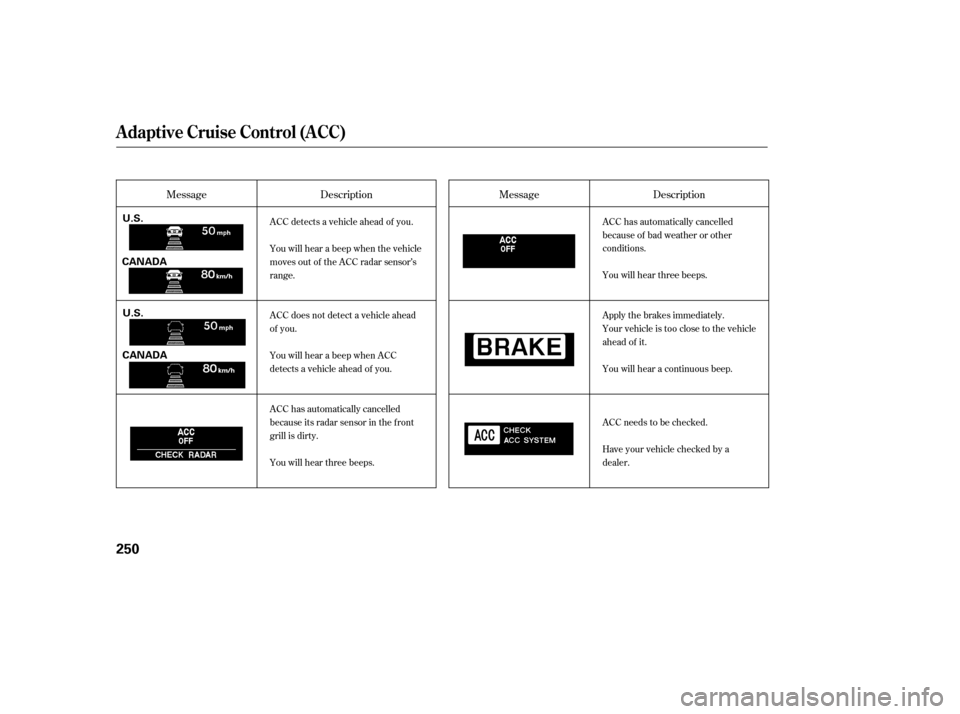
MessageMessage
Description Description
ACC detects a vehicle ahead of you.
You will hear a beep when the vehicle
moves out of the ACC radar sensor’s
range.
ACC does not detect a vehicle ahead
of you.
You will hear a beep when ACC
detects a vehicle ahead of you.
ACC has automatically cancelled
because its radar sensor in the f ront
grill is dirty.
You will hear three beeps. ACC has automatically cancelled
because of bad weather or other
conditions.
You will hear three beeps.
Apply the brakes immediately.
Your vehicle is too close to the vehicle
ahead of it.
You will hear a continuous beep.
ACC needs to be checked.
Have your vehicle checked by a
dealer.
A daptive Cruise Control (A CC)
250
U.S.
U.S.
CANADA
CANADA
Page 297 of 454

Help assure your vehicle’s f uture
reliability and perf ormance by paying
extra attention to how you drive
during the f irst 600 miles (1,000 km).
During this period:Avoid full-throttle starts and rapid
acceleration.
Avoidhardbrakingforthefirst
200 miles (300 km).
Do not change the oil until the
scheduled maintenance time.
You should also f ollow these
recommendations with an
overhauled or exchanged engine, or
when the brakes are replaced. Do not tow a trailer. We recommend quality gasolines
containing detergent additives that
help prevent f uel system and engine
deposits.
In addition, in order to maintain good
perf ormance, f uel economy, and
emissions control, we strongly
recommend, in areas where it is
available, the use of gasoline that
does NOT contain manganese-based
f uel additives such as MMT.
Use of gasoline with these additives
may adversely af f ect perf ormance,
and cause the malfunction indicator
lamp on your instrument panel to
come on. If this happens, contact
your authorized dealer f or service.
Your vehicle is designed to operate
on premium unleaded gasoline with a
pump octane of 91 or higher. If this
octane grade is unavailable, regular
unleaded gasoline with a pump
octane of 87 or higher may be used
temporarily. The use of regular
unleaded gasoline can cause metallic
knocking noises in the engine and
will result in decreased engine
perf ormance. The long-term use of
regular-grade gasoline can lead to
engine damage.
Break-in Period
Fuel Recommendation
Break-in Period, Fuel Recommendation
296
Page 304 of 454

When properly installed, cellular
phones, alarms, two-way radios, and
low-powered audio systems should
not interf ere with your vehicle’s
computer controlled systems, such
as your airbags and anti-lock brakes.Bef ore installing any accessory:
Make sure the accessory does not
obscure any lights, or interf ere
with proper vehicle operation or
perf ormance.
Modif ying your vehicle, or installing
some non-Acura accessories, can
make your vehicle unsaf e. Bef ore
you make any modif ications or add
anyaccessories,besuretoreadthe
f ollowing inf ormation.
Your dealer has Acura accessories
that allow you to personalize your
vehicle. These accessories have
been designed and approved f or your
vehicle, and are covered by warranty.
Although non-Acura accessories may
f it on your vehicle, they may not
meet f actory specif ications, and
could adversely af f ect your vehicle’s
handling and stability (see page ).
Do not install accessories on the
side pillars or across the rear
windows as these may interf ere
with proper operation of the side
curtain airbags. Bef ore installing any electronic
accessory, have the installer
contact your dealer. If possible,
have your dealer inspect the f inal
installation. Be sure electronic accessories do
not overload electrical circuits
(see page ) or interf ere with
the proper operation of your
vehicle.
306 413
A ccessories
A ccessories and Modif ications
Bef ore Driving
303
Improper accessories or
modifications can affect your
vehicle’s handling, stability, and
performance, and cause a
crash in which you can be hurt
or killed.
Follow all instructions in this
owner’s manual regarding
accessories and modifications.
Page 305 of 454

Some examples are:Larger or smaller wheels and tires
can interf ere with the operation of
your vehicle’s anti-lock brakes and
other systems.
Modif ying your steering wheel or
any other part of your vehicle’s
saf ety systems could make the
systems inef f ective.
If you plan to modif y your vehicle,
consult your dealer.
Raising your vehicle with a non-
Acura suspension kit can af f ect
the handling and stability. Lowering the vehicle with a non-
Acura suspension kit that
signif icantly reduces ground
clearance can allow the
undercarriage to hit speed bumps
or other raised objects, which
could cause the airbags to deploy.
Non-Acura wheels can cause
excessive stress on suspension
components and are not
compatible with the tire pressure
monitoring system.
Removing parts f rom your vehicle,
or replacing components with non-
Acura components could seriously
af f ect your vehicle’s handling,
stability, and reliability. Modif ying Your Vehicle
A ccessories and Modif ications
304
Page 310 of 454

........................
Preparing to Drive .310
.......................
Starting the Engine .311
Check Starting System .................................
Message .312
..............
Automatic Transmission .313
...........................
SH-AWD System .320
...........................................
Parking .321
.............................
Braking System .322
................
Anti-lock Brakes(ABS) . 323
Collision Mitigation Brake System ......................................
(CMBS) .325
Tire Pressure ...
Monitoring System (TPMS) . 335
Vehicle Stability Assist (VSA) ........................................
System .339
...........................
Towing a Trailer .341
...................
Towing Your Vehicle . 346
This section gives you tips on
starting the engine under various
conditions, and how to operate the
automatic transmission. It also
includes important inf ormation on
parking your vehicle, the braking
system, the SH-AWD system, the
vehicle stability assist (VSA) system,
the tire pressure monitoring system
(TPMS), the collision mitigation
brake system (CMBS), and facts you
need if you are planning to tow a
trailer.
Driving
Driving
309
Page 322 of 454

If the SH-AWD indicator on the
instrument panel stays on, and the
multi-inf ormation display shows an
SH-AWD message, there is a
problem with the system. Your
vehicle still has normal f ront-wheel
drive with vehicle stability assist
(VSA), but does not have the
advantages of SH-AWD. Have your
vehicle checked by a dealer as soon
as possible.Check the indicator on the
instrument panel to verif y that the
security system is set. If the vehicle is f acing downhill,
turn the front wheels toward the
curb. If the vehicle is f acing uphill, turn
the front wheels away from the
curb. Never park over dry leaves, tall
grass, or other f lammable
materials. The hot three way
catalytic converter could cause
these materials to catch on fire.
Make sure the parking brake is
f ully released bef ore driving away.
Driving with the parking brake
partially set can overheat or
damage the rear brakes.
Always use the parking brake when
you park your vehicle. Make sure
the parking brake is set f irmly, or
your vehicle may roll if it is parked
on an incline.
Set the parking brake bef ore you put
the transmission in Park. This keeps
the vehicle from moving and putting
pressure on the parking mechanism
in the transmission.
Make sure the moonroof and the
windows are closed.
Turn of f the lights.
Place any packages, valuables, etc.,
in the trunk or take them with you.
Lock the doors.
SH-A WD System, Parking
Parking
Parking T ips
Driving
321