CD changer ACURA RL 2012 User Guide
[x] Cancel search | Manufacturer: ACURA, Model Year: 2012, Model line: RL, Model: ACURA RL 2012Pages: 562, PDF Size: 12.87 MB
Page 277 of 562

Thechartontherightexplainsthe
error messages you may see in the
display while playing a disc.
If you see an error message in the
display while playing a disc, press
the eject button. After ejecting the
disc, check it for damage or
deformation. If there is no damage,
insert the disc again.
For additional information on
damaged discs, see page .
Theaudiosystemwilltrytoplaythe
disc. If there is still a problem, the
error message will reappear. Press
the eject button, and pull out the disc.
Insert a dif f erent disc. If the new
disc plays, there is a problem with
the f irst disc. If the error message
cycle repeats and you cannot clear it,
take your vehicle to a dealer.Solution Error Message Cause
275
Press the EJECT button and pull out the disc(s).
Check the disc f or serious damage, signs of
deformation, excessive scratches, and/or dirt
(see page 275). Insert the disc again. If the code
does not disappear, or the disc(s) cannot be
removed, consult your dealer. Do not try to
f orce the disc out of the player. FOCUS Error
Eject Error
Disc Changer Error Messages
Features
271
CHECK DISC
BAD DISC
PLEASE CHECK
MANUAL
PUSH EJECT 11/07/20 18:34:51 31SJA670_276
ProCarManuals.com
Page 280 of 562
When using CD-R or CD-RW discs,
use only high quality discs labeled
f or audio use.
When recording a CD-R or
CD-RW, the recording must be
closedforittobeusedbythedisc
changer.
Handle your discs properly to
prevent damage and skipping. Play only standard, round, 5-inch
(12 cm) discs. Smaller or odd-
shaped discs may jam in the drive
or cause other problems. When using DVD-R/RW discs,
they should meet DVD verif ication
standards.Never try to insert f oreign objects in
the disc changer.
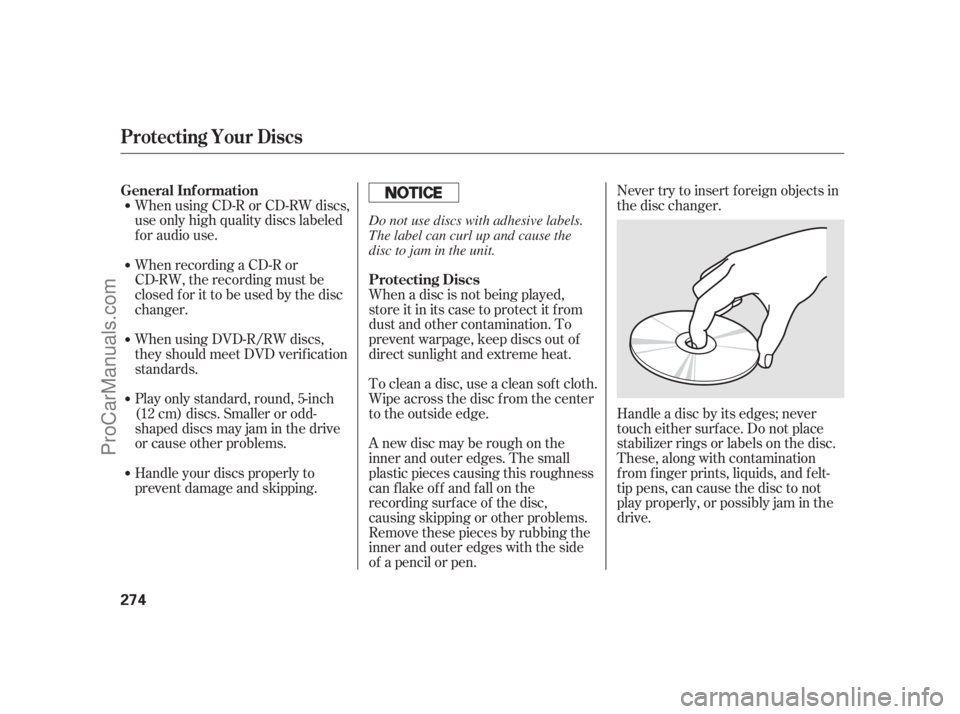
Handle a disc by its edges; never
touch either surf ace. Do not place
stabilizer rings or labels on the disc.
These, along with contamination
f rom f inger prints, liquids, and f elt-
tip pens, can cause the disc to not
play properly, or possibly jam in the
drive. When a disc is not being played,
store it in its case to protect it f rom
dust and other contamination. To
prevent warpage, keep discs out of
direct sunlight and extreme heat.
To clean a disc, use a clean sof t cloth.
Wipe across the disc f rom the center
to the outside edge.
A new disc may be rough on the
inner and outer edges. The small
plastic pieces causing this roughness
can f lake of f and f all on the
recording surf ace of the disc,
causing skipping or other problems.
Remove these pieces by rubbing the
inner and outer edges with the side
of a pencil or pen. General Inf ormation
Protecting Discs
Protecting Your Discs
274
Do not use discs with adhesive labels.
The label can curl up and cause the
disc to jam in the unit.
11/07/20 18:35:10 31SJA670_279
ProCarManuals.com
Page 281 of 562
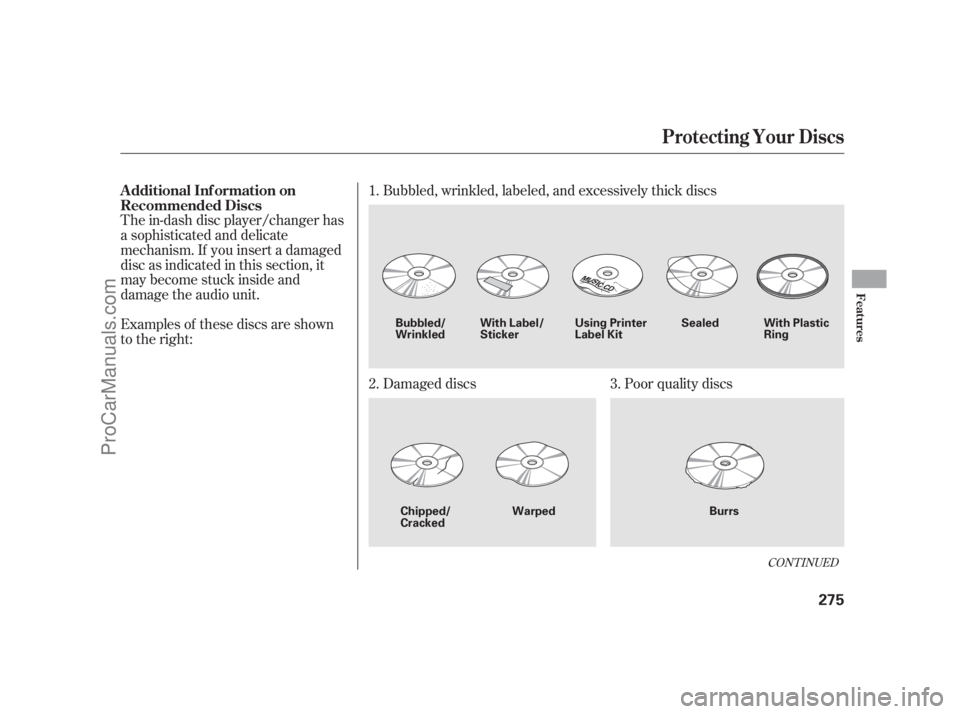
The in-dash disc player/changer has
a sophisticated and delicate
mechanism. If you insert a damaged
disc as indicated in this section, it
maybecomestuckinsideand
damage the audio unit.
Examples of these discs are shown
to the right:Bubbled, wrinkled, labeled, and excessively thick discs
Damaged discs Poor quality discs 1.
2. 3.
CONT INUED
Additional Inf ormation on
Recommended Discs
Protecting Your Discs
Features
275
Sealed
Warped Burrs Chipped/
CrackedWith Label/
StickerWith Plastic
Ring Using Printer
Label Kit Bubbled/
Wrinkled
11/07/20 18:35:21 31SJA670_280
ProCarManuals.com
Page 552 of 562

Bulb Replacement
.......................... Back-up Lights . 474
................................. Fog Lights . 472
................ Front Parking Lights . 471
........ Front Side Marker Lights . 471
................................. Headlights . 468
............................ Specif ications . 527
............ Turn Signal Lights . 470, 473
..................................... Built-in-key . 167
.............................. Bulbs, Halogen . 468
............................ Capacities Chart . 526
............. Carbon Monoxide Hazard . 56
.................... Cargo, How to Carry . 393
............. CAUTION, Explanation of . iii
......................................... CD Care . 274
....................... CD Error Message . 271
................................... CD Changer . 236
................................ Ceiling Lights . 200
........................ Certif ication Label . 524
................................. Chains, Tires . 488
.................... Changing a Flat Tire . 497
Changing Oil
........................................ How to . 459...................................... When to . 445
... Charging System Indicator . 62, 508
............ Checklist, Bef ore Driving . 400
..................................... Child Saf ety . 38
.............................. Booster Seats . 53
................................... Child Seats . 45
..... Important Saf ety Reminders . 38
.......................................... Inf ants . 43
.......................... Larger Children . 52
......................................... LATCH . 47
...................... Risks with Airbags . 39
............................. Small Children . 44
......................................... Tethers . 51
......... Where Should a Child Sit? . 39
....................................... Child Seats . 45
......................................... LATCH . 47
.......... Tether Anchorage Points . 51
................ Childproof Door Locks . 155
Cleaning
................................... Seat Belts . 476
.................... Client Service Of f ice . 540
............... Climate Control System . 204
......................... Clock, Setting the . 313
........................ CO in the Exhaust . 534
............ Cold Weather, Starting in . 401Collision Mitigation Braking
System (CMBS )
............................... Indicator . 69, 424
................................... Operation . 418
...................... Compact Spare Tire . 496
........................... Compass System . 281
................. Console Compartment . 195
................. Consumer Inf ormation . 540
............. Controls, Instruments and . 59
Coolant
........................................ Adding . 461
.................................... Checking . 387
......................... Proper Solution . 461
................... Temperature Gauge . 70
Crankcase Emissions Control
........................................ System . 534
................ Cruise Control Indicator . 65
............ Cruise Control Operation . 316
................................... Cup Holders . 194
Index
C
II
TM TM
11/07/20 19:11:40 31SJA670_551
ProCarManuals.com