clock ACURA RL KA9 1996 Service Repair Manual
[x] Cancel search | Manufacturer: ACURA, Model Year: 1996, Model line: RL KA9, Model: ACURA RL KA9 1996Pages: 1954, PDF Size: 61.44 MB
Page 230 of 1954
Muting Logi c
Wheneve r th e navigatio n syste m is givin g guidance ,
fron t speaker s ar e muted . Whe n th e voic e contro l sys -
te m is bein g used , al l o f th e speaker s ar e muted .
Whe n usin g On-Star , bot h th e audi o syste m an d th e
navigatio n syste m ar e muted , an d th e voic e contro l
switc h (TAL K an d BAC K buttons ) i s disabled .
Voice Contro l Limitation s
Before assumin g tha t a voic e contro l complain t i s hard -
war e related , ensur e tha t th e voic e contro l syste m is be -
in g operate d correctl y (se e "Voic e recognitio n doe s no t
work" , pag e 23-35) .
LCD Displa y Uni t Limitation s
• I n col d temperatures , th e displa y ma y sta y dar k fo r th e
firs t 2 o r 3 minute s unti l i t warm s up .
• Whe n th e displa y i s to o ho t becaus e o f direc t summe r
sunlight , i t wil l remai n dar k unti l th e temperatur e
drops .
• Whe n th e humidit y i s hig h an d th e interio r tempera -
tur e i s low , th e displa y ma y appea r cloudy . Th e dis -
pla y wil l clea r u p afte r som e use .
• Fingerprint s o n th e touc h pane l ma y sometime s b e
noticeabl e becaus e o f th e panel' s low-reflectio n coat -
ing. Whe n cleanin g th e panel , wip e i t gentl y wit h a
sof t cloth . T o avoi d scratchin g th e panel , d o no t ru b
to o hard , o r us e abrasiv e cleaner s o r sho p towels .
• Th e touc h pane l i s a n infrare d system , s o ther e i s n o
nee d t o pres s hard . I f a touc h switc h doe s no t functio n
immediately , shif t you r finge r slightly , an d touc h i t
again .
Note : Inpu t ma y b e affecte d b y direc t sunlight .
Symptom Duplicatio n
• Whe n th e sympto m ca n b e duplicated , follo w th e self -
diagnosti c procedure s an d th e appropriat e trou -
bleshootin g procedures .
• Whe n th e sympto m doe s no t reappea r o r onl y reap -
pear s intermittently , as k th e custome r abou t th e condi -
tion s whe n th e sympto m occured .
-Tr y t o establis h i f outsid e interferenc e ma y hav e
bee n th e cause .
-Tr y t o duplicat e th e sympto m unde r th e sam e condi -
tion s th e custome r wa s experiencing .
-Vibration , temperatur e extremes , an d moistur e (dew ,
humidity ) ar e factor s tha t ar e difficul t t o duplicate .
- Inspec t th e vehicl e fo r after-marke t electroni c device s
(vehicl e locators , amps , rada r detectors , etc) that
ma y b e hidden .
Service Precaution s
• Befor e disconnectin g th e battery , mak e sur e yo u hav e
th e anti-thef t code s fo r th e radi o an d th e navigatio n
system , an d writ e dow n th e frequencie s fo r th e radio' s
prese t buttons .
• Whe n th e batter y i s disconnected , th e interna l GP S
cloc k
is rese t to "0:00" . The cloc k will rese t to th e cor -
rec t tim e afte r th e syste m finishe s GP S initialization .
• Afte r reconnectin g th e battery , yo u hav e t o wai t t o ge t
the initia l signa l fro m th e satellite , whic h ma y tak e fro m
10 to 4 5 minutes . Follo w th e instruction s o n th e screen .
• Afte r reconnectin g th e battery , d o th e powe r windo w
control uni t resettin g procedure .
• Befor e returnin g th e vehicl e t o th e customer , ente r th e
radi o code , the n ente r th e customer' s radi o statio n
presets , an d se t th e clock . D o th e engin e contro l mod -
ul e (PCM ) idl e lear n procedure .
After Servicing-Ma p Matchin g
• Par k th e vehicl e in a n are a wher e th e GP S satellit e sig -
nal s wil l b e unobstructed . Mak e sur e th e GP S indica -
to r o n th e ma p scree n i s green .
• Driv e th e vehicl e 1 mil e befor e enterin g a destinatio n
an d confir m th e roa d bein g use d i s displaye d a t th e
botto m o f th e scree n (ma p matched) .
• Ente r th e deale r addres s an d confir m th e syste m
route s an d perform s normally .
• Clea r an y previou s destination s tha t ma y hav e bee n
entere d fo r testin g purposes .
Obtaining A Navigatio n DV D
If th e navigatio n DV D is los t o r damaged , o r yo u nee d a
yearl y updat e DVD , yo u hav e 2 way s t o purchas e one .
Yo u ca n eithe r cal l (888 ) 549-3798 , o r orde r on-lin e a t
www.Acura.com .
Both method s requir e a credi t card . Th e DV D fo r thi s
mode l ha s a n orang e label , an d canno t b e ordere d
throug h th e part s system . Th e followin g DVD s wil l no t
wor k in thi s navigatio n system :
• Earlie r mode l Acur a Navigatio n DVD s (blac k label )
• Ma p softwar e program s manufacture d b y othe r com -
panie s
• DV D movies , o r DVD s containin g audi o recording s
Updat e DVD s ar e availabl e fo r purchas e usuall y i n th e
fal l o f eac h year . The y ma y contai n th e following :
• Enhance d ma p an d Point s o f interes t (PO D coverag e
• Fixe s fo r mino r softwar e bug s
• Additiona l feature s
Note : Updat e i s o f cours e optional , an d ther e i s n o pro -
gra m to provid e fre e DVD s containin g yearl y mappin g
updates.
ProCarManuals.com
Page 271 of 1954

Navigation Syste m
System Diagnosi s Mod e (cont'd )
GPS Informatio n
This scree n show s th e curren t statu s o f GP S reception .
Th e circula r diagra m show s th e curren t locatio n o f th e
GP S satellite s (yello w numbers ) a s the y woul d appea r i n
th e sky . Th e oute r circl e represent s th e horizo n ( 0 degree s
elevation) . Th e middl e an d inne r circle s represent s 3 0
an d 6 0 degree s respectively . Th e ver y cente r o f th e dia -
gra m (9 0 degree s elevation ) i s directl y overhead .
Naturally, nearb y obstructions , lik e tal l building s wil l
bloc k satellite s i n tha t direction . Tha t i s wh y i t i s neces -
sar y t o b e i n a n ope n are a t o effectivel y troubleshoo t
GP S receptio n issues .
The satellit e number s show n o n th e diagra m corre -
spond t o th e "PRN " numbe r i n th e "GP S Details "
screen . Ther e ar e alway s 2 4 "active " GP S satellite s in
orbit . Becaus e satellite s fail , an d hav e t o b e remove d
fro m service , spare s ar e alway s parke d in orbit , read y t o
b e activated . Thi s is wh y th e PR N (satellit e ID number )
can be greate r tha n 24 .
NOTE : T o us e thi s scree n fo r troubleshooting , th e vehi -
cl e shoul d b e ou t sid e awa y fro m buildings , tal l trees ,
an d high-tensio n wire s fo r a t leas t 1 0 minute s wit h th e
engin e running . Also , mak e sur e th e rea r shel f i s fre e o f
loos e item s tha t ca n bloc k receptio n an d tha t th e trun k
li d is closed .
• Th e "Numbe r o f Satellites " bo x show s th e numbe r o f
acquire d satellite s (maximu m o f 12) . I t shoul d contai n
3 o r mor e icons . I f no t troubleshoo t fo r "GP S ico n i s
white " (se e pag e 23-32 ).
• Th e "Curren t Position " show s latitude , longitude , an d
elevatio n (i n meters) . I f ther e ar e les s tha n 3 satel -
lites , th e elevatio n ca n b e grossl y inaccurate .
• Th e Date/Tim e fiel d show s th e curren t date , an d als o
a tim e tha t include s dayligh t saving s an d othe r off -
set s entere d b y th e custome r i n Setu p scree n 2
"Adjus t Tim e Zone/Clock" .
GPS Detai l
By pressin g an d holdin g th e MEN U butto n fo r 1 0 sec -
onds , a GP S Detai l scree n is displayed . Thi s scree n dis -
play s rea l tim e incomin g satellit e positiona l data . Mos t
o f th e informatio n show n o n thi s scree n i s fo r factor y
use , howeve r som e o f th e dat a ca n indicat e partia l GP S
signa l interference .
• Th e bo x TS/A S an d HDop/VDo p is fo r factor y use .
• Th e Spee d an d Directio n informatio n i s update d i n
rea l tim e whe n driving , an d ca n b e use d t o detec t
intermitten t spee d senso r problems .
• Th e Date/Tim e Informatio n i s th e sam e a s i n Setu p
scree n 2 "Adjus t Tim e Zone/Clock" .
• I f th e "3D " ico n i s show n abov e th e yello w dots , thi s
implie s tha t a t leas t 4 satellite s ar e availabl e fo r ma p
positioning , an d th e "GPS " indicator on th e ma p
scree n wil l b e green . Se e th e "Globa l Positionin g
System " detaile d explanatio n i n th e "Syste m
Description" .
• I f th e ro w o f dat a i n th e tabl e belo w begin s wit h a
"yello w dot" , th e AZ I an d E L field s ca n b e use d t o
locat e eac h satellit e o n th e circula r GP S diagra m (se e
prio r screen) .
NOTE : Th e dat a belo w is a n exampl e only .
Th e tabl e o f value s show n o n th e scree n belo w ha s th e
followin g columns :
If "3D " i s missing , fol -
lo w troubleshootin g
(see pag e 23-32 ).
If al l 0 , then , follo w
troubleshootin g (se e
page 23-32 ).
ProCarManuals.com
Page 275 of 1954
Navigation System
System Diagnosis Mode (cont'd)
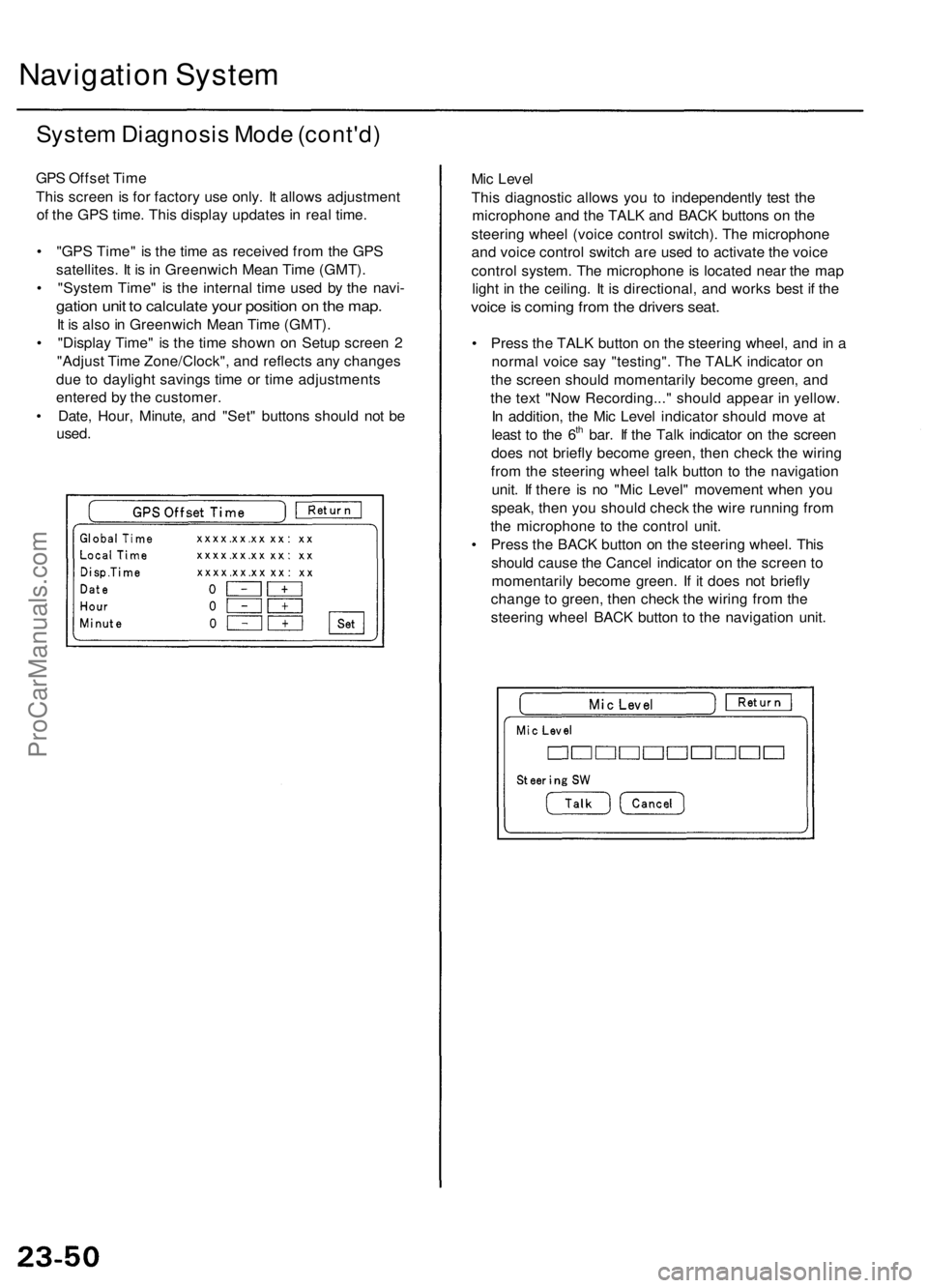
GPS Offset Time
This screen is for factory use only. It allows adjustment
of the GPS time. This display updates in real time.
• "GPS Time" is the time as received from the GPS
satellites. It is in Greenwich Mean Time (GMT).
• "System Time" is the internal time used by the navi-
gation unit to calculate your position on the map.
It is also in Greenwich Mean Time (GMT).
• "Display Time" is the time shown on Setup screen 2
"Adjust Time Zone/Clock", and reflects any changes
due to daylight savings time or time adjustments
entered by the customer.
• Date, Hour, Minute, and "Set" buttons should not be
used.
Mic Level
This diagnostic allows you to independently test the
microphone and the TALK and BACK buttons on the
steering wheel (voice control switch). The microphone
and voice control switch are used to activate the voice
control system. The microphone is located near the map
light in the ceiling. It is directional, and works best if the
voice is coming from the drivers seat.
• Press the TALK button on the steering wheel, and in a
normal voice say "testing". The TALK indicator on
the screen should momentarily become green, and
the text "Now Recording..." should appear in yellow.
In addition, the Mic Level indicator should move at
least to the 6th bar. If the Talk indicator on the screen
does not briefly become green, then check the wiring
from the steering wheel talk button to the navigation
unit. If there is no "Mic Level" movement when you
speak, then you should check the wire running from
the microphone to the control unit.
• Press the BACK button on the steering wheel. This
should cause the Cancel indicator on the screen to
momentarily become green. If it does not briefly
change to green, then check the wiring from the
steering wheel BACK button to the navigation unit.ProCarManuals.com
Page 387 of 1954
Timing Bel t
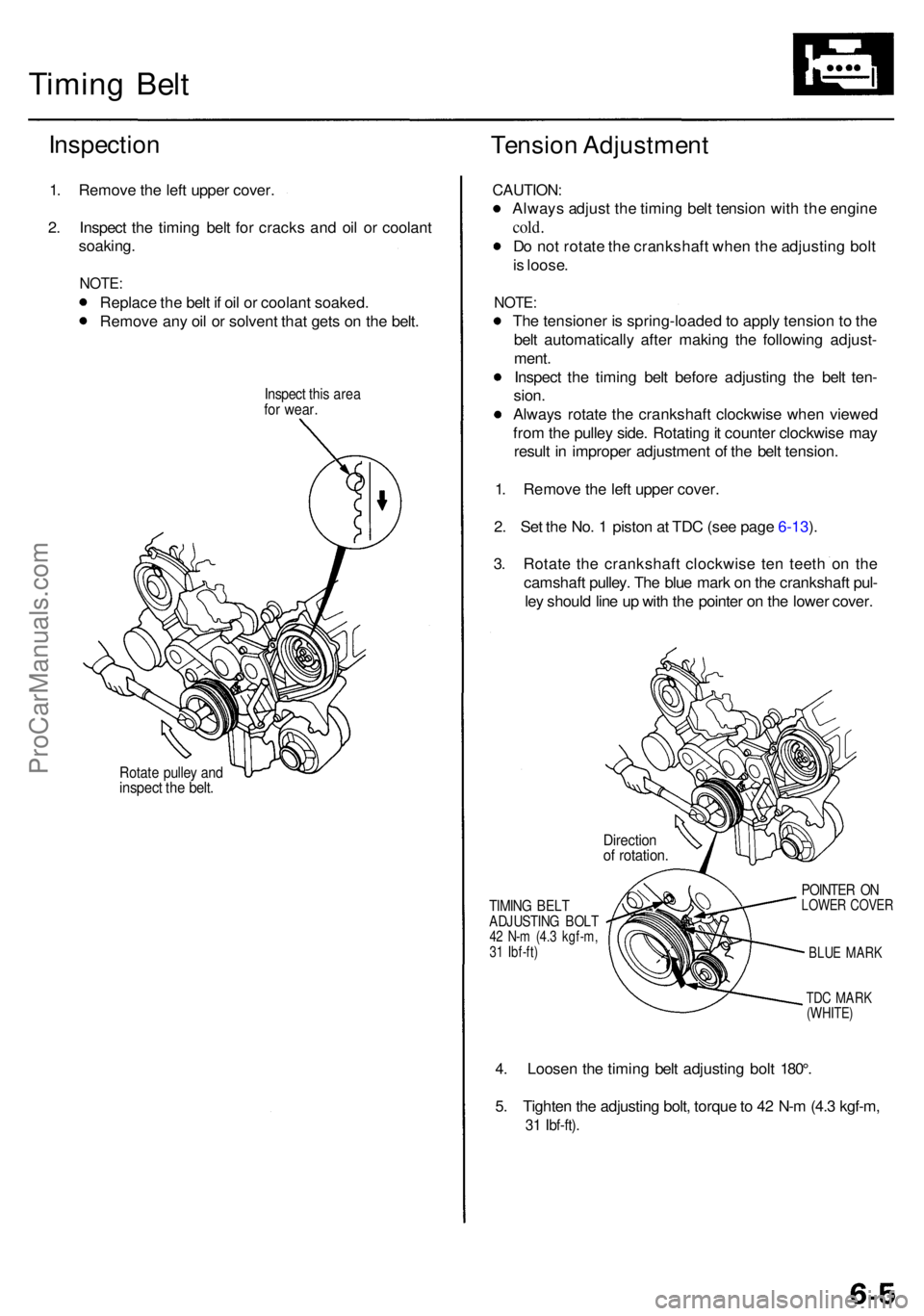
Inspectio n
1. Remov e th e lef t uppe r cover .
2 . Inspec t th e timin g bel t fo r crack s an d oi l o r coolan t
soaking .
NOTE:
Replac e th e bel t i f oi l o r coolan t soaked .
Remov e an y oi l o r solven t tha t get s o n th e belt .
Inspec t thi s are afor wear .
Tensio n Adjustmen t
Rotate pulle y an dinspec t th e belt .
CAUTION :
Always adjus t th e timin g bel t tensio n wit h th e engin e
cold.
Do no t rotat e th e crankshaf t whe n th e adjustin g bol t
i s loose .
NOTE :
The tensione r i s spring-loade d to appl y tensio n t o th e
bel t automaticall y afte r makin g th e followin g adjust -
ment .
Inspec t th e timin g bel t befor e adjustin g th e bel t ten -
sion .
Alway s rotat e th e crankshaf t clockwis e whe n viewe d
fro m th e pulle y side . Rotatin g it counte r clockwis e ma y
resul t i n imprope r adjustmen t o f th e bel t tension .
1 . Remov e th e lef t uppe r cover .
2 . Se t th e No . 1 pisto n a t TD C (se e pag e 6-13 ).
3 . Rotat e th e crankshaf t clockwis e te n teet h o n th e
camshaf t pulley . Th e blu e mar k o n th e crankshaf t pul -
le y shoul d lin e u p wit h th e pointe r o n th e lowe r cover .
TIMING BEL TADJUSTIN G BOL T42 N- m (4. 3 kgf-m ,
3 1 Ibf-ft )
POINTE R O NLOWE R COVE R
BLU E MAR K
TD C MAR K
(WHITE )
4. Loose n th e timin g bel t adjustin g bol t 180° .
5 . Tighte n th e adjustin g bolt , torqu e to 4 2 N- m (4. 3 kgf-m ,
31 Ibf-ft) .
Directio nof rotation .
ProCarManuals.com
Page 389 of 1954
Tension Adjustmen t
CAUTION:
Always adjus t th e balance r bel t tensio n wit h th e
engin e cold .
D o no t rotat e th e crankshaf t whe n th e adjustin g bol t
i s loose .
NOTE :
The tensione r i s spring-loade d t o appl y tensio n t o th e
bel t automaticall y afte r makin g th e followin g adjust -
ment.
Inspec t th e balance r bel t befor e adjustin g th e bel t
tension .
Alway s rotat e th e crankshaf t clockwis e whe n viewe d
fro m th e pulle y side . Rotatin g i t counterclockwis e ma y
resul t i n imprope r adjustmen t o f th e bel t tension .
1 . Remov e th e engin e cove r (se e pag e 5-3 ).
2 . Remov e th e intak e ai r duc t an d ai r cleane r housin g
assembl y (se e pag e 5-4 ).
3 . Loose n th e mountin g bolt , loc k bol t an d adjustin g
rod , the n remov e th e alternato r bel t (se e pag e 5-7 ).
4 . Loose n th e idle r pulle y cente r nu t an d adjustin g
bolt, the n remov e th e ai r conditionin g (A/C ) com -
presso r bel t (se e pag e 5-7 ).
5 . Loose n th e adjustin g bolt , locknu t an d mountin g
bolt , the n remov e th e powe r steerin g (P/S ) pum p
bel t (se e pag e 6-6 ).
6 . Remov e th e TC S contro l valv e uppe r an d lowe r
bracket s (se e pag e 6-8 ).
7 . Disconnec t th e TC S throttl e senso r connecto r an d
TC S throttl e actuato r connector , the n remov e th e
TC S contro l valv e assembl y (se e pag e 6-8 ).
8 . Disconnec t th e vehicl e spee d senso r (VSS ) sub-har -
nes s connector , the n remov e th e wir e harnes s holde r
(se e pag e 6-8 ).
9 . Remov e th e breathe r hos e an d vacuu m hose s (se e
pag e 6-9 ).
10 . Remov e th e vacuu m hose s an d ignitio n contro l
modul e (ICM ) bracke t (se e pag e 6-9 ).
11 . Remov e th e crankshaf t pulle y (se e pag e 6-3 ).
12 . Remov e th e uppe r an d lowe r cover s (se e pag e 6-6 ). 13
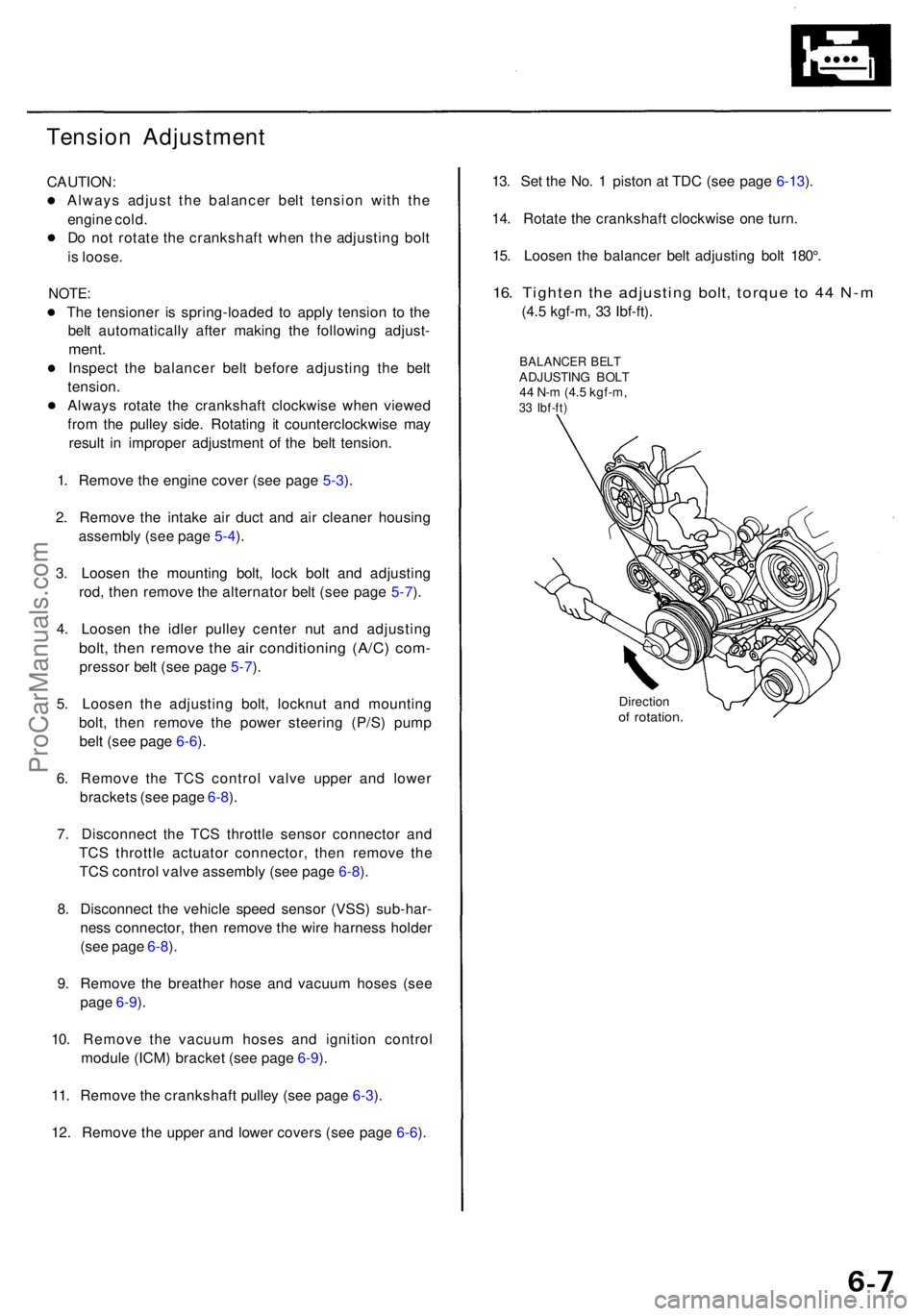
. Se t th e No . 1 pisto n a t TD C (se e pag e 6-13 ).
14 . Rotat e th e crankshaf t clockwis e on e turn .
15 . Loose n th e balance r bel t adjustin g bol t 180° .
16. Tighte n th e adjustin g bolt , torqu e t o 4 4 N- m
(4.5 kgf-m , 3 3 Ibf-ft) .
BALANCE R BEL TADJUSTIN G BOL T
4 4 N- m (4. 5 kgf-m ,
33 Ibf-ft )
Directio nof rotation .
ProCarManuals.com
Page 394 of 1954
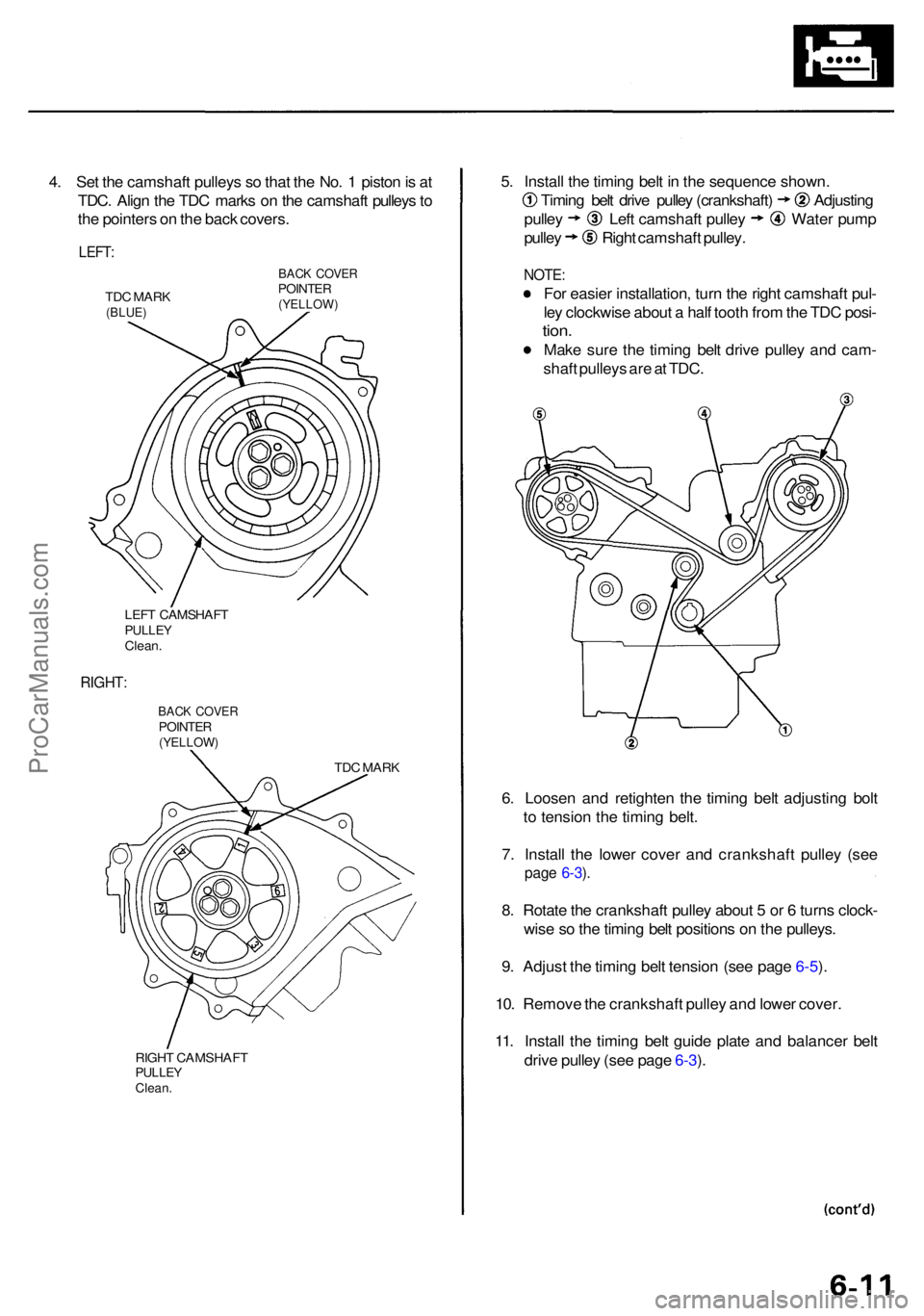
4. Se t th e camshaf t pulley s s o tha t th e No . 1 pisto n is a t
TDC . Alig n th e TD C mark s o n th e camshaf t pulley s to
th e pointer s o n th e bac k covers .
LEFT:
TDC MAR K(BLUE )
BACK COVE RPOINTE R(YELLOW )
LEFT CAMSHAF TPULLEYClean.
RIGHT :
BACK COVE RPOINTE R(YELLOW )
TDC MAR K
RIGH T CAMSHAF T
PULLEYClean.
5. Instal l th e timin g bel t i n th e sequenc e shown .
Timing bel t driv e pulle y (crankshaft ) Adjustin g
pulley Lef t camshaf t pulle y Wate r pum p
pulley Righ t camshaf t pulley .
NOTE :
For easie r installation , tur n th e righ t camshaf t pul -
le y clockwis e abou t a hal f toot h fro m th e TD C posi -
tion.
Mak e sur e th e timin g bel t driv e pulle y an d cam -
shaf t pulley s ar e a t TDC .
6 . Loose n an d retighte n th e timin g bel t adjustin g bol t
t o tensio n th e timin g belt .
7 . Instal l th e lowe r cove r an d crankshaf t pulle y (se e
page 6-3 ).
8 . Rotat e th e crankshaf t pulle y abou t 5 or 6 turn s clock -
wis e s o th e timin g bel t position s o n th e pulleys .
9 . Adjus t th e timin g bel t tensio n (se e pag e 6-5 ).
10 . Remov e th e crankshaf t pulle y an d lowe r cover .
11 . Instal l th e timin g bel t guid e plat e an d balance r bel t
driv e pulle y (se e pag e 6-3 ).
ProCarManuals.com
Page 395 of 1954
Timing Bel t an d Balance r Bel t
Installatio n (cont'd )
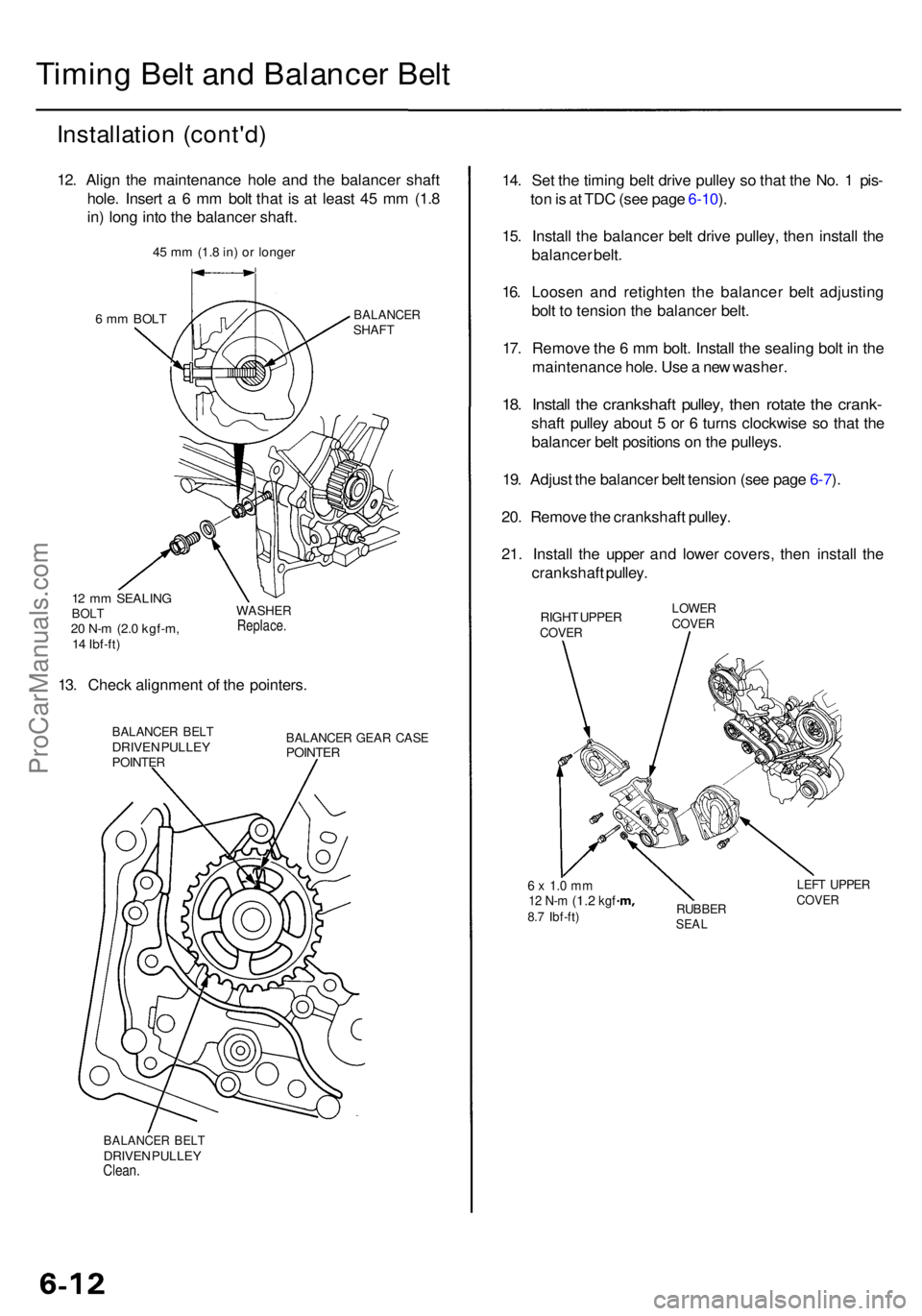
12. Alig n th e maintenanc e hol e an d th e balance r shaf t
hole . Inser t a 6 m m bol t tha t i s a t leas t 4 5 m m (1. 8
in ) lon g int o th e balance r shaft .
6 m m BOL TBALANCE RSHAFT
12 m m SEALIN GBOLT20 N- m (2. 0 kgf-m ,
1 4 Ibf-ft )
WASHE RReplace .
13. Chec k alignmen t o f th e pointers .
BALANCE R BEL TDRIVE N PULLE YPOINTE R
BALANCE R GEA R CAS EPOINTE R
BALANCE R BEL TDRIVE N PULLE YClean.
14. Se t th e timin g bel t driv e pulle y s o tha t th e No . 1 pis -
to n is a t TD C (se e pag e 6-10 ).
15 . Instal l th e balance r bel t driv e pulley , the n instal l th e
balance r belt .
16 . Loose n an d retighte n th e balance r bel t adjustin g
bol t t o tensio n th e balance r belt .
17 . Remov e th e 6 m m bolt . Instal l th e sealin g bol t i n th e
maintenanc e hole . Us e a ne w washer .
18. Instal l th e crankshaf t pulley , the n rotat e th e crank -
shaft pulle y abou t 5 or 6 turn s clockwis e s o tha t th e
balance r bel t position s o n th e pulleys .
19 . Adjus t th e balance r bel t tensio n (se e pag e 6-7 ).
20 . Remov e th e crankshaf t pulley .
21 . Instal l th e uppe r an d lowe r covers , the n instal l th e
crankshaf t pulley .
RIGHT UPPE RCOVE R
LOWE RCOVER
6 x 1. 0 m m12 N- m (1. 2 kgf8.7 Ibf-ft )RUBBE RSEAL
LEFT UPPE RCOVER
45 m m (1. 8 in ) o r longe r
ProCarManuals.com
Page 420 of 1954
Valve Guides
Reaming
NOTE: Fo r ne w valv e guide s only .
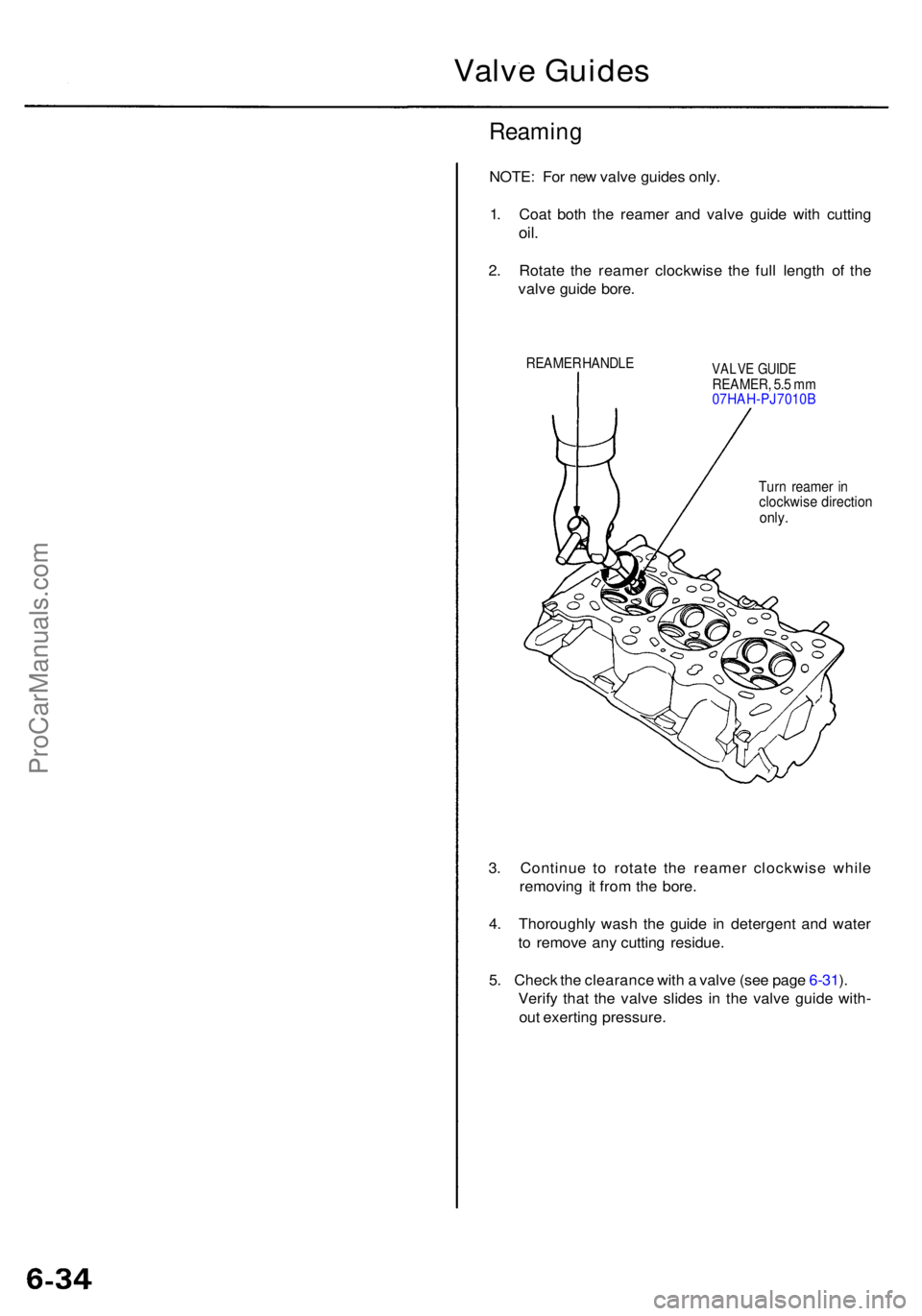
1 . Coa t bot h th e reame r an d valv e guid e wit h cuttin g
oil.
2. Rotat e th e reame r clockwis e th e ful l lengt h o f th e
valv e guid e bore .
REAME R HANDL EVALVE GUID EREAMER , 5. 5 m m
07HAH-PJ7010 B
Tur n reame r i n
clockwis e directio nonly.
3. Continu e t o rotat e th e reame r clockwis e whil e
removin g i t fro m th e bore .
4 . Thoroughl y was h th e guid e i n detergen t an d wate r
t o remov e an y cuttin g residue .
5 . Chec k th e clearanc e wit h a valv e (se e pag e 6-31 ).
Verif y tha t th e valv e slide s i n th e valv e guid e with -
ou t exertin g pressure .
ProCarManuals.com
Page 468 of 1954
Replacement (cont'd )
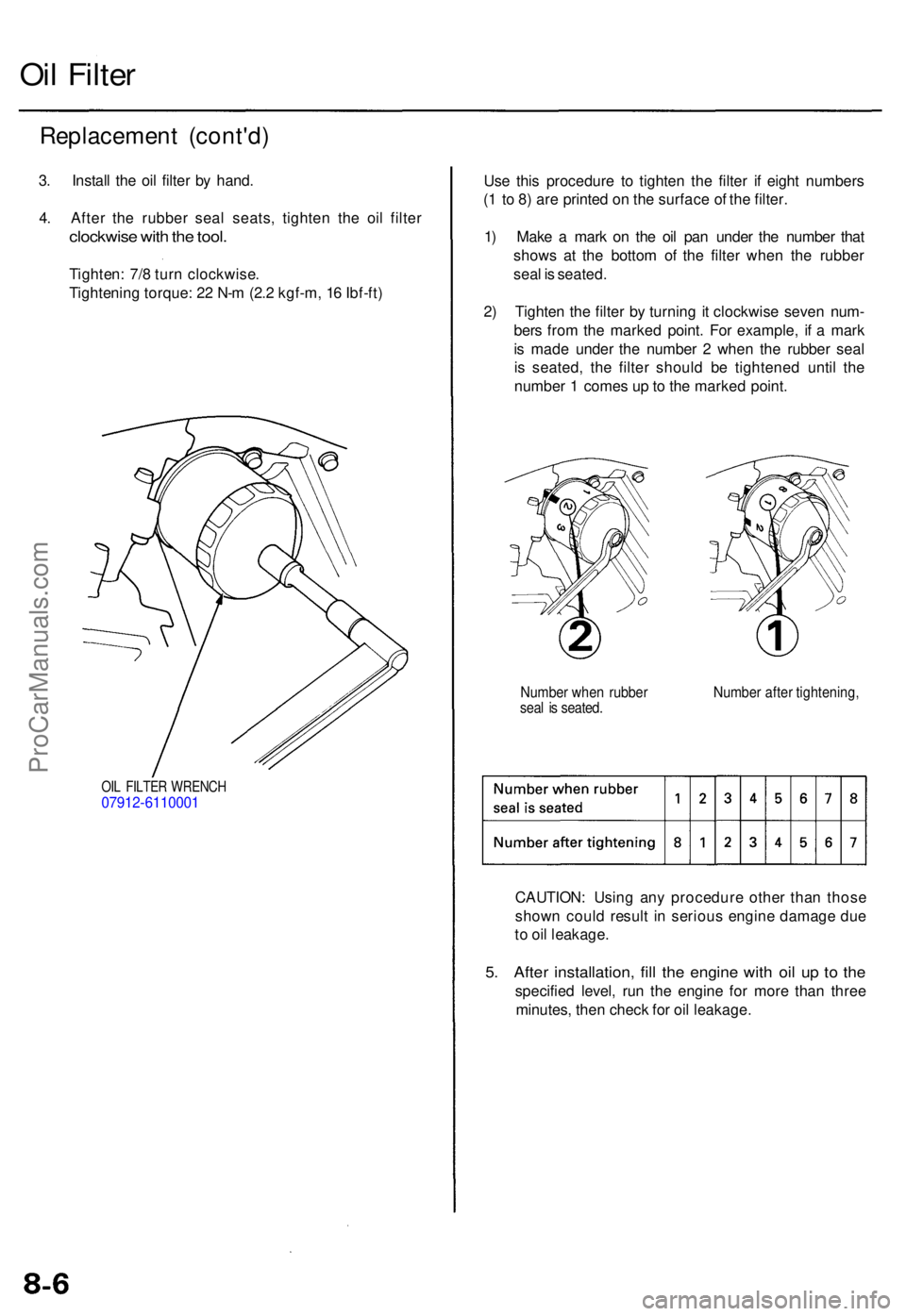
3. Instal l th e oi l filte r b y hand .
4 . Afte r th e rubbe r sea l seats , tighte n th e oi l filte r
clockwis e wit h th e tool .
Tighten : 7/ 8 tur n clockwise .
Tightenin g torque : 2 2 N- m (2. 2 kgf-m , 1 6 Ibf-ft )
Oil Filte r
OIL FILTE R WRENC H07912-611000 1
Use thi s procedur e t o tighte n th e filte r i f eigh t number s
( 1 t o 8 ) ar e printe d o n th e surfac e o f th e filter .
1 ) Mak e a mar k o n th e oi l pa n unde r th e numbe r tha t
show s a t th e botto m o f th e filte r whe n th e rubbe r
sea l i s seated .
2 ) Tighte n th e filte r b y turnin g i t clockwis e seve n num -
ber s fro m th e marke d point . Fo r example , i f a mar k
i s mad e unde r th e numbe r 2 whe n th e rubbe r sea l
i s seated , th e filte r shoul d b e tightene d unti l th e
numbe r 1 come s u p to th e marke d point .
Numbe r whe n rubbe r Numbe r afte r tightening ,seal i s seated .
CAUTION : Usin g an y procedur e othe r tha n thos e
show n coul d resul t i n seriou s engin e damag e du e
t o oi l leakage .
5. Afte r installation , fil l th e engin e wit h oi l u p t o th e
specifie d level , ru n th e engine for mor e tha n thre e
minutes , the n chec k fo r oi l leakage .
ProCarManuals.com
Page 496 of 1954
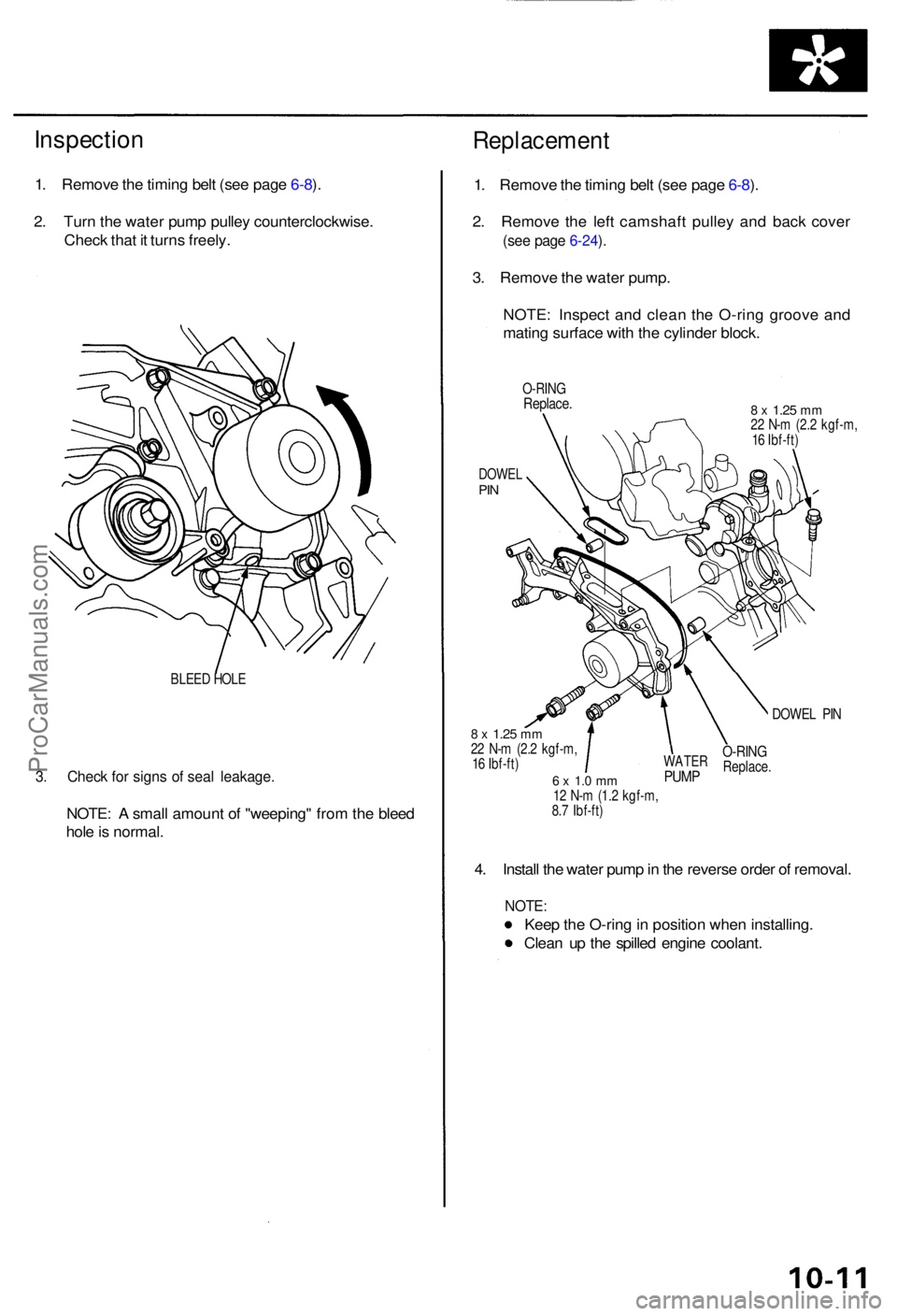
Inspection
1. Remov e th e timin g bel t (se e pag e 6-8 ).
2 . Tur n th e wate r pum p pulle y counterclockwise .
Chec k tha t i t turn s freely .
BLEED HOL E
3. Chec k fo r sign s o f sea l leakage .
NOTE: A smal l amoun t o f "weeping " fro m th e blee d
hol e is normal .
Replacemen t
1. Remov e th e timin g bel t (se e pag e 6-8 ).
2 . Remov e th e lef t camshaf t pulle y an d bac k cove r
(see pag e 6-24 ).
3 . Remov e th e wate r pump .
NOTE : Inspec t an d clea n th e O-rin g groov e an d
matin g surfac e wit h th e cylinde r block .
O-RIN GReplace .8 x 1.2 5 mm22 N- m (2. 2 kgf-m ,
1 6 Ibf-ft )
DOWE LPIN
DOWE L PI N
8 x 1.2 5 mm22 N- m (2. 2 kgf-m ,
1 6 Ibf-ft )
6 x 1. 0 m m12 N- m (1. 2 kgf-m ,
8. 7 Ibf-ft )
4. Instal l th e wate r pum p in th e revers e orde r o f removal .
NOTE:
Keep th e O-rin g in positio n whe n installing .
Clea n u p th e spille d engin e coolant .
WATERPUMP
O-RIN GReplace .
ProCarManuals.com